
A 20-line Python script called driver.create_node("libcloud-demo-1", ...) and got back a running 1 vCPU, 1 GB VPS in Ashburn with an IPv4 and an IPv6 address. That took 17 seconds the first time we ran it and 5 seconds the second. The same script then created a DNS zone and pointed www at the server. SSH answered about half a minute later and printed Ubuntu 24.04.4 LTS. Stopping the server took 4 seconds, and deleting the server, the zone and the SSH key took 4 more.
The script is ordinary Apache Libcloud code. libcloud-noderings adds two drivers to Libcloud under the name noderings: a compute driver for NodeRings virtual machines and a DNS driver for NodeRings DNS. If you have code that already talks to another cloud through Libcloud, the calls are the same. Only the driver name and the IDs of the plan, city and image change.
| Libcloud call | What it does on NodeRings |
|---|---|
list_locations() | Cities where servers are sold; the ID is Country/City, such as United States/Ashburn |
list_sizes(location) | Plans by plan code, such as SC-GC-1C-1G-20, with vCPU, RAM and disk read from the code |
list_images() | Operating systems: ubuntu_24_04, debian_13, rocky_9 and the rest |
create_node(...) | Orders the cheapest matching offer and waits until the server has an address |
list_nodes(), ex_get_node(name_or_id) | Servers with state, IPs, and plan, provider and city in extra |
stop_node, start_node, reboot_node | Power changes; each waits until it is done |
destroy_node(node) | Deletes the server, which ends hourly billing |
create_zone, create_record, delete_zone | DNS zones and records, one Libcloud record per value |
How the Libcloud drivers reach NodeRings
NodeRings is a marketplace. Independent hosting providers sell plans under shared plan codes, and you buy through one account; how NodeRings works explains the model. That is why create_node takes a size and a location instead of a provider's own instance type: it looks for every offer of that plan code in that city and orders the cheapest one. In both of our runs that was a provider called Enzonix.
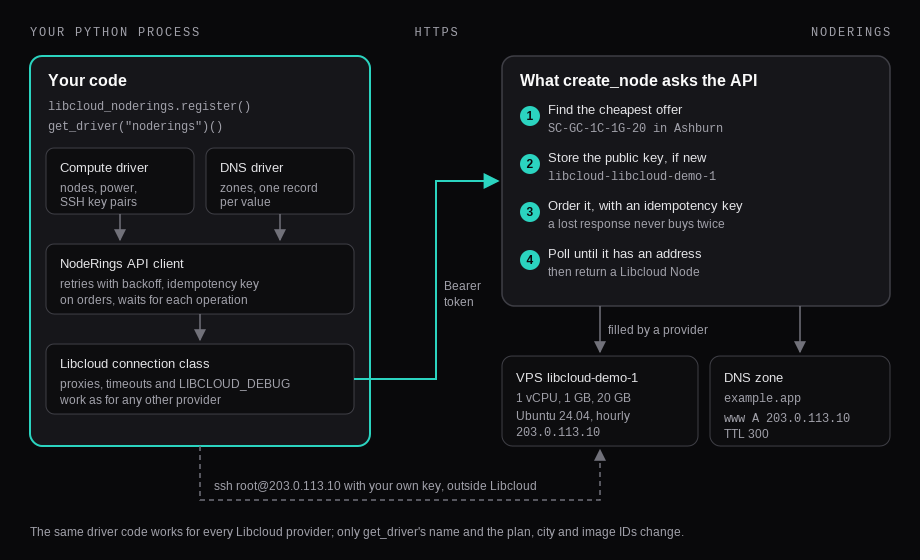
Both drivers send their requests through Libcloud's own connection class. Proxy settings, timeouts and LIBCLOUD_DEBUG=/dev/stderr request logging behave as they do for any built-in provider. Between the drivers and that connection sits a small API client that does the parts a marketplace order needs: it retries rate-limited and temporary failures with backoff, puts an idempotency key on every order so a lost response is retried without buying a second server, and waits for each operation to finish before the call returns. API errors come back as a LibcloudError with the API's own message.
What you need for Libcloud on a NodeRings VPS
You need a NodeRings account with a client organization and prepaid credit, because hourly plans draw from credit. The server in this post is plan SC-GC-1C-1G-20 (1 vCPU, 1 GB RAM, 20 GB disk) on hourly billing, which was $0.007 an hour in Ashburn.
You need Python 3.10 or later. The package pulls in Apache Libcloud 3.8 or later; we ran it with Libcloud 3.9.1 on Python 3.12.
The drivers authenticate with a service account token. In the console, open Organization, then Access Control, then Service accounts, create one and generate a token. Put it in the environment, where both drivers look for it:
export NODERINGS_TOKEN="<your token>"You can pass it as the driver's first argument instead, as with any Libcloud driver. If the token can reach more than one organization, pick one with ex_organization_id= or NODERINGS_ORGANIZATION_ID.
Step 1: Install the NodeRings drivers for Libcloud
The package is going to PyPI as libcloud-noderings, so pip install libcloud-noderings will work once it is published. Until then, install it from GitHub:
python3 -m venv venv
. venv/bin/activate
pip install "git+https://github.com/noderings/libcloud-noderings.git"
That installs apache-libcloud alongside it. Nothing else is needed: the drivers use Libcloud's connection and the standard library.
Step 2: Register the drivers and pick a plan, city and image
Libcloud only knows its built-in providers. libcloud_noderings.register() adds the two NodeRings drivers under the name noderings, and you call it once before get_driver. Calling it a second time does nothing.
import libcloud_noderings
from libcloud.compute.providers import get_driver

libcloud_noderings.register()
driver = get_driver("noderings")()  # reads NODERINGS_TOKEN

location = next(l for l in driver.list_locations() if l.name == "Ashburn")
size = next(s for s in driver.list_sizes(location) if s.id == "SC-GC-1C-1G-20")
image = next(i for i in driver.list_images() if i.id == "ubuntu_24_04")
With our token, list_locations() returned three cities, list_sizes(location) returned five plans sold in Ashburn, and list_images() returned 13 operating systems, from ubuntu_26_04 to rocky_9. The size object for our plan looked like this:
SC-GC-1C-1G-20  ram=1024  disk=20
extra={'vcpus': 1, 'billing_type': 'usage', 'compute_type': 'general_compute', 'compute_category': 'shared_compute'}
price is None on every size. Prices belong to the offer, and different providers sell the same plan code at different prices, so the driver picks the offer at order time.
Step 3: Create the VPS and point DNS at it
This is the whole create.py from the video, give or take the imports:
import time

import libcloud_noderings
from libcloud.compute.base import NodeAuthSSHKey
from libcloud.compute.providers import get_driver
from libcloud.dns.providers import get_driver as get_dns_driver

libcloud_noderings.register()
driver = get_driver("noderings")()  # reads NODERINGS_TOKEN
dns = get_dns_driver("noderings")()

location = next(l for l in driver.list_locations() if l.name == "Ashburn")
size = next(s for s in driver.list_sizes(location) if s.id == "SC-GC-1C-1G-20")
image = next(i for i in driver.list_images() if i.id == "ubuntu_24_04")

start = time.monotonic()
node = driver.create_node(
    "libcloud-demo-1",
    size,
    image,
    location=location,
    auth=NodeAuthSSHKey(open("demo_key.pub").read()),
    ex_tags=["web"],
)
print(f"{node.name} is {node.state} at {node.public_ips} after {time.monotonic() - start:.0f}s")
print(node.extra["provider_name"], node.extra["plan_code"], node.extra["city"], node.extra["billing_type"])

zone = dns.create_zone("example.app")
dns.create_record("www", zone, "A", node.public_ips[0], extra={"ttl": 300})
for record in dns.list_records(zone):
    print(record.name, record.type, record.data, record.ttl)
libcloud-demo-1 is running at ['203.0.113.10', '2001:db8::10'] after 5s
Enzonix SC-GC-1C-1G-20 Ashburn usage
www A 203.0.113.10 300NodeAuthSSHKey takes the public key as a string. The driver stores it in NodeRings as libcloud-<hostname>, here libcloud-libcloud-demo-1, unless a key with the same material is already stored, in which case it reuses that one. To install keys you already keep in NodeRings, pass their names or IDs in ex_ssh_keys. NodeAuthPassword sets a root password instead.
public_ips lists the IPv4 address first, then the IPv6 address. create_zone returns the nameservers to set at your registrar in zone.extra["nameservers"]; until you set them, the records exist in NodeRings but nobody outside resolves them.
The rest of the create_node options, all from the driver's code:
| Argument | What it does |
|---|---|
ex_ssh_keys | Names or IDs of NodeRings SSH keys to install as well |
ex_tags | Tags on the server |
ex_firewall_ruleset | Name or ID of a firewall ruleset to attach once the server has an address |
ex_billing_type | usage (hourly, the default), subscription or free |
ex_sort | price (cheapest, the default) or rating (best rated) |
ex_provider_id | Only consider offers from this provider |
ex_plan_id, ex_region_id | Order an exact plan in an exact region, instead of size and location |
ex_wait | Wait until the server has an address (default True) |
Write ex_billing_type exactly as in the table, in lower case. The driver looks the value up in a fixed list, and a value it does not know, such as hourly, drops the billing filter instead of raising an error. The order then goes to the cheapest offer of any billing type, which can be a monthly subscription.
Step 4: Wait for SSH, then log in
The two timings in the opening tell you something about what create_node waits for. It returns when NodeRings reports the order as applied and the server has an address. The operating system is still booting at that point. In our runs SSH answered 25 seconds after create_node returned the first time and 32 seconds after it the second time, so anything that logs in next should retry:
until ssh -q -i demo_key -o ConnectTimeout=5 root@203.0.113.10 true; do sleep 3; done
ssh -i demo_key root@203.0.113.10 'hostname; . /etc/os-release; echo $PRETTY_NAME'
libcloud-demo-1
Ubuntu 24.04.4 LTSThe hostname inside the server is the name you passed to create_node.
Step 5: Stop, start and find the server again
A later script does not need the Node object from create.py. ex_get_node finds a server by its hostname or its ID and returns None when there is no such server:
node = driver.ex_get_node("libcloud-demo-1")
for action in (driver.stop_node, driver.start_node):
    start = time.monotonic()
    action(node)
    print(f"{action.__name__}: {driver.ex_get_node(node.id).state} after {time.monotonic() - start:.0f}s")
stop_node: stopped after 4s
start_node: running after 1sEach power call returns once the server has reached the new state. Stopping took 4 seconds in both runs; starting took 4 seconds the first time and 1 second the second. The address stayed the same, so the DNS record stayed right.
Hostnames are not unique on NodeRings, and create_node does not check whether the name is taken. Run create.py twice and you buy two servers called libcloud-demo-1. After that, ex_get_node("libcloud-demo-1") raises an error that lists both IDs instead of guessing, so keep the node ID if you will need to act on the server later, or check list_nodes() before you create one.
Step 6: Delete the server, the zone and the key
driver.destroy_node(driver.ex_get_node("libcloud-demo-1"))
dns.delete_zone(next(z for z in dns.list_zones() if z.domain == "example.app"))
driver.delete_key_pair(driver.get_key_pair("libcloud-libcloud-demo-1"))
deleted the server, the zone and the key in 4sdelete_zone deletes the zone with every record in it, without asking. destroy_node ends hourly billing. Each of our servers existed for about two minutes, which cost a small fraction of a cent. The SSH key that create_node stored stays in NodeRings after the server is gone, which is why the script deletes it too.
How NodeRings DNS records map to Libcloud records
NodeRings stores DNS records as sets: one name and type with one or more values and a single TTL. Libcloud treats each value as its own record. The driver bridges the two like this:
| Libcloud call | What happens to the NodeRings record set |
|---|---|
create_record("www", zone, "A", "192.0.2.10") | Adds the value to the www A set; adding a value that is already there changes nothing |
create_record(..., extra={"ttl": 300}) | Also sets the TTL of the whole set, not just this value |
update_record(record, data="192.0.2.12") | Replaces that one value; a new name or type moves it to that set |
delete_record(record) | Removes that one value, and the set when it was the last one |
create_record(None, zone, "MX", "10 mx1.example.net.") | None or "" is the zone apex |
Write hostnames in record values with a trailing dot. TXT values are plain text; the driver adds the quotes and splits long values for you. create_zone("example.app", extra={"dnssec": True}) signs the zone, and ex_enable_dnssec(zone) signs an existing one and returns the DS record for your registrar.
When Libcloud is the right tool for NodeRings servers
Libcloud is a library, and that is its use. It suits Python code that creates servers as part of doing something else: a test harness that needs a clean machine for ten minutes, a script that builds a customer's server when a form is submitted, or an internal tool that already handles several clouds through Libcloud and should handle one more. The calls run when your code calls them, with your own error handling around them.
It keeps no record of what should exist. If the script crashes between create_node and destroy_node, the server stays up and keeps billing until something deletes it. For servers you want to keep in a declared state, use a tool with state, such as the Terraform provider or Pulumi, which also has a Python SDK. For configuration that converges, see Ansible, SaltStack, Chef or Puppet. Kubernetes users have Crossplane, and runbooks that people start by hand fit Rundeck. For a throwaway development box, Vagrant is simpler still.
Common errors
We hit each of these on purpose. Each is the message inside the LibcloudError or InvalidCredsError that the call raised.
| Error | Cause | Fix |
|---|---|---|
A NodeRings API token is required as the driver's key, or in NODERINGS_TOKEN | No token argument and no NODERINGS_TOKEN in the environment | Export the token, or pass it to the driver |
NodeRings rejected the API token | The token is wrong, expired or revoked (an InvalidCredsError) | Generate a new token for the service account |
NodeRings: finding an offer: NodeRingsUsageError: No offer for plan code SC-GC-1C-1G-20 in Nowhere, United States with billing type usage. ... | No provider sells that plan in that city with that billing type; nothing is ordered | Pick a location from list_locations() and a size from list_sizes(location) |
create_node needs auth (an SSH key or a password) or ex_ssh_keys | No way to log in was given | Pass auth=NodeAuthSSHKey(...), NodeAuthPassword(...) or ex_ssh_keys |
create_node needs a location from list_locations(), or ex_plan_id and ex_region_id | location= was left out | Pass a NodeLocation from list_locations() |
NodeRings: resolving SSH keys: NodeRingsUsageError: no SSH key is named no-such-key; ... | A name in ex_ssh_keys that NodeRings does not have; nothing is ordered | Fix the name, or import the key with import_key_pair_from_string() first |
NodeRings: resolving the firewall ruleset: NodeRingsUsageError: no firewall ruleset is named no-such-ruleset | ex_firewall_ruleset names a ruleset that does not exist; nothing is ordered | Create the ruleset first, or fix the name |
NodeRings: creating zone lc-err-test.example.app: Domain already hosted. (HTTP 409 on POST /v1/dns/zones) | The zone already exists | Use list_zones() to find it instead |
www A: 'not-an-ip' is not an IPv4 address | The driver checks values before it sends them | Fix the value |
alias CNAME: CNAME records take exactly one value | A second create_record on a CNAME that already has a value | Use update_record to change it |
Frequently asked questions
Does Apache Libcloud support NodeRings?
Through a separate package. libcloud-noderings adds a compute driver and a DNS driver to Libcloud 3.8 and later. Call libcloud_noderings.register() once, then get_driver("noderings") works like any built-in provider. The source is on GitHub under the Apache 2.0 license.
How do I install libcloud-noderings?
Until it is on PyPI, install it from GitHub with pip install "git+https://github.com/noderings/libcloud-noderings.git". That installs Apache Libcloud with it. Once the package is published, pip install libcloud-noderings will do the same.
How long does create_node take on NodeRings?
In our two runs, create_node returned a running server with an address in 17 seconds and in 5 seconds. SSH took another 25 to 32 seconds to answer, because the operating system is still booting when the call returns.
Why is the price of every NodeSize None?
On NodeRings a plan code is sold by several providers at different prices, so a size has no single price. create_node picks the cheapest offer at order time, or the best rated one with ex_sort="rating". The console's marketplace shows the current offers.
Does wait_until_running work with the NodeRings driver?
The README says Libcloud's own wait_until_running works unchanged. With the default ex_wait=True you rarely need it, because create_node already waits for an address. It is useful after create_node(..., ex_wait=False), when you order several servers and want to wait for all of them together. We did not test that path for this post.
Can I use the Libcloud DNS driver without ordering servers?
Yes. The DNS driver needs only the token, and zones and records cost nothing to create. The repository's live tests run the DNS part without the billed server for that reason.
Should I use Libcloud or the Terraform provider?
Use Libcloud when servers are created by Python code as a step in something larger, and the code also deletes them. Use the Terraform provider or Pulumi when the servers should keep existing and changes go through review. All of them call the same API.
Try it
You need a NodeRings account with credit, a service account token and Python 3.10 or later. Install the drivers with pip install "git+https://github.com/noderings/libcloud-noderings.git", export NODERINGS_TOKEN, and run the create.py above with your own public key and a zone you own. Wait for SSH, log in, and then delete the server, the zone and the stored key with the three lines from Step 6.