
One SaltStack state file, five states, and salt-call --local state.apply ordered a 1 vCPU, 1 GB VPS in Ashburn, put a firewall in front of it, hosted a DNS zone and pointed www at the new address. The run took 117 seconds, and SSH was answering 129 seconds after we started it. A second run changed nothing in 3.7 seconds. The teardown state deleted all of it in 4.3 seconds, which is also when the $0.007 an hour stopped.
All of that comes from saltext-noderings, a Salt extension with three parts: a Salt Cloud driver, an execution module with 36 functions, and a state module. Each one talks to the NodeRings API from the machine that runs Salt.
| You want to | Salt |
|---|---|
| Order a server and install a minion on it | salt-cloud -p <profile> <name> |
| Keep a server in code | noderings.vm_present, noderings.vm_absent |
| Open only the ports you need | noderings.firewall_ruleset_present |
| Host a domain and point a name at the server | noderings.dns_zone_present, noderings.dns_record_present |
| Store the SSH key the server gets | noderings.ssh_key_present |
| Look up offers, stop a server, change one record | salt-call noderings.list_offers, noderings.stop_vm, noderings.set_record |
Every state supports test=True, so you can see what a run would buy or delete before it does.
How the Salt extension reaches the NodeRings API
NodeRings is a marketplace. Independent hosting providers sell plans under shared size codes, and you buy through one account. How NodeRings works explains the model. For Salt it means a state never names a hosting company. You give a plan code and a city, and the extension orders the cheapest matching offer.
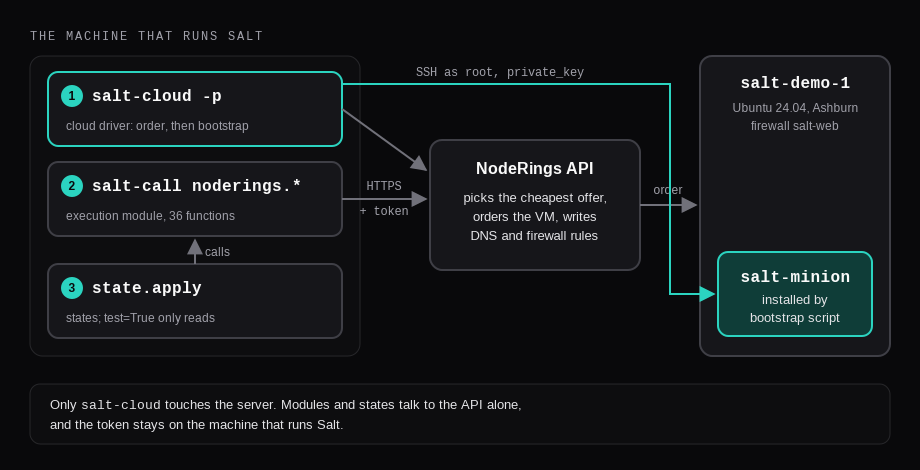
The split matters when you decide where to install it. The execution and state modules run wherever salt-call runs: a master, a minion, or a laptop in masterless mode as we used here. The Salt Cloud driver runs on the master and is the only piece that connects to the server it ordered. The token never leaves the machine that runs Salt.
What you need before the first run
You need a NodeRings account with a client organization, a payment method, and at least $10 of prepaid credit, because hourly plans draw from credit and the order check wants that much available. On your machine you need Salt 3006 or newer, git, and an SSH key. We ran everything below on Salt 3008.5 in a Python 3.12 virtualenv.
The extension is installed from GitHub for now. A PyPI release under the name saltext.noderings is coming, and then the URL below becomes a plain package name.
# Salt from the onedir packages (the default install)
salt-pip install "git+https://github.com/noderings/saltext-noderings.git"

# Salt in a virtualenv
pip install "git+https://github.com/noderings/saltext-noderings.git"
It has no dependencies beyond Salt. Check that Salt finds it:
$ salt-call --local sys.list_functions noderings
local:
    - noderings.attach_ruleset
    - noderings.create_ruleset
    - noderings.create_ssh_key
    ...
    - noderings.stop_vm
Salt signs in with a service account token. In the console, open Organization, then Access Control, then Service accounts. Create one, give it the Administrator role (or something narrower if Salt only touches DNS), and generate a token. The console shows it once. Put it in pillar so only the minions that need it get it:
# /srv/pillar/top.sls
base:
  '*':
    - noderings

# /srv/pillar/noderings.sls
noderings:
  token: <service account token>
Without noderings:token in pillar or the minion config, the extension reads NODERINGS_TOKEN from the environment. That is what we used, so the token never sat in a file on the test machine.
For a masterless run, /etc/salt/minion needs one line, file_client: local, and the states live under /srv/salt.
Step 1: Write a Salt state for the VPS
Create /srv/salt/noderings/init.sls. It declares the key, the firewall, the server, the zone and the record, in that order.
salt-demo-key:
  noderings.ssh_key_present:
    - name: salt-demo
    - public_key: {{ salt['file.read']('/root/.ssh/id_ed25519.pub') | trim }}

salt-web-firewall:
  noderings.firewall_ruleset_present:
    - name: salt-web
    - rules:
      - {direction: ingress, action: accept, protocol: tcp, destination_ports: "22", source: {cidrs: [0.0.0.0/0]}}
      - {direction: ingress, action: accept, protocol: tcp, destination_ports: "80", source: {cidrs: [0.0.0.0/0]}}
      - {direction: ingress, action: accept, protocol: tcp, destination_ports: "443", source: {cidrs: [0.0.0.0/0]}}
      - {direction: ingress, action: accept, protocol: icmp, source: {cidrs: [0.0.0.0/0]}}
      - {direction: ingress, action: drop, protocol: any, source: {cidrs: [0.0.0.0/0]}}

salt-demo-1:
  noderings.vm_present:
    - plan_code: SC-GC-1C-1G-20     # 1 vCPU, 1 GB RAM, 20 GB disk
    - country: United States
    - city: Ashburn
    - billing_type: usage          # hourly, from prepaid credit
    - distro: ubuntu_24_04
    - ssh_keys: [salt-demo]
    - firewall_ruleset: salt-web
    - tags: [web]
    - require:
      - noderings: salt-demo-key
      - noderings: salt-web-firewall

example.net:
  noderings.dns_zone_present

www:
  noderings.dns_record_present:
    - zone: example.net
    - rtype: A
    - ttl: 300
    - values:
      - __slot__:salt:noderings.get_vm(salt-demo-1).ipv4
    - require:
      - noderings: salt-demo-1
      - noderings: example.net
Firewall rules run top to bottom. Traffic that matches no rule is accepted, so the last rule, the drop, is the one that closes every other port. Each rule takes one port or one range like 8000-8100, which is why 80 and 443 get a rule each.
The record's value is a Salt slot, and that line is the part to copy exactly. Jinja renders the whole file before the first state runs, so a bare {{ salt['noderings.get_vm']('web-1')['ipv4'] }} on a fresh account gets None back and the run stops with 'None' has no attribute 'ipv4' before anything is ordered. The extension's README avoids that by wrapping the record in {% set web = salt['noderings.get_vm']('web-1') %}{% if web %}, which skips the record on the first run and adds it on the second. A __slot__: value is evaluated when its own state runs instead. By then vm_present has finished and the server has an address, so one run is enough.
Step 2: Preview the run with test=True
$ salt-call --local state.apply noderings test=True
...
          ID: salt-demo-1
    Function: noderings.vm_present
      Result: None
     Comment: Virtual machine salt-demo-1 would be ordered
...
          ID: www
    Function: noderings.dns_record_present
      Result: False
     Comment: DNS zone example.net does not exist in this organization; create it with noderings.create_zone or the noderings.dns_zone_present state
test=True only reads, so nothing is bought. The failure for www is expected on the very first preview. The zone state ahead of it would create example.net, but in test mode it doesn't, and the record state looks for a zone that is not there yet. Once the zone exists, the record previews cleanly.
The preview earns its keep on later changes. Change tags: [web] to tags: [web, prod] and run state.sls_id salt-demo-1 noderings test=True:
          ID: salt-demo-1
    Function: noderings.vm_present
      Result: None
     Comment: Virtual machine salt-demo-1 would be updated
     Changes:
              ----------
              tags:
                  ----------
                  new:
                      - prod
                      - web
                  old:
                      - web
Tags, the attached firewall and the power state change in place, and the server keeps its address. The operating system is different. Changing distro to debian_13 makes the state fail with Virtual machine salt-demo-1 runs ubuntu_24_04, not debian_13. Set allow_reinstall: True to reinstall it, which erases the disk. Add allow_reinstall: True when erasing the disk is what you want. Plan and region only matter for the first order. An existing server is never moved to a cheaper offer.
Step 3: Apply it, then apply it again
$ salt-call --local state.apply noderings --state-output=terse
local:
  Name: salt-demo - Function: noderings.ssh_key_present - Result: Changed - Duration: 3183.84 ms
  Name: salt-web - Function: noderings.firewall_ruleset_present - Result: Changed - Duration: 2964.847 ms
  Name: salt-demo-1 - Function: noderings.vm_present - Result: Changed - Duration: 97042.255 ms
  Name: example.net - Function: noderings.dns_zone_present - Result: Changed - Duration: 1845.761 ms
  Name: www - Function: noderings.dns_record_present - Result: Changed - Duration: 11996.448 ms

Summary for local
------------
Succeeded: 5 (changed=5)
Failed:    0
------------
Total states run:     5
Total run time: 117.033 s
vm_present took 97 seconds because it waits until the server is provisioned and powered on before it returns. That wait is what makes the slot in the next state safe. An earlier run on the same plan took 74 seconds for the same state, so expect some spread.
$ salt-call --local noderings.get_record example.net www A
local:
    ----------
    name:
        www
    ttl:
        300
    type:
        A
    values:
        - 203.0.113.10
    zone_id:
        00000000-0000-4000-8000-000000000001
$ ssh root@203.0.113.10 hostname
salt-demo-1
The second state.apply reported Result: Clean for all five states in 3.7 seconds. The extension finds the server by hostname, the ruleset, zone and key by name, and the record by name and type, so keep those names unique in your organization.
Running the state again also repairs drift. During testing we deleted the salt-web ruleset by hand with salt-call --local noderings.delete_ruleset salt-web, which detached it from the server. The next state.apply recreated the ruleset with all five rules and attached it again in 11 seconds.
One-off calls with the execution module
Not everything belongs in a state. The execution module covers the same API for quick questions and one-time changes. To see what the plan costs in Ashburn before ordering anything:
$ salt-call --local noderings.list_offers SC-GC-1C-1G-20 "United States" Ashburn
local:
- billing_type: usage
  capabilities:
  - guest_firewall
  - instant_apps
  - cloudinit_userdata
  - snapshots
  ...
  ipv6: true
  prices:
  - billing_period: month
    charge_timing: in_arrears
    currency: USD
    minimum_charge: '0.007000'
    pricing_model: usage_based
    unit_amount: '0.007000'
    unit_name: per compute-hour
  ...
The output is trimmed here. The first offer in the list is the one vm_present orders. When the state sets a firewall ruleset, offers without the guest_firewall capability are dropped before that choice. A few more calls from the module:
salt-call --local noderings.get_vm salt-demo-1        # addresses, power state, tags
salt-call --local noderings.stop_vm salt-demo-1       # disk and IPs are kept
salt-call --local noderings.set_record example.net www A '["192.0.2.10"]' ttl=300
salt-call --local noderings.delete_vm salt-demo-1     # took 2.2 seconds
On a master, the same functions run as salt '<minion>' noderings.<function> on any minion that has the extension and the token in its pillar.
Order a VPS and bootstrap a minion with Salt Cloud
The state module orders bare servers. If you want each new server to come up as a minion, use the Salt Cloud driver. It orders through the same code and then logs in over SSH to run Salt's bootstrap script.
/etc/salt/cloud.providers.d/noderings.conf:
my-noderings:
  driver: noderings
  minion:
master: salt.example.com/etc/salt/cloud.profiles.d/noderings.conf:
noderings-ashburn-small:
  provider: my-noderings
  size: SC-GC-1C-1G-20             # plan code
  location: United States/Ashburn  # Country/City
  image: ubuntu_24_04
  billing_type: usage
  ssh_keys: [salt-demo]            # stored in NodeRings
  private_key: /root/.ssh/id_ed25519
  firewall_ruleset: salt-web
  tags: [web]
The provider block also takes token. We left it out, so the driver read NODERINGS_TOKEN from the environment. salt-cloud --list-sizes my-noderings, --list-locations and --list-images show what you can put in a profile.
salt-cloud -p noderings-ashburn-small salt-demo-1Our test machine has no public Salt master for a new server to call home to, so we set minion: {file_client: local} in the provider block instead of master. Everything else ran for real. salt-cloud -p ordered the server, waited for SSH, copied pre-generated minion keys, and installed salt-minion 3008.5 from the Salt Project packages. The whole command took 229 seconds, most of it spent installing packages on the new server. On the new server, systemctl is-active salt-minion said active and salt-call --local grains.item os osrelease returned Ubuntu 24.04. With a real master in the provider block, the minion's key is already accepted on the master when the command returns.
Set deploy: False in the profile to order without bootstrapping. Delete the server with salt-cloud -d salt-demo-1, which took 4.4 seconds. salt-cloud -Q lists every server in the organization, including ones Salt did not create.
How to delete everything when you are done
Keep the teardown as a state too, in /srv/salt/noderings/absent.sls:
salt-demo-1:
  noderings.vm_absent

example.net:
  noderings.dns_zone_absent

salt-web:
  noderings.firewall_ruleset_absent:
    - require:
      - noderings: salt-demo-1

salt-demo:
  noderings.ssh_key_absent:
    - require:
      - noderings: salt-demo-1
$ salt-call --local state.apply noderings.absent --state-output=terse
...
Succeeded: 4 (changed=4)
Failed: 0
------------
Total states run: 4
Total run time: 4.262 sOn an hourly plan the charge stops when the VM is deleted. A monthly subscription is cancelled at once without a refund for the rest of the month, so keep teardown states away from servers you pay for monthly.
Common errors
These are the exact messages we hit while writing this.
| Error | Cause | Fix |
|---|---|---|
'None' has no attribute 'ipv4' | The record value uses unguarded Jinja salt['noderings.get_vm'], which renders before the server exists | Use __slot__:salt:noderings.get_vm(salt-demo-1).ipv4, or guard the record with {% if web %} and run twice |
DNS zone example.net does not exist in this organization | test=True on a first run, before the zone state has really run | Expected in the first preview; it clears once the zone exists |
SSH key with same fingerprint already exists. (HTTP 409 on POST /v1/ssh-keys) | The same public key is already stored under another name | Use the existing name, or remove the old one with noderings.ssh_key_absent |
Domain already hosted. (HTTP 409 on POST /v1/dns/zones) | noderings.create_zone on a zone you already have | Use noderings.dns_zone_present, which leaves an existing zone alone |
destination_ports '80,443' must be one port such as 443 or one range such as 8000-8100 | A comma list in one rule | One rule per port or range |
a virtual machine named salt-demo-1 already exists | noderings.create_vm with a hostname in use | Use vm_present, or pick another hostname |
Virtual machine salt-demo-1 runs ubuntu_24_04, not debian_13 | distro changed on an existing server | Add allow_reinstall: True if erasing the disk is what you want |
The API also allows about two requests per second per operation. The extension retries rate-limited calls with backoff, so a big state run gets slower instead of failing.
Frequently asked questions
Is there a SaltStack module for NodeRings?
Yes. saltext-noderings adds a Salt Cloud driver, the noderings execution module and the noderings state module. The source and full reference are on GitHub and in the documentation. It needs Salt 3006 or newer and installs with salt-pip or pip from the GitHub URL.
Can Salt Cloud create a VPS on NodeRings?
Yes. Set driver: noderings in a provider block, describe the plan and city in a profile, and run salt-cloud -p <profile> <name>. The driver orders the cheapest matching hourly offer and bootstraps a minion over SSH unless the profile says deploy: False.
Do I need a Salt master to manage NodeRings servers?
No. Everything in this guide except the Salt Cloud bootstrap ran masterless with salt-call --local. A master only matters when you want the new servers to be minions that a master controls.
Should I use Salt, Ansible or Terraform for this?
Use the one your team already runs. All three talk to the same API and order the same server. The Ansible guide does it with a playbook and a dynamic inventory, and the Terraform guide does it with a state file. Salt's advantage is that the server, its DNS and the minion's configuration can live in the same state tree. The rest of this series covers Chef, Puppet, Pulumi and Crossplane.
How much does it cost to try?
The cheapest hourly offer for 1 vCPU and 1 GB in Ashburn was $0.007 an hour. We ordered three test servers while writing this, each deleted within a few minutes. salt-call noderings.list_offers shows the current offers and prices before you order.
Try it
You need a NodeRings account with $10 of credit, a service account token, an SSH key and Salt 3006 or newer. Install the extension from GitHub, copy init.sls into /srv/salt/noderings/, change the domain, and run salt-call --local state.apply noderings test=True first. When the preview looks right, drop test=True.