
Most Ansible guides start after the server exists. Someone clicked through a control panel, copied an IP address into an inventory file, and only then did the playbook begin. With the noderings.cloud collection the order is part of the playbook. One file buys a 1 vCPU, 1 GB VPS in Ashburn on hourly billing, puts a firewall in front of it, points www at it, and installs nginx on it.
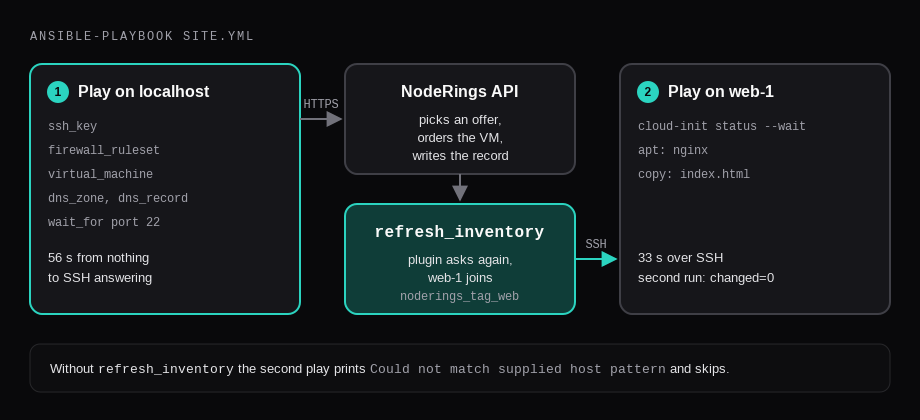
Our first run went from nothing to SSH answering in 56 seconds. The configure play took another 33. Running the same playbook again changed nothing, and the teardown playbook deleted everything in 5 seconds, which is also when the $0.007 an hour stopped.
| You want to | Module |
|---|---|
| Order, stop, reinstall or delete a server | virtual_machine |
| Open only the ports you need | firewall_ruleset, firewall_address_group |
| Point a name at it | dns_zone, dns_record, dns_geo_record |
| Log in with your key | ssh_key |
| Treat your servers as inventory | the noderings inventory plugin |
| See who sells what, where, for how much | marketplace_offer_info, marketplace_plan_info |
| Back it up or add an IP | virtual_machine_backup, virtual_machine_additional_ip |
There are 35 modules in all, including game servers, roles, groups and secrets. Every one of them supports check mode, so --check --diff shows the change before anything is bought or deleted.
Why order servers from Ansible at all
Terraform is the usual answer for creating infrastructure, and we wrote the Terraform version of this too. The case for doing it in Ansible is smaller and more practical. If your team already lives in playbooks, a second tool with its own state file is one more thing to keep in sync. Ansible has no state file. Each module asks the API what exists, compares it with what you wrote, and changes the difference. The server's hostname is its identity, so hostname: web-1 means the same machine on every run.
NodeRings is a marketplace, and that shapes the module. Independent hosting providers sell plans under shared size codes, and you buy through one account. How NodeRings works explains the model. For Ansible it means you never name a hosting company. You give a plan code and a city, and the module picks an offer.
What you need before the first run
You need a NodeRings account with a client organization, a payment method, and at least $10 of prepaid credit, because hourly plans draw from credit and the order check wants that much available. On your machine you need ansible-core 2.16 or newer, Python 3.9 or newer, and an SSH key. We ran everything below on ansible-core 2.21 with version 0.1.0 of the collection.
Install the collection. It has no Python dependencies.
ansible-galaxy collection install noderings.cloudAnsible signs in with a service account token. In the console, open Organization, then Access Control, then Service accounts. Create one, give it the Administrator role (or something narrower if the playbook only touches DNS), and generate a token. The console shows it once.
export NODERINGS_TOKEN="paste-the-token-here"Every module reads NODERINGS_TOKEN. In a real project, keep the token in Ansible Vault and pass it once with module_defaults, so no task repeats it:
- hosts: localhost
  module_defaults:
    group/noderings.cloud.noderings:
      api_token: "{{ vault_noderings_token }}"
Step 1: Order the server, the firewall and the DNS record
Create a project folder with site.yml. The first play runs on localhost, because it talks to the NodeRings API and not to a server.
- name: Order the server and its DNS
  hosts: localhost
  gather_facts: false
  tasks:
    - name: My SSH key
      noderings.cloud.ssh_key:
        name: laptop
        public_key: "{{ lookup('ansible.builtin.file', '~/.ssh/id_ed25519.pub') }}"

    - name: Firewall for a web server
      noderings.cloud.firewall_ruleset:
        name: web
        rules:
          - {direction: ingress, action: accept, protocol: tcp, destination_ports: "22", source: {cidrs: [0.0.0.0/0]}}
          - {direction: ingress, action: accept, protocol: tcp, destination_ports: "80", source: {cidrs: [0.0.0.0/0]}}
          - {direction: ingress, action: accept, protocol: tcp, destination_ports: "443", source: {cidrs: [0.0.0.0/0]}}
          - {direction: ingress, action: accept, protocol: icmp, source: {cidrs: [0.0.0.0/0]}}
          - {direction: ingress, action: drop, protocol: any, source: {cidrs: [0.0.0.0/0]}}

    - name: The server
      noderings.cloud.virtual_machine:
        hostname: web-1
        plan_code: SC-GC-1C-1G-20      # 1 vCPU, 1 GB RAM, 20 GB disk
        country: United States
        city: Ashburn
        billing_type: usage            # hourly, from prepaid credit
        distro: ubuntu_24_04
        ssh_keys: [laptop]
        firewall_ruleset: web
        tags: [web]
        state: running
      register: vm

    - name: The zone
      noderings.cloud.dns_zone:
        name: example.com

    - name: www points at the server
      noderings.cloud.dns_record:
        zone: example.com
        name: www
        type: A
        ttl: 300
        values: ["{{ vm.virtual_machine.ipv4 }}"]

    - name: Wait for SSH
      ansible.builtin.wait_for:
        host: "{{ vm.virtual_machine.ipv4 }}"
        port: 22
        timeout: 300

    - name: Re-read the inventory so web-1 is in it
      ansible.builtin.meta: refresh_inventory
Firewall rules run top to bottom. Traffic that matches no rule is accepted, so the last rule, the drop, is the one that actually closes the other ports. Each rule takes one port or one range like 8000-8100. Ports 80 and 443 need a rule each.
billing_type: usage matters. Leave it out and the module can pick a monthly plan charged to your card. The comment on plan_code is the whole size: the code is the same at every provider that sells it.
Step 2: Let Ansible find the server by itself
Hardcoding the IP address in an inventory file defeats the point. The collection ships an inventory plugin that asks the API for your servers on every run. Create inventory/noderings.yml (the name has to end in noderings.yml):
plugin: noderings.cloud.noderings
states: [running]
compose:
  ansible_user: "'root'"
And an ansible.cfg next to the playbook:
[defaults]
inventory = inventory
host_key_checking = False
host_key_checking = False is there because a freshly ordered server has a host key you have never seen. Turn it back on, or pin the keys, once the fleet is stable. After the first run, the inventory looks like this:
$ ansible-inventory --graph
@all:
  |--@ungrouped:
  |--@noderings:
  |  |--web-1
  |--@noderings_tag_web:
  |  |--web-1
  |--@noderings_city_ashburn:
  |  |--web-1
  |--@noderings_country_united_states:
  |  |--web-1
  |--@noderings_plan_sc_gc_1c_1g_20:
  |  |--web-1
  |--@noderings_billing_usage:
  |  |--web-1
  |--@noderings_state_running:
  |  |--web-1
Tags become groups, and so do the city, the country, the plan, the billing type and the provider. Every field of the VM is also a host variable with a noderings_ prefix, such as noderings_region_city. keyed_groups, groups and compose work the way they do in any other inventory plugin.
Step 3: Configure the server in the same playbook
Add a second play under the first. It targets the tag group, so a second web server with the same tag gets the same treatment without any change here.
- name: Configure the web servers
  hosts: noderings_tag_web
  gather_facts: false
  tasks:
    - name: Wait until cloud-init is done
      ansible.builtin.command: cloud-init status --wait
      changed_when: false

    - name: Install nginx
      ansible.builtin.apt:
        name: nginx
        update_cache: true

    - name: A page
      ansible.builtin.copy:
        dest: /var/www/html/index.html
        content: "web-1 is up\n"
The cloud-init task is there because SSH answers before cloud-init has finished. An apt task that starts too early fights cloud-init for the package lock.
The refresh_inventory line at the end of the first play is the part we got wrong on the first try. Ansible reads the inventory once, when the playbook starts. A server ordered halfway through is not in any group, and the second play prints Could not match supplied host pattern, ignoring: noderings_tag_web and skips. meta: refresh_inventory makes Ansible ask the plugin again, and web-1 shows up.
Step 4: Run it, then run it again
$ ansible-playbook site.yml
...
PLAY RECAP *********************************************************************
localhost  : ok=6    changed=4    unreachable=0    failed=0    skipped=0
web-1      : ok=3    changed=2    unreachable=0    failed=0    skipped=0
Then check the result from outside:
$ curl http://203.0.113.24/
web-1 is up
$ dig +short @ans1.nrings.io www.example.com A
203.0.113.24
Run the playbook a second time. Every task reports ok and the recap says changed=0 for both hosts, which is what you want from a playbook you plan to run from CI every day. The modules find the server by hostname, the ruleset and zone by name, and the record by name and type, so keep those names unique in your organization or pass the id instead.
Preview a change with check mode
Say you want a second tag on the server. Change tags: [web] to tags: [web, prod] and run with --check --diff:
TASK [The server] **************************************************************
--- before
+++ after
@@ -80,6 +80,7 @@
     "tags": [
+        "prod",
         "web"
     ],
changed: [localhost]
Check mode only reads, so nothing changed on the server. Tags, the firewall, the power state, backups and extra IP addresses all change in place, and the VM keeps its address. The operating system is different, because reinstalling erases the disk. Changing distro on its own only warns:
[WARNING]: web-1 runs ubuntu_24_04; set allow_reinstall=true to reinstall it (this erases the disk)Add allow_reinstall: true, or use state: reinstalled, and the module reinstalls the server with the new distribution. It keeps its IP addresses, so the DNS record and the firewall stay valid. We reinstalled one test server through all 13 distributions on offer, from Ubuntu 22.04 to Rocky 10. Each reinstall took between 41 and 64 seconds, and SSH answered a few seconds later every time.
How to delete everything when you are done
- name: Remove everything
  hosts: localhost
  gather_facts: false
  tasks:
    - noderings.cloud.virtual_machine: {hostname: web-1, state: absent}
    - noderings.cloud.dns_zone: {name: example.com, state: absent}
    - noderings.cloud.firewall_ruleset: {name: web, state: absent}
    - noderings.cloud.ssh_key: {name: laptop, state: absent}
That took 5.4 seconds. On an hourly plan the charge stops when the VM is deleted. A monthly subscription is cancelled at once without a refund for the rest of the month, so keep teardown playbooks away from servers you pay for monthly.
Common errors
These are the exact messages we hit while writing this.
| Error | Cause | Fix |
|---|---|---|
SSH key with same fingerprint already exists. (HTTP 409 on POST /v1/ssh-keys) | The same public key is already stored under another name | Use the existing name, or delete the old entry with state: absent |
destination_ports '80,443' must be one port such as 443 or one range such as 8000-8100 | A comma list in one rule | One rule per port or range |
Could not match supplied host pattern, ignoring: noderings_tag_web | The server was ordered after the inventory was read | Add meta: refresh_inventory after the order |
web-1 runs ubuntu_24_04; set allow_reinstall=true to reinstall it | distro changed on an existing server | Add allow_reinstall: true if erasing the disk is what you want |
Two more come up in practice. A firewall rule that matches servers by tag needs at least one server with that tag to exist, so order the servers before you write tag rules. And secret cannot read a stored value back, so it rewrites it on every run unless you set update_value: on_create.
Frequently asked questions
Is there an Ansible collection for NodeRings?
Yes. It is noderings.cloud, installed with ansible-galaxy collection install noderings.cloud. The source is on GitHub. It covers servers, DNS, firewalls, SSH keys, access control, game servers and a dynamic inventory.
Can Ansible create a VPS, or only configure one?
It can do both. The virtual_machine module orders, stops, reinstalls and deletes servers, and the same playbook can configure them over SSH once they exist.
Should I use Ansible or Terraform to manage servers?
If you already use Terraform, keep it for creating servers and hand the inventory to Ansible for configuration. If your team only uses Ansible, the collection saves you a second tool and a state file. Both talk to the same API, and the Terraform guide orders the same server.
How much does it cost to try?
The cheapest hourly offer for 1 vCPU and 1 GB in Ashburn was $0.007 an hour on the marketplace. A test that runs for ten minutes costs a fraction of a cent. marketplace_offer_info lists the current offers and prices before you order.
Does the inventory plugin work with AWX or Ansible Automation Platform?
It is a standard inventory plugin, so any tool that runs ansible-inventory with the collection installed can use it as an inventory source. Pass the token as the NODERINGS_TOKEN environment variable or through a credential.
Try it
You need a NodeRings account with $10 of credit, a service account token and an SSH key. Copy the two plays into site.yml, add the inventory file, change the domain, and run ansible-playbook site.yml. If you would rather manage DNS from Terraform and keep Ansible for the servers, Manage DNS with Terraform covers zones, mail records, GeoDNS and DNSSEC.