
One Chef run in local mode, chef-client -z on a workstation, ordered a 1 vCPU, 1 GB VPS in Ashburn, put a five-rule firewall in front of it, created a DNS zone and pointed www at the new address. The run took 62 seconds and reported 5/5 resources updated. SSH answered 72 seconds after we pressed enter. The second run took 11 seconds and changed nothing.
Chef has three places where a cloud can plug in, and NodeRings has a project for each. The noderings cookbook gives you resources for recipes. The knife-noderings plugin orders a server and bootstraps it as a node in one command. The kitchen-noderings driver runs Test Kitchen instances on hourly VPS plans. They share an API and a token, and they do different jobs:
| You want to | Reach for | It runs |
|---|---|---|
| Declare VMs, DNS and firewalls in a recipe and keep them that way | noderings cookbook | chef-client or cinc-client, local mode or against a Chef Infra Server |
| Order a server and make it a node of your Chef Infra Server | knife noderings server create | knife on your workstation |
| See which plans, cities and images are sold | knife noderings plan list, region list, distro list | knife |
| List, stop, start, reboot or delete servers by hand | knife noderings server ... | knife |
| Test a cookbook on a real VPS and delete it afterwards | kitchen-noderings (driver: name: noderings) | kitchen test |
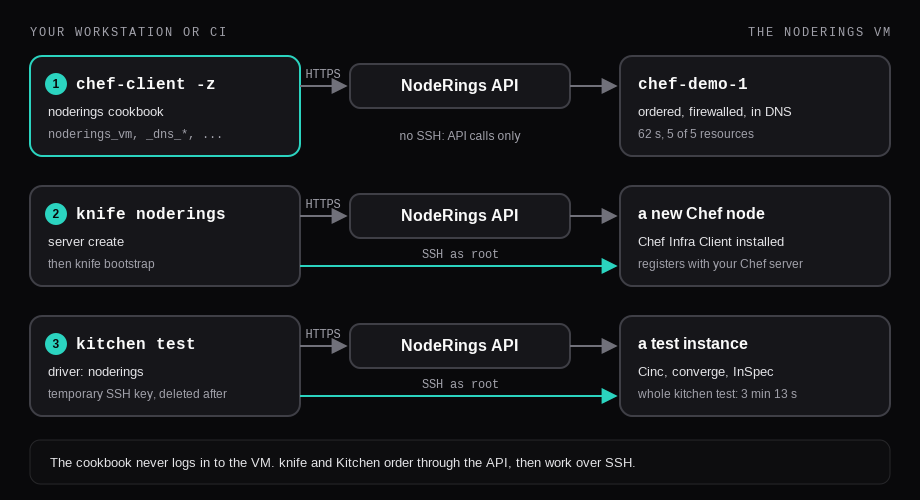
The difference in the diagram decides most of the choice. The cookbook's resources make HTTPS calls and install nothing, so the node that runs them can be anything: your laptop, a CI runner, a management node. It never logs in to the VPS it orders. knife and Kitchen do log in, because their job is to put Chef on the new server.
What you need for Chef on a NodeRings VPS
You need a NodeRings account with a client organization and prepaid credit, because hourly plans draw from credit. The VPS in this post is plan SC-GC-1C-1G-20 (1 vCPU, 1 GB RAM, 20 GB disk) on hourly billing, which was $0.007 an hour in Ashburn. How NodeRings works explains why you order a plan code and a city instead of a hosting company.
On your machine you need Chef Workstation or Cinc Workstation. We ran everything below on Cinc Workstation 26.4, which ships Cinc Client 19.4, knife 19.3 and Test Kitchen 4.1. Where this post says chef, Cinc users can type cinc, and chef-client is cinc-client. The cookbook needs Chef Infra Client 17 or later. The gems need Ruby 3.1 and knife 18 or later.
All three read a service account token. In the console, open Organization, then Access Control, then Service accounts, create one and generate a token. Then:
export NODERINGS_TOKEN="paste-the-token-here"None of the three is on a package registry yet. A Supermarket release of the cookbook and RubyGems releases of the two gems are coming soon. Until then you install from GitHub: a git source for the cookbook, and gem build for each gem.
The noderings cookbook: VPS, firewall and DNS from a recipe
The cookbook has five resources. Each one finds its object by name, compares it with what the recipe says and changes the difference, so a recipe can run every half hour from chef-client without ordering a second server.
| Resource | Manages | Publishes in node.run_state['noderings'] |
|---|---|---|
noderings_vm | Order, tags, firewall, power state, reinstall, delete | ['vms'][hostname]: id, ipv4, ipv6, power_state, ... |
noderings_firewall_ruleset | A ruleset and its ordered rules | ['firewall_rulesets'][name]: id |
noderings_ssh_key | A public key for new VMs | ['ssh_keys'][name]: id |
noderings_dns_zone | A zone, optionally signed with DNSSEC | ['dns_zones'][zone]: id, nameservers, ds, ... |
noderings_dns_record | All records of one name and type |
Step 1: Install the cookbook from GitHub
Make a project with a wrapper cookbook and a Policyfile:
chef-demo/
├── Policyfile.rb
└── cookbooks/demo/
    ├── metadata.rb
└── recipes/default.rbcookbooks/demo/metadata.rb:
name 'demo'
version '0.1.0'
chef_version '>= 17'
depends 'noderings'
Policyfile.rb pulls the cookbook straight from GitHub:
name 'noderings_demo'
default_source :supermarket
run_list 'demo::default'

cookbook 'noderings', git: 'https://github.com/noderings/noderings-cookbook.git', branch: 'main'
cookbook 'demo', path: 'cookbooks/demo'
The branch: 'main' is required. Both Policyfiles and Berkshelf assume a branch called master when you give a git source without one, and fail with a git rev-parse master error. If you use Berkshelf, the line is the same:
cookbook 'noderings', git: 'https://github.com/noderings/noderings-cookbook.git', branch: 'main'Step 2: Write the recipe
cookbooks/demo/recipes/default.rb:
noderings_ssh_key 'chef-demo' do
  public_key ::File.read(::File.expand_path('~/.ssh/chef-demo.pub'))
end

noderings_firewall_ruleset 'chef-web' do
  rules [
    { direction: 'ingress', action: 'accept', protocol: 'tcp', destination_ports: '22', source: { cidrs: ['0.0.0.0/0'] } },
    { direction: 'ingress', action: 'accept', protocol: 'tcp', destination_ports: '80', source: { cidrs: ['0.0.0.0/0'] } },
    { direction: 'ingress', action: 'accept', protocol: 'tcp', destination_ports: '443', source: { cidrs: ['0.0.0.0/0'] } },
    { direction: 'ingress', action: 'accept', protocol: 'icmp', source: { cidrs: ['0.0.0.0/0'] } },
    { direction: 'ingress', action: 'drop', protocol: 'any', source: { cidrs: ['0.0.0.0/0'] } },
  ]
end

noderings_vm 'chef-demo-1' do
  plan 'SC-GC-1C-1G-20'        # 1 vCPU, 1 GB RAM, 20 GB disk
  country 'United States'
  city 'Ashburn'
  billing_type 'usage'         # hourly, from prepaid credit
  distro 'ubuntu_24_04'
  ssh_keys ['chef-demo']
  firewall_ruleset 'chef-web'
  tags ['web']
end

noderings_dns_zone 'example.org'

noderings_dns_record 'www' do
  zone 'example.org'
  type 'A'
  values(lazy { node.run_state['noderings']['vms']['chef-demo-1']['ipv4'] })
  ttl 300
end
The lazy block is the part that ties the recipe together. Chef compiles every resource before it converges any of them, and at compile time the VM has no address because it has not been ordered. noderings_vm writes the address into node.run_state when the order finishes, and lazy delays the read until the record converges, a few seconds later.
Firewall rules run top to bottom, and traffic that matches no rule is accepted, so the final drop is what closes every other port. Each rule takes one port or one range such as 8000-8100. The ruleset holds exactly the rules you list, in order, and the resource removes any rule you delete from the recipe.
The token comes from the api_token property if you set one, then from node.run_state['noderings_api_token'], then from NODERINGS_TOKEN. Keep it out of node attributes, which a Chef Infra Server stores. With chef-vault, one line at the top of the recipe does it:
node.run_state['noderings_api_token'] = chef_vault_item('secrets', 'noderings')['token']Step 3: Converge it, then converge it again
Lock the policy, export it to a directory that local mode understands, and run it:
chef install
chef export Policyfile.rb export
cd export && chef-client -z
Converging 5 resources
Recipe: demo::default
* noderings_ssh_key[chef-demo] action create
- create NodeRings SSH key chef-demo
* noderings_firewall_ruleset[chef-web] action create
- create NodeRings firewall ruleset chef-web
- set the 5 rule(s) of NodeRings firewall ruleset chef-web (it had 0)
* noderings_vm[chef-demo-1] action create
- order NodeRings virtual machine chef-demo-1 (SC-GC-1C-1G-20 from Enzonix in Ashburn, United States, ubuntu_24_04)
* noderings_dns_zone[example.org] action create
- create NodeRings DNS zone example.org
* noderings_dns_record[www] action create
- create NodeRings DNS record www A in example.org: 203.0.113.10
Running handlers:
Running handlers complete
Infra Phase complete, 5/5 resources updated in 01 minutes 02 secondsAlmost all of the minute is the order: noderings_vm waits until the server is provisioned before it moves on, which is why the DNS record already has an address to read. The resource picked the cheapest hourly offer for the plan in Ashburn and printed which provider sells it. ssh root@203.0.113.10 with the matching private key answered on the first try, 72 seconds after the run started.
Run chef-client -z again and the summary turns into 0/5 resources updated in 11 seconds. Every resource looked itself up through the API and found nothing to do.
Step 4: Preview a change with why-run
Every resource supports why-run, which reads from the API and skips every write. Change tags ['web'] to tags ['web', 'prod'], run chef install and chef export again, and then:
$ chef-client -z --why-run
  * noderings_ssh_key[chef-demo] action create (up to date)
  * noderings_firewall_ruleset[chef-web] action create (up to date)
  * noderings_vm[chef-demo-1] action create
    - Would set the tags of NodeRings virtual machine chef-demo-1 to prod, web
  * noderings_dns_zone[example.org] action create (up to date)
  * noderings_dns_record[www] action create (up to date)
Infra Phase complete, 1/5 resources would have been updated
Tags, the firewall ruleset and the power state change in place, and the server keeps its addresses. The plan of an existing VM never changes; a different plan only logs a warning. A different distro stops the run, because a reinstall erases the disk:
NodeRings virtual machine chef-demo-1 runs ubuntu_24_04, not debian_13. Reinstalling erases its disk, so it is only done with allow_reinstall true (or the :reinstall action)Why-run has one blind spot on a first run. It cannot see objects that the same run would create, so a dry run of this recipe against an empty organization fails at the VM with no NodeRings SSH key is named chef-demo. Once the key and ruleset exist, why-run works as shown.
Besides :create and :delete, noderings_vm has :start, :stop, :restart and :reinstall actions, and power_state 'stopped' keeps a server off between runs.
knife noderings: order a server and bootstrap it as a node
knife-noderings is for the other common Chef workflow, where a Chef Infra Server holds the cookbooks and policies and each server runs chef-client against it. One command orders the server and runs knife bootstrap on it.
Install the knife plugin from GitHub
git clone https://github.com/noderings/knife-noderings.git
cd knife-noderings
gem build knife-noderings.gemspec
chef gem install ./knife-noderings-0.1.0.gem     # cinc gem install on Cinc Workstation
The gem has no dependencies beyond knife itself. Give knife the token in config.rb, or leave NODERINGS_TOKEN exported:
knife[:noderings_api_token] = ENV['NODERINGS_TOKEN']Without any config.rb, every command prints WARNING: No knife configuration file found first and then works anyway.
Look at the catalog before you order
These commands only read, so they are the safe way to check a token and a plan code:
$ knife noderings region list
Country        City
Netherlands    Amsterdam
United States  Ashburn
United States  Phoenix

$ knife noderings plan list --country "United States" --city Ashburn
Plan code         Billing       Compute          Category
SC-GC-1C-1G-20    usage         general_compute  shared_compute
SC-GC-1C-2G-40    usage         general_compute  shared_compute
SC-GC-2C-4G-80    subscription  general_compute  shared_compute
SC-GC-4C-8G-160   subscription  general_compute  shared_compute
SC-GC-8C-16G-320  subscription  general_compute  shared_compute
knife noderings distro list printed 13 images, from ubuntu_26_04 to rocky_9, and knife noderings ssh key list shows the key names that --noderings-ssh-key accepts. Every list command takes -F json or -F yaml.
Manage servers, including ones Chef did not order
The server commands find a VM by hostname or ID, whoever created it. Here they are against the server the recipe ordered:
$ knife noderings server list
ID                                    Hostname     IPv4          Plan            Distro        State
6f1c2a3e-0000-4000-8000-000000000001  chef-demo-1  203.0.113.10  SC-GC-1C-1G-20  ubuntu_24_04  running

$ knife noderings server show chef-demo-1
billing_type:        usage
distro:              ubuntu_24_04
hostname:            chef-demo-1
ipv4:                203.0.113.10
ipv6:                2001:db8::10
plan_code:           SC-GC-1C-1G-20
power_state:         running
provisioning_status: applied
tags:                web

$ knife noderings server stop chef-demo-1
chef-demo-1: stopped
$ knife noderings server start chef-demo-1
chef-demo-1: running
show also prints the IDs of the VM, plan, region and firewall ruleset, left out above. The stop took 4.8 seconds and the start 3.6, and each command waits until the server reports the new state. knife noderings server reboot takes one or more names, and knife noderings server delete chef-demo-1 asks for confirmation (skip it with -y) and stops hourly billing.
knife noderings server create
knife noderings server create --hostname web-1 \
  --plan SC-GC-1C-1G-20 --country "United States" --city Ashburn \
  --noderings-ssh-key chef-demo -i ~/.ssh/chef-demo \
  --noderings-tags web \
  --run-list 'recipe[demo::default]'
The command is a subclass of knife bootstrap, so every bootstrap option works, including --policy-name and --policy-group, --environment, --json-attributes and --bootstrap-version. In order, it:
- stops if a server with that hostname already exists, and tells you to use
knife bootstrapinstead, - picks the cheapest matching offer (
--sort ratingfor the best rated) and orders it with an idempotency key, so a retried request never buys two servers, - waits for an address, then attaches the firewall ruleset,
- waits for port 22, then 20 more seconds for cloud-init to install the keys,
- runs
knife bootstrapasroot, installing Chef Infra Client and registering the node under the hostname (or-N).
The node also gets an Ohai hint named noderings with the server's ID and hostname, so a recipe can branch on hint?('noderings'). --firewall-ruleset attaches a ruleset in step 3. It must allow SSH from your workstation, or step 4 times out with check the firewall ruleset allows port 22. It is the same attach-after-address step that left our Kitchen instance unreachable below, so try it on a throwaway server first.
We did not run server create for this post. The bootstrap registers the new node with a Chef Infra Server, and our test machine had none that a server on the internet could reach. Its ordering half follows the same order, wait and attach steps as the Kitchen driver below, which we did run. When you delete a server that was a node, knife noderings server delete web-1 --purge also deletes the Chef node and client with the same name.
kitchen-noderings: test cookbooks on real VPS instances
Test Kitchen's job is to build a fresh machine, converge a cookbook on it, run tests and throw the machine away. With the noderings driver, the machine is an hourly VPS, so the test sees a real kernel, real systemd and a real public network for a fraction of a cent.
Install the driver from GitHub
git clone https://github.com/noderings/kitchen-noderings.git
cd kitchen-noderings
gem build kitchen-noderings.gemspec
chef gem install ./kitchen-noderings-0.1.0.gem   # cinc gem install on Cinc Workstation
Run kitchen test
We tested a small web cookbook whose recipe runs apt_update, installs nginx and writes an index page, with two InSpec checks: nginx is running, and http://localhost/ returns the page. The kitchen.yml:
driver:
  name: noderings
  plan: SC-GC-1C-1G-20
  country: United States
  city: Ashburn

provisioner:
  name: chef_infra
  product_name: cinc

verifier:
  name: inspec

platforms:
  - name: ubuntu-24.04

suites:
  - name: default
$ kitchen test
-----> Creating <default-ubuntu-2404>...
Ordering NodeRings server kitchen-default-ubuntu-2404-nuvgbg (SC-GC-1C-1G-20 from Enzonix in Ashburn, United States, ubuntu_24_04)
NodeRings server <6f1c2a3e-0000-4000-8000-000000000002> created.
NodeRings server <6f1c2a3e-0000-4000-8000-000000000002> has address 203.0.113.20; waiting for SSH
[SSH] Established
Finished creating <default-ubuntu-2404> (1m25.58s).
-----> Converging <default-ubuntu-2404>...
Infra Phase complete, 4/9 resources updated in 15 seconds
Finished converging <default-ubuntu-2404> (1m28.87s).
-----> Verifying <default-ubuntu-2404>...
✔ is expected to be running
✔ body is expected to match /is up/
Test Summary: 2 successful, 0 failures, 0 skipped
-----> Destroying <default-ubuntu-2404>...
NodeRings server <6f1c2a3e-0000-4000-8000-000000000002> destroyed.
-----> Test Kitchen is finished. (3m12.72s)The whole cycle took 3 minutes 13 seconds. Creating the instance took 86 seconds, about the same as the cookbook's order. Most of the 89-second converge was Kitchen installing Cinc on the new server; the recipe itself ran in 15. On destroy, the driver deleted the server and the temporary key it had uploaded as kitchen-<server name>, and nothing was left in the organization afterwards.
Our first attempt failed at apt_package[nginx] with 404 Not Found from the Ubuntu mirror. The image's package lists were older than the mirror, which is why the recipe now starts with apt_update. Images go stale between rebuilds, and a real server catches that in Kitchen before production does.
The platform name picks the image: ubuntu-24.04 becomes ubuntu_24_04, debian-13 becomes debian_13, and rockylinux-9 and centos-stream-9 map to rocky_9 and centos_9. Set distro on a platform for anything else. Each instance gets a hostname like kitchen-default-ubuntu-2404-nuvgbg, so several runs can share an organization.
The driver records the server ID in Kitchen's state file the moment the order returns, so a kitchen create that is interrupted and run again reuses the server instead of buying a second one. kitchen doctor checks the token and the offer settings before anything is billed. If you would rather use a key you already stored, list it in noderings_ssh_keys and point the transport's ssh_key at the private half.
The driver also takes firewall_ruleset, which attaches a ruleset once the server has an address. We left it out. In our one run with firewall_ruleset: chef-web, the instance never answered on port 22 and we destroyed it after six minutes, while the same ruleset worked on the server the cookbook ordered. Without the option, the test server has no NodeRings firewall, which is acceptable for a machine that lives three minutes.
How to delete everything when you are done
A cleanup recipe uses the same resources with action :delete. We saved it as cookbooks/demo/recipes/cleanup.rb:
noderings_vm('chef-demo-1') { action :delete }
noderings_dns_zone('example.org') do
  force_delete true          # the zone still holds the www record
  action :delete
end
noderings_firewall_ruleset('chef-web') { action :delete }
noderings_ssh_key('chef-demo') { action :delete }
Add named_run_list :cleanup, 'demo::cleanup' to the Policyfile. A change to the Policyfile itself needs chef update, because chef install keeps using the existing lock. Then export again and run the named run list:
$ chef update && chef export Policyfile.rb export --force
$ cd export && chef-client -z -n cleanup
Recipe: demo::cleanup
  * noderings_vm[chef-demo-1] action delete
    - delete NodeRings virtual machine chef-demo-1 (6f1c2a3e-0000-4000-8000-000000000001)
  * noderings_dns_zone[example.org] action delete
    - delete NodeRings DNS zone example.org
  * noderings_firewall_ruleset[chef-web] action delete
    - delete NodeRings firewall ruleset chef-web
  * noderings_ssh_key[chef-demo] action delete
    - delete NodeRings SSH key chef-demo
Infra Phase complete, 4/4 resources updated in 07 seconds
noderings_vm waits until the API no longer knows the server before it moves on, so the ruleset is free to delete by the time its turn comes.
On an hourly plan, billing stops when the VM is deleted. A monthly subscription is cancelled at once without a refund for the rest of the month, so keep delete recipes away from servers you pay for monthly.
Common errors
These are the messages we hit while writing this, plus two that the resources raise on purpose.
| Error | Cause | Fix |
|---|---|---|
Git error: command `git rev-parse master` failed | A git source without a branch; the repositories use main | Add branch: 'main' in the Policyfile or Berksfile |
no NodeRings SSH key is named chef-demo; create it first (noderings_ssh_key) | A why-run against an empty organization, or a key name with a typo | Run once without --why-run, or fix the name |
runs ubuntu_24_04, not debian_13. Reinstalling erases its disk | distro changed on an existing VM | Set allow_reinstall true, or use action :reinstall, if erasing the disk is the point |
a new VM needs ssh_keys or a password so you can log in | noderings_vm with neither | Add ssh_keys, or a password |
this public key is already stored in NodeRings under another name | The same public key is stored under another name, and NodeRings keeps each key once | Use the existing name, or delete the old key first |
WARNING: No knife configuration file found | knife without a config.rb | Harmless; add config.rb with knife[:noderings_api_token] to silence it |
Frequently asked questions
Is there a Chef cookbook for NodeRings?
Yes. The noderings cookbook has the resources noderings_vm, noderings_dns_zone, noderings_dns_record, noderings_firewall_ruleset and noderings_ssh_key. The source is on GitHub, and you install it from there with a git source in a Policyfile or Berksfile until the Supermarket release is out.
Can Chef create a VPS, or only configure one?
Both. noderings_vm orders, stops, starts, reinstalls and deletes servers from a recipe, and knife noderings server create orders one and bootstraps Chef on it in one command.
Do I need a Chef Infra Server?
Only for knife noderings server create, whose bootstrap registers the new node with one. The cookbook runs fine in local mode (chef-client -z), as in this post, and Test Kitchen needs no server either.
Does it work with Cinc?
Yes. Everything in this post ran on Cinc Workstation with Cinc Client 19.4, and the Kitchen example installs Cinc on the test server with product_name: cinc. The cookbook supports Chef Infra Client and Cinc Client 17 or later.
How much does it cost to test a cookbook on NodeRings with Test Kitchen?
Our kitchen test kept a 1 vCPU, 1 GB server alive for about three minutes on a plan that costs $0.007 an hour, so one run costs a small fraction of a cent. The driver orders hourly (usage) plans by default, and deleting the server on kitchen destroy stops the billing. Use kitchen test in CI rather than kitchen converge, which leaves the server running. A failed kitchen test also keeps its instance for debugging unless you pass --destroy=always.
Should I use Chef, Ansible or Terraform to order servers?
Use the tool that already runs your configuration. If your servers are Chef nodes, the cookbook keeps their infrastructure in the same recipes and the same run. Teams on playbooks have the Ansible collection, and Terraform users have the provider. All of them call the same API. The rest of this series covers SaltStack, Puppet, Pulumi and Crossplane.
Try it
You need a NodeRings account with credit, a service account token and Chef or Cinc Workstation. Copy the Policyfile and the recipe, change the zone to a domain you own, and run chef install, chef export Policyfile.rb export and chef-client -z in export. Point your registrar at the nameservers in node.run_state['noderings']['dns_zones'], and www resolves to the new server.