
A 1 vCPU, 1 GB virtual machine in Ashburn costs $0.007 an hour on the cheapest hourly offer in the NodeRings marketplace. With the NodeRings Terraform provider that machine is about 30 lines of HCL. terraform apply orders it, puts a firewall in front of it and points a DNS name at it. terraform destroy deletes all of it and the hourly charge stops with the VM.
We ran the provider's whole test suite against production before writing this. Five test VMs were ordered, changed, imported and destroyed, and the bill for all of it came to three and a half cents.
| You want to | Use |
|---|---|
| Order a VM | noderings_virtual_machine |
| Choose who sells it, where, and for how much | data.noderings_marketplace_offer |
| Open only the ports you need | noderings_firewall_ruleset, noderings_firewall_ruleset_rules |
| Give it a name | noderings_dns_zone, noderings_dns_record |
| Log in with your key | noderings_ssh_key |
| Add backups or a second IP | noderings_virtual_machine_backup, noderings_virtual_machine_additional_ip |
| Let a teammate in with limited rights | noderings_role, noderings_group, noderings_role_assignment |
The provider also covers game servers, DNSSEC, secrets and billing lookups. The full list is on the Terraform Registry. OpenTofu uses the same provider.
What happens when you run terraform apply
NodeRings is a marketplace. Independent hosting providers list machines, and you buy from them through one account and one API. If that model is new to you, How NodeRings works explains who sells what. For Terraform it means your configuration never names a hosting company. You describe the machine you want, and the provider finds an offer that fits.
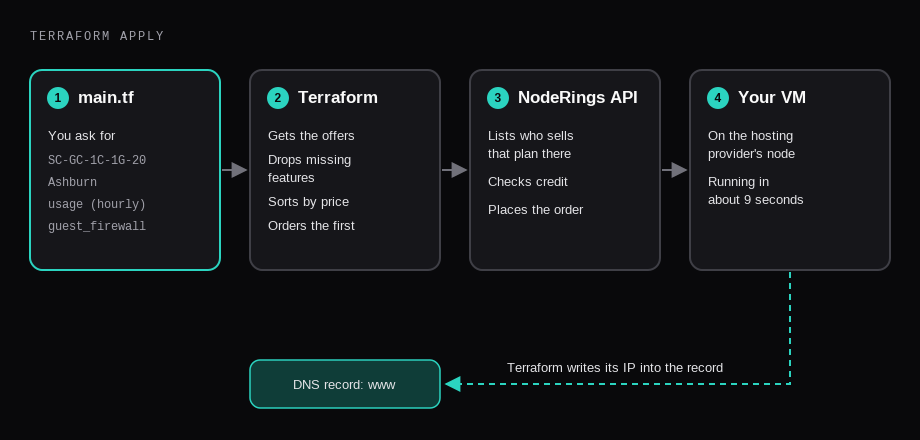
The NodeRings API decides which offers exist. It only returns providers that are selling your plan code in your city right now. The Terraform provider then drops the ones that miss a feature you asked for, such as the guest firewall, sorts the rest by price, and orders the first. The API checks your credit, creates the VM in that provider's region, and returns the addresses. Terraform carries the IPv4 address straight into your DNS record.
What you need before the first apply
An account with a client organization, a payment method, and prepaid credit. Hourly plans draw from credit, and the order check wants at least $10 available. You also need Terraform 1.5 or newer and an SSH key on your laptop.
Terraform signs in with a service account token. In the console, open Organization, then Access Control, then Service accounts. Create one, give it the Administrator role (or a narrower role if you only manage DNS, say), and generate a token. The console shows it once. Put it in your shell, or in whatever secret store your CI uses:
export NODERINGS_TOKEN="paste-the-token-here"The token belongs to one organization. If you run staging and production in separate organizations, give each its own token and its own provider block with an alias.
Order the VM
Make a folder with one file, main.tf. The first block installs the provider. The second reads the token from the environment.
terraform {
  required_providers {
    noderings = {
      source  = "noderings/noderings"
      version = "~> 0.1"
    }
  }
}

provider "noderings" {}
Next comes the offer. A plan code is a size that every provider sells under the same name. SC-GC-1C-1G-20 is shared compute with 1 vCPU, 1 GB of RAM and a 20 GB disk. billing_type = "usage" asks for hourly billing from credit. Leave it out and you can get a monthly plan charged to your card.
data "noderings_marketplace_offer" "web" {
  plan_code            = "SC-GC-1C-1G-20"
  country              = "United States"
  city                 = "Ashburn"
  billing_type         = "usage"
  require_capabilities = ["guest_firewall"]
}
Then the key and the machine. file() reads your public key from disk, and the VM gets it as root's authorized key. The offer supplies the plan and region IDs, so you never copy an ID from the console.
resource "noderings_ssh_key" "laptop" {
  name       = "laptop"
  public_key = file("~/.ssh/id_ed25519.pub")
}

resource "noderings_virtual_machine" "web" {
  hostname    = "web-1"
  plan_id     = data.noderings_marketplace_offer.web.plan_id
  region_id   = data.noderings_marketplace_offer.web.region_id
  distro      = "debian_13"
  ssh_key_ids = [noderings_ssh_key.laptop.id]
  tags        = ["web"]
}

output "ssh" {
  value = "ssh root@${noderings_virtual_machine.web.ipv4}"
}
Run terraform init, then terraform plan. The plan reads the marketplace and shows the VM it would order, and nothing is bought yet. To see which provider it picked, add an output for data.noderings_marketplace_offer.web.provider_name. terraform apply places the order:
noderings_ssh_key.laptop: Creation complete after 2s
noderings_virtual_machine.web: Creation complete after 9s

Outputs:

ssh = "ssh root@203.0.113.24"
Nine seconds is how long the order took in our runs. The guest still needs a few seconds to boot before SSH answers.
Put a firewall in front of it
A new VM accepts traffic on every port. The firewall below allows SSH from your office, HTTPS from anyone, and drops the rest. Rules run top to bottom, and the noderings_firewall_ruleset_rules resource owns the whole list. If you move a rule in the file, Terraform moves it on the server and keeps the other rules where they are.
resource "noderings_firewall_address_group" "office" {
  name  = "office"
  cidrs = ["198.51.100.0/24"]
}

resource "noderings_firewall_ruleset" "web" {
  name = "web"
}

resource "noderings_firewall_ruleset_rules" "web" {
  ruleset_id = noderings_firewall_ruleset.web.id

  rule {
    direction         = "ingress"
    action            = "accept"
    protocol          = "tcp"
    destination_ports = "22"
    source { address_group_ids = [noderings_firewall_address_group.office.id] }
  }

  rule {
    direction         = "ingress"
    action            = "accept"
    protocol          = "tcp"
    destination_ports = "443"
    source { cidrs = ["0.0.0.0/0"] }
  }

  rule {
    direction = "ingress"
    action    = "drop"
    protocol  = "any"
    source { cidrs = ["0.0.0.0/0"] }
  }
}

resource "noderings_firewall_ruleset_attachment" "web" {
  virtual_machine_id = noderings_virtual_machine.web.id
  ruleset_id         = noderings_firewall_ruleset.web.id
}
The last rule matters more than it looks. Traffic that matches no rule is accepted, so a ruleset with only accept rules opens ports without closing any.
Give your address groups their own names. NodeRings makes an address group named after each VM's hostname, holding that VM's addresses, so a group of yours called web-1 would collide with it.
Point a domain at it
Host the zone on NodeRings and the record follows the VM. If the VM is ever replaced and gets a new address, the next apply updates the record in the same run.
resource "noderings_dns_zone" "site" {
  name = "example.com"
}

resource "noderings_dns_record" "www" {
  zone_id = noderings_dns_zone.site.id
  name    = "www"
  type    = "A"
  ttl     = 300
  records = [noderings_virtual_machine.web.ipv4]
}

output "nameservers" {
  value = noderings_dns_zone.site.nameservers
}
Set the printed nameservers at your registrar. The zone reports pending_ns until the delegation shows up, then active. Turning on signing is one more resource, noderings_dns_zone_dnssec, and DNSSEC fails closed explains what to check before you add the DS record.
Change it without losing it
Most edits apply in place. A few order a new machine, which means new IP addresses and an empty disk. terraform plan marks those with must be replaced, and that line is the one to look for before you type yes.
| Change in main.tf | What NodeRings does |
|---|---|
tags | Updates the VM in place |
power_state = "stopped" | Stops the VM, keeps the disk and IPs |
| Firewall rules or their order | Updates the ruleset, VM untouched |
| Address group CIDRs | Updates the group, rules keep working |
hostname, distro, ssh_key_ids | New VM, unless reinstall_on_change = true |
plan_id or region_id | New VM. There is no resize |
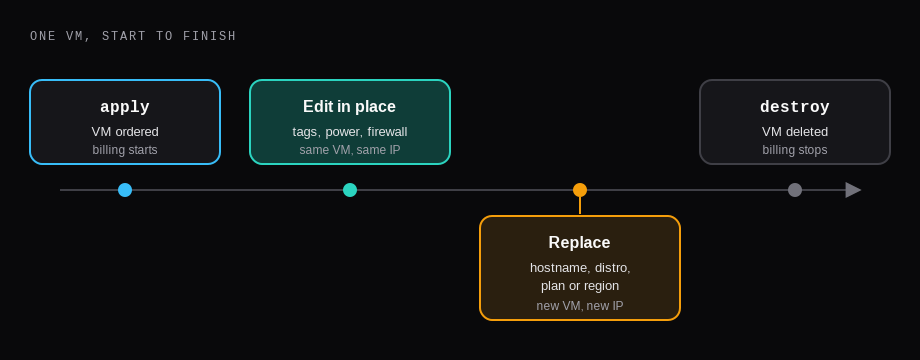
With reinstall_on_change = true, a new hostname, distro or SSH key reinstalls the operating system on the same VM. The disk is wiped, but the VM keeps its IP addresses and its subscription, so your DNS record and firewall attachment stay valid.
Stop a cheaper offer from moving your server
The offer lookup runs on every plan. Say a second provider starts selling SC-GC-1C-1G-20 in Ashburn for less. The lookup now returns that provider's plan, plan_id changes, and the next plan wants to replace your VM with one at the new provider. That is correct behavior for a data source, and it is a surprise the first time.
Three settings prevent it, and you can combine them.
resource "noderings_virtual_machine" "web" {
  # ...the arguments from above...

  # Terraform refuses to delete or replace the VM while this is true.
  deletion_protection = true

  # Use the lookup to create the VM, then keep it on that offer.
  lifecycle {
    ignore_changes = [plan_id, region_id]
  }
}
The third is to pin the provider with provider_id (or storefront_slug) on the offer lookup, so it only ever considers that one company. data.noderings_marketplace_offers lists every offer for a code with its provider ID and prices, and data.noderings_marketplace_providers lists providers with their ratings. If you would rather buy from the best-rated provider than the cheapest, set sort = "rating".
Bring console-made servers under Terraform
If you already created VMs, zones and firewalls by hand, import them instead of rebuilding. Terraform 1.5 and newer read import blocks from your configuration:
import {
  to = noderings_virtual_machine.web
  id = "4f6d1c2a-0000-0000-0000-000000000000"
}

import {
  to = noderings_dns_record.www
  id = "<zone id>/www/A"
}
Write the matching resource blocks, run terraform plan, and check that nothing says must be replaced. The API never returns a VM's SSH keys or root password, so the first apply after an import writes those from your configuration into the state. That apply only updates the state, and the VM is left alone.
Destroy, and what it costs
terraform destroy deletes the VM, the firewall, the records and the key in dependency order. On an hourly plan the charge stops with the VM. On a fixed-price plan the subscription ends right away, without a refund for the unused part of the month, so put deletion_protection = true on anything you pay for monthly.
The API allows about 2 requests per second for each operation. The provider paces itself and retries rate-limited calls, so a large plan takes longer and still finishes.
When something goes wrong, TF_LOG=DEBUG terraform apply logs every API call with its status and duration. TF_LOG=TRACE adds the request and response bodies, with passwords, tokens and secret values masked.
Frequently asked questions
Is there a Terraform provider for NodeRings?
Yes. It is noderings/noderings on the Terraform Registry, and the source is on GitHub. It manages virtual machines, firewalls, DNS, game servers, SSH keys and access control.
Does it work with OpenTofu?
Yes. OpenTofu uses the same provider. Use tofu init and tofu apply in place of the Terraform commands.
How much does a VM ordered with Terraform cost?
The same as one ordered in the console. Prices belong to the hosting provider. The cheapest hourly offer for a 1 vCPU, 1 GB VM in Ashburn is $0.007 an hour. Prices move as providers change them, and data.noderings_marketplace_offers shows the current ones before you order.
Can I choose which hosting provider runs my VM?
Yes. Set provider_id or storefront_slug on data.noderings_marketplace_offer. Without them, Terraform orders the cheapest offer that matches your filters, or the best rated with sort = "rating".
What happens to the bill when I run terraform destroy?
Hourly VMs stop billing when they are deleted. Fixed-price subscriptions are cancelled immediately and the rest of the period is not refunded.
Try it
You need a NodeRings account with $10 of credit, a service account token and an SSH key. Copy the blocks above into one main.tf, change the domain and the office network, and run terraform apply. If you prefer to work from an editor chat window, Create a VM from Cursor with NodeRings MCP orders the same machine by asking for it in plain language.