We applied an Ingress for web in a test zone, and within 30 seconds the NodeRings nameserver ans1.nrings.io answered for it with an A record. A second Ingress got a CNAME. external-dns also wrote the TXT records that mark both as its own. Changing the Ingress's target updated the A record within about 10 seconds, and deleting the Ingresses removed both records within 6. A record we had added by hand in the same zone survived.
In a second cluster, cert-manager asked for one certificate covering a zone and its wildcard, *. included. It proved control of both names by writing _acme-challenge TXT records in NodeRings DNS, and the Certificate went Ready after 2 minutes 17 seconds. The challenge records were gone afterwards.
Two new integrations do this, and they share one NodeRings DNS client underneath:
| Integration | What it is | How you install it |
|---|---|---|
external-dns-noderings-webhook | A webhook provider for ExternalDNS: records for your Ingresses, Services and Gateway routes | A sidecar in the official external-dns Helm chart (we used chart 1.24.0, external-dns v0.24) |
cert-manager-webhook-noderings | An ACME DNS-01 solver for cert-manager: TLS certificates, wildcards included, for names in NodeRings DNS | Its own Helm chart next to cert-manager (tested with cert-manager 1.21) |
One thing to be clear about up front. The certificate in our run came from Pebble, Let's Encrypt's test ACME server, running inside the cluster and checking the challenge on the NodeRings nameserver directly. We had no domain delegated to NodeRings for this test, and Let's Encrypt itself only looks up challenges through public DNS. The ClusterIssuer for real Let's Encrypt is below, and it differs from the test one only in the server URL and the delegation it needs.
How external-dns and cert-manager use NodeRings DNS
Both webhooks do the same small job: they take a record change that Kubernetes software has decided on and send it to the NodeRings DNS API over HTTPS with a service account token. Neither one decides what records should exist. external-dns makes that plan from your Ingresses and Services, and cert-manager makes it from the ACME challenge.
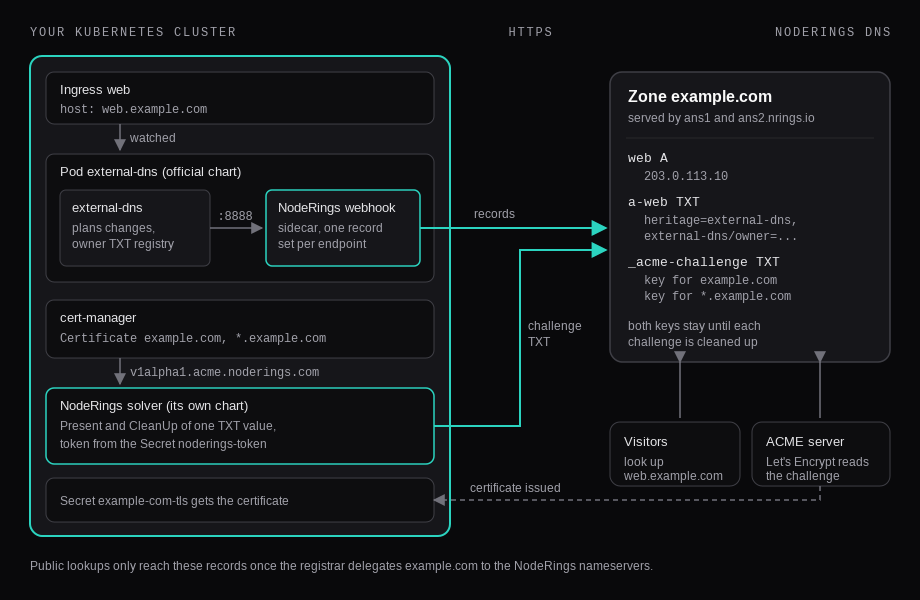
The external-dns webhook runs as a second container in the external-dns pod, and external-dns calls it on localhost:8888. Because it plugs into the official chart's provider.webhook setting, you keep running upstream external-dns from its own chart and upgrade it as usual.
The cert-manager solver is a small API server of its own. cert-manager reaches it through a Kubernetes APIService, v1alpha1.acme.noderings.com, which is the standard way cert-manager runs DNS providers it does not ship. Issuers refer to it by groupName: acme.noderings.com and solverName: noderings.
What you need before you start
- A Kubernetes cluster and Helm 3. We ran both tests in kind; a single-node cluster like the one in k3s on a single VPS works the same way.
- A zone in NodeRings DNS. Add it in the console under DNS, then Add zone, or create it with the Terraform provider or Pulumi.
- The domain delegated to NodeRings. At your registrar, set the nameservers to the ones the console shows for the zone. Without that, the records exist on
ans1.nrings.ioandans2.nrings.iobut the rest of the internet, Let's Encrypt included, never asks those servers. - A NodeRings service account token that can manage DNS records in the zone. Create one under Settings, then Service accounts.
Both projects are open source under Apache 2.0. Their container images and the solver's Helm chart are published to ghcr.io/noderings with the first release. Until that release is out, build the images from the repositories with make image and push them to a registry your cluster can pull from, or kind load them into a kind cluster as we did.
Part 1: DNS records from Ingresses with external-dns
Step 1: Store the token and write the chart values
kubectl create namespace external-dns
kubectl -n external-dns create secret generic noderings-token --from-literal=token=<TOKEN>
These are the repository's examples/values.yaml for the official chart, with example.com as the zone in both places it appears:
provider:
  name: webhook
  webhook:
    image:
      repository: ghcr.io/noderings/external-dns-noderings-webhook
      tag: v0.1.0
    env:
      - name: NODERINGS_TOKEN
        valueFrom:
          secretKeyRef:
            name: noderings-token
            key: token
      # Keep this the same as domainFilters below.
      - name: DOMAIN_FILTER
        value: example.com

domainFilters: [example.com]

# "sync" also deletes records when their Ingress or Service goes away.
# "upsert-only" never deletes.
policy: sync

registry: txt
txtOwnerId: my-cluster

sources: [service, ingress]
interval: 1m
txtOwnerId is the name this cluster signs its records with. If two clusters write to the same zone, give each its own ID, and each will only change records its own TXT records mark.
Step 2: Install the official external-dns chart
helm repo add external-dns https://kubernetes-sigs.github.io/external-dns/
helm upgrade --install external-dns external-dns/external-dns --version 1.24.0 \
  -n external-dns -f values.yaml
When it starts, the webhook checks the token and logs the zones it will manage. With a wrong token it exits with a message saying the NodeRings API rejected it, so a broken Secret shows up as a crash loop straight away instead of as missing records later.
Step 3: Annotate an Ingress
apiVersion: networking.k8s.io/v1
kind: Ingress
metadata:
  name: web
  annotations:
    external-dns.kubernetes.io/ttl: "300"
spec:
  rules:
    - host: web.example.com
      http:
        paths:
          - path: /
            pathType: Prefix
            backend: {service: {name: web, port: {number: 80}}}
external-dns takes the name from host and the address from the Ingress's load balancer status. To point the name somewhere else, add external-dns.kubernetes.io/target, which is what our test did because kind has no load balancer. A target that is an IP address becomes an A record, and a hostname becomes a CNAME.
Watch the annotation prefix. external-dns v0.24 reads annotations under external-dns.kubernetes.io/. Annotations under the older external-dns.alpha.kubernetes.io/ prefix, which most tutorials on the web still use, are ignored unless you start external-dns with --enable-legacy-annotation-prefix. Nothing fails: external-dns logs that all records are up to date and creates nothing.
Step 4: Check the records on the NodeRings nameserver
Ask the NodeRings nameserver directly, which works before delegation too:
dig +short web.example.com @ans1.nrings.io
kubectl -n external-dns logs deploy/external-dns -c webhook
This is the end-to-end test from the repository, run against the production API. It creates a throwaway zone, installs chart 1.24.0 with the webhook sidecar in kind, and checks every answer on ans1.nrings.io. It sets interval to 10 seconds instead of the default minute to keep the test short:
== Ingress with an address and an alias
   web.edns-e2e-f07d65.example.com A -> 192.0.2.10
   www.edns-e2e-f07d65.example.com CNAME -> web.edns-e2e-f07d65.example.com.
   ownership TXT: "heritage=external-dns,external-dns/owner=e2e,external-dns/resource=ingress/default/web"
== Changed target
   web.edns-e2e-f07d65.example.com A -> 192.0.2.20
== A record not owned by external-dns survives
   manual.edns-e2e-f07d65.example.com A -> 198.51.100.1
== Deleting the Ingresses removes their records
   web.edns-e2e-f07d65.example.com A -> <none>
   www.edns-e2e-f07d65.example.com CNAME -> <none>
   manual.edns-e2e-f07d65.example.com A -> 198.51.100.1
The webhook's own log shows each change as one write of a whole record set:
level=INFO msg="wrote record set" zone=edns-e2e-f07d65.example.com name=web type=A ttl=120 values=[192.0.2.10]
level=INFO msg="wrote record set" zone=edns-e2e-f07d65.example.com name=www type=CNAME ttl=300 values=[web.edns-e2e-f07d65.example.com]
level=INFO msg="wrote record set" zone=edns-e2e-f07d65.example.com name=a-web type=TXT ttl=300 values="[\"heritage=external-dns,external-dns/owner=e2e,external-dns/resource=ingress/default/web\"]"
level=INFO msg="deleted record set" zone=edns-e2e-f07d65.example.com name=web type=A
The web record has TTL 120 because the test Ingress set the TTL annotation to 120. The CNAME had no annotation and got the webhook's DEFAULT_TTL of 300. The manual record is the one external-dns did not create: it has no ownership TXT record, so external-dns never touches it, even with policy: sync.
How Kubernetes endpoints map to NodeRings records
NodeRings stores one record set per name and type, with one or more values. An external-dns endpoint has the same shape, so one endpoint becomes one record set:
| Record types | A, AAAA, CNAME, TXT, MX, SRV, NS below the apex, CAA, PTR, NAPTR. external-dns manages A, AAAA and CNAME unless you add types with --managed-record-types |
| Zone apex | Supported. The apex SOA and NS records belong to NodeRings and are never changed |
| Nested zones | A name goes to the longest matching zone, so api.dev.example.com lands in dev.example.com if you host both |
| TTL | The external-dns.kubernetes.io/ttl annotation, otherwise DEFAULT_TTL (300) |
| Set identifiers | Skipped with a warning; NodeRings DNS has no weighted or latency routing |
| A rejected record | Logged and reported to external-dns; the rest of the change still goes through, and external-dns retries on its next run |
The webhook's other settings are environment variables on its container, under provider.webhook.env in the values: EXCLUDE_DOMAINS to leave names alone, DRY_RUN=true to log changes without making them, NODERINGS_ORGANIZATION_ID for tokens that reach several organizations, and LOG_LEVEL=debug to log every API call. The token itself is never logged.
Part 2: TLS certificates with the cert-manager DNS-01 solver
DNS-01 is the ACME challenge you answer with a TXT record at _acme-challenge.<name>. It is the only kind Let's Encrypt accepts for wildcard certificates, and it works for hosts that the internet cannot reach, because the CA only talks to DNS.
Step 1: Install the solver next to cert-manager
You need cert-manager 1.15 or later. Install the solver into the namespace where cert-manager runs, and store the token there:
helm install noderings-webhook oci://ghcr.io/noderings/charts/cert-manager-webhook-noderings \
  --namespace cert-manager

kubectl -n cert-manager create secret generic noderings-token --from-literal=token=<TOKEN>
Until the chart is published, install it from the repository's deploy/cert-manager-webhook-noderings directory instead; that is what the end-to-end test does. If cert-manager runs in another namespace or under another service account, set certManager.namespace and certManager.serviceAccountName, because the chart only lets that account call the solver.
Step 2: Create a ClusterIssuer
Start with the Let's Encrypt staging server until a certificate goes Ready, then switch the URL to https://acme-v02.api.letsencrypt.org/directory:
apiVersion: cert-manager.io/v1
kind: ClusterIssuer
metadata:
  name: letsencrypt-noderings
spec:
  acme:
    server: https://acme-staging-v02.api.letsencrypt.org/directory
    email: you@example.com
    privateKeySecretRef:
      name: letsencrypt-noderings-account
    solvers:
      - dns01:
          webhook:
            groupName: acme.noderings.com
            solverName: noderings
            config:
              tokenSecretRef:
                name: noderings-token
                key: token
The config block takes three more fields: organizationId, apiUrl, and ttl for the challenge record, which defaults to 60 seconds.
Where the solver may read the token Secret from is the setting people get wrong:
| Issuer kind | Reads the Secret from | Chart value that allows it |
|---|---|---|
| ClusterIssuer | cert-manager's cluster resource namespace, cert-manager by default | Allowed out of the box |
Issuer in team-a | Its own namespace, team-a | secretAccess.namespaces: [team-a] |
| Issuers everywhere | Each Issuer's own namespace | secretAccess.allNamespaces: true |
secretAccess.secretNames limits reads to Secrets named noderings-token unless you change it. A ClusterIssuer can also leave tokenSecretRef out if you install the chart with ambientCredentials.secretName=noderings-token.
Step 3: Ask for a certificate for the zone and its wildcard
apiVersion: cert-manager.io/v1
kind: Certificate
metadata:
  name: example-com
  namespace: default
spec:
  secretName: example-com-tls
  issuerRef:
    name: letsencrypt-noderings
    kind: ClusterIssuer
  dnsNames:
    - example.com
    - "*.example.com"
kubectl get certificate example-com -wBoth names in this certificate are answered at the same TXT name, _acme-challenge.example.com, with different keys. The solver adds and removes only its own value, keeps any other value on the record, and deletes the record when the last one goes. Presenting a key twice or cleaning it up twice changes nothing. For an Ingress, the usual cert-manager.io/cluster-issuer: letsencrypt-noderings annotation works too.
What our certificate run looked like
The repository's end-to-end test runs cert-manager v1.21.3, Pebble 2.10.3 as the ACME server and the solver chart in kind, against the production NodeRings API. It points both Pebble and cert-manager's propagation check at the NodeRings nameserver, so its throwaway zone needs no delegation. Those two settings are for testing only; with a delegated domain, you leave cert-manager's resolvers alone.
== ClusterIssuer and Certificate for cm-e2e-2207cc.example.com and *.cm-e2e-2207cc.example.com
certificate.cert-manager.io/e2e condition met
NAME   READY   SECRET    AGE
e2e    True    e2e-tls   2m17s
== Issued certificate
   issuer=CN = Pebble Intermediate CA 375181
   X509v3 Subject Alternative Name: critical
       DNS:cm-e2e-2207cc.example.com, DNS:*.cm-e2e-2207cc.example.com
== Challenge records are cleaned up
   _acme-challenge.cm-e2e-2207cc.example.com TXT -> <none>
In this run cert-manager handled the two names one after the other. The solver logged presented challenge record and, about 65 seconds later, removed challenge record set, then the same pair for the second name.
The solver also passes cert-manager's own DNS-01 conformance suite in strict mode against the production API. That suite is the test cert-manager publishes for DNS provider webhooks: it presents and cleans up records, including several keys on one name, and checks each step on the authoritative nameserver.
Using both on one Ingress
The two integrations are separate installs, and they fit together on a single Ingress. external-dns publishes the name, and cert-manager's ingress-shim creates the Certificate from the tls section:
apiVersion: networking.k8s.io/v1
kind: Ingress
metadata:
  name: web
  annotations:
    external-dns.kubernetes.io/ttl: "300"
    cert-manager.io/cluster-issuer: letsencrypt-noderings
spec:
  tls:
    - hosts: [web.example.com]
      secretName: web-example-com-tls
  rules:
    - host: web.example.com
      http:
        paths:
          - path: /
            pathType: Prefix
            backend: {service: {name: web, port: {number: 80}}}
Neither webhook needs the other, and the same token can serve both if it may manage records in the zone. Because cert-manager proves control with DNS instead of HTTP, the certificate does not wait for the A record to resolve or for traffic to reach the Ingress controller.
Common errors
These come from the two READMEs; they cover what you are most likely to see.
| Symptom | Cause | Fix |
|---|---|---|
| external-dns logs "All records are already up to date" and nothing appears | No endpoints found: the old external-dns.alpha.kubernetes.io/ annotation prefix, a name outside domainFilters, or an Ingress without an address | Use the external-dns.kubernetes.io/ prefix, check the filters, or set a target |
| Webhook exits with "the NodeRings API rejected the token" | Wrong token in the Secret, or the service account was deleted | Put a valid token in the Secret |
no managed NodeRings zone for endpoint; skipping in the webhook log | The name is outside every zone the token can see, or outside DOMAIN_FILTER | Create the zone, or fix the filter |
| Records exist but do not resolve on the internet | The registrar does not delegate the domain to NodeRings yet | Set the nameservers, then check with dig @ans1.nrings.io |
Challenge stuck in pending with "propagation check failed" | Same cause: public resolvers cannot see the record | Delegate the domain; dig _acme-challenge.example.com TXT @ans1.nrings.io shows whether NodeRings has it |
reading Secret ...: forbidden | The Issuer's namespace or Secret name is not allowed | Add it under secretAccess |
no NodeRings DNS zone hosts ...; create the zone in NodeRings first | The token cannot see a zone for that name | Create the zone, or set organizationId |
APIService v1alpha1.acme.noderings.com not available | The solver pod is not ready | Read its log with kubectl -n cert-manager logs deploy/noderings-webhook-cert-manager-webhook-noderings |
Frequently asked questions
Does external-dns support NodeRings DNS?
Yes, through a webhook provider. external-dns-noderings-webhook runs as a sidecar in the official external-dns Helm chart, set with provider.name: webhook. It needs external-dns with webhook support; we tested chart 1.24.0 with external-dns v0.24. The source is on GitHub.
Why does external-dns ignore my annotations?
external-dns v0.24 reads annotations under external-dns.kubernetes.io/. The older external-dns.alpha.kubernetes.io/ prefix is ignored unless external-dns runs with --enable-legacy-annotation-prefix, and the only sign is that no records appear.
How do I get a wildcard certificate from Let's Encrypt with cert-manager and NodeRings DNS?
Install cert-manager-webhook-noderings, create a ClusterIssuer with a dns01.webhook solver using groupName: acme.noderings.com and solverName: noderings, and list both example.com and "*.example.com" in the Certificate. The domain has to be delegated to the NodeRings nameservers, because Let's Encrypt looks up the challenge in public DNS. The source is on GitHub.
Can I test the DNS-01 solver without a delegated domain?
Yes, the way the repository's end-to-end test does: run Pebble in the cluster with -dnsserver pointed at the NodeRings nameserver, and start cert-manager with --dns01-recursive-nameservers-only and --dns01-recursive-nameservers pointed at the same server. That proves the whole flow, but only against a test CA. Let's Encrypt itself needs the delegation.
Will external-dns delete DNS records I created by hand?
No. external-dns only changes records that its ownership TXT records mark, with the cluster's txtOwnerId. In our test, a record added by hand stayed in place while external-dns created, changed and deleted its own records around it.
How long do records and certificates take?
With a 10-second interval, our test saw the A and CNAME records on the NodeRings nameserver within 30 seconds of applying the Ingresses, a changed target within about 10 seconds, and deletions within 6. With the default interval of one minute, allow up to a minute more. The certificate for a zone and its wildcard took 2 minutes 17 seconds from Pebble. After delegation, public resolvers also cache answers for their TTL, which there is no DNS propagation explains.
Try it
You need a Kubernetes cluster, Helm, a zone in NodeRings DNS whose domain is delegated to NodeRings, and a service account token. Install external-dns with the values above and annotate one Ingress, then check dig @ans1.nrings.io. Then install the solver, create the staging ClusterIssuer and ask for a certificate for your zone and its wildcard. Once it goes Ready, switch the ClusterIssuer to the production Let's Encrypt URL. To run the servers that the records point at, see how NodeRings works, or order one with Terraform, Ansible or Crossplane from inside the same cluster.