
With Crossplane, a VPS is a Kubernetes object. You write a VirtualMachine manifest next to your Deployments, kubectl apply it, and a controller in the cluster orders the server from NodeRings, keeps it the way the manifest says, and deletes it when you delete the object. The same goes for its firewall, its SSH key and its DNS records.
We ran the provider in a throwaway kind cluster against the live API. A DNS zone and a record were Ready 13 seconds after kubectl apply. The VM, a 1 vCPU, 1 GB machine in Ashburn on hourly billing, was Ready 14 seconds after apply, and SSH answered at 67 seconds. kubectl delete removed all seven objects and the real resources behind them in 5.3 seconds, and the hourly charge of $0.007 stopped with the VM.
| You want to | Kind | API group |
|---|---|---|
| Order, reinstall or delete a server | VirtualMachine | compute.noderings.m.crossplane.io |
| Back it up, snapshot it, add an IP | VirtualMachineBackup, VirtualMachineSnapshot, VirtualMachineAdditionalIP | compute.noderings.m.crossplane.io |
| Open only the ports you need | Ruleset, RulesetRules, RulesetAttachment, AddressGroup | firewall.noderings.m.crossplane.io |
| Point a name at it | Zone, Record, GeoRecord, ZoneDNSSEC | dns.noderings.m.crossplane.io |
| Log in with your key | SSHKey | iam.noderings.m.crossplane.io |
| Give a team limited rights | Role, Group, RoleAssignment, GroupMembership | iam.noderings.m.crossplane.io |
There are 24 kinds in all, game servers and organization secrets included. Every one exists twice: namespaced under *.noderings.m.crossplane.io, which is what Crossplane v2 recommends and what this post uses, and cluster-scoped under *.noderings.crossplane.io.
How the Crossplane provider for NodeRings works
Crossplane is a set of controllers that run inside Kubernetes. A provider adds the resource kinds for one cloud and a controller for each. The NodeRings provider is generated with Upjet from the NodeRings Terraform provider, and that Terraform provider is compiled into the provider's Go binary. Nothing downloads Terraform, and no state file exists anywhere. The state is the object's status.
NodeRings itself is a marketplace: independent hosting providers sell servers under shared plan codes, and you buy through one account. How NodeRings works covers the model. For Crossplane it means a VirtualMachine names an offer by two IDs, planId and regionId, which pick one size from one seller in one city.
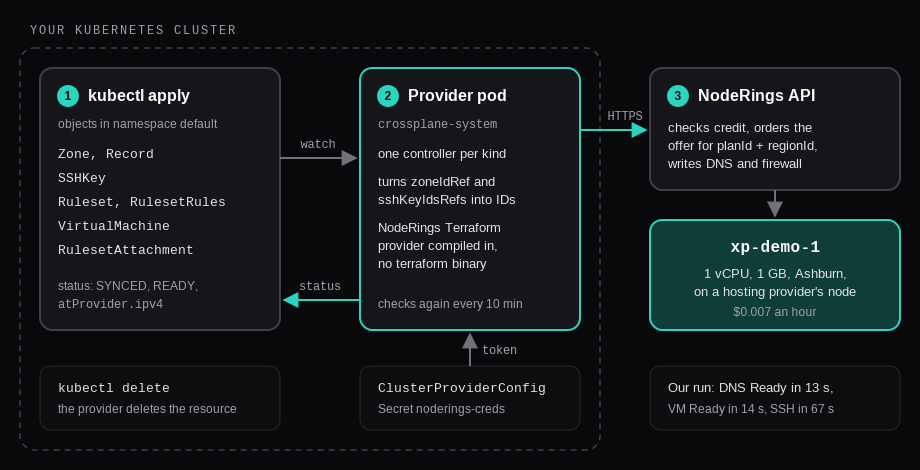
The reconcile loop is the part Terraform and Ansible users have to get used to. Nobody runs a plan. The provider observes each object when it changes and again on a poll interval (10 minutes by default), compares it with the real resource, and fixes the difference. If someone edits the record in the console, the next check puts it back.
What you need before you start
You need a NodeRings account with a client organization, a payment method, and at least $10 of prepaid credit, because hourly plans draw from credit and the order check wants that much available. Create a service account token in the console under Organization, then Access Control, then Service accounts. The console shows it once.
The provider is in pre-release. It is complete and tested against the live API, but no package is published yet, because it is being donated to crossplane-contrib and v0.1.0 will be released from there. Until then you build it from source. For that you need Go, Docker, goimports on your PATH, and git. The Makefile downloads its own kind, helm, kubectl and Crossplane CLI into .cache/tools.
Once that release exists, the README says the package address will be xpkg.crossplane.io/crossplane-contrib/provider-upjet-noderings, and installing it will be one Provider manifest instead of the build below.
Step 1: Build the provider and run it in a kind cluster
git clone --recurse-submodules https://github.com/noderings/provider-upjet-noderings.git
cd provider-upjet-noderings
make local-deploy
make local-deploy does four things. It compiles the provider and builds its image and package, creates a kind cluster called local-dev if none exists and switches kubectl to it, installs Crossplane 2.4.3 with Helm, and loads the package into Crossplane with packagePullPolicy: Never. On our machine, with Go modules already cached, it took 3 minutes 37 seconds. Add KIND_CLUSTER_NAME=something if you want another cluster name. Point KUBECONFIG at a separate file first if you do not want it touching your usual kubeconfig.
When it finishes, the provider is healthy:
$ kubectl get providers.pkg.crossplane.io provider-upjet-noderings
NAME                       INSTALLED   HEALTHY   PACKAGE                                                    AGE
provider-upjet-noderings   True        True      xpkg.crossplane.internal/dev/provider-upjet-noderings@...  63s
The cluster now has 53 NodeRings CRDs. To run the provider in a cluster you already have, the same build leaves a package file in _output/xpkg/linux_amd64/ that you can push to a registry you control and install from there.
Step 2: Give the provider a token
The token goes into a Secret as JSON under the key credentials:
export NODERINGS_TOKEN="paste-the-token-here"
kubectl -n crossplane-system create secret generic noderings-creds \
  --from-literal=credentials="{\"token\":\"$NODERINGS_TOKEN\"}"
The JSON also takes organization_id (to act in another organization), endpoint, max_retries, requests_per_second and http_timeout. A ClusterProviderConfig named default points at the Secret, and every namespaced resource uses it unless told otherwise:
apiVersion: noderings.m.crossplane.io/v1beta1
kind: ClusterProviderConfig
metadata:
  name: default
spec:
  credentials:
    source: Secret
    secretRef:
      name: noderings-creds
      namespace: crossplane-system
      key: credentials
If one team should use its own token, create a namespaced ProviderConfig in that team's namespace and reference it from their objects with providerConfigRef: {kind: ProviderConfig, name: ...}.
Step 3: Create a DNS zone and a record
DNS is free, which makes it the right first test. Save this as dns.yaml:
apiVersion: dns.noderings.m.crossplane.io/v1alpha1
kind: Zone
metadata:
  name: example-io
  namespace: default
spec:
  forProvider:
    name: example.io
---
apiVersion: dns.noderings.m.crossplane.io/v1alpha1
kind: Record
metadata:
  name: www
  namespace: default
spec:
  forProvider:
    zoneIdRef:
      name: example-io
    name: www
    type: A
    ttl: 300
    records:
      - 192.0.2.10
zoneIdRef names the Zone object, so you never copy a zone ID. Every ID field has a ...Ref and a ...Selector form like this one. The provider waits until the zone has an ID and then fills it in.
$ kubectl apply -f providerconfig.yaml -f dns.yaml
clusterproviderconfig.noderings.m.crossplane.io/default created
zone.dns.noderings.m.crossplane.io/example-io created
record.dns.noderings.m.crossplane.io/www created

$ kubectl wait --for=condition=Ready zones.dns.noderings.m.crossplane.io/example-io records.dns.noderings.m.crossplane.io/www --timeout=120s
zone.dns.noderings.m.crossplane.io/example-io condition met
record.dns.noderings.m.crossplane.io/www condition met
Both were Ready 13 seconds after the apply. The zone's status.atProvider.nameservers lists ans1.nrings.io and ans2.nrings.io, which go at your registrar.
The long names in that kubectl wait are deliberate. Every kind exists in a cluster-scoped and a namespaced group, and kubectl get zone picks the cluster-scoped dns.noderings.crossplane.io one, where you have created nothing. Use the full zones.dns.noderings.m.crossplane.io, or kubectl get managed, which lists every Crossplane object in the namespace.
Step 4: Order the VPS with its key and firewall
Save this as server.yaml. It holds five objects: the SSH key, a ruleset, its rules, the VM, and the attachment that puts the ruleset in front of the VM.
apiVersion: iam.noderings.m.crossplane.io/v1alpha1
kind: SSHKey
metadata:
  name: xp-demo
  namespace: default
spec:
  forProvider:
    name: xp-demo
    publicKey: ssh-ed25519 AAAA... you@laptop
---
apiVersion: firewall.noderings.m.crossplane.io/v1alpha1
kind: Ruleset
metadata:
  name: xp-web
  namespace: default
spec:
  forProvider:
    name: xp-web
---
apiVersion: firewall.noderings.m.crossplane.io/v1alpha1
kind: RulesetRules
metadata:
  name: xp-web
  namespace: default
spec:
  forProvider:
    rulesetIdRef:
      name: xp-web
    rule:
      - {direction: ingress, action: accept, protocol: tcp, destinationPorts: "22", source: {cidrs: [0.0.0.0/0]}}
      - {direction: ingress, action: accept, protocol: tcp, destinationPorts: "80", source: {cidrs: [0.0.0.0/0]}}
      - {direction: ingress, action: accept, protocol: icmp, source: {cidrs: [0.0.0.0/0]}}
      - {direction: ingress, action: drop, protocol: any, source: {cidrs: [0.0.0.0/0]}}
---
apiVersion: compute.noderings.m.crossplane.io/v1alpha1
kind: VirtualMachine
metadata:
  name: xp-demo-1
  namespace: default
spec:
  forProvider:
    hostname: xp-demo-1
    planId: 81dea236-1453-484c-aaf2-564a30aa353b    # SC-GC-1C-1G-20, hourly
    regionId: 506ab941-39ff-4dea-9869-b853284b39a5  # Ashburn, United States
    distro: ubuntu_24_04
    sshKeyIdsRefs:
      - name: xp-demo
    tags:
      - web
---
apiVersion: firewall.noderings.m.crossplane.io/v1alpha1
kind: RulesetAttachment
metadata:
  name: xp-demo-1
  namespace: default
spec:
  forProvider:
    virtualMachineIdRef:
      name: xp-demo-1
    rulesetIdRef:
      name: xp-web
Firewall rules run top to bottom, and traffic that matches no rule is accepted, so the final drop is what closes everything else. Each rule takes one port or one range like 8000-8100.
planId and regionId decide everything about the server except its software: the size, the seller, the city and the billing. There is no separate billing field. The plan above is an hourly (usage-billed) plan at $0.007 an hour, which is why it stops costing money when the object is deleted. The provider has no lookup kind for offers yet, so find the IDs on the console's order page, with the API's ListMarketplaceOfferings, or with the noderings_marketplace_offer data source from the Terraform guide. Plan IDs belong to one seller and can change, so look them up again before you reuse old ones.
Apply it and wait:
$ kubectl apply -f server.yaml
sshkey.iam.noderings.m.crossplane.io/xp-demo created
ruleset.firewall.noderings.m.crossplane.io/xp-web created
rulesetrules.firewall.noderings.m.crossplane.io/xp-web created
virtualmachine.compute.noderings.m.crossplane.io/xp-demo-1 created
rulesetattachment.firewall.noderings.m.crossplane.io/xp-demo-1 created

$ kubectl wait --for=condition=Ready virtualmachines.compute.noderings.m.crossplane.io/xp-demo-1 --timeout=900s
virtualmachine.compute.noderings.m.crossplane.io/xp-demo-1 condition met
For the first few seconds the VM shows SYNCED False with cannot resolve references: mg.Spec.ForProvider.SSHKeyIds: referenced field was empty (referenced resource may not yet be ready). That is the provider waiting for the SSH key to get its ID, and it clears without help. The VM was Ready 14 seconds after the apply. Ready means the API has the VM provisioned and powered on. The operating system was still booting:
$ IP=$(kubectl get virtualmachines.compute.noderings.m.crossplane.io xp-demo-1 -o jsonpath='{.status.atProvider.ipv4}')
$ until ssh root@$IP true 2>/dev/null; do sleep 2; done
$ ssh root@$IP "hostname; uptime -p"
xp-demo-1
up 0 minutes
SSH answered 67 seconds after kubectl apply. The status carries the rest of what the API knows, including ipv6, planCode, regionCity, providerName and planBillingType, which read usage for this plan.
Change things by editing the object
Point the record at the new server by changing the manifest, or with a patch:
kubectl patch records.dns.noderings.m.crossplane.io www --type merge \
  -p "{\"spec\":{\"forProvider\":{\"records\":[\"$IP\"]}}}"
The record was updated in place 4.4 seconds later, and dig +short @ans1.nrings.io www.example.io A returned the VM's address. Tags, powerState, the firewall rules and the attachment also change in place.
The operating system is different, because changing it erases the disk. Change distro on its own and the provider refuses:
update failed: async update failed: diff contains fields that require resource replacement: diff contains fields that require resource replacement: AttributeName("distro"),The object goes to SYNCED False and the server is left alone. The provider never deletes and recreates a resource to apply a change, which is a safer default than Terraform's. To reinstall, set reinstallOnChange: true in forProvider. We did that with distro: debian_13 and about two and a half minutes later the status showed debian_13, SSH answered as Debian 13 at the same IP address, and the DNS record and firewall needed no change. The same flag covers hostname, sshKeyIds and the root password. A reinstall wipes the disk and deletes snapshots, so leave the flag off on servers whose data you care about.
On servers billed monthly, also set deletionProtection: true. Deleting one cancels the subscription without a refund for the rest of the month.
Adopt a server you already have
Servers that were ordered in the console can come under Crossplane too. Put the server's NodeRings ID in the crossplane.io/external-name annotation, and with managementPolicies: ["Observe"] the provider only reads it:
apiVersion: compute.noderings.m.crossplane.io/v1alpha1
kind: VirtualMachine
metadata:
  name: legacy-web
  namespace: default
  annotations:
    crossplane.io/external-name: "<ID of the existing VM>"
spec:
  managementPolicies: ["Observe"]
  forProvider: {}
That object was Ready at once, with the hostname, plan code, city and distribution of the server in its status. Deleting it removed only the Kubernetes object, and the server kept running. Drop the Observe policy and fill in forProvider once you want Crossplane to manage it. For most kinds the external name is the NodeRings ID. A Record uses <zone id>/<name>/<type>, such as <zone id>/www/A, and a snapshot uses <vm id>/<snapshot id>.
How to delete everything
$ kubectl delete -f server.yaml -f dns.yaml
sshkey.iam.noderings.m.crossplane.io "xp-demo" deleted from default namespace
ruleset.firewall.noderings.m.crossplane.io "xp-web" deleted from default namespace
rulesetrules.firewall.noderings.m.crossplane.io "xp-web" deleted from default namespace
virtualmachine.compute.noderings.m.crossplane.io "xp-demo-1" deleted from default namespace
rulesetattachment.firewall.noderings.m.crossplane.io "xp-demo-1" deleted from default namespace
zone.dns.noderings.m.crossplane.io "example-io" deleted from default namespace
record.dns.noderings.m.crossplane.io "www" deleted from default namespace
kubectl delete waits for each object's finalizer, which the provider removes after the real resource is gone, so the command returning means the VM, zone, ruleset and key were deleted. That took 5.3 seconds. The VM lived for about six minutes, including the reinstall, and cost less than a cent. kind delete cluster --name local-dev removes the test cluster.
Common errors
The first three came up in our run. The last one is the CRD's own validation, and kubectl apply prints it before anything reaches the API.
| Error | Cause | Fix |
|---|---|---|
cannot resolve references: mg.Spec.ForProvider.SSHKeyIds: referenced field was empty (referenced resource may not yet be ready) | The referenced object has no ID yet | Nothing. It clears once the SSH key, zone or ruleset is created |
diff contains fields that require resource replacement: AttributeName("distro") | distro, hostname or the SSH keys changed on an existing VM | Set reinstallOnChange: true if wiping the disk is what you want, or revert the change |
kubectl get zone shows nothing although the zone exists | Short names resolve to the cluster-scoped dns.noderings.crossplane.io group | Use zones.dns.noderings.m.crossplane.io or kubectl get managed |
spec.forProvider.planId is a required parameter | A VirtualMachine without planId (or regionId, hostname) | Add it, or set managementPolicies: ["Observe"] to only read an existing server |
RulesetAttachment and RulesetRules showed READY False for a short while after the VM was already Ready. They became Ready on their next check without any change.
Frequently asked questions
Is there a Crossplane provider for NodeRings?
Yes. It is provider-upjet-noderings, with source on GitHub. It covers servers, backups, snapshots, firewalls, DNS with GeoDNS and DNSSEC, SSH keys, access control and game servers. It is in pre-release, so for now you build it with make local-deploy or build the package yourself.
Can Crossplane create a VPS?
Yes. A VirtualMachine object orders the server, and deleting the object deletes it. In our run the VM was Ready 14 seconds after kubectl apply and reachable over SSH at 67 seconds.
Should I use Crossplane or Terraform for VPS servers?
Use Crossplane if your team already runs Kubernetes and wants servers handled like everything else in the cluster, with GitOps tools such as Argo CD applying manifests and the provider correcting drift on its own. Use Terraform if you want a plan you read before every change and no cluster to run. Both use the same NodeRings Terraform provider underneath, so they behave the same against the API. Teams that configure servers after ordering them can hand the IP to Ansible.
How much does it cost to try?
The DNS zone, records, firewall rulesets and SSH keys are free. The cheapest hourly offer for 1 vCPU and 1 GB in Ashburn was $0.007 an hour. Our whole test, with one VM alive for about six minutes, cost less than a cent.
Can I use the NodeRings provider in a Composition?
The kinds are ordinary Crossplane managed resources, so a Composition can create them like any other. We did not build one for this post. The one thing a Composition has to supply is the planId and regionId, since the provider has no offer lookup yet.
Try it
You need a NodeRings account with $10 of credit, a service account token, Docker and Go. Clone the repository, run make local-deploy, create the Secret and the ClusterProviderConfig, then apply dns.yaml with your own domain. Add server.yaml once DNS works. The Pulumi, Chef, Puppet and SaltStack posts in this series (Pulumi, Chef, Puppet, SaltStack) order the same server with other tools.