
One puppet apply on OpenVox 8 stored an SSH key, built a five-rule firewall, ordered a 1 vCPU, 1 GB VPS in Ashburn and created a DNS zone. The catalog took 62 seconds to apply, and SSH answered 73 seconds after we pressed enter. A second run wrote the www A record in 5 seconds. A third run changed nothing in under 3 seconds, and the teardown manifest deleted all of it in 4.
All of that comes from noderings, a Puppet module with five types. They work the same on OpenVox, the community fork of Puppet maintained by Vox Pupuli, and on Puppet 8. Everything below ran on the openvox-agent package, which still installs the command as puppet.
| You want to | Puppet |
|---|---|
| Keep a server in code: order, tags, firewall, power, delete | noderings_vm |
| Open only the ports you need | noderings_firewall_ruleset |
| Store the SSH key a new server gets | noderings_ssh_key |
| Host a domain, optionally signed with DNSSEC | noderings_dns_zone |
| Point a name at the server | noderings_dns_record |
| See what already exists, with addresses | puppet resource noderings_vm |
| Keep the token on the node, readable only by root | class { 'noderings': } |
How Puppet talks to the NodeRings API
NodeRings is a marketplace. Independent hosting providers sell plans under shared size codes, and you buy through one account. How NodeRings works explains the model. For Puppet it means a manifest never names a hosting company. You give a plan code and a city, and noderings_vm orders the cheapest matching offer, or the best rated one with sort => rating.
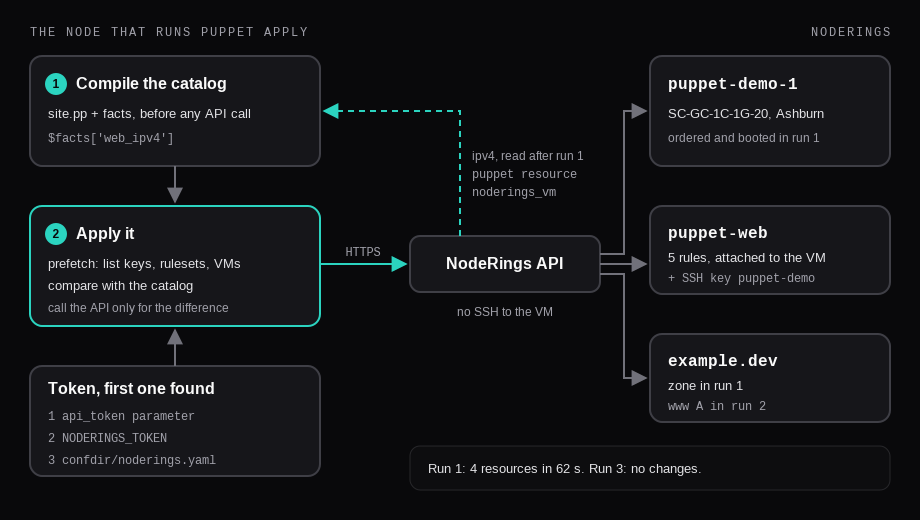
Two things in the diagram shape the rest of this post. The providers need no packages and never log in to the VM, so the node that applies them can be a laptop, a CI runner, or the primary server's own agent. And Puppet compiles the whole catalog before it applies any of it. A resource cannot read the address of a VM that the same run is about to order, which is why the DNS record arrives one run later.
What you need for Puppet on a NodeRings VPS
You need a NodeRings account with a client organization and prepaid credit, because hourly plans draw from credit. The VPS in this post is plan SC-GC-1C-1G-20 (1 vCPU, 1 GB RAM, 20 GB disk) on hourly billing, which was $0.007 an hour in Ashburn.
On the machine that runs Puppet you need OpenVox 8 or 9, or Puppet 8, and puppetlabs-stdlib 9 or later. We used OpenVox agent 8.34.0 on Ubuntu 24.04, from the Vox Pupuli apt repository:
wget https://apt.voxpupuli.org/openvox8-release-ubuntu24.04.deb
sudo dpkg -i openvox8-release-ubuntu24.04.deb
sudo apt-get update && sudo apt-get install openvox-agent
The package puts puppet in /opt/puppetlabs/bin. It also enables the puppet agent service without starting it, and puppet apply does not need it.
The types read a service account token. In the console, open Organization, then Access Control, then Service accounts, create one and generate a token. Then:
export NODERINGS_TOKEN="paste-the-token-here"Step 1: Install the noderings module from GitHub
The module will be on the Puppet Forge as noderings-noderings soon. Until then you install it from GitHub. With r10k, a Puppetfile takes a git source:
mod 'puppetlabs-stdlib', '10.2.0'
mod 'noderings-noderings',
  git: 'https://github.com/noderings/puppet-noderings.git',
  branch: 'main'
$ r10k puppetfile install -v
INFO -> Deploying module to .../modules/stdlib
INFO -> Deploying module to .../modules/noderingsWe installed r10k 5.0.3 with the agent's own gem (/opt/puppetlabs/puppet/bin/gem install r10k). r10k lists dependencies only as you write them, so the stdlib line is yours to keep. Without r10k, clone the repository into a directory named noderings on your modulepath and run puppet module install puppetlabs-stdlib.
r10k removes anything in modules/ that the Puppetfile does not name, so we kept our own code in a second directory, site/, and passed --modulepath site:modules to every command. In a control repository, the environment's modulepath does the same job.
Step 2: Write the manifest
site.pp:
$anywhere = { 'cidrs' => ['0.0.0.0/0'] }

noderings_ssh_key { 'puppet-demo':
  public_key => file('demo/puppet-demo.pub'),
}

noderings_firewall_ruleset { 'puppet-web':
  rules => [
    { 'direction' => 'ingress', 'action' => 'accept', 'protocol' => 'tcp', 'destination_ports' => '22', 'source' => $anywhere },
    { 'direction' => 'ingress', 'action' => 'accept', 'protocol' => 'tcp', 'destination_ports' => '80', 'source' => $anywhere },
    { 'direction' => 'ingress', 'action' => 'accept', 'protocol' => 'tcp', 'destination_ports' => '443', 'source' => $anywhere },
    { 'direction' => 'ingress', 'action' => 'accept', 'protocol' => 'icmp', 'source' => $anywhere },
    { 'direction' => 'ingress', 'action' => 'drop', 'protocol' => 'any', 'source' => $anywhere },
  ],
}

noderings_vm { 'puppet-demo-1':
  plan             => 'SC-GC-1C-1G-20',   # 1 vCPU, 1 GB RAM, 20 GB disk
  country          => 'United States',
  city             => 'Ashburn',
  billing_type     => 'usage',            # hourly, from prepaid credit
  distro           => 'ubuntu_24_04',
  ssh_keys         => ['puppet-demo'],
  firewall_ruleset => 'puppet-web',
  tags             => ['web'],
}

noderings_dns_zone { 'example.dev': }

# The catalog is compiled before the VM exists, so its address arrives as a fact.
if $facts['web_ipv4'] {
  noderings_dns_record { 'example.dev/www/A':
    values => [$facts['web_ipv4']],
    ttl    => 300,
  }
}
The public key sits in site/demo/files/puppet-demo.pub, so file('demo/puppet-demo.pub') reads it at compile time. We generated a fresh key pair for the demo with ssh-keygen -t ed25519 -f puppet-demo.
Firewall rules run top to bottom, and traffic that matches no rule is accepted, so the final drop is what closes every other port. Each rule takes one port or one range such as 8000-8100, and 0.0.0.0/0 covers IPv4 only; add a second rule with ::/0 for IPv6. The ruleset holds exactly the rules you list, in order, and a later run removes any rule you delete from the manifest.
You do not need require arrows. noderings_vm automatically requires the SSH keys and the ruleset it names, and noderings_dns_record requires its zone.
A record's title can be zone/name/TYPE, which also sets zone, record_name and type. It is the same form puppet resource prints, so a record you list can be pasted back into a manifest. The longer form works too:
noderings_dns_record { 'www':
  zone   => 'example.dev',
  type   => 'A',
  values => ['203.0.113.10'],
  ttl    => 300,
}
Step 3: Apply it and read the address
$ puppet apply --modulepath site:modules site.pp
Notice: Compiled catalog for workstation.example.com in environment production in 0.05 seconds
Notice: /Stage[main]/Main/Noderings_ssh_key[puppet-demo]/ensure: created
Notice: /Stage[main]/Main/Noderings_firewall_ruleset[puppet-web]/ensure: created
Notice: /Stage[main]/Main/Noderings_vm[puppet-demo-1]/ensure: created
Notice: /Stage[main]/Main/Noderings_dns_zone[example.dev]/ensure: created
Notice: Applied catalog in 61.97 seconds
Nearly all of the 62 seconds is the order. noderings_vm waits until the server is provisioned and booted, attaches the ruleset, and only then lets Puppet move on. The order carries an idempotency key, so a lost response is retried without buying a second server.
puppet resource reads the VM back, with the read-only id, ipv4, ipv6 and plan_code:
$ puppet resource noderings_vm puppet-demo-1 --modulepath site:modules
noderings_vm { 'puppet-demo-1':
  ensure           => 'present',
  distro           => 'ubuntu_24_04',
  firewall_ruleset => 'puppet-web',
  id               => '6f1c2a3e-0000-4000-8000-000000000001',
  ipv4             => '203.0.113.10',
  ipv6             => '2001:db8::10',
  plan_code        => 'SC-GC-1C-1G-20',
  power_state      => 'running',
  provider         => 'api',
  tags             => ['web'],
}

$ ssh -i puppet-demo root@203.0.113.10 'hostname; grep PRETTY /etc/os-release'
puppet-demo-1
PRETTY_NAME="Ubuntu 24.04.4 LTS"
Without a title, puppet resource noderings_vm lists every VM in the organization, whoever created it.
Step 4: Add the DNS record, then apply again
Facter turns any FACTER_ environment variable into a fact, which is the shortest way to feed the address into the next compile:
$ export FACTER_web_ipv4=203.0.113.10
$ puppet apply --modulepath site:modules site.pp
Notice: /Stage[main]/Main/Noderings_dns_record[example.dev/www/A]/ensure: created
Notice: Applied catalog in 5.14 seconds

$ puppet apply --modulepath site:modules site.pp
Notice: Compiled catalog for workstation.example.com in environment production in 0.06 seconds
Notice: Applied catalog in 2.69 seconds
The third run had nothing to do. Each type prefetches its objects with one list call, compares them with the catalog, and stays quiet when they match. In a real setup the address would live in Hiera next to the rest of the node's data, and you would set it once.
puppet resource noderings_dns_zone example.dev shows the nameservers to set at your registrar:
noderings_dns_zone { 'example.dev':
  ensure      => 'present',
  dnssec      => 'false',
  nameservers => ['ans1.nrings.io', 'ans2.nrings.io'],
  provider    => 'api',
}
Set dnssec => true on the zone to sign it, and the same command then prints the DS record for the registrar.
Step 5: Preview a change with --noop
Change tags => ['web'] to ['web', 'prod'] and run with --noop:
$ puppet apply --modulepath site:modules site.pp --noop
Notice: /Stage[main]/Main/Noderings_vm[puppet-demo-1]/tags: tags changed ['web'] to ['web', 'prod'] (noop)
Notice: Class[Main]: Would have triggered 'refresh' from 1 event
Notice: Applied catalog in 3.60 seconds
Tags, firewall_ruleset and power_state change in place, and the server keeps its addresses. power_state => 'stopped' keeps a server off between runs, and firewall_ruleset => '' detaches the ruleset. The plan of an existing VM never changes. A different distro fails the run, because a reinstall erases the disk:
Error: NodeRings virtual machine puppet-demo-1 runs ubuntu_24_04, not debian_13. Reinstalling erases its disk, so it is only done with allow_reinstall => true--noop also works before anything exists. We ran the same manifest with new names and got five created (noop) lines and no errors, because the providers only look up key and ruleset IDs when they really create the VM.
Run it from a Puppet server with the noderings class
On a node that gets its catalog from a primary server, an exported environment variable is awkward. The noderings class writes the token to noderings.yaml in the Puppet confdir with mode 0600, owned by root, and keeps it out of diffs and reports:
class { 'noderings':
  api_token => Sensitive(lookup('noderings::api_token')),
}
Keep the token encrypted in Hiera with hiera-eyaml. Each resource takes its token from its own api_token parameter first, then NODERINGS_TOKEN, then that file, and every noderings_* resource automatically requires the file. Declare the class on the one node that manages your NodeRings objects, such as a management node, rather than on every server.
How to delete everything when you are done
teardown.pp:
noderings_vm { 'puppet-demo-1': ensure => absent }

noderings_dns_zone { 'example.dev':
  ensure       => absent,
  force_delete => true,   # the zone still holds the www record
}

noderings_firewall_ruleset { 'puppet-web': ensure => absent }
noderings_ssh_key { 'puppet-demo': ensure => absent }

Noderings_vm['puppet-demo-1'] -> Noderings_firewall_ruleset['puppet-web']
Noderings_vm['puppet-demo-1'] -> Noderings_ssh_key['puppet-demo']
The automatic relationships put the key and ruleset before the VM, which suits creating. The two chain arrows put the VM first when deleting, so the ruleset is no longer attached when its turn comes.
$ puppet apply --modulepath site:modules teardown.pp
Notice: /Stage[main]/Main/Noderings_vm[puppet-demo-1]/ensure: removed
Notice: /Stage[main]/Main/Noderings_dns_zone[example.dev]/ensure: removed
Notice: /Stage[main]/Main/Noderings_firewall_ruleset[puppet-web]/ensure: removed
Notice: /Stage[main]/Main/Noderings_ssh_key[puppet-demo]/ensure: removed
Notice: Applied catalog in 3.84 seconds
On an hourly plan, billing stops when the VM is deleted. Our server lived a few minutes, which cost well under a cent. A monthly subscription is cancelled at once without a refund for the rest of the month, so keep ensure => absent away from servers you pay for monthly.
Common errors
We hit each of these while writing this post.
| Error | Cause | Fix |
|---|---|---|
A NodeRings API token is required. Set it with the noderings class ... | No api_token, no NODERINGS_TOKEN and no noderings.yaml | Export the token, or declare the noderings class |
a new VM needs ssh_keys or a password so you can log in | noderings_vm for a new hostname with neither | Add ssh_keys, or a password passed as Sensitive |
runs ubuntu_24_04, not debian_13. Reinstalling erases its disk | distro changed on an existing VM | Set allow_reinstall => true if erasing the disk is the point |
No offer for plan code SC-GC-1C-1G-20 in Berlin, United States with billing type usage | No provider sells that plan in that city with that billing | Pick a city where it is sold, or another plan or billing_type |
this public key is already stored in NodeRings under another name | NodeRings keeps each public key once, and this one has another name | Use the existing name, or delete the old key first |
noderings: api_token is required | include noderings with nothing for api_token | Pass api_token, for example from Hiera |
Frequently asked questions
Is there a Puppet module for NodeRings?
Yes. The noderings module has the types noderings_vm, noderings_dns_zone, noderings_dns_record, noderings_firewall_ruleset and noderings_ssh_key, and a noderings class for the token. The source is on GitHub. Its Forge name is noderings-noderings; until it is published there, install it from GitHub with r10k as shown above.
Does the module work with OpenVox?
Yes. It supports OpenVox 8 and 9 and Puppet 8, and everything in this post ran on OpenVox agent 8.34.0. The module's acceptance tests also install an OpenVox 8 agent and apply manifests against the real API.
Can Puppet create a VPS, or only configure one?
The noderings_vm type orders, stops, starts, reinstalls and deletes servers. It does not configure the operating system inside them. To manage the new server itself, bootstrap an agent on it with your usual tooling, or have another tool log in, as the Ansible collection does in its second play.
Why does the DNS record need a second run?
Puppet compiles the whole catalog before it applies any resource, so the record's values are fixed before the VM is ordered. Read the address with puppet resource noderings_vm <hostname> and pass it in as a fact or Hiera value. If the name can point at a hostname instead, a CNAME record avoids the second run.
Do I need a Puppet server?
No. Everything here ran with puppet apply. The types also work in agent runs against a primary server; declare the noderings class on the node that manages the objects, so the token lives in its confdir.
Should I use Puppet, Ansible or Terraform to order servers?
Use the tool that already holds your configuration. If your servers are Puppet nodes, the module keeps their infrastructure in the same Hiera and the same code review. Terraform is better at passing one resource's output to another in a single run, which is exactly what Puppet makes you do in two. All of them call the same API, and the rest of this series covers Chef, SaltStack, Pulumi and Crossplane.
Try it
You need a NodeRings account with credit, a service account token and an OpenVox or Puppet 8 agent. Put the Puppetfile and site.pp above in a directory, run r10k puppetfile install, change example.dev to a domain you own and run puppet apply --modulepath site:modules site.pp. Then pass the address from puppet resource noderings_vm in as FACTER_web_ipv4, apply once more, and point your registrar at the two nameservers.