
One pulumi up created eight things on NodeRings: an SSH key, a firewall ruleset with four rules, a 1 vCPU, 1 GB VPS in Ashburn on hourly billing, the attachment between the two, a DNS zone and a www record pointing at the new address. Pulumi reported the update done in 11 seconds. SSH answered 67 seconds after we pressed enter, and pulumi destroy removed all of it in 5 seconds, which is also when the $0.007 an hour stopped.
The provider is pulumi-noderings, version 0.1.1. It is the NodeRings Terraform provider wrapped by the Pulumi Terraform bridge, so every resource and argument behaves the same in both tools. Its npm, PyPI and NuGet packages are coming soon. Today you install the plugin from the GitHub release and write the program in Pulumi YAML or Go, which both work straight from GitHub, or generate a local SDK for TypeScript and Python with one command.
| You want to | Pulumi type |
|---|---|
| Find who sells a size in a city, and the price | noderings:getMarketplaceOffer |
| Order, stop or reinstall a server | noderings:VirtualMachine |
| Log in with your key | noderings:SshKey |
| Open only the ports you need | noderings:FirewallRuleset, noderings:FirewallRulesetRules, noderings:FirewallRulesetAttachment |
| Point a name at it | noderings:DnsZone, noderings:DnsRecord |
| Read what already exists | noderings:getVirtualMachines, noderings:getDnsZone, noderings:getSshKey |
The schema has the same resources as the Terraform provider: GeoDNS records, DNSSEC, firewall address groups, game servers with their backups and databases, roles, groups and secrets.
How Pulumi talks to NodeRings
NodeRings is a marketplace. Independent hosting providers sell plans under shared size codes such as SC-GC-1C-1G-20, and you buy through one account and one API. How NodeRings works explains the model. For Pulumi it means the program never names a hosting company. getMarketplaceOffer takes a size, a city and a billing type and returns the cheapest matching plan, and the VM is ordered from that.
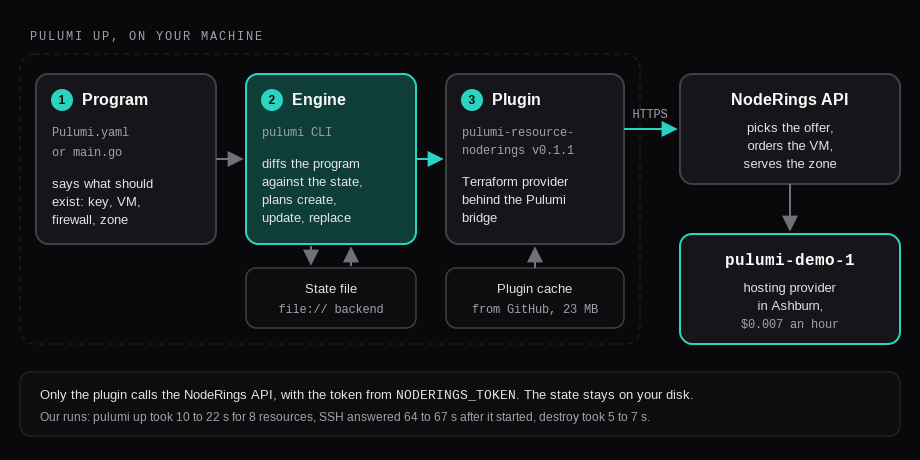
The plugin is a Go binary, pulumi-resource-noderings, 23 MB to download. Pulumi starts it next to your program and talks to it over gRPC. Your program never makes an HTTP call itself, which is why the YAML, Go, Python and TypeScript versions of a program produce the same plan and the same errors.
What you need before the first run
You need a NodeRings account with a client organization, a payment method and at least $10 of prepaid credit, because hourly plans draw from credit and the order check wants that much available. On your machine you need the Pulumi CLI and an SSH key. We used Pulumi 3.278.0 on Linux.
curl -fsSL https://get.pulumi.com | shPulumi wants a backend for its state. Pulumi Cloud is the default, but nothing here needs it. A local backend keeps the state in ~/.pulumi on your machine and encrypts the secrets in it with a passphrase:
pulumi login --local
export PULUMI_CONFIG_PASSPHRASE="pick-a-long-passphrase"
The provider signs in with a service account token. In the console, open Organization, then Access Control, then Service accounts. Create one, give it the Administrator role (or something narrower if the program only touches DNS), and generate a token. The console shows it once.
export NODERINGS_TOKEN="paste-the-token-here"For a shared project, store it in the stack instead. It is encrypted with the same passphrase:
pulumi config set noderings:token --secretStep 1: Install the plugin from GitHub
pulumi plugin install resource noderings v0.1.1 --server github://api.github.com/noderingsThat took 6 seconds. Builds exist for Linux, macOS and Windows on amd64 and arm64.
Pulumi YAML needs this step. A YAML program has no package manifest to say where the plugin lives, so without it Pulumi looks for a pulumi/pulumi-noderings repository that does not exist. Go programs can skip it, because the Go SDK records the download URL and the version, and Pulumi fetched the plugin by itself the first time we ran pulumi preview on a clean machine.
Step 2: Write the program
Make a directory and put this in Pulumi.yaml:
name: noderings-web
runtime: yaml
description: An hourly VPS with a firewall and a DNS record on NodeRings.
config:
  sshPublicKey:
    type: string
variables:
  offer:
    fn::invoke:
      function: noderings:getMarketplaceOffer
      arguments:
        planCode: SC-GC-1C-1G-20        # 1 vCPU, 1 GB RAM, 20 GB disk
        country: United States
        city: Ashburn
        billingType: usage              # hourly, from prepaid credit
        requireCapabilities: [guest_firewall]
resources:
  key:
    type: noderings:SshKey
    properties:
      name: pulumi-demo
      publicKey: ${sshPublicKey}
  web:
    type: noderings:VirtualMachine
    properties:
      hostname: pulumi-demo-1
      planId: ${offer.planId}
      regionId: ${offer.regionId}
      distro: ubuntu_24_04
      sshKeyIds: [ "${key.id}" ]
      tags: [web]
  fw:
    type: noderings:FirewallRuleset
    properties:
      name: pulumi-web
  fwRules:
    type: noderings:FirewallRulesetRules
    properties:
      rulesetId: ${fw.id}
      rules:
        - { direction: ingress, action: accept, protocol: tcp, destinationPorts: "22", source: { cidrs: [0.0.0.0/0] } }
        - { direction: ingress, action: accept, protocol: tcp, destinationPorts: "80", source: { cidrs: [0.0.0.0/0] } }
        - { direction: ingress, action: accept, protocol: icmp, source: { cidrs: [0.0.0.0/0] } }
        - { direction: ingress, action: drop, protocol: any, source: { cidrs: [0.0.0.0/0] } }
  fwAttach:
    type: noderings:FirewallRulesetAttachment
    properties:
      virtualMachineId: ${web.id}
      rulesetId: ${fw.id}
  zone:
    type: noderings:DnsZone
    properties:
      name: example.com
  www:
    type: noderings:DnsRecord
    properties:
      zoneId: ${zone.id}
      name: www
      type: A
      ttl: 300
      records: [ "${web.ipv4}" ]
outputs:
  perHour: ${offer.prices[0].unitAmount}
  ip: ${web.ipv4}
  nameservers: ${zone.nameservers}
Then create a stack and give it your public key:
pulumi stack init dev
pulumi config set sshPublicKey "$(cat ~/.ssh/id_ed25519.pub)"
billingType: usage asks for an hourly plan. Without it each provider offers one arbitrary plan for the code, which can be a monthly one charged to your card. requireCapabilities: [guest_firewall] limits the lookup to providers whose platform can run the firewall, because a ruleset attached to a VM elsewhere has nothing to enforce it. And the firewall reads top to bottom with unmatched traffic accepted, so the final drop rule is the one that closes every other port. Each rule takes one port or one range like 8000-8100, which is why 22 and 80 get a rule each.
Write values like the distro and the capability exactly as above, with underscores. The generated API docs show some of them camel-cased (ubuntu2404, guestFirewall) for every language except Python. ubuntu_24_04 and guest_firewall are the values we ran with.
The perHour output reads the first entry of the offer's price list, which for this plan was the compute hour. The other entries are traffic, extra IPs and disk.
Step 3: Order the VPS with pulumi up
$ pulumi up --yes
...
     Type                                          Name               Status
 +   pulumi:pulumi:Stack                           noderings-web-dev  created (10s)
 +   ├─ noderings:index:SshKey                     key                created (0.43s)
 +   ├─ noderings:index:VirtualMachine             web                created (5s)
 +   ├─ noderings:index:FirewallRuleset            fw                 created (0.33s)
 +   ├─ noderings:index:DnsZone                    zone               created (0.92s)
 +   ├─ noderings:index:FirewallRulesetRules       fwRules            created (5s)
 +   ├─ noderings:index:DnsRecord                  www                created (4s)
 +   └─ noderings:index:FirewallRulesetAttachment  fwAttach           created (0.83s)

Outputs:
    ip         : "203.0.113.24"
    nameservers: [
        [0]: "ans1.nrings.io"
        [1]: "ans2.nrings.io"
    ]
    perHour    : "0.007000"

Resources:
    + 8 created

Duration: 11s
The VM resource finishes in about 5 seconds. The provider waits until the platform reports the VM provisioned with its addresses, and at that point the operating system is still booting. Pulumi has no way to know when sshd starts, so wait for it yourself:
$ until ssh root@$(pulumi stack output ip) true; do sleep 2; done
SSH answered 67 s after pulumi up started (up itself: 17 s)
$ ssh root@$(pulumi stack output ip) hostname
pulumi-demo-1
$ dig +short @ans1.nrings.io www.example.com A
203.0.113.24
The 17 seconds include the preview that pulumi up runs first. Across our runs, the update itself took 10 to 22 seconds and SSH answered 64 to 67 seconds after the command started. One of the three VMs we waited on never answered at all, although the API reported it provisioned. After 13 minutes we destroyed it and ran again, and the next one was fine. If you script this, give the SSH loop a timeout.
Step 4: Preview a change before you buy it
Say you add a second tag. Change tags: [web] to tags: [web, prod] and run pulumi preview:
$ pulumi preview
     Type                               Name               Plan       Info
     pulumi:pulumi:Stack                noderings-web-dev
 ~   ├─ noderings:index:VirtualMachine  web                update     [diff: ~tags]
 ~   └─ noderings:index:DnsRecord       www                update     [diff: ~records]

Resources:
    ~ 2 to update
    6 unchanged
The DNS record in that plan looks alarming and is harmless. The provider marks the VM's computed outputs, ipv4 included, as unknown until an update finishes, so the preview cannot promise the record stays the same. When we applied it, the result was ~ 1 updated, the tag change took 2 seconds, and the address and record did not move.
The line to watch for is replace. Changing distro on its own produces this:
 ++ noderings:index:VirtualMachine web create replacement [diff: ~distro]
 +- noderings:index:VirtualMachine web replace [diff: ~distro]
 ++ noderings:index:FirewallRulesetAttachment fwAttach create replacement [diff: ~virtualMachineId]
 +- noderings:index:FirewallRulesetAttachment fwAttach replace [diff: ~virtualMachineId]
 ~  noderings:index:DnsRecord www update [diff: ~records]
 -- noderings:index:FirewallRulesetAttachment fwAttach delete original [diff: ~virtualMachineId]
 -- noderings:index:VirtualMachine web delete original [diff: ~distro]
Pulumi creates the replacement before deleting the original, so for a short while you have two servers, and the new one has a new IP address and an empty disk. The same happens when hostname or sshKeyIds change. A different planId or regionId always replaces, because there is no resize.
| Change in the program | What happens to the VPS |
|---|---|
tags | Updated in place, same IP |
powerState: stopped | Stopped, disk and IP kept |
| Firewall rules or their order | Ruleset updated, VM untouched |
distro, hostname, sshKeyIds | New VM, unless reinstallOnChange: true |
planId, regionId | Always a new VM |
Reinstall instead of replace
Add reinstallOnChange: true next to the new distro, and the same change becomes an update of the existing VM:
      distro: debian_13
      reinstallOnChange: true
warning: [WARNING] Changing distro reinstalls VM pulumi-demo-1 because reinstall_on_change = true.
This wipes its disk, deletes all of its snapshots and cancels its backup add-on.
~ noderings:index:VirtualMachine web update [diff: +reinstallOnChange~distro]The VM keeps its IP addresses and its subscription, so the DNS record and the firewall attachment stay valid. The disk is still wiped, and the warning says so in the preview, before anything happens.
Stop a cheaper offer from moving your server
getMarketplaceOffer runs on every preview and every update. If a second provider starts selling SC-GC-1C-1G-20 in Ashburn for less, the lookup returns that provider's plan, planId and regionId change, and the next pulumi up wants to replace your server with one at the new provider. The plan looks like the distro replacement above, with planId and regionId in the diff. It is the right answer to the question the program asked, and a surprise the first time you see it on a server with data.
We could not trigger it on purpose. Ashburn had one hourly offer for this size with the firewall capability while we wrote this, so the lookup kept returning the same plan. Two settings keep a server where it is either way. ignoreChanges uses the lookup to create the VM and then leaves those two fields alone:
  web:
    type: noderings:VirtualMachine
    properties:
      # ...as above...
    options:
      ignoreChanges: [planId, regionId]
Or pin the seller with providerId (or storefrontSlug) in the lookup arguments, so it only considers that one company. If you would rather buy from the best rated provider than the cheapest, add sort: rating to the lookup. On anything you pay for monthly, also set deletionProtection: true, which makes Pulumi refuse to delete the VM, including for a replacement.
The same program in Go, TypeScript or Python
The Go SDK resolves straight from GitHub:
go get github.com/noderings/pulumi-noderings/sdk/go/noderings@v0.1.1It declares Go 1.26.6, so an older toolchain downloads that version on first use. The resource calls map one to one from the YAML:
offer := noderings.GetMarketplaceOfferOutput(ctx, noderings.GetMarketplaceOfferOutputArgs{
	PlanCode:            pulumi.String("SC-GC-1C-1G-20"),
	Country:             pulumi.String("United States"),
	City:                pulumi.String("Ashburn"),
	BillingType:         pulumi.String("usage"),
	RequireCapabilities: pulumi.StringArray{pulumi.String("guest_firewall")},
})

web, err := noderings.NewVirtualMachine(ctx, "web", &noderings.VirtualMachineArgs{
	Hostname:  pulumi.String("pulumi-demo-1"),
	PlanId:    offer.PlanId(),
	RegionId:  offer.RegionId(),
	Distro:    pulumi.String("ubuntu_24_04"),
	SshKeyIds: pulumi.StringArray{key.ID()},
	Tags:      pulumi.StringArray{pulumi.String("web")},
})
Our Go version of the whole program built and previewed the same eight resources.
For TypeScript and Python, install the plugin as in step 1, then let Pulumi generate the SDK into your project from the plugin's schema:
pulumi package add noderings@0.1.1It writes the SDK to sdks/noderings, adds it to package.json or requirements.txt, and records the package in Pulumi.yaml. Import it as @noderings/pulumi in TypeScript and pulumi_noderings in Python, the same names the registry packages will have, so nothing changes in your code when they are published. Both previewed against the live API for us. Installing the Python SDK with pip from the Git repository looks like it works and then fails at the first preview, because the package in Git carries version 0.0.0 and Pulumi goes looking for a plugin with that version.
How to delete everything
$ pulumi destroy --yes
...
 -   ├─ noderings:index:DnsRecord                  www       deleted (0.87s)
 -   ├─ noderings:index:FirewallRulesetAttachment  fwAttach  deleted (0.39s)
 -   ├─ noderings:index:VirtualMachine             web       deleted (1s)
 -   ├─ noderings:index:FirewallRulesetRules       fwRules   deleted (2s)
 -   ├─ noderings:index:SshKey                     key       deleted (0.41s)
 -   ├─ noderings:index:FirewallRuleset            fw        deleted (0.55s)
 -   └─ noderings:index:DnsZone                    zone      deleted (0.78s)

Resources:
    - 8 deleted

Duration: 5s
Pulumi deletes in dependency order: the record and the attachment before the VM, the rules before the ruleset. On an hourly plan the charge stops with the VM. A monthly subscription is cancelled at once without a refund for the rest of the month, which is the other reason for deletionProtection. The stack itself stays with its history and config until you run pulumi stack rm dev.
Common errors
These are the messages we hit while writing this.
| Error | Cause | Fix |
|---|---|---|
could not find latest version for provider noderings: 404 HTTP error fetching plugin from https://api.github.com/repos/pulumi/pulumi-noderings/releases/latest | A YAML program ran before the plugin was installed | Run the pulumi plugin install ... --server github://api.github.com/noderings line from step 1 |
Could not automatically download and install resource plugin 'pulumi-resource-noderings' at version v0.0.0 | Python SDK installed with pip from the Git repository | Use pulumi package add noderings@0.1.1 instead |
unable to install noderings@0.1.1: unable to resolve: package noderings@0.1.1 not found | pulumi package add ran before the plugin was installed | Install the plugin first, then run it again |
No offer for plan code SC-GC-1C-1G-20 in Miami, United States with billing type usage. The plan code is sold in: Amsterdam (Netherlands), Ashburn (United States). | Nobody sells that size hourly in that city | Try another city, but read the next paragraph first |
Must set a configuration value for the city attribute | getMarketplaceOffers (plural) called without a city | Pass country and city; the plural lookup lists offers in one city |
The list of cities in that message caught us out. We tried Amsterdam next and got the same error, with Amsterdam in the list. The size is sold there, but only as a $5 monthly plan. The list covers every billing type, so check a city with getMarketplaceOffers and your billingType before you trust it.
Frequently asked questions
Is there a Pulumi provider for NodeRings?
Yes. It is pulumi-noderings, with the source and plugin binaries on GitHub. It covers servers, DNS, firewalls, SSH keys, access control and game servers. The Go SDK and Pulumi YAML work today. TypeScript and Python work through pulumi package add until the npm and PyPI packages are out.
Can Pulumi create a VPS on NodeRings?
Yes. noderings:VirtualMachine orders the server from the plan that getMarketplaceOffer returns, and pulumi up gives you its IPv4 and IPv6 addresses as outputs a few seconds later. Stopping, reinstalling and deleting it are changes to the same resource.
Do I need Pulumi Cloud to use it?
No. Everything in this post ran against a local backend with pulumi login --local and a passphrase. Pulumi Cloud, S3 or any other backend Pulumi supports works the same way, because the state never goes to NodeRings.
Should I use Pulumi or Terraform for NodeRings?
They run the same provider code, so pick the one your team already uses. Pulumi gives you real languages, loops and functions, and secrets encrypted in the state. Terraform has a registry package today and a larger body of examples. The Terraform guide builds the same server, and so do the guides for Ansible, SaltStack, Chef, Puppet and Crossplane.
How much does it cost to try?
The hourly 1 vCPU, 1 GB offer in Ashburn was $0.007 an hour. We ordered four test servers while writing this, none of them lived longer than 15 minutes, and the whole exercise cost less than three cents. The DNS zone, the firewall and the SSH key cost nothing.
Try it
You need a NodeRings account with $10 of credit, a service account token, an SSH key and the Pulumi CLI. Install the plugin, copy the program into Pulumi.yaml, change example.com to your domain and run pulumi up. When you are done, pulumi destroy stops the bill.