
NGINX2Root is five critical vulnerabilities in nginx, each scoring CVSS 8.1, all fixed in nginx 1.30.7 stable and 1.31.9 mainline on November 18, 2026. CVE-2026-123007 is the HTTP/2 flow-control integer overflow that can crash any nginx with an HTTP/2 listener through a heap out-of-bounds write. The other four need specific features enabled, but they all share the same severity score and the same fix window. Censys counted 8.8 million potentially exposed services as of November 19.
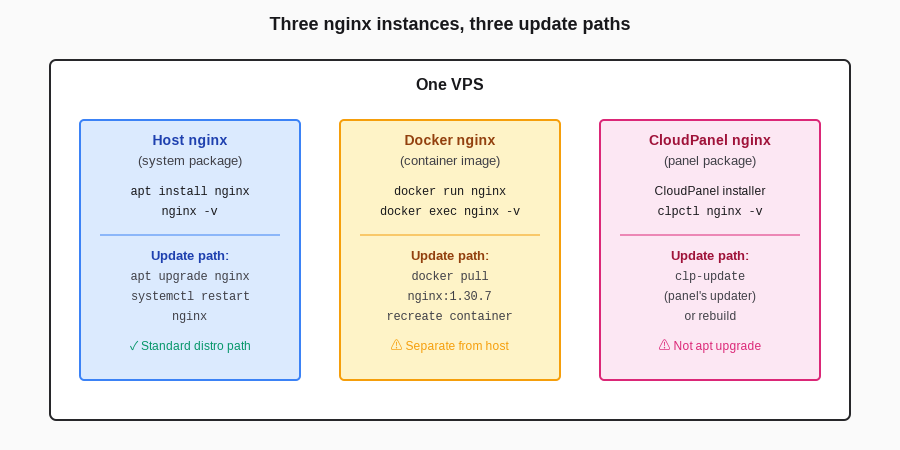
The nginx running on your VPS might be three places at once. The host package you installed with apt. The nginx inside the official nginx Docker image, or inside nginx-proxy-manager, or bundled into an app container you pulled. The nginx that CloudPanel, HestiaCP or CyberPanel compiled or ships, with its own update path that is not the same as apt upgrade.
This post covers how to find them all, check whether the installed package revision has the backport, restart without just reloading, and verify the running binary is not a deleted old one. It also covers which CVEs the HTTP/2 disable workaround does not help with, and what the kernel SCTP container-escape chain means for nginx in Docker on a VPS.
The five CVEs and what they need
F5 published the advisory on November 18, 2026. Nginx.org lists all five on the security advisories page. CERT-EU's advisory 2026-022 names them together as NGINX2Root and explains the preconditions. BleepingComputer's coverage on November 19 says CVE-2026-123007 affects nginx 1.9.5 through 1.31.8.
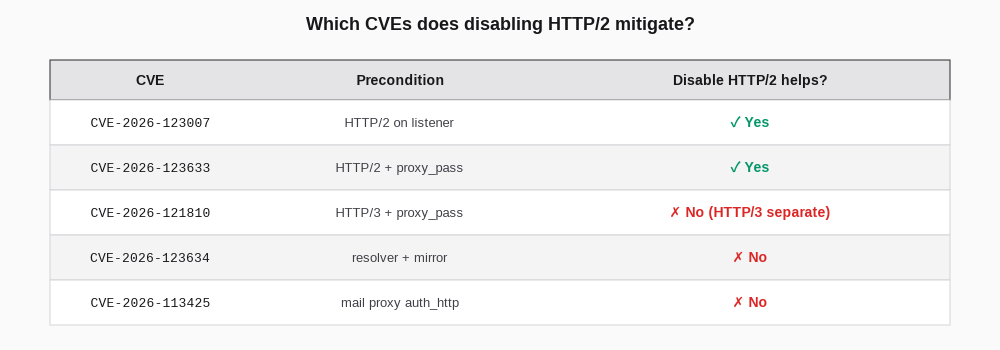
| CVE | What it does | Precondition | Does disabling HTTP/2 help? |
|---|---|---|---|
| CVE-2026-123007 | HTTP/2 flow-control integer overflow, heap OOB write | HTTP/2 enabled on a listener | Yes |
| CVE-2026-123633 | HTTP/2 use-after-free when proxying upstream | HTTP/2 + proxy_pass | Yes |
| CVE-2026-121810 | HTTP/3/QUIC use-after-free with upstream | HTTP/3 enabled + proxy_pass | No, HTTP/3 is separate |
| CVE-2026-123634 | Resolver waiting list UAF | resolver + proxy_pass from request data + mirror with mirror_request_body off | No |
| CVE-2026-113425 | Mail proxy auth_http UAF | Mail module + auth_http | No |
CVE-2026-123007 is the one Xint's write-up demonstrates. An attacker needs HTTP/2 on a listener, nothing else. That covers every nginx reverse proxy or app server listening on 443 with http2 in the listen line, which is most of the web. The other four need features many sites skip, but they all score 8.1 and all five ship fixes in the same releases.
The fixed versions are nginx 1.30.7 stable and 1.31.9 mainline for open-source builds. NGINX Plus 37.0.8.1 and 37.3.0.1 for F5's commercial product. No in-the-wild exploitation was reported as of November 18.
BleepingComputer also notes CVE-2026-118899, a TLS 1.3 request-body infinite loop DoS that ships the same fix. That one is denial of service, not remote code execution, so the CVSS is lower. The patch batch is six CVEs total, five at 8.1 and one DoS.
Matt Johansen explains NGINX2Root and the HTTP/2 flow-control vulnerability (Vulnerable U, November 2026).
Where nginx lives on a VPS
The nginx you remember installing with apt install nginx is one copy. The nginx inside the official nginx Docker image on Docker Hub, or inside containers like nginx-proxy-manager, jwilder/nginx-proxy, or app images that bundle nginx, is a second set. The nginx that CloudPanel, HestiaCP, CyberPanel, or aaPanel ships is a third, and those panels each have their own package manager or build process that is separate from Ubuntu's apt.
HestiaCP installs nginx from Ubuntu packages on Debian and Ubuntu. CyberPanel uses OpenLiteSpeed by default, which is not nginx, so if you chose OpenLiteSpeed you are not affected by nginx CVEs. If you installed CyberPanel with nginx instead of OLS, that nginx came from the panel's own repo. CloudPanel ships a panel-specific nginx package. aaPanel's App Store lets you install nginx from source or from a repo the panel controls.
| Where nginx lives | How to check the version | How to update it |
|---|---|---|
| Host package (Ubuntu/Debian) | nginx -v or dpkg -l | grep nginx | apt update && apt upgrade nginx |
| Docker official image | docker exec <container> nginx -v | Pull new image, recreate container |
| nginx-proxy-manager | Check container image tag | Update via their UI or pull new image |
| CloudPanel | Panel's package manager | CloudPanel's update process |
| HestiaCP (nginx) | nginx -v on host | apt upgrade (uses Ubuntu packages) |
| CyberPanel (OLS) | Not nginx | Not affected by nginx CVEs |
| CyberPanel (nginx) | Panel commands | Panel's update process |
| aaPanel nginx | Panel's App Store | App Store update or rebuild |
A VPS running WordPress behind nginx in Docker, with CloudPanel managing other sites on the host, has two nginx binaries. The host package is CloudPanel's. The container's nginx is whatever the Docker image ships. Patching one does not patch the other.
The same is true for stacks where Caddy or Traefik terminates TLS and nginx sits behind it in a container. Caddy vs Traefik vs Nginx Proxy Manager covers that termination layer. Even if Caddy is patched, the nginx container still needs its own update. Docker Compose on a VPS explains how those stacks are structured.
Check the package revision, not just nginx -v
Distros backport security fixes without changing the upstream version number. Ubuntu 22.04's nginx package stayed at 1.18.0 for years, but the package revision climbed as patches landed. nginx -v prints the upstream version. dpkg -l | grep nginx on Debian/Ubuntu prints the package revision, which is what tells you whether the backport is in.
Ubuntu's CVE-2026-123007 tracker and USN-9159-1 list the fixed package versions:
- Ubuntu 22.04:
nginx 1.18.0-6ubuntu14.23 - Ubuntu 24.04:
nginx 1.24.0-2ubuntu7.20 - Ubuntu 26.04:
nginx 1.28.3-2ubuntu1.13 - Ubuntu 20.04: Available via Ubuntu Pro
Debian's security tracker lists:
- Debian 12 (bookworm):
nginx 1.22.1-9+deb12u11 - Debian 13 (trixie):
nginx 1.26.3-3+deb13u11
AlmaLinux published a backport notice on November 18. RHEL 8, 9, and 10 had no erratum as of this writing. Check your distribution's security tracker, not just the version nginx prints.
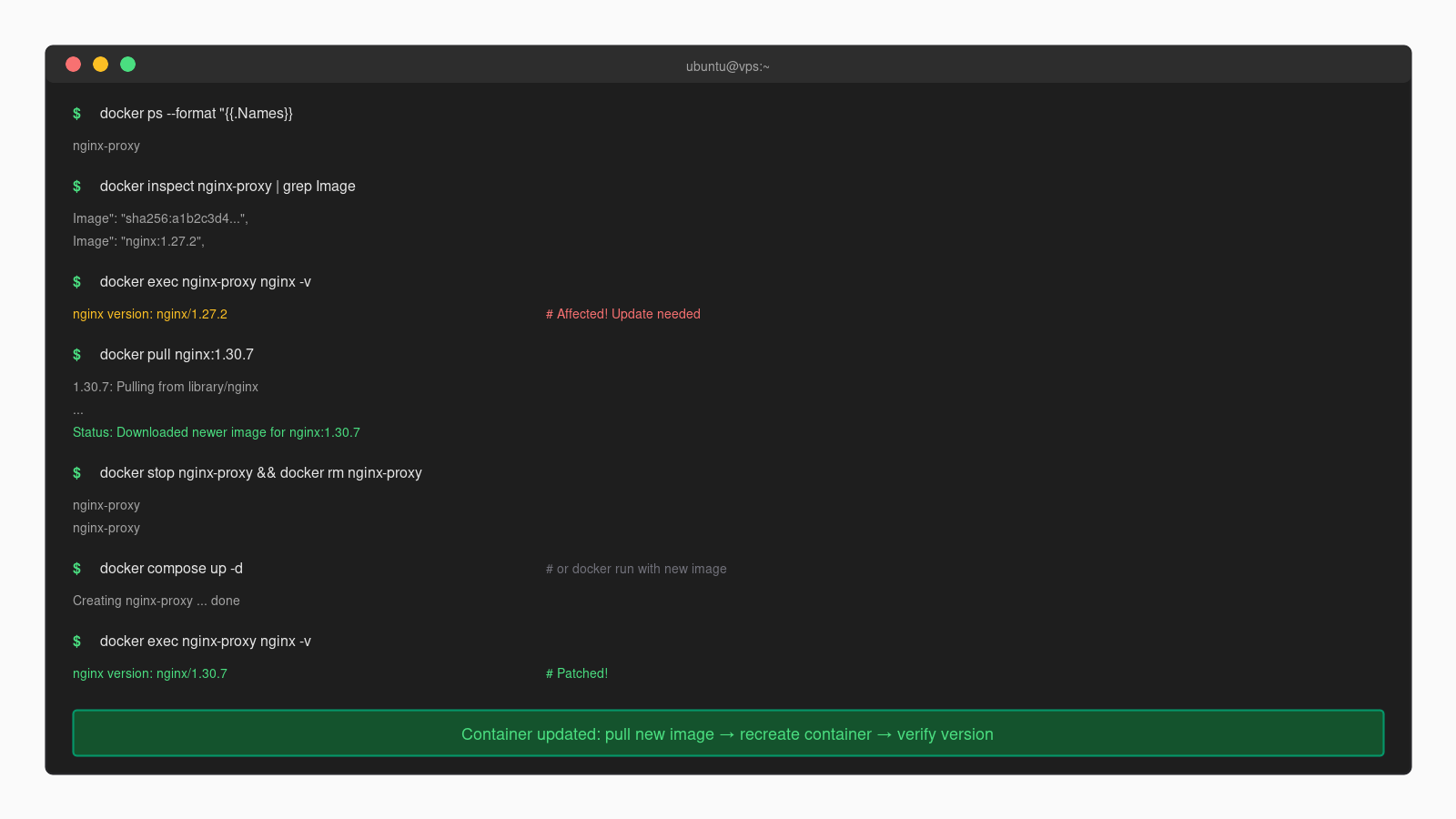
On a container, docker exec <container-name> nginx -v prints the nginx version inside that container. The official nginx Docker images are tagged by upstream version. If your compose file or Kubernetes manifest pulls nginx:1.27, that image shipped nginx 1.27.x, which is affected. The fixed image tags are nginx:1.30.7 stable and nginx:1.31.9 mainline. Update your image tag and recreate the container.
# Host nginx package check
dpkg -l | grep nginx
# or on RHEL-based
rpm -qa | grep nginx

# Container nginx check
docker ps --format "{{.Names}}"
docker exec <container-name> nginx -v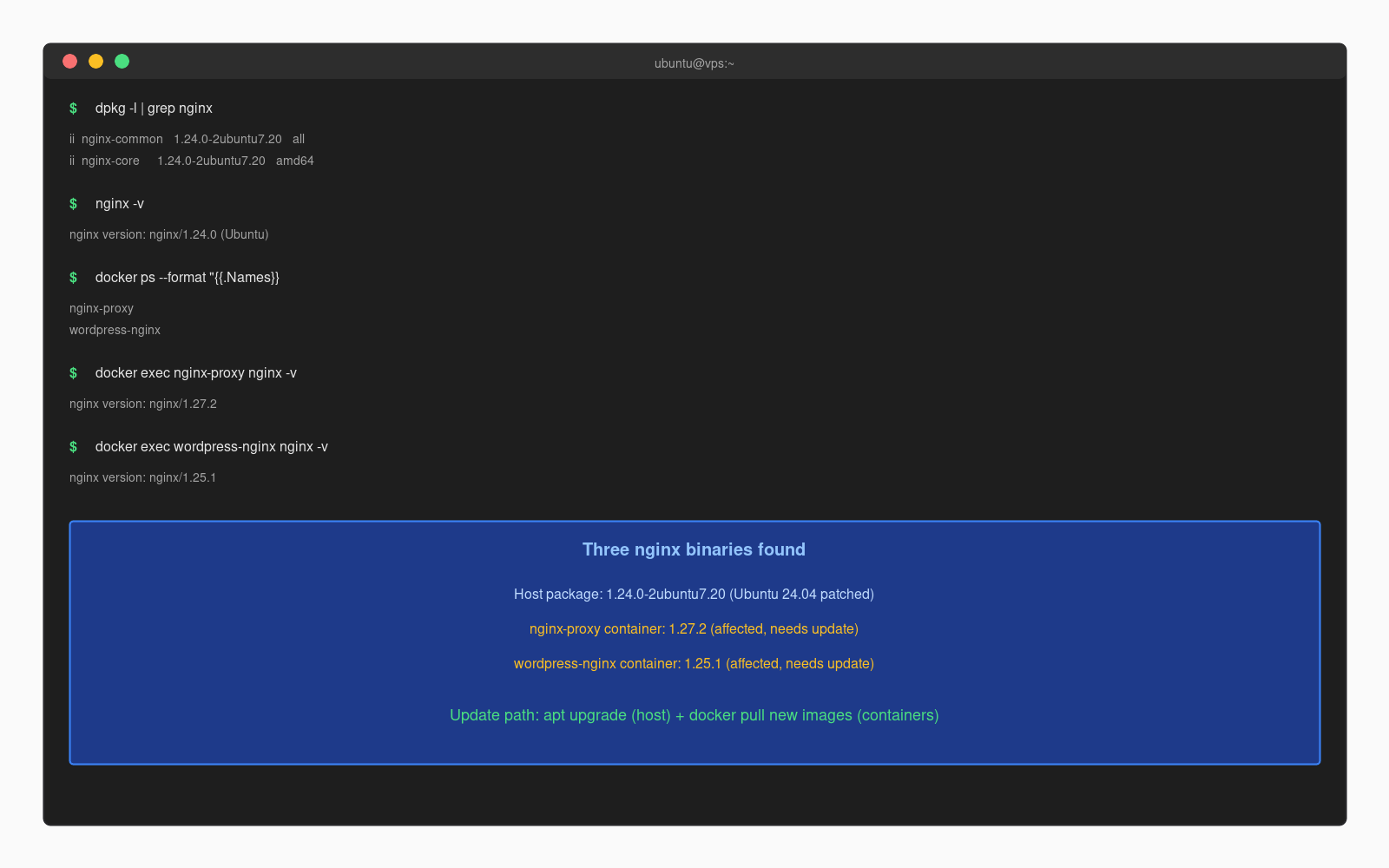
Restart nginx, do not just reload
nginx -s reload or systemctl reload nginx tells the master process to spawn new workers with the new config and gracefully shut down the old workers. The workers reload, but the master process stays running, and the master is still the old binary if you upgraded the package without a restart.
A full restart with systemctl restart nginx stops the master and starts a new one, which loads the patched binary. After upgrading the package, restart nginx to make sure the patched code is running.
sudo apt update
sudo apt upgrade nginx
sudo systemctl restart nginx
nginx -v
For Docker containers, recreate the container after pulling the fixed image:
docker pull nginx:1.30.7
docker stop <container-name>
docker rm <container-name>
# Then run docker run or docker compose up with the new image
A reloaded nginx master still has the old binary mapped in memory. You can check /proc/<pid>/exe to see whether the binary on disk changed after the package upgrade but before the restart:
pgrep -x nginx | head -1  # get master PID
ls -l /proc/<master-pid>/exe
If ls -l says (deleted) next to the binary path, the running process is still the old version. Restart nginx to load the patched binary.
The HTTP/2 disable mitigation and what it misses
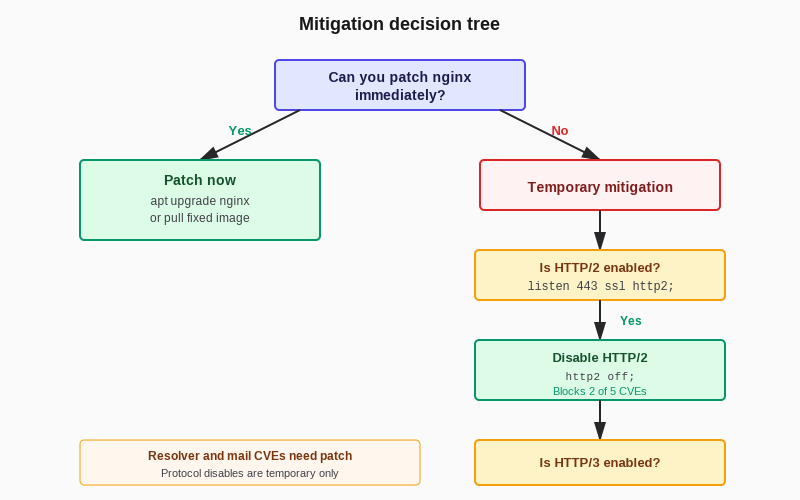
Temporarily disabling HTTP/2 blocks CVE-2026-123007 and CVE-2026-123633, the two CVEs that need HTTP/2 enabled. It does not help with the HTTP/3, resolver, or mail CVEs.
To disable HTTP/2 on a listener:
# Old config
listen 443 ssl http2;

# Temporary mitigation
listen 443 ssl;
# or
http2 off;
Reload nginx after changing the config. Clients that try to negotiate HTTP/2 will fall back to HTTP/1.1. The connection still works, but you lose HTTP/2's multiplexing and server push.
This is a temporary workaround until you can apply the patch. It does not fix the vulnerability. It only blocks the attack path that needs HTTP/2. If your nginx is built with HTTP/3 support and you have quic in a listen directive, CVE-2026-121810 is a separate attack surface. If you use proxy_pass with dynamic upstreams and resolver, CVE-2026-123634 is a third. If you run the nginx mail proxy with auth_http, CVE-2026-113425 is a fourth.
The mitigation matrix:
| CVE | Disabling HTTP/2 mitigates? | What else mitigates? |
|---|---|---|
| CVE-2026-123007 | Yes | None, patch required |
| CVE-2026-123633 | Yes | None, patch required |
| CVE-2026-121810 | No | Disable HTTP/3, or patch |
| CVE-2026-123634 | No | Remove dynamic proxy_pass + resolver + mirror, or patch |
| CVE-2026-113425 | No | Disable mail proxy, or patch |
Disabling HTTP/2 buys time. It does not replace the patch.
The kernel SCTP container-escape chain
Xint's write-up mentions a kernel SCTP vulnerability chain that allows container escape when combined with NGINX2Root. The details are still embargoed as of November 24, 2026, but the researcher confirmed that blacklisting the sctp kernel module is a recommended mitigation.
On a VPS running Docker, the kernel is shared between the host and all containers. If an attacker gains code execution inside an nginx container through one of these CVEs, and the kernel is vulnerable to the SCTP chain, they can escape the container and reach the host. That means every container on that VPS is compromised, not just the one running nginx.
To check whether SCTP is loaded:
lsmod | grep sctpTo blacklist it:
echo "blacklist sctp" | sudo tee -a /etc/modprobe.d/blacklist.conf
sudo rmmod sctp
sudo update-initramfs -u
This prevents the SCTP module from loading. SCTP is the Stream Control Transmission Protocol, used for telecom signaling and some specialized networking. Most web servers and Docker containers do not need it. If your application does not use SCTP, blacklisting it removes that kernel attack surface.
The SCTP chain is separate from the nginx CVEs, but the combination turns remote code execution inside a container into full host compromise. Patching nginx stops the initial entry. Blacklisting SCTP stops the escape.
How to tell from the error log
CERT-EU's advisory says a successful exploit causes the worker process to exit on signal. The nginx error log will show lines like:
worker process <pid> exited on signal 11Signal 11 is SIGSEGV, a segmentation fault. A single line during a deploy or reload is normal. Repeated lines, or lines when no one is deploying, are a sign that something is crashing the workers. That could be the exploit, or it could be a module bug or memory corruption from another cause.
Check your nginx error logs for recent exited on signal entries:
sudo grep "exited on signal" /var/log/nginx/error.logIf you see repeated crashes, patch immediately.
Panel-specific update paths
CloudPanel, HestiaCP, CyberPanel, and aaPanel each manage their own packages. apt upgrade on the host might not update the panel's nginx.
CloudPanel
CloudPanel ships its own nginx package. Check the CloudPanel changelog and update through the panel's updater:
sudo clp-updateAfter the update, restart nginx through the panel or with systemctl restart nginx. CloudPanel on a 2 GB VPS covers the panel's defaults.
HestiaCP
HestiaCP uses Ubuntu's nginx packages, so apt upgrade nginx and systemctl restart nginx apply the fix. The LEMP stack guide is the same workflow. WordPress on Nginx and MariaDB covers the same stack with a WordPress site.
CyberPanel with OpenLiteSpeed
OpenLiteSpeed is not nginx. OLS has its own codebase and its own security advisories. If you installed CyberPanel with OpenLiteSpeed, you are not affected by nginx CVEs. Check the LiteSpeed changelog for OLS vulnerabilities.
CyberPanel with nginx
If you chose nginx instead of OLS, CyberPanel installed nginx from its own repo. Update through the panel's package manager or the CyberPanel update command. CyberPanel vs Hestia vs aaPanel explains the OLS vs nginx choice.
aaPanel
aaPanel's App Store installs nginx from source or from a managed repo. Update through the App Store's nginx upgrade button, or rebuild from source with the fixed version. The host's apt upgrade does not touch the App Store nginx.
Docker image update checklist
For every nginx container on the VPS:
- Find the container:
docker ps --format "{{.Names}}" - Check the image tag:
docker inspect <container> | grep Image - Check the nginx version inside:
docker exec <container> nginx -v - If the version is affected (1.9.5 through 1.31.8 for CVE-2026-123007), update the image tag in your compose file or manifest to
nginx:1.30.7ornginx:1.31.9. - Pull the new image:
docker pull nginx:1.30.7 - Recreate the container:
docker compose down && docker compose up -d, ordocker stop && docker rm && docker runwith the new image. - Verify the new version:
docker exec <container> nginx -v
For app containers that bundle nginx (such as some WordPress images or custom builds), check the base image and rebuild if necessary. If the Dockerfile uses FROM nginx:1.27, change it to FROM nginx:1.30.7 and rebuild.
nginx-proxy-manager has its own release cycle. Check the nginx-proxy-manager releases page for a patched version. Update through the UI or by pulling the new Docker image and recreating the container.
Verify the running binary after restart
After upgrading and restarting, confirm the patched binary is running:
# Get the master nginx PID
pgrep -x nginx | head -1

# Check the binary path
ls -l /proc/<pid>/exe

# Check the package version
dpkg -l | grep nginx
# or
rpm -qa | grep nginx

# Check the nginx version nginx reports
nginx -v
If /proc/<pid>/exe shows (deleted), the master is still the old binary. Run systemctl restart nginx again and check again.
For containers, docker exec <container> nginx -v after recreating the container should show the fixed version. If it does not, the image did not update. Pull the correct image tag again and recreate.
What if the host has the kernel and you do not
If your VPS is LXC, OpenVZ, or Virtuozzo, you share the host's kernel. The guest cannot replace the kernel. If the kernel is vulnerable to the SCTP chain, only the host administrator can blacklist the module or patch the kernel. Open a ticket with your provider and ask whether the host kernel has the SCTP module loaded and whether they plan to blacklist it.
NoisyTCP CVE-2026-99288 covers the container vs KVM question in detail. KVM VPS owners control their own kernel. Container VPS owners do not.
Interim mitigation summary
If you cannot patch immediately:
- Disable HTTP/2 in nginx config:
http2 off;or removehttp2fromlistendirectives. Reload nginx. - Disable HTTP/3 if enabled: remove
quicfromlistendirectives. Reload nginx. - Blacklist the kernel
sctpmodule if the kernel is vulnerable and your provider has not patched it. - Check nginx error logs for
exited on signalentries.
These are stopgaps. Apply the patch as soon as the fixed package or image is available.
FAQ
Does nginx -v tell me if I am patched?
Not reliably. Distros backport fixes without changing the upstream version. Check the package revision with dpkg -l | grep nginx or rpm -qa | grep nginx and compare it to your distro's security advisory.
Is disabling HTTP/2 enough?
No. Disabling HTTP/2 blocks CVE-2026-123007 and CVE-2026-123633. It does not block the HTTP/3, resolver, or mail CVEs. Patch nginx to fix all five.
Am I affected if nginx is behind Cloudflare?
Cloudflare terminates TLS and HTTP/2 at their edge. Requests reach your origin as HTTP/1.1 or HTTP/2 depending on your origin config. If your origin nginx has HTTP/2 enabled, it is still vulnerable to attacks from anyone who can reach your origin directly, bypassing Cloudflare. Cloudflare does not inspect traffic between their edge and your origin for exploit payloads.
Do I need to reboot the VPS?
No. Restarting nginx is enough. Rebooting applies a kernel update if one is pending, but the nginx patch is in userspace. systemctl restart nginx loads the new binary without a reboot.
How do I find all nginx processes on the VPS?
pgrep -a nginx
ps aux | grep nginx
Check the host and inside each Docker container. Some panels run a second nginx for the panel UI on a different port.
What if my panel's nginx is a custom build?
Check the panel's changelog or support docs for a fixed version. Custom builds do not update through apt. Use the panel's updater or rebuild from source with nginx 1.30.7 or later.
Is OpenLiteSpeed affected?
No. OpenLiteSpeed is a separate web server codebase. It is not nginx and does not share these CVEs. If you installed CyberPanel with OpenLiteSpeed, you are not affected by NGINX2Root.