
UFW on the guest listed 5432/tcp DENY IN Anywhere. Three nmap scans from a second guest all printed 5432/tcp open postgresql. A drop on the bridge in front of that NIC, same port and same scanner, came back filtered on three more scans. The Compose file left running publishes Postgres on 127.0.0.1 and on ::1. After a power cycle, docker ps showed that container healthy. The daemon started it.
The guest was Ubuntu 24.04.5, kernel 6.8.0-147-generic, qemu -m 2048 -smp 2. MemTotal was 2,014,852 kB and SwapTotal was 0. Docker was 29.1.3 from the Ubuntu docker.io package, and Compose was 2.40.3. The scanner was a second guest, qemu -m 1024 -smp 1, nmap 7.94SVN, at 192.0.2.20. Postgres answered on 192.0.2.10.
| Setting | In this file |
|---|---|
| Image | postgres:16-alpine pinned by digest. The server inside it was Postgres 16.15. |
restart | unless-stopped, so a power cycle brings it back and a manual stop stays stopped. |
| Healthcheck | pg_isready. A failed check leaves the container running, so a systemd timer restarts the unhealthy ones. |
| Logs | json-file, max-size 10m, max-file 3. Without the cap, docker system df missed a 42,122,195 byte log. |
| Ports | 127.0.0.1:5432 and [::1]:5432. The public publish is what nmap called open. |
user | Unset. Starting as uid 999 failed in initdb on a fresh data directory. |
| Socket | No docker.sock mount. The container monitor in Uptime Kuma is the one that needs it. |
mem_limit | 256m. Idle cgroup memory.current was 61.8 MiB before the limit, 59.9 MiB under it. |
cap_drop | ALL, then CHOWN, DAC_OVERRIDE, FOWNER, SETGID, and SETUID added back. ALL alone exited. |
stop_grace_period | 30s. docker stop returned in 334 ms. |
| Env file | .env mode 600, passed with env_file. The password stays in that file. |
| Network | Bridge labdb_app. NetworkMode was that bridge. |
| Volume | Named volume pgdata, and a comment naming it for the backup. |
| Cron | docker system df posted to a listener on the guest, the same shape as a push monitor. |
| Reboot | docker ps showed Up 24 seconds (healthy) once SSH answered. |
What belongs in the Compose file?
The fifteen rows are one service. The digest, the restart policy, the check, the log cap, and the loopback publish are the lines I would look for first in someone else's file.
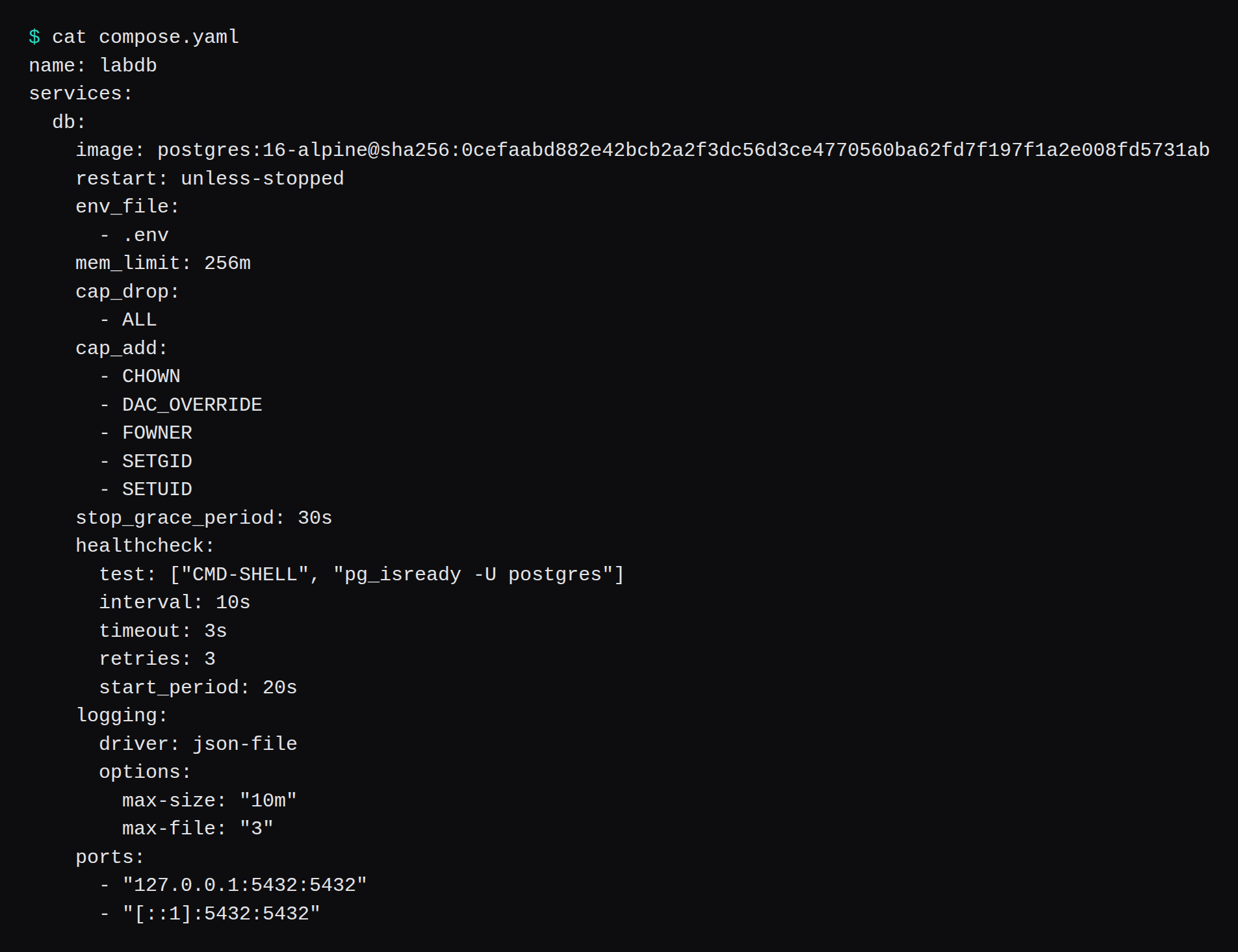
name: labdb
services:
  db:
    image: postgres:16-alpine@sha256:0cefaabd882e42bcb2a2f3dc56d3ce4770560ba62fd7f197f1a2e008fd5731ab
    restart: unless-stopped
    env_file:
      - .env
    mem_limit: 256m
    cap_drop:
      - ALL
    cap_add:
      - CHOWN
      - DAC_OVERRIDE
      - FOWNER
      - SETGID
      - SETUID
    stop_grace_period: 30s
    healthcheck:
      test: ["CMD-SHELL", "pg_isready -U postgres"]
      interval: 10s
      timeout: 3s
      retries: 3
      start_period: 20s
    logging:
      driver: json-file
      options:
        max-size: "10m"
        max-file: "3"
    ports:
      - "127.0.0.1:5432:5432"
      - "[::1]:5432:5432"
    volumes:
      - pgdata:/var/lib/postgresql/data
    networks:
      - app
# volumes to copy: pgdata
volumes:
  pgdata:
networks:
  app:
    driver: bridge
.env held POSTGRES_PASSWORD and stat printed mode 600. It sits beside the Compose file. On a git checkout, a .gitignore line for .env is what keeps the password out of the repo.
docker inspect reported NetworkMode labdb_app, StopTimeout 30, and memory 268435456. The only mount was the named volume.
The systemd timer talks to the Docker socket as root, because it runs docker restart on the guest. That is a different grant from mounting the socket into a container. Uptime Kuma mounts it for the container monitor.
Nick Janetakis wrote the longer version of treating one Compose file as the production file, including unless-stopped and a healthcheck.
Does UFW block a published Docker port?
With the port published on 0.0.0.0, the deny line left it open. The sequence was ufw default deny incoming, ufw allow 22/tcp, ufw deny 5432/tcp, then ufw --force enable. Status said the firewall was active and that 5432 was DENY IN from anywhere. ss showed 0.0.0.0:5432 and [::]:5432.
The nat table had already rewritten the packet:
-A DOCKER ! -i br-c6a9ac214d79 -p tcp -m tcp --dport 5432 -j DNAT --to-destination 172.18.0.2:5432
-A ufw-user-input -p tcp -m tcp --dport 5432 -j DROP
172.18.0.2 was the container on the Compose bridge. The DROP lived in ufw-user-input, which is on the filter INPUT chain. Docker's packet filtering page describes the same split: published traffic is handled in the nat table, and the packet is diverted before the INPUT and OUTPUT chains UFW uses. Issue 690 is the long report of that behavior. The daemon's iptables integration stayed on. That page says turning the rules off is likely to break container networking.
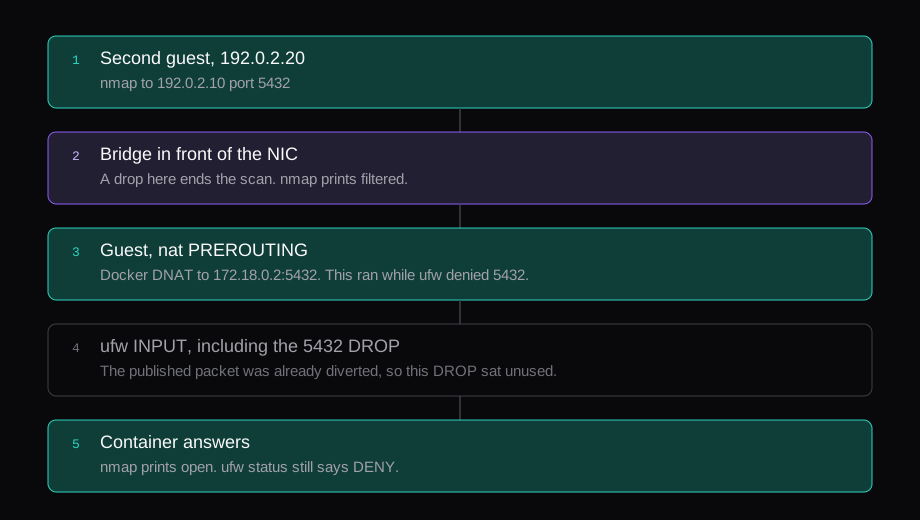
From 192.0.2.20 the scan was:
sudo nmap -p 5432 192.0.2.10Three runs, 0.08, 0.09, and 0.10 seconds, each one open. The figure is the 0.09 second run, then the filtered run from the bridge drop.
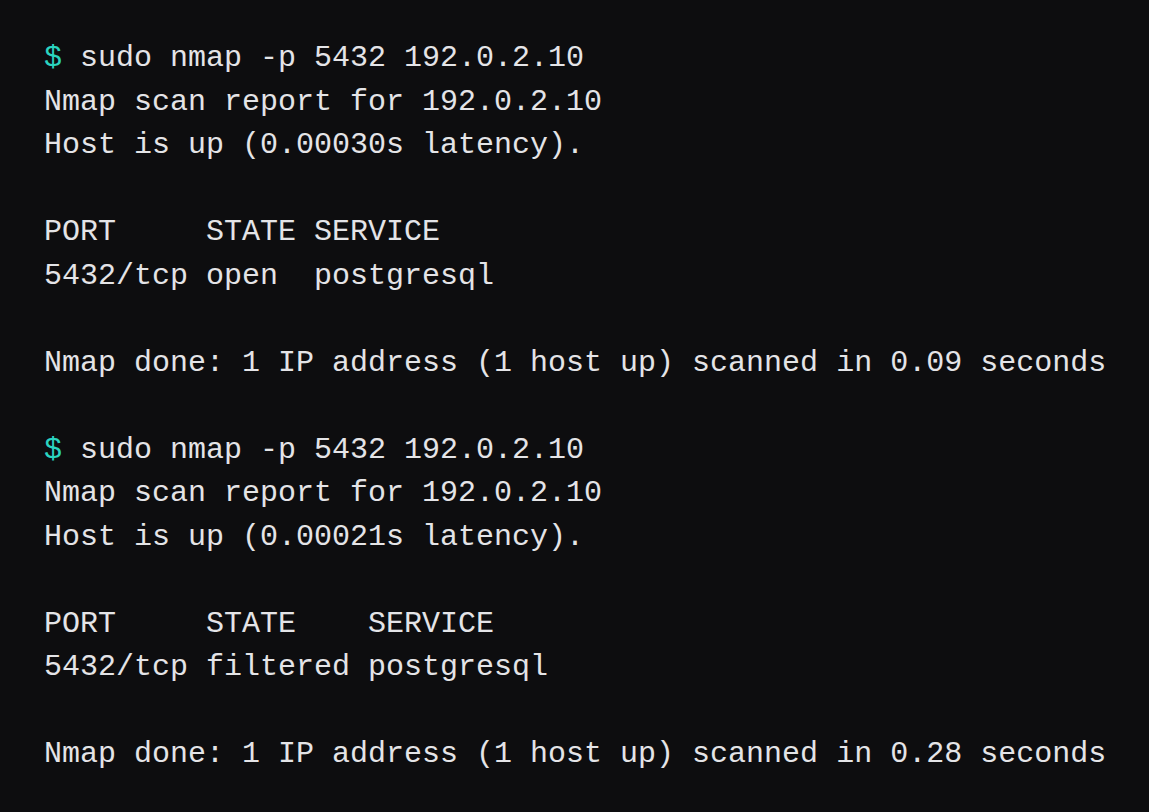
I then removed the bridge drop and changed the publish to 127.0.0.1:5432:5432 and [::1]:5432:5432. ss showed those two addresses and no 0.0.0.0:5432. From the guest, a connect to 192.0.2.10:5432 was refused, and 127.0.0.1:5432 accepted. nmap from the second guest now printed filtered, because the packet finally reached the UFW DROP. With UFW switched off, the same scan printed closed in 0.09 seconds, which is the kernel saying nothing is listening. The filtered result with the loopback publish was the UFW DROP. The earlier filtered result was the bridge drop, taken while the container was still published on the public address.
The public listener for a stack like this is the proxy on 80 and 443, which is the Caddy, Traefik, and Nginx Proxy Manager comparison. Postgres stays on the loopback addresses.
Where does the drop have to sit?
In front of the guest. The rule that changed open to filtered was nftables on the bridge the two guests shared, matching TCP 5432 from the scanner's tap to the target's tap. The guest's UFW table was unchanged between the open scans and the filtered scans.
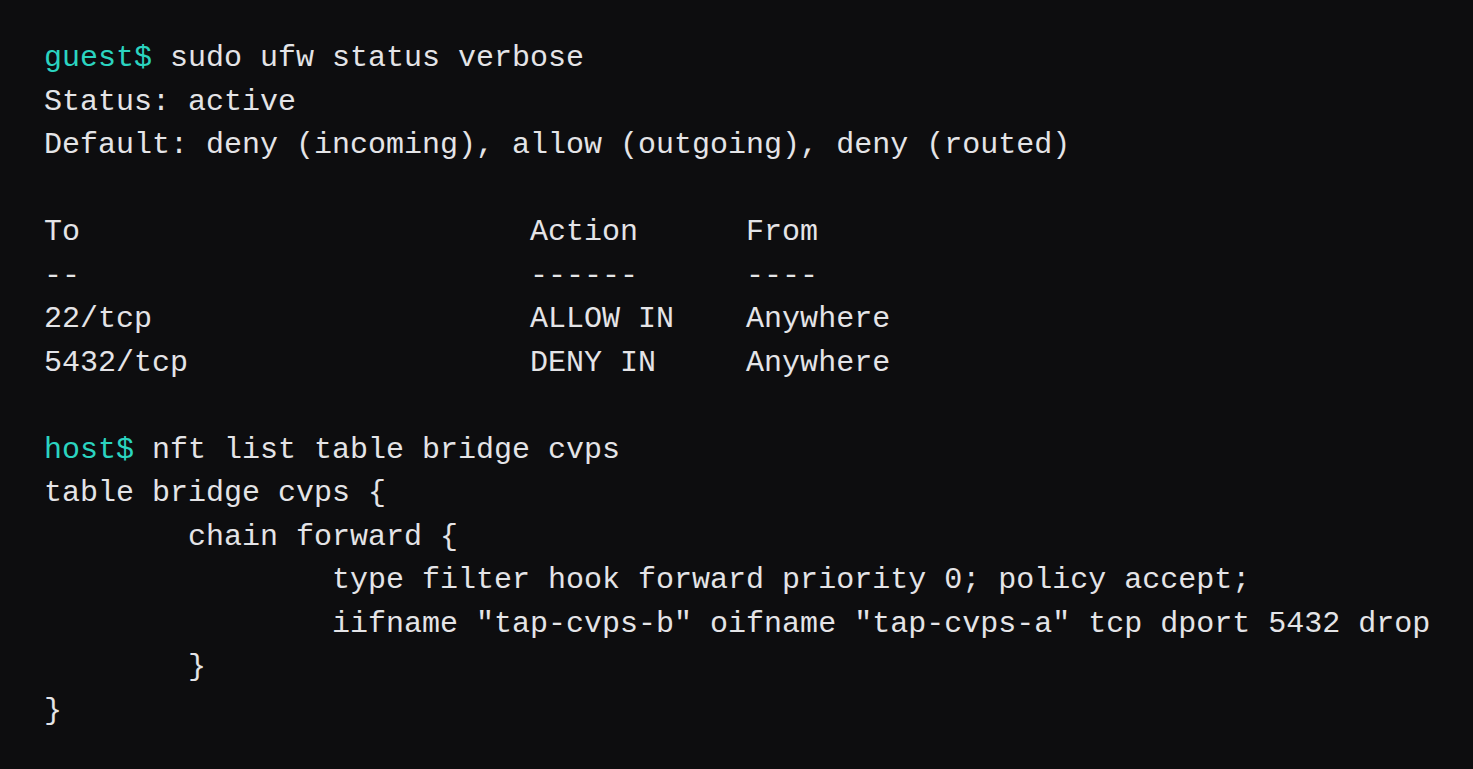
On a Proxmox VM bought through NodeRings, that outer ruleset is the firewall on the VM. You write allow and deny rules in the panel, and the operator pushes them to the Proxmox VM firewall on the hypervisor, which is in front of the guest in the same way this bridge was. The docs say that ruleset is not attached on VirtFusion or SolusVM 2. Those guests keep the provider's own networking. How NodeRings works is the account of which side of the VM that rule lands on. This lab did not click a panel. The drop was the nftables rule above, on the host bridge.
Jake Saunders wrote the firewall notes after an Umami container on his VPS was mined through a Next.js bug. He says to skip UFW, because Docker overrides those rules, to publish on 127.0.0.1 for a port that should stay on the machine, and to keep a second firewall outside the VM. The account of that box puts the miner inside the Umami container, running as the container user, with no socket mount. That is why this file leaves the socket off the database.
The iptables page says extra filtering on the guest belongs in DOCKER-USER, ahead of Docker's own chains. The bridge was the filter I measured.
What did the capability drop and a fixed user do?
cap_drop: ALL with no caps added back exited immediately.
chmod: /var/lib/postgresql/data: Operation not permitted
error: failed switching to 'postgres': operation not permitted
--user 999:999 on an empty data directory got as far as initdb and then stopped.
initdb: error: could not change permissions of directory "/var/lib/postgresql/data": Operation not permittedThe image's entrypoint still wants to chmod the data directory and switch user. With CHOWN, DAC_OVERRIDE, FOWNER, SETGID, and SETUID added back, a fresh volume initialized and the log said Postgres 16.15 was ready to accept connections. Those five are what this image needed. Another image will want a different set, or none. The way to find out is the error on a throwaway volume, which is what these two runs were.
Before the limit, one reading of cgroup memory.current was 64,790,528 bytes, 61.8 MiB, and docker stats printed 23.01 MiB. I set mem_limit: 256m. Under that limit the cgroup read 62,783,488 bytes, 59.9 MiB, and docker stats printed 21.23 MiB of the 256 MiB. The container reached healthy. The two tools disagree because the cgroup charges page cache and docker stats is closer to the resident set. 256m is sized from the cgroup reading, the larger of the two.
stop_grace_period: 30s showed up as StopTimeout 30. docker stop returned in 334 ms. The 30 seconds are the wait you get if Postgres handles SIGTERM and keeps running. This one exited.
Do container logs show up in docker system df?
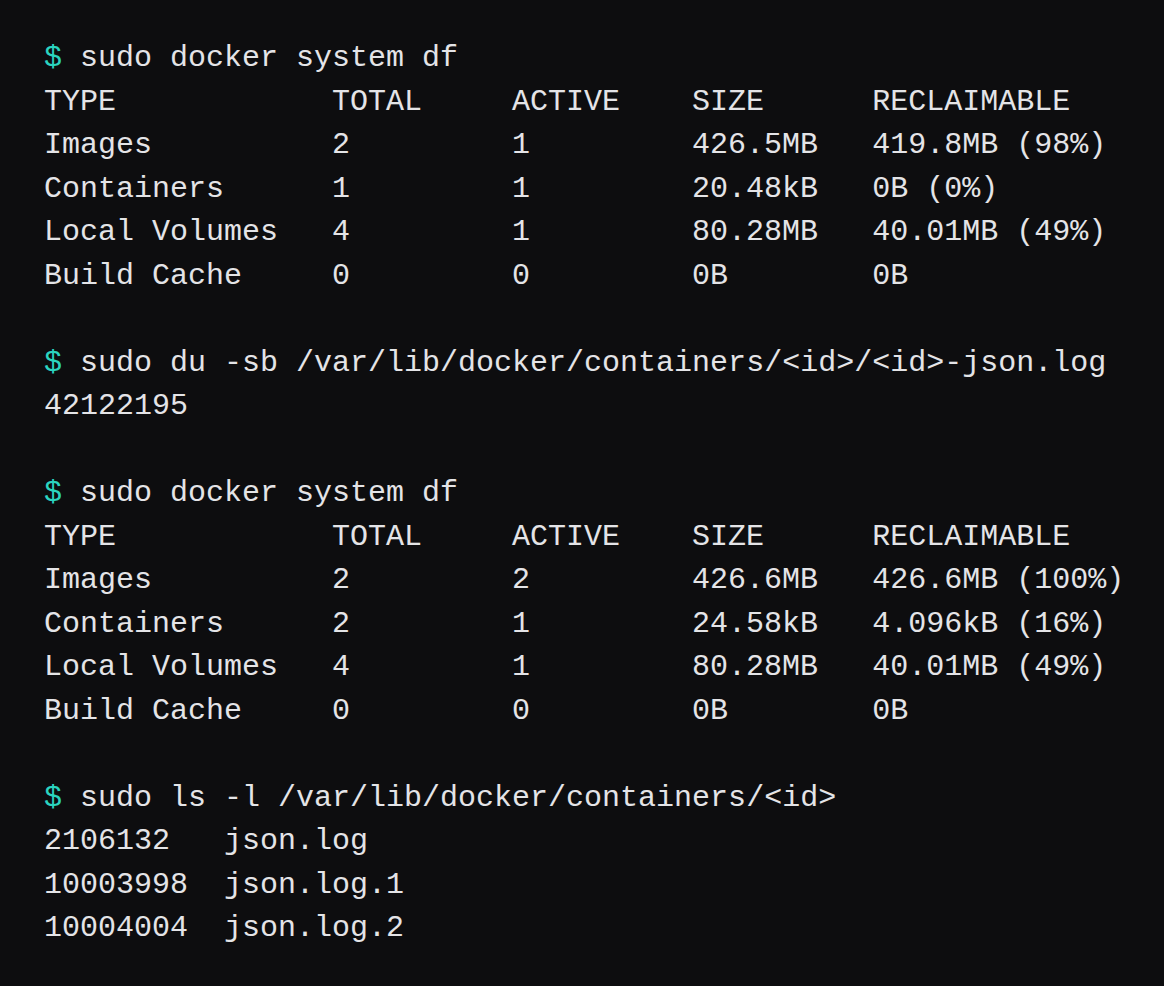
On this daemon the container row barely moved. A BusyBox 1.36.1 container, digest sha256:73aaf090f3d85aa34ee199857f03fa3a95c8ede2ffd4cc2cdb5b94e566b11662, wrote 40 chunks of 1,048,576 bytes of the letter A, each followed by a newline, and exited. No log options. The json log was 42,122,195 bytes. docker system df moved the container row from 20.48 kB to 24.58 kB.
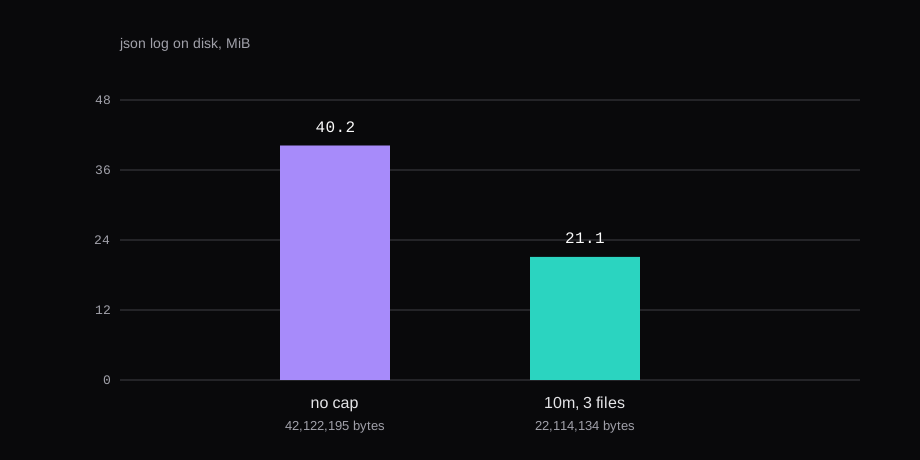
The same writer with max-size 10m and max-file 3 left three files: 2,106,132 bytes, 10,003,998 bytes, and 10,004,004 bytes. Sum 22,114,134. Two of them sit just over 10,000,000 bytes, which is the cap, and the third is the file still being written when the container exited. A longer writer would roll that third file and drop the oldest. I stopped at 40 MiB of output.
Docker's logging page says the default json-file driver ships without rotation, and that the local driver rotates on its own. I kept json-file and set the cap in the Compose file, because that is the driver this daemon uses when the file says nothing.
The cron on the guest posts that df table once a minute:
#!/bin/sh
docker system df --format '{{.Type}} {{.Size}}' \
  | curl -fsS --data-binary @- http://127.0.0.1:8099/df
/etc/cron.d/docker-df runs it as root. One run delivered Images 426.5MB, Containers 20.48kB, Local Volumes 120.5MB, Build Cache 0B. The listener was a one-shot HTTP server on the guest, so I could see the body. On a VPS the same curl goes to the push URL from the Uptime Kuma heartbeat, which goes red when the cron stops calling. df stays green while the json log grows. The du of /var/lib/docker/containers is the check for that. The cap above is what bounds the file.
Does a healthcheck restart the container?
A BusyBox container with restart: unless-stopped and a check of test -f /tmp/healthy went unhealthy with RestartCount 0. Five seconds later it was still running, still unhealthy, and the counter was still 0. The process was up the whole time, so the restart policy had no exit to act on. Docker's restart page ties the policy to the container exiting, or to the daemon starting. The failed check only changed the status.
The timer that did restart it:
# /etc/systemd/system/restart-unhealthy.service
[Service]
Type=oneshot
ExecStart=/usr/local/sbin/restart-unhealthy

# /etc/systemd/system/restart-unhealthy.timer
[Timer]
OnBootSec=10
OnUnitActiveSec=10
AccuracySec=1

[Install]
WantedBy=timers.target
#!/bin/sh
ids=$(docker ps -q --filter health=unhealthy)
if [ -n "$ids" ]; then
docker restart $ids
fiThe service printed the container id, and docker ps then showed that container up for 17 seconds, unhealthy again, RestartCount still 0. docker restart from the timer is what moved it. /tmp/healthy is absent, so the check keeps failing, and the timer would restart the container every 10 seconds until the unit is stopped. I disabled the timer and removed the container before the reboot test. On the Postgres service the check is pg_isready, which passes once the server accepts connections, so a restart is for the case where the process is up and not accepting.
The Postgres container reached healthy on the fourth sample, samples 2 seconds apart, with start_period 20s. That was during the start period. Docker still reported healthy once pg_isready succeeded.
Should Watchtower pull the next tag?
Pin the digest, and change it when you mean to. containrrr/watchtower has a maintenance notice as the last commit on main, from 17 December 2025. In that discussion the maintainers say they are archiving the project, and that they will not vouch for the forks. The README already told people to keep it off production. A moving tag picks up a fix, and it picks up whatever else was pushed under that name. The digest stays until the file changes.
Saunders' note says to update, because the Umami container was an old Next.js. Changing the digest is that update. The push monitor is how you notice the cron, or the backup, that was supposed to remind you. This guest has no unattended pull.
Does the stack come back after a reboot?
Yes, when it was running at poweroff. I shut the guest down, the qemu process exited, and I booted the same disk with the same qemu -m 2048 -smp 2. Docker came up active. The first docker ps after SSH answered was Up Less than a second (health: starting), ports 127.0.0.1:5432 and [::1]:5432. The next one showed healthy at 24 seconds of uptime. RestartCount was 0. I did not run Compose on the way up.

unless-stopped is the policy that did that. The restart docs say a container you have stopped by hand stays stopped across a daemon restart under unless-stopped, and that always starts it again when the daemon comes back. I did not power the guest off with this container already stopped. The stop I timed was followed by docker compose up before the reboot, so the process was running when the guest went down.
Questions people ask about this file
Does restart unless-stopped start a container I stopped by hand?
The docs say no, including after the daemon restarts. always is the policy that brings a manually stopped container back when Docker itself starts. What I measured was a guest poweroff with the container still running.
Do I turn Docker's iptables off so UFW applies?
Leave it on. The packet filtering page says those rules are required for bridge networks, and that setting iptables to false is likely to break container networking. Publish on loopback, or drop the port in front of the guest. Both of those changed the nmap result here. The iptables switch stayed at its default.
Does publishing on 127.0.0.1 hold on older Docker?
This engine was 29.1.3, and the loopback publish was what ss showed after the recreate. The port publishing page says that before 28.0.0 a host on the same L2 segment could still reach a port published only on localhost. I did not put a second machine on that segment to retest the old leak.
Is rootless the way out of the UFW bypass?
Rootless is a different daemon. This guest is the rootful engine from apt install docker.io, and the nmap result belongs to that engine. The Podman thread (1,123 points) is the long argument for leaving Docker's root daemon. The publish line in this file is the one the scan was aimed at.