
A bug that sat in the Linux kernel for 11 years just got a name. CVE-2026-99288, NoisyTCP, is a remotely triggerable race in the code that matches incoming TCP packets to their connections. An attacker needs no credentials and no open port beyond one that accepts TCP, which is SSH, your web server, or anything else that listens. The researcher's proof-of-concept crashed virtual machines running Nginx, Apache, and sshd in their default configurations in 5 seconds to 2 minutes, and a bare-metal server with 8 RX queues in about 14 hours. The result is a kernel panic and a reboot, not data theft or code execution.
The fix reached the mainline kernel on November 3, and stable releases 6.12.117, 6.18.63, and 7.3.4 followed on November 10. A second patch for arm64 and other weakly ordered CPUs landed in 6.12.118, 6.18.64, and 7.3.5 on November 17. The older long-term branches—5.10, 5.15, 6.1, and 6.6—still have no release with the fix as of today. Debian backported the patch to bookworm on November 15. Ubuntu, Red Hat Enterprise Linux 8, 9, and 10, AlmaLinux, and community Rocky Linux had no fixed package yet when I checked. For people running virtual private servers, the question is simpler than the CVE sounds: who can patch the kernel, and what do you do when the host has it and you don't?
What the bug does
The kernel looks up established TCP connections without taking a lock, because speed matters. The memory for TCP sockets is marked SLAB_TYPESAFE_BY_RCU, which means the kernel can reuse it for a new socket before an old lookup holding that address has finished. The lookup protects itself by taking a reference on the socket and then checking the connection's addresses and ports again. If those match, it assumes the socket is the right one.
What it did not check is whether the socket it now holds is actually registered in the hash table. If a new socket happens to have the same addresses and ports, the second check passes. The lookup returns the new, unregistered socket. The fix adds the missing test: after taking the reference, check whether the socket's nulls node is hashed. If it is not, or if the tuple no longer matches, drop the reference and start over.
The researcher's proof-of-concept forces the reuse with a SYN cookie request socket. That kind of socket is never registered and has no listener attached. The lookup returns it anyway. tcp_v4_rcv() then reads the listener's state through a NULL pointer, and the kernel panics in interrupt context. The whole machine goes down, container or not.
| Precondition | Do you have it? |
|---|---|
| A TCP port the attacker can reach | SSH, HTTP, any service |
| Two or more receive queues, or RPS spreading packets over CPUs | Multi-queue NICs on servers and VMs; single-queue with RPS off may not |
CONFIG_SYN_COOKIES built in | Enabled on most distributions |
The researcher explains how an attacker wins the race from outside. IPv4 fragments and ordinary TCP segments get different receive hashes, so crafted packets can steer both sides of the race onto different RX queues or CPUs. A server needs no special configuration beyond having more than one receive context. SYN cookies can be forced by flooding the SYN queue, which is the textbook attack they exist to absorb.
The gap vs. what ranks now
If you search for CVE-2026-99288, the top results are the kernel CVE announcement, the researcher's GitHub write-up, security advisories from Sophos and Red Hat, and coverage from BleepingComputer. Those are good for understanding the bug. They are less helpful when you are standing in front of a VPS you rent, your hosting provider has not emailed you, and you need to figure out whether the kernel that answers packets is fixed, who can patch it, and what to do if the answer is "not you."
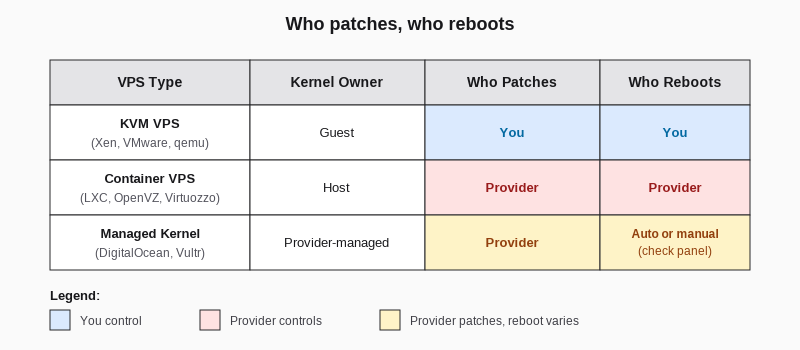
The write-ups say "update your kernel," but on a VPS that advice splits into at least three paths. If you have a KVM VPS, the guest runs its own kernel, so you can patch and reboot it yourself. If you have a container VPS—LXC, OpenVZ, or Virtuozzo—the guest shares the host kernel, and only the host can patch it. If your provider manages the kernel for you, through something like Vultr's managed kernel setting or DigitalOcean's auto-upgrade, the patch might arrive without you touching a thing, or it might wait until you reboot, or the host might still be on an older LTS kernel that does not have the fix yet.
This post covers how to tell whether your kernel is affected, how to check whether a fixed package is available from your distribution, what you can and cannot do yourself on a KVM VPS versus a container VPS, what to ask your provider when the host kernel is out of reach, and what the interim mitigations actually cost.
Check your running kernel
On a Linux VPS, run this:
uname -rThat prints the kernel version currently loaded. If you are on a KVM VPS (the guest boots its own kernel), that version is yours to patch. If you are on a container VPS (LXC, OpenVZ, Virtuozzo), that version is the host's, and your package manager inside the container cannot replace it.
uname -r output | What it means |
|---|---|
6.12.118, 6.18.64, 7.3.5, or later in those branches | Fixed on x86 and arm64 |
6.12.117, 6.18.63, 7.3.4 | First patch only; arm64 needs the second |
5.10.*, 5.15.*, 6.1.*, 6.6.* | No upstream release with the fix yet |
| Anything from 4.4 to 6.12.116, 6.18.62, 7.3.3 | Affected |
| Below 4.4 | Not affected; the bug was introduced in 4.4 |
Debian backported the fix to bookworm's 6.1.192 as linux package version 6.1.192-1 (DLA-4906-1) and to trixie as 6.12.117-1 (DSA-6628-1). Ubuntu shows all supported releases, from 16.04 to 26.10, as vulnerable with no fixed package released. Red Hat lists RHEL 8, 9, and 10 as affected with no erratum yet. AlmaLinux has backported fixes in its testing repository but not production. The package version alone does not tell the story; check your distribution's security tracker.
If you are on a managed VPS where the provider controls the kernel, the version might have a provider suffix like -pve for Proxmox or -aws for Amazon's kernel, and the fix might have been backported without the version number changing upstream.
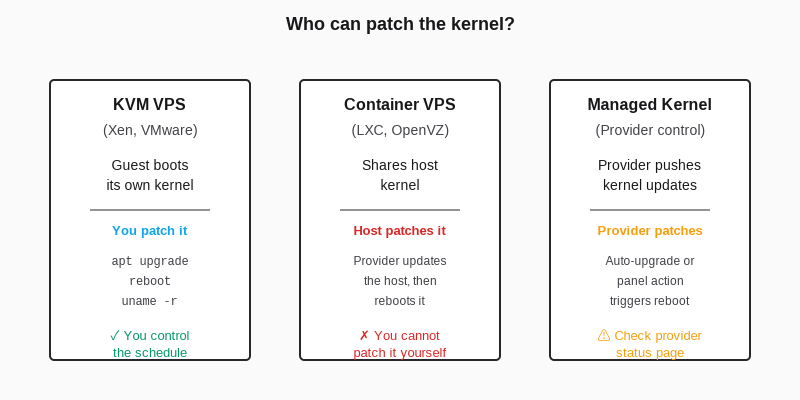
KVM VPS: you patch it yourself
If your VPS is KVM, Xen, or VMware—anything where the guest boots its own kernel—you can patch it the same way you would patch a physical machine. Update the kernel package, reboot, and check uname -r again.
On Debian 12 (bookworm):
sudo apt update
sudo apt install linux-image-amd64
sudo reboot
On Ubuntu 24.04:
sudo apt update
sudo apt upgrade
sudo reboot
On Red Hat-based systems (RHEL, Rocky Linux, AlmaLinux), wait for your distribution to publish the fixed package. As of November 23, RHEL 8, 9, and 10 have no erratum. AlmaLinux has testing kernels but no production release. Check your distribution's security tracker before assuming a newer kernel number means the fix is in.
After the reboot, run uname -r again. If the version is at or past the fixed releases listed in the table, you are done. If it is still on the old version, check whether a newer kernel package is installed but not booted. Some distributions keep the previous kernel as a fallback. The grub menu or dpkg -l | grep linux-image on Debian will show you what is installed.
Container VPS: the host has the kernel
If your VPS is LXC, OpenVZ, or Virtuozzo, you do not have your own kernel. The container shares the host's kernel, and uname -r inside the container prints the host's version. You cannot replace it from inside the container.
On these VPSes, the person who can patch the kernel is the host administrator, which is your provider. If the host is running an affected kernel, every container on that host is affected. If the host is patched, every container is patched. You do not get to choose the kernel version separately.
| VPS type | Who owns the kernel | Can the guest patch it? |
|---|---|---|
| KVM, Xen, VMware | The guest | Yes |
| LXC | The host | No |
| OpenVZ, Virtuozzo | The host | No |
| Proxmox VE with qemu VMs | The guest | Yes |
| Proxmox VE with LXC | The host | No |
If your provider has a status page, check it. If they have sent an email about CVE-2026-99288, follow it. If not, open a ticket and ask whether the host kernel is patched and when it will be rebooted. A fixed package installed on the host does not mean the patch is running. The host needs a reboot, and that affects every container on it.
Incus and Proxmox LXC containers follow the same rule: the host kernel is what runs your workload. Incus on Ubuntu: container or VM? explains that choice. The VM path gets you a kernel you control. The container path keeps you on the host's schedule.
Managed kernel: someone else reboots
Some providers offer a managed kernel option, where the host updates the guest kernel automatically, or where the guest's kernel is replaced through the control panel instead of through apt or dnf inside the guest. DigitalOcean's droplets, for example, can run with a provider-managed kernel or with the kernel the guest installs itself. Vultr has a similar setting.
If your VPS is on a managed kernel, check the provider's documentation or control panel to see whether the kernel update has been pushed. The reboot might be automatic, or it might require you to restart the VPS through the panel. uname -r will tell you what is running now. If it is still an affected version, check whether a reboot is pending or whether you need to trigger it yourself.
Proxmox VE nodes run a Proxmox kernel package. CVE-2026-98432: the Proxmox kernel to boot covers how that kernel is updated and when a reboot applies it. The same workflow applies here. The package is installed through apt, but the node needs a reboot to load it, and a cluster needs to empty the node first. That post also explains how to check whether a Proxmox kernel package has a specific fix when the changelog does not name the CVE.
What to ask your provider
If your VPS is a container and the host kernel is out of your reach, or if the kernel is managed and you cannot tell whether the fix is live, here is what to ask:
- What kernel version is the host running? (
uname -rfrom inside a container prints the host version, so you might already have this.) - Has the host kernel been patched for CVE-2026-99288?
- When will the host be rebooted to load the patched kernel?
- Will that reboot require downtime for my VPS, and when is it scheduled?
A fixed package installed on the host is not the same as a fixed kernel answering packets. Until uname -r shows a version that has the fix, the old kernel is still running. For container VPSes, that reboot is on the host, and the host administrator is the one who schedules it.
Interim mitigations and their trade-offs
If you cannot patch immediately, the researcher and Red Hat document two temporary mitigations. Neither one is a substitute for the kernel update. Both have costs.
Disable SYN cookies
The published crash uses SYN cookies, which are on by default. Turning them off blocks that specific path.
sudo sysctl -w net.ipv4.tcp_syncookies=0This setting is per network namespace. If you run containers on the VPS, you have to apply it inside each container that uses its own network namespace. Disabling SYN cookies reopens the door to SYN flood attacks, which is exactly what SYN cookies exist to absorb. If your server faces the internet and someone decides to flood it, you lose the SYN queue and legitimate connections cannot complete.
Serialize to one RX queue
The race needs two receive contexts. Reducing the exposed network interface to one RX queue and disabling RPS and RFS blocks the race.
sudo ethtool -L eth0 combined 1
sudo sysctl -w net.core.rps_cpus=0
This costs receive throughput. Multi-queue NICs exist because one queue becomes a bottleneck on fast links. Dropping back to one queue means one CPU handles all incoming packets on that interface, and under load that CPU becomes the limit. For a lightly loaded server, the performance hit might be small. For a busy web server or database, it is not.
Both mitigations are stopgaps. Apply them only if the kernel update is delayed and the exposure matters. The fix is the kernel patch and a reboot.
Provider-side firewalls reduce exposure but do not fix the bug
If your VPS provider offers a firewall that sits outside the guest—Proxmox VE's VM firewall, or a panel firewall—that firewall can drop packets before they reach the guest NIC, which shrinks the window an attacker has to trigger the race. A provider firewall covers what ufw misses measures how a Proxmox bridge firewall rule kept a SYN flood from reaching the guest at all, while ufw deny inside the guest left the softirq counter at 78.5% of the vCPU.
A provider firewall does not change uname -r. It does not patch the kernel. It just makes it harder for an attacker to send the crafted packets that drive the race. If the guest's own application or another container on the same bridge can still send TCP packets to the vulnerable port, the race is still possible. The fix is the kernel update. The firewall is a layer of defense in depth, not a remediation.
Why some distributions have no fix yet
The upstream stable releases that have the fix are 6.12.117, 6.18.63, 7.3.4, and their November 17 successors with the second patch. The older long-term branches—5.10, 5.15, 6.1, and 6.6—do not have the fix in an upstream release as of November 23. The first patch is in the stable queue for those branches; the second is not.
Debian backported both patches to bookworm's 6.1.192, so Debian 12 users have a fixed package ahead of the upstream 6.1 branch. Ubuntu, Red Hat, and downstream distributions that follow Red Hat's kernel packages are still waiting. Ubuntu's tracker shows all supported releases as vulnerable. Red Hat's CVE page lists RHEL 8, 9, and 10 as affected with no kernel update published.
For distributions on the 5.10, 5.15, 6.1, or 6.6 branches, the patch is coming, but it is not released yet. The 6.12, 6.18, and 7.3 branches have it. If your distribution is on one of the older branches and has not backported the fix itself, the choice is to wait for the next upstream release and the distribution's package, to backport the patch yourself, or to move to a newer kernel series if your distribution offers one.
Before you tell a customer their server is patched
Which kernels fix NoisyTCP CVE-2026-99288?
Upstream: 6.12.117, 6.18.63, 7.3.4 (first patch only); 6.12.118, 6.18.64, 7.3.5 (both patches, arm64 fully fixed). Mainline: fixed since 7.4-rc2. Debian 12: fixed in linux 6.1.192-1 (DLA-4906-1). Debian 13: fixed in linux 6.12.117-1 (DSA-6628-1). Ubuntu, RHEL 8/9/10, AlmaLinux, Rocky: no fixed package in production as of November 23.
Does a newer kernel version mean the CVE is fixed?
No. Distributions backport security fixes without changing the upstream version number. Check the distribution's security tracker, the package changelog, or the advisory. Debian 12 is fixed at 6.1.192-1 even though upstream 6.1.192 does not have the fix.
Does the VPS guest need to reboot, or is installing the package enough?
Installing the package is not enough. The guest has to reboot to load the new kernel. Run uname -r after the reboot to confirm the version changed.
On a container VPS, can the guest patch the kernel?
No. The container shares the host kernel. Only the host can patch it. The guest's package manager inside the container cannot replace the kernel the host loaded.
Does a provider firewall fix the vulnerability?
No. A provider firewall that drops packets before the guest NIC reduces exposure, but it does not change the kernel version. The vulnerability is in the kernel's TCP code. The fix is the kernel update.
FAQ
How do I know if my VPS is KVM or a container?
Run systemd-detect-virt. If it prints kvm, xen, vmware, or qemu, you have your own kernel. If it prints lxc, openvz, or container, the host kernel is shared. You can also check /proc/1/cgroup or look for /proc/vz (OpenVZ). On a KVM guest, lsmod lists kernel modules. On a container, lsmod might be empty or show the host's modules.
My kernel version is 5.15. Is that affected?
Yes. The bug was introduced in 4.4, released in January 2016. Any kernel from 4.4 up to 6.12.116, 6.18.62, or 7.3.3 is affected. 5.15 falls in that range. The upstream 5.15 branch has no release with the fix yet, but your distribution may have backported the patch. Check the distribution's security tracker.
What if my provider does not answer?
If your provider does not respond to a ticket about CVE-2026-99288, and the kernel is a container or managed type you cannot patch yourself, the interim mitigations are your only option until the host is updated. Disabling SYN cookies or reducing to one RX queue buys time, but both have performance costs. If the provider offers a firewall outside the guest, enable it and restrict inbound TCP to only the ports you need. That shrinks the attack surface without changing the kernel.
Can I just change the SSH port to avoid the bug?
No. The bug is not specific to SSH or any single port. It is in the kernel's TCP connection lookup code, which runs for every TCP service. Changing the SSH port from 22 to something else does not close the vulnerability. Any reachable TCP port can be used to trigger the race.
What is the realistic risk of exploitation?
The researcher demonstrated a kernel crash (denial of service) against virtual machines in 5 seconds to 2 minutes, and against a bare-metal server in about 14 hours. No remote code execution or privilege escalation has been demonstrated. The confirmed impact is a kernel panic and a reboot. If your server is publicly reachable on TCP and has multiple RX queues (most servers and VMs do), an attacker can crash it remotely without any credentials. The race is narrow, but it is real, and 11 years of kernel releases carry it.