
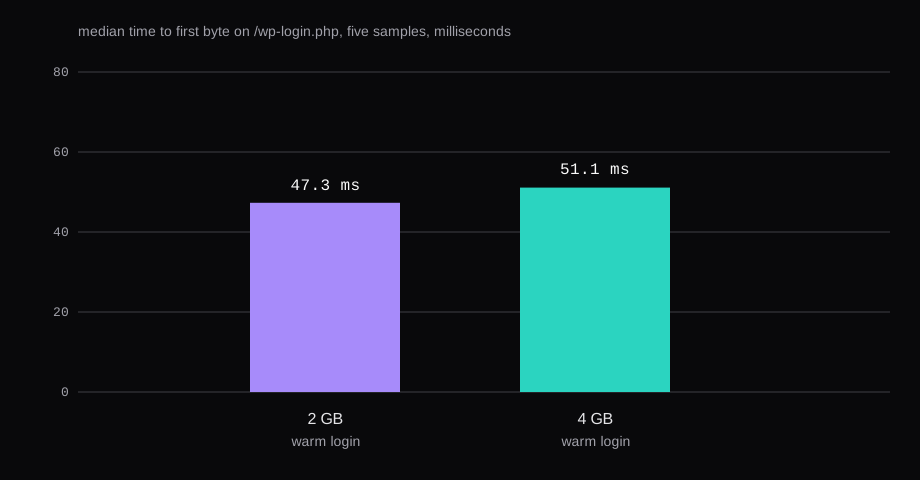
WordPress 7.1.4 on a 2 GB guest answered /wp-login.php in 47.3 ms. The same disk, booted at 4 GB with the same two vCPUs, answered it in 51.1 ms. Both numbers are the median of five warm samples of time_starttransfer, taken with curl on the guest against 127.0.0.1. /hello-world/ was nginx's own 404, 162 bytes, until the location block named index.php. After systemctl restart nginx that URL was a 200 of 71,726 bytes.
W3Techs counts WordPress on 39.5% of websites and 58.2% of the sites where it can name a content management system. The requirements page asks for PHP 8.3 or newer, MariaDB 10.11 or newer or MySQL 8.0 or newer, HTTPS, and Apache or Nginx. The timings are plain HTTP on Ubuntu 24.04.5, kernel 6.8.0-147-generic. Wayback's view counter on DigitalOcean's Ubuntu 16.04 WordPress LAMP tutorial was 795,000, and the 18.04 counter was 617,000. The 22.04 tutorial is the page they still serve.
| 2 GB | 4 GB | |
|---|---|---|
| qemu | -m 2048 -smp 2 | -m 4096 -smp 2 |
MemTotal | 2,014,840 kB | 4,009,844 kB |
SwapTotal | 0 | 0 |
/wp-login.php median | 47.3 ms | 51.1 ms |
/hello-world/ median | 182.0 ms | 133.5 ms |
| mariadbd RSS | 108.8 MiB | 107.3 MiB |
| php-fpm RSS, 3 processes | 156.2 MiB | 135.6 MiB |
| nginx RSS | 12.5 MiB | 12.8 MiB |
MemAvailable | 1,525 MiB | 3,392 MiB |
The guests were KVM, -cpu host, one 12 GB qcow2, swap off. Twenty Twenty-Five 1.5 was the active theme. The plugin list was Akismet 5.7.2 and Hello Dolly 1.7.2, both inactive.
The Instant App locks the distro
The Instant Apps page still uses WordPress as the example, bound to Ubuntu 26.04 LTS. That tab omits cloud-init profiles and inline user data. The docs' examples are WordPress 6.7 and 6.8. First boot writes the generated passwords to /root/.noderings_password and does not send mail. A reboot leaves the file. Reinstall writes new secrets. The firewall checkbox on that screen starts off.
The guest in the table is a plain Ubuntu 24.04.5 cloud image. The nginx file below is the one it served. Instant Apps and the marketplace are separate catalogs. The marketplace docs are where a plan's RAM line is read.
Packages, then the versions they actually were
sudo apt install nginx mariadb-server php-fpm php-mysql \
  php-curl php-gd php-intl php-mbstring php-xml php-zip php-imagick
php-mysql brings mysqli. php8.3-opcache came in with php8.3-fpm. The pool file and the opcache ini are the ones the packages shipped. The pool is user = www-data, pm = dynamic, pm.max_children = 5, pm.start_servers = 2. A one-file PHP script served by FPM printed enable=1, mem=128, revalidate=2, and an empty jit. The ini ships opcache.jit=off.
PHP 8.3.6 (cli)
10.11.14-MariaDB-0ubuntu0.24.04.1
nginx/1.24.0 (Ubuntu)
wp core version printed 7.1.4. WP-CLI was 2.12.0, the phar from raw.githubusercontent.com/wp-cli/builds/gh-pages/phar/wp-cli.phar. The download line from wp core download said the md5 was e3ab64c0de73fe22c0e482c00fa9298c.
A getvps.net install uses Ubuntu 24.04 as well, with MariaDB 11 and Certbot. This guest stayed on Ubuntu's MariaDB 10.11.14, the floor the requirements page names.
The database user is bound to localhost
Root on this image authenticates through the socket, so sudo mariadb opens the client. The WordPress account is a different user, limited to one database and to localhost.
openssl rand -base64 24 | sudo tee /root/.wp-db-pass >/dev/null
sudo chmod 600 /root/.wp-db-pass
sudo mariadb <<SQL
CREATE DATABASE wordpress CHARACTER SET utf8mb4 COLLATE utf8mb4_unicode_ci;
CREATE USER 'wp'@'localhost' IDENTIFIED BY '$(sudo cat /root/.wp-db-pass)';
GRANT ALL PRIVILEGES ON wordpress.* TO 'wp'@'localhost';
FLUSH PRIVILEGES;
SQL
The password stays in /root/.wp-db-pass. SELECT VERSION() was the 10.11.14 string above, bind_address was 127.0.0.1, max_connections was 151, and innodb_buffer_pool_size was 134,217,728 bytes, the packaged 128 MiB. Tune MariaDB from the slow log, not a paste put a 24G pool of this same server version under a 2 GiB cap, and the process was killed. This guest is still on 128 MiB.
sudo mkdir -p /var/www/wordpress
wp core download --path=/var/www/wordpress
wp config create --path=/var/www/wordpress \
  --dbname=wordpress --dbuser=wp \
  --dbpass="$(sudo cat /root/.wp-db-pass)" \
  --dbhost=localhost --skip-salts
curl -fsSL https://api.wordpress.org/secret-key/1.1/salt/ \
  | sudo tee /root/wp-salts.php >/dev/null
sudo chmod 600 /root/wp-salts.php
wp config create can fetch those salts itself. I passed --skip-salts and put the eight define lines from that URL into wp-config.php, above the "stop editing" marker. The URL returns a new set on every request. DB_NAME is wordpress, DB_USER is wp, DB_HOST is localhost.
www-data has to own the tree
The first layout was ubuntu:www-data, directories 775, files 664. PHP-FPM runs as www-data. WordPress will use its direct filesystem method only when a file it creates is owned by the same user as its own PHP files. wp_can_install_language_pack() returned false, the installer skipped the language list, and the site-title form was the first screen.
chown -R www-data:www-data made the owners match. Directories stayed 775, files stayed 664, and wp-config.php was 640. The language list showed up, with English (United States) selected. The SSH user ubuntu is in the www-data group, so it can still edit those group-writable files. A new login is what picks the group up.
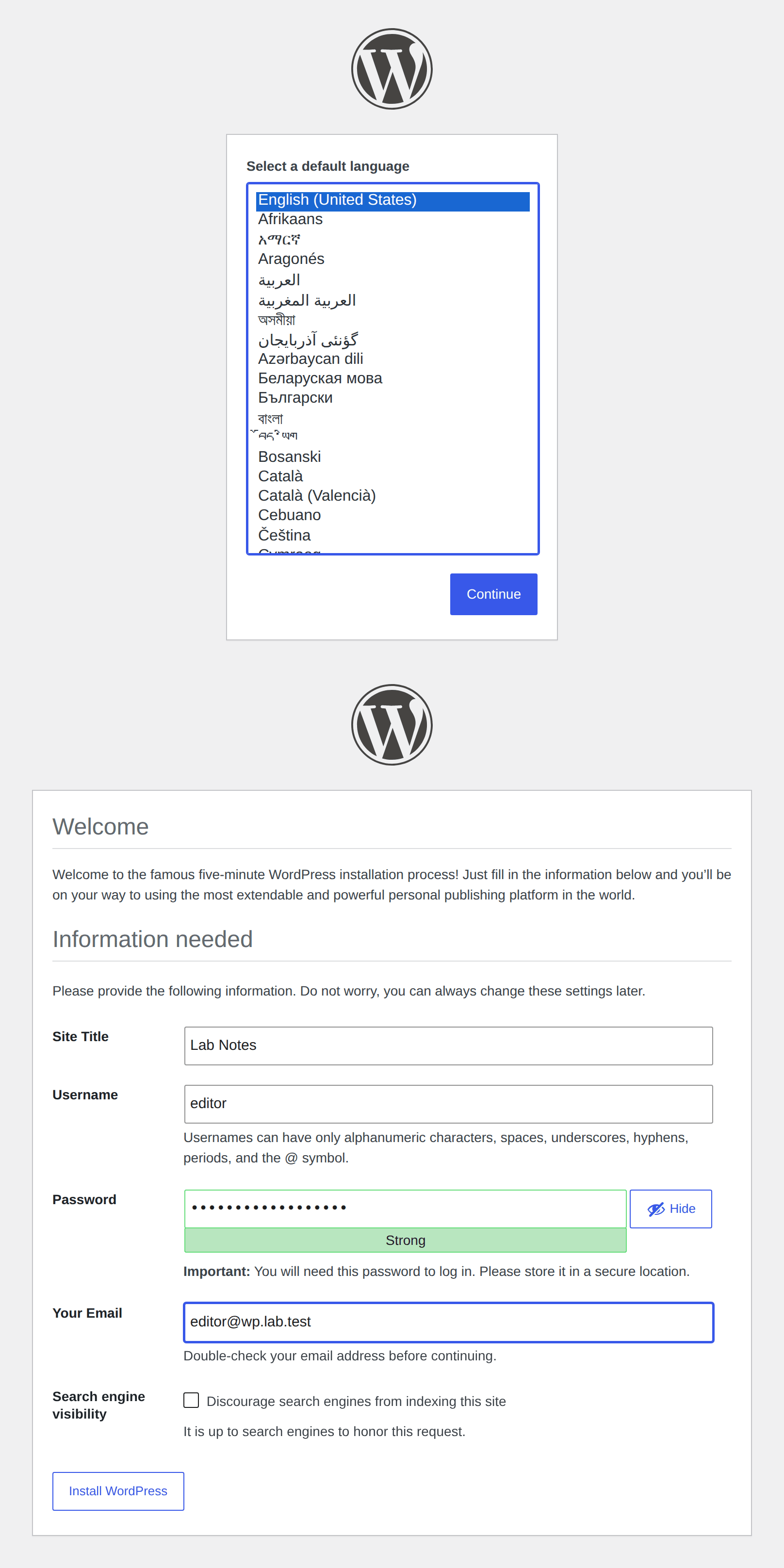
The form in that shot was left unsubmitted. wp core install created the site from the shell, with --skip-email, because this guest has nowhere for mail to go. The URL was http://wp.lab.test, the title Lab Notes, the user editor. The admin password is in /root/.wp-admin-pass, mode 600.
Permalinks 404 until the location names index.php
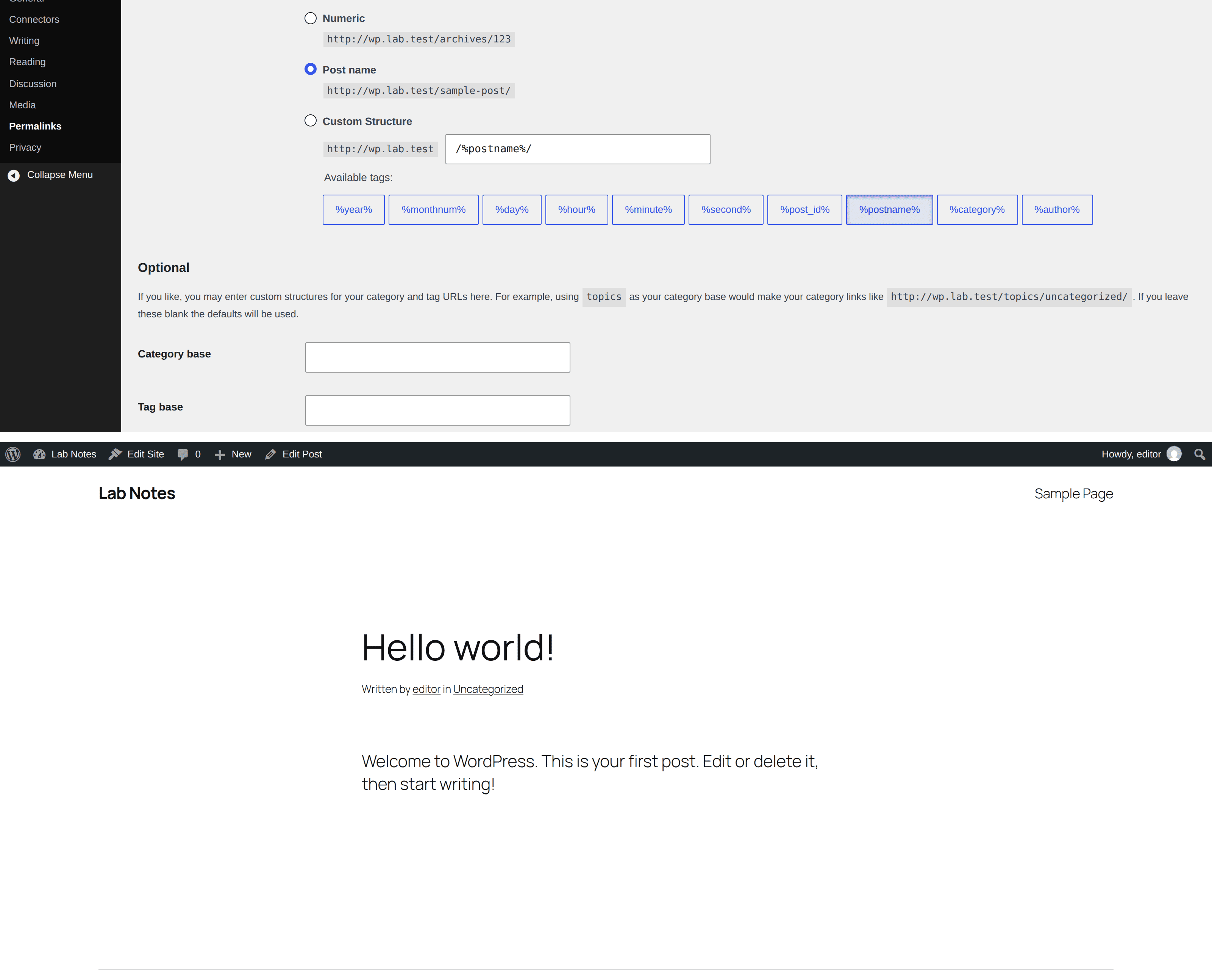
The nginx page in the developer handbook shows try_files $uri $uri/ /index.php?$args for a single site. On Apache with AllowOverride, the permalink radio is enough, because WordPress writes .htaccess. The radio on this guest wrote /%postname%/ into the database and left nginx alone.
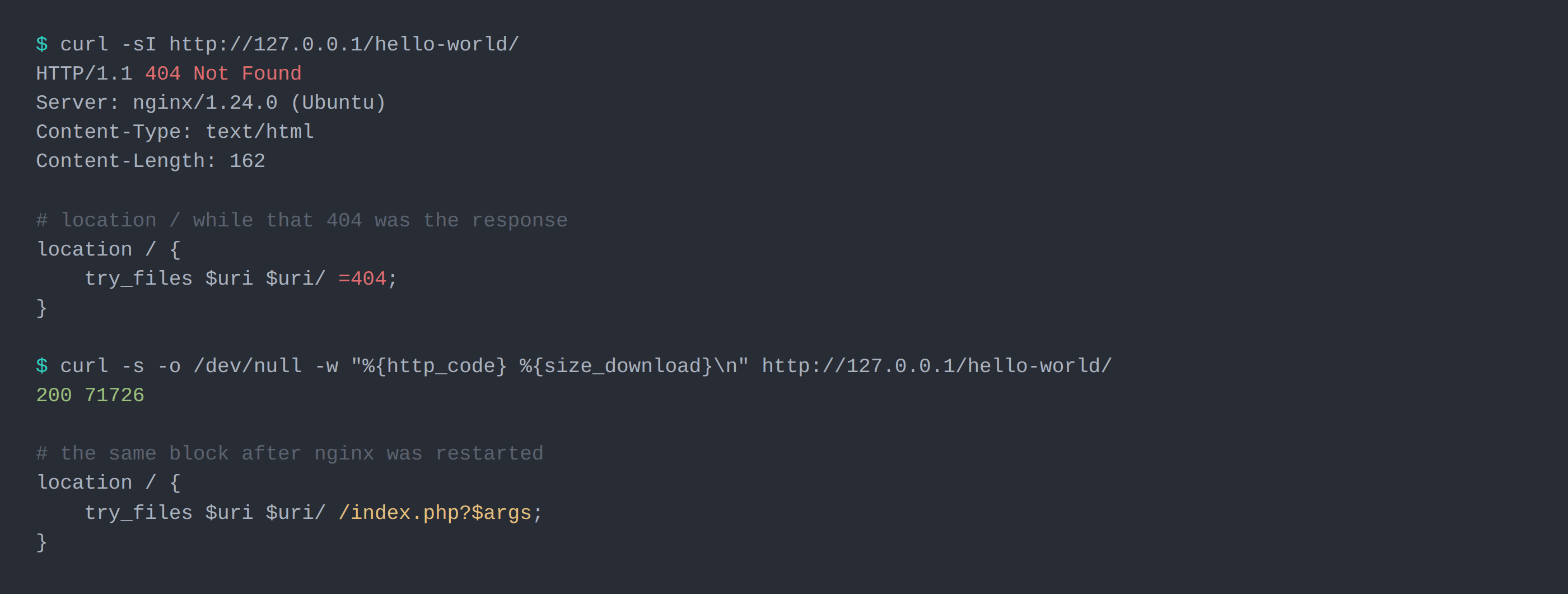
The first server block used try_files $uri $uri/ =404. nginx looked for a file at that path, missed, and returned its own page.
HTTP/1.1 404 Not Found
Server: nginx/1.24.0 (Ubuntu)
Content-Type: text/html
Content-Length: 162
/?p=1 returned 200 through the whole of that. wp rewrite list printed No rewrite rules. The option was set in the database. Nginx reads the server block.
The block that is on disk now:
server {
    listen 80 default_server;
    listen [::]:80 default_server;
    server_name wp.lab.test;
    root /var/www/wordpress;
    index index.php;
    client_max_body_size 64m;

    location / {
        try_files $uri $uri/ /index.php?$args;
    }

    location ~ \.php$ {
        include snippets/fastcgi-php.conf;
        fastcgi_pass unix:/run/php/php8.3-fpm.sock;
    }

    location ~ /\.ht {
        deny all;
    }
}
sudo nginx -t was clean and systemctl reload nginx ran. The next request was still the 162-byte 404. nginx -T reads the file you would load, which already had the new line, and the workers were still on the old one. systemctl restart nginx was the command that served /index.php. The same curl then returned 200 and 71726 bytes. The title in that HTML was the Hello world post.
PHP's upload_max_filesize was 2M, post_max_size was 8M, and memory_limit was 128M. The 64m on the nginx body leaves that 2M ceiling where the package put it.
The extra 2 GB left the warm login alone
The 2 GB samples were taken after the install, the permalink change, and the browser screenshots, so opcache had already compiled the login. They were 37.6, 43.3, 47.3, 50.2, and 56.2 ms. The median is 47.3.
On the 4 GB boot the first request returned 200 in 1.613 seconds. The five after it were 32.4, 38.9, 51.1, 52.2, and 61.6 ms. The median is 51.1. The 2 GB samples are warm only.
/hello-world/ was slower on both boots. The 2 GB samples were 133.4, 179.0, 182.0, 184.4, and 199.0 ms, median 182.0. The 4 GB samples were 104.1, 110.8, 133.5, 137.9, and 186.2 ms, median 133.5. The ranges overlap. The extra RAM stayed free.
The pool may start five children, and each inherits a memory_limit of 128M. The sample caught three.
curl -s -o /dev/null -w "%{http_code} %{time_starttransfer}\n" \
  http://127.0.0.1/wp-login.php
Error establishing a database connection
That sentence is the <h1> of a page titled Database Error. HTTP status 500, 2,482 bytes. I set DB_PASSWORD to a value that fails authentication for wp, and requested /.
MariaDB logged one warning:
[Warning] Access denied for user 'wp'@'localhost' (using password: YES)The same <h1> came back when DB_HOST was localhost:/tmp/no-such.sock. MariaDB's journal stayed unchanged. The socket on this guest is /run/mysqld/mysqld.sock, mode 777, owner mysql. DB_HOST of localhost is that socket. 127.0.0.1 would be TCP to bind_address. A wrong password reaches the server and gets refused. A wrong socket never arrives, and the page still looks the same.
I put DB_HOST and DB_PASSWORD back. /wp-login.php returned 200.
Ports 22, 80, and 443
The timings above were taken before ufw existed on the guest. After them I set incoming to deny, allowed 22, 80, and 443, and enabled it. SSH on port 2222 of the host, forwarded to 22, still logged in.
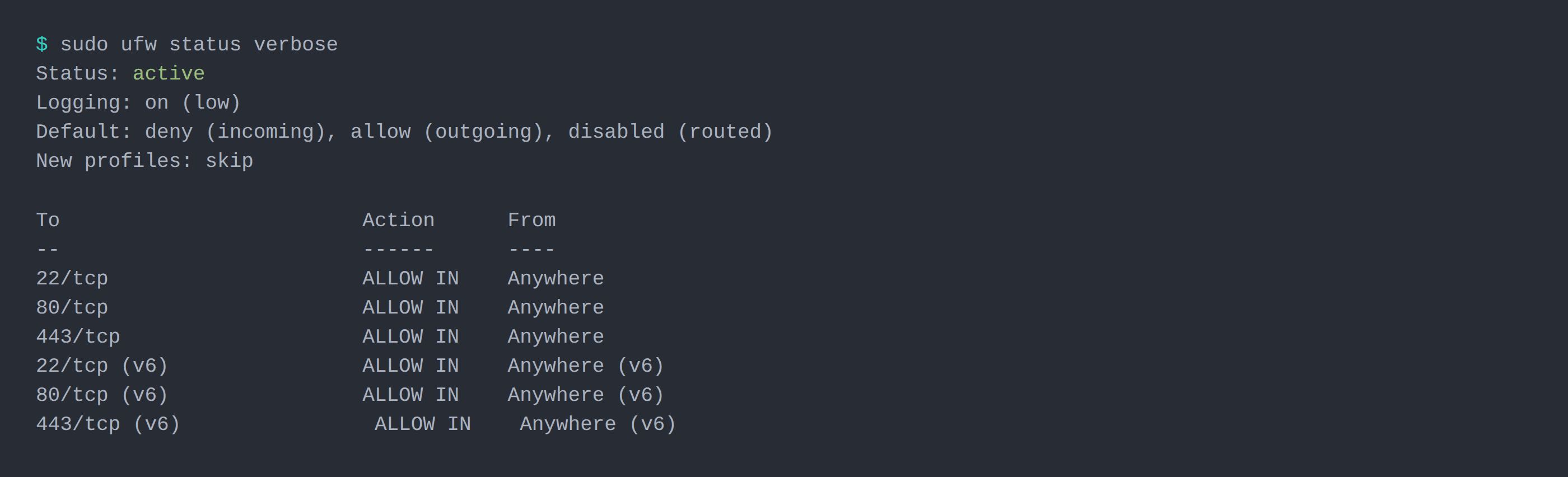
On a Proxmox VM bought through NodeRings, the ruleset in front of the guest is the firewall on the VM. The Instant App checkbox that would create those rules starts off. The name wp.lab.test was a hosts entry on the machine that ran the browser. A public name is DNS.
This guest stopped at HTTP. Caddy vs Traefik vs Nginx Proxy Manager on one VPS is the post that terminates HTTPS and times it. Certbot is the usual follow-on for this nginx file, once the A record points here and 80 and 443 are open in front of the guest. Behind TLS termination, set HTTPS from X-Forwarded-Proto (or WP_HOME / WP_SITEURL on https) so WordPress does not emit http:// links and bounce into a redirect loop (serverkueche). Keep MariaDB on localhost or an internal Docker network with no published port (DCHost). After first login, delete Hello Dolly and the sample content, set DISALLOW_FILE_EDIT, and block or rate-limit xmlrpc.php and /wp-login.php if you do not need them.
A move is the database and wp-content
This run is a new install. A site leaving shared hosting brings its database and its wp-content directory. The old URL sits in the options table, and wp search-replace is the WP-CLI command that rewrites it. The siteurl here is http://wp.lab.test. The .htaccess from the old host still needs the nginx line above, or the pretty URLs come back as that 162-byte page.
Questions that come with the first boot
Is 2 GB enough for WordPress?
For this site, yes. The table is one post on Twenty Twenty-Five, both bundled plugins inactive, with 1,525 MiB still available. A 1 GB boot and WooCommerce are outside this run.
Why does the permalink page save and the URL still 404?
The save writes /%postname%/ into the database. Nginx answers from the server block. Until that block ends in /index.php?$args, /hello-world/ is the 162-byte page and /?p=1 keeps working.
Which log line is the database error?
Access denied for user 'wp'@'localhost' (using password: YES) when the password is wrong. MariaDB stays quiet when the socket path is wrong. The browser shows the same heading either way.