
A Hytale dedicated server, on the server manual, needs Java 25, at least 4 GB of memory, and UDP 5520. The same page wants the view held to 12 chunks, which it counts as 384 blocks. The sample jvm.options in the launcher script sets -Xmx4G, so the heap ceiling and the memory floor are the same 4 GB.
The downloader zip is 9,724,217 bytes. The Linux binary inside it printed 2026.05.13-99ade04 from -version. -print-version, the flag the quick start says will name the game build without downloading, still opened a device login. That process was stopped. There is no HytaleServer.jar here, and no cgroup reading from a boot.
| Piece | What the manual says |
|---|---|
| Java | 25. Adoptium is the build it recommends. x64 and arm64 both run. |
| Memory | At least 4 GB. Usage moves with the loaded world. |
| View | Hold the maximum at 12 chunks, 384 blocks. |
| Port | UDP 5520. The protocol is QUIC. --bind changes the port. |
| Heap sample | -Xms2G and -Xmx4G, one flag per line in jvm.options. |
| Login | /auth login device, then https://accounts.hytale.com/device. 500 servers on one game license. |
How much RAM does a Hytale server need?
The 4 GB line is the floor for the machine, and the page is plain about what pushes past an empty start. CPU moves with player count and with entities, NPCs and mobs included. RAM moves with the loaded area: a high view distance, and players who explore on their own. Two people who stay in one camp keep one region in memory. Two people who walk apart keep two. The page also says that, without extra tooling, it is hard to see how much of the allocated heap the process really needs, and that a tight heap shows up as CPU because the collector gets busy.
The sample file next to start.sh is three lines:
-Xms2G
-Xmx4G
-XX:+UseG1GC
A 4 GB guest in the Paper systemd run had MemTotal of 4,009,864 kB. -Xms4G -Xmx4G tried to map 4,294,967,296 bytes, and the kernel returned errno 12 before the server printed a version. The Hytale sample starts lower, at 2 GB, and still allows the heap to grow to 4 GB. The operating system, the asset cache, and the rest of the JVM share the machine with that ceiling. A plan whose entire size is 4 GB is the floor with the sample heap laid on top of it.
View distance is the knob the manual names for that RAM. It asks you to limit the maximum to 12 chunks, 384 blocks, for performance and for gameplay. It sets that next to Minecraft's default of 10 chunks, 160 blocks, and it says Hytale's 384 block default is about 24 Minecraft chunks. Twelve against ten is a small step in chunk count. In blocks the same pair is 384 against 160.
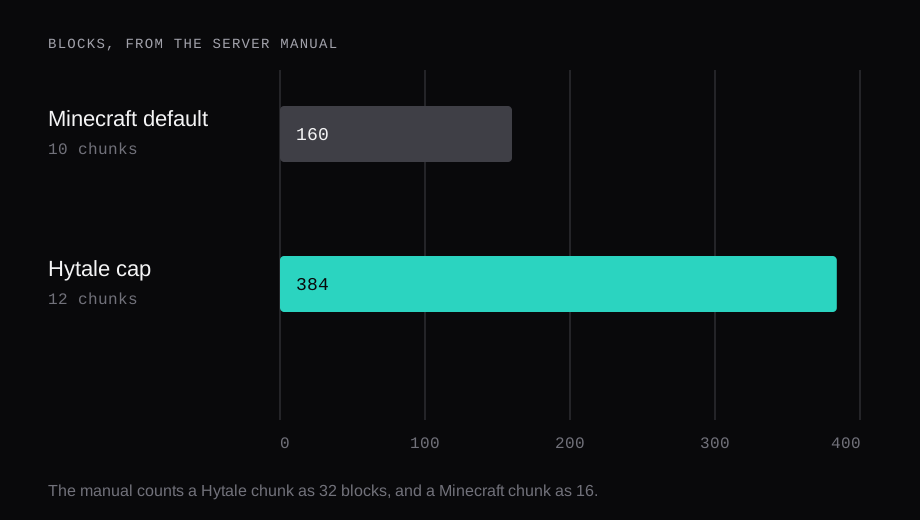
The generated server API names the field MaxViewRadius on HytaleServerConfig, the class it describes as the configuration file. The constants page sets both DEFAULT_MAX_VIEW_RADIUS and MAX_VIEW_RADIUS_LIMIT to 32. The comment on the ceiling says the offset list grows with the cube of the radius, so an unbounded value can force a multi-gigabyte allocation the first time chunk tracking runs, and a larger server value buys nothing because the client clamps its own sphere. This run stopped before a config.json existed, so the value the process would have written is unread, and the constants page leaves the unit of that 32 unnamed. The manual's 12 chunk cap and the class's 32 are both published.
Which Java does the server run?
The manual's check is java --version. The sample it prints is Temurin 25.0.1+8. On this machine the java on the path is Ubuntu's OpenJDK 11.0.32.1. A Temurin 25 JDK, unpacked and invoked by its own path so it left the system binary alone, printed 25.0.5+8-LTS.
openjdk 11.0.32.1 2026-08-18
OpenJDK Runtime Environment (build 11.0.32.1+1-post-1ubuntu1-24.04-Ubuntu)
OpenJDK 64-Bit Server VM (build 11.0.32.1+1-post-1ubuntu1-24.04-Ubuntu, mixed mode, sharing)

openjdk 25.0.5 2026-10-20 LTS
OpenJDK Runtime Environment Temurin-25.0.5+8 (build 25.0.5+8-LTS)
OpenJDK 64-Bit Server VM Temurin-25.0.5+8 (build 25.0.5+8-LTS, mixed mode, sharing)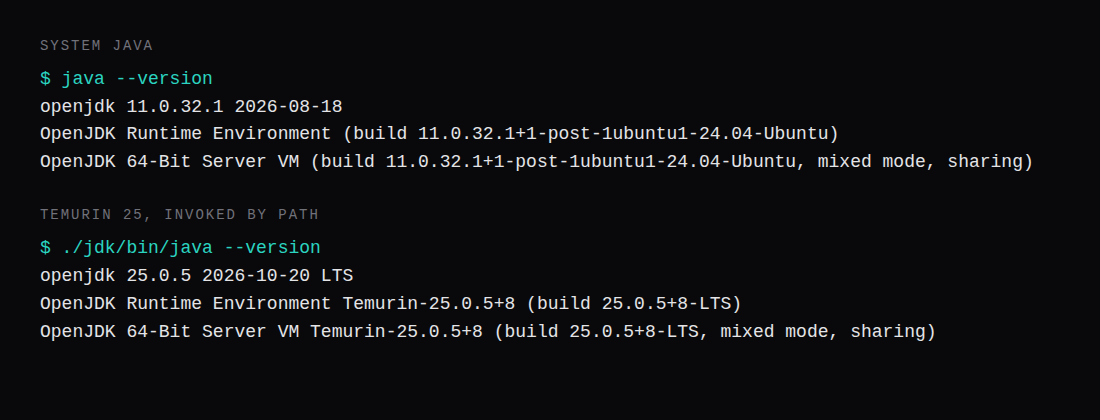
The one-line start on the manual includes the ahead-of-time cache the server ships:
java -XX:AOTCache=HytaleServer.aot -jar HytaleServer.jar --assets Assets.zipThe start.sh printed in the same article passes jvm.options and then the jar. The AOT flag is in that one-liner, and it is absent from the script unless you add the line to jvm.options. The script's own server arguments are --assets ../Assets.zip --backup --backup-dir backups --backup-frequency 30.
The release Maven metadata lists latest as 0.7.5, one of five versions in the file. The manual's pom example is 2026.01.22-6f8bdbdc4, with a note to replace it. That metadata names the modding jar. The game build the downloader would have fetched stayed behind the device login.
The manual's sample directory listing shows Assets.zip at 3,298,097,359 bytes, next to Client and Server. That is the listing on the page. It is the size of the copy step, and it is a reason the disk has to be larger than the 4 GB of RAM.
UDP 5520, and the Minecraft rule beside it
The help text in the manual defaults the bind to 0.0.0.0:5520. --bind 3500 is the example of a different port. The protocol is QUIC over UDP. A TCP forward on 25565, the Minecraft Java port, arrives on a different protocol and a different port. The Linux rule on the page is:
sudo ufw allow 5520/udpThe same section has an iptables line and a Windows firewall cmdlet. 5520 stayed closed, because the jar was left unbooted.
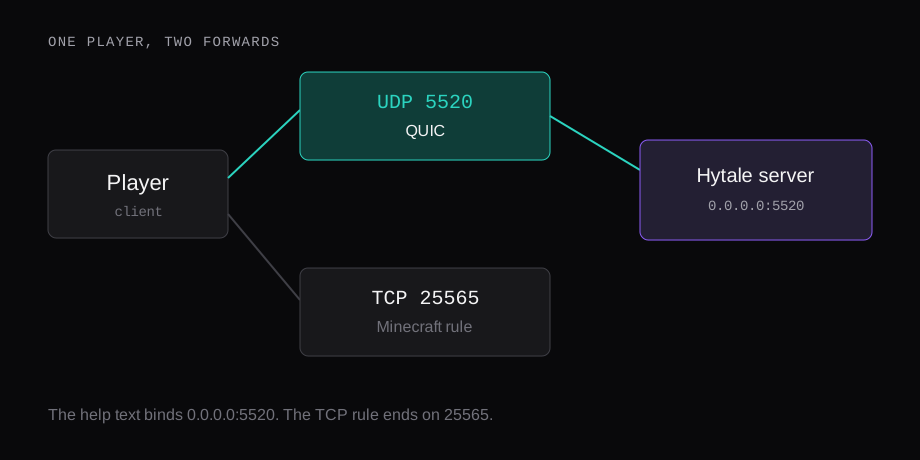
On a home router the forward has to be UDP. The page says QUIC copes with most NAT, and that symmetric NAT can break the path, in which case it points the host at a VPS. Clients on carrier-grade NAT are expected to connect. SRV records, the trick that hides a port behind a name, are listed as unsupported, so the address players type still carries the port.
The device login, then the files
Three ways onto the files, all of them tied to an account that owns the game. Copy Server and Assets.zip out of the launcher install. Run the downloader, which is OAuth. Or start HytaleServer.jar --bootstrap, run /auth login device, then /update setup or /update download, and let it extract Assets.zip, start.sh, and Server/. The credentials from that login are carried into the real boot.
The prompt the manual shows is a visit to https://accounts.hytale.com/device, a code, and a wait of 900 seconds. After that, the sample line is Authentication successful! Mode: OAUTH_DEVICE. One game license can register 500 servers. Past that, the page says you buy another license. A fleet that has to log in without a person at each console is the provider authentication guide. The single server is the device command.
config.json, permissions.json, bans.json, and whitelist.json are read at startup. An in-game change writes them back, so a hand edit while the process is up gets replaced. Stop it, then edit. Worlds live under universe/worlds/, each with its own config.json, its own main thread, and a share of a pool for the parallel work. Mods are zip or jar files dropped in mods/.
Exit code 8 and the wrapper
The updater checks on an interval of 3600 seconds, downloads into updater/staging/, and shuts down with exit code 8 when the files are ready. start.sh is what notices 8, copies the staged jar and assets over the old ones, and leaves config, saves, and mods in place. Any other exit ends the loop. A crash within 30 seconds of an applied update points at updater/backup/ for a rollback. HYTALE_DISABLE_UPDATES turns the checker off. The layout has to be the one the page draws, Assets.zip and the script beside a Server/ directory, or the checker stays disabled.
That loop is the script. A panel that starts java -jar on its own, or restarts the process without the script, leaves the staged files where the updater put them. The gameserver template docs describe the egg catalog. Exit code 8 is the wrapper's job, and that page stays on the catalog.
The script also turns on the game's own backups, every 30 minutes, under backups/. On a hosted panel the Backups tab, when the plan includes it, is a different copy. Order the game from the host is where the plan and that tab come from. The server page is where the console and the files are. The protocol hash has to match the client exactly, or the join is rejected. The page lists a later window of two protocol versions either side. The rule it describes as current is the exact hash.
What are the Hytale server requirements?
Java 25, at least 4 GB of memory, x64 or arm64, and UDP 5520. The manual wants the view held to 12 chunks, 384 blocks. The sample heap ceiling is -Xmx4G.
What is MaxViewRadius?
The field on HytaleServerConfig. The constants page sets the default and the ceiling to 32, and it leaves the unit unnamed. The server manual's cap, in chunks, is 12.
Which port does a friend need open?
UDP 5520, or whatever you passed to --bind. The packet is QUIC. A TCP forward on 25565 stays on the Minecraft port.
How many servers can one Hytale license run?
One license runs 500 servers. The manual says another game license is how you go past that.