
DNS is the part of an infrastructure that people still edit by hand, in a web form, at the worst possible moment. Then someone asks why the SPF record changed and nobody knows. Putting the zone in Terraform fixes the "who changed it" question with a git log and the "what will change" question with terraform plan.
We wrote one main.tf with a zone, an apex address, www, two MX hosts, SPF, DMARC, a CAA record, a GeoDNS answer and DNSSEC signing. terraform apply created all nine resources in 8.5 seconds on the NodeRings provider. terraform destroy removed them in 7.6.
| You want to | Resource |
|---|---|
| Host a domain | noderings_dns_zone |
| Add records of one name and type | noderings_dns_record |
| Answer differently by continent, country or region | noderings_dns_geo_record |
| Sign the zone | noderings_dns_zone_dnssec |
| Read a zone you did not create here | data.noderings_dns_zone |
If you also need the servers those records point to, Order a VPS with Terraform covers the VM side with the same provider.
Set up the provider
You need Terraform 1.5 or newer (we used 1.17.2) or OpenTofu, and a NodeRings service account token. In the console, open Organization, then Access Control, then Service accounts, create one, and generate a token. A role that only covers DNS is enough for everything in this post.
export NODERINGS_TOKEN="paste-the-token-here"terraform {
required_providers {
noderings = {
source = "noderings/noderings"
version = "~> 0.1"
}
}
}
provider "noderings" {}Create the zone and delegate it
resource "noderings_dns_zone" "site" {
  name                = "example.com"
  deletion_protection = true
}

output "nameservers" {
  value = noderings_dns_zone.site.nameservers
}
After the apply, Terraform prints the two nameservers:
nameservers = tolist([
  "ans1.nrings.io",
  "ans2.nrings.io",
])
Set those at your registrar. Until the registrar's change reaches the parent zone, the zone's state is pending_ns and delegation_ok is false. You do not have to wait for that to keep working. The nameservers answer for the zone straight away, so you can build every record and test them with dig @ans1.nrings.io before you switch the delegation. That is the safe order for a migration: copy the records, compare the answers, then move the NS.
deletion_protection = true makes Terraform refuse to delete the zone. Leave it on. A deleted zone takes every record with it, and on a busy domain the damage is measured in mail that bounced.
Add records, one resource per name and type
A noderings_dns_record is an RRset: every value for one name and one type. Two A records for www are one resource with two values. That matches how DNS works and avoids the classic problem of two resources fighting over the same name.
resource "noderings_dns_record" "apex" {
  zone_id = noderings_dns_zone.site.id
  name    = "@"
  type    = "A"
  ttl     = 300
  records = ["192.0.2.10"]
}

resource "noderings_dns_record" "mx" {
  zone_id = noderings_dns_zone.site.id
  name    = "@"
  type    = "MX"
  ttl     = 3600
  records = ["10 mx1.mail.example.net.", "20 mx2.mail.example.net."]
}
@ is the zone apex and * is a wildcard. Hostnames inside values end with a dot. TXT values go in as plain text without the surrounding quotes, and values longer than 255 characters (a 2048-bit DKIM key, say) are split into strings for you.
A real zone has a dozen of these, and a dozen near-identical blocks get tedious. A map and for_each keep the whole zone readable on one screen:
locals {
  records = {
    "@/A"        = { ttl = 300, values = ["192.0.2.10"] }
    "@/AAAA"     = { ttl = 300, values = ["2001:db8::10"] }
    "www/CNAME"  = { ttl = 300, values = ["example.com."] }
    "@/MX"       = { ttl = 3600, values = ["10 mx1.mail.example.net.", "20 mx2.mail.example.net."] }
    "@/TXT"      = { ttl = 3600, values = ["v=spf1 include:mail.example.net -all"] }
    "_dmarc/TXT" = { ttl = 3600, values = ["v=DMARC1; p=quarantine; rua=mailto:dmarc@example.com"] }
    "@/CAA"      = { ttl = 3600, values = ["0 issue \"letsencrypt.org\""] }
  }
}

resource "noderings_dns_record" "this" {
  for_each = local.records

  zone_id = noderings_dns_zone.site.id
  name    = split("/", each.key)[0]
  type    = split("/", each.key)[1]
  ttl     = each.value.ttl
  records = each.value.values
}
The key is name/type, which is also how Terraform addresses each record in the state, so terraform state list reads like the zone file.
Check the answers with dig
Ask the NodeRings nameserver directly, so no resolver cache gets in the way:
$ dig +short @ans1.nrings.io example.com MX
20 mx2.mail.example.net.
10 mx1.mail.example.net.
$ dig +short @ans1.nrings.io _dmarc.example.com TXT
"v=DMARC1; p=quarantine; rua=mailto:dmarc@example.com"
$ dig +short @ans1.nrings.io example.com CAA
0 issue "letsencrypt.org"
The TXT value comes back quoted because that is how dig prints TXT strings. In Terraform it stays unquoted. If you paste the quotes into records, they become part of the value.
Send visitors to the nearest server with a GeoDNS record
noderings_dns_geo_record returns a different answer depending on where the query comes from. The most specific match wins: a region such as US-CA, then a country, then a continent, then default.
resource "noderings_dns_geo_record" "app" {
  zone_id = noderings_dns_zone.site.id
  name    = "app"
  type    = "A"
  ttl     = 60
  default = "192.0.2.10"

  continents = {
    EU = "198.51.100.10"
  }
  countries = {
    JP = "203.0.113.10"
  }
}
"Where the query comes from" usually means the resolver, and with EDNS Client Subnet it means the visitor's network. The nameserver sees the resolver explains why that difference matters. dig can pretend to be any network with +subnet, which makes the record testable from one laptop:
$ dig +short @ans1.nrings.io app.example.com A +subnet=81.2.69.0/24
198.51.100.10
$ dig +short @ans1.nrings.io app.example.com A +subnet=133.242.0.0/24
203.0.113.10
$ dig +short @ans1.nrings.io app.example.com A +subnet=8.8.8.0/24
192.0.2.10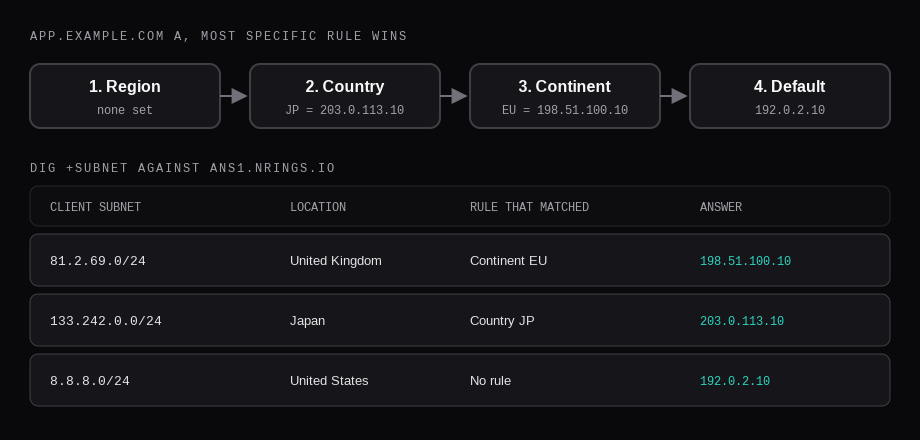
The geo database decides what "Europe" means, and databases disagree at the edges. One /24 we tested sits in a data center in Ashburn, and ipinfo.io places it in the US. The nameserver's database put it in Europe and returned the EU answer. Cloud and hosting ranges move between owners more often than home broadband does, so test the subnets of the networks you care about instead of trusting the map.
Geo records accept a TTL of 30 to 60 seconds, defaulting to 60. A long TTL would let a resolver serve one region's answer to everyone behind it. Only A, AAAA, CNAME, NAPTR and SRV can be geo-routed, and each name has one geo record. If you are deciding between GeoDNS and anycast in the first place, GeoDNS vs Anycast for a small site compares the two on two VPS.
Sign the zone with DNSSEC
resource "noderings_dns_zone_dnssec" "site" {
  zone_id = noderings_dns_zone.site.id
}

output "ds_record" {
  value = noderings_dns_zone_dnssec.site.ds
}
The apply prints the DS record to give your registrar:
ds_record = "15069 13 2 89bf3065bf177911211dbf61229138db993a9e5255324733c3bb38704f0d8434"That is key tag 15069, algorithm 13 (ECDSA P-256 with SHA-256) and digest type 2 (SHA-256). The zone is signed as soon as the resource exists, and mode reads signed_ds_pending until NodeRings sees the DS at the parent, then signed_active.
The order of operations matters more with DNSSEC than with anything else in DNS. With the DS published at the parent, a validating resolver rejects any answer it cannot verify, so turning signing off first breaks the domain for those users. The provider refuses to delete the DNSSEC resource or the zone while the DS is still at the parent, unless you set force_destroy = true. Remove the DS at the registrar, wait for the parent's TTL, and then remove the resource. DNSSEC fails closed goes through what that failure looks like.
Bring an existing zone under Terraform
If the zone was built in the console or by another tool, import it instead of recreating it. Terraform 1.5 and newer read import blocks, and the record ID is <zone id>/<name>/<type>:
import {
  to = noderings_dns_record.blog
  id = "${noderings_dns_zone.site.id}/blog/A"
}

resource "noderings_dns_record" "blog" {
  zone_id = noderings_dns_zone.site.id
  name    = "blog"
  type    = "A"
  ttl     = 300
  records = ["192.0.2.44"]
}
noderings_dns_record.blog: Preparing import... [id=58f6f616-9837-44b0-844a-171f1f71ff51/blog/A]
Plan: 1 to import, 0 to add, 0 to change, 0 to destroy.We created that record with Ansible first, to stand in for a record somebody made by hand, and the plan picked it up without touching it. When the values in your block differ from what is live, the plan shows the difference as an update, which is a cheap way to find out what the zone really holds.
Common errors
These came straight out of our runs.
| Error | Cause | Fix |
|---|---|---|
@ A records already exist in the zone. Import them with terraform import ... or set allow_overwrite = true to replace them. | A record of that name and type exists outside Terraform | Import it, or set allow_overwrite = true to take it over |
CNAME not allowed at the apex with Use ALIAS for the zone apex. | A CNAME on @, which DNS forbids next to SOA and NS | Use type = "ALIAS" at the apex |
Attribute ttl value must be between 30 and 60, got: 300 | A long TTL on a geo record | Use 30 to 60 seconds |
Domain already hosted. (HTTP 409) | The domain is already a zone in some organization | Import that zone, or remove it from the other organization first |
Frequently asked questions
Can Terraform manage DNS records?
Yes. With the NodeRings provider, noderings_dns_zone creates the zone and noderings_dns_record manages each set of records by name and type. Twenty-three record types are supported, including MX, TXT, CAA, SRV, TLSA and HTTPS.
How do I add an MX record with Terraform?
Use noderings_dns_record with name = "@", type = "MX" and each value as priority plus hostname, for example "10 mx1.mail.example.net.". Put all MX hosts in one resource.
Does Terraform support GeoDNS?
On NodeRings, yes, through noderings_dns_geo_record. You set a default answer and optional answers per continent, country or region, and the most specific match wins.
Can I enable DNSSEC with Terraform?
Yes. noderings_dns_zone_dnssec signs the zone and outputs the DS record for your registrar. The zone becomes signed_active once the DS is visible at the parent.
Does it work with OpenTofu?
Yes. The provider works the same in OpenTofu. Run tofu init and tofu apply instead.
Try it
Copy the blocks above into one main.tf, replace example.com with your domain, and run terraform apply. Check every answer with dig @ans1.nrings.io before you change the nameservers at your registrar. If your team configures servers with Ansible rather than Terraform, Order and configure a VPS with one Ansible playbook manages the same zones and records from a playbook.