
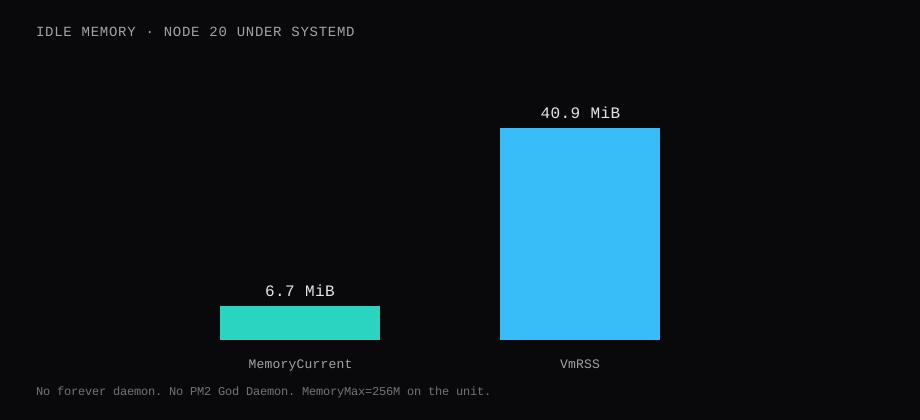
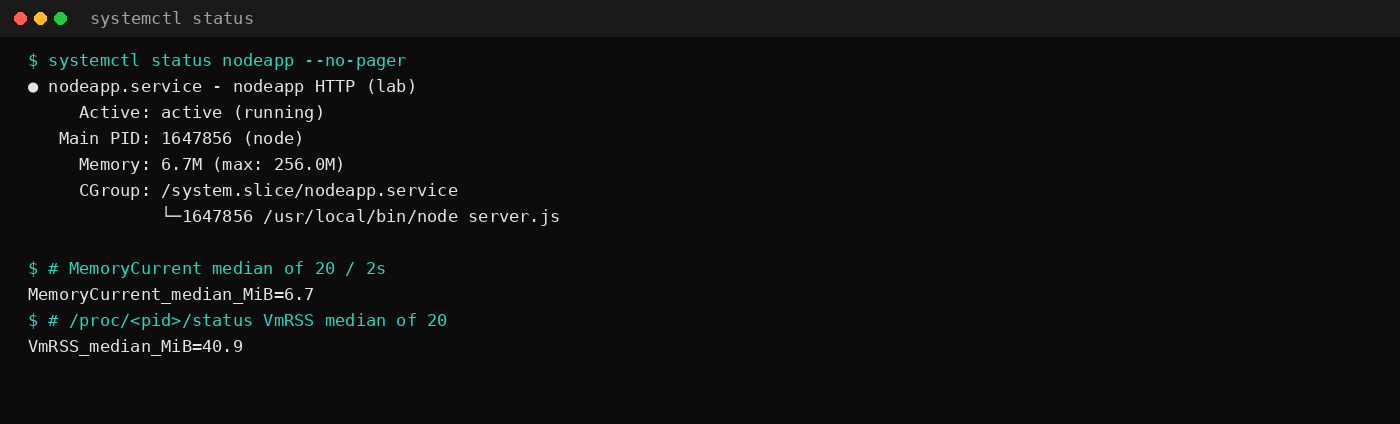
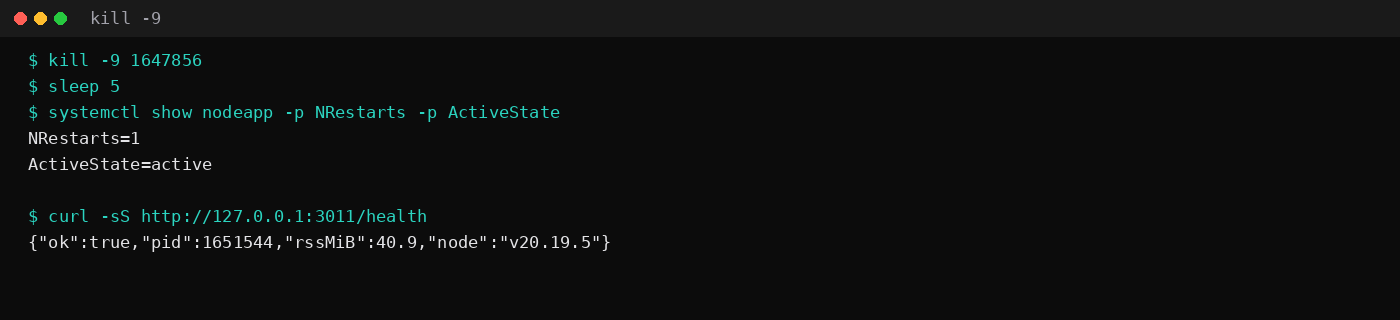
Node v20.19.5 under a systemd unit held 6.7 MiB idle MemoryCurrent on this lab host. That is the unit's cgroup charge, the median of twenty samples two seconds apart after a quiet window. /proc/<pid>/status VmRSS sat at 40.9 MiB for the same process (shared mapped pages of the Node binary show up in RSS; the cgroup number is closer to anonymous charge). After kill -9 on the MainPID, systemd scheduled a restart, NRestarts went to 1, and the unit was active (running) again. curl to the loopback /health endpoint returned 200 on the new PID.
The stack carries no forever daemon and no PM2 God Daemon. The init system already on Ubuntu is the supervisor.
| Reading | Value |
|---|---|
systemd MemoryCurrent | 6.7 MiB, median of 20 |
process VmRSS | 40.9 MiB, median of 20 |
NRestarts after kill -9 | 1 |
| Health | 127.0.0.1:3011/health → 200 |
| Stack | Node v20.19.5, unit nodeapp.service, user nodeapp |
MemoryMax | 256M |
forever 4.0.3 last published a version in January 2022. It still installs from npm, and old bookmarks still say forever start app.js. On a current Ubuntu VPS that path adds another user-space supervisor for a job systemd already does with journald, cgroups, and enable. Keep forever on the skip list for new apps.
PM2 still earns a place when you want cluster mode, pm2 monit, or several Node apps under one CLI. The Discord bot + PM2 post measured that stack. This post is the one-service Linux path.
| Skip this | What this run did |
|---|---|
forever start server.js | systemd unit with Restart=always |
nohup node server.js & in SSH | systemctl enable --now nodeapp |
| Running as root | User=nodeapp / Group=nodeapp |
Binding 0.0.0.0:3000 on a public NIC | 127.0.0.1 only (lab port 3011) |
| Leaving the unit disabled | enabled under multi-user.target |
Why systemd instead of forever?
forever answered a real problem when people ran Node from a shell and watched SSH drop kill the process. Ubuntu's default init since 15.04 already restarts services, collects logs, and applies memory ceilings. A .service file is one more unit beside nginx or Caddy. You read failures with journalctl -u nodeapp. You cap leaks with MemoryMax=. You avoid a second Node process whose only job is babysitting the first.
Use forever only while you migrate an old host that already depends on it. New deploys skip it.
How do you install the app and the user?
Create a system user and a directory it owns. Point ExecStart at the same node binary command -v node prints (here /usr/local/bin/node for v20.19.5).
sudo useradd --system --create-home --home-dir /home/nodeapp --shell /usr/sbin/nologin nodeapp
sudo mkdir -p /home/nodeapp/app
sudo chown -R nodeapp:nodeapp /home/nodeapp
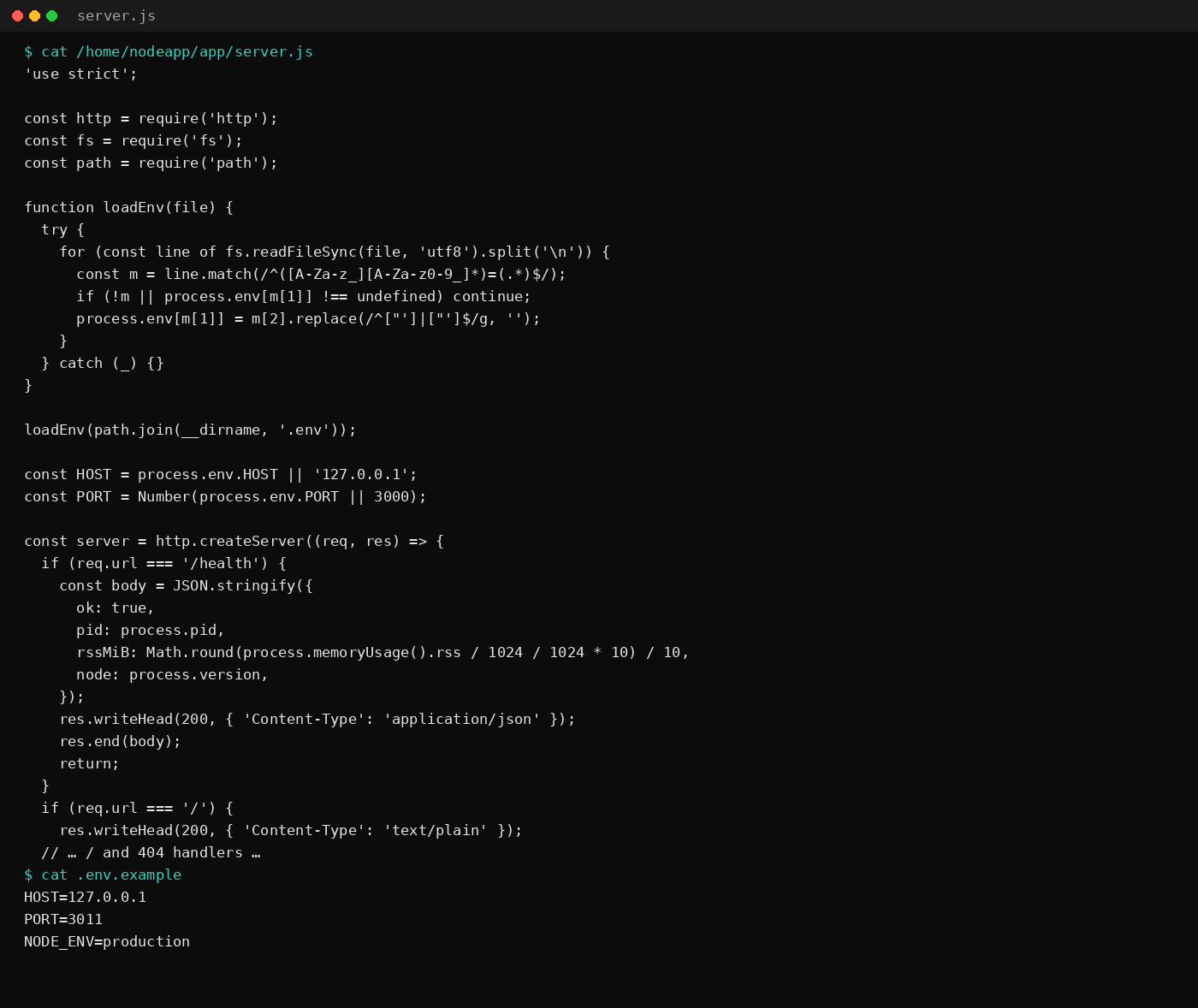
server.js is a plain http server. This lab stayed on the core module. It loads .env from the working directory, listens on HOST/PORT, and serves /health with pid and RSS.
'use strict';

const http = require('http');
const fs = require('fs');
const path = require('path');

function loadEnv(file) {
  try {
    for (const line of fs.readFileSync(file, 'utf8').split('\n')) {
      const m = line.match(/^([A-Za-z_][A-Za-z0-9_]*)=(.*)$/);
      if (!m || process.env[m[1]] !== undefined) continue;
      process.env[m[1]] = m[2].replace(/^["']|["']$/g, '');
    }
  } catch (_) {}
}

loadEnv(path.join(__dirname, '.env'));

const HOST = process.env.HOST || '127.0.0.1';
const PORT = Number(process.env.PORT || 3000);

const server = http.createServer((req, res) => {
  if (req.url === '/health') {
    const body = JSON.stringify({
      ok: true,
      pid: process.pid,
      rssMiB: Math.round(process.memoryUsage().rss / 1024 / 1024 * 10) / 10,
      node: process.version,
    });
    res.writeHead(200, { 'Content-Type': 'application/json' });
    res.end(body);
    return;
  }
  if (req.url === '/') {
    res.writeHead(200, { 'Content-Type': 'text/plain' });
    res.end('nodeapp ok\n');
    return;
  }
  res.writeHead(404);
  res.end();
});

server.listen(PORT, HOST, () => {
  console.log(`listening on http://${HOST}:${PORT}`);
});
# /home/nodeapp/app/.env
HOST=127.0.0.1
PORT=3000
NODE_ENV=productionThis lab used PORT=3011 because 127.0.0.1:3000 was already taken on the host. Prefer 3000 on a clean guest. Keep secrets in .env with mode 0600 owned by nodeapp.
What does the unit file look like?
[Unit]
Description=nodeapp HTTP
Documentation=https://nodejs.org/docs/latest-v20.x/api/
After=network-online.target
Wants=network-online.target

[Service]
Type=simple
User=nodeapp
Group=nodeapp
WorkingDirectory=/home/nodeapp/app
Environment=NODE_ENV=production
EnvironmentFile=-/home/nodeapp/app/.env
ExecStart=/usr/local/bin/node server.js
Restart=always
RestartSec=3
NoNewPrivileges=true
MemoryMax=256M

[Install]
WantedBy=multi-user.target
Write that to /etc/systemd/system/nodeapp.service. The leading - on EnvironmentFile means a missing file is non-fatal. Restart=always covers crashes and SIGKILL. MemoryMax=256M is a tripwire for this tiny app; raise it for Next.js or a fat API after you watch the graph.
Unit files under /etc/systemd/system are world-readable, and systemctl show prints the environment. Put secrets in the EnvironmentFile with mode 600 (or 640 and group membership for the service user), never as plain Environment= lines for tokens. Prefer absolute paths in ExecStart; systemd does not run a shell, so ~, pipes, and $PATH surprises fail quietly.
A useful hardening block on top of NoNewPrivileges is ProtectSystem=strict, ProtectHome=true, PrivateTmp=true, plus ReadWritePaths= for any directory the app must write (uploads, SQLite, logs). If the process needs nowhere writable except its state dir, that is the shape. Add StartLimitBurst / StartLimitIntervalSec so a bad deploy cannot restart forever every second. RestartSec=3 already slows the loop; the start limit stops it.
sudo systemctl daemon-reload
sudo systemctl enable --now nodeapp
systemctl status nodeapp --no-pager
curl -sS http://127.0.0.1:3000/health
journalctl -u nodeapp -n 20 --no-pager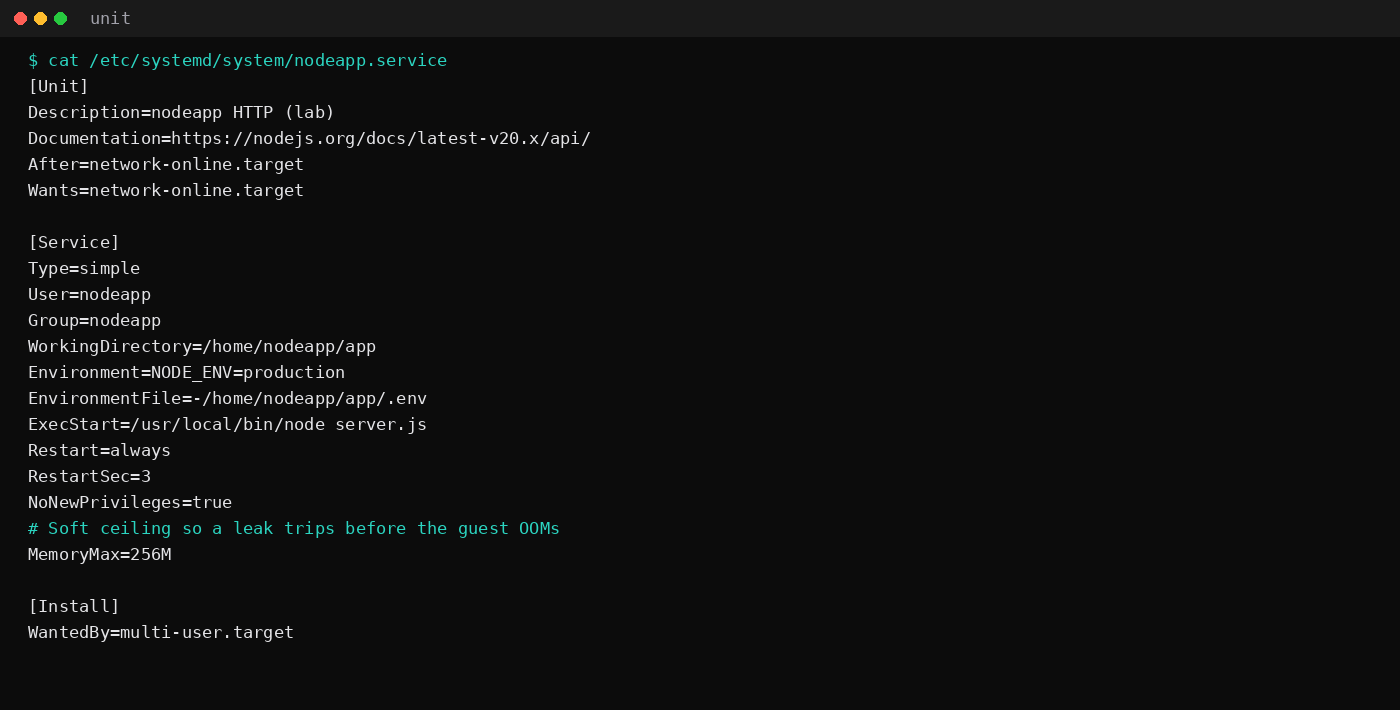
Put Caddy (or nginx) on 80/443 and reverse_proxy 127.0.0.1:3000 when the hostname is public. The Caddy automatic HTTPS post owns that front door. Leave 3000 closed on the panel firewall.
What does a crash look like under systemd?
kill -9 "$(systemctl show nodeapp -p MainPID --value)"
sleep 5
systemctl show nodeapp -p ActiveState -p NRestarts
curl -sS http://127.0.0.1:3000/health
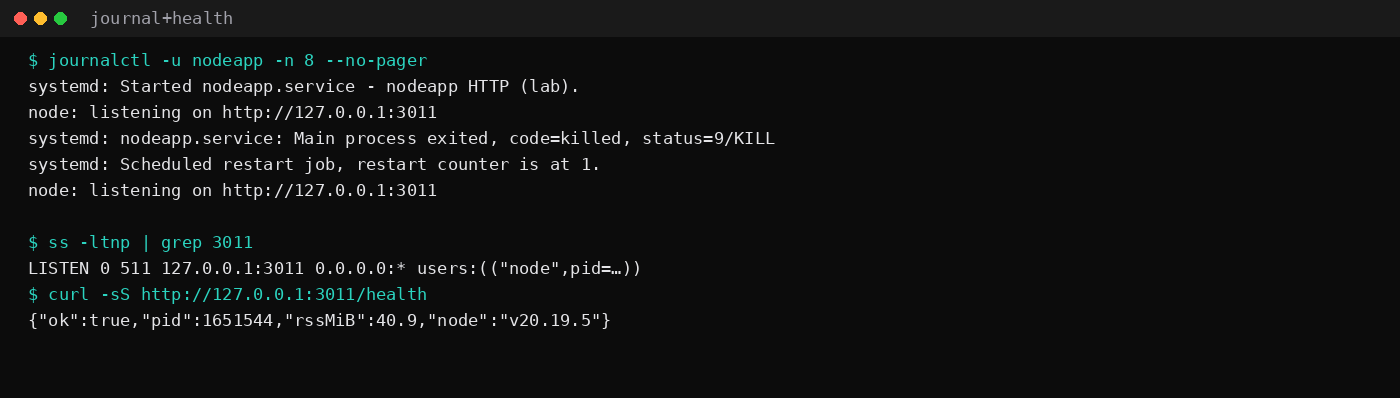
This lab printed ActiveState=active and NRestarts=1. The journal showed status=9/KILL, then Scheduled restart job, then listening on http://127.0.0.1:3011 again.
FAQ
forever, PM2, or systemd?
forever: legacy. PM2: several Node apps, cluster mode, or the workflow in the PM2 Discord post. systemd: one Linux service, no extra daemon RSS, same tools you use for everything else on the box.
EnvironmentFile or dotenv?
Both work. This unit passes EnvironmentFile so systemd owns the variables visible in systemctl show. The small loadEnv in server.js also reads .env when you run the file by hand. Prefer one source of truth in production; the unit file is enough if every start goes through systemd.
Why is VmRSS higher than MemoryCurrent?
VmRSS counts resident pages, including shared file mappings for the Node binary. systemd's MemoryCurrent / cgroup memory.current charges the unit differently and sat near the anonymous RSS in this run (about 6–7 MiB). Quote both when you size a plan. Put MemoryMax on the cgroup number you want to enforce.
Can I still use forever while I migrate?
Yes for a weekend cutover: run the new unit on a second port, flip Caddy, then stop forever. Leave forever 4.x off greenfield apps.