
Enzonix
Shared Compute - General Compute
$5.00/mo
1 vCPU · 1 GB · 20 GB
Choose location
Ashburn, United States
| Provider | Plan | vCPU | RAM | Disk | Regions | Billing | Price |
|---|---|---|---|---|---|---|---|
| Enzonix | Shared Compute - General Compute | 1 | 1 GB | 20 GB | Ashburn, United States | Fixed price | $5.00/mo |
| Enzonix | Shared Compute - General Compute | 1 | 1 GB | 20 GB | Amsterdam, Netherlands | Fixed price | $5.00/mo |
| Enzonix | Shared Compute - General Compute | 2 | 4 GB | 80 GB | Amsterdam, Netherlands | Fixed price | $9.00/mo |
| Enzonix | Shared Compute - General Compute | 2 | 4 GB | 80 GB | Ashburn, United States | Fixed price | $9.00/mo |
| Enzonix | Shared Compute - General Compute | 4 | 8 GB | 160 GB | Amsterdam, Netherlands | Fixed price | $16.00/mo |
| Enzonix | Shared Compute - General Compute | 4 | 8 GB | 160 GB | Ashburn, United States | Fixed price | $16.00/mo |
| Enzonix | Shared Compute - General Compute | 8 | 16 GB | 320 GB | Amsterdam, Netherlands | Fixed price | $32.00/mo |
| Enzonix | Shared Compute - General Compute | 8 | 16 GB | 320 GB | Ashburn, United States | Fixed price | $32.00/mo |
| Enzonix | Shared Compute - General Compute | 1 | 1 GB | 20 GB | Ashburn, United States | Hourly | $0.007/hr |
| Enzonix | Shared Compute - General Compute | 1 | 2 GB | 40 GB | Ashburn, United States | Hourly | $0.01/hr |
| Enzonix | Shared Compute - General Compute | 2 | 4 GB | 80 GB | Ashburn, United States | Hourly | $0.015/hr |
SSPanel UIM Instant App
SSPanel UIM is the shop panel. User tunnels come from a Mod_Mu node you attach: soga is the usual choice, and XrayR or Air-Universe also work. Compare live prices, deploy, and hand out subscription links.

SSPanel UIM
Instant App on marketplace VPS
Live marketplace offers
Choose billing and size, compare providers side by side, pick a location, then launch.
Shared Compute - General Compute
$5.00/mo
1 vCPU · 1 GB · 20 GB
Choose location
Ashburn, United States
1 provider
SSPanel UIM is the web shop and the admin UI (PHP, MariaDB, and Redis). The recorded base URL is https://${IPV4}.sslip.io, and the page that answers on first boot is HTTP on port 80 because the install sets SERVER_NAME=:80. User traffic starts when you pair a Mod_Mu node. Prefer soga. XrayR and Air-Universe are the other backends this panel is set up to name. Use it instead of paying for a managed proxy-panel host.
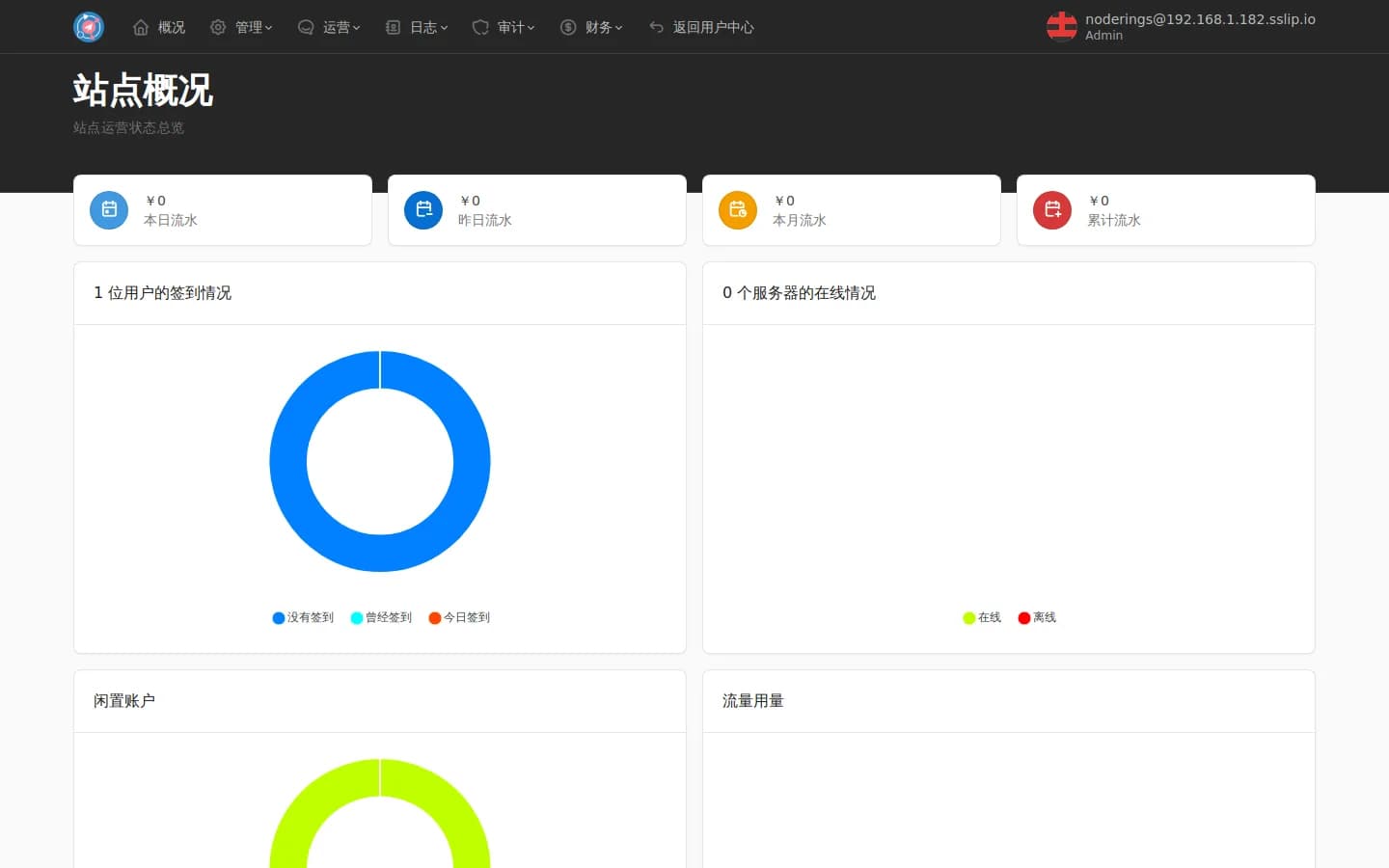
Sign in at http://YOUR_IP/ and open the site overview. Revenue, check-ins, and server status live in the admin UI — not in the credentials file.
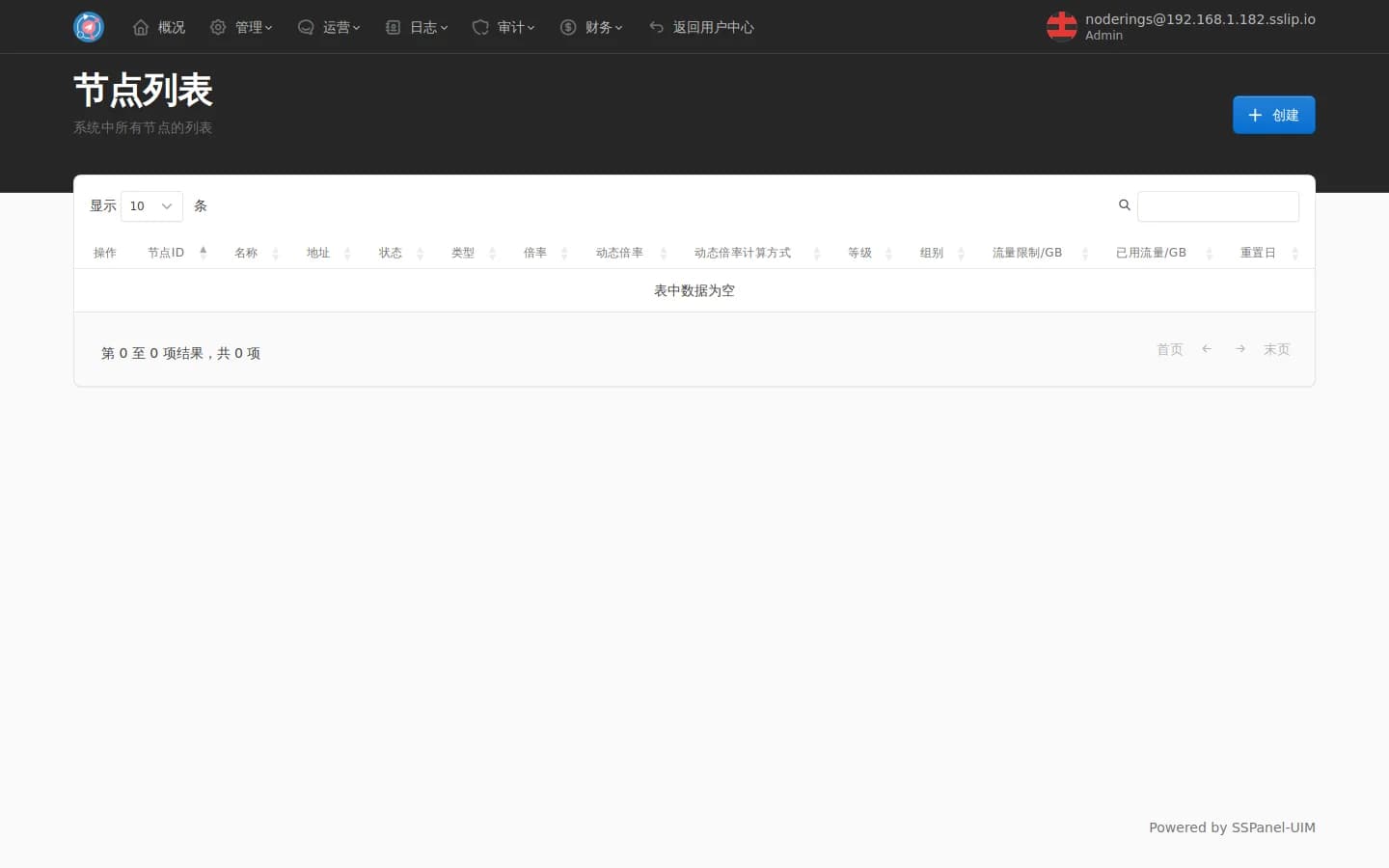
This Instant App does not start soga, XrayR, or Air-Universe. Add a node in the admin list, then point one of those backends at the panel.
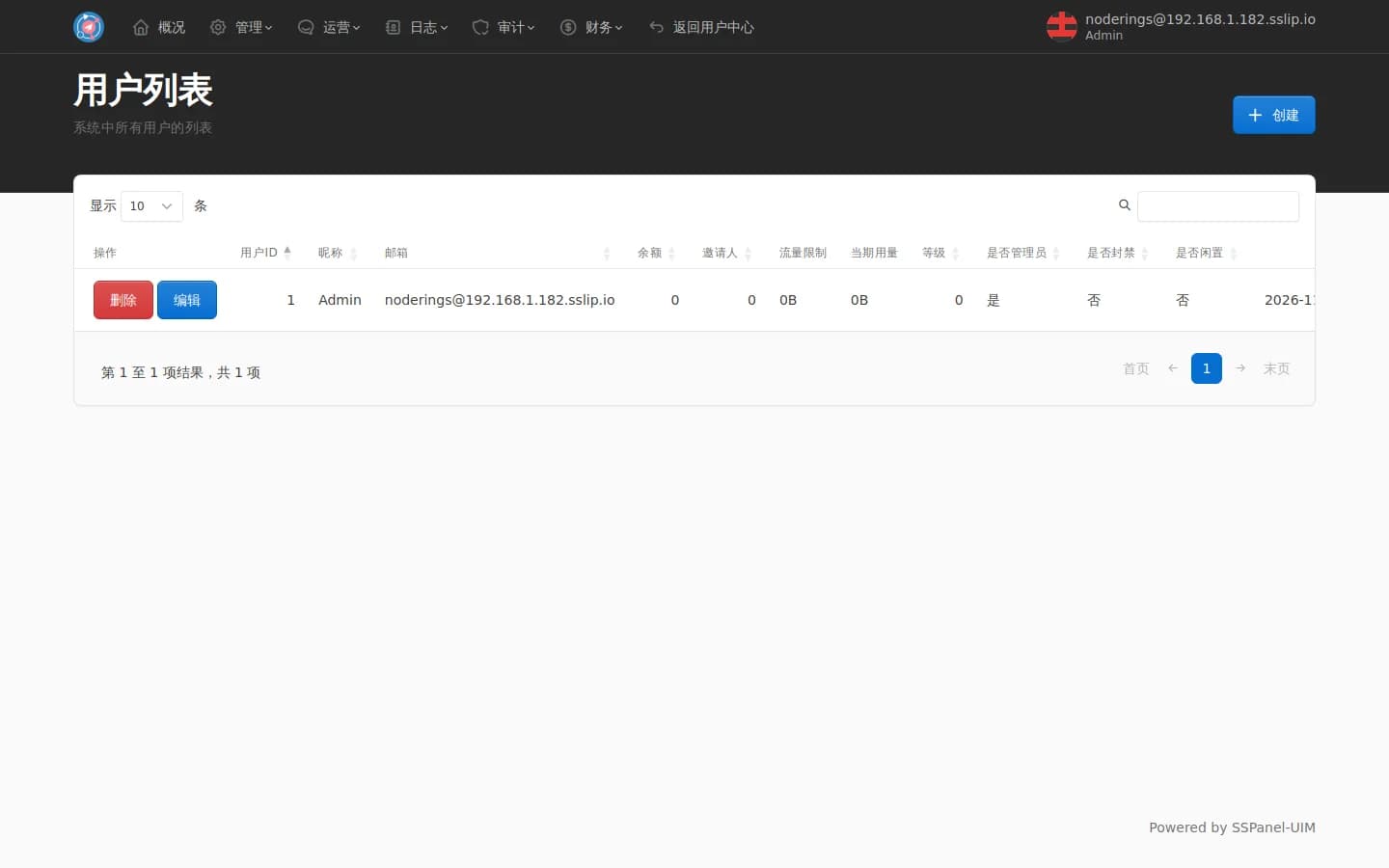
Create shop users in the admin user list. Each user gets a subscription after a Mod_Mu node is online.
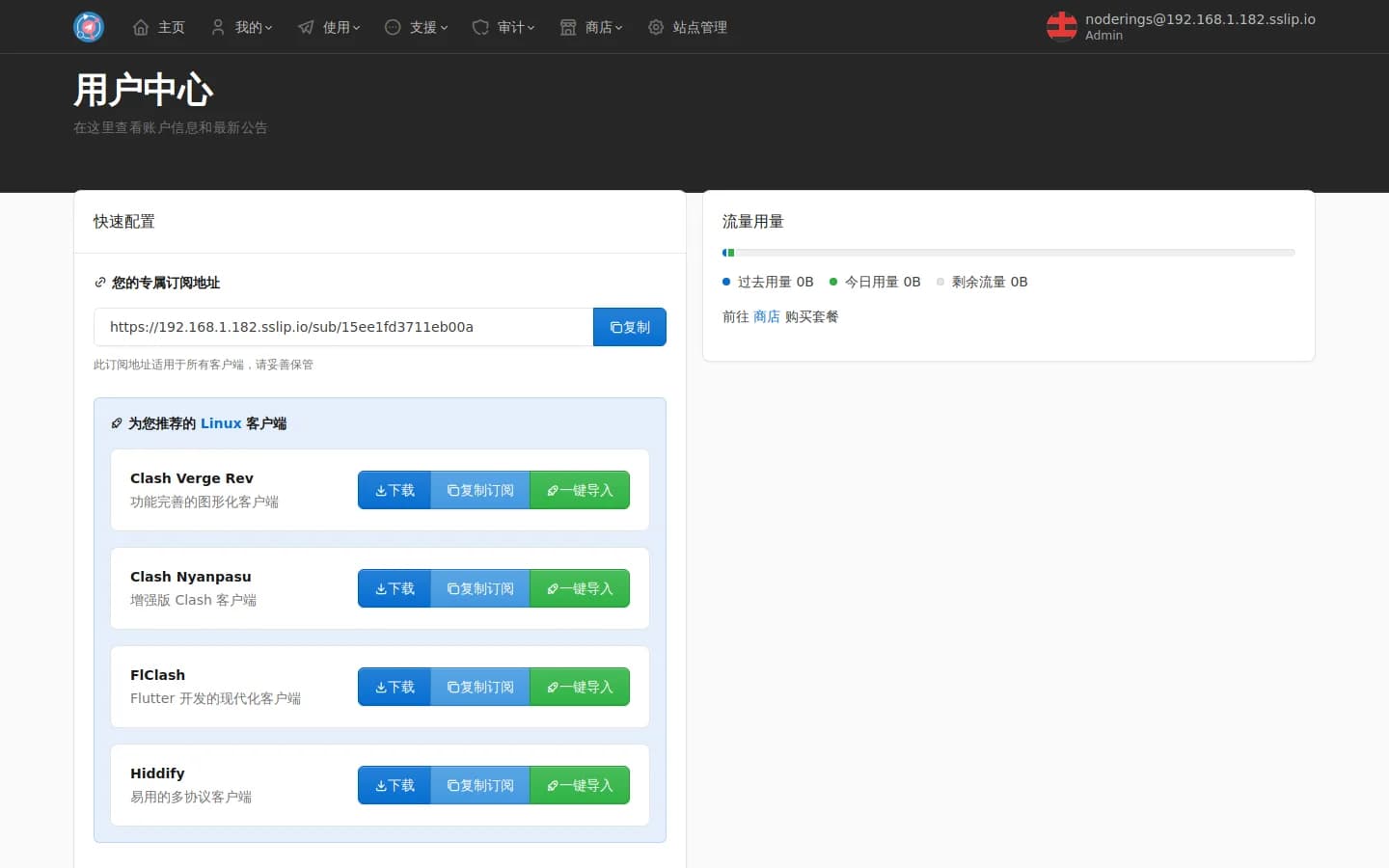
The user center shows the subscription URL and recommended clients. MariaDB and Redis stay on the VPS; phones only need that link.
SSPanel UIM + a Mod_Mu node (soga, XrayR, or Air-Universe)
SSPanel UIM stores users, products, and nodes. The proxy process is a separate Mod_Mu backend. This Instant App installs the panel only. soga is the backend to prefer. XrayR and Air-Universe are the other names recorded for this install. A panel login with no node leaves the phone on its normal connection.
After the VPS is up, sign in on port 80, change the admin password, and plan the node you will attach.
01
In a browser, open http://YOUR_IP/ . That is the address that answers on first boot. If the browser is sent to https://${IPV4}.sslip.io before a certificate exists, come back to the HTTP address on port 80. The stored base URL is that https name for when you add a certificate.
02
SSH in as root. The email is noderings@ followed by the VPS IPv4 and .sslip.io. The password was generated on the VPS.
cat /root/.noderings_password03
Use sspanel_uim_admin_email and sspanel_uim_admin_pass. Change the password, and review whether public registration is open, before you leave the shop on the internet.
04
TCP 22 is SSH. TCP 80 is the panel. Compose also publishes TCP 443 and UDP 443 for later HTTPS. With SERVER_NAME=:80, day-one admin is the HTTP site on port 80.
05
sspanel_uim_base_url is https://${IPV4}.sslip.io. sslip.io only points the name at this IPv4. It is not a CDN camouflage domain. After you add a real hostname, update the site URL in the panel.
Users live in the panel. A subscription connects only after a Mod_Mu node is online and listed.
01
Create a node that uses the Mod_Mu API. Note the node id and the API details the node page shows.
02
Prefer soga. XrayR and Air-Universe are the other backends this landing names. Point the node at this panel. This Instant App does not install that software for you. Do not run a node image with no panel to talk to.
03
Add a user and a product or quota. The admin account is the operator login, not a VPN profile.
04
From the user area, copy the subscription URL. The format follows the protocol that node serves.
05
Disable the user in the panel. The node should drop that subscription on its next sync.
Import the user subscription after the node is online. The admin password does not connect the phone.
01
Android: v2rayNG, NekoBox, or Hiddify. iOS: Hiddify, Streisand, Happ, or Shadowrocket. Windows: v2rayN, Happ, or Hiddify. Clash Meta when the subscription is Clash-compatible.
02
Paste the user subscription URL. If no node is paired, the import can succeed and the tunnel can still fail.
03
Select the profile and turn the tunnel on. Allow the VPN permission the phone asks for.
04
Open a page that shows your public IP and compare it with the node address, which may be this VPS or another host.
05
Confirm the node process is running, the node id matches the panel, and the protocol port is reachable. The panel on port 80 is not the tunnel.
These apps run on the phone or computer. They are not Instant Apps. They import the subscription your Mod_Mu node publishes.

Android. Import the user subscription.

Android client built on sing-box.

Imports subscription links from the user account.

iOS, and macOS on Apple silicon.

Phone and desktop builds.

Paid iOS app. Imports subscription links.

Windows. Paste the subscription URL.

Use when the panel gives you a Clash-compatible subscription.
SSPanel UIM is a shop panel. The exit exists only after soga, XrayR, or Air-Universe is passing traffic. A filtered network still depends on that node's protocol.
| Situation | Fit | What to expect |
|---|---|---|
| Multi-user subscriptions | Often used | The panel is built for products, users, and subscription links. Pair a node before you call it a VPN. |
| Everyday privacy exit | Depends on the network | Useful after the node sends traffic through a VPS you picked. The panel website is not the exit. |
| China (GFW) | Depends on the network | SSPanel-class shops are commonly used with Xray nodes. Whether a line connects depends on the node protocol and that ISP. No unblock guarantee. |
| Filtered networks in Iran | Depends on the network | Possible when the node serves a protocol that network still allows. Test on your own line. |
| Panel with no Mod_Mu node | Poor match | This Instant App does not install soga, XrayR, or Air-Universe. Subscriptions stay offline until one of those is paired. |
Compare live SSPanel UIM VPS plans from independent providers, then run the shop panel and pair it with a Mod_Mu node on the offer you pick. Use it instead of paying for a managed proxy-panel host.
See live prices, regions, and plan sizes before you buy. Shop self-hosted SSPanel hosts across independent providers.
Deploy SSPanel UIM and the VPS comes up with the panel, MariaDB, Redis, and an admin account. You still attach a node before anyone has a tunnel.
The provider region is the geography of this VPS. Put the node here or on another host. Client addresses follow the node you configure.
The admin email and password are written on the server. Change the password after the first sign-in. You decide who receives a subscription.
Most SSPanel guides assume one server you already own, plus a node you install yourself. NodeRings lists Compute Instance plans from independent providers so you can compare panel hosts by price, size, and region, then launch on the one that fits.
SSPanel UIM Instant App prepares the panel on the provider VPS you selected. It does not install soga, XrayR, or Air-Universe. The provider operates that machine. NodeRings lists the plan and deploys the Instant App.
Compare plans, pick a provider offer, and launch SSPanel UIM on that server.
01
Pick a provider offer. A sensible start is 2 vCPU, 2 GB RAM, and 30 GB disk. Smaller and larger plans stay on the list.
02
Launch the Instant App on that plan. The panel, MariaDB, and Redis come up on first boot. There are no extra form fields.
03
Install soga (or XrayR or Air-Universe), create a user, and import that subscription in v2rayNG, Hiddify, Clash Meta, or another app below.
NodeRings Instant App starts the upstream image with MariaDB and Redis, creates an admin account, and records the sslip.io base URL. It does not install a proxy node.
Credentials are written on first boot to:
/root/.noderings_passwordRead them over SSH:
cat /root/.noderings_passwordSSPanel Compose project
/opt/noderings/sspanel-uimCompose file and env files.
Env files
/opt/noderings/sspanel-uim/.env
/opt/noderings/sspanel-uim/admin.env
Base URL, SERVER_NAME=:80, and the generated admin password.
Credentials file
/root/.noderings_passwordWritten on first boot.
Install log
/tmp/sspanel-uim-admin.logBootstrap output from first boot.
Compose runs the SSPanel image, a one-shot init, cron, MariaDB, and Redis. There is no soga, XrayR, or Air-Universe service in this file.
webPanel HTTP on port 80. TCP 443 and UDP 443 are published for later HTTPS.
cronScheduled panel jobs.
mariadbPanel database.
redisCache.
initOne-shot first-boot setup. It exits when it finishes.
Compose status
cd /opt/noderings/sspanel-uim && docker compose psWeb logs
cd /opt/noderings/sspanel-uim && docker compose logs web --tail 80The panel you open on day one is http://YOUR_IP/ . Cloudflare can give visitors a padlock without installing a certificate on the VPS. The recorded base URL is already shaped as https://${IPV4}.sslip.io.
Add your domain
Sign up at Cloudflare and add the domain you want to use.
Point it at your VPS
Create an A record to your server IP and leave the orange cloud on.
Open the https site
Visit https://your-domain, sign in, and set the panel base URL to that same https address.
Only allow Cloudflare
Optional. Keep port 22 allowed. If a Mod_Mu node runs on this VPS, keep its protocol port reachable by clients. This allow list covers 80 and 443 only.
curl -s https://www.cloudflare.com/ips-v4 | while read ip; do sudo ufw allow from "$ip" to any port 80,443 proto tcp; doneLater you can drop SERVER_NAME=:80 and let the container request its own certificate. Until then, HTTP on port 80 is the working admin path.
The panel, MariaDB, and Redis share this VPS. A node on the same box needs more room. These rows are starting points, not a filter on the plans above.
| Workload | Illustrative starting point | Note |
|---|---|---|
| Panel only, node elsewhere | 2 vCPU, 2 GB RAM, 30 GB disk | Matches the Instant App floor. |
| Panel plus soga on this VPS | 2 vCPU, 4 GB RAM, 40 GB disk | Leave headroom for MariaDB and the node process together. |
| Many shop users | 4 vCPU, 4-8 GB RAM, 40 GB disk | Database size and the provider bandwidth cap show up together. |
Illustrative only. Live plans are not filtered by this table. A filtered network can still block a tunnel that fits on a small VPS.
You get root on a provider VPS. NodeRings lists the plan and deploys SSPanel UIM. The provider runs the machine.
The admin password, which Mod_Mu node is attached, who can register, who receives a subscription, the host firewall, and the provider terms.
The VPS, the network, and the exit IP. Abuse on a public proxy port can get that provider to suspend the server.
The marketplace and the Instant App. NodeRings does not run a VPN service and does not see client traffic.
v2rayNG and NekoBox on Android. Hiddify on Android, iOS, Windows, macOS, and Linux. Streisand on iOS and macOS. Happ on phone and desktop. Shadowrocket on iOS. v2rayN on Windows. Clash Meta when the subscription is Clash-compatible. The phone connects to the Mod_Mu node, not to the panel login.
People run SSPanel-class shops in front of Xray nodes on filtered networks. The ISP sees the node protocol, not the panel brand. This Instant App ships the panel only. Test the node you attach, on your own line. No unblock guarantee.
It is not installed. Prefer soga. XrayR and Air-Universe are the other Mod_Mu backends named for this panel. Add the node in the admin area, then point that software at this VPS.
Import the same user subscription on the second device, or create another user. Disable the user in the panel to stop access.
Xboard is another shop panel, and that Instant App tries to start Xboard-Node on the same VPS. SSPanel UIM waits for soga, XrayR, or Air-Universe. 3X-UI is an all-in-one Xray panel with no separate shop node.
TCP 22 for SSH and TCP 80 for the panel. TCP 443 and UDP 443 are published for later HTTPS. Also leave open the protocol port of the Mod_Mu node once you install it.
NodeRings lists provider plans and deploys the Instant App onto the plan you pick. The provider operates the VPS. You operate SSPanel UIM and whichever node you attach.
Xboard Instant App
Subscription panel that tries to start Xboard-Node on the same VPS. V2bX and soga also fit that panel.
v2ray-agent Instant App
Docker Reality with Xray and a ready VLESS URL. No shop panel.
MTProto Proxy Instant App
Telegram-only proxy on port 443. Not a general VPN.
reality-ezpz Instant App
One-command VLESS Reality installer without a browser admin.
3X-UI Instant App
All-in-one Xray panel when you do not need a separate node.
Outline Server Instant App
Jigsaw Outline Shadowsocks server with access keys.
Hiddify Manager Instant App
All-in-one panel with Xray and sing-box on the same VPS.
All Instant Apps
Browse every Instant App landing on Compute Instance.