
Enzonix
Shared Compute - General Compute
$5.00/mo
1 vCPU · 1 GB · 20 GB
Choose location
Ashburn, United States
| Provider | Plan | vCPU | RAM | Disk | Regions | Billing | Price |
|---|---|---|---|---|---|---|---|
| Enzonix | Shared Compute - General Compute | 1 | 1 GB | 20 GB | Ashburn, United States | Fixed price | $5.00/mo |
| Enzonix | Shared Compute - General Compute | 1 | 1 GB | 20 GB | Amsterdam, Netherlands | Fixed price | $5.00/mo |
| Enzonix | Shared Compute - General Compute | 2 | 4 GB | 80 GB | Amsterdam, Netherlands | Fixed price | $9.00/mo |
| Enzonix | Shared Compute - General Compute | 2 | 4 GB | 80 GB | Ashburn, United States | Fixed price | $9.00/mo |
| Enzonix | Shared Compute - General Compute | 4 | 8 GB | 160 GB | Amsterdam, Netherlands | Fixed price | $16.00/mo |
| Enzonix | Shared Compute - General Compute | 4 | 8 GB | 160 GB | Ashburn, United States | Fixed price | $16.00/mo |
| Enzonix | Shared Compute - General Compute | 8 | 16 GB | 320 GB | Amsterdam, Netherlands | Fixed price | $32.00/mo |
| Enzonix | Shared Compute - General Compute | 8 | 16 GB | 320 GB | Ashburn, United States | Fixed price | $32.00/mo |
| Enzonix | Shared Compute - General Compute | 1 | 1 GB | 20 GB | Ashburn, United States | Hourly | $0.007/hr |
| Enzonix | Shared Compute - General Compute | 1 | 2 GB | 40 GB | Ashburn, United States | Hourly | $0.01/hr |
| Enzonix | Shared Compute - General Compute | 2 | 4 GB | 80 GB | Ashburn, United States | Hourly | $0.015/hr |
Hiddify Manager Instant App
Hiddify Manager is an all-in-one panel with Xray and sing-box, a ready user, and an automatic sslip.io domain. Compare live prices, deploy, and connect from the Hiddify app, v2rayNG, or Streisand.

Hiddify Manager
Instant App on marketplace VPS
Live marketplace offers
Choose billing and size, compare providers side by side, pick a location, then launch.
Shared Compute - General Compute
$5.00/mo
1 vCPU · 1 GB · 20 GB
Choose location
Ashburn, United States
1 provider
Hiddify Manager is the web panel. Behind it, Xray and sing-box (Hiddify Core) accept connections and forward traffic. Users get a panel path and a subscription URL. This Instant App creates the first user, named noderings, with no form fields at create time. For production camouflage, add a CDN domain under Domains after deploy.
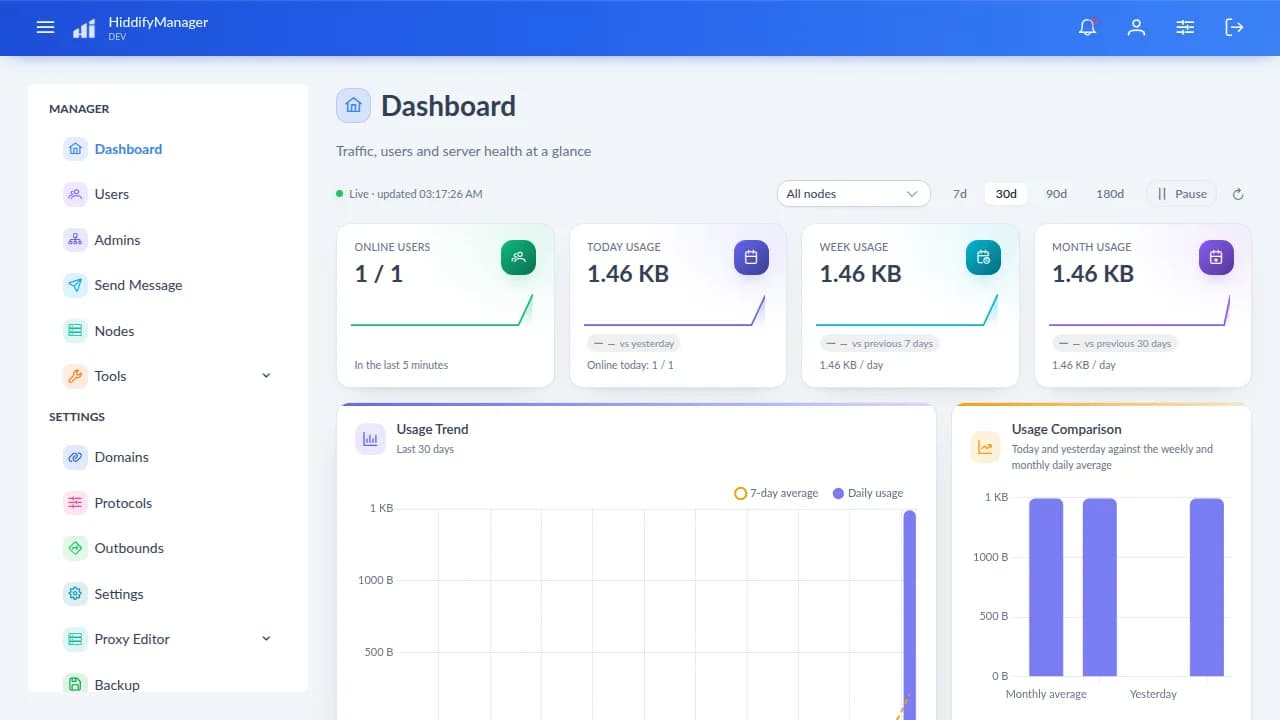
The home screen shows online users, usage trends, config health for Xray and sing-box, and node CPU, RAM, and disk. Refresh when you want a live check.
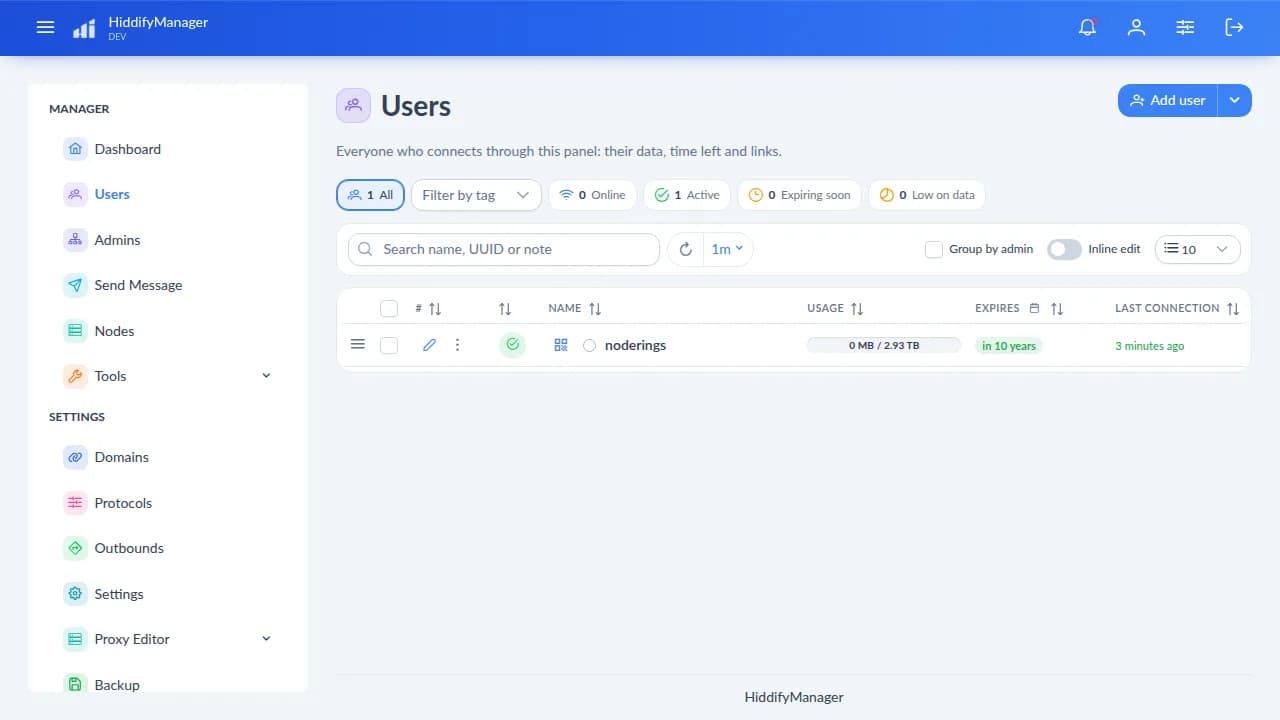
Each user gets a panel path and a subscription. The Instant App creates noderings for you. Add another user when a second phone should have its own quota.
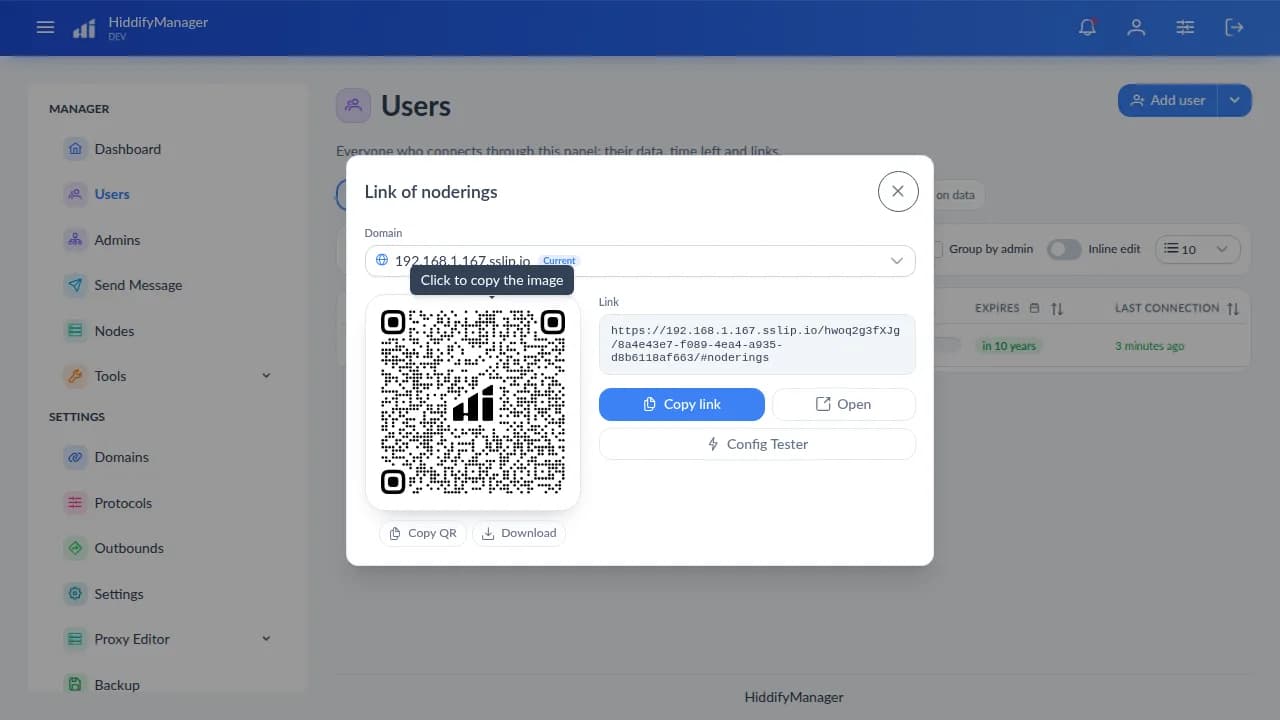
Open a user to copy the share URL, show a QR code, or hand out the subscription URL. The first subscription is hiddify_subscription_url in the credentials file.
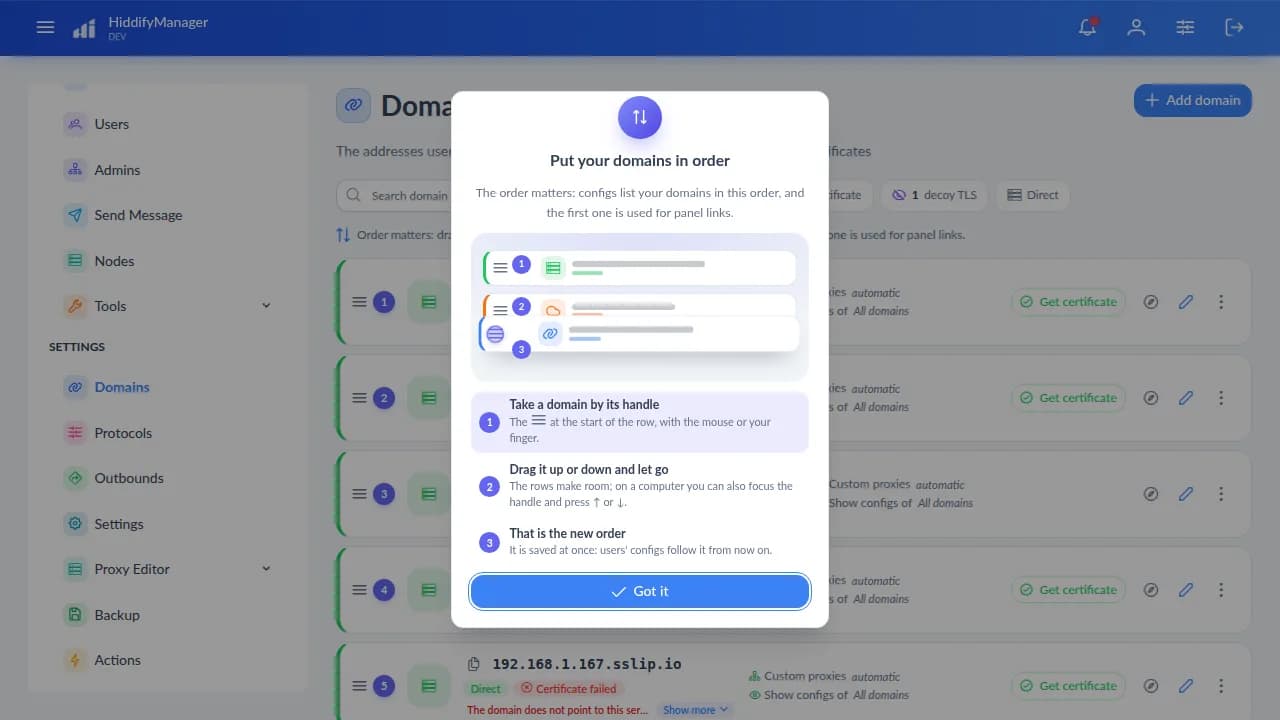
First boot uses an sslip.io name so install can finish without a buyer domain. Add a CDN or Reality domain when you are ready. Keep the working domain in the subscription you hand out.
Xray + sing-box
Hiddify Manager stores users, domains, and traffic. Xray and sing-box (Hiddify Core) on the same VPS accept connections and forward traffic. The panel UI is not the VPN by itself.
After the VPS is up, sign in, change the panel password, and decide whether the sslip.io domain is enough or you want a CDN domain.
01
In a browser, open the hiddify_panel_url from the credentials file. The path includes a secret admin proxy path and the admin UUID. Sign in with that UUID and hiddify_admin_pass.
02
SSH in as root with the create-flow password or key. The file lists the panel password, admin UUID, core, and the first subscription URL. hiddify_core is xray+sing-box.
cat /root/.noderings_password03
Open My account in the panel and set a new admin password before you leave the login on the public internet.
04
TCP 22 is SSH. TCP 80 and 443 are the panel and VPN entry. Hiddify may open more protocol ports as you enable them under Protocols.
05
First boot uses ${IPV4}.sslip.io so install can complete without a buyer domain. For filtered networks, point a domain at this VPS through a CDN with Full SSL, then add it under Domains. Plain sslip.io without CDN is a weak camouflage story.
A user is a Hiddify account with a share link and a subscription. The Instant App creates the first one, named noderings.
01
In the panel, go to Users. The first row is noderings.
02
Click Add user and give it a name. You can set traffic and time limits on the same form.
03
Use Show user link on the row, or open the user. Copy the share URL, show the QR code, or use the subscription URL. For the first Instant App user, hiddify_subscription_url is already in the credentials file.
04
Importing one subscription on a phone and a laptop counts as one user. Create a separate user when you want a separate quota or a clean revoke.
05
Delete that user in the panel. Old subscription links for that user stop working after the panel reloads the proxy lists.
You import a subscription URL, a share link, or a QR code. Then you turn the tunnel on in the client app.
01
Android: Hiddify, v2rayNG, or NekoBox. iOS: Hiddify, Streisand, Happ, or Shadowrocket. Windows: Hiddify, v2rayN, or Happ. macOS and Linux: Hiddify, Happ, or Clash Verge Rev.
02
Paste hiddify_subscription_url, open the user share link and follow its install steps, or scan the QR from Show user link.
03
Select a node from the subscription and turn the tunnel on. Allow the VPN permission the phone asks for.
04
Open a page that shows your public IP and compare it with the VPS address. In the Hiddify dashboard, online users and traffic should move.
05
Confirm TCP 443 is open and the subscription host is your domain or sslip.io name, not 127.0.0.1. After you switch to a CDN domain, set CDN SSL to Full (not Flexible). A phone with the wrong clock can fail TLS. Set the phone time to automatic and try again.
These apps run on the phone or computer. They are not Instant Apps. Import a Hiddify Manager subscription or share link. The Hiddify app below is the client; this Instant App is the server panel.

Official Hiddify client. Imports a subscription or share link from Hiddify Manager.

Android. Import the subscription or scan the QR.

Android. Imports the subscription links.

iOS, and macOS on Apple silicon. Imports subscription links.

Phone and desktop builds. Imports the subscription.

Paid iOS app. Imports subscription links.

Windows. Paste the subscription URL.

Use when you export or prefer a Clash-compatible subscription from the user portal.
A VPS in a region you pick is an exit for traffic you send through Hiddify Manager. On a filtered ISP, the result depends on the domain, CDN, protocol, and what that network blocks. First boot uses sslip.io without a CDN.
| Situation | Fit | What to expect |
|---|---|---|
| Everyday privacy exit | Depends on the network | Useful when you want traffic from a phone to leave through a VPS you picked. The hosting provider can see that server. |
| Filtered networks in Iran | Often used | Hiddify Manager is commonly used with a CDN camouflage domain and Xray or sing-box over HTTPS. The ready sslip.io name without CDN is a weak start. Test on your own line. |
| China (GFW) | Depends on the network | People test CDN domains, Reality, and protocol mixes. Expect to tune Domains and Protocols. No guarantee. |
| Russia and other filtered ISPs | Depends on the network | Sometimes chosen when a network filters WireGuard or OpenVPN. The protocol and domain still have to pass that ISP. |
| Turkey | Often used | Commonly used on Turkish networks. If this build includes Türkçe, switch the panel language to that. Pho3nix and x-ui-TR are not separate Instant Apps. |
| OpenVPN-only or office VPN profiles | Poor match | OpenVPN Connect will not import a Hiddify subscription. This Instant App hands out Xray and sing-box style links. |
Compare live Hiddify Manager VPS plans from independent providers, then run the anti-censorship panel with Xray and sing-box on the offer you pick. Use it instead of paying for a commercial anti-censorship VPN or a retail subscription.
See live prices, regions, and plan sizes before you buy. Shop self-hosted anti-censorship panel hosts across independent providers.
Deploy Hiddify Manager and the VPS comes up with the panel, both cores, MariaDB, Redis, and a ready subscription URL. You still get root SSH.
The provider region is the geography of the VPS address clients will use. Add a CDN domain in Domains when you want camouflage in front of that address.
The panel password and the first user subscription URL are written on the server. You change the password, revoke users, and decide which domains stay active.
Most Hiddify Manager install guides assume one server you already own. NodeRings lists Compute Instance plans from independent providers so you can compare self-hosted anti-censorship offers by price, size, and region, then launch on the one that fits.
Hiddify Manager Instant App prepares the panel and cores on the provider VPS you selected. The provider operates that machine. NodeRings lists the plan and deploys the Instant App.
Compare plans, pick a provider offer, and launch Hiddify Manager on that server.
01
Pick a provider offer. A sensible start is 2 vCPU, 4 GB RAM, and 40 GB disk. Smaller and larger plans stay on the list when they meet the floor.
02
Launch the Instant App on that plan. The panel, MariaDB, Redis, Xray, sing-box, and first user come up together. There are no extra form fields.
03
Read hiddify_subscription_url from the server, import it in the Hiddify app, v2rayNG, Streisand, or another app below, and confirm the tunnel from the phone.
NodeRings Instant App installs Hiddify Manager with Docker (experimental upstream profile), MariaDB, and Redis on the host network, sets an admin password, keeps the sslip.io domain, and writes the first subscription URL.
Credentials are written on first boot to:
/root/.noderings_passwordRead them over SSH:
cat /root/.noderings_passwordHiddify Compose project
/opt/noderings/hiddifydocker-compose.yml, docker.env, and docker-data volume for panel state.
Credentials file
/root/.noderings_passwordWritten on first boot. Includes the panel password and the first subscription URL.
Install log
/tmp/hiddify-admin.logBootstrap output from the Instant App first-boot script.
Compose runs the Hiddify Manager container (privileged, host network), MariaDB, and Redis. Xray and sing-box run inside the manager container.
hiddifyPanel, HAProxy-style entry, Xray, and sing-box on host network.
mariadbPanel database on localhost:3306.
redisPanel cache/queue on localhost:6379.
Container status
cd /opt/noderings/hiddify && docker compose psLive logs
cd /opt/noderings/hiddify && docker compose logs -fRestart stack
cd /opt/noderings/hiddify && docker compose restartAdmin links inside the container
docker exec hiddify hiddify adminHiddify already serves HTTPS on the VPS (self-signed on sslip.io until ACME succeeds). A CDN with Full SSL is the usual camouflage path. Flexible SSL will not work.
Add your domain
Sign up at a CDN such as Cloudflare and add the domain you want users to connect through.
Point it at your VPS
Create an A record to your server IP and leave proxying on. Set SSL/TLS mode to Full.
Register it in Hiddify
In the panel, open Domains and add the domain. Re-issue or copy user subscription links so clients use that hostname.
Only allow the CDN to the panel if you want
Optional. With SSH (port 22) allowed, open the CDN IP ranges to ports 80 and 443, or keep 443 open to the world if phones connect without the CDN.
Keep port 22 allowed for SSH. Keep TCP 443 allowed for Hiddify entry, or phones will not connect.
Hiddify Manager runs MariaDB, Redis, the panel, Xray, and sing-box. CPU and RAM matter more once several users are online. These rows are starting points, not a filter on the plans above.
| Workload | Illustrative starting point | Note |
|---|---|---|
| One or two phones | 2 vCPU, 4 GB RAM, 40 GB disk | Matches the Instant App floor. Enough for the panel and a personal subscription. |
| A household or a small team | 2 vCPU, 4–8 GB RAM, 40 GB disk | More headroom when several clients are online and you enable extra protocols. |
| Many subscription users | 4 vCPU, 8 GB RAM, 40 GB disk | CPU, MariaDB, and the provider's bandwidth cap show up before disk does. |
Illustrative only. Live plans are not filtered by this table. A filtered network can still block a tunnel that fits on a small VPS.
You get root on a provider VPS. NodeRings lists the plan and deploys Hiddify Manager. The provider runs the machine.
Panel password, which domains and users exist, who receives a subscription, the host firewall, and the provider's terms. Add a CDN domain if that is what you want on the public internet.
The VPS, the network, and the exit IP. Abuse on a public proxy port can get that provider to suspend the server.
The marketplace and the Instant App that deploys Hiddify Manager with Xray and sing-box. NodeRings does not run a VPN service and does not see client traffic.
The Hiddify app on Android, iOS, Windows, macOS, and Linux. v2rayNG and NekoBox on Android. Streisand on iOS and macOS. Happ on phone and desktop. Shadowrocket on iOS. v2rayN on Windows. Clash Meta when you use a Clash-compatible subscription. OpenVPN Connect will not import Hiddify links.
People commonly run Hiddify Manager with a CDN camouflage domain when an ISP filters ordinary VPN apps. A line connects when the domain, the client, and that ISP still match. First boot uses sslip.io without CDN, which many filtered networks can recognize. Add a Full-SSL CDN domain under Domains and test on your own connection.
Create another user, or import the same subscription on a second device. One shared subscription counts as one user. To stop a device, delete that user or rotate its subscription.
You rent a VPS and run Hiddify Manager yourself. You choose the region, the domains, and who gets a subscription. The VPS provider can see the server. NodeRings lists plans and deploys the Instant App.
TCP 22 for SSH, TCP 80 and 443 for the panel and VPN entry. Extra protocol ports may open when you enable them under Protocols.
NodeRings lists provider plans and deploys the Instant App onto the plan you pick. The provider operates the VPS. You operate Hiddify Manager and its cores.
A subscription URL for the first user, named noderings. Import it to pull VLESS and related links from Xray and sing-box. hiddify_core in the same file is xray+sing-box.
Xray and sing-box (Hiddify Core). The web UI configures them. MariaDB and Redis store panel state.
3X-UI Instant App
The Sanaei panel with Xray-core on the same VPS. A different panel UX, same client class.
S-UI Instant App
The Alireza panel with sing-box on the same VPS.
Libertea Instant App
Multi-protocol panel with Xray providers, Shadowsocks, and camouflage routes.
TX-UI Instant App
3X-UI fork with AmneziaWG 3.1, MTProto FakeTLS, and Iran routing helpers.
SSPanel UIM Instant App
Shop panel on port 80. Pair soga, XrayR, or Air-Universe for user traffic.
All Instant Apps
Browse every Instant App landing on Compute Instance.