
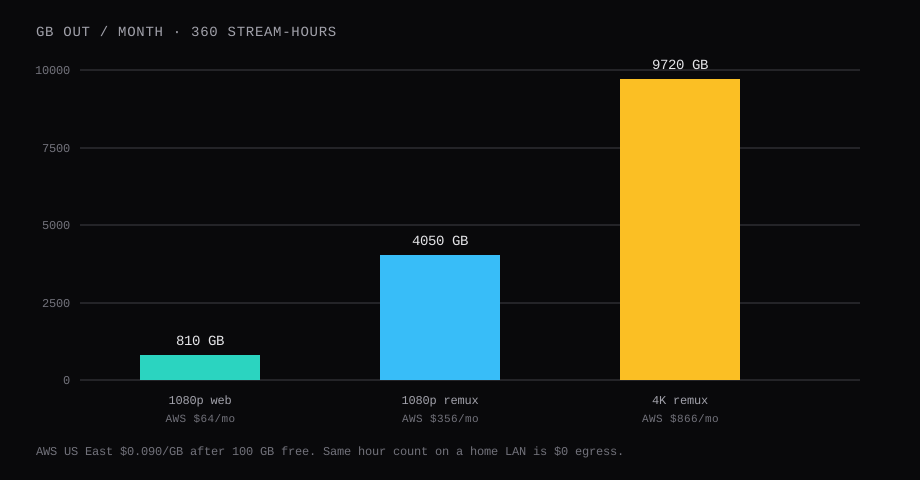
Three hundred sixty stream-hours in a month is twelve hours a day of one concurrent viewer. At a soft 1080p encode around 5 Mbps that is 810 GB out. At a 1080p remux near 25 Mbps it is 4,050 GB. At a 4K remux near 60 Mbps it is 9,720 GB. On AWS US East those months cost $63.90, $355.50, and $865.80 after the first 100 GB free, at $0.090 per GB. On a Hetzner-style plan that already includes that traffic, the traffic line is €0. On a home NAS where every viewer sits on the LAN, the egress meter stays at zero.
CPU and disk price the box. Bitrate times hours prices the month when the box sits in someone else's datacenter.
| Profile | Rough bitrate | GB / hour | GB / 360 h | AWS after 100 GB free |
|---|---|---|---|---|
| Soft 1080p / web encode | ~5 Mbps | 2.25 | 810 | $63.90 |
| 1080p remux | ~25 Mbps | 11.25 | 4,050 | $355.50 |
| 4K remux | ~60 Mbps | 27 | 9,720 | $865.80 |
The bitrate rows are planning numbers in the same band SSD Nodes and other remux write-ups quote. Your library will print its own with ffprobe. One tebibyte (1,024 GB) of the same AWS ladder, after the free 100 GB, is $83.16; the egress maths post owns that ladder in full.
When the NAS is the honest answer
Same house, same Wi-Fi or Ethernet: the NAS streams over the LAN and the cloud egress meter stays dark. Buy disk once. Keep the library off the public internet if you want. Remote relatives are the hard case, and they live on the upload of the home link. One 1080p remux wants about 25 Mbps of clear upload for a single Direct Play. One 4K remux wants about 60 Mbps. A 20 Mbps asymmetric DSL line falls short of either unless the server downscales on purpose, which turns into CPU work and a softer picture.
If every regular viewer is in the building, put Plex (or Jellyfin) on the NAS and stop reading cloud bandwidth tables.
When remote access fails on the home box, Plex can fall back to Relay. Official docs cap Relay streams at 2 Mbps for everyone, including Plex Pass. That is fine for a slideshow and useless for a 1080p remux. Direct Remote Access (port forward or a clean public path) is the quality lever; Relay is the emergency ladder. CGNAT and weak upload are why people move the server to a VPS in the first place: a public IP and a fat uplink replace the basement choke point.
Rough planning from home upload alone: about 10 Mbps clear up supports one soft 1080p stream; 20 Mbps supports one solid remux or two softer encodes; 50 Mbps and up is where 4K Direct Play stops being a fantasy. Cap remote bitrate in Plex to about 70 to 80 percent of measured upload so one viewer cannot saturate the line for the rest of the house.
When the VPS is the honest answer
Viewers live in more than one home. The home upload is too thin for even one remux. You want the library online without a basement machine that must stay cool and powered. Then a VPS with included or unmetered transfer is the shape that matches the table above. A metered hyperscaler that bills $0.090 per GB will punish Direct Play of large files, because Direct Play is honest about the bytes on disk.
Hybrid that still works: NAS at home as the working library, restic to a storage box as the offsite copy. Stream from the NAS. Restore from the box. Keep the offsite copy off the nightly remux path unless that host already includes the traffic.
Remote video streaming on Plex needs Plex Pass or Remote Watch Pass once the client is off the LAN (rule in force since 29 April 2025). Factor that subscription into the month beside the VPS invoice. Jellyfin stays free for the same Direct Play job; this post keeps Plex because the title people search is still "Plex on a VPS."
| Skip this | Why |
|---|---|
| Defaulting to a metered hyperscaler for a remux library | The 4K row above is hundreds of dollars a month in egress alone |
Publishing 32400 on 0.0.0.0 | Put Caddy or a VPN in front; leave the app on loopback |
| Reading "unmetered" as infinite with no fair-use | Contabo and others can throttle; read the port and the policy |
| Pricing only the disk | The 360-hour table is the bill that surprises people |
| Assuming LAN-only needs a paid remote stack | Jellyfin and Navidrome cover free local media without Plex Pass |
How do you install Plex with Docker?
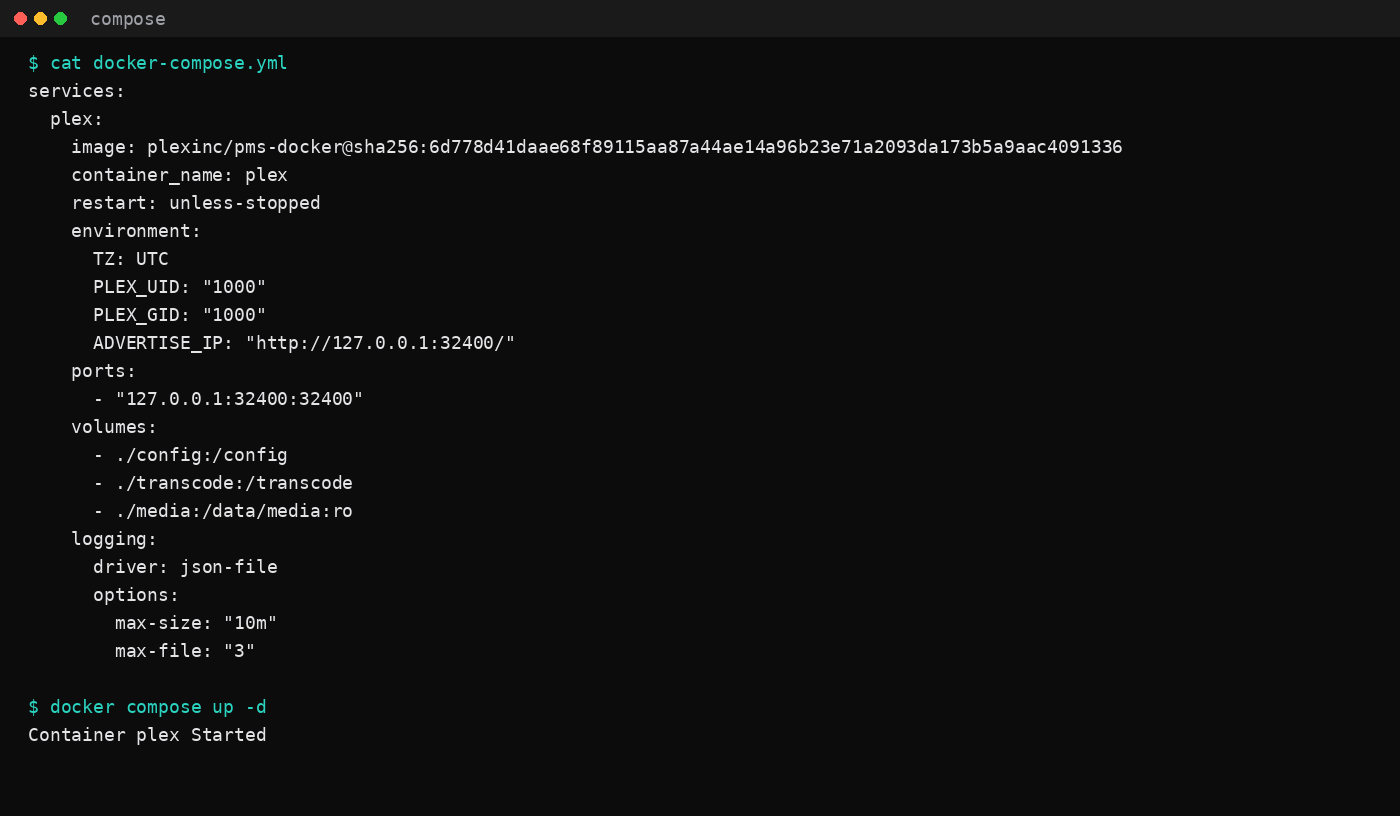
This lab used the official image plexinc/pms-docker, version 1.43.5.11079-b3b13e506, digest sha256:6d778d41daae68f89115aa87a44ae14a96b23e71a2093da173b5a9aac4091336. Pin that digest (or the digest Hub prints the day you install). Skip floating latest in production compose files.
The guest was Ubuntu 24.04 with Docker Engine, the same shape as the Compose checklist. Volumes are /config, /transcode, and a read-only media tree at /data/media. PLEX_UID / PLEX_GID are 1000. Publish only 127.0.0.1:32400:32400. Host networking stayed off for this layout. /dev/dri stayed unmounted; this post measures Direct Play. GPU transcode is a different budget.
services:
  plex:
    image: plexinc/pms-docker@sha256:6d778d41daae68f89115aa87a44ae14a96b23e71a2093da173b5a9aac4091336
    container_name: plex
    restart: unless-stopped
    environment:
      TZ: UTC
      PLEX_UID: "1000"
      PLEX_GID: "1000"
      ADVERTISE_IP: "http://127.0.0.1:32400/"
    ports:
      - "127.0.0.1:32400:32400"
    volumes:
      - ./config:/config
      - ./transcode:/transcode
      - ./media:/data/media:ro
    logging:
      driver: json-file
      options:
        max-size: "10m"
        max-file: "3"
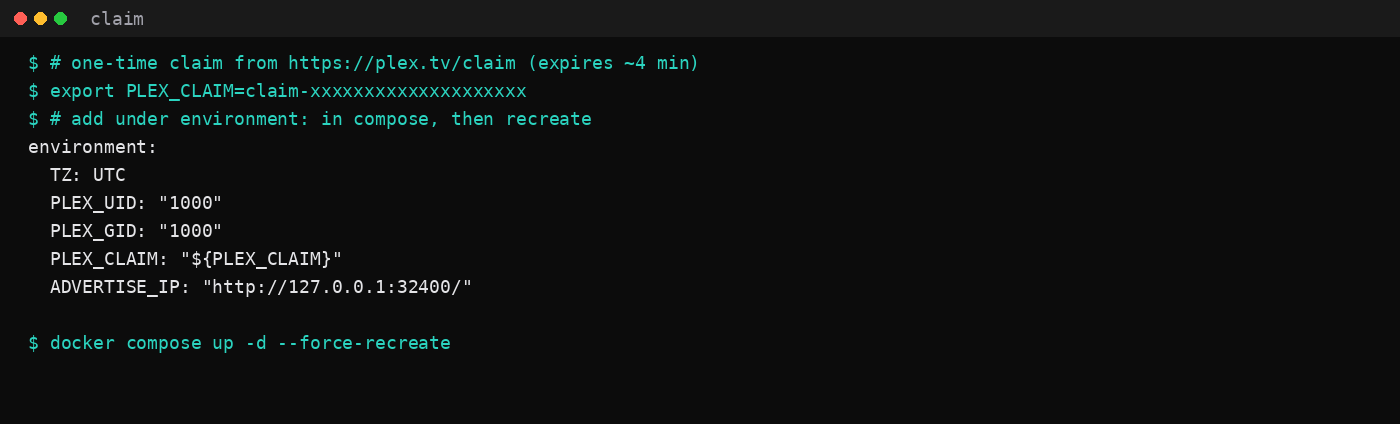
Claim the server once. Open plex.tv/claim, copy the token (it expires in a few minutes), put it in PLEX_CLAIM, and recreate:
export PLEX_CLAIM=claim-xxxxxxxxxxxxxxxxxxxx
# add PLEX_CLAIM under environment, then:
docker compose up -d --force-recreate
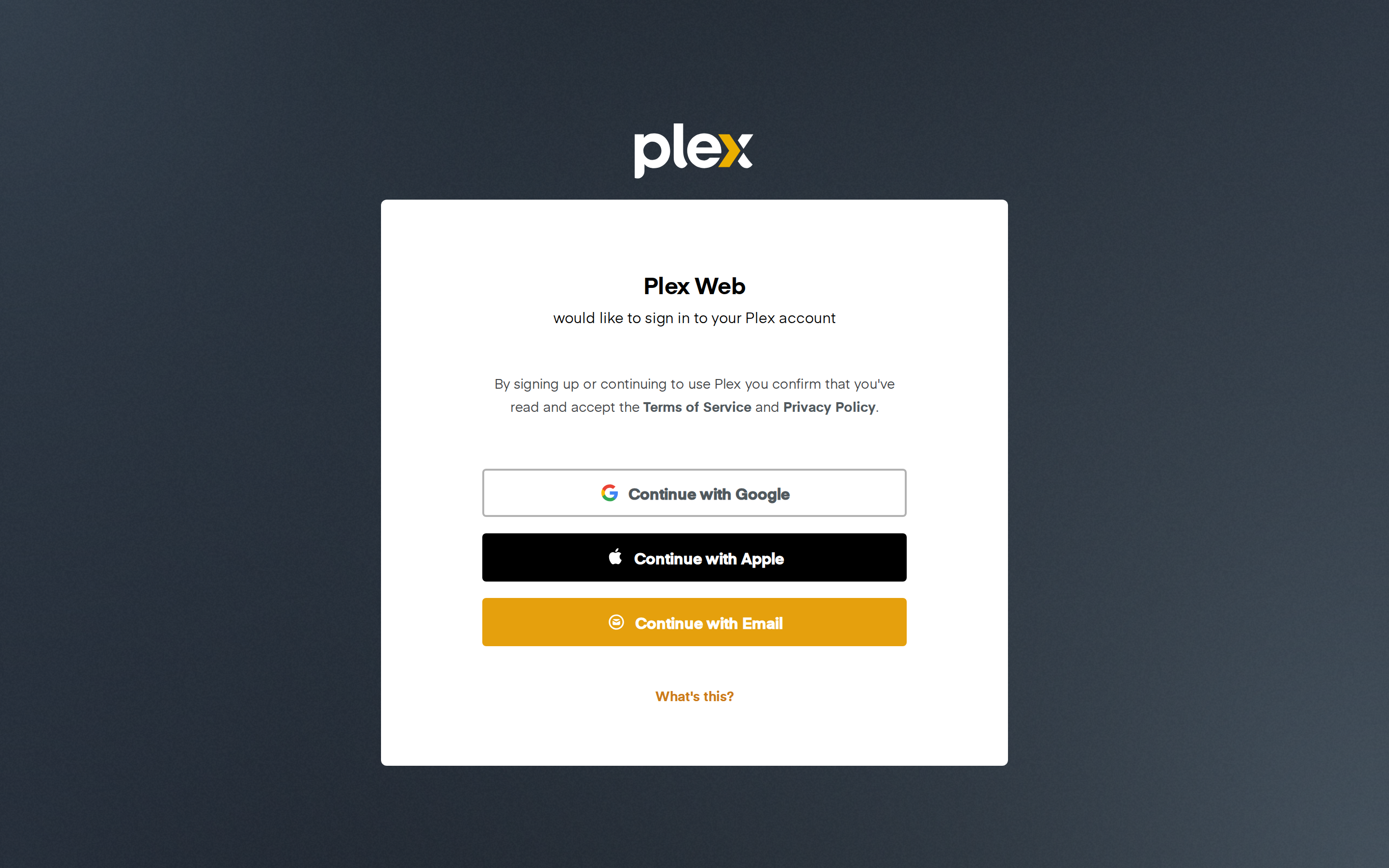
Then open http://127.0.0.1:32400/web/ (or the HTTPS hostname below), sign in, and finish the wizard. Add a library that points at /data/media.
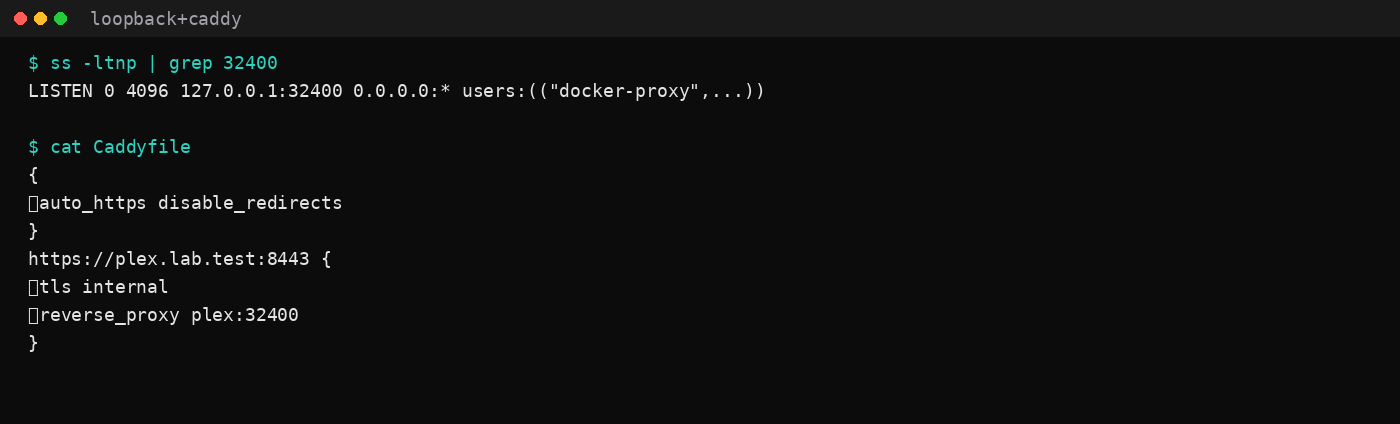
On the VPS, put Caddy on 80/443 and keep Plex on loopback. Lab Caddyfile shape (internal TLS on 8443 so the host's own 443 stayed free):
{
	auto_https disable_redirects
}
https://plex.lab.test:8443 {
	tls internal
	reverse_proxy plex:32400
}
WireGuard or Tailscale can reach that loopback without a public hostname. The WireGuard post owns the tunnel; DNS and the firewall leave 32400 closed on the public interface. Prefer the Caddy automatic HTTPS layout when the hostname is real.
What does one Direct Play file look like on the wire?
The lab library held a sixty-second MP4 from testsrc2: 1280×720, 30 fps, libx264, AAC. ffprobe printed codec_name=h264 and bit_rate=5046216 (about 5.05 Mbps on the video stream). File size was 38 MiB for that minute, which lines up with the soft-1080p planning row.
ffprobe -v error -select_streams v:0 \
  -show_entries stream=codec_name,bit_rate,width,height \
  -of default=nw=1 media/lab-stream.mp4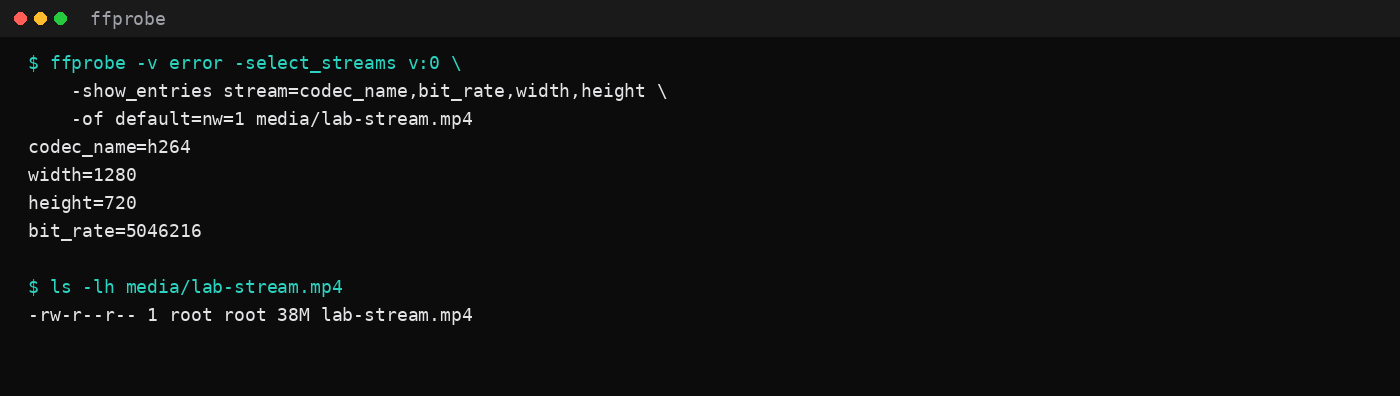
Direct Play ships those bits almost as stored. That is light on CPU and heavy on egress when the client is off-LAN. A forced transcode to a lower bitrate can shrink the GB/hour column and raise the CPU column. Prefer matching clients to files you already encode for them. Downscale when you mean to trade CPU for bandwidth.
How much RAM does idle Plex use?
After first-run setup and a quiet window, cgroup memory.current sat at 241.9 MiB (median of twenty samples, two seconds apart). docker stats printed 233.9 MiB. CPU was under one percent with no sessions.
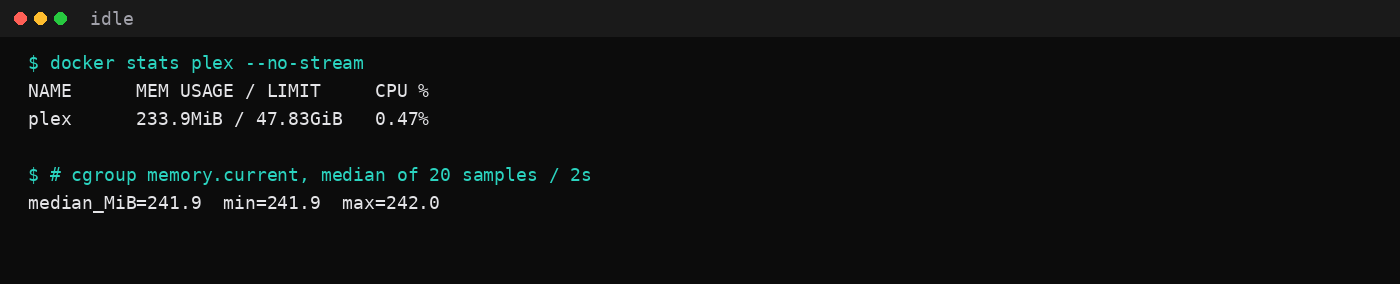
A 2 GB plan can hold the container beside Ubuntu on Direct Play with a modest library. Transcoding, large scans, and several concurrent remuxes are a different budget. The 2 GB idle table is the wider context for what else fits on that size of guest.
FAQ
Does Direct Play use less CPU than a transcode?
Yes. This lab left /dev/dri unmounted and treated Direct Play as the path to keep. A downscale transcode spends CPU to save bandwidth. On a metered VPS that trade can be rational. On an unmetered plan with clients that can play the file, Direct Play is usually the cheaper wall-clock choice.
How much home upload do I need instead of a VPS?
One concurrent Direct Play needs roughly the file bitrate in clear upload, plus headroom for TCP and other household use. Plan about 25 Mbps up for one 1080p remux and about 60 Mbps up for one 4K remux. Two remux viewers at once roughly doubles that.
Plex or Jellyfin on the same box?
Jellyfin on Docker measured 156.8 MiB idle with Direct Play and no Plex account. Pick Jellyfin when you want the free stack and you are fine without Plex clients and Plex Pass remote. Pick Plex when the household already lives in that client ecosystem and you have priced Pass plus egress.
Should the library live on the VPS disk?
Only if the VPS transfer plan survives the stream-hour table. Large remux libraries also burn disk and snapshots. Many people keep bulk media on the NAS and use the VPS only when remote upload is the bottleneck. Offsite backup stays a restic problem either way.
Is "unlimited" bandwidth enough for 4K remux nights?
Included 20 TB on a Hetzner CX-class EU plan covers the 9.7 TB row above with room left. Fair-use and port-speed limits still apply on hosts that print "unlimited." Read the port (100 Mbps vs 1 Gbit) and the fair-use clause before you schedule three concurrent 4K remuxes.