
Jellyfin 12.4 held 156.8 MiB idle. That is cgroup memory.current, the median of twenty samples taken 30 seconds apart, after the wizard, one library item, and ten minutes with no traffic. docker stats printed 156.7 MiB. smem put the same processes at 268.3 MiB PSS. During Direct Play of one H.264 file the cgroup median was 174.8 MiB, with a short CPU spike to 63.6 percent on the first sample and a median of 0.15 percent after that. The container showed zero ffmpeg encoder processes.
The hardware page still says at least 8 GB for an average deployment, and that 4 GB may be enough for a Linux server without a GUI. The same page says a server without a GPU is a poor fit because CPU transcoding is demanding. This run took the 4 GB headless line as a Direct Play budget. Transcoding stayed off. The file the client could already play is the one that worked.
The 2 GB idle table left Jellyfin off for that hardware line. This post is the 4 GB case with the expensive path closed.
| Reading | Idle | Direct Play |
|---|---|---|
cgroup memory.current | 156.8 MiB, median of 20 | 174.8 MiB, median of 12 |
docker stats | 156.7 MiB | 174.6 MiB |
smem PSS | 268.3 MiB | 284.7 MiB |
| CPU percent | 0.01, median | 0.15 median, 63.6 max on the first sample |
| Play method | (idle) | DirectPlay |
| ffmpeg encoder in the container | (idle) | 0 |
| Skip this | What this run saw |
|---|---|
| Transcoding left on for every user | The session would have been free to pick a Transcode path |
| A public Cloudflare hostname for video | The tunnel post already covers that clause |
latest or a third-party image | This run pinned jellyfin/jellyfin:12.4 by digest |
| Publishing 8096 on every interface | Caddy listened on loopback. 8096 stayed on 127.0.0.1 |
Does Jellyfin's 4 GB line include transcoding?
The hardware page has two 4 GB sentences. One sits under a dedicated GPU recommendation: "RAM: 8GB. (4GB may be sufficient for a Linux server without its own GUI.)" The system-memory section repeats the idea for a headless Linux server. The servers-without-GPUs section is the other half of the story. Video transcoding on the CPU is performance demanding. HDR tone-mapping without a GPU is worse.
This guest left /dev/dri unmounted. Hardware acceleration was None. The measurement is idle against Direct Play. A software 1080p to 720p encode is a different post.
How do you install Jellyfin with Docker?
The image is jellyfin/jellyfin:12.4, digest sha256:fea863d0cd9ec445985d9c75fc6ed64e38a1d2766cf0c250a33d553f4fc1b771. Hub also prints a packaging tag 12.4.20261026-211555 for the same build. Skip latest, the floating 12 tag, LinuxServer, hotio, and unstable. A newer stable tag on the day you install replaces 12.4, and you should pin that digest instead.
The machine was Ubuntu 24.04, Docker 29.1.3, 8 CPUs, about 47 GiB of RAM, and swap was 0. That is the same lab shape as the Forgejo install. The container still has to fit a 4 GB plan. sse4_1 is present on this CPU. Jellyfin has required it since 10.11. This CPU has the flag, so that refusal stayed off this run.
Volumes are /config, /cache, and a read-only /media. The process runs as 1000:1000. Publish only 127.0.0.1:8096:8096. Leave 7359/udp off. Leave host networking off. Leave /dev/dri unmounted. restart: unless-stopped. Log the json-file driver at max-size 10m and max-file 3, as in the Compose checklist.
services:
  jellyfin:
    image: jellyfin/jellyfin:12.4@sha256:fea863d0cd9ec445985d9c75fc6ed64e38a1d2766cf0c250a33d553f4fc1b771
    user: "1000:1000"
    restart: unless-stopped
    environment:
      JELLYFIN_PublishedServerUrl: https://media.example.com
    ports:
      - "127.0.0.1:8096:8096"
    volumes:
      - ./config:/config
      - ./cache:/cache
      - ./media:/media:ro
    logging:
      driver: json-file
      options:
        max-size: "10m"
        max-file: "3"
  caddy:
    image: caddy:2.11.7@sha256:36c24ad91a7ff7bc4c87fe22bfa8df3c4b18da0773d73fc12ee2c52b98c0bb7e
    restart: unless-stopped
    depends_on:
      - jellyfin
    ports:
      - "127.0.0.1:8443:8443"
    volumes:
      - ./Caddyfile:/etc/caddy/Caddyfile:ro
      - caddy-data:/data
      - caddy-config:/config
volumes:
  caddy-data:
  caddy-config:
{
auto_https disable_redirects
}
https://media.lab.test:8443 {
tls internal
reverse_proxy jellyfin:8096
}On the VPS, Caddy's published lines become 80:80 and 443:443, and the hostname is the one in DNS. This lab kept 8443 on loopback with an internal certificate so the screenshots left the host's own 443 alone. JELLYFIN_PublishedServerUrl stayed https://media.example.com. Known proxies was set to 127.0.0.1 so Jellyfin trusts X-Forwarded-* from Caddy and can tell LAN from remote clients (reverse proxy docs). Leave those blank and every viewer looks like Caddy. Caddy’s default reverse_proxy already upgrades WebSockets; Jellyfin needs that for live sessions. If you log full request URLs at the proxy, redact api_key query params. When you later mount /dev/dri for VAAPI/QSV, also enable the matching method under Dashboard → Playback → Transcoding (hardware acceleration); a device node alone does nothing.
/health returned Healthy once Kestrel was up. The server reported version 12.4.0.
How do you leave transcoding off and still play a file?
One library, one item. The file was a thirty-second MP4 from testsrc2, 1280x720, 30 fps, libx264, yuv420p, AAC. ffprobe printed h264 and yuv420p. The library held that one title. Big Buck Bunny from Blender is fine when that download shows the same codec pair.
Hardware acceleration was None under Dashboard, Playback, Transcoding.
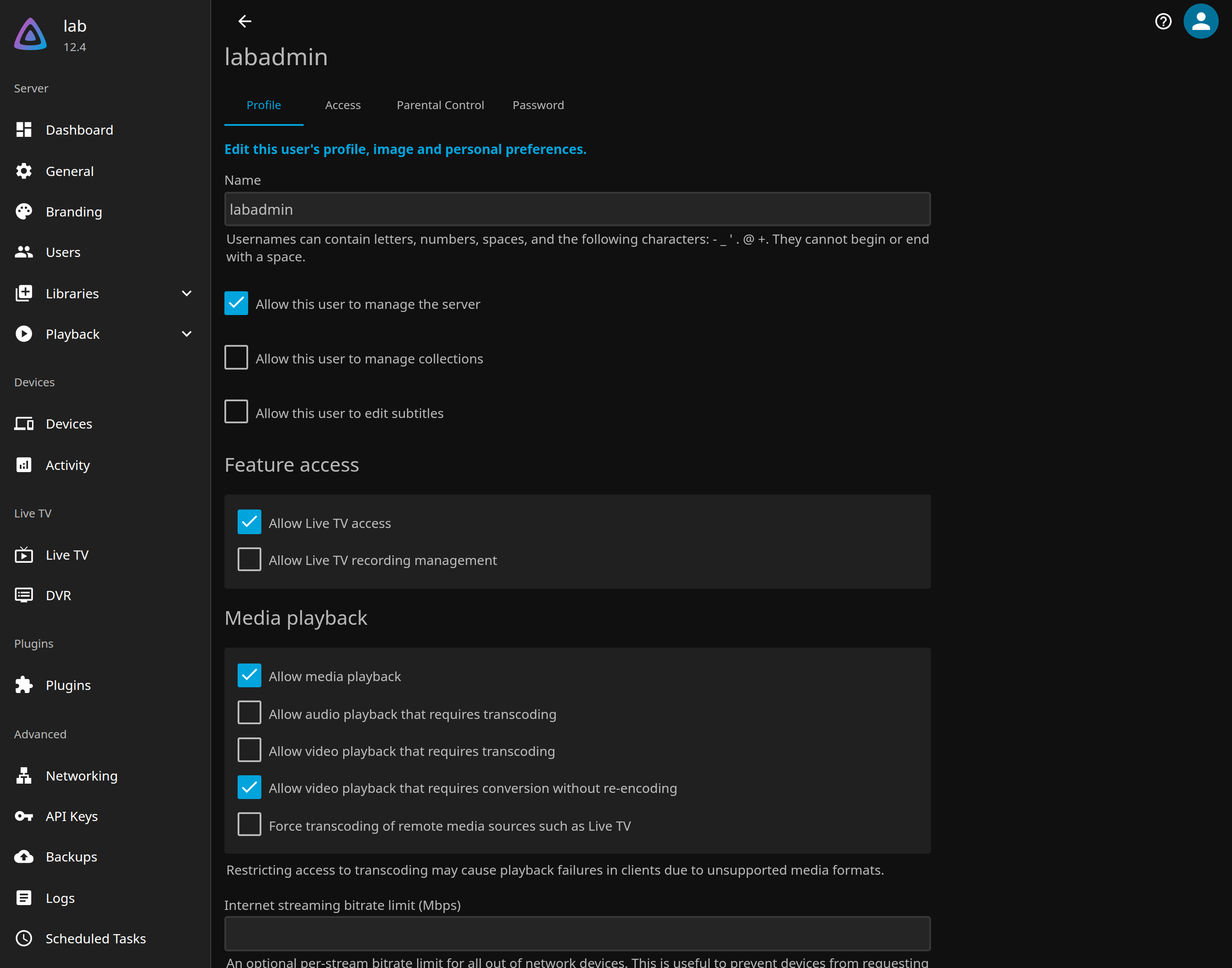
On the admin user, these boxes were clear:
- Allow audio playback that requires transcoding
- Allow video playback that requires transcoding
Allow media playback stayed on. Allow video playback that requires conversion without re-encoding stayed on, so a remux is still allowed. Deletion stayed off. The warning under those boxes says restricting transcoding may cause playback failures when a client lacks a decoder for the file as stored. That is the point of this setup.
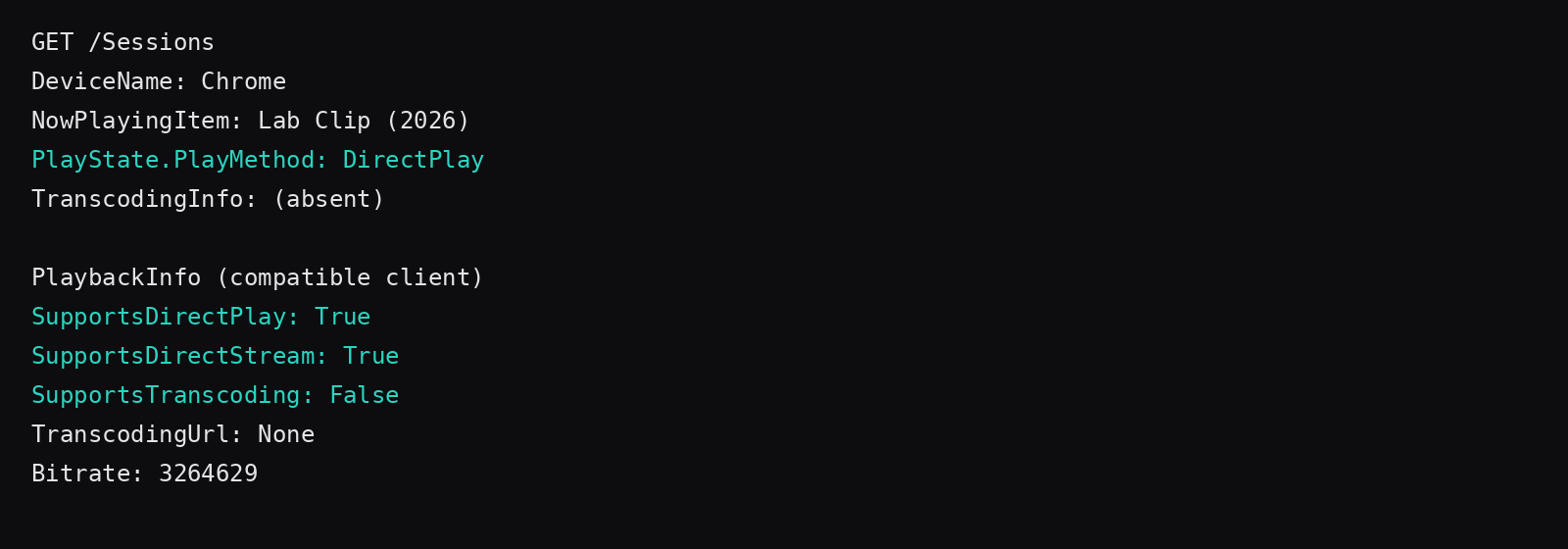
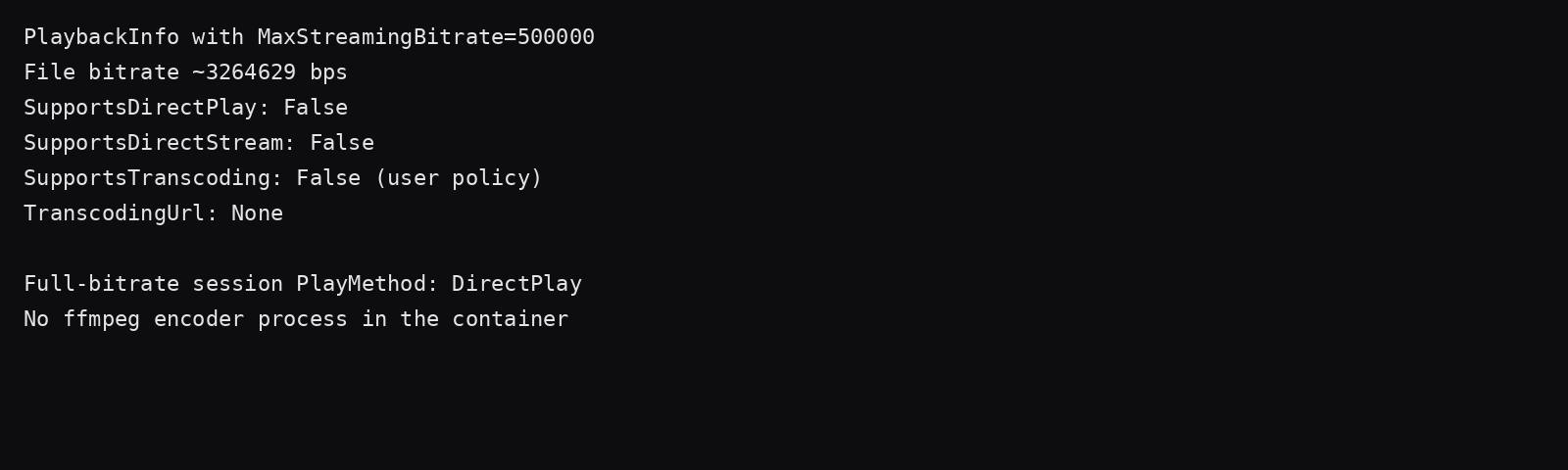
PlaybackInfo for a Chromium-shaped profile returned SupportsDirectPlay: True, SupportsDirectStream: True, SupportsTranscoding: False, and an empty TranscodingUrl. A live session reported PlayState.PlayMethod: DirectPlay for Lab Clip (2026). docker top on the container listed zero ffmpeg lines while that session was open.
When the client's max streaming bitrate was set to 500 kbps against a file at about 3.26 Mbps, PlaybackInfo returned Direct Play false, Direct Stream false, Transcoding false, and an empty transcode URL. The file bitrate limit is how you see the failure while the Transcode path stays closed. Restore the limit so the file plays again.
How do you watch it without a public hostname?
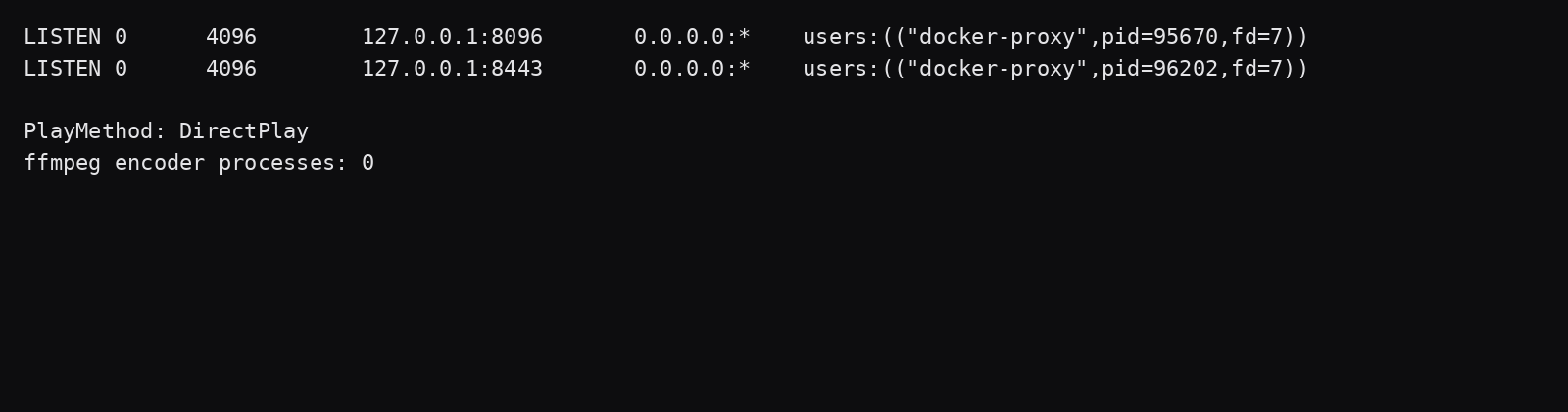
ss showed 8096 and 8443 on 127.0.0.1 only.
WireGuard or Tailscale is how a phone reaches that loopback. WireGuard forwards to Caddy on the tunnel address. Tailscale Serve points at 127.0.0.1. Leave Funnel off for this library. The WireGuard and WireGuard versus Tailscale posts own the tunnel. The panel firewall leaves 8096 closed because nothing publishes it.
Skip a Cloudflare Tunnel public hostname for this library. The tunnel comparison already says the public route is the CDN path the video clause covers, and a private network route is the exception its FAQ names.
How much memory and CPU does Direct Play use?
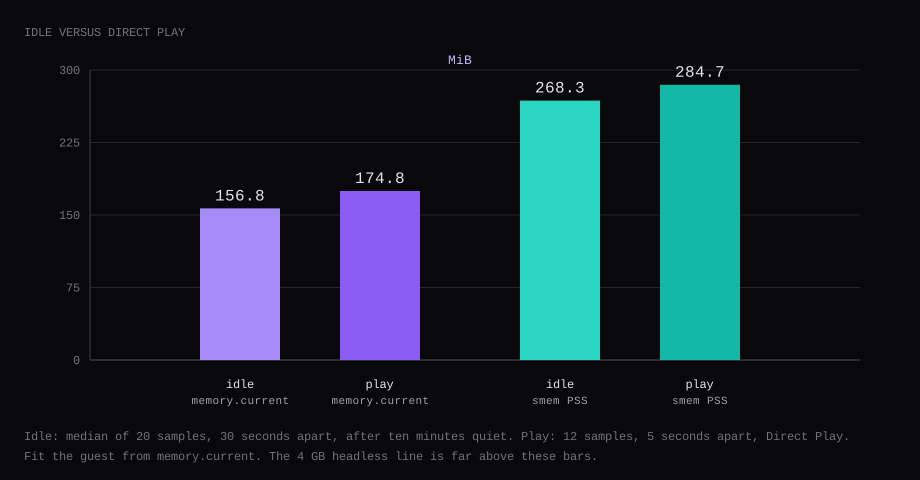
The play samples pulled the static MP4 through the API while a session reported DirectPlay. The first CPU reading was 63.6 percent. The rest sat near idle. Peak memory.current in that window was 185.0 MiB. A 4 GB guest still has to run Ubuntu beside the container. The bars are far under that line.
How do you back it up and keep it up?
Stop Jellyfin. Archive /config. This run wrote config-backup.tgz at 383,520 bytes. sha256sum was:
f7c1bac993b96e6c25a6b5186a019e1f635f3b2a1a32299008a4597784927c12Restore onto a clean directory, start the container, and /health returned Healthy. The same movie scanned back as Lab Clip (2026). The restored jellyfin.db hashed to the same value as the copy taken before the restore:
797f5051c2cca6c31362b00f72f2ce7774a0c10c45cb20dedf94f9df30a312c7A longer off-box copy is restic to a storage box. After a reboot, hit /health again and play the item once. EnableMetrics stayed false. Trickplay and chapter-image extraction were already off on the library. Leave Watchtower out and pin the digest. A later mem_limit can use the play peak plus headroom you print. It stayed off during these samples.
FAQ
Will Jellyfin fit on 2 GB?
The 2 GB table left it off. The hardware page's headless line is 4 GB. This guest measured the container in the 150 to 185 MiB band with Direct Play only. Ubuntu still needs its share. Buy the 4 GB plan for the official floor.
Does /health prove playback?
/health returned Healthy and proved HTTP plus the database. The dashboard session line is the playback proof. DirectPlay is the string this post needed.
What if the client lacks H.264?
Playback fails when the bitrate limit is under the file and transcoding is closed. That is the low-bitrate test above. Remux without re-encoding can still help a container mismatch. A codec the client lacks a decoder for needs a different file, or a GPU plan and transcoding turned back on.
Do you need a GPU for this setup?
This run left the render device unmounted. A GPU plan is for the transcode path the hardware page warns about. Direct Play of a compatible file is the 4 GB case.
Can you put Jellyfin on a Cloudflare Tunnel public hostname?
Use a private route, or put the VPS behind WireGuard or Tailscale as above. The public hostname case is the video clause in the tunnel post.