
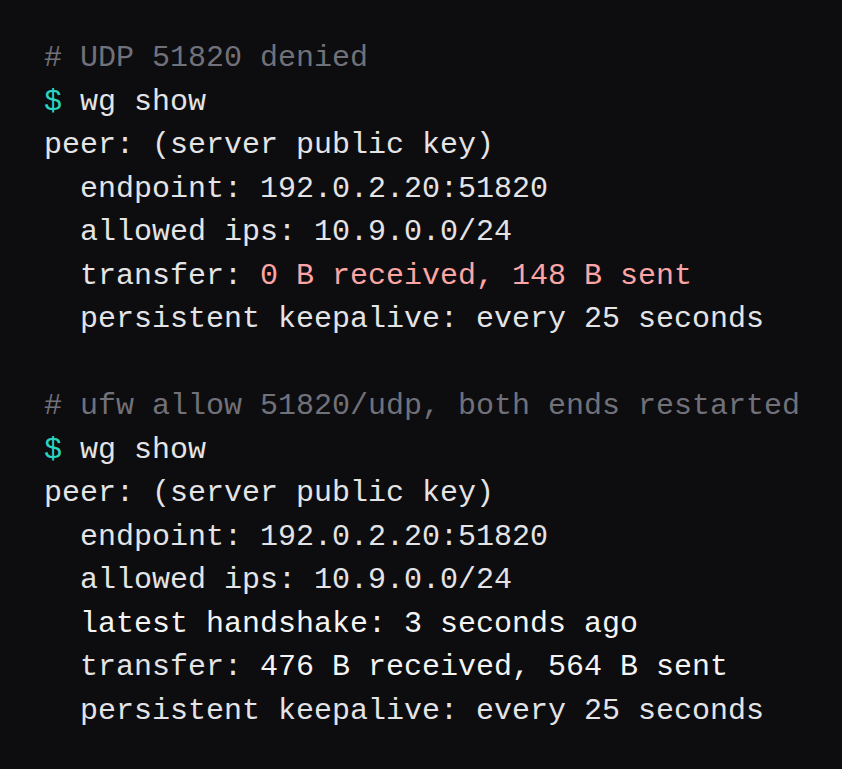
ufw 0.36.2 had incoming set to deny, and the only allow was TCP 22. The client's wg show listed a peer, 148 bytes sent, 0 bytes received, and the handshake line was absent. Two pings to 10.9.0.1 were lost. ufw allow 51820/udp, then a restart of both ends. Three pings came back, at 0.643 ms, 0.530 ms, and 0.708 ms. The next wg show read latest handshake: 3 seconds ago, with 476 bytes received and 564 bytes sent.
The guests are qemu, Ubuntu 24.04.5 LTS, kernel 6.8.0-147-generic, one vCPU each. The server was -m 2048 and free -m printed 1,967. The client was -m 1024 and free -m printed 961. wg --version printed wireguard-tools v1.0.20210914. The package is 1.0.20210914-1ubuntu4. Server 192.0.2.20, client 192.0.2.30, one bridge.
WireGuard on a VPS, with a phone QR is Ubuntu 26.04.1 and the QR a phone scans. This page leaves the QR there. The peer here is the second Linux guest. OpenVPN on Ubuntu 24.04: one client, then a ping is the other tunnel on these same two machines.
Keys, then wg0
apt-get install wireguard
umask 077
wg genkey | tee /etc/wireguard/server.key \
  | wg pubkey > /etc/wireguard/server.pub
The package that command installs on these guests is 1.0.20210914-1ubuntu4, which is the wg --version string wireguard-tools v1.0.20210914. Run the same two lines on the client, into /etc/wireguard/client.key and client.pub. Private keys stay in those files, mode 600. They are lab keys, and the disks were removed after the capture.
wg-quick@wg0 reads /etc/wireguard/wg0.conf. The server file in the next block is that path. PostUp is two jobs: turn on forwarding, then masquerade 10.9.0.0/24 out enp0s2, the NIC that had 10.0.2.15. PostDown deletes that nat table.
PostUp = sysctl -w net.ipv4.ip_forward=1
PostUp = nft -f /etc/wireguard/masq.nft
PostDown = nft delete table ip nat
masq.nft is the one rule:
table ip nat {
  chain postrouting {
    type nat hook postrouting priority srcnat
    ip saddr 10.9.0.0/24
    oifname enp0s2 masquerade
  }
}
Server /etc/wireguard/wg0.conf, with the private key kept in the file and out of this page:
[Interface]
Address = 10.9.0.1/24
ListenPort = 51820
PrivateKey = (server key)

[Peer]
PublicKey = (client public key)
AllowedIPs = 10.9.0.2/32
Client:
[Interface]
Address = 10.9.0.2/24
PrivateKey = (client key)

[Peer]
PublicKey = (server public key)
Endpoint = 192.0.2.20:51820
AllowedIPs = 10.9.0.0/24
PersistentKeepalive = 25
wg-quick reads that file, puts the Address on wg0, and installs a route for each AllowedIPs entry. On the client that route is 10.9.0.0/24, which is why a ping to 10.9.0.1 has somewhere to go before you touch ip route yourself. The server's AllowedIPs = 10.9.0.2/32 is the one address it will accept from that peer.
The client's key pair is the same two commands, with the names changed:
umask 077
wg genkey | tee /etc/wireguard/client.key \
  | wg pubkey > /etc/wireguard/client.pub
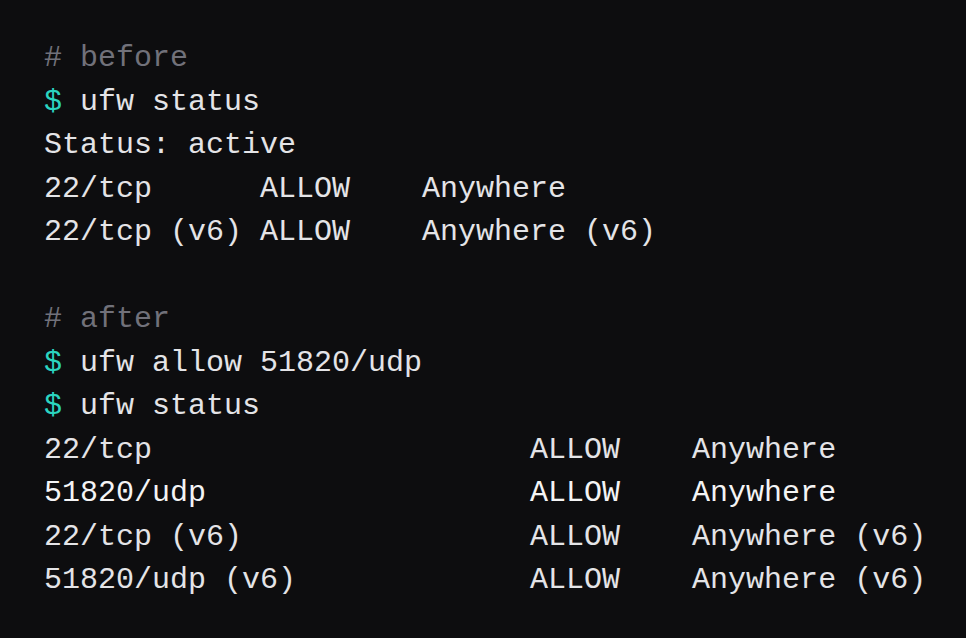
ufw on the server started as incoming deny, outgoing allow, TCP 22 allowed. UDP 51820 was absent. The handshake line stayed absent, and both pings were lost. The allow that changed it:
ufw allow 22/tcp
ufw allow 51820/udp
ufw allow in on wg0
ufw status
The UDP allow is the one that produced the handshake. ufw allow in on wg0 came after the ping had already succeeded. sysctl -w inside PostUp holds forwarding until wg-quick tears the interface down. A file under /etc/sysctl.d is the copy that survives a reboot where wg-quick is what brings the interface back:
printf '%s\n' net.ipv4.ip_forward=1 \
  > /etc/sysctl.d/99-ipforward.conf
sysctl --system
Bring both ends up, then read the handshake:
systemctl enable --now wg-quick@wg0
wg show
ss -ulpn | grep 51820
ping -c 3 10.9.0.1
systemctl enable --now wg-quick@wg0 on both. With ufw still off, the server's wg show already had latest handshake: 3 seconds ago and the client's endpoint learned as 192.0.2.30 on a high port. ss showed UDP 0.0.0.0:51820. grep 51820 is that socket. The three ping times in the opening are the same ping after ufw allow 51820/udp. Before the allow, wg show had bytes sent, zero received, and the handshake line was absent. The quickstart is wg genkey, wg pubkey, and wg-quick. The rest of this page is what happens when a firewall and AllowedIPs are in the way.
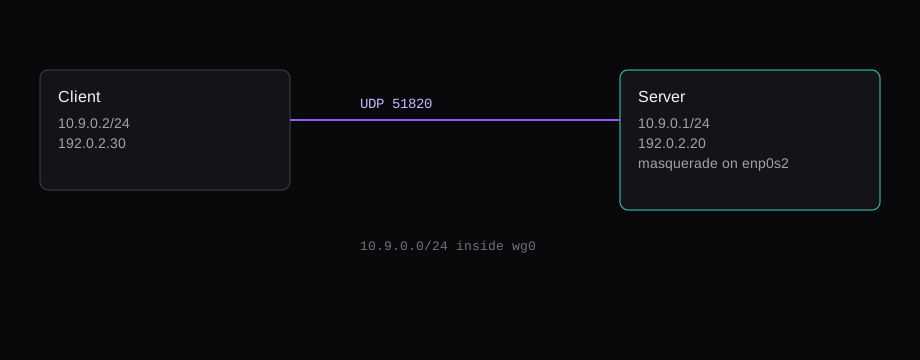
UDP 51820
The deny test was a reset of ufw: incoming deny, outgoing allow, TCP 22 allowed, UDP 51820 absent from the list. I started the client. The handshake line stayed absent, the transfer counter sat at 0 bytes received and 148 bytes sent, and both pings were lost.
After ufw allow 51820/udp and a restart, the three pings above came back and the handshake line read 3 seconds ago. I added ufw allow in on wg0 after that ping had already succeeded. The next three pings also succeeded. The rule that changed the result was the UDP allow.
AllowedIPs is a filter, and also a route
wg-quick installs a route for each AllowedIPs entry. On the client that was 10.9.0.0/24, so a ping to 10.9.0.1 has somewhere to go. A packet to 1.1.1.1 needs a route of its own.
I added 1.1.1.1/32 via 10.9.0.1 while AllowedIPs was still 10.9.0.0/24. curl exited 7 in 0.000087 seconds. The message was No route to host. The box had a route, and WireGuard still refused the destination, because 1.1.1.1 sat outside the peer's allowed list.
wg set wg0 peer SERVER_PUBLIC_KEY \
  allowed-ips 10.9.0.0/24,1.1.1.1/32
ip route get 1.1.1.1 then printed dev wg0 src 10.9.0.2. The same curl returned 301 in 0.152 seconds. The client's transfer counter moved from 952 bytes received and 1,384 bytes sent to 5,172 received and 3,048 sent. That is 4,220 bytes down and 1,664 bytes up for one request. The server's masquerade was the nftables rule for 10.9.0.0/24 out enp0s2.
AllowedIPs = 0.0.0.0/0 on the client is the choice that sends the rest of the client's traffic at the server. I left it off, so the bridge path I was logged in on stayed where it was. The phone post is where a full tunnel is the point.
895.5 Mbit/s on this bridge
iperf3 3.16, from 10.9.0.2 to 10.9.0.1, ten seconds, three times. Receiver rates: 1,118.3, 878.8, and 895.5 Mbit/s. Median 895.5.
OpenVPN 2.6.19 on these guests, AES-256-GCM, same ten-second shape: 265.3, 192.1, 167.9 Mbit/s, median 192.1. WireGuard's median is 4.7 times that. The unencrypted iperf on the bridge addresses, tunnel left unused, was 13,971, 12,811, and 11,306 Mbit/s, median 12,811. Virtio on one host. A provider port is a different ceiling. WireGuard vs Tailscale vs Headscale on a VPS put a third guest in the middle and measured the hub, the direct Tailscale path, and the relay. The number here is those two peers on one bridge.
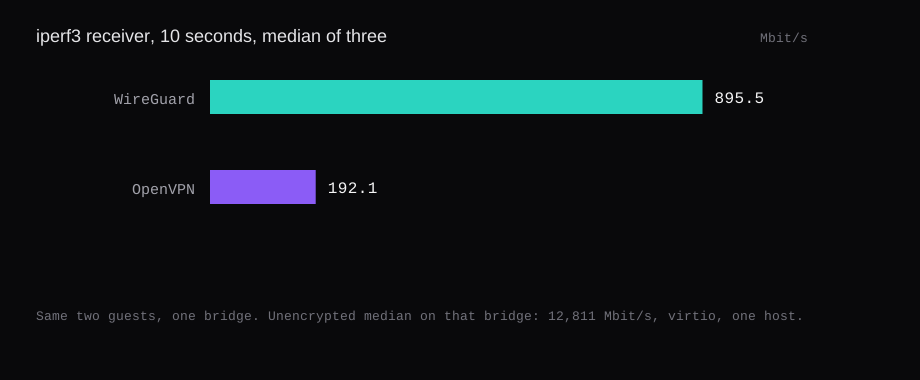
The handshake line is the check. Config files can look finished while UDP 51820 is still denied, and the symptom is a peer with bytes sent, zero received, and the handshake line missing. The allow is one ufw line. The rate, once the handshake is there, was 895.5 Mbit/s on this bridge.