
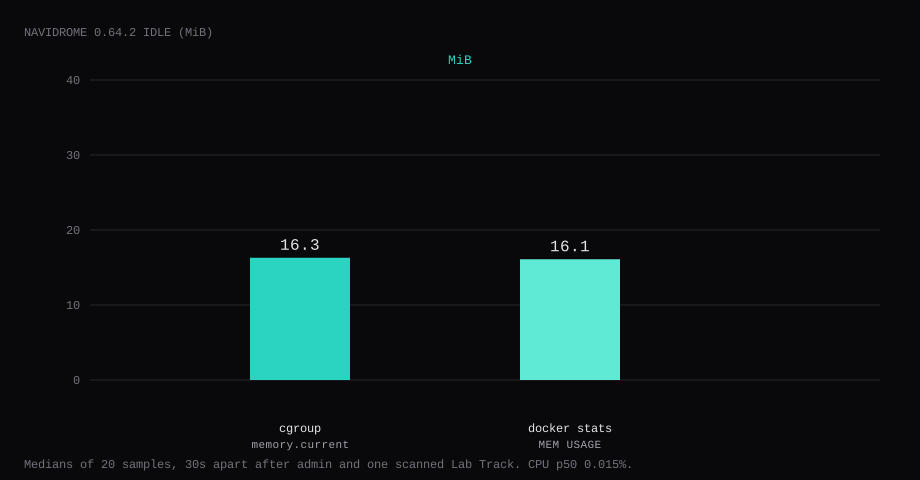
Navidrome 0.64.2 held 16.3 MiB idle on this lab host after an admin account existed and one MP3 sat in the library as Lab Track. That is cgroup memory.current, the median of twenty samples taken 30 seconds apart with a quiet UI. docker stats printed 16.1 MiB. CPU percent sat at 0.02. Port 4533 listened on 127.0.0.1 only. A curl to the guest's LAN address on 4533 was refused.
Navidrome is a lightweight music server with a modern web UI and a Subsonic-compatible API. Point it at a folder of files you already own, scan once, and stream from the browser or from apps such as Symfonium, Ultrasonic, and Feishin. It handles multi-user libraries, playlists, favourites, and transcoding when a client asks for a format the file is not already in. Compared with Jellyfin it stays focused on audio and keeps a smaller idle footprint on a VPS.
The official Docker docs publish 4533:4533, mount /data and /music, and create the first admin on first visit. Competing guides stop once the login page loads. Pin 0.64.2 by digest, bind 4533 to loopback, run as 1000:1000 so the music tree is readable, create the admin, scan until one album shows, turn the insights collector off, and put Caddy on 443.
| Reading | Value |
|---|---|
cgroup memory.current | 16.3 MiB, median of 20 |
docker stats | 16.1 MiB |
| CPU percent | 0.02, median |
| Host listener | 127.0.0.1:4533 |
| Library after scan | 1 album, 1 song (Lab Album / Lab Track) |
| Image | navidrome/navidrome:0.64.2 |
| Skip this | What this run did |
|---|---|
4533:4533 on every interface | Published 127.0.0.1:4533:4533 |
Floating latest | Pinned 0.64.2 by digest |
| Root container + mystery PUID myths | Compose user: "1000:1000" and matching chown |
| Stopping at an empty library | Dropped one track under Artist/Album/ and waited for scan |
| Leaving insights on | ND_ENABLEINSIGHTSCOLLECTOR=false |
| Opening 4533 on the panel firewall | Left 4533 closed; Caddy on 80/443 |
How do you install Navidrome on Docker?
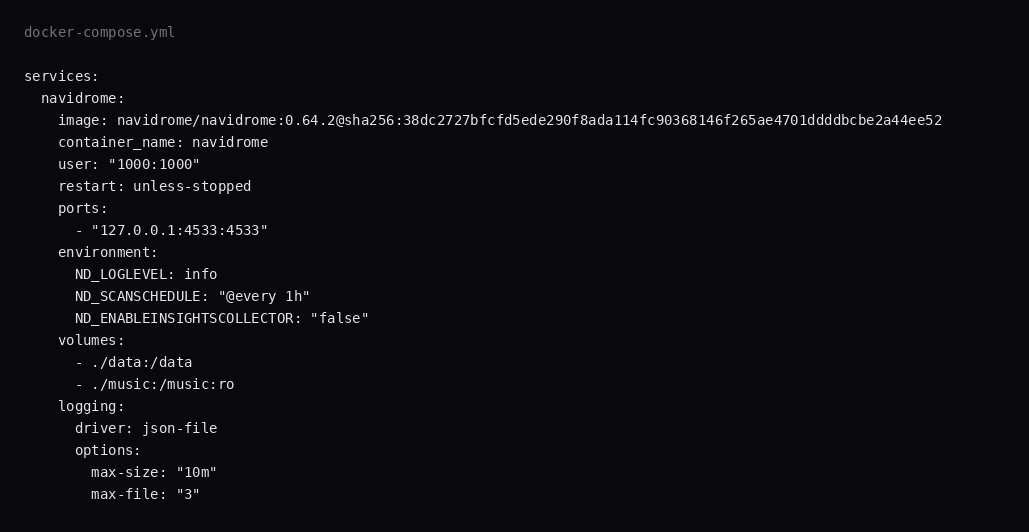
The image is navidrome/navidrome:0.64.2, digest sha256:38dc2727bfcfd5ede290f8ada114fc90368146f265ae4701ddddbcbe2a44ee52. Skip LinuxServer and other third-party wrappers for this stack. If you install a newer stable tag than 0.64.2, pin that digest.
mkdir -p ~/navidrome/{data,music}
sudo chown -R 1000:1000 ~/navidrome/data ~/navidrome/music
cd ~/navidrome
services:
navidrome:
image: navidrome/navidrome:0.64.2@sha256:38dc2727bfcfd5ede290f8ada114fc90368146f265ae4701ddddbcbe2a44ee52
container_name: navidrome
user: "1000:1000"
restart: unless-stopped
ports:
- "127.0.0.1:4533:4533"
environment:
ND_LOGLEVEL: info
ND_SCANSCHEDULE: "@every 1h"
ND_ENABLEINSIGHTSCOLLECTOR: "false"
volumes:
- ./data:/data
- ./music:/music:ro
logging:
driver: json-file
options:
max-size: "10m"
max-file: "3"/music is read-only inside the container. Navidrome writes the SQLite database and cache under /data. Log rotation matches the Compose checklist.
docker compose up -d
curl -sS -o /dev/null -w '%{http_code}\n' http://127.0.0.1:4533/
A working process answers with a redirect into the SPA, often 302.
How do you fine-tune the library and clients?
Keep music on a dedicated volume with stable Artist/Album/Track tags; Navidrome’s scanner follows that layout. ND_MUSICFOLDER and the /music mount must agree. Schedule or trigger rescan after large drops; Melonslab’s Navidrome guide also sets ND_SCANNER_SCHEDULE=@daily and optional ND_BACKUP_PATH / ND_BACKUP_SCHEDULE for nightly DB copies. Transcoding is optional: prefer Direct Play when clients accept the source codec. ND_ENABLEINSIGHTSCOLLECTOR=false (and optionally ND_ENABLEEXTERNALSERVICES=false) keeps telemetry and remote metadata fetches off. Prefer a dedicated hostname behind Caddy without ND_BASEURL; only set ND_BASEURL / ND_BASEPATH for a real subpath, and do not use Caddy handle_path in a way that strips the prefix (navidrome#4531). Melonslab also drops inbound X-Real-IP / True-Client-IP at Caddy so clients cannot spoof the address Navidrome trusts.
Subsonic clients need the HTTPS URL, username, and password. Create the first admin over an SSH tunnel before DNS is public. Back up /data separately from the music tree you may already sync with Syncthing or rclone.
Why must 4533 stay on loopback?
The same port serves the web UI, the admin settings, and the Subsonic/OpenSubsonic API that phone clients use. Publishing 4533 on every interface puts that stack on the internet without TLS.
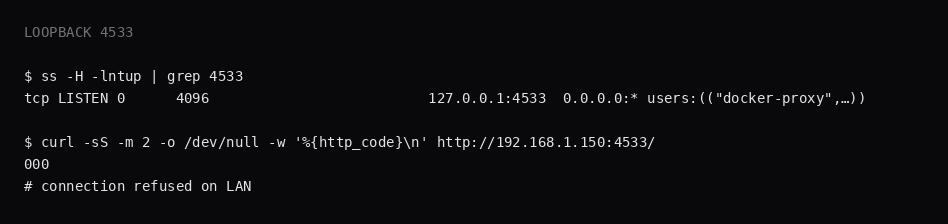
ss -H -lntup | grep 4533On this host that printed 127.0.0.1:4533. Curl to 192.168.1.150:4533 failed with connection refused. Leave 4533 closed in the panel firewall. Open 80 and 443 for Caddy. Docker published ports often bypass UFW inside the guest, so the loopback bind is what kept the LAN address quiet. The public-address case is in provider-side firewall.
How do you create the first admin?
Open http://127.0.0.1:4533 on the guest, or tunnel:
ssh -N -L 4533:127.0.0.1:4533 user@YOUR_VPS_IPThe first visit shows the create-admin form. There is no published default password. Pick a username and a long password, submit, then sign in. Crop the password from screenshots. The next visit is the Sign in page.
What does one scanned track prove?
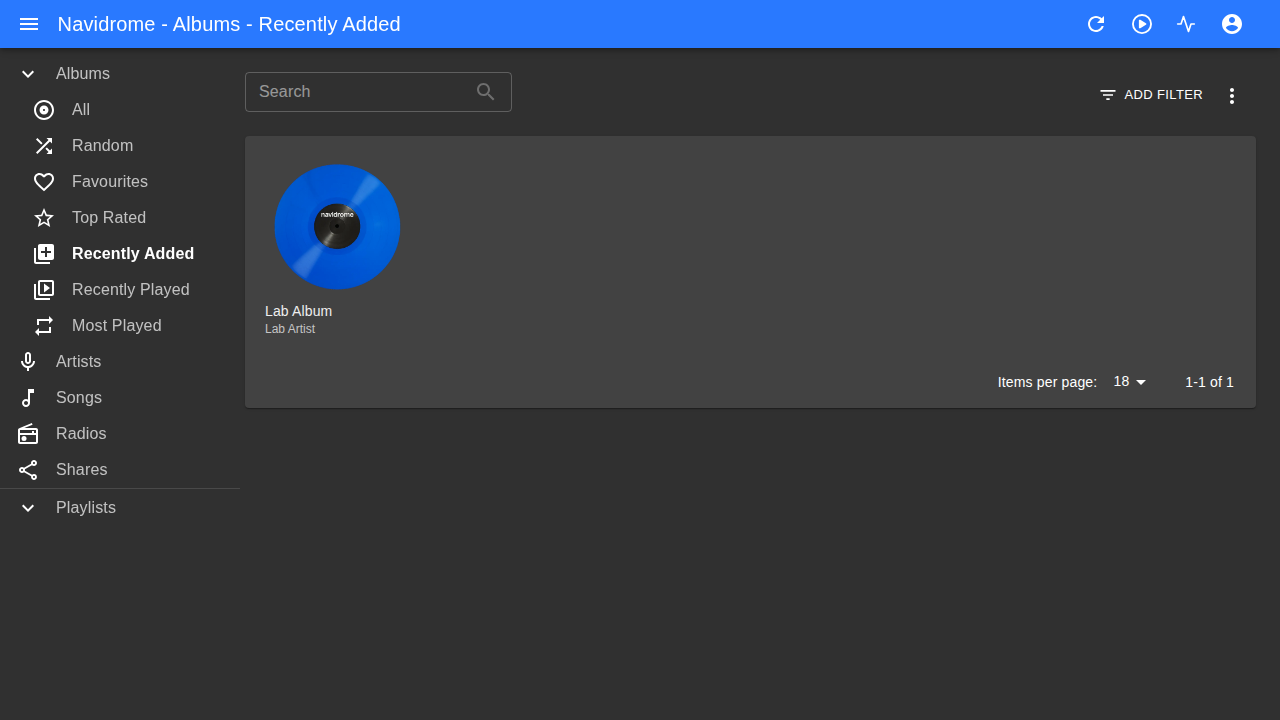
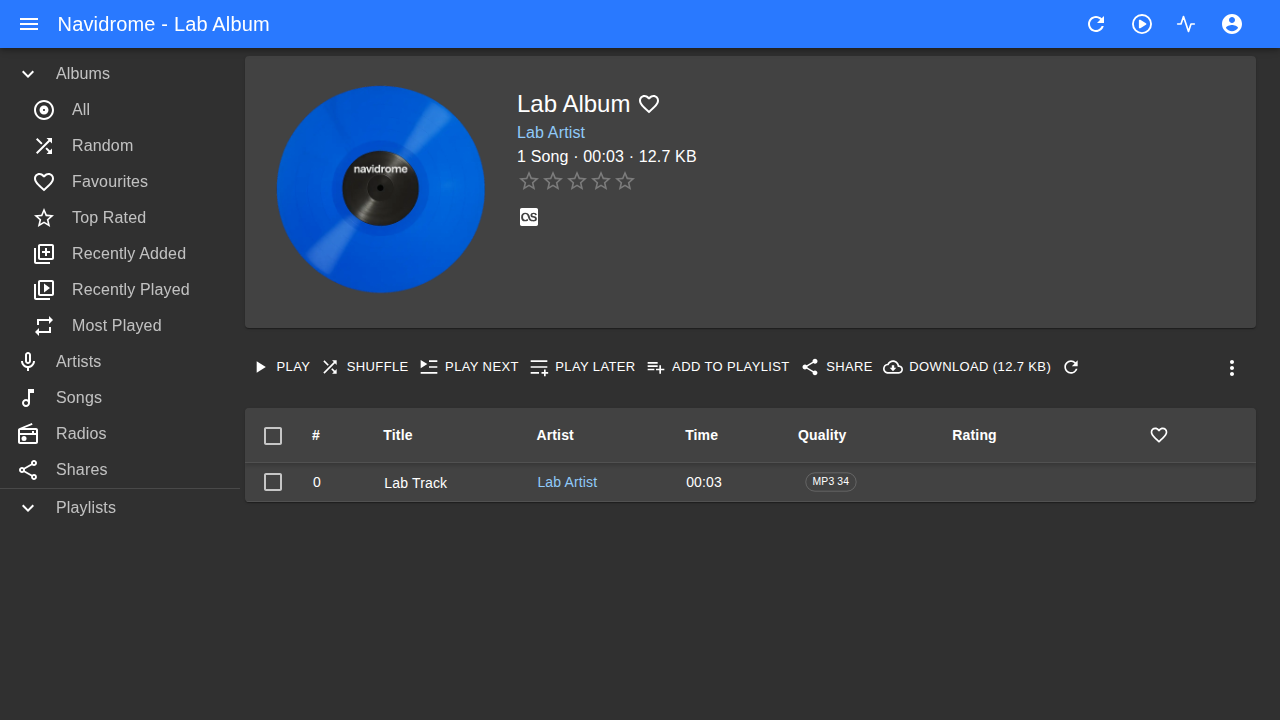
Put an audio file under the music mount in the Artist/Album/track layout. This lab used a three-second MP3 at music/Lab Artist/Lab Album/01-Lab-Track.mp3, owned by uid 1000. Wait for the scheduled scan, or trigger a scan from Settings. Recently Added then showed Lab Album, and opening it listed Lab Track (about 3 seconds, MP3).
If /music is empty and you get a permission error, the container is running as 1000:1000 and the host files are owned by root. Fix the chown before you chase scan bugs.
# after admin exists, optional API check
curl -sS -X POST http://127.0.0.1:4533/auth/login \
  -H 'Content-Type: application/json' \
  -d '{"username":"YOUR_USER","password":"YOUR_PASSWORD"}'
Use the returned token with GET /api/album or GET /api/song.
Where does Caddy go?
Point a hostname at loopback 4533:
music.example.com {
	reverse_proxy 127.0.0.1:4533
}
A path prefix needs ND_BASEURL set to that path. TLS setup is in the Caddy HTTPS post.

How do you back up data?
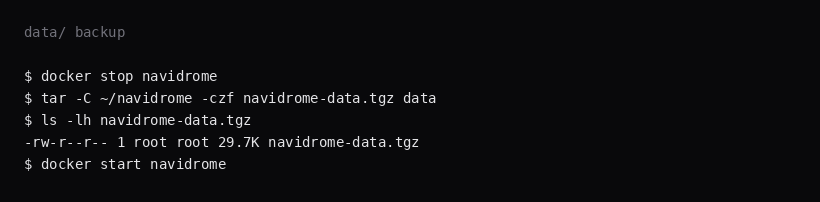
/data holds the SQLite database, cache, and plugins. Music files live under ./music and are a separate backup. Stop the container, archive data/, start again:
docker compose stop navidrome
tar -C ~/navidrome -czf navidrome-data.tgz data
docker compose start navidrome
On this lab the archive was about 30 KB for a starter database and one scanned track. Point Restic at that tarball, or at a consistent snapshot of data/ plus your music tree.
How do you run a personal radio on the VPS?
Keep the music tree the source of truth; Navidrome’s DB is replaceable if you retain tags. Scrobbling to Last.fm or ListenBrainz is optional in settings. Playlists can be collaborative when you add users. Transcoding presets should match phone bandwidth. If artwork is missing, fix tags or enable external providers carefully. Never publish 4533; phones should use HTTPS via Caddy.
FAQ
PUID and PGID? Official Navidrome uses Compose user:. Match that uid to the owner of ./data and ./music. LinuxServer-style PUID/PGID env vars belong to other images.
Multiple libraries? One /music mount is the default. Add extra library roots in settings after the first path scans cleanly.
Navidrome or Jellyfin? Jellyfin is the video stack in Install Jellyfin with Docker on a VPS. Navidrome is the music server with a Subsonic/OpenSubsonic API for phone clients.
Subsonic clients? Point any OpenSubsonic-compatible app at https://music.example.com with the same username and password. The API uses that hostname.
Insights collector? This run set ND_ENABLEINSIGHTSCOLLECTOR=false. Turn it on when you want those telemetry reports.
Does UFW block a published 4533? Inside the guest, published Docker ports often bypass UFW. Bind 127.0.0.1:4533:4533 and leave 4533 closed on the panel firewall.