
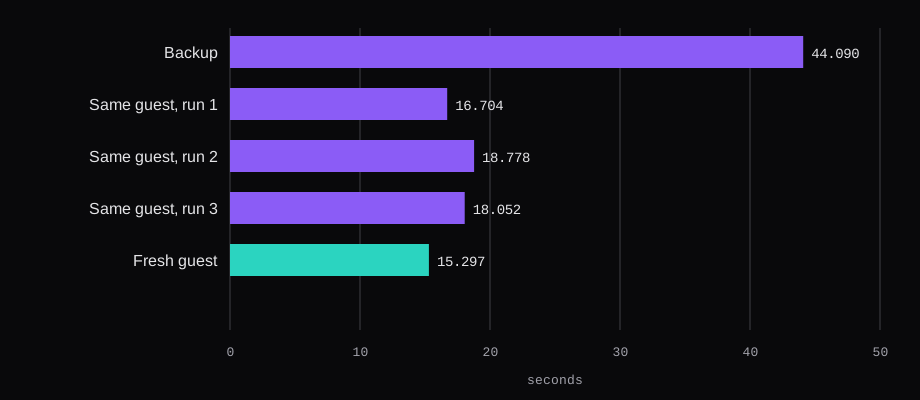
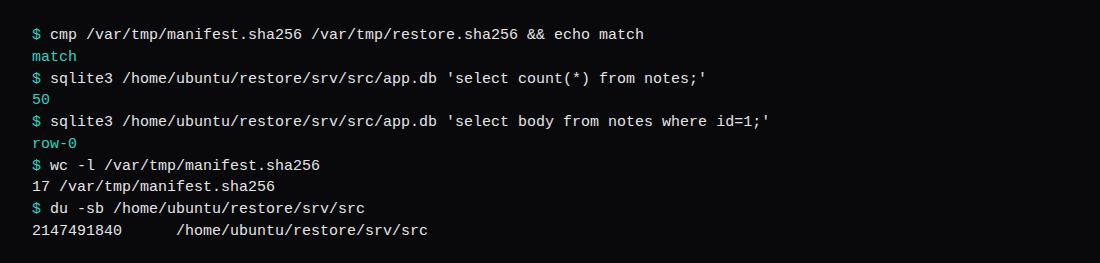
The second guest started with an empty tree. find /srv /home/ubuntu/restore -type f | wc -l printed 0. restic restore latest wrote snapshot 9d110ed9 into that directory, restic's own summary said 2.000 GiB in 0:13, and the wall clock around the process was 15.297 seconds. cmp of the sha256 manifest against the restored files printed match. sqlite3 opened app.db, counted 50 rows, and the body of row 1 was row-0. du -sb of the restored tree was 2,147,491,840, the same byte count as the source.
On the guest that created the snapshot, the same restore three times took 16.704, 18.778, and 18.052 seconds. The median is 18.052, and the spread from the fastest to the slowest is 2.074 seconds. The backup that produced 9d110ed9 took 44.090 seconds of wall clock. Restic's summary for that run was 2.000 GiB stored in 0:43.
BX11 is 1 TB, traffic unlimited, locations FSN 1 and HEL 1, 10 snapshots, €3.20 a month excl. VAT, or €0.0051 an hour excl. VAT. The bytes in these timings went to an SFTP server on this bench, on port 23, with a path relative to the home directory. That is the backend the Storage Box access doc names for Restic. The euro figure is the BX11 page.
How do you point restic at a Hetzner Storage Box?
The access doc's Restic section is two sentences: "Restic is natively supported with the SFTP backend. As another option, we support the restic backend, which is provided by Rclone over SSH." This run used SFTP. The same page says the extended SSH service is port 23, you turn on SSH support in the console, and a connection from outside Hetzner's network also needs External Reachability. The hostname they print is uXXXXX.your-storagebox.de. The account id stays in that example form here. The public key they want is normal OpenSSH format. Only /home/ is writable, so the path you give restic is relative.
Restic 0.16.4, which is the Ubuntu package this guest installed, wants URL syntax when the command includes a port. The 0.16.4 repository page says a relative path uses one slash: sftp://user@host:2222/relative-dir. An ssh config alias is the other form they show, and it is the one that ran. ServerAliveInterval is in that same page because an SFTP server can drop a quiet connection while restic is still hashing.
Host storagebox
  HostName uXXXXX.your-storagebox.de
  User uXXXXX
  Port 23
  IdentityFile ~/.ssh/id_ed25519
  ServerAliveInterval 60
  ServerAliveCountMax 240
install -d -m 700 /etc/restic
install -m 600 /dev/stdin /etc/restic/password
export RESTIC_REPOSITORY=sftp:storagebox:restic
export RESTIC_PASSWORD_FILE=/etc/restic/password
restic init
restic backup /srv/src --tag lab
restic snapshots
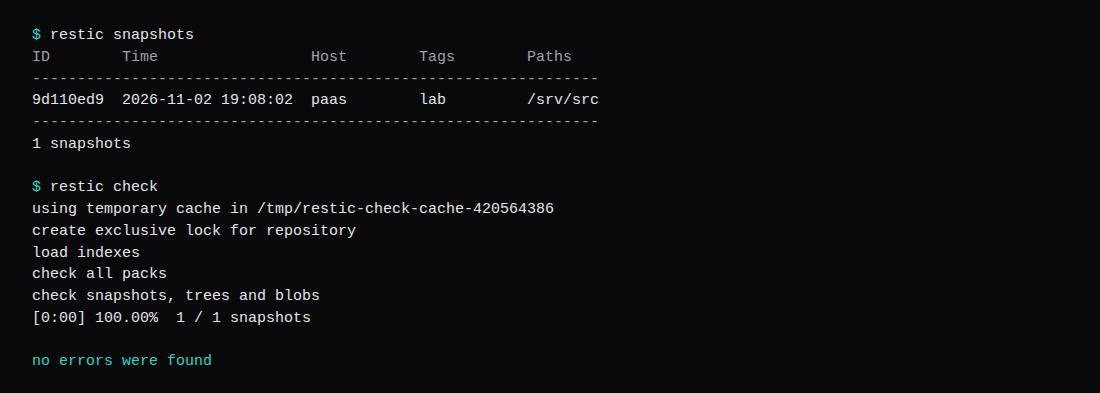
restic check
restic forget --keep-daily 7 --keep-weekly 4 --keep-monthly 6 --pruneCopy that Host block and those restic commands onto a real box. The timed commands used a different HostName, because the SFTP daemon was the bench host as seen from the guest:
Host storagebox
  HostName 10.0.2.2
  Port 23
  User resticbox
  IdentityFile /home/ubuntu/.ssh/box
  StrictHostKeyChecking yes
RESTIC_REPOSITORY was sftp:storagebox:backup. From the guest, 10.0.2.2 is the qemu user-net gateway, so the TCP connection landed on the host's sshd, listening on port 23, chrooted, key only. The password file was mode 600, owner ubuntu, which is also the User= of the systemd unit. restic init printed created restic repository 1e98596663 at sftp:storagebox:backup, then "Losing your password means that your data is irrecoverably lost."
The guest was Ubuntu 24.04.5 LTS, kernel 6.8.0-147-generic, started with qemu -m 2048 -smp 2. free reported MemTotal 2,014,852 kB and swap 0. restic version was restic 0.16.4 compiled with go1.22.2 on linux/amd64, package 0.16.4-2ubuntu0.24.04.3. sqlite3 was 3.45.1. Both guests came up as hostname paas with the same /etc/machine-id, a5b6200cba6740e490de41e8b7dedbe8, because both disks are overlays of one cloud image. The find that printed 0 is what shows the second disk started empty.
What files were in the backup?
The tree is generated. Sixteen files, part-00.bin through part-15.bin, each 128 MiB from os.urandom, plus app.db. Sixteen times 128 MiB is 2 GiB of payload, 2,147,483,648 bytes. du -sb /srv/src printed 2,147,491,840, which is that payload plus 8,192 bytes of the database and the directory entries. du -sh printed 2.1G. The database is one table, notes, with 50 rows inserted as row-0 through row-49, so the first row id is 1 and its body is row-0.
Random bytes are there so the stored size stays on the file size. A tree of zeroes would collapse under dedup, and the stored-size line would shrink with it. Restic reported Added to the repository: 2.000 GiB (2.000 GiB stored). After both snapshots, du -sb of the repository directory was 2,147,788,400. That is 296,560 bytes over the source tree.
The manifest was taken before restic init:
cd /srv/src && find . -type f -print0 | sort -z | xargs -0 sha256sum > /var/tmp/manifest.sha256Seventeen lines. The sha256 of that manifest file is 2ca0f1ffe7cf4d0c1fb75b98e62d1cc15726f011810c8c709909f20cf077ed7d. The same command, run inside each restored tree, had to match those seventeen lines byte for byte. Four runs matched: three on the source guest, one on the fresh guest.
How long does a restic restore take?
| Run | Wall seconds | What restic printed |
|---|---|---|
| Backup | 44.090 | 2.000 GiB stored, in 0:43, snapshot 9d110ed9 |
| Same guest, run 1 | 16.704 | Restored 20 files/dirs, in 0:15 |
| Same guest, run 2 | 18.778 | Restored 20 files/dirs, in 0:17 |
| Same guest, run 3 | 18.052 | Restored 20 files/dirs, in 0:16 |
| Median of those three | 18.052 | |
| Fresh guest | 15.297 | Restored 20 files/dirs, in 0:13 |
restic check | 1.484 | no errors were found |
The wall clock is date before and after the process. Restic's own in 0:43 is the integer summary it prints, so it sits a second under the wall time. Each restore went to its own empty directory. On the source guest those directories were /home/ubuntu/restore-1 through restore-3. On the fresh guest the target was /home/ubuntu/restore. Restic writes the original path under the target, so the files landed at .../srv/src.
While the backup ran, a one-second sample of the guest recorded /proc/net/dev and statvfs. The window was 44.032 seconds. Transmit rose by 2,234,717,948 bytes and receive by 89,267,034. The peak one-second transmit rate was 80.51 MiB/s. Disk used moved between 4.574 GiB and 4.669 GiB, and the last sample was 21,516,288 bytes above the first. The 2 GiB tree was already on the disk when the sampler started, so the chart is the transmit rate, and disk used barely moved.
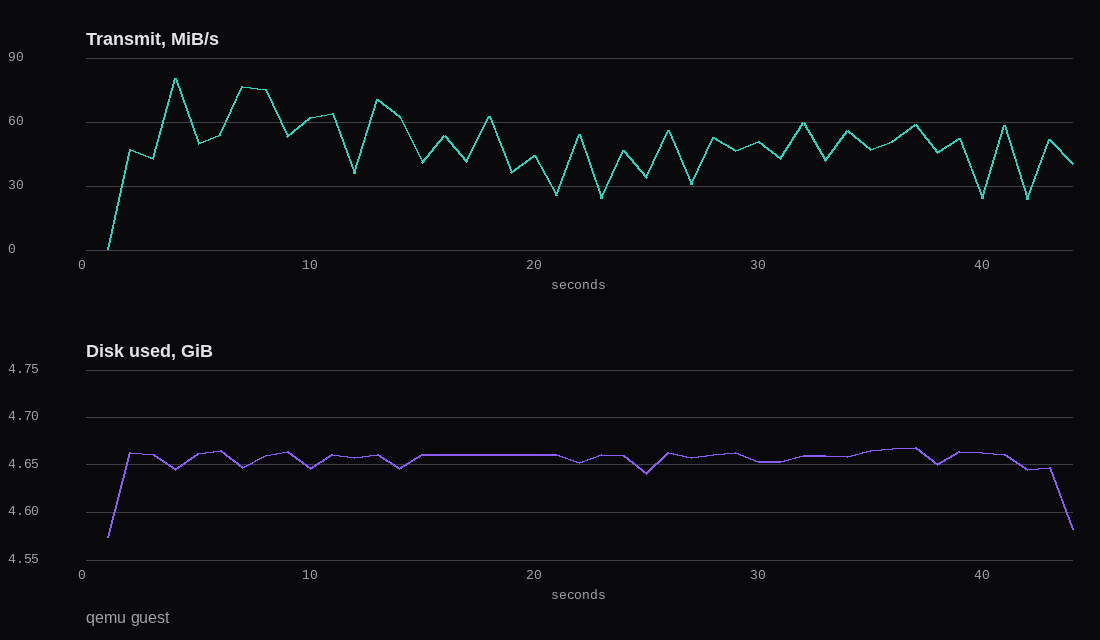
The backup's own summary, before any second run, was:
no parent snapshot found, will read all files

Files:          17 new,     0 changed,     0 unmodified
Dirs:            3 new,     0 changed,     0 unmodified
Added to the repository: 2.000 GiB (2.000 GiB stored)

processed 17 files, 2.000 GiB in 0:43
snapshot 9d110ed9 saved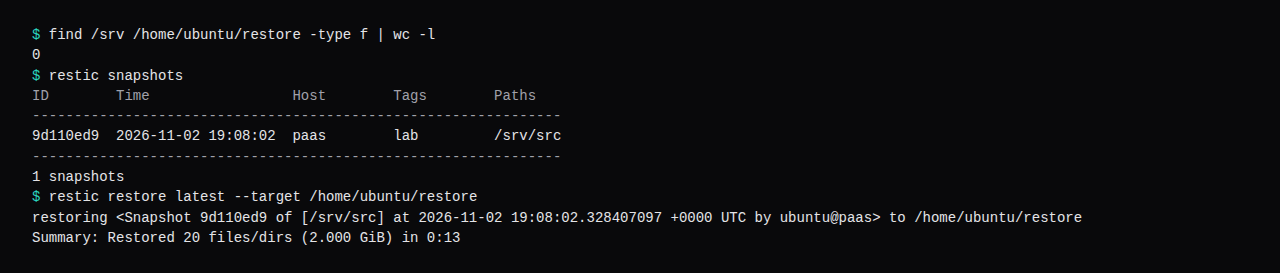
What does restic check prove?
restic check on 0.16.4 says it tests the repository for errors, and that it can also read all data and therefore simulate a restore. The flag for reading the blobs is --read-data. This run used the default. The output was load indexes, check all packs, check snapshots, trees and blobs, then no errors were found. Wall clock 1.484 seconds, one snapshot.
A clean check does not open app.db. The count of 50, and the body row-0, came from sqlite3 on the restored file. That file was closed when it was backed up. A database some other process is still writing needs a consistent copy first, which is the restore measured for Vaultwarden. If the VPS is also the mail host, that store belongs in the same backup tree. Idle RAM and the port 25 timeout for Stalwart and Mailcow are in Self-host email.
How do you keep seven daily restic snapshots?
The forget command that ran, on the repository when it held only 9d110ed9, was:
restic forget --keep-daily 7 --keep-weekly 4 --keep-monthly 6 --pruneRestic grouped that one snapshot as the daily, the weekly, and the monthly snapshot, and kept it. The 0.16.4 help for --prune says it runs prune if snapshots have been removed. The log ended on the keep table. Prune deletes packs after the last snapshot that referenced them is gone, so with this snapshot still kept, the packs stayed.
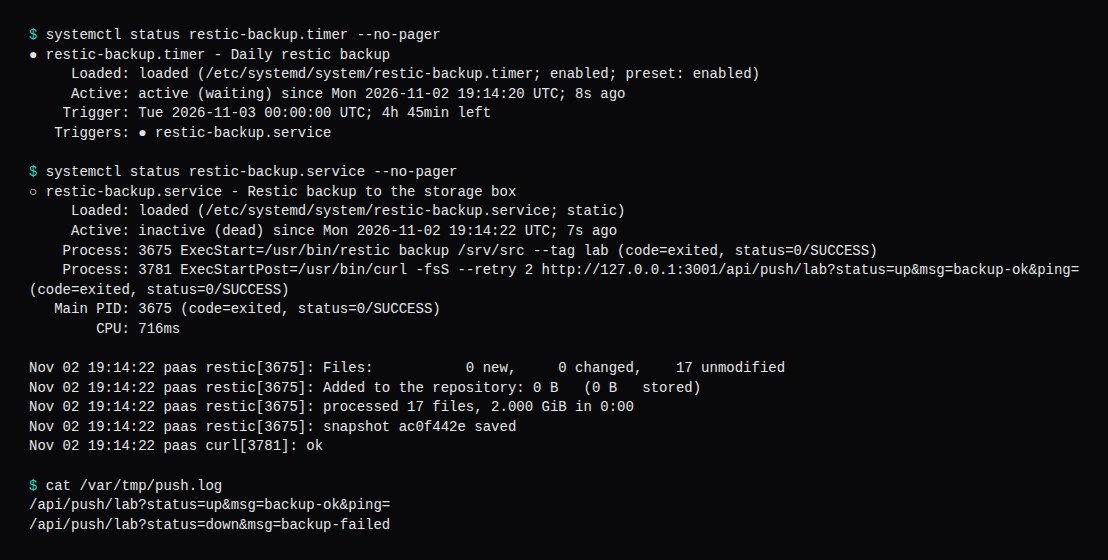
The systemd unit then took a second snapshot of the same tree, ac0f442e, parent 9d110ed9. Restic printed 0 new, 0 changed, 17 unmodified, Added to the repository: 0 B (0 B stored), processed 17 files, 2.000 GiB in 0:00. systemctl status recorded CPU 716ms. du -sb of the repository went from 2,147,788,124 bytes to 2,147,788,400, a gain of 276 bytes for the new snapshot object. Both snapshots are still in the repo. Every timed restore used 9d110ed9.
How do you schedule restic with a systemd timer?
The unit that ran is a oneshot, as the backup user, with OnFailure pointing at a second unit that only curls. The timer is OnCalendar=daily and Persistent=true, so a missed day fires after the guest comes back. Enable the timer, and start the service once if you want a run before midnight.
# /etc/systemd/system/restic-backup.service
[Unit]
Description=Restic backup to the storage box
OnFailure=restic-backup-failed.service

[Service]
Type=oneshot
User=ubuntu
Environment=RESTIC_REPOSITORY=sftp:storagebox:backup
Environment=RESTIC_PASSWORD_FILE=/etc/restic/password
ExecStart=/usr/bin/restic backup /srv/src --tag lab
ExecStartPost=/usr/bin/curl -fsS --retry 2 "http://127.0.0.1:3001/api/push/lab?status=up&msg=backup-ok&ping="

# /etc/systemd/system/restic-backup.timer
[Unit]
Description=Daily restic backup

[Timer]
OnCalendar=daily
Persistent=true
Unit=restic-backup.service

[Install]
WantedBy=timers.target

# /etc/systemd/system/restic-backup-failed.service
[Unit]
Description=Tell Uptime Kuma the restic backup failed

[Service]
Type=oneshot
ExecStart=/usr/bin/curl -fsS --retry 2 "http://127.0.0.1:3001/api/push/lab?status=down&msg=backup-failed"
systemctl daemon-reload
systemctl enable --now restic-backup.timer
systemctl start restic-backup.serviceOn a real box, RESTIC_REPOSITORY becomes sftp:storagebox:restic with the Host block from the first section, and the curl URL becomes the push URL Uptime Kuma prints on the monitor. The token in this unit is lab, because that is what the listener on 127.0.0.1:3001 was waiting for. Kuma's own token is whatever that monitor shows. The listener recorded:
/api/push/lab?status=up&msg=backup-ok&ping=
/api/push/lab?status=down&msg=backup-failed
The up line is ExecStartPost after ac0f442e saved. The down line is a separate unit, ExecStart=/bin/false, with the same OnFailure= target, started once. The daily timer stayed active (waiting). The same unit file is what you enable on the VPS. The guest in the timings was qemu.
Where do Borg, Kopia, and a box snapshot fit?
The BX11 feature list names BorgBackup, rsync via SSH, Restic, and Rclone. Borg on this box is the SSH service on port 23, and the remote binary is selected with --remote-path. Their example is borg init --encryption=repokey --remote-path=borg-1.4 ssh://[email protected]:23/./borg-repository. Append-only is documented there, under Borg: "This mode only allows the creation of new archives, but denies the deletion of old archives." They also note that a restricted client can still mark archives deleted, and an unrestricted client is what actually removes them.
The product page's sub-account line is the control that applies to a second login, restic included: "With a sub-account, you can create another user and assign a directory for this user. When the user logs in, they will only be able to access the files that are saved in this directory." The snapshot line is separate from restic's snapshots: "Using the snapshot function, you can create an image of your Storage Box and, if necessary, restore your Storage Box from this snapshot." Ten of those are included. A snapshot of the VPS disk stays with that VPS account. The teal bar was a second guest that had the password file, the key, and the repository URL.
Kopia ships a CLI and a GUI, and it can store to SFTP. I used restic because the box documents that SFTP backend. The fresh guest had the restic binary, the key, and the password file. The first guest's disk stayed put, and the box side of the connection was SFTP. The BX11 page also lists 10 concurrent connections. The access doc tells Rclone users to drop --checkers below 8 if md5 errors show up. This SFTP session was one SSH connection.