
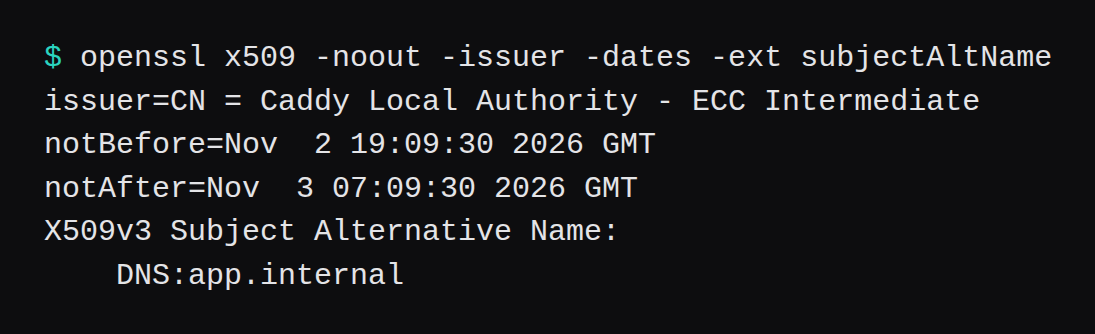
The Caddyfile shipped with the package listens on :80 only. The journal's line for that file was server is listening only on the HTTP port, so no automatic HTTPS will be applied to this server. I replaced it with the hostname app.internal. Caddy obtained a certificate, issuer local. The leaf's notBefore is Nov 2 19:09:30 2026 GMT and its notAfter is Nov 3 07:09:30 2026 GMT, 12 hours. curl on the same guest then failed with SSL certificate problem: unable to get local issuer certificate, because the service user could not install the root.
The guest was Ubuntu 24.04.5 LTS, kernel 6.8.0-147-generic, glibc 2.39, qemu -m 1024 -smp 1. MemTotal was 984,552 kB. SwapTotal was 0. The address on the guest NIC was 10.0.2.15/24. Caddy came from the Cloudsmith apt repo on the install page. caddy version printed v2.11.7 h1:yj0Y4fYZGPkSvibBJ1sTWE33xC0fxztVyXEW5iIdUT4=. The package was caddy 2.11.7.
| On this guest | |
|---|---|
| Binary | 2.11.7, du -B1 -s /usr/bin/caddy 51,957,760 bytes |
| Service | caddy.service, User=caddy, uid 999 |
| Shipped file | site address :80. Automatic HTTPS stayed off. |
| Hostname that issued | app.internal, issuer local |
| Leaf | 12 hours. Intermediate 7 days. Root 3,600 days. |
curl with the root file | HTTP/2 200, body pong from 8080 |
| Public name | nr-caddy-lab-7f3a9c.com, dig status NXDOMAIN |
| Let's Encrypt | tls-alpn-01 then http-01, both DNS problem: NXDOMAIN |
| After 10 minutes | ps RSS 48,260 kB. MemoryCurrent 10,244,096 bytes. |
What does the package listen on before you add a name?
The unit file is /usr/lib/systemd/system/caddy.service. Installing the package enabled it. User=caddy, Group=caddy, and ExecStart=/usr/bin/caddy run --environ --config /etc/caddy/Caddyfile. AmbientCapabilities includes CAP_NET_BIND_SERVICE, which is how uid 999 can bind 80 and 443. id printed uid=999(caddy).
The comment in the shipped Caddyfile says to point the domain's A and AAAA records at this machine's public IP, then replace :80 with the domain name. Until that replacement, ss showed a listener on *:80 and nothing on 443. The automatic HTTPS page is the one that distinguishes a public name, which goes to a public CA, from a name such as .internal, which stays on Caddy's own CA.

The install commands, as run:
sudo apt-get install -y debian-keyring debian-archive-keyring apt-transport-https curl
curl -1sLf 'https://dl.cloudsmith.io/public/caddy/stable/gpg.key' | sudo gpg --dearmor -o /usr/share/keyrings/caddy-stable-archive-keyring.gpg
curl -1sLf 'https://dl.cloudsmith.io/public/caddy/stable/debian.deb.txt' | sudo tee /etc/apt/sources.list.d/caddy-stable.list
sudo apt-get update
sudo apt-get install -y caddy
dpkg recorded Installed-Size 50,810 KiB. After the install, the guest disk had risen from 2,673,246,208 bytes used to 2,808,971,264, a rise of 135,725,056 bytes. That includes debian-keyring, which apt fetched as a 31.3 MB archive before Caddy itself.
What certificate does a .internal name get?
The upstream was Python 3.12.3, python3 -m http.server 8080 --bind 127.0.0.1, serving one file whose body is pong from 8080. The Caddyfile was:
app.internal {
	reverse_proxy 127.0.0.1:8080
}
caddy validate --config /etc/caddy/Caddyfile printed Valid configuration. systemctl reload caddy kept the service active. The journal then said enabling automatic TLS certificate management for app.internal, and certificate obtained successfully with issuer local.
The same reload tried to install the root into the system trust store and failed. The sudo log line was caddy : user NOT in sudoers, and Caddy logged failed to install root certificate with failed to execute sudo: exit status 1. The leaf was already on disk at /var/lib/caddy/.local/share/caddy/certificates/local/app.internal/app.internal.crt. The root was beside it, under pki/authorities/local/root.crt. Data directory du -B1 -s /var/lib/caddy was 135,168 bytes.
openssl on the leaf, with SNI app.internal:
issuer=CN = Caddy Local Authority - ECC Intermediate
notBefore=Nov  2 19:09:30 2026 GMT
notAfter=Nov  3 07:09:30 2026 GMT
DNS:app.internal
The subject was empty. The name is in the SAN. The intermediate's subject is CN = Caddy Local Authority - ECC Intermediate, its issuer is CN = Caddy Local Authority - 2026 ECC Root, and its notAfter is Nov 9 19:09:30 2026 GMT, 7 days after the same notBefore. The root is self-signed, that same CN, notAfter Sep 10 19:09:30 2036 GMT. From the leaf's notBefore to the root's notAfter is 3,600 days.
curl without that root exited 60. The same request with --cacert pointed at root.crt returned HTTP/2 200, via: 1.0 Caddy, server: SimpleHTTP/0.6 Python/3.12.3, and the body pong from 8080. The response also carried alt-svc: h3=":443"; ma=2592000. ss showed a TCP listener on *:443 and a UDP socket on *:443. I did not complete a QUIC handshake. A plain request to http://app.internal/ returned 308 Permanent Redirect to https://app.internal/, Server: Caddy.
UFW was then enabled with the default deny on incoming. The allows were 22/tcp, 80/tcp, 443/tcp, and 443/udp. A request from the host, through a forward onto the guest, still got the 308 on port 80 and HTTP/2 200 on port 443. This guest has no second firewall in front of UFW. The firewall guide is the one for the rules that sit on the hypervisor, which this lab did not have.
systemctl restart brought *:443 back in 0.244 seconds. The leaf's sha256 was fc5f9661c36583dc95e4cda0897e23c536f9b80e77903a4b37cd26a3e3a80a5c before and after. NRestarts stayed 0. The next request was HTTP/2 200 again.
A Docker image of this same 2.11.7, measured in Caddy vs Traefik vs Nginx Proxy Manager, held 11,468,800 bytes of cgroup memory after ten quiet minutes. That was a container. This one is the apt unit.
What does Let's Encrypt say if the name has no DNS?
dig for nr-caddy-lab-7f3a9c.com returned status NXDOMAIN, answer count 0. I added that hostname to the Caddyfile with the same reverse_proxy, reloaded, and took it out again before the scheduled retry. The Caddyfile had no email line. The log created an ACME account at https://acme-v02.api.letsencrypt.org/directory with an empty contact list, then tried the challenges.
The first challenge was tls-alpn-01. The second was http-01. Both came back urn:ietf:params:acme:error:dns and the same detail twice, once for A and once for AAAA:
DNS problem: NXDOMAIN looking up A for nr-caddy-lab-7f3a9c.com - check that a DNS record exists for this domainThe obtain line named the issuer acme-v02.api.letsencrypt.org-directory and said it would retry in 60 seconds, with max_duration 2,592,000 seconds, which is 30 days. I reloaded a Caddyfile that contained only app.internal inside that minute. The log names Let's Encrypt and then stops. A second name, caddy-lab-unused.example.com, failed earlier and differently: rejectedIdentifier, Cannot issue for "caddy-lab-unused.example.com", forbidden by policy. The order was refused before either challenge type.

After that reload, curl to app.internal was still HTTP/2 200. The public name was gone from the file, so the 60 second retry had nothing left to ask for.
Where did the memory sit for ten minutes?
The sampler wrote a row every 30 seconds, 21 rows, so the last row is 600 seconds after the first. ps RSS started at 49,920 kB and ended at 48,260 kB. MemoryCurrent started at 12,075,008 bytes and ended at 10,244,096 bytes. The last eight rows were the same pair: ps RSS 48,260 kB and MemoryCurrent 10,244,096 bytes. MemAvailable on the last row was 683,696 kB.
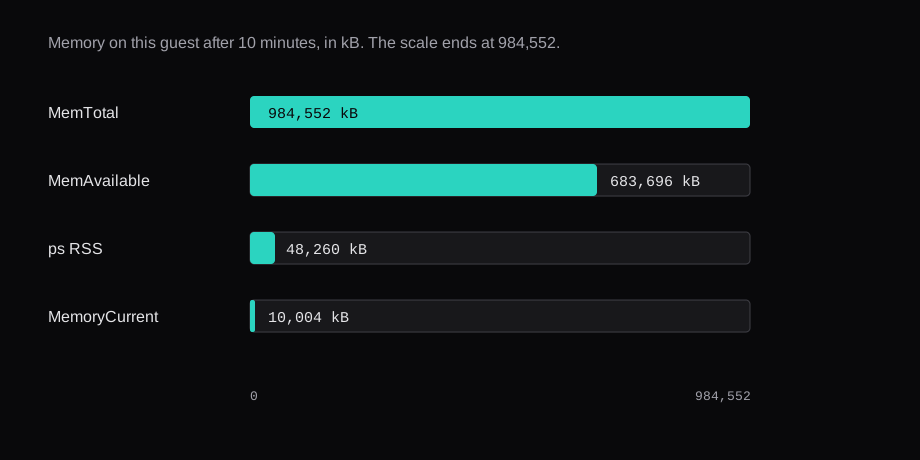
ps RSS counts mappings that MemoryCurrent leaves out. The number I would compare with the Docker post is MemoryCurrent.
FAQ
Does Caddy turn on HTTPS as soon as it is installed?
The unit starts on install. The file it starts with is a site on :80, and the log said automatic HTTPS stays off for that server. A hostname in the site address is what turned it on here.
How long is the local certificate?
The leaf notAfter is 12 hours after notBefore. The intermediate notAfter is 7 days after the same start. The root notAfter is Sep 10 19:09:30 2036 GMT, 3,600 days from the leaf's notBefore.
Why did curl reject the certificate?
The root stayed in the data directory. The sudo log said the caddy user is not in sudoers, and Caddy logged failed to execute sudo: exit status 1. The same curl with --cacert set to root.crt returned HTTP/2 200.
What if the DNS name has no record?
dig said NXDOMAIN. Let's Encrypt failed tls-alpn-01 and then http-01 with DNS problem: NXDOMAIN for the A lookup and the AAAA lookup. The log's retry was 60 seconds, and the max duration on that line was 30 days.
Does the Caddyfile need an email address?
This one had none. The local certificate still issued, and the Let's Encrypt account was created with an empty contact list.