
AWS made T9g instances generally available on November 20, 2026. These are burstable EC2 T9g plans powered by Graviton5, with four sizes at 2 vCPUs each. AWS claims up to 45% better price performance than T4g, and T9g.micro and T9g.small are covered under the Free Tier. Hetzner also sells ARM VPS, as does Oracle. Those two and AWS all use Ampere or Graviton chips, 64-bit ARM in a data center.
That much is in the launch announcements. What they leave out is the pre-purchase compatibility check, the things that break on ARM, and when x86 saves more trouble than ARM saves money.
What ARM and x86 mean for a VPS
ARM and x86 are instruction set architectures. The CPU in your VPS speaks one or the other, and the software you run has to match. An x86 binary expects x86. An ARM64 binary expects ARM64. A container built for amd64 will not start on an arm64 host unless something translates it, and that translation is expensive.
For Linux VPS hosting, x86 is x86-64, also called amd64 in Docker and x86_64 in uname. ARM is 64-bit ARM, called arm64 in Docker and aarch64 in uname. Both names point at 64-bit architectures that most server software already supports, as long as the image you pull or the binary you download was built for that platform.
The x86-64 side has two decades of server deployment behind it. Almost everything that runs on Linux has an x86 build. ARM64 is newer to data centers. Apple Silicon brought ARM64 to developer laptops, and cloud vendors started offering ARM instances to match. The software exists, but coverage is not universal.
Check compatibility before you buy
Checking an image is a one-line command. It tells you what the registry offers without pulling gigabytes.
docker manifest inspect IMAGE:TAG | grep architectureFor example:
docker manifest inspect nginx:latest | grep architectureIf you see "architecture": "arm64" and "architecture": "amd64" in the output, the image supports both. If you only see amd64, that image will not run natively on an ARM VPS.
The same check works for every image in your stack. A Docker Compose file lists your images. Run the check on each one, including sidecars, databases, and anything else the application depends on. One missing arm64 variant breaks the deployment.
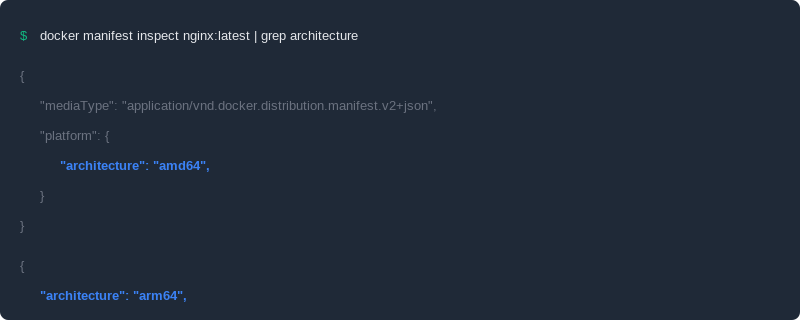
The registry page sometimes prints architecture badges. Docker Hub shows them. AWS ECR Public also shows them. If the badge or the manifest says arm64, the image supports ARM. If it says only amd64 or x86, it does not.
Official images from Docker Hub, Bitnami, and the major projects tend to ship multi-arch. Internal images, vendor-provided images, and anything closed-source are where the gaps live.
What typically breaks on ARM
Closed-source x86 binaries break because they cannot run on ARM without emulation. Proprietary control panels, licensed monitoring agents, and game server binaries that were compiled for x86 and never rebuilt for ARM all fall into this category.
SteamCMD game servers are one example. Valheim has an official x86 Linux dedicated server and no ARM build. It can run under Box64, an x86 emulation layer for ARM Linux, but emulation adds overhead and stability risk. Crossplay does not work. A valheim-arm image wraps the Box64 setup and labels itself as lightly tested.
Counter-Strike 2 also ships an x86 server. People have run it under Box64 on ARM, with segfaults during startup that require manually adding missing libraries. Once it starts, performance is worse than native and reliability is unknown.
Minecraft Java runs fine on ARM. The JVM handles the platform difference. A Paper server on a Hetzner CAX11 or an AWS T9g.small works the same as it does on x86. Minecraft Bedrock, by contrast, needs x86 emulation unless you find a rebuild.
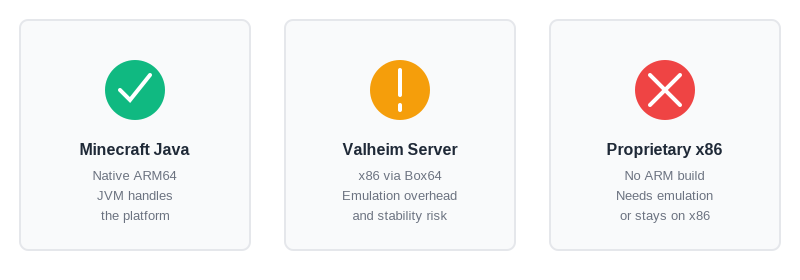
QEMU can emulate x86 on ARM. Docker supports it via binfmt_misc. The emulated container starts, but every instruction goes through the translator. CPU-bound workloads run several times slower. Memory overhead increases. Emulation is a workaround, not a production plan.
What runs fine on ARM
Official Docker images for nginx, Postgres, Redis, MariaDB, and most other open-source projects ship arm64 variants. If your stack is entirely open-source images from Docker Hub or other public registries that publish multi-arch, ARM works.
Static site generators, CI runners, web frameworks, CDN origin servers, and anything written in Go, Rust, Python, Node.js, or Java with no native dependencies runs on ARM as long as the image or package manager offers an arm64 build.
GitHub Actions runners work on ARM. The self-hosted runner downloads include a linux-arm64 tarball. An ARM VPS running that binary can execute workflows the same way an x86 runner does, as long as the job's own dependencies also support ARM.
Containers that call native libraries need those libraries built for ARM. If a Python package includes C extensions, it needs an arm64 wheel or the build tools to compile it. If a Node.js package wraps a native module, that module needs an ARM build. Package managers usually handle this, but older or less common dependencies may only publish x86 wheels.
ARM VPS pricing in 2026
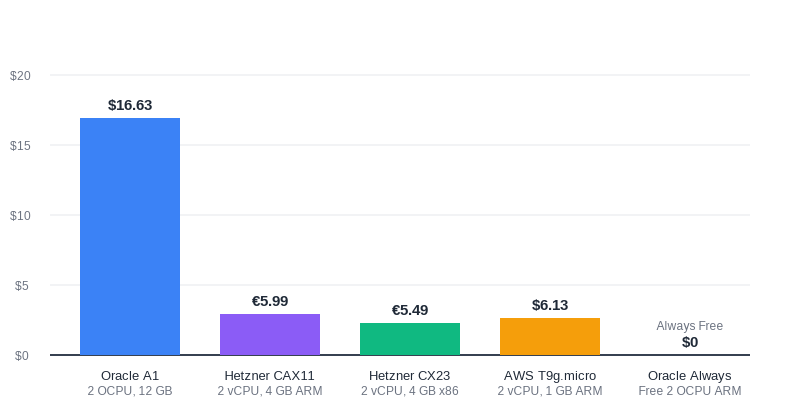
Hetzner CAX was once the cheap option. After price increases on April 1 and June 15, 2026, CAX now costs more than CX at the same vCPU and RAM. CAX11 is €5.99/month excluding VAT and IPv4. CX23, also 2 vCPU and 4 GB, is €5.49. CAX21 is €10.49. CX33, also 4 vCPU and 8 GB, is €8.49. The old advice that ARM is cheaper no longer holds at Hetzner.
AWS T9g pricing depends on region and credit consumption. T9g.micro is about $0.0084/hour in us-east-1, with a monthly cap around $6.13. T9g.small is roughly $0.0168/hour or $12.26/month. These are burstable instances. If you stay under the baseline, the hourly rate covers it. Prolonged CPU use above the baseline costs extra CPU credits. The AWS page lists baseline percentages and credit earn rates. T9g.micro earns 12 credits/hour at a 10% baseline. T9g.small earns 24 credits/hour at a 20% baseline.
Oracle Cloud offers Ampere A1 at $0.01/OCPU-hour and $0.0015/GB-hour. A 2 OCPU, 12 GB VM costs $0.0228/hour before storage, about $16.63/month. Always Free accounts get 3,000 OCPU-hours and 18,000 GB-hours monthly, enough to run 2 OCPUs and 12 GB continuously at no charge.
Where ARM wins
ARM instances tend to offer consistent per-core performance. A T9g vCPU and an A1 OCPU deliver steady single-threaded speed without the deep throttling that some older burstable x86 plans impose. For workloads that need predictable per-thread latency, ARM can outperform a burstable x86 plan at the same price.
Power efficiency translates to cost per vCPU in some cases. Graviton5 and Ampere Altra run more cores at lower wattage than equivalent Xeon generations, so vendors with tight power budgets can price ARM lower. That shows up in per-vCPU rates when it shows up at all, not in headline features.
If your stack already runs on ARM, sticking with ARM avoids a migration. If you develop on an M-series Mac and your Compose stack passes docker manifest inspect checks for arm64, an ARM VPS matches your local environment. The images are the same digests. The syscalls behave the same way. What runs locally runs remotely.
Where x86 is the safer default
Existing x86 stacks with unknown dependencies should stay on x86. If you cannot verify every image, every binary, every plugin, and every dependency, x86 avoids the discovery that one piece does not support ARM.
Game servers that depend on SteamCMD are safer on x86. Valheim, CS2, ARK, and most other Steam-distributed servers ship x86 binaries. Emulation works in some cases, but native x86 removes the emulation tax and the stability unknowns.
Control panels and monitoring agents from vendors often ship x86-only binaries. Plesk, cPanel, DirectAdmin, and similar tools were built for x86 and may not offer ARM builds. If your workflow depends on a vendor's prebuilt agent, check their docs before choosing ARM.
Windows does not run on ARM64 VPS. KVM with Windows guests requires x86 or x86-64. If your use case includes Windows VMs, choose x86.
Decision table
| Your situation | Choose ARM64 | Choose x86-64 |
|---|---|---|
All images pass docker manifest inspect and show arm64 | Yes, if the price or performance is better | Stick with x86 if already deployed there and migration adds no value |
| One or more images are amd64-only | Use x86 or rebuild the image | Yes |
| SteamCMD game server (Valheim, CS2, ARK) | Expect emulation overhead and stability risk | Yes |
| Minecraft Java | Yes, the JVM handles it | Also fine |
| Proprietary panel or agent (cPanel, DirectAdmin, vendor monitoring) | Check vendor ARM support | Yes if no ARM build exists |
| Windows KVM guest | No ARM support | Yes |
| Existing x86 deployment with unknown dependencies | Test thoroughly or stay on x86 | Yes |
| M-series Mac for local dev, all images multi-arch | Yes, matches your laptop | Also fine |
How to migrate from x86 to ARM
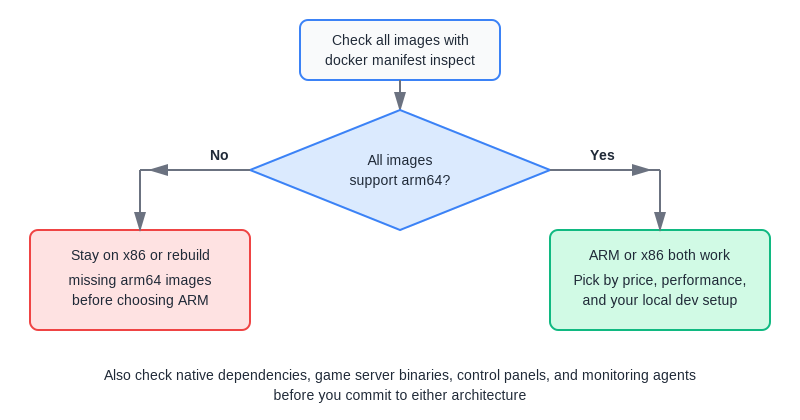
Migrating a running stack from x86 to ARM means checking every dependency, rebuilding images if needed, testing the whole stack on ARM, and cutting over traffic.
Start with the compatibility check. Run docker manifest inspect IMAGE:TAG | grep architecture for every image in your Compose file, including databases, caches, sidecars, init containers, and anything else the stack depends on. If all of them list arm64, the images are ready. If any list only amd64, you need an arm64 build.
For images you control, rebuild with docker buildx build --platform linux/amd64,linux/arm64. Push the multi-arch manifest to your registry. For third-party images that only offer amd64, find an alternative that supports arm64, rebuild from source if the license allows it, or emulate with QEMU and accept the performance cost.
Provision an ARM VPS in the same region as your current x86 VPS. Deploy your stack there. Run smoke tests. Check logs. Load test if the workload is production traffic. Compare performance against the x86 instance. If the ARM instance performs worse or shows errors, diagnose before cutting over.
For databases, replicate from the x86 primary to an ARM replica. Let the replica catch up. When replication lag is low, promote the replica to primary and redirect clients. If the application is stateless, deploy on ARM, update DNS or load balancer config, and drain traffic from the x86 instance.
Backups and monitoring need to work on the new instance before you delete the old one. If your backup script or monitoring agent requires x86, that is a compatibility gap. Fix it or stay on x86.
Price per vCPU is not the whole picture
Comparing $6/month for 2 vCPUs on ARM against $8/month for 2 vCPUs on x86 leaves out the CPU generation, the baseline, the network cap, the storage speed, and whether the application bottlenecks on CPU at all.
A 2 vCPU ARM instance on an Ampere Altra and a 2 vCPU x86 instance on a Xeon E5 from 2016 are both 2 vCPUs, but the per-core performance, memory bandwidth, and instruction sets differ. What 4 vCPU means on EPYC 9004 vs Xeon E5 covers how much the generation matters. A recent Genoa core beats an older Broadwell core at the same clock.
Benchmarks on idle VPS do not predict production performance. YABS and sysbench scores measure the host's CPU under a synthetic load. Benchmark a VPS with YABS and nr-liveval explains what those scores mean. A high sysbench score does not guarantee your Postgres queries or Next.js build will finish faster.
Test with your actual workload. Deploy your application on both an ARM and an x86 plan from the same provider. Run the same traffic through both. Measure request latency, build times, database query times, or whatever metric matters for your use case. Pick the instance that performs better for that workload at a price you can pay.
ARM VPS on NodeRings
NodeRings lists Compute Instance plans from independent hosts. Plans include x86 and ARM options across more than 60 cities. Buyers can filter by region, compare prices, and deploy VMs without opening separate accounts at each host.
ARM plans appear in the same catalog as x86 plans. The listing shows the host, city, specs, architecture, and price. If a host offers both x86 and ARM in the same location, both appear in search results. Buyers pick the one that fits their stack.
GeoDNS is included with every NodeRings account. Health checks, failover, and geographic routing work the same whether the VMs are x86, ARM, or a mix. A buyer running workloads on both architectures can route traffic by health and location without needing a separate DNS provider.
Providers list their plans on NodeRings and control their own pricing and infrastructure. NodeRings is the marketplace and order path. The VM runs on hardware the provider already manages. Support tickets go to the host.
FAQ
Can Docker run on an ARM VPS?
Yes. Docker works on ARM Linux the same way it works on x86 Linux. The difference is which images you can pull. An arm64 image runs natively. An amd64 image requires emulation or a rebuild.
Do I need to rebuild my containers for ARM?
If your images already support arm64, no. If they only support amd64, yes. Check with docker manifest inspect IMAGE:TAG. Multi-arch images have both and work on both.
Is ARM faster than x86 for game servers?
No. Most game servers ship x86 binaries. Running them on ARM means emulation, which is slower. For games with native ARM builds or JVM-based servers like Minecraft Java, ARM performs about the same as x86 at the same generation and clock speed. For SteamCMD servers like Valheim and CS2, x86 is faster because it runs the binary natively.
Why does Hetzner CAX cost more than CX now?
Hetzner raised CAX prices twice in 2026, once on April 1 and again on June 15. After the increases, every CAX plan costs more than the CX plan with the same vCPU and RAM. The price change removed the per-euro advantage ARM had. Performance and architecture are still reasons to pick CAX, but price no longer is.
What is Oracle Always Free, and does it include ARM?
Oracle Always Free includes 3,000 OCPU-hours and 18,000 GB-hours monthly on Ampere A1 instances. That is enough to run a 2 OCPU, 12 GB ARM VM continuously at no charge. Free Tier accounts keep those resources indefinitely. It is one of the few ways to run a production ARM VPS without a monthly bill.