
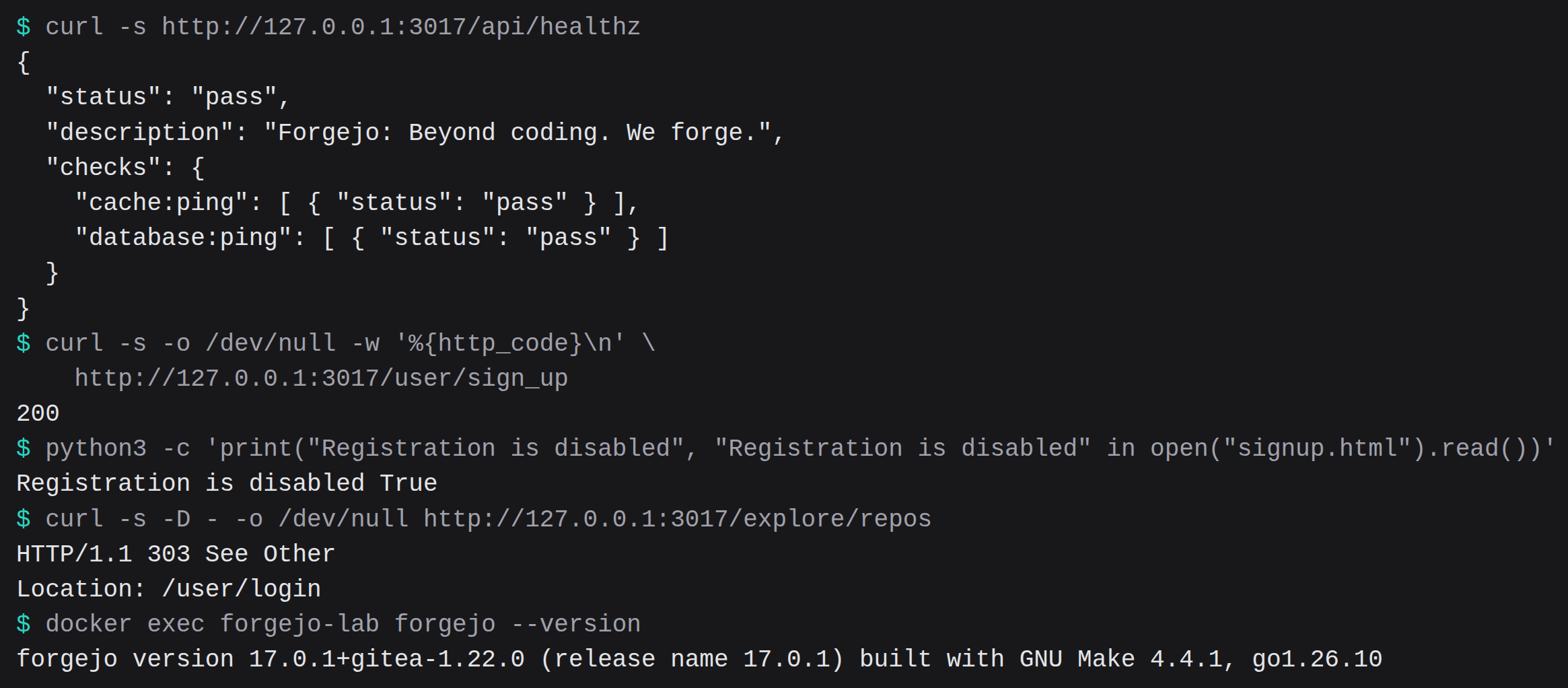
Forgejo 17.0.1 answered /api/healthz 1.955 seconds after docker run. docker image inspect reported 82,533,704 bytes for that image, and docker images printed 287MB. After a one-file push and an SSH clone, docker stats read 110 MiB. The signup page returned HTTP 200, and the HTML contained the sentence "Registration is disabled". /explore/repos returned 303 to /user/login. The push took 0.324 seconds. The clone took 0.254 seconds. The commit sha is:
121407865731c0600447a94ad1eec7183867b63e| Clock | What it measured | Seconds |
|---|---|---|
/api/healthz | docker run until HTTP 200, status pass | 1.955 |
| HTTP push | one file onto main of a private repo | 0.324 |
| SSH clone | that same repo, ed25519 key | 0.254 |
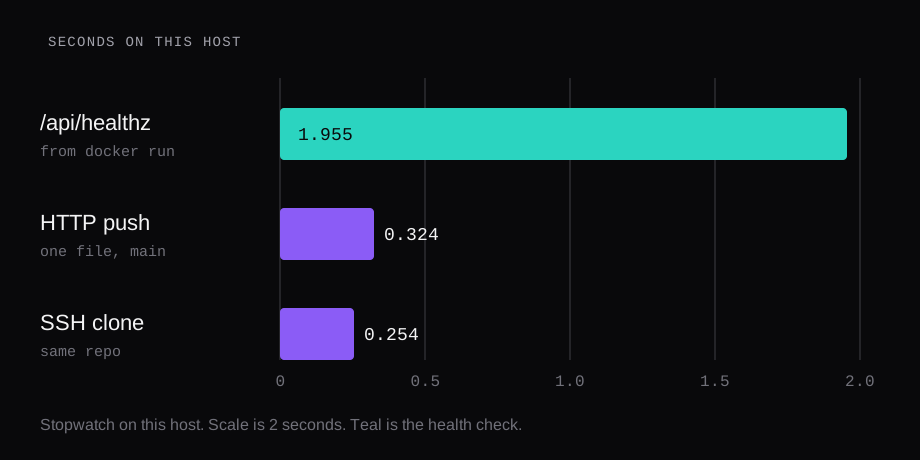
The machine was Ubuntu 24.04.3 LTS, Docker 29.1.3, 8 CPUs, 47 GiB of RAM, and swap was 0. Both published ports were bound to 127.0.0.1. Binding the database and the app to loopback, then checking what a scanner still sees, is the habit in the Compose checklist.
How do you install Forgejo with Docker
The image is codeberg.org/forgejo/forgejo tag 17.0.1. The digest was:
sha256:fcd19ff4ebc85fb098a67e8e1d0d5a84d07dd6e8a23edcfdfd5b71a6178953beThe pull on this host took 8.47 seconds. That clock is this network, so it is a poor way to compare registries. The byte count is the part worth keeping.
The 17.0 release shows a container tag 17.0 that follows the latest 17.0.Y patch on its own. This run pinned 17.0.1, so a later pull stays on the build that was timed.
Official examples publish host port 3000 to container port 3000, and host port 222 to container port 22. This run used 127.0.0.1:3017 and 127.0.0.1:2227. The data directory is a host folder mounted at /data. Create it empty and chown 1000:1000 before the first start. USER_UID and USER_GID are both 1000.
Passing --user 1000:1000 made the container exit 111. The log was:
s6-svscan: fatal: unable to open .s6-svscan/lock: Permission deniedThe image starts as root and drops to those ids. Leave --user off.
docker run -d --name forgejo \
  -e USER_UID=1000 \
  -e USER_GID=1000 \
  -e FORGEJO__server__DOMAIN=localhost \
  -e FORGEJO__server__SSH_DOMAIN=localhost \
  -e FORGEJO__server__SSH_PORT=2227 \
  -e FORGEJO__server__START_SSH_SERVER=false \
  -e FORGEJO__server__ROOT_URL=\
http://127.0.0.1:3017/ \
  -e FORGEJO__database__DB_TYPE=sqlite3 \
  -e FORGEJO__service__DISABLE_REGISTRATION=true \
  -e FORGEJO__service__REQUIRE_SIGNIN_VIEW=true \
  -e FORGEJO__security__INSTALL_LOCK=true \
  -e FORGEJO__security__DISABLE_GIT_HOOKS=true \
  -p 127.0.0.1:3017:3000 \
  -p 127.0.0.1:2227:22 \
  -v ./forgejo:/data \
  codeberg.org/forgejo/forgejo:17.0.1
A public hostname replaces localhost in those two variables when people clone from somewhere else. This lab kept both ports on 127.0.0.1.
docker exec of forgejo --version printed:
forgejo version 17.0.1+gitea-1.22.0 \
(release name 17.0.1) \
built with GNU Make 4.4.1, go1.26.10 \
: bindata, timetzdata, sqlite, \
sqlite_unlock_notify
The backslashes are only there so the line fits. The binary printed it as one line.
Which Forgejo release should you pin
Major releases land about every three months. 17.0 is a non-LTS release, supported until 28 January 2027. The schedule on that same release page is the one to plan against:
| Version | Release | End of support |
|---|---|---|
| 15.0 LTS | 16 April 2026 | 15 July 2027 |
| 16.0 | 16 July 2026 | 29 October 2026 |
| 17.0 | 15 October 2026 | 28 January 2027 |
| 18.0 | 14 January 2027 | 29 April 2027 |
| 19.0 LTS | 15 April 2027 | 13 July 2028 |
16.0's published end of support is 29 October 2026. 15.0 is the long support line if you want fewer upgrades. 17.0.1 is the patch this container ran.
The security announcement for 15.0.11, 16.0.7, and 17.0.1 says containers from those releases drop the compromised eMudhra TLS certificates. It also says 17.0.1 was expected to clear defects that blocked some upgrades to 17.0.0. On this container a one-file push completed, which is the check that mattered here. The announcement's own write-up of those defects is the place to read them.
How do you disable Forgejo registration
The cheat sheet default for DISABLE_REGISTRATION is false, so a container with no extra environment lets anyone create an account. Once it is true, only an admin creates accounts. REQUIRE_SIGNIN_VIEW defaults to false. True forces a login before a page or the API. INSTALL_LOCK defaults to false. True closes the installation page. DISABLE_GIT_HOOKS defaults to true.
All four were set before the first request. The ini on the volume afterwards read them back as true. The signup URL returned 200, and the body contained "Registration is disabled". Home returned 200 and contained a sign-in form. The word Install was absent from that page. Anonymous GET /api/v1/repos/search returned 403 with this body: "Only signed in user is allowed to call APIs." A token from the admin still created the repo. The 403 is the anonymous caller.
GLOBAL_TWO_FACTOR_REQUIREMENT defaults to none. The values are none, all, and admin. With it set to admin, the API answered 403 and the body was: "This Forgejo instance requires users to enable two-factor authentication before they can access their accounts." Git over HTTP was redirected to /user/login. The admin had no second factor yet, so the gate matched the cheat sheet: every admin has to enable 2FA. To time a push, the value was set back to none and the container was recreated on the same volume. A forge you leave running keeps admin or all, and the admin enrolls a second factor before that token will work. This lab skipped the enrollment, and the 403 is what that gate returns until the admin enrolls.
Git hooks stay on the default. The cheat sheet's warning for false is specific. A user who holds the Git Hook privilege can run code as the Forgejo OS user, read the config and the database, and grant themselves administrator through that database. The lab value stayed true.
SECRET_KEY encrypts 2FA secrets. forgejo generate secret SECRET_KEY makes a new one. Lose the key and those secrets stay unreadable. Ours remained on the volume. It is left out of this page.
The 16.0.4 release, published 10 September 2026, records a critical fix in repository templates. A malicious template could read data on the Forgejo host and run processes there. The same page records a restricted API token changing content outside that restriction when a pull request allowed maintainer edits, and draft-release attachments being readable by a caller with only read access. That includes an unauthenticated caller on a public repository. This image is 17.0.1, which is later than that fix. The release page has the detail. The way the template was abused stays there.
How do you publish Forgejo SSH
The first starts died before HTTP came up. The built-in SSH server was on, so it tried to listen on port 22 inside the container. The image already runs sshd on that port. The process received signal 15. The saved ini kept the setting, so a new environment on the next start left it in place until the data directory was recreated.
The working run turns that built-in server off. The image sshd owns container port 22, published as host port 2227. SSH_PORT is 2227, so clone URLs show the host port. The URL the API returned was:
ssh://git@localhost:2227/lab/hello.git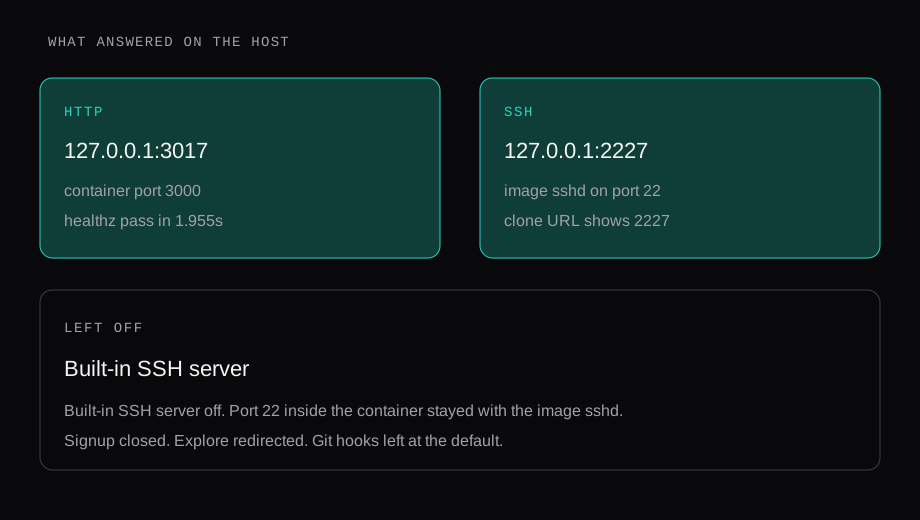
An ed25519 key titled lab was added through the API. SSH to port 2227 greeted that key and stopped short of a shell. The clone of the private repo lab/hello took 0.254 seconds, and the file read hello. The HTTP push of the same commit took 0.324 seconds. The repo was created with "private": true.
ssh -p 2227 \
  -o BatchMode=yes \
  [email protected]
The admin user came from the CLI, with the password in a mode 600 file and --must-change-password=false so the token could push. The token scope was all. The token is left out of this page.
docker exec -u git forgejo \
  forgejo admin user create \
  --username lab --admin \
  --email [email protected] \
  --password "$PASS" \
  --must-change-password=false
How do you back up a Forgejo container
forgejo dump, run as the git user, wrote a zip of 230,826 bytes. The log said it packed repositories under /data/git/repositories, packed the data directory, added app.ini, dumped the database, and skipped LFS because LFS was off. That zip is this instance: one private repo, one commit, sqlite. Copy it off the disk that holds /data. A bigger forge writes a bigger archive, and the command is the same shape.
docker exec -u git forgejo \
  forgejo dump \
  --file /tmp/forgejo-dump.zip
How much RAM does Forgejo use
Three single docker stats readings. 107.2 MiB and 0.13% CPU right after the first healthy start. 110 MiB, 0.17% CPU, 21 processes after the push and the clone. 106.6 MiB, 0.11% CPU, 20 processes on a later start of the same volume. One sample each. The install documentation states no memory floor. These numbers are this 8-CPU host, and a Forgejo process does little with the spare cores while it sits idle.
An earlier measurement of Gitea 28.3.0 on a 2 GB guest is in What fits on a 2 GB VPS. That row is a cgroup memory.current of 174.3 MiB, and docker stats on the same round printed 59.5 MiB. Different binary, different counter, different machine. Forgejo's own install page still gives no RAM number, so the 110 MiB is the reading to plan from until you measure yours.
SQLite is the database this container used. DB_TYPE was sqlite3 and the file was /data/gitea/gitea.db. The ini still lists a MySQL host and user beside that. Those lines are the template default. The health check's database ping passed. Postgres is the move when you already run it. We left it out.
Forgejo Actions needs a separate runner process. This lab registered none, so the 110 MiB has no CI jobs in it. A public forge also gets crawled. REQUIRE_SIGNIN_VIEW is the switch we measured: explore redirected, and the anonymous API returned that 403.
If Caddy sits on the same host, the cheat sheet default for REVERSE_PROXY_TRUSTED_PROXIES is 127.0.0.0/8,::1/128, which matches a local proxy. The certificate side of that setup is Caddy with automatic HTTPS.
Does Forgejo fit a 2 GB VPS
110 MiB of docker stats on this host, plus git itself and the repos you push. The 2 GB piece shows what else was already sitting in that budget. Leave room for the dump zip and for packs of the repositories. The image docker images printed was 287MB, which is small next to the GitLab image in the comparison.
Should you run Forgejo 15 or 17
15.0 is the long support line, through 15 July 2027. 17.0 runs through 28 January 2027. We pinned 17.0.1 because that patch is the one the announcement ties to the certificate cleanup and to the upgrades that 17.0.0 blocked. A forge you want to touch less often can track 15.0 and its patches. Either way, pin the patch you measured.
Does this Forgejo install include CI
The server can dispatch Actions. A runner is a second process you register with the forge. It was absent from this container, and the memory readings leave it out. Add it when a repository needs a job, and measure again. The 110 MiB is the forge with one commit in it, idle.