
The choice is where the visitor's TLS ends. On a public Cloudflare hostname it ends at Cloudflare. On a VPS running Caddy it ends in Caddy. On Pangolin it ends in Traefik, on that same VPS, with a login in front of the HTTP routes.
This host ran all three far enough to time something real, and no further. cloudflared 2026.10.7 opened a quick tunnel to a local page. Twenty requests came back HTTP 200, median 217 ms, from 185 ms to 262 ms. Caddy 2.6.2, forwarding over WireGuard to a second network namespace, answered the same kind of GET in a median 5.7 ms. Pangolin 1.25.3 came up with no site connected, so there is no proxied-request time for it. After the resources page was serving, Docker reported 304.6 MiB for the Pangolin container, 5.7 MiB for Gerbil, and 24.7 MiB for Traefik.
| Quick tunnel | Caddy and WireGuard | Pangolin | |
|---|---|---|---|
| Visitor TLS ends | Cloudflare | Caddy on this host | Traefik on this host |
| Median of 20 GETs | 217 ms | 5.7 ms | no origin connected |
| Memory | 42,252 KiB, cloudflared | 39,768 KiB, Caddy | 335 MiB, three containers |
| First HTTP 200 | 7.7 s from process start | 1.6 s after the packages were in | 13.0 s, images already on disk |
The 217 ms request left the machine, hit Cloudflare, and came back. The 5.7 ms request crossed a veth on this host. Read the table with that in mind.
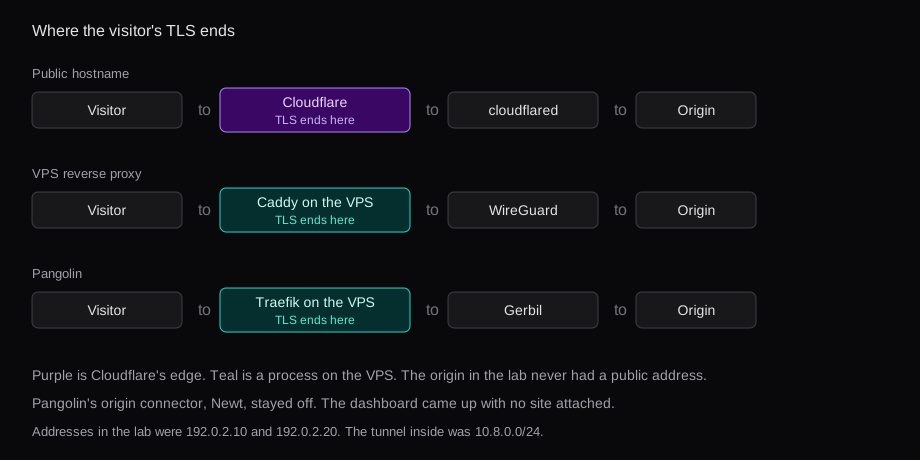
Where the visitor's TLS ends
A quick tunnel and a named tunnel put the visitor's HTTPS in the same place. cloudflared tunnel --url http://127.0.0.1:18096 printed a trycloudflare.com hostname and proxied one local page. A named tunnel on a domain you control does the same termination, then adds DNS you manage. In both cases Cloudflare accepts the visitor's TLS, and cloudflared makes a new request to the origin. The Tunnel FAQ says the origin sees that internal request. The visitor's address stays at Cloudflare unless a header carries it.
Caddy was the other edge. Two namespaces, 192.0.2.10 and 192.0.2.20, with WireGuard between 10.8.0.1 and 10.8.0.2. The origin was python3 -m http.server on 10.8.0.2:8096. Caddy on the first namespace presented its internal certificate and proxied to that port. A visitor in this lab was curl on the host. On a real VPS the visitor is the internet, and the origin is a machine at home that dials out. The TLS still ends in Caddy. The bytes after that are whatever you configured, HTTP to the home address over the tunnel. Caddy, Traefik, and Nginx Proxy Manager is the comparison of the proxy itself. WireGuard on a VPS, with a phone QR is the same tunnel with a phone as the client.
Pangolin is that VPS edge with a database and a UI. The compose file from the manual runs three containers: Pangolin 1.25.3, Gerbil, and Traefik v3.7.17. Traefik terminates TLS. Gerbil holds the WireGuard side. The image label on Pangolin is AGPL-3.0. Newt, or the Pangolin CLI, is what you would run beside the origin. This host had no public name to point at it, so that connector stayed off.
What a public hostname is allowed to carry
Section 2.8 used to sit in Cloudflare's umbrella agreement and was the line people quoted when a tunnel full of video got throttled. In May 2023 Cloudflare moved that restriction into the CDN service-specific terms. The umbrella clause is gone. The CDN clause is still the rule. The application services terms say:
Unless you are an Enterprise customer, Cloudflare offers specific Paid Services (e.g., the Developer Platform, Images, and Stream) that you must use in order to serve video and other large files via the CDN.
The FAQ splits that by route type. A public hostname is published through the reverse proxy, and on Free, Pro, and Business the paid service is required for video and other large files. A private network route is reached through the Cloudflare One client, Cloudflare Mesh, or Cloudflare WAN, and the FAQ puts private network routes outside that clause. WebSockets on a tunnel are supported. The FAQ limits gRPC to private subnet routing.
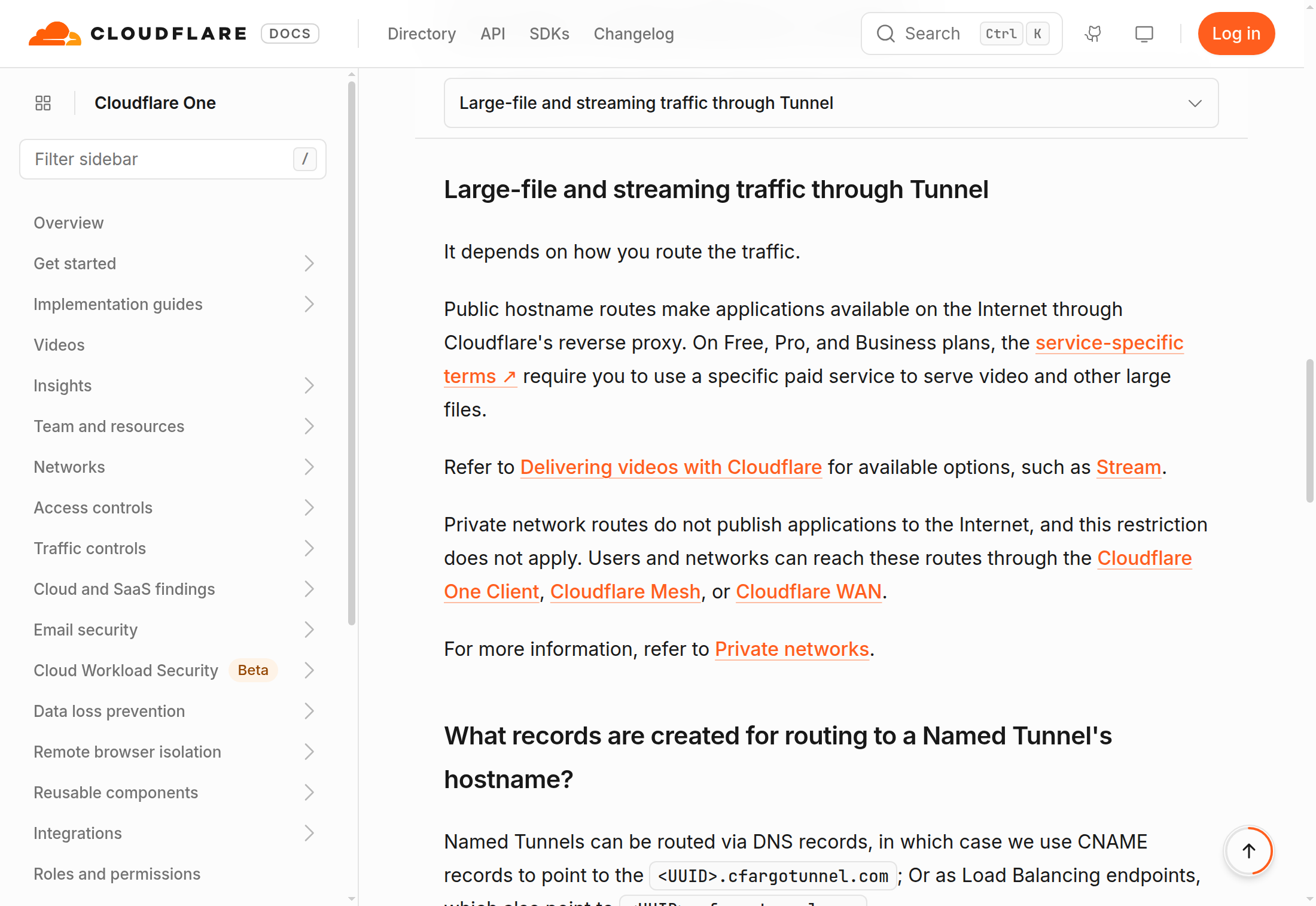
The routing page puts a remotely managed tunnel at roughly 5,000 to 10,000 published applications, because the stored config tops out around 1 MB. The Zero Trust pricing page lists a 50 user limit on the free plan and $7 per user per month on pay-as-you-go, with no user limit on that paid row. Access is optional. A public hostname works without it. Access is how you put a login on the Cloudflare side of the route.
WireGuard and Caddy, on this host
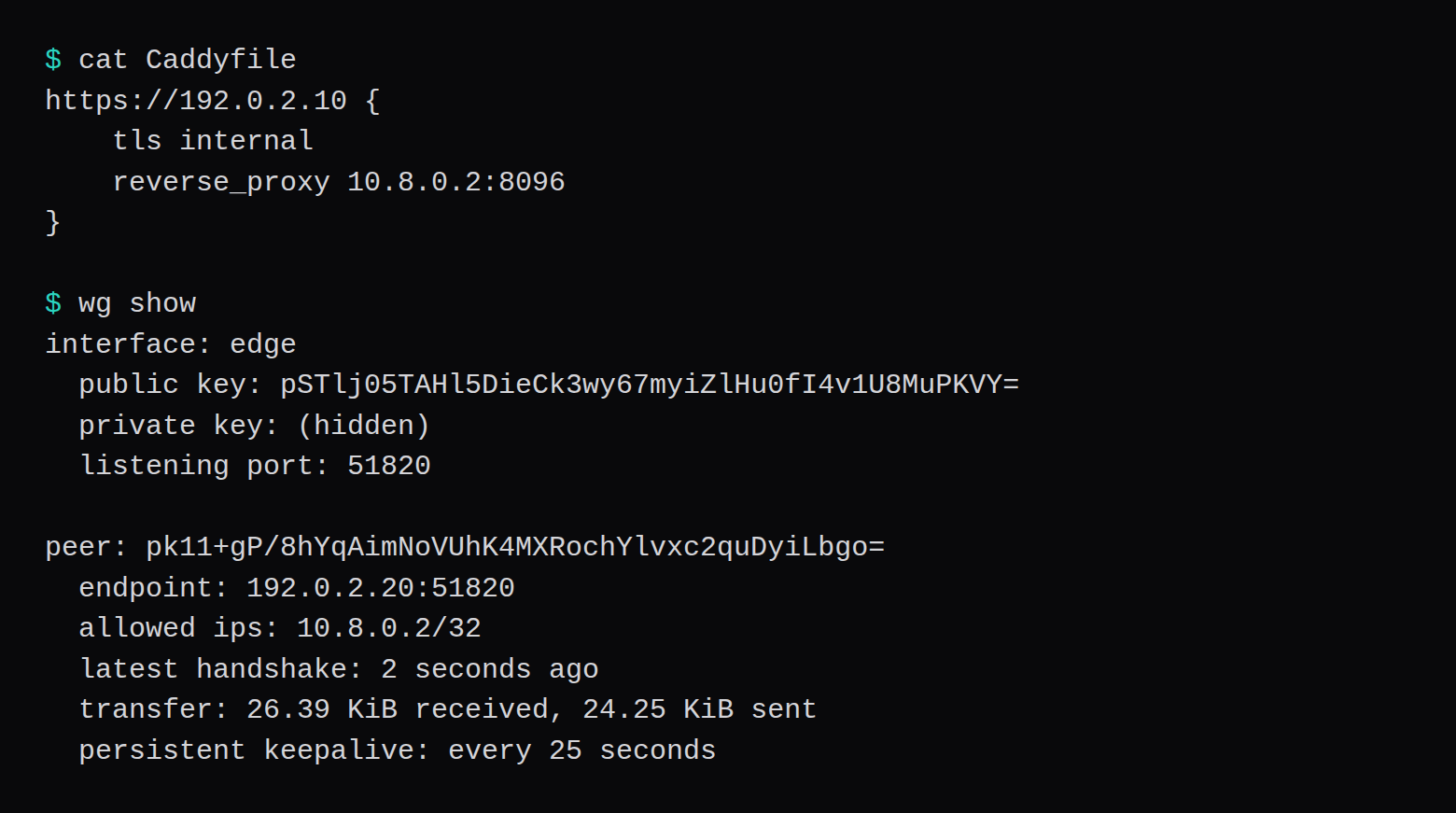
The Caddyfile was four lines. WireGuard's tools were v1.0.20210914. Caddy was the Ubuntu 24.04 package, 2.6.2.
https://192.0.2.10 {
    tls internal
    reverse_proxy 10.8.0.2:8096
}
From the moment the namespaces were created to the first HTTPS 200 was 1.6 seconds, packages already installed. Twenty requests through Caddy had a median time_total of 5.7 ms. Twenty requests from the edge namespace straight to http://10.8.0.2:8096, over WireGuard and without Caddy, had a median of 1.1 ms. Caddy's resident set was 39,768 KiB. The kernel WireGuard interface has no process of its own to charge.
What you take on, once this is a public VPS, is the patching. Caddy, the kernel, and the SSH door are yours. The ports you want open are 80, 443, and the WireGuard UDP, and the rest can stay closed. On a Proxmox provider, NodeRings firewall rules are pushed to the VM firewall on the hypervisor. On VirtFusion and SolusVM 2 that page leaves the guest firewall to the provider's own networking. A flood aimed at the VPS hits that address. A public Cloudflare hostname is a name on Cloudflare's edge.
Pangolin with no site connected
docker compose up -d, images already pulled, reached HTTP 200 on the setup page in 13.0 seconds. The certificate was generated on this machine. Let's Encrypt had nothing to validate, because no public name pointed here. Traefik's log recorded Plugins loaded for Badger v1.8.0. The manual's example still pins Badger v1.4.0. v1.8.0 was the release that existed, and it is the one this stack loaded.
The first docker stats pass showed the Pangolin container at 394 MiB. Once the resources page was serving, the three figures were 304.6 MiB, 5.7 MiB, and 24.7 MiB. That is 335 MiB with a local admin, one empty organization, and no site. Pangolin's VPS page calls 1 vCPU, 2 GB, and 8 GB of disk enough for most deployments, and says a 1 GB VPS may need swap during install or under traffic. 335 MiB is the idle stack on a host that had memory to spare. It is not a loaded tunnel.
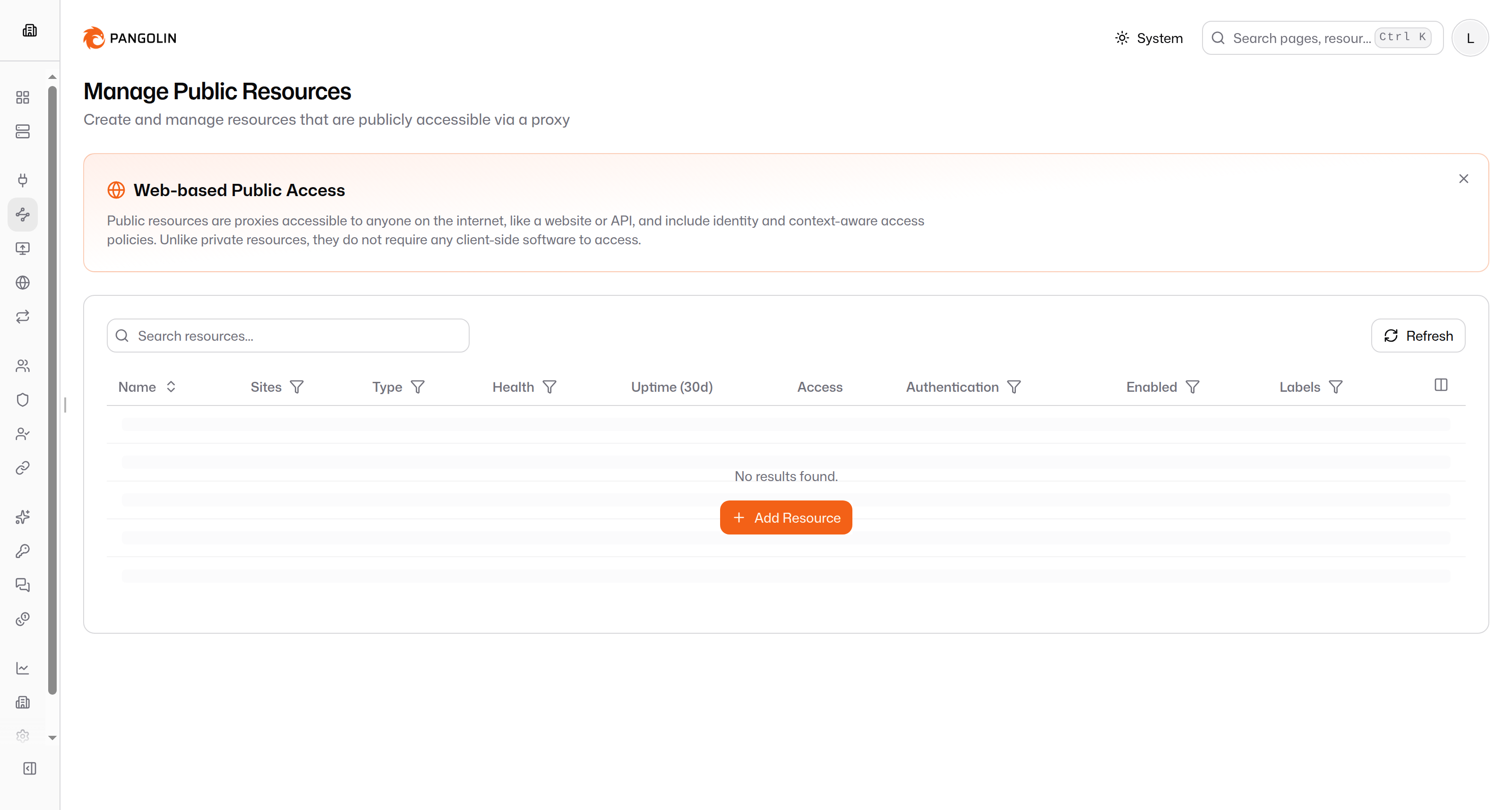
Community Edition is the AGPL build. The Pangolin FAQ says the self-hosted Enterprise Edition is free for personal use and for an organization under $100,000 in gross annual revenue, and that SSO, RBAC, and audit logging sit on the paid self-hosted plans. The account in this lab is a local user, which is what the setup form created.
Raw TCP and UDP are a different object from the HTTP resource. The default config ships with allow_raw_resources: true. Pangolin's own page describes them as unauthenticated pipes bound to a port on the VPS, and uses a game server as the example. A login applies to the HTTP resource. A raw port is an open pipe. CrowdSec is a community installer flag, --crowdsec, and this compose file left it out.
What the twenty requests were
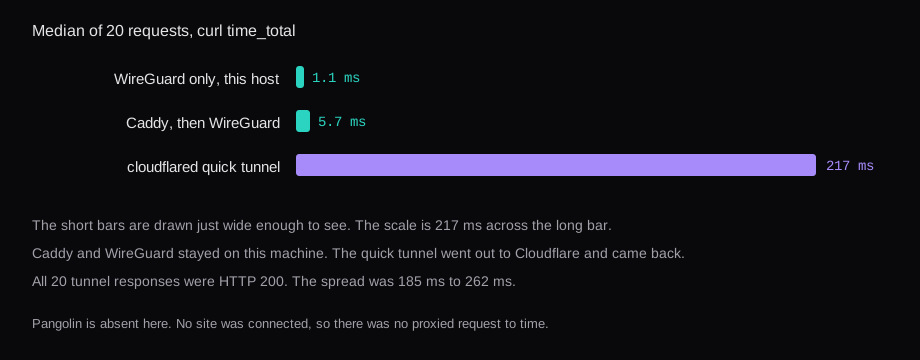
cloudflared used 42,252 KiB once the tunnel was up. The same origin, fetched on the host itself, had a median of 0.5 ms, so almost all of the 217 ms is the path out and back. A second city would change that number. This host is the only vantage.
Can you put Jellyfin on a public hostname?
The terms cover video and other large files on the CDN, for Free, Pro, and Business, unless you are on Enterprise or the file is served by a paid Cloudflare service such as Stream, Images, or R2. A public hostname route is that CDN path. A private network route is the exception the FAQ names. The file sitting on a disk at home, fetched through a public hostname on a free plan, is the case the clause describes.
Does Cloudflare see a password on that hostname?
The visitor's TLS ends at Cloudflare, and cloudflared opens a separate request to the origin. A form POST is HTTP on Cloudflare's side of that handoff. That is the point of a proxy that can run a WAF. Caddy and Traefik put the same handoff on the VPS. The password is visible to whichever process decrypted the visitor.
Will 1 GB hold Pangolin?
Docker's reading here was 335 MiB for three containers, idle, with no site and no traffic. Pangolin's page says a 1 GB VPS may need swap during install or when traffic shows up, and recommends 2 GB. The 335 MiB figure has no Newt session in it and no bytes proxied.
What gets hit in a flood?
A public hostname is a name on Cloudflare's network. The address you defend is theirs. A VPS reverse proxy, and Pangolin in front of one, publish your VPS address. The packet arrives there first. Leave 80, 443, and the WireGuard UDP open, and treat those as the surface. The game-port version of that surface is the DDoS piece linked above.