
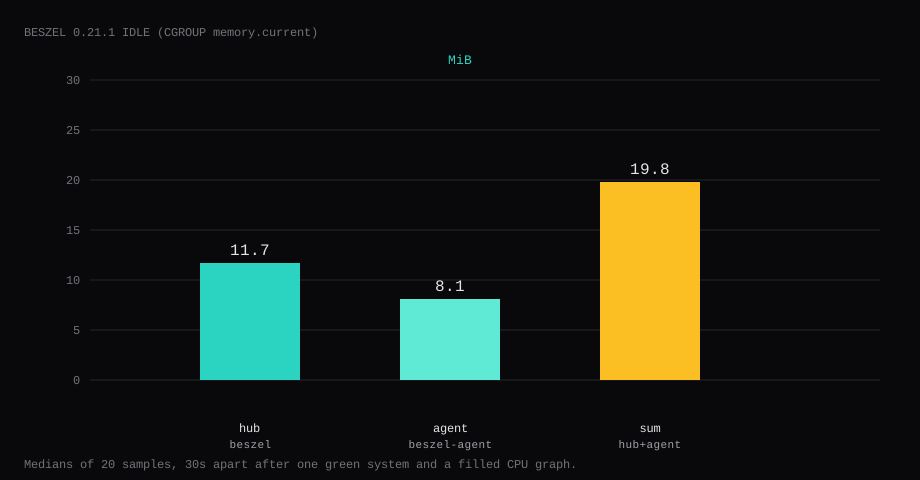
Beszel 0.21.1 held 19.8 MiB idle on this lab host after one green system (vps) and a quiet UI with CPU, memory, and disk graphs already drawing. That sum is cgroup memory.current for the hub and the agent, each the median of twenty samples taken 30 seconds apart. The hub was 11.7 MiB and the agent 8.1 MiB. docker stats printed 11.3 MiB and 8.1 MiB (19.4 MiB together). CPU percent sat at 0. Port 8091 listened on 127.0.0.1 only. A curl to the guest's LAN address on 8091 was refused.
Beszel is a lightweight server monitoring hub plus per-host agents. The hub stores history and draws CPU, memory, disk, and network graphs; agents ship metrics with a token/key pair. It aims at the gap between “SSH and htop” and a full Prometheus stack: one UI, small binaries, Docker-friendly install. A single VPS can run hub and agent together; more machines get an agent each pointed at the hub URL.
The getting started guide ships a Compose file that publishes 8090:8090 and pairs a local agent over a unix socket. Competing guides leave that publish on every interface and stop once the first-user form loads. Pin 0.21.1 by digest, bind the hub to loopback, create the admin, and put KEY and TOKEN on the agent. Wait for a green row and a CPU chart with points. Put Caddy on 443.
| Reading | hub | agent | sum |
|---|---|---|---|
cgroup memory.current | 11.7 MiB | 8.1 MiB | 19.8 MiB |
docker stats | 11.3 MiB | 8.1 MiB | 19.4 MiB |
| CPU percent | 0 | 0 | 0 |
| Host listener | 127.0.0.1:8091 | unpublished (unix socket) | - |
| Skip this | What this run did |
|---|---|
8090:8090 on every interface | Published 127.0.0.1:8091:8090 |
| Agent without KEY or TOKEN | Copied both from Add System / fingerprint |
HUB_URL=http://localhost:8090 from a second Compose network | Shared beszel_socket + HUB_URL=http://127.0.0.1:8091 |
| Stopping at a grey system | Opened system detail until the CPU chart had samples |
| Opening 8091 on the panel firewall | Left 8091 closed; Caddy on 80/443 |
How do you install Beszel hub and agent on Docker?
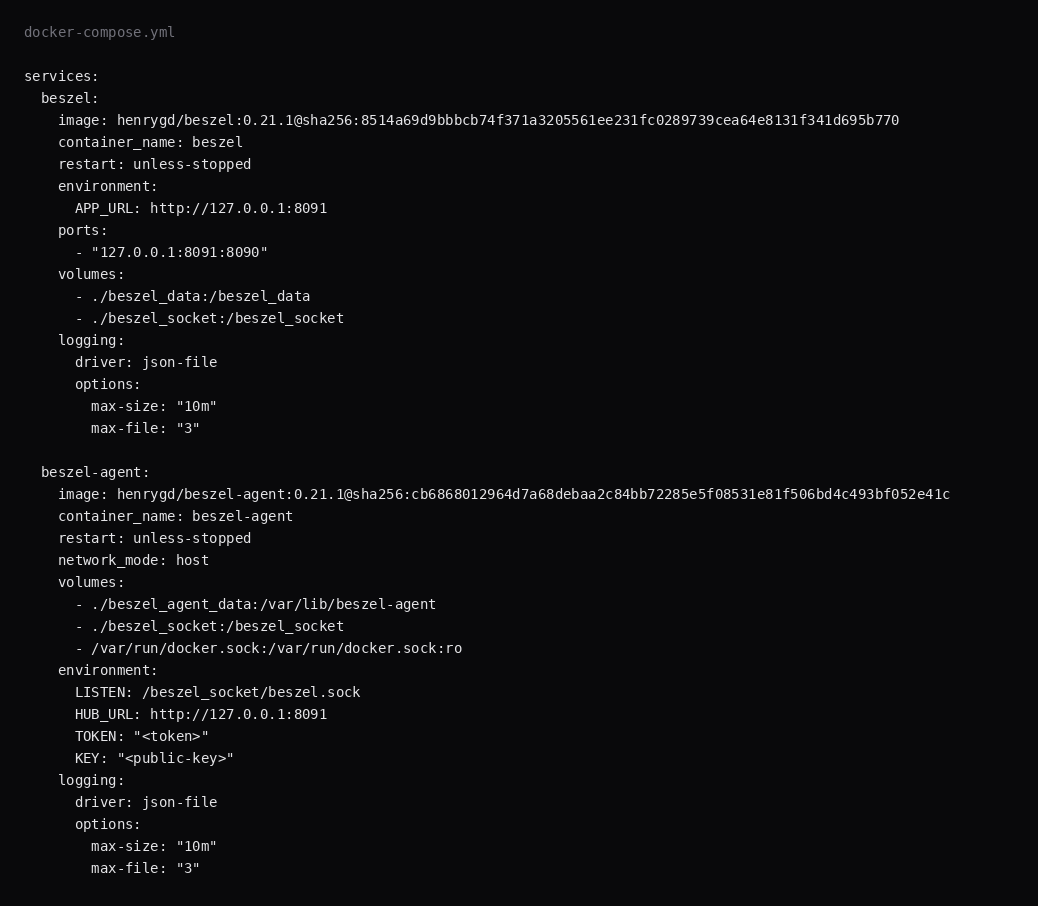
This lab pinned henrygd/beszel:0.21.1 (digest sha256:8514a69d9bbbcb74f371a3205561ee231fc0289739cea64e8131f341d695b770) and henrygd/beszel-agent:0.21.1 (digest sha256:cb6868012964d7a68debaa2c84bb72285e5f08531e81f506bd4c493bf052e41c). Host port 8090 was already taken, so the hub published 8091 on loopback. If 8090 is free on your VPS, map 127.0.0.1:8090:8090 instead and keep APP_URL in sync.
mkdir -p ~/beszel/{beszel_data,beszel_socket,beszel_agent_data} && cd ~/beszelStart with the hub only. Fill KEY and TOKEN after you create the system in the UI.
services:
  beszel:
    image: henrygd/beszel:0.21.1@sha256:8514a69d9bbbcb74f371a3205561ee231fc0289739cea64e8131f341d695b770
    container_name: beszel
    restart: unless-stopped
    environment:
      APP_URL: http://127.0.0.1:8091
    ports:
      - "127.0.0.1:8091:8090"
    volumes:
      - ./beszel_data:/beszel_data
      - ./beszel_socket:/beszel_socket
    logging:
      driver: json-file
      options:
        max-size: "10m"
        max-file: "3"

  beszel-agent:
    image: henrygd/beszel-agent:0.21.1@sha256:cb6868012964d7a68debaa2c84bb72285e5f08531e81f506bd4c493bf052e41c
    container_name: beszel-agent
    restart: unless-stopped
    network_mode: host
    volumes:
      - ./beszel_agent_data:/var/lib/beszel-agent
      - ./beszel_socket:/beszel_socket
      - /var/run/docker.sock:/var/run/docker.sock:ro
    environment:
      LISTEN: /beszel_socket/beszel.sock
      HUB_URL: http://127.0.0.1:8091
      TOKEN: "<token>"
      KEY: "<public-key>"
    logging:
      driver: json-file
      options:
        max-size: "10m"
        max-file: "3"
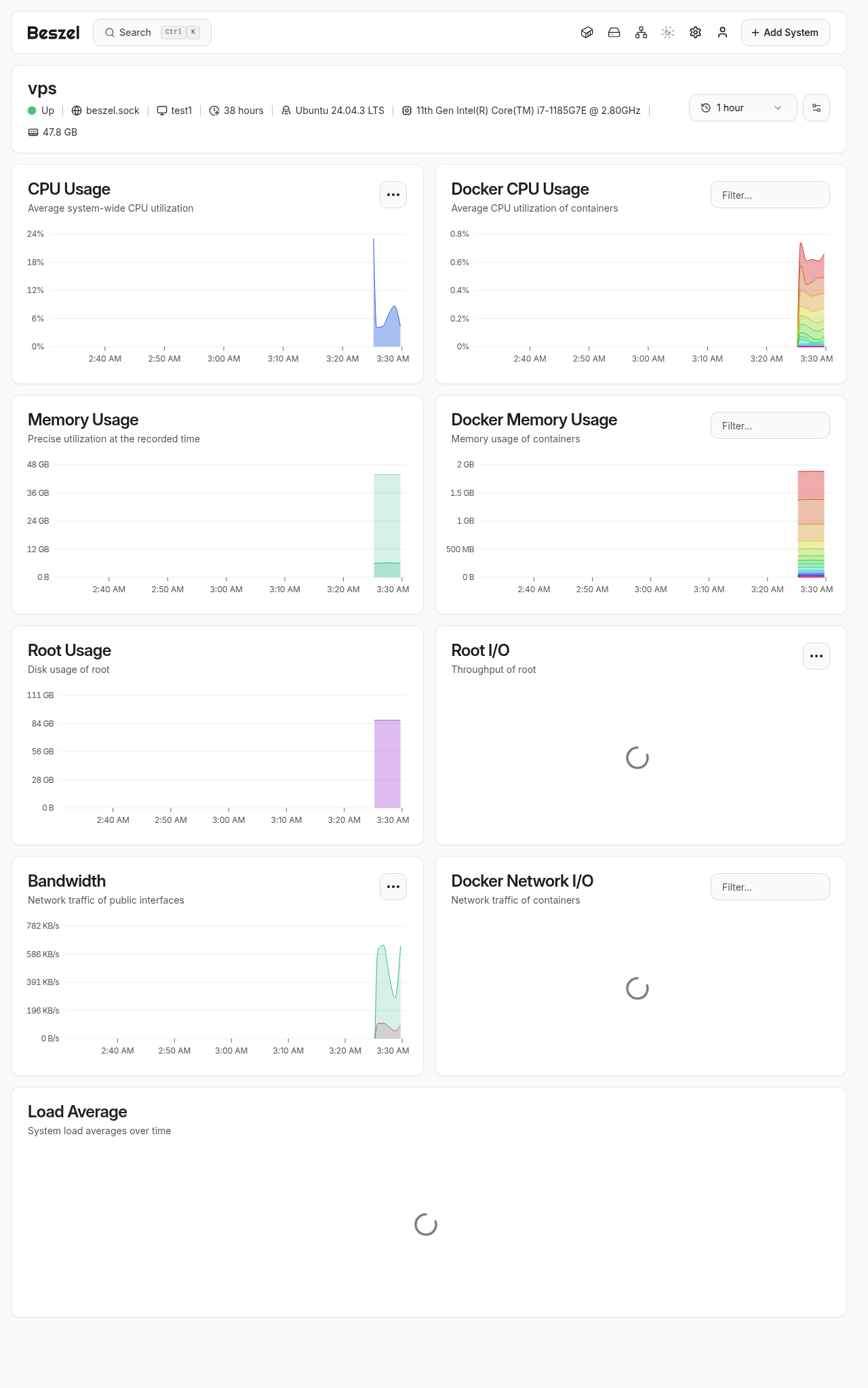
LISTEN on the unix socket matches the official same-host recipe. With host networking, the agent dials the hub at HUB_URL on the host loopback. Mounting docker.sock fills the Docker CPU and memory cards on the system page. Log rotation matches the Compose checklist.
docker compose up -d beszel
curl -sS -o /dev/null -w '%{http_code}\n' http://127.0.0.1:8091/
You want 200. The first visit opens the create-account form.
How do you add systems and read the graphs?
From the hub UI, Add System, copy the install env (KEY, TOKEN, HUB_URL) into the agent compose or binary service on that host. HUB_URL is the base origin only (https://beszel.example.com); the agent appends /api/beszel/agent-connect itself, so a path suffix returns 404 (Beszel discussion #1774, agent install). Same-host agents should use the shared unix socket (LISTEN=/beszel_socket/beszel.sock) because localhost between containers is the wrong network namespace. Remote agents need host networking for NIC stats, docker.sock:ro for container metrics, and a token that has not leaked into a public gist. Private CA hubs set CA_CERT_FILE (env docs).
Alerts and retention depend on the Beszel version you pin; set notification channels once a graph is green. Hub data lives on its volume: back that up if historical graphs matter. Agents are disposable; the hub is the source of truth. For log diving use Dozzle; Beszel is metrics, not stdout.
Why must 8091 stay on loopback?
The hub is a PocketBase app with your metrics history and the first-user form. Anyone who can reach it can try that form before you finish setup.
ss -H -lntup | grep 8091On this host that printed 127.0.0.1:8091. Curl to 192.168.1.150:8091 failed with connection refused. Leave 8091 closed in the panel firewall. Open 80 and 443 for Caddy. Docker published ports often bypass UFW inside the guest, so the loopback bind is what kept the LAN address quiet.

How do you create the admin and add a system?
Open http://127.0.0.1:8091/ (or an SSH tunnel to that port). Create the account with an email and a long password. Crop the password from screenshots. Both a regular hub user and a PocketBase superuser are created on that first run; password resets for /_/ use the superuser CLI, which is separate from the hub login.
Click Add System. For this same-host layout:
- Set Host / IP to
/beszel_socket/beszel.sock. - Copy the public
KEYand theTOKENinto the agent environment. - Save, then bring the agent up:
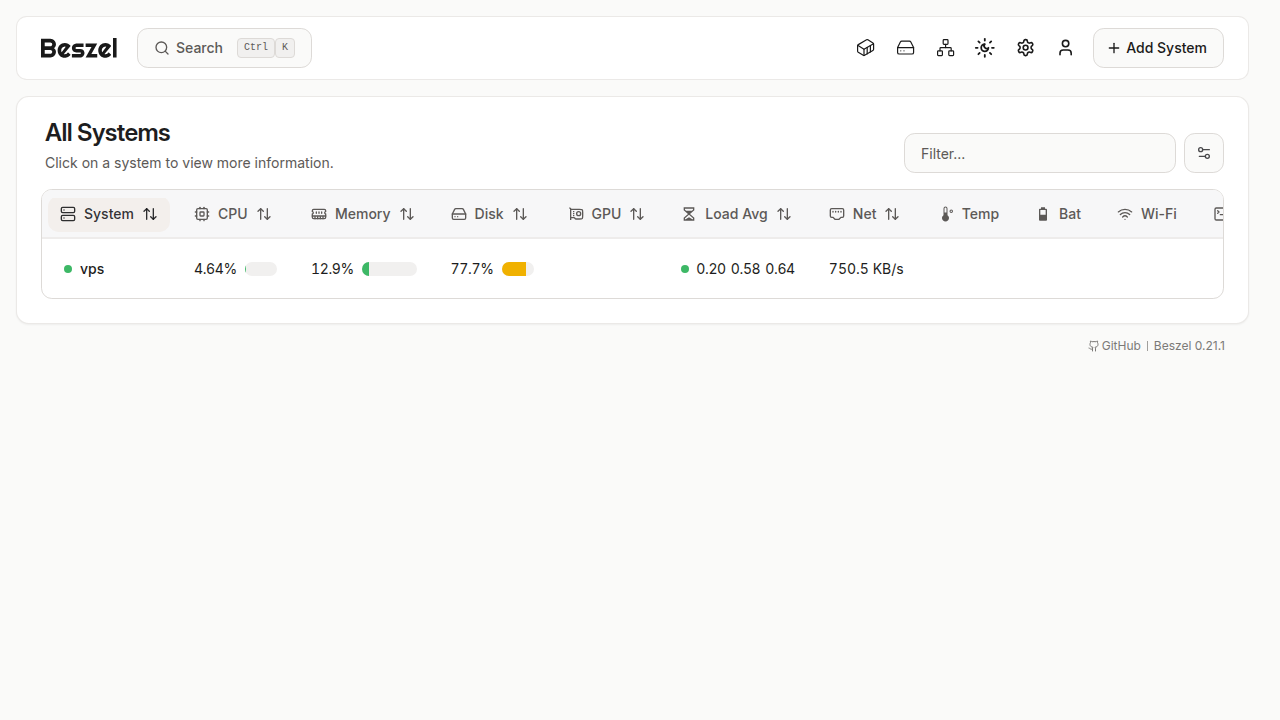
docker compose up -dThe agent log should show a WebSocket connect to the hub. The systems table flips the row to green (up) and starts filling CPU, memory, disk, and load. Open the system page and wait until the CPU chart has points.
A universal token under Settings → Tokens works the same way for several agents. Remote agents keep LISTEN=45876 (or another port) and put the VPS address in Host / IP instead of the socket path. On that host, open or close 45876 in the firewall.
Where does Caddy go?
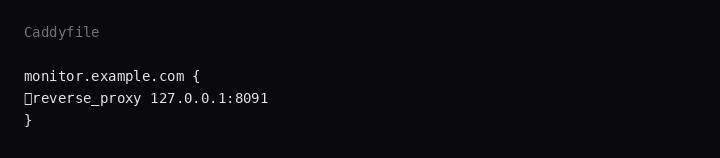
monitor.example.com {
	reverse_proxy 127.0.0.1:8091
}
Set APP_URL to that same https://monitor.example.com and recreate the hub so links and cookies match the public name. TLS setup is in the Caddy HTTPS post. Beszel's reverse-proxy notes cover forwarded headers when Caddy terminates TLS.
How do you back up beszel_data?
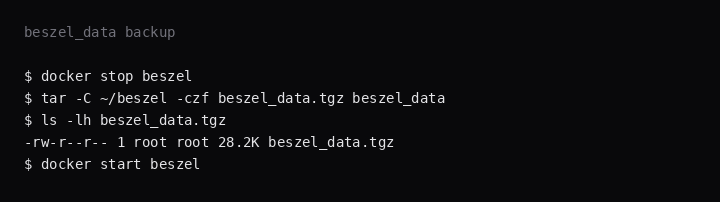
Hub state lives under ./beszel_data. Stop the hub, archive the directory, start again:
docker stop beszel
tar -C ~/beszel -czf beszel_data.tgz beszel_data
docker start beszel
On this lab the archive was about 28 KB after one admin and one system. Point Restic at that tarball. Agent state under beszel_agent_data is smaller and easier to recreate from KEY and TOKEN.
How do you grow from one agent to many?
Add each VPS as its own system with its own token. Keep the hub on the most stable host. If the hub is down, agents buffer or gap depending on version; treat hub uptime as part of monitoring itself. Disk graphs matter more than CPU for small hosts that fill /. Export or screenshot baselines after a quiet week so a regression is obvious.
FAQ
Why host networking on the agent? Host network is how the agent reads host interface counters. Drop it only if you accept weaker host network stats and map a port yourself.
Socket or port 45876? On the same host, use the shared unix socket as Host / IP. On a remote host, listen on 45876 (or another port) and point the hub at that address. With the socket path you can leave 45876 closed.
Why did localhost fail for HUB_URL? From a container on the Compose bridge, localhost is the container. Use the host loopback with host networking, a shared socket, or the hub's docker-network DNS name.
Beszel vs Uptime Kuma? Kuma watches HTTP checks and status pages (Uptime Kuma post). Beszel graphs the host and its containers. Many stacks run both.
Alerts? Point Beszel notifications at ntfy or another sink from the hub settings. This lab stopped at a green system and a filled graph.
Netdata or Grafana? Netdata and Grafana run heavier agents and scrapers. Beszel is the small hub and agent pair with a built-in UI. This lab's idle number is the comparison point on a quiet VPS.