
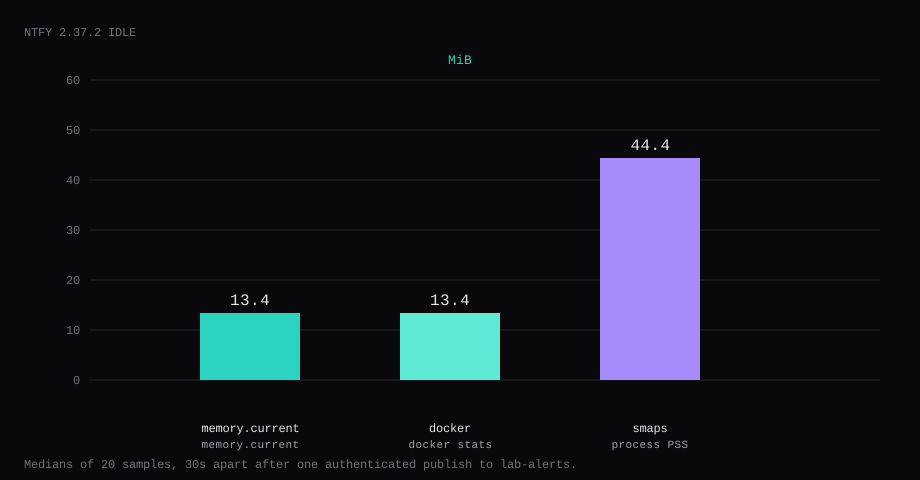
ntfy 2.37.2 held 13.4 MiB idle on this lab host after an authenticated publish to lab-alerts and a quiet UI. That is cgroup memory.current, the median of twenty samples taken 30 seconds apart. docker stats printed 13.4 MiB. Process PSS from /proc/…/smaps was 44.4 MiB. Port 2586 listened on 127.0.0.1 only. A curl to the guest's LAN address on 2586 was refused. /v1/health returned {"healthy":true,"role":"active"} with no cookie. An anonymous publish to a topic returned HTTP 403.
ntfy is a simple HTTP pub/sub service for push notifications. You PUT or POST a message to a topic URL and phones or desktops subscribed to that topic light up. The getting started guide shows scripts that notify you when a backup finishes or a long job fails. Topics are just names: they do not need to be created first, which is convenient and also why an open public server is a spam magnet.
The config docs start with ntfy serve on port 80 and open topics. Competing guides publish 80:80 and leave that default. Pin v2.37.2 by digest and publish loopback only. Set deny-all, create an admin, publish one authenticated message, and keep Caddy as the only public path.
| Reading | Value |
|---|---|
cgroup memory.current | 13.4 MiB, median of 20 |
docker stats | 13.4 MiB |
process PSS (smaps) | 44.4 MiB |
| CPU percent | 0.06, median |
| Host listener | 127.0.0.1:2586 → container :80 |
/v1/health (no cookie) | "healthy":true |
| Anon publish | HTTP 403, code 40301 |
| Skip this | What this run did |
|---|---|
80:80 on every interface | Published 127.0.0.1:2586:80 |
| Default open topics | NTFY_AUTH_DEFAULT_ACCESS=deny-all + require login |
Floating latest without a digest | Pinned v2.37.2 by digest |
| Topics guessed by URL alone | Admin user for publish and subscribe |
| Opening 2586 on the panel firewall | Left 2586 closed; Caddy on 80/443 |
How do you install ntfy on Docker?
The image is binwiederhier/ntfy:v2.37.2, digest sha256:1875ddcf815c8a3c981d6d78c67a93452d0abba79b1ab9520b1f5f5238902bd7. On this pull, latest pointed at the same digest. Pin v2.37.2 in Compose.
mkdir -p ~/ntfy/lib && cd ~/ntfyservices:
ntfy:
image: binwiederhier/ntfy:v2.37.2@sha256:1875ddcf815c8a3c981d6d78c67a93452d0abba79b1ab9520b1f5f5238902bd7
container_name: ntfy
command: serve
restart: unless-stopped
ports:
- "127.0.0.1:2586:80"
environment:
NTFY_BASE_URL: https://ntfy.example.com
NTFY_LISTEN_HTTP: ":80"
NTFY_CACHE_FILE: /var/lib/ntfy/cache.db
NTFY_AUTH_FILE: /var/lib/ntfy/auth.db
NTFY_AUTH_DEFAULT_ACCESS: deny-all
NTFY_ENABLE_LOGIN: "true"
NTFY_REQUIRE_LOGIN: "true"
NTFY_BEHIND_PROXY: "true"
TZ: UTC
volumes:
- ./lib:/var/lib/ntfy
logging:
driver: json-file
options:
max-size: "10m"
max-file: "3"Inside the container the process listens on :80. The host publishes 2586 on loopback because other apps already own 8080. For a first bring-up on loopback only, set NTFY_BASE_URL=http://127.0.0.1:2586 until Caddy and DNS are ready. Log rotation matches the Compose checklist.
docker compose up -d
curl -sS http://127.0.0.1:2586/v1/health
You want {"healthy":true,"role":"active"}.

Why must 2586 stay on loopback?
ntfy is a push endpoint. Anyone who can reach an open topic can publish noise to your phone.
ss -H -lntup | grep 2586On this host that printed 127.0.0.1:2586. Curl to 192.168.1.150:2586 failed with connection refused. Leave 2586 closed in the panel firewall. Open 80 and 443 for Caddy. Docker published ports often bypass UFW inside the guest, so the loopback bind is what kept the LAN address quiet. The public-address case is in provider-side firewall.

What can you send through ntfy?
Plain text is the common case. The publish API also supports titles, priorities, tags/emojis, click actions, and file attachments within the size limits you configure. Cron, Healthchecks, Uptime Kuma, and shell one-liners all speak HTTP, so the VPS becomes the private relay for “this finished” and “this broke” instead of wiring every tool to a vendor webhook. Android, iOS, and a web app subscribe to topics; desktop users can use the same web UI or a CLI watch.
On a self-hosted box the two hard choices are auth (who may publish) and upstream push for Apple. Instant iOS delivery usually needs NTFY_UPSTREAM_BASE_URL pointed at the public ntfy.sh infrastructure so Apple’s APNs path still works. uptime.bet’s ntfy Docker guide and diylabhub note what that upstream call carries: a message id and a hash of the topic URL, not the message body; the phone then fetches the real payload from your server. Set upstream to https://ntfy.sh, not your own domain, and make NTFY_BASE_URL match the server URL typed in the iOS app exactly (rthomasv3). Without upstream, delivery can take tens of minutes to hours. This lab left upstream unset; Android and the web UI were enough to prove the stack.
How do you prove deny-all?
With NTFY_AUTH_DEFAULT_ACCESS=deny-all and NTFY_REQUIRE_LOGIN=true, an anonymous publish fails:
curl -sS -d 'hello open' http://127.0.0.1:2586/lab-alertsThis lab returned HTTP 403 with "code":40301 and "error":"forbidden", and an anonymous poll of the same topic returned the same 403. /v1/health stayed 200 with no cookie.

How do you add an admin and publish one message?
docker exec -e NTFY_PASSWORD='YOUR_LONG_PASSWORD' ntfy \
  ntfy user add --role=admin labadmin
Admins can read and write every topic. Publish and poll with basic auth:
curl -sS -u labadmin:YOUR_LONG_PASSWORD \
  -d 'Lab backup finished' http://127.0.0.1:2586/lab-alerts

curl -sS -u labadmin:YOUR_LONG_PASSWORD \
  'http://127.0.0.1:2586/lab-alerts/json?poll=1'
This lab got message id lRLGURzTvKp9 on publish and the same id on the poll. Crop the password. For scripts, use an access token from ntfy token add after the password test.
Open http://127.0.0.1:2586/app on the guest, or tunnel, and sign in as that user to subscribe in the browser.
ssh -N -L 12586:127.0.0.1:2586 user@YOUR_VPS_IP
How do you fine-tune ntfy after deny-all works?
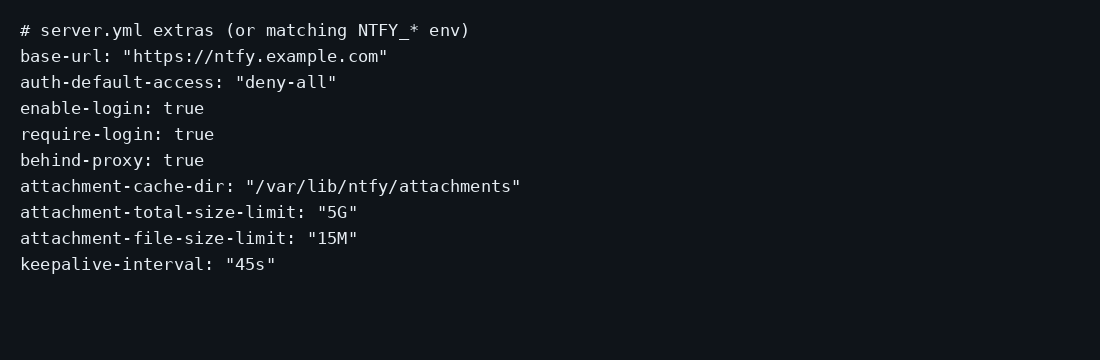
Auth and the message cache already live under ./lib. The config reference adds attachment storage, cache duration, and per-visitor rate limits. Sensible first knobs for a household server:
# extras as env (or matching keys in server.yml)
NTFY_CACHE_DURATION=12h
NTFY_ATTACHMENT_CACHE_DIR=/var/lib/ntfy/attachments
NTFY_ATTACHMENT_TOTAL_SIZE_LIMIT=5G
NTFY_ATTACHMENT_FILE_SIZE_LIMIT=15M
NTFY_ATTACHMENT_EXPIRY_DURATION=3h
NTFY_VISITOR_REQUEST_LIMIT_BURST=60
NTFY_VISITOR_REQUEST_LIMIT_REPLENISH=5s
cache-duration (default 12h) is how long poll/since= can still see a message after publish. Attachments need a directory on the volume and caps so one client cannot fill the disk. Rate-limit bursts protect the public hostname once Caddy is live; put your monitor host in NTFY_VISITOR_REQUEST_LIMIT_EXEMPT_HOSTS if Healthchecks fires in bursts. For scripts, prefer ntfy token add access tokens over embedding the admin password in cron. Treat tokens as nearly as powerful as that user’s password (uptime.bet: full account access except password change/delete), so create a dedicated backup-bot user with ntfy access backup-bot backups write-only instead of sharing the admin token.
Per-topic ACLs beat a single admin when a friend needs one inbox: ntfy user add alice then ntfy access alice backups rw. Leave deny-all as the default so unknown topics stay closed. manuel laggner’s NPM writeup pairs deny-all with NTFY_REQUIRE_LOGIN=true so anonymous publish and subscribe both fail closed.
Where does Caddy go?
ntfy.example.com {
	reverse_proxy 127.0.0.1:2586
}
Set NTFY_BASE_URL to that same https://ntfy.example.com (no trailing slash). NTFY_BEHIND_PROXY=true makes rate limits see X-Forwarded-For, and Caddy carries WebSocket upgrades for live subscriptions. TLS setup is in the Caddy HTTPS post. Pairing with monitors is in Uptime Kuma.

How do you back up auth and cache?
Users and ACLs live in auth.db. Recent messages live in cache.db. Stop the container, archive the lib directory, start again:
docker compose stop ntfy
tar -czf ntfy-lib.tgz lib
docker compose start ntfy
On this lab the archive was about 5 KB after one admin and one message. Point Restic at that tarball.

How do you use ntfy from real jobs?
Cron: curl -fsS -u user:pass -d "done" https://ntfy.example.com/backups. Healthchecks and Uptime Kuma can POST to the same topic. Use priorities so a failed backup outranks a noise ping. Separate topics per severity or per machine. Tokens beat passwords in scripts. On Android, subscribe at first unlock and enable deep links if you use action buttons.
FAQ
Why not leave topics open? On a public hostname, a guessed topic is an inbox and a spam target. deny-all plus an admin (or a per-topic ACL) limits that topic to accounts you create.
2586 or 80? Inside the container ntfy still listens on 80. The host publish is 127.0.0.1:2586:80 so other loopback apps can keep 8080.
Per-topic users? Create a user without --role=admin, then ntfy access USER TOPIC rw.
Attachments on by default? Only if you set attachment-cache-dir (or the env equivalent) and accept the size limits. Without that directory, keep payloads small text.
Email notifications? Optional SMTP sender settings exist in the same config page. This lab stayed on push + web.
Does UFW block a published 2586? Often not inside the guest. Bind 127.0.0.1:2586:80 and leave 2586 closed on the panel firewall.
iOS upstream? Instant delivery on Apple may need NTFY_UPSTREAM_BASE_URL (often https://ntfy.sh) so APNs can reach the device. This lab did not set it.