
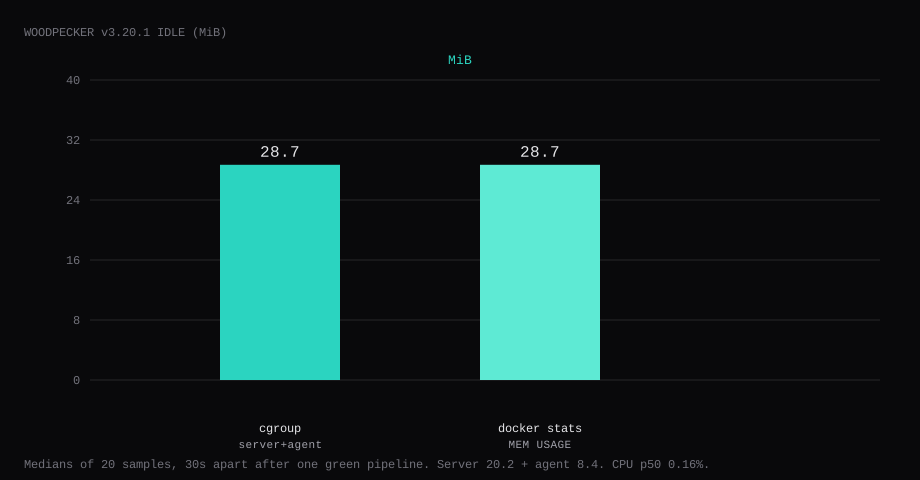
Woodpecker CI v3.20.1 held 28.7 MiB idle on this lab host after Forgejo OAuth worked and one pipeline on labadmin/lab-ci finished green. That is cgroup memory.current for woodpecker-server plus woodpecker-agent, the median of twenty samples taken 30 seconds apart with a quiet UI. docker stats printed 28.7 MiB for the pair (server 20.2 MiB, agent 8.4 MiB). CPU percent sat at 0.16. Port 8010 listened on 127.0.0.1 only on this lab because 8000 was already taken; use 127.0.0.1:8000:8000 when 8000 is free. A curl to the guest's LAN address on that port was refused.
Woodpecker CI is a lightweight, open-source CI engine descended from the Drone lineage. Pipelines are YAML next to the code; agents run steps in containers. Paired with Forgejo it gives you Gitea/Forgejo-native CI without GitHub. Server holds the UI and forge webhooks; agents execute. On one VPS both share a Docker network with the forge so OAuth and clone URLs resolve.
The Docker Compose example wires GitHub. The Forgejo forge docs list WOODPECKER_FORGEJO_* and warn about same-host networking. Competing guides stop at the OAuth login. Pin v3.20.1 by digest, put server and agent on the forge's Docker network, register an OAuth app whose callback path is exactly /authorize, allow Forgejo webhooks to reach the CI URL, enable one repo, push a .woodpecker workflow until it goes green, and leave the UI on loopback behind Caddy.
Forgejo itself is a separate footprint. The Forgejo on Docker post measured about 110 MiB idle for the forge alone with no CI runner. This post measures Woodpecker on top of that forge.
| Reading | Value |
|---|---|
cgroup memory.current (server+agent) | 28.7 MiB, median of 20 |
docker stats (pair) | 28.7 MiB |
| Server / agent split | 20.2 / 8.4 MiB |
| CPU percent | 0.16, median |
| Host listener | 127.0.0.1:8010 (lab) / 127.0.0.1:8000 (post) |
| After proof | OAuth login; pipeline #2 success on lab-ci |
| Images | woodpeckerci/woodpecker-server:v3.20.1, woodpeckerci/woodpecker-agent:v3.20.1 |
| Server backup | stopped tar of wp-server/ ~13 KB |
| Skip this | What this run did |
|---|---|
8000:8000 on every interface | Published 127.0.0.1:8000:8000 |
OAuth callback missing /authorize | Callback https://ci.example.com/authorize |
| Agent off the forge network | Shared network + WOODPECKER_BACKEND_DOCKER_NETWORK |
| Stopping at the login page | Enabled lab-ci and got a green pipeline |
| Webhooks blocked to docker bridge | Forgejo ALLOWED_HOST_LIST=external,loopback,private |
| Opening 8000 on the panel firewall | Left the app port closed; Caddy on 80/443 |
How do you wire Forgejo OAuth and webhooks?
Create an OAuth2 application in Forgejo (user settings or site admin → Applications). The authorization callback URL must match the Woodpecker public URL with path /authorize:
https://ci.example.com/authorizeCopy the client id and secret into the Woodpecker env file. For a lab without TLS, the same rule applies with http://127.0.0.1:8000/authorize (or the hostname you put in /etc/hosts).
Same-host webhooks from Forgejo to Woodpecker need an allow list. Skip it and push events die on the forge. In app.ini (or the matching FORGEJO__webhook__* env):
[webhook]
ALLOWED_HOST_LIST = external,loopback,private
loopback covers 127.0.0.0/8. private covers the docker bridge when the hook URL resolves to 172.17.0.1. The Forgejo cheat sheet documents the list. Keep Forgejo's ROOT_URL on a hostname the pipeline containers can resolve. On a shared Compose network that is often the service name (http://forgejo:3000/). Behind Caddy on a real DNS name, use https://git.example.com/ so clone URLs match what the agent fetches.
How do you install Woodpecker next to Forgejo?
Images are woodpeckerci/woodpecker-server:v3.20.1 (digest sha256:0f31560e29d67ec4a06d6eeee4bac38d2a2697a6a741b8a0db3998180f3a3517) and woodpeckerci/woodpecker-agent:v3.20.1 (digest sha256:a7d7299a13add0b3936fa0ac9ed23507fe283a7fc7d9596c4289d7e8206541eb). Generate the agent shared secret and put OAuth values in a mode-600 .env:
openssl rand -hex 32# .env - mode 600
WOODPECKER_FORGEJO_CLIENT=YOUR_CLIENT_ID
WOODPECKER_FORGEJO_SECRET=YOUR_CLIENT_SECRET
WOODPECKER_AGENT_SECRET=PASTE_OPENSSL_OUTPUT
WOODPECKER_GRPC_SECRET=PASTE_ANOTHER_OPENSSL_OUTPUTnetworks:
wp-lab:
name: wp-lab
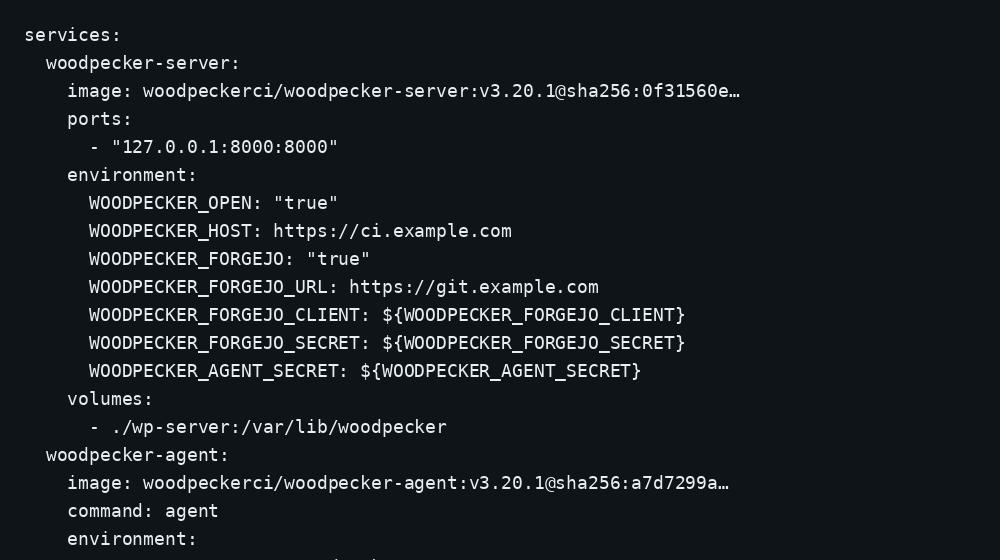
services:
woodpecker-server:
image: woodpeckerci/woodpecker-server:v3.20.1@sha256:0f31560e29d67ec4a06d6eeee4bac38d2a2697a6a741b8a0db3998180f3a3517
container_name: woodpecker-server
restart: unless-stopped
ports:
- "127.0.0.1:8000:8000"
env_file: .env
environment:
WOODPECKER_OPEN: "true"
WOODPECKER_HOST: https://ci.example.com
WOODPECKER_FORGEJO: "true"
WOODPECKER_FORGEJO_URL: https://git.example.com
WOODPECKER_FORGEJO_CLIENT: ${WOODPECKER_FORGEJO_CLIENT}
WOODPECKER_FORGEJO_SECRET: ${WOODPECKER_FORGEJO_SECRET}
WOODPECKER_AGENT_SECRET: ${WOODPECKER_AGENT_SECRET}
WOODPECKER_GRPC_SECRET: ${WOODPECKER_GRPC_SECRET}
volumes:
- ./wp-server:/var/lib/woodpecker
networks: [wp-lab]
logging:
driver: json-file
options:
max-size: "10m"
max-file: "3"
woodpecker-agent:
image: woodpeckerci/woodpecker-agent:v3.20.1@sha256:a7d7299a13add0b3936fa0ac9ed23507fe283a7fc7d9596c4289d7e8206541eb
container_name: woodpecker-agent
command: agent
restart: unless-stopped
depends_on: [woodpecker-server]
environment:
WOODPECKER_SERVER: woodpecker-server:9000
WOODPECKER_AGENT_SECRET: ${WOODPECKER_AGENT_SECRET}
WOODPECKER_BACKEND_DOCKER_NETWORK: wp-lab
volumes:
- ./wp-agent:/etc/woodpecker
- /var/run/docker.sock:/var/run/docker.sock
networks: [wp-lab]
logging:
driver: json-file
options:
max-size: "10m"
max-file: "3"Attach the Forgejo service to wp-lab as well. WOODPECKER_BACKEND_DOCKER_NETWORK puts each job container on that network so git clone can reach the forge by service name. Own ./wp-server as uid 1000 before the first up so SQLite can create /var/lib/woodpecker/woodpecker.sqlite. Log rotation matches the Compose checklist.
mkdir -p wp-server wp-agent
sudo chown -R 1000:1000 wp-server
docker compose up -d
curl -sS -o /dev/null -w '%{http_code}\n' http://127.0.0.1:8000/login
A working server returns 200 on /login. Persist WOODPECKER_GRPC_SECRET so agents keep a stable token across server restarts.
Why must the UI stay on loopback?
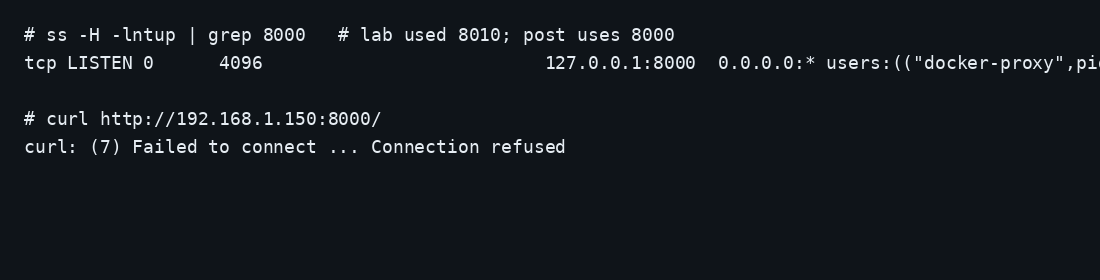
Woodpecker holds forge OAuth tokens and can start containers through the agent's docker.sock. Publishing 8000 on every interface puts that control plane on the internet without TLS.
ss -H -lntup | grep 8000On this lab host the publish was 127.0.0.1:8010. Curl to the guest LAN address failed with connection refused. Leave the app port closed in the panel firewall. Open 80 and 443 for Caddy. Docker published ports often bypass UFW inside the guest, so the loopback bind kept the LAN address quiet. The public-address case is in provider-side firewall.
How do you sign in and enable a repo?
Open the Woodpecker URL, choose the Forgejo button, sign in on the forge, and authorize the app. Crop secrets from screenshots. Then Add repository, find the repo, and click Enable. Enabling registers the Forgejo webhook that points at /api/hook.
ssh -N -L 8000:127.0.0.1:8000 user@YOUR_VPS_IP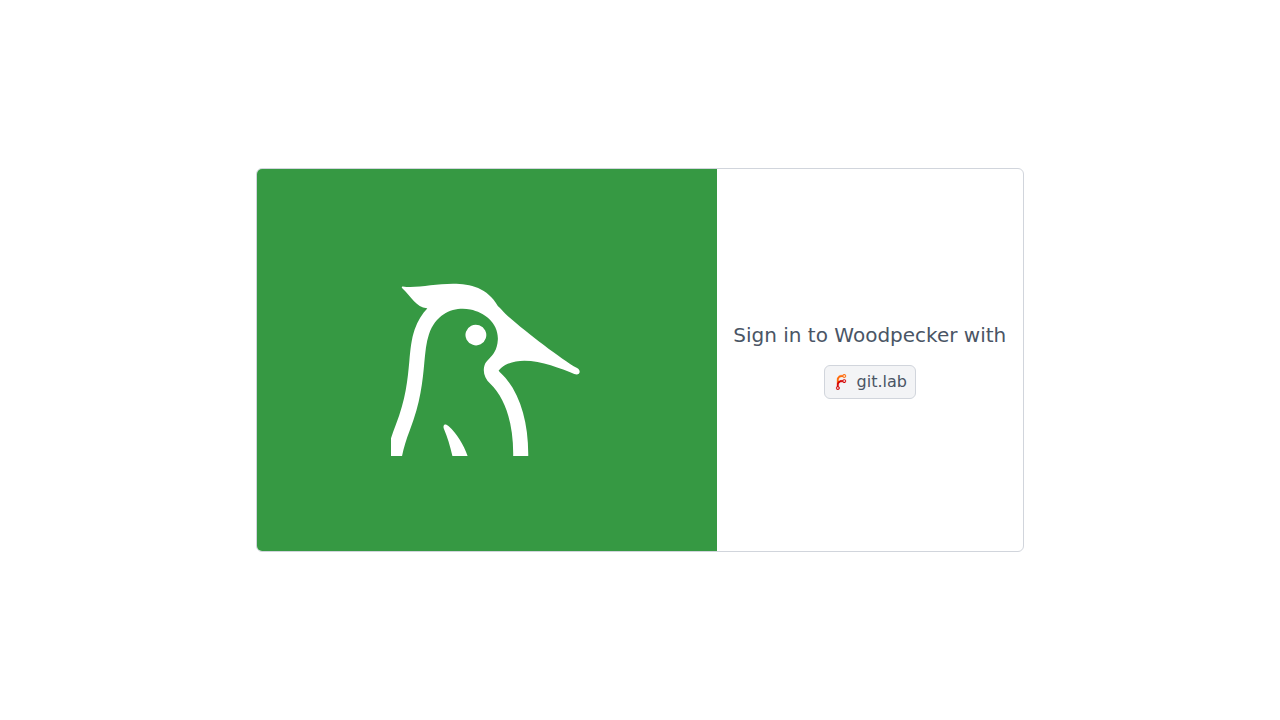
What does one green pipeline prove?
Add a workflow under .woodpecker/ (this lab used .woodpecker/lab.yaml), commit, and push to the branch you enabled:
when:
  - event: push
    branch: main

steps:
  - name: hello
    image: alpine:3.20
    commands:
      - echo "woodpecker lab ok"
      - uname -a
git add .woodpecker/lab.yaml
git commit -m 'add woodpecker lab pipeline'
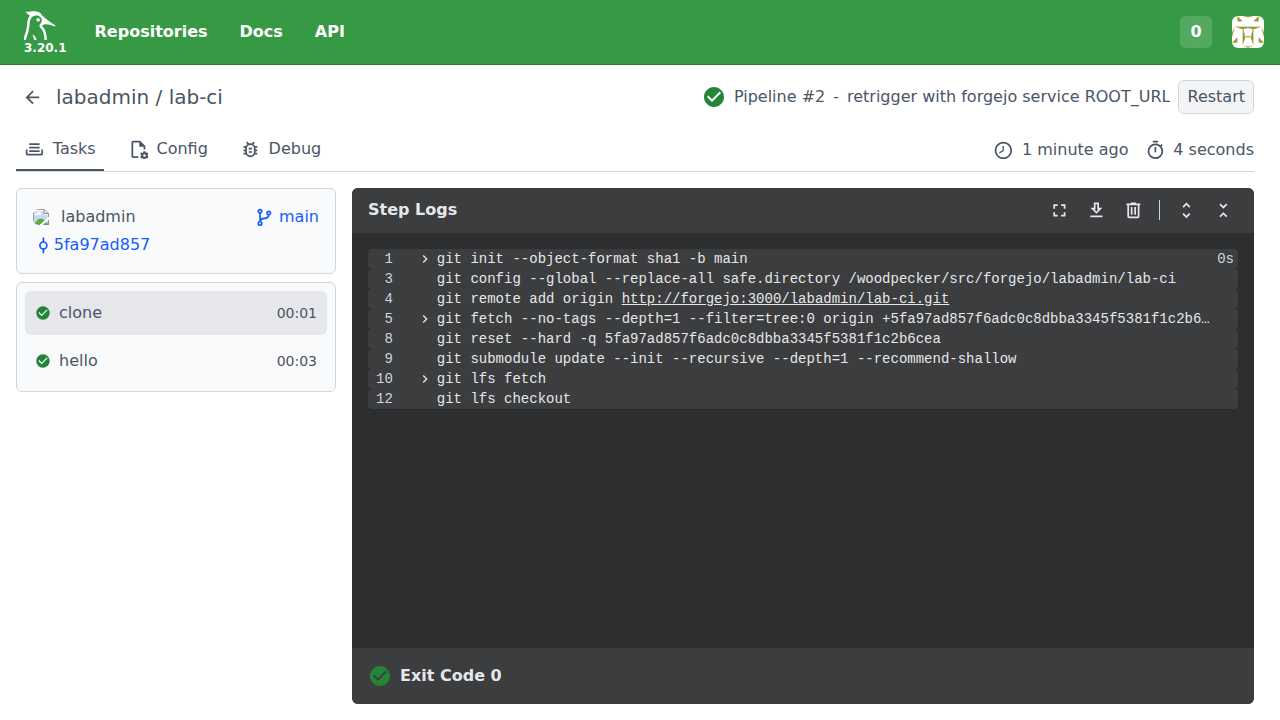
git push origin mainA success status means the webhook reached Woodpecker, the agent picked up the job, the clone URL resolved on the shared network, and the step container ran. OAuth login only proves the forge trust. This lab's first push failed on clone while ROOT_URL still pointed at a host-only address; after ROOT_URL matched the Compose service name, pipeline #2 finished green in about four seconds.
Where does Caddy go?
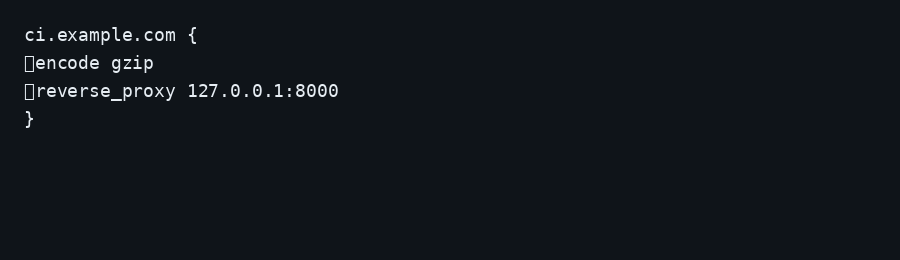
Set WOODPECKER_HOST to the public HTTPS URL before you rely on OAuth redirects in production.
ci.example.com {
	encode gzip
	reverse_proxy 127.0.0.1:8000
}
# .env / compose
WOODPECKER_HOST=https://ci.example.com
WOODPECKER_FORGEJO_URL=https://git.example.comRestart the server after changing those values. Update the Forgejo OAuth callback to https://ci.example.com/authorize. TLS setup is in the Caddy HTTPS post. Put CI on its own hostname.
How do you back up Woodpecker server data?
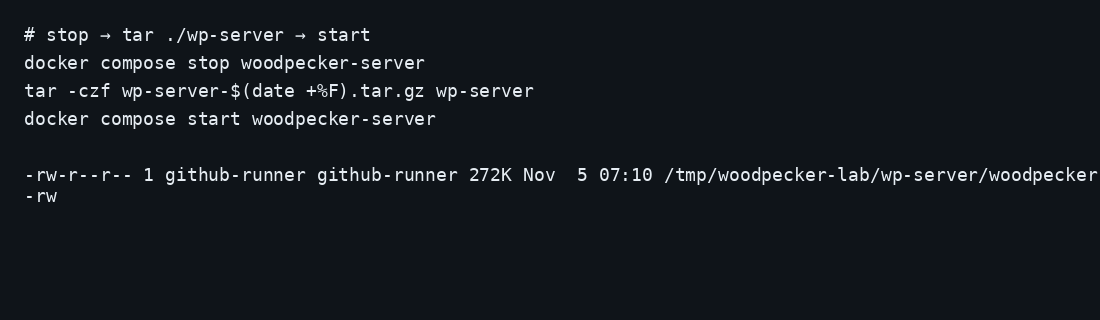
/var/lib/woodpecker holds the SQLite store and server state. Stop the server, archive wp-server/, start again:
docker compose stop woodpecker-server
tar -C ~/woodpecker -czf wp-server-$(date +%F).tar.gz wp-server
docker compose start woodpecker-server
On this lab the stopped archive was about 13 KB after one enabled repo and two pipelines. Point Restic at that tarball. The agent config under wp-agent/ is small; recreate it if needed. Copying SQLite while the server writes risks a torn database.
How do you keep CI useful on a small host?
Limit concurrent pipelines so builds do not OOM the VPS: set WOODPECKER_MAX_WORKFLOWS on the agent (default often 1; raise only with spare RAM) (general admin). Cap step containers with WOODPECKER_BACKEND_DOCKER_LIMIT_MEM / WOODPECKER_BACKEND_DOCKER_LIMIT_CPU_QUOTA (Docker backend). Prefer small images. Prefer a system-wide Forgejo OAuth app under site admin when several users share CI (Forgejo forge docs). Keep Forgejo’s max API page size at least 50 or Woodpecker pagination breaks. The agent does not prune images; schedule docker image / wp_* volume cleanup on the host. Separate trusted and untrusted repos if you ever run forks.
FAQ
Woodpecker or Forgejo Actions? Forgejo can dispatch Actions when you register a runner. The Forgejo install left that runner out. Woodpecker is a separate CI with its own UI and agents. One webhook path per repo keeps the failure story short.
Agent on a second host? Point WOODPECKER_SERVER at the server's reachable gRPC address and share WOODPECKER_AGENT_SECRET. Drop WOODPECKER_BACKEND_DOCKER_NETWORK unless that remote Docker daemon shares a network path to the forge.
SQLite or Postgres? SQLite on ./wp-server is enough for a single-VPS forge and a handful of repos. Move the server store when you need a separate database host.
Gitea env names? Forgejo uses WOODPECKER_FORGEJO_*. Older Gitea guides use WOODPECKER_GITEA_*. On Forgejo, stick to the FORGEJO_* names.
GitHub Actions runner instead? Self-hosted Actions against github.com is a different install: actions/runner on a VPS.
Does UFW block a published 8000? Inside the guest, published Docker ports often bypass UFW. Bind 127.0.0.1:8000:8000 and leave 8000 closed on the panel firewall.