
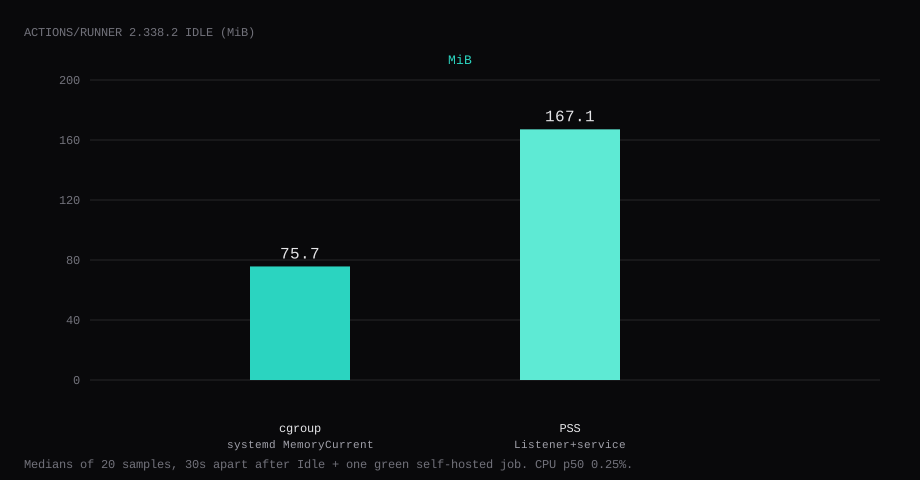
actions/runner 2.338.2 held 75.7 MiB idle on this lab host after the runner sat Idle and one runs-on: self-hosted job had finished green. That is systemd MemoryCurrent for the runner unit, the median of twenty samples taken 30 seconds apart with no job running. Process PSS for Runner.Listener plus the service wrapper was 167.1 MiB. CPU percent on the Listener sat at 0.25. The runner dials out to GitHub. No inbound port was published.
GitHub-hosted runners are convenient until you need custom hardware, private network access, or fewer minutes on the bill. A self-hosted runner is software you install on a VPS that polls GitHub for jobs labeled self-hosted. It can build, test, and deploy with the same workflow YAML, using your disk and CPU. The trust model flips: GitHub never sees your machine’s secrets except what the job logs, and you must assume PR workflows from forks can be hostile.
The official add-a-runner flow downloads a release tarball, runs config.sh with a short-lived registration token, then run.sh or svc.sh. Competing guides paste a Hub wrapper image and stop when Settings shows Idle. Pin the actions/runner tarball by sha256, run as a dedicated user, register with an ephemeral token, install the systemd unit, prove one green job, and leave inbound CI ports closed on the panel firewall.
GitHub requires runner 2.329.0 or newer to register on github.com, and runners must stay within about 30 days of the latest release to keep picking up jobs. This lab used 2.338.2.
| Reading | Value |
|---|---|
systemd MemoryCurrent | 75.7 MiB, median of 20 |
| process PSS | 167.1 MiB |
CPU percent (Runner.Listener) | 0.25, median |
| Host listener | none (egress only) |
| After proof | Idle online; job hello Succeeded |
| Release | actions-runner-linux-x64-2.338.2.tar.gz |
| Skip this | What this run did |
|---|---|
| Random Hub "github-runner" image | Official actions/runner tarball 2.338.2 |
| Registration token in Compose or git | gh api …/registration-token, used once, never committed |
Root + docker.sock by default | Dedicated actions-runner user, no Docker socket |
| Stopping at Idle in Settings | One green workflow on [self-hosted, Linux, X64] |
| Pinning forever at 2.329.0 | 2.338.2 now; plan to update within the 30-day window |
| Opening a CI port on the firewall | Nothing published; runner connects outbound |
How do you install actions/runner on a VPS?
Create a system user and a directory it owns. Download the Linux x64 tarball for v2.338.2 and check the checksum before you extract.
sudo useradd --system --create-home --home-dir /home/actions-runner --shell /bin/bash actions-runner
sudo mkdir -p /home/actions-runner/actions-runner
cd /home/actions-runner
sudo -u actions-runner curl -fsSL -O \
  https://github.com/actions/runner/releases/download/v2.338.2/actions-runner-linux-x64-2.338.2.tar.gz
sha256sum actions-runner-linux-x64-2.338.2.tar.gz
# baebf204307bac6193480852732f0aba2ae97b6c5597c244f4d5558390147c40
sudo -u actions-runner tar xzf actions-runner-linux-x64-2.338.2.tar.gz -C actions-runner
On this lab the digest was baebf204307bac6193480852732f0aba2ae97b6c5597c244f4d5558390147c40. Confirm against the release assets when you install. A newer patch tag replaces 2.338.2 the same way.

How do you register without leaving a token on disk?
Mint a registration token for the repo (or org), pass it to config.sh, and discard it. The token expires in about an hour. Crop it from screenshots and logs.
# repo-scoped example
gh api -X POST repos/OWNER/REPO/actions/runners/registration-token --jq .token
cd /home/actions-runner/actions-runner
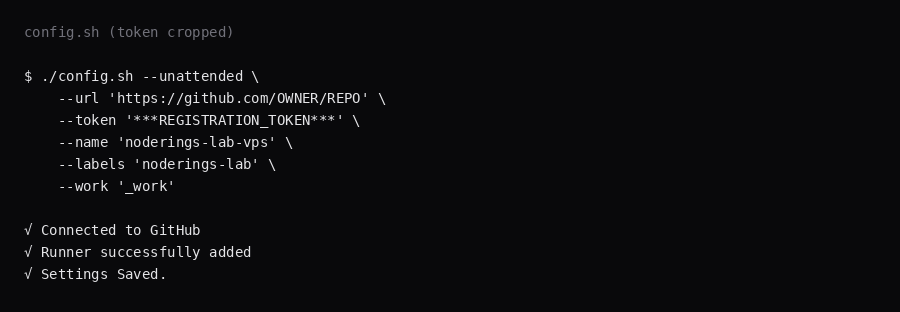
sudo -u actions-runner ./config.sh --unattended \
--url 'https://github.com/OWNER/REPO' \
--token 'REGISTRATION_TOKEN' \
--name 'noderings-lab-vps' \
--labels 'noderings-lab' \
--work '_work'This lab registered against a private lab repo as noderings-lab-vps with custom label noderings-lab. The default labels self-hosted, Linux, and X64 showed up automatically.
How do you run it under systemd?
From the runner directory, as root once:
sudo ./svc.sh install actions-runner
sudo ./svc.sh start
systemctl status 'actions.runner.*.service' --no-pager
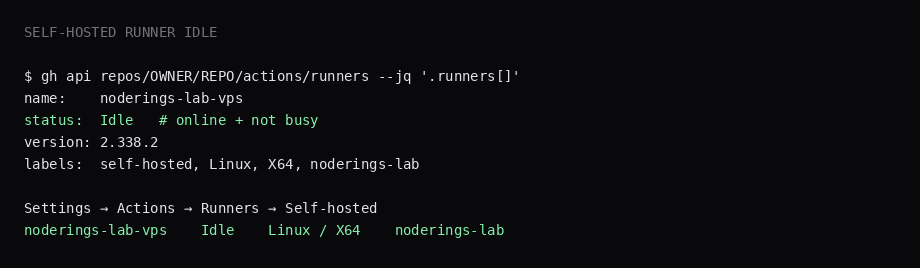
The unit runs as actions-runner. After it connects, Settings → Actions → Runners and the API show Idle until a job is assigned.
gh api repos/OWNER/REPO/actions/runners --jq '.runners[] | {name,status,busy,labels:[.labels[].name]}'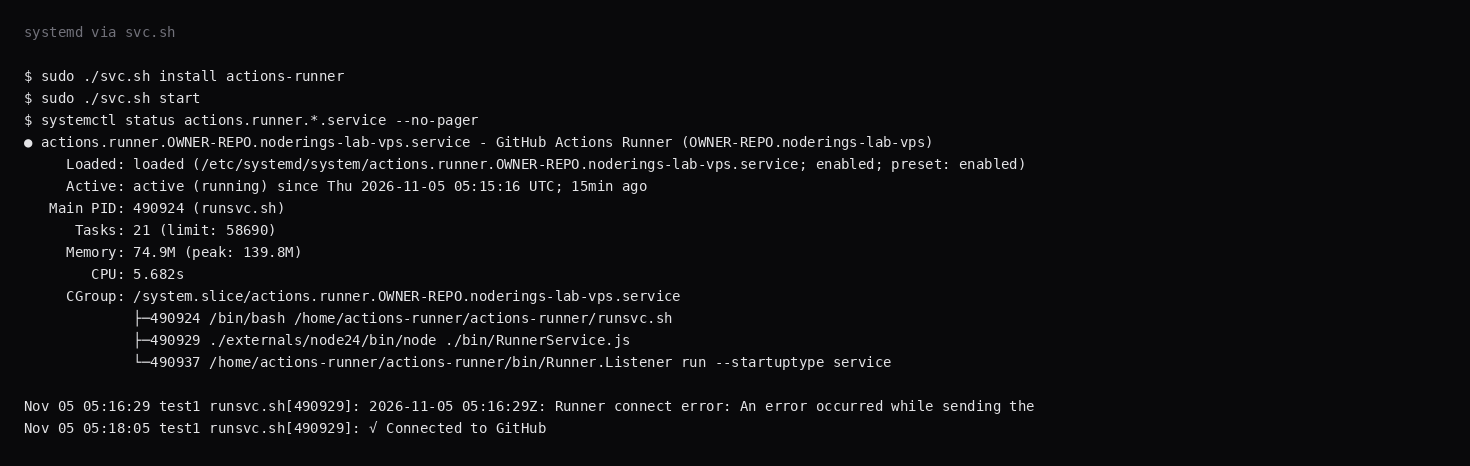
What does one green self-hosted job prove?
Add a workflow that targets the runner labels, then dispatch it:
name: lab
on:
  workflow_dispatch:
jobs:
  hello:
    runs-on: [self-hosted, Linux, X64, noderings-lab]
    steps:
      - name: hello
        run: |
          echo "hello from self-hosted"
          uname -a
          id
gh workflow run lab.yml --ref main
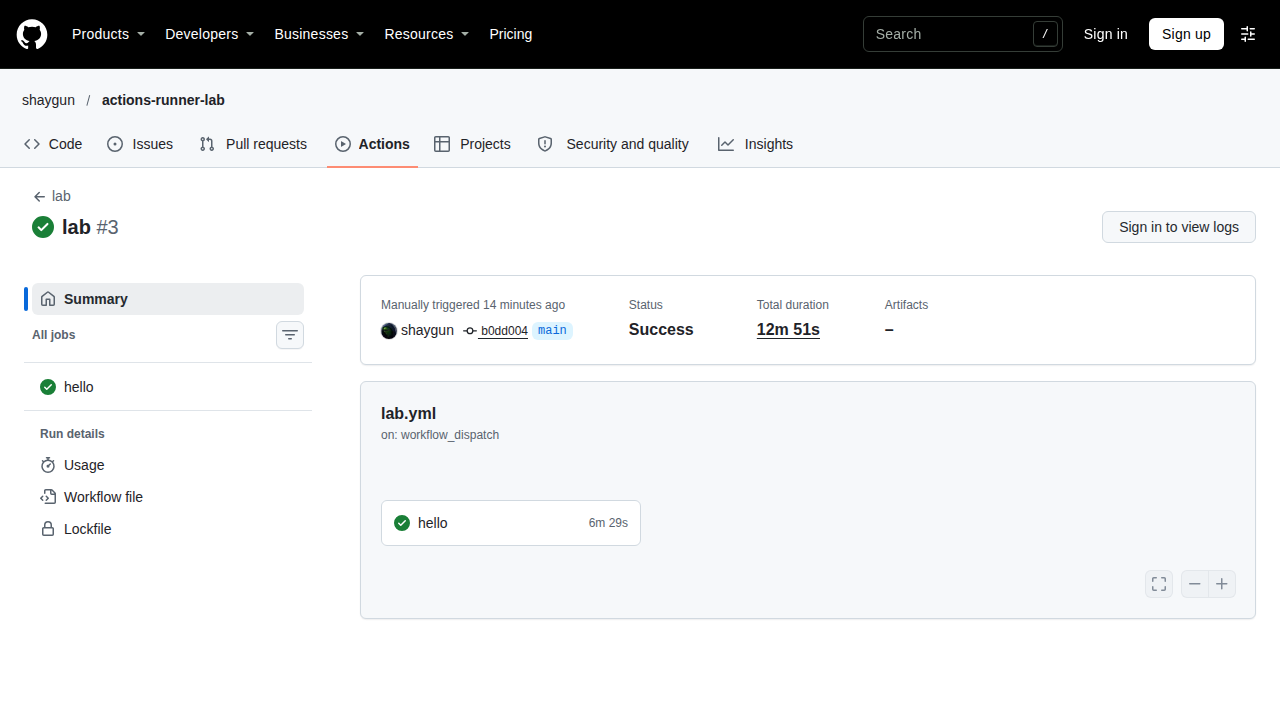
gh run list --limit 1On this lab the run finished completed / success. The journal printed Running job: hello and then Job hello completed with result: Succeeded. That is the proof this VPS executed the job.
Flaky egress to *.actions.githubusercontent.com can delay connect or result upload. The job steps finish on the box, and the Actions UI catches up once TLS to the results receiver holds. Keep outbound HTTPS open.
Why is there no inbound port?
The runner opens outbound connections to GitHub's Actions endpoints. Nothing on the VPS listens for an inbound connection. Leave random high ports closed in the panel firewall. The public-address case is in provider-side firewall.
How do you remove or rebuild the runner?
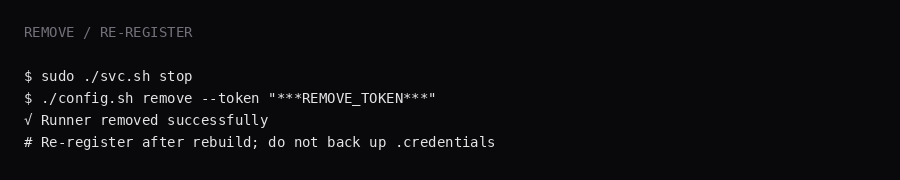
Leave .credentials out of backups. Remove the registration, then re-register after a rebuild:
sudo ./svc.sh stop
# mint a remove token from the same UI/API family as registration
./config.sh remove --token 'REMOVE_TOKEN'
Build caches and _work can hold repo checkouts and secrets from jobs. If you point Restic at those paths, the snapshot can include those checkouts and secrets. A fresh config.sh creates the runner identity again.
How do you run GitHub’s runner without surprises?
Register as a repo or org runner with the least privilege. Prefer --ephemeral (or JIT configs from the REST API) so a runner accepts one job and deregisters (self-hosted runners reference). Labels only route jobs; runner groups are what restrict which repos can use a machine (Stéphane Robert on isolation). GitHub’s secure use guidance is blunt: almost never put self-hosted runners on public repos, because any PR can run code on your VPS. Mirror the same “no host socket” rule. Watch disk for leftover _work directories.
FAQ
myoung34/github-runner or the official tarball? Use the official actions/runner release. Third-party images wrap registration for Compose. You rely on their image and their update cadence.
What about Actions Runner Controller? ARC is the Kubernetes path with ghcr.io/actions/actions-runner. On a single VPS, stay with the tarball and systemd.
Repo runner or org runner? Same binary. Change the --url to the org and use an org registration token when you want shared runners.
docker.sock? Only mount it when jobs must build images, and treat that as root-equivalent on the host. This lab left Docker out of the runner user.
GitHub-hosted vs self-hosted? GitHub-hosted bills minutes and keeps the VM ephemeral. Self-hosted on a VPS keeps caches warm and the code on your disk, and you own that security boundary.
Does UFW need a new allow rule? Allow outbound HTTPS to GitHub. Leave inbound rules alone for the runner process.