
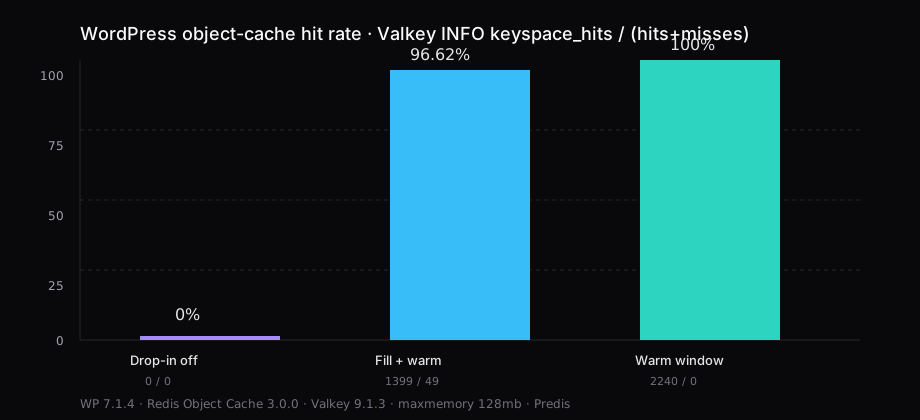
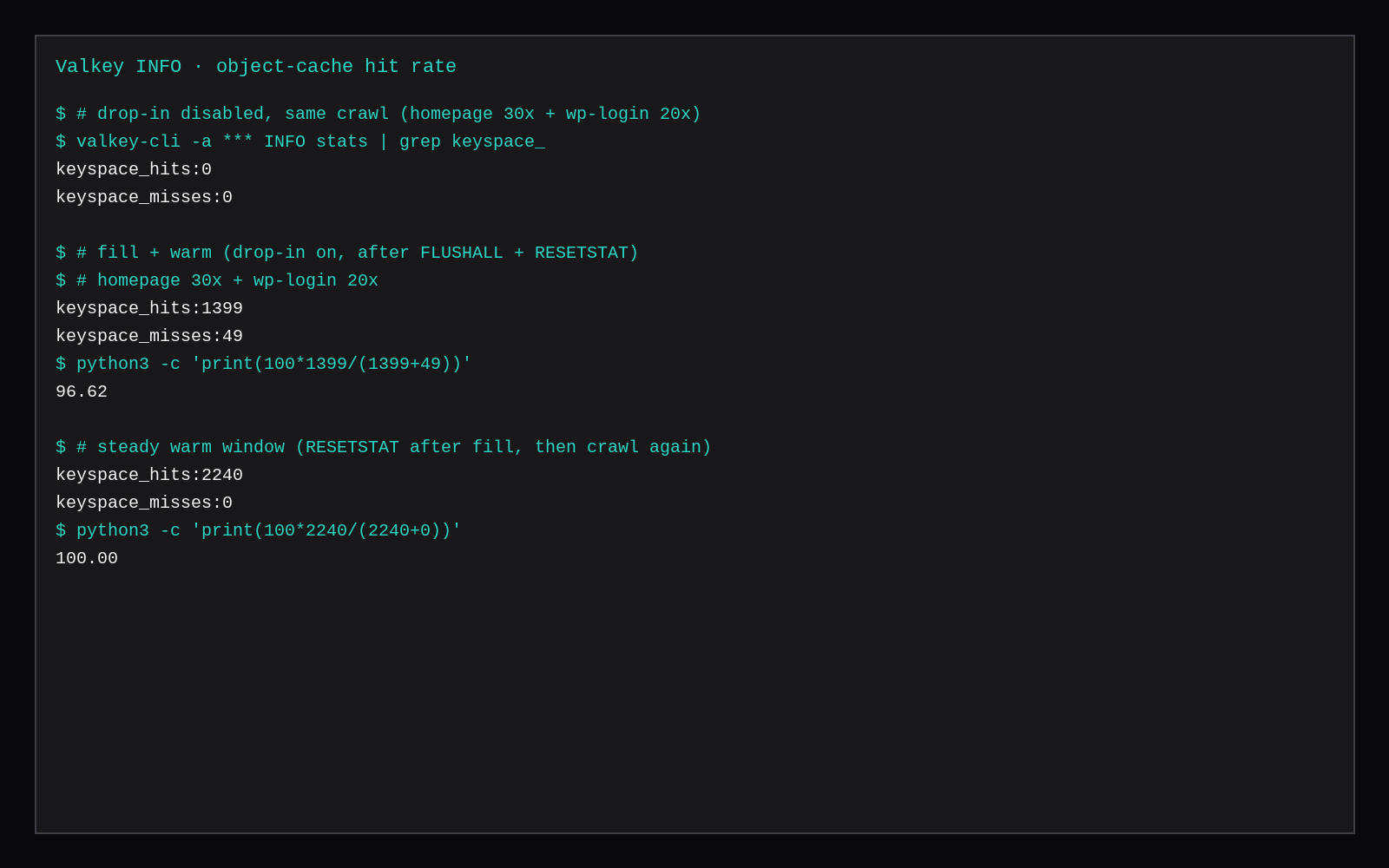
WordPress 7.1.4 talked to Valkey 9.1.3 through Till Krüss’s Redis Object Cache 3.0.0 drop-in. After FLUSHALL and CONFIG RESETSTAT, a crawl of the homepage thirty times and /wp-login.php twenty times produced keyspace_hits:1399 and keyspace_misses:49, a 96.62% hit rate. Reset the stats again with the cache already warm, repeat the same crawl, and Valkey reported 2240 hits and 0 misses: 100%. With the drop-in disabled, the same crawl left keyspace_hits:0 and keyspace_misses:0. Valkey sat at about 5 MiB in docker stats with maxmemory 128mb.
Object cache stores PHP/wp_options/query results between requests. It sits beside a full-page cache such as OpenLiteSpeed + LSCache or Nginx fastcgi_cache. A page-cache hit can skip PHP. An object-cache hit still runs PHP; it skips a lot of MariaDB work for groups that fit in Valkey.
| Drop-in off | Fill + warm | Warm window | |
|---|---|---|---|
keyspace_hits | 0 | 1399 | 2240 |
keyspace_misses | 0 | 49 | 0 |
| Hit rate | n/a (no traffic) | 96.62% | 100% |
| WordPress | 7.1.4 | 7.1.4 | 7.1.4 |
| Plugin | Redis Object Cache 3.0.0 disabled | 3.0.0 + drop-in | same |
| Client | — | Predis 2.4.1 | same |
| Backend | Valkey 9.1.3 (redis_version 7.2.4) | same | same |
maxmemory | 128mb / allkeys-lru | same | same |
Hit rate here is keyspace_hits / (keyspace_hits + keyspace_misses) from Valkey INFO stats after a fixed crawl. That is the server’s count of GET traffic when you ask whether the object cache is doing work.
Object cache vs page cache
A page cache stores the finished HTML. LSCache’s x-litespeed-cache: hit and a 0.30 ms TTFB are that layer. Object cache is the WordPress wp_cache_* API backed by Redis or Valkey: options, transients (when they are not forced to the database), and query groups land in memory between PHP requests.
You can run both. Page cache handles anonymous HTML. Object cache helps on misses, logged-in traffic, and admin screens where the full page cannot be served from disk. This post measures only the object-cache hit rate.
Compose: WordPress, MariaDB, Valkey
The lab used Docker Compose on the host, WordPress published on 127.0.0.1:8089, Valkey on the compose network only (no host publish of 6379). Images were pinned by digest: wordpress:7.1.4-php8.3-apache, mariadb:11.4, valkey/valkey:9.1.3-alpine.
services:
  db:
    image: mariadb:11.4@sha256:d1891ede5a559f1086f55053bb8cc1569b0298338c4d72d71725a7f74f6ba620
    env_file: .env
    volumes:
      - db_data:/var/lib/mysql

  wordpress:
    image: wordpress:7.1.4-php8.3-apache@sha256:04b6c5d0dd2c3909dc6f835b1b666b1fb7d72d81b19717283c6604da2b11f40e
    depends_on:
      db:
        condition: service_healthy
    env_file: .env
    environment:
      WORDPRESS_CONFIG_EXTRA: |
        define('WP_HOME', 'http://127.0.0.1:8089');
        define('WP_SITEURL', 'http://127.0.0.1:8089');
        define('WP_REDIS_HOST', 'valkey');
        define('WP_REDIS_PORT', 6379);
        define('WP_REDIS_PASSWORD', 'choose-a-long-secret');
        define('WP_REDIS_PREFIX', 'wpoc:');
    ports:
      - "127.0.0.1:8089:80"
    volumes:
      - wp_data:/var/www/html

  valkey:
    image: valkey/valkey:9.1.3-alpine@sha256:bf09d58e96d6b4524a15396b65b242bbe18beebbcc15a04d8ee75ddac62fae0b
    command:
      - valkey-server
      - --bind
      - 0.0.0.0
      - --protected-mode
      - "no"
      - --requirepass
      - ${VALKEY_PASSWORD}
      - --maxmemory
      - 128mb
      - --maxmemory-policy
      - allkeys-lru
    volumes:
      - valkey_data:/data
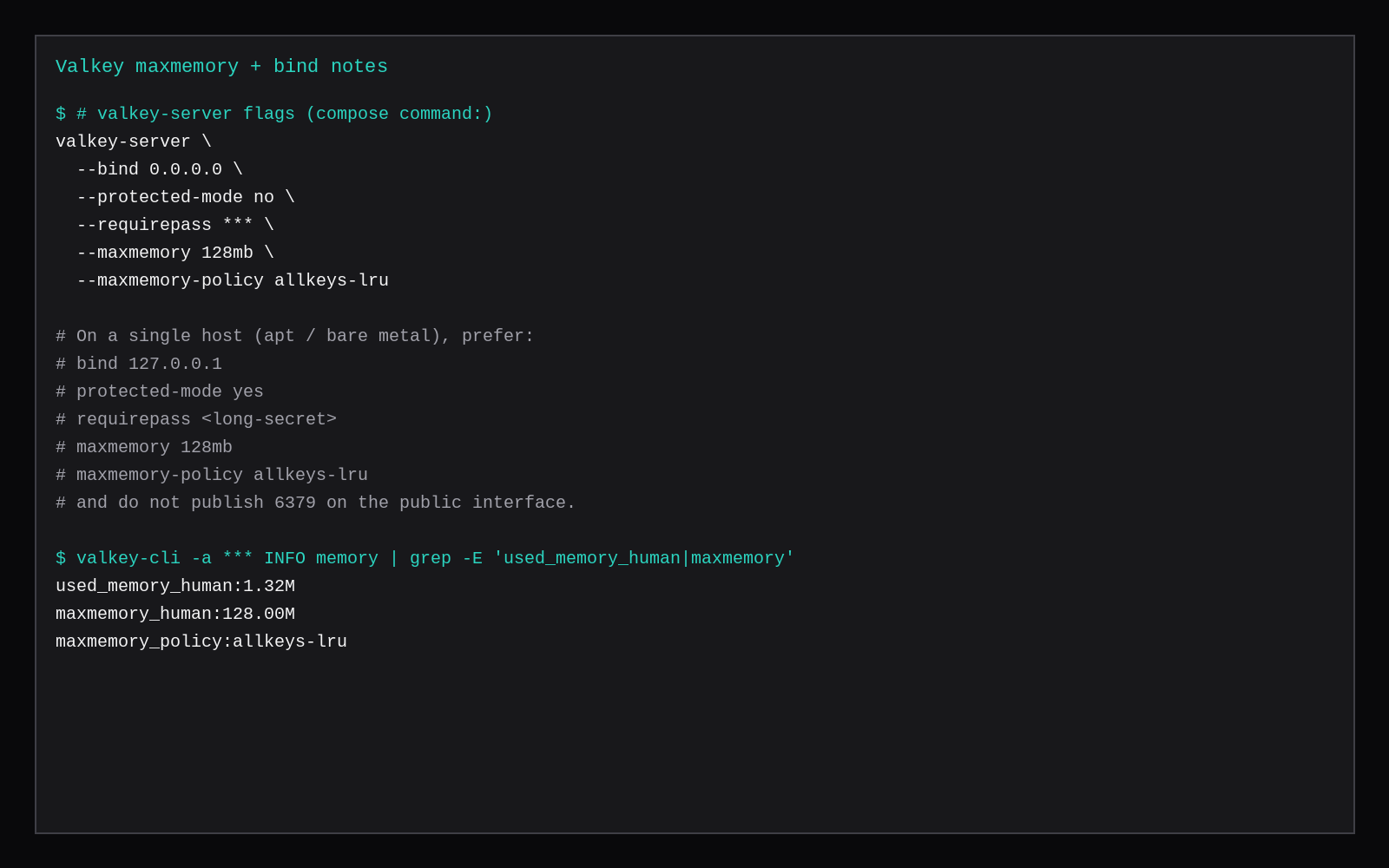
Keep WP_REDIS_PASSWORD and VALKEY_PASSWORD the same string. On a single Ubuntu guest without Compose, prefer bind 127.0.0.1 and leave 6379 off the public interface. The Compose 0.0.0.0 bind is for the internal network only because this service has no ports: mapping. Cap maxmemory so MariaDB still has room on a 2 GB plan; 128mb was enough for this cold lab keyspace (used_memory_human around 1.3M after the crawl).
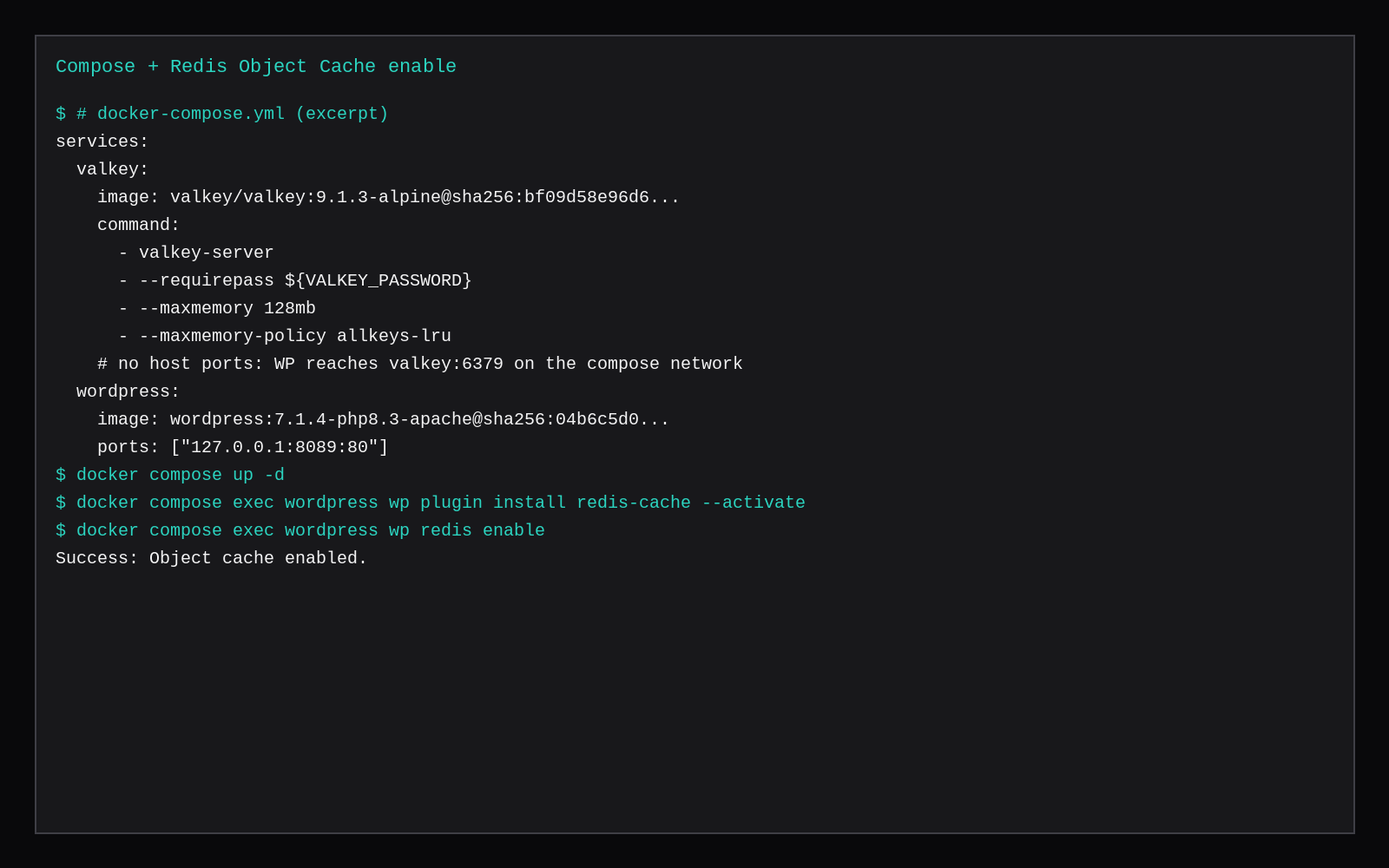
docker compose up -d
docker compose exec wordpress wp core is-installed --allow-root
WordPress on Docker Compose covers the WP + MariaDB shape without Valkey. Valkey on a VPS covers loopback bind, requirepass, and idle RSS for Valkey alone.
Enable the drop-in
docker compose exec wordpress wp plugin install redis-cache --activate --allow-root
docker compose exec wordpress wp redis enable --allow-root
docker compose exec wordpress wp redis status --allow-root
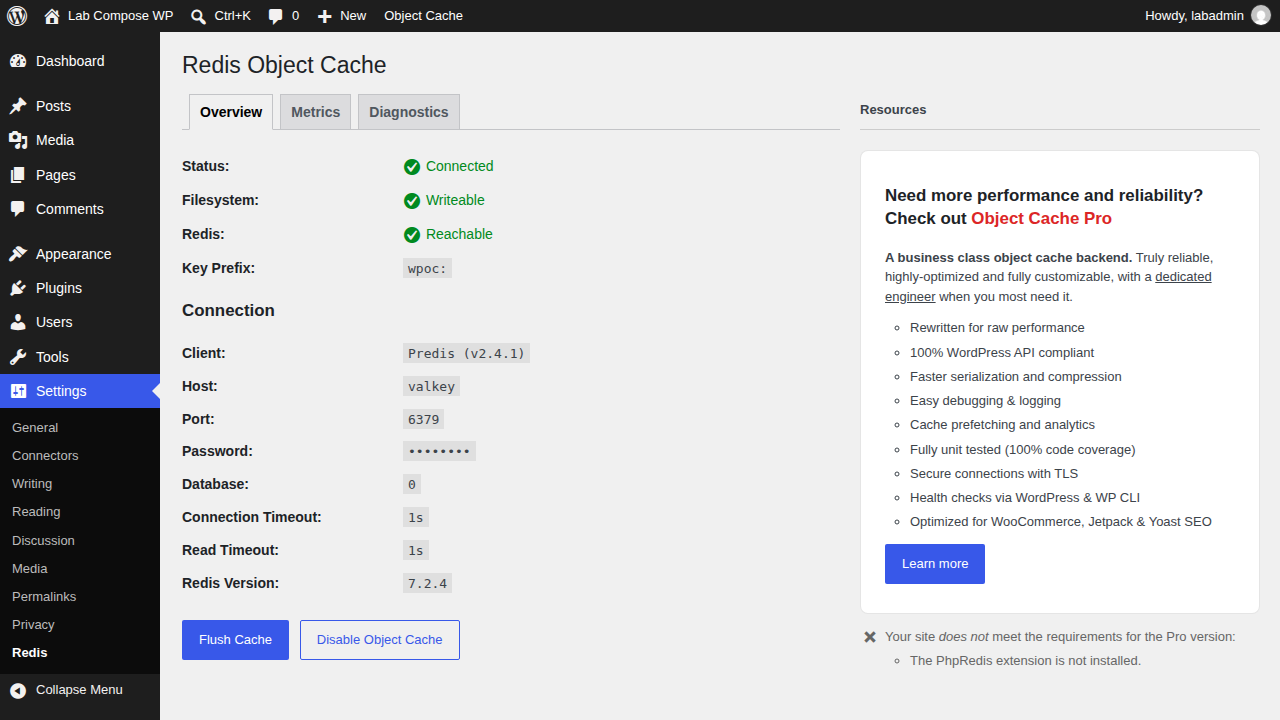
Status in this run: Connected, Predis 2.4.1, drop-in Valid, host valkey, prefix wpoc:. PhpRedis was not loaded; Predis is enough for a small site. The plugin still labels the backend “Redis Version: 7.2.4” because Valkey reports a Redis-compatible protocol version alongside valkey_version:9.1.3.
docker compose exec valkey valkey-cli -a "$VALKEY_PASSWORD" INFO server | grep -E 'redis_version|valkey_version'
# redis_version:7.2.4
# valkey_version:9.1.3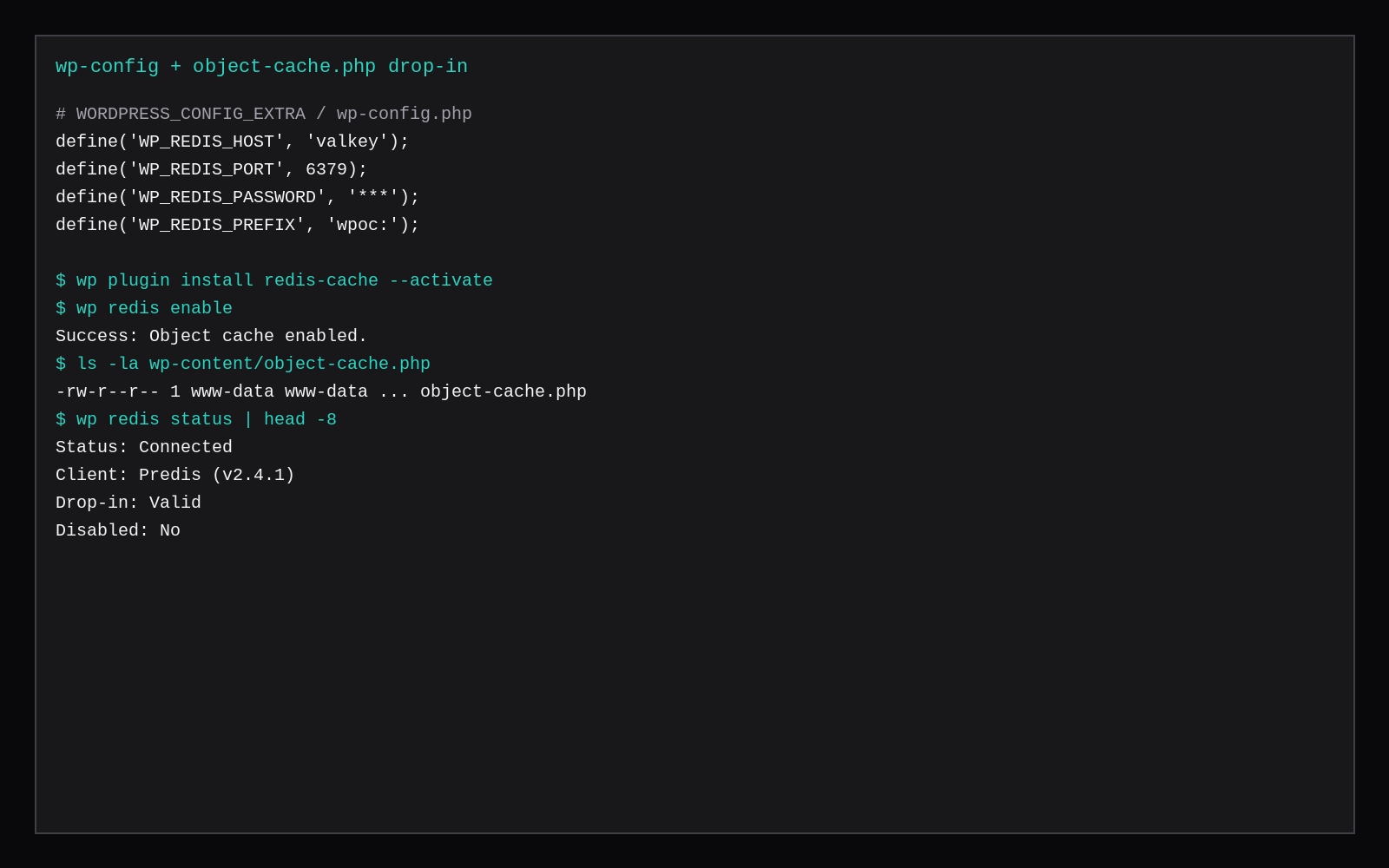
Measure hit rate
Reset stats (or flush, then reset), crawl, then read INFO stats:
PASS=your-valkey-password

docker compose exec valkey valkey-cli -a "$PASS" FLUSHALL
docker compose exec valkey valkey-cli -a "$PASS" CONFIG RESETSTAT

for i in $(seq 1 30); do curl -s -o /dev/null http://127.0.0.1:8089/; done
for i in $(seq 1 20); do curl -s -o /dev/null http://127.0.0.1:8089/wp-login.php; done

docker compose exec valkey valkey-cli -a "$PASS" INFO stats | grep keyspace_
# keyspace_hits:1399
# keyspace_misses:49

python3 -c 'print(100 * 1399 / (1399 + 49))'
# 96.62
For a warm-only window, skip FLUSHALL, run CONFIG RESETSTAT after traffic has already filled keys, then crawl again. This lab got 2240 / 0.
With wp redis disable --force, the same curl loops produced zero keyspace counters: WordPress was not talking to Valkey.
Valkey config that fits 2 GB
# bare metal / apt guest (prefer this on one host)
bind 127.0.0.1
protected-mode yes
requirepass <long-secret>
maxmemory 128mb
maxmemory-policy allkeys-lru
Publish 6379 on 0.0.0.0 and every scanner on the internet will knock. Unlimited maxmemory on a 2 GB box lets a chatty plugin fill RAM until the OOM killer takes MariaDB with it. Sizing idle memory on 2 GB is the broader RAM picture; leave headroom for MariaDB buffers and PHP-FPM or Apache workers.
Redis or Valkey for this plugin
The drop-in speaks the Redis protocol. Valkey answered PONG, accepted Predis, and reported a compatible redis_version. Pick Valkey when you want the Linux Foundation fork and the image you already pin elsewhere on the box. Pick Redis when your host’s package or managed service is Redis and you would rather keep one daemon family. The hit-rate method above is the same either way: crawl, then INFO stats.
Skip these
| Skip this | What to do |
|---|---|
| Calling it done after a green Connected screen | Crawl and read keyspace_hits / keyspace_misses |
| Measuring before any traffic | Fill keys, then sample; or report fill+warm separately from warm-only |
| Treating object cache as a page cache | Keep LSCache / Nginx / CDN for HTML; object cache for PHP groups |
| Publishing 6379 on every interface | Loopback or compose-internal only, plus requirepass |
Unlimited maxmemory on 2 GB | Set a ceiling (128–256mb here) and allkeys-lru |
| Comparing hit rates across different crawl shapes | Fix the URL list and request counts before you compare builds |
Where this fits on a 2 GB VPS
A marketplace Compute Instance at 2 GB holds WordPress, MariaDB, and a small Valkey when maxmemory stays honest. Use Compose as above, or install Valkey on the guest next to an existing LEMP/Nginx WordPress stack and point WP_REDIS_HOST at 127.0.0.1.
Redis vs Valkey for a WordPress object cache
Valkey is the Linux Foundation Redis-compatible fork that many hosts adopted after Redis’s licence changes. For WordPress object caching the wire protocol and common plugins (Redis Object Cache and friends) still speak the same commands; the decision is usually who ships security updates on your distro, not a different hit-rate math. Drop-in replacements keep WP_REDIS_HOST pointed at loopback, persist AOF or RDB if you care about warm starts after reboot, and size maxmemory below the VPS free RAM so the OOM killer does not take PHP-FPM instead. Hit rate on a quiet blog is a different number from a logged-in WooCommerce admin; re-measure under the traffic shape you actually serve.
FAQ
What hit rate counts as healthy? After warm-up, mid-90s and up on a repeatable public crawl is normal for a small content site. A fresh flush shows more misses while keys refill. WooCommerce and heavily personalized pages miss more; measure your own URL mix.
Flush on deploy? Yes when you change code or options that live in object cache. wp redis flush or the plugin’s Flush Cache button. Expect a short miss spike afterward.
Redis Object Cache vs LiteSpeed Cache? Different jobs. LSCache is primarily page cache (plus its own object options). Redis Object Cache is the Redis/Valkey drop-in for wp_cache_*. They can sit on the same site.
Multisite? Use a stable WP_REDIS_PREFIX and check the plugin docs for network installs. This lab was single-site.
PhpRedis or Predis? PhpRedis is the C extension and usually faster under load. Predis is pure PHP and what this official WordPress image used without extra packages. Hit rate is about whether keys are found; the client mainly changes latency.
Valkey idle in this stack was about 5 MiB in docker stats. Size the VPS for MariaDB and PHP first, then give Valkey a fixed maxmemory so a cache stampede cannot own the box.