
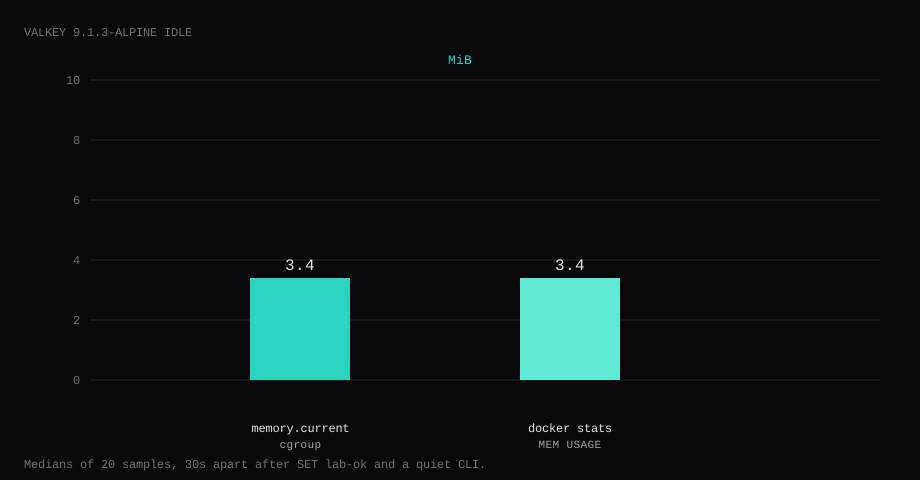
Valkey 9.1.3 held 3.4 MiB idle on this lab host after SET lab-ok 1 and a quiet CLI. That is cgroup memory.current, the median of twenty samples taken 30 seconds apart. docker stats printed the same 3.4 MiB. CPU percent sat at 0.14. Port 6379 listened on 127.0.0.1 only. A connect to the guest's LAN address on 6379 was refused. Without a password, PING returned NOAUTH Authentication required. With requirepass, GET lab-ok returned 1. INFO memory showed maxmemory_human:256.00M and maxmemory_policy:allkeys-lru.
Valkey is an open-source (BSD) high-performance key/value store under the Linux Foundation. It speaks the Redis-compatible command set for caching, queues, sessions, rate limits, and small primary datasets: strings, hashes, lists, sets, sorted sets, bitmaps, HyperLogLog, and more. Clients that already talk Redis usually work with a Valkey endpoint. The 9.x line adds I/O threading work, per-database ACL scoping, and smaller memory for short strings; this lab pins 9.1.3-alpine and treats it as a local cache with a hard RAM ceiling.
The Docker Hub page ships valkey/valkey with protected mode off so other containers on the Compose network can talk to it. Competing guides publish 6379:6379 and stop at PING. Pin 9.1.3-alpine by digest and bind the port to loopback. Set a long requirepass, cap maxmemory, and prove one authenticated write. Leave 6379 closed on the panel firewall. Apps on the guest use 127.0.0.1.
| Reading | Value |
|---|---|
cgroup memory.current | 3.4 MiB, median of 20 |
docker stats | 3.4 MiB |
| CPU percent | 0.14, median |
| Host listener | 127.0.0.1:6379 |
Unauthenticated PING | NOAUTH Authentication required. |
GET lab-ok after AUTH | 1 |
maxmemory | 256mb, allkeys-lru |
| Skip this | What this run did |
|---|---|
6379:6379 on every interface | Published 127.0.0.1:6379:6379 |
| No password (Docker protected mode is already off) | --requirepass from a mode 600 secret |
Floating latest | Pinned 9.1.3-alpine by digest |
| No memory ceiling | --maxmemory 256mb + allkeys-lru |
Stopping at PING | SET / GET with auth, NOAUTH without |
How do you install Valkey on Docker?
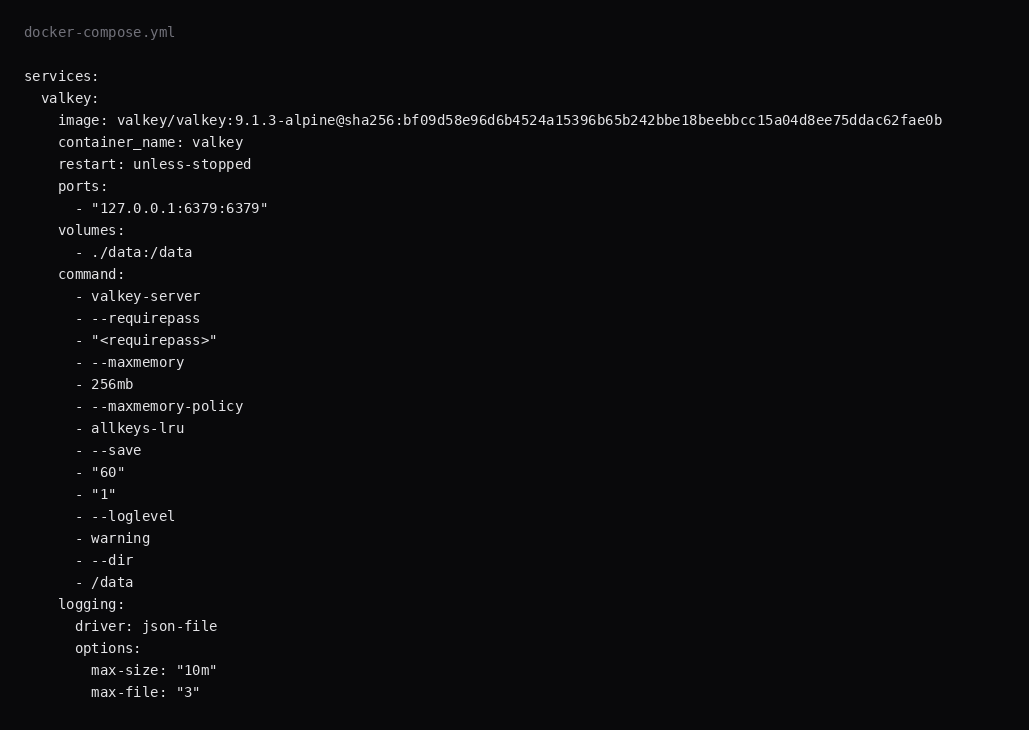
This lab pinned valkey/valkey:9.1.3-alpine (digest sha256:bf09d58e96d6b4524a15396b65b242bbe18beebbcc15a04d8ee75ddac62fae0b). Generate a password once and keep it out of screenshots:
mkdir -p ~/valkey/data && cd ~/valkey
openssl rand -hex 24 | awk '{print "VALKEY_PASSWORD="$0}' > .env
chmod 600 .env
services:
valkey:
image: valkey/valkey:9.1.3-alpine@sha256:bf09d58e96d6b4524a15396b65b242bbe18beebbcc15a04d8ee75ddac62fae0b
container_name: valkey
restart: unless-stopped
ports:
- "127.0.0.1:6379:6379"
volumes:
- ./data:/data
command:
- valkey-server
- --requirepass
- "${VALKEY_PASSWORD}"
- --maxmemory
- 256mb
- --maxmemory-policy
- allkeys-lru
- --save
- "60"
- "1"
- --loglevel
- warning
- --dir
- /data
logging:
driver: json-file
options:
max-size: "10m"
max-file: "3"Pass the password into Compose with env_file: [.env] or export it before docker compose up. Inside the container Valkey still listens on all interfaces. Publishing 127.0.0.1:6379:6379 limits the host listener to loopback. --save 60 1 writes an RDB under /data when at least one key changed in the last minute. Log rotation matches the Compose checklist.
docker compose up -d
docker exec valkey valkey-cli -a "$VALKEY_PASSWORD" --no-auth-warning PING
You want PONG.
What should you tune after SET works?
requirepass (or ACLs) and maxmemory are the two that stop a forgotten open port or an unbounded cache from wrecking the guest. allkeys-lru is the usual eviction policy for a pure cache; use noeviction only when writes must fail instead of dropping keys. HIP-HOSTING’s Ubuntu Valkey notes show the trap with volatile-lru: without TTLs on keys it behaves like noeviction and apps start seeing OOM command not allowed. Persistence: RDB snapshots are enough for “warm cache after reboot”; turn on AOF (appendonly yes, appendfsync everysec) when the data is closer to a primary store, as in VPS.DO’s Valkey compose. The Valkey admin docs warn that a write-heavy process can approach roughly twice normal memory while an RDB/AOF rewrite runs, so leave headroom under the guest’s RAM, not only under maxmemory.
Prefer REDISCLI_AUTH (or a newer VALKEYCLI_AUTH if your client documents it) over valkey-cli -a so the password does not sit in ps output. Save intervals and dir/dbfilename belong in a mounted config or command flags you can see in docker inspect.
For apps on the same Compose network, publish nothing on the host and reach valkey:6379 over the internal DNS name with the password in the app env. TLS between containers is optional on a single host; TLS at the edge matters if Valkey ever leaves the private network. Replication and Cluster are separate topologies; this post is one process, one password, one memory cap.
# sketch of flags this lab used
--requirepass "$VALKEY_PASSWORD"
--maxmemory 256mb
--maxmemory-policy allkeys-lru
--save 60 1
Watch INFO memory and INFO stats after the app is live. If used_memory rides the ceiling, raise maxmemory or fix the app’s key TTL. Prefer named keys with TTLs over “cache forever.”
Why must 6379 stay on loopback?
The security docs spell out that an open port lets anyone run FLUSHALL. Valkey is built for trusted clients on a trusted network, and the official image turns protected mode off for Compose networking, so a published 6379:6379 without a password is reachable from the LAN and from any other host that can route to the guest.
ss -H -lntup | grep 6379On this host that printed 127.0.0.1:6379. A connect to 192.168.1.150:6379 was refused. Leave 6379 closed in the panel firewall. Open 80 and 443 for whatever serves HTTP. Docker published ports often bypass UFW inside the guest, so the loopback bind is what kept the LAN address quiet.
There is no Caddy stanza here, because RESP is not HTTP. Same-host apps point at 127.0.0.1:6379. Multi-container stacks can skip the host publish and use the Compose service name on the private network instead.

How do you prove requirepass?
Without credentials:
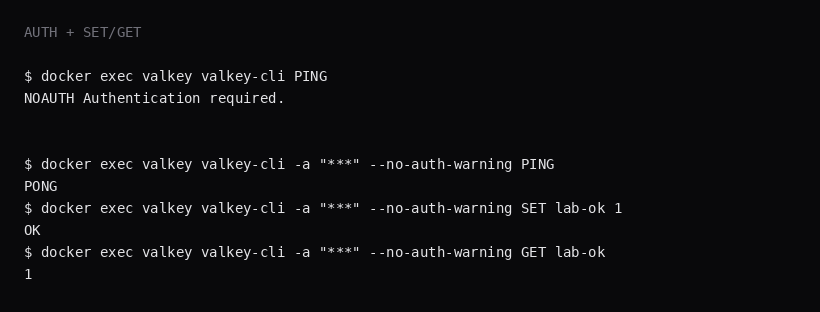
docker exec valkey valkey-cli PINGThis lab returned NOAUTH Authentication required.
With the password:
docker exec valkey valkey-cli -a "$VALKEY_PASSWORD" --no-auth-warning SET lab-ok 1
docker exec valkey valkey-cli -a "$VALKEY_PASSWORD" --no-auth-warning GET lab-ok
You want OK then 1. Crop the password from any screenshot. ACL users fit when you need more than one client role. One app on this guest can stay on requirepass.
Why set maxmemory on a VPS?
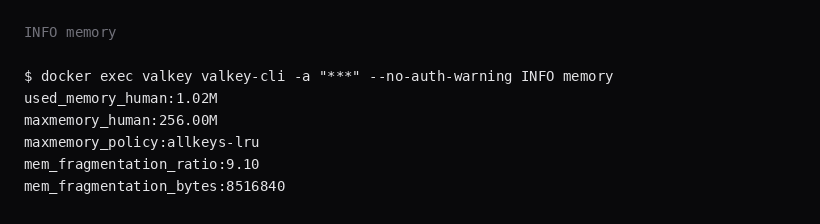
A cache that grows without a ceiling competes with Postgres and Caddy until the OOM killer picks a victim. This lab set --maxmemory 256mb and --maxmemory-policy allkeys-lru so Valkey evicts keys at that cap, before the guest runs out of memory and writes start to fail. Size the number for your working set. 256mb is this lab's ceiling.
docker exec valkey valkey-cli -a "$VALKEY_PASSWORD" --no-auth-warning INFO memoryLook for used_memory_human, maxmemory_human, and maxmemory_policy. After one small key, used memory stayed near 1 MiB while the cap stayed at 256 MiB.
How do you back up /data?
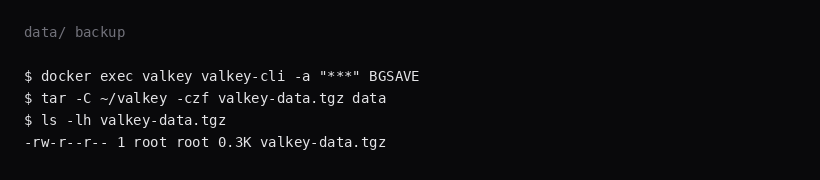
RDB files land under ./data (dump.rdb). Trigger a save, then archive the directory:
docker exec valkey valkey-cli -a "$VALKEY_PASSWORD" --no-auth-warning BGSAVE
tar -C ~/valkey -czf valkey-data.tgz data
On this lab the archive was about 0.3 KB after one key. Point Restic at that tarball. AOF is available if you need a denser write log; this install stayed on RDB snapshots.
How do you run Valkey next to real apps?
Point the app at 127.0.0.1:6379 (or the Compose service name) with the password in env, never in the repo. Prefer short TTLs on cache keys. Watch evicted_keys in INFO stats after traffic arrives; rising evictions mean the budget is tight or TTLs are wrong. ACL users beat a single requirepass when multiple apps share one instance (Valkey security post); requirepass is only a compatibility layer on the default user. Keep protected-mode yes if you ever bind beyond loopback without auth (Percona practices). Skip exposing Valkey on the public internet entirely; SSH tunnels are enough for rare admin CLI use.
When you outgrow one process, replication and Sentinel/Cluster are the upstream docs, not this compose file.
FAQ
Why is protected mode off in the image? So sibling containers on the Compose network can connect without fighting the default bind. On a VPS, follow that with loopback (or no host publish) and requirepass.
Valkey vs Redis? Valkey is the Linux Foundation fork of the Redis codebase. Clients that speak RESP keep working. Pin a Valkey tag the same way you would pin Redis.
ACL instead of requirepass? Use ACL when apps need separate users and command rules. For one password shared by one app on one guest, requirepass is enough.
TLS? Valkey can terminate TLS. This lab stayed on loopback plaintext between local processes. Cross-host links need TLS or a private network you trust.
Already running Valkey as a sidecar? Paperless-ngx and similar stacks often ship Valkey or Redis inside Compose. Keep that broker on the Compose network without publishing 6379 on the host.