
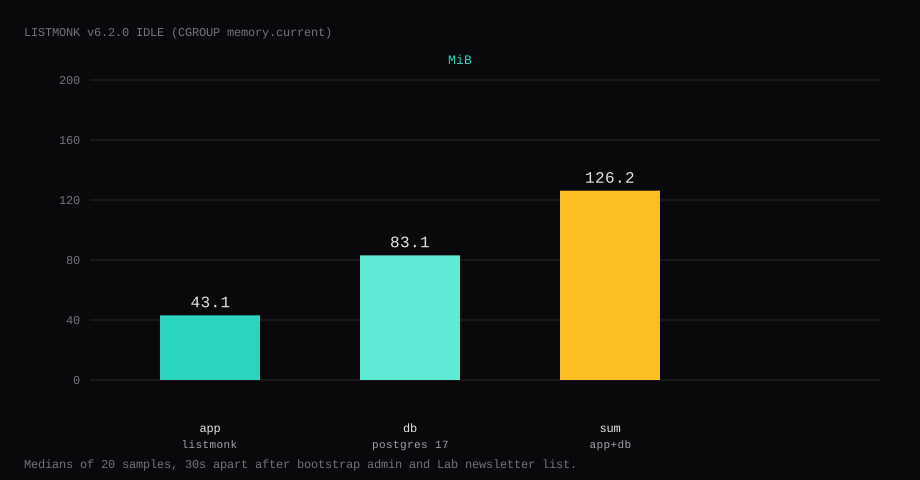
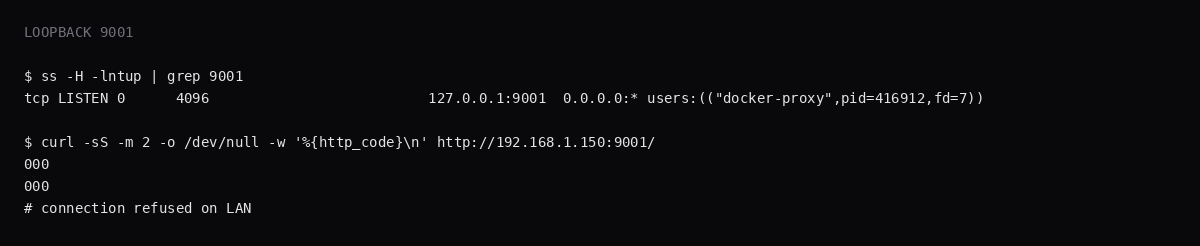
Listmonk v6.2.0 held 126.2 MiB idle on this lab host after a bootstrap Super Admin and one public list (Lab newsletter). That sum is cgroup memory.current for the app and Postgres 17, each the median of twenty samples taken 30 seconds apart. The app was 43.1 MiB and Postgres 83.1 MiB. docker stats printed 23.8 MiB for the app and 35.3 MiB for Postgres. CPU percent sat at 0.02 for the app and 0 for Postgres. Port 9001 listened on 127.0.0.1 only (host 9000 was already taken). A curl to the guest's LAN address on 9001 was refused. /api/health with a session returned {"data":true}.
Listmonk is a self-hosted newsletter and mailing-list manager: subscribers, lists, campaigns, templates, and transactional messages over SMTP you configure. It is built for people who want Mailchimp-style workflows without giving a vendor the address book. The admin UI covers imports, segments, campaign analytics, and bounce handling once SMTP and webhooks are wired.
The official compose publishes 9000:9000, leaves Postgres password as listmonk, and creates the Super Admin on first visit unless LISTMONK_ADMIN_* is set. Competing guides stop once the app URL loads. Pin v6.2.0 by digest, bind the app to loopback, replace the DB password, set the admin env before the first up, create one list, and put Caddy on 443.
| Reading | app | db | sum |
|---|---|---|---|
cgroup memory.current | 43.1 MiB | 83.1 MiB | 126.2 MiB |
docker stats | 23.8 MiB | 35.3 MiB | 59.1 MiB |
| CPU percent | 0.02 | 0 | - |
| Host listener | 127.0.0.1:9001 | unpublished | - |
| Skip this | What this run did |
|---|---|
9000:9000 on every interface | Published 127.0.0.1:9001:9000 |
POSTGRES_PASSWORD=listmonk | openssl rand into mode 600 .env |
| First visit creates admin on a public IP | LISTMONK_ADMIN_USER / PASSWORD on first boot |
Floating latest | Pinned v6.2.0 by digest |
| Stopping at an empty dashboard | Created list Lab newsletter |
| Opening 9000 on the panel firewall | Left the app port closed; Caddy on 80/443 |
How do you install Listmonk on Docker?
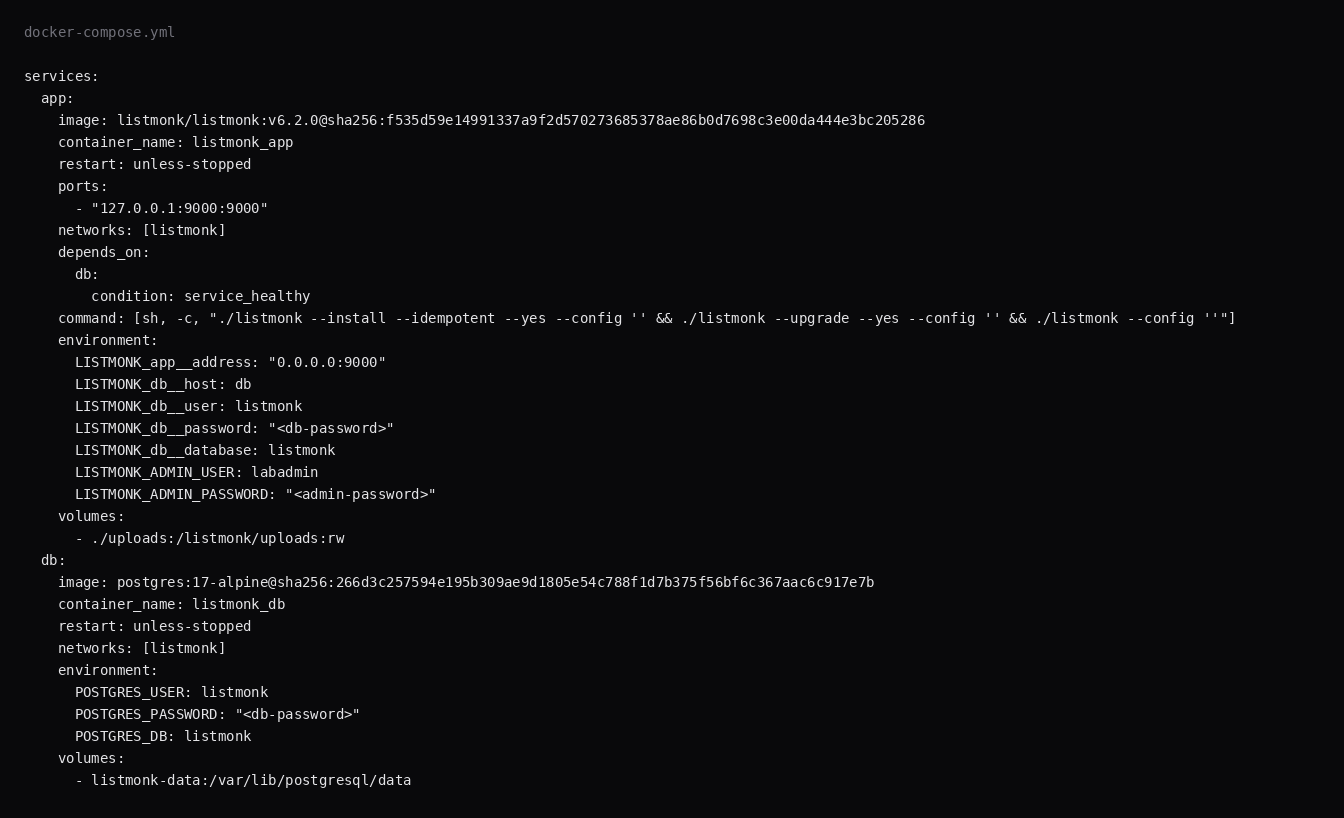
This lab pinned listmonk/listmonk:v6.2.0 (digest sha256:f535d59e14991337a9f2d570273685378ae86b0d7698c3e00da444e3bc205286) and postgres:17-alpine@sha256:266d3c257594e195b309ae9d1805e54c788f1d7b375f56bf6c367aac6c917e7b. Skip v7.0.0-beta for a production guest. If host 9000 is free, map 127.0.0.1:9000:9000 instead of 9001.
mkdir -p ~/listmonk/uploads && cd ~/listmonk
openssl rand -hex 24 | awk '{print "POSTGRES_PASSWORD="$0}' > .env
echo 'LISTMONK_ADMIN_USER=labadmin' >> .env
echo 'LISTMONK_ADMIN_PASSWORD=YOUR_LONG_PASSWORD' >> .env
chmod 600 .env
services:
app:
image: listmonk/listmonk:v6.2.0@sha256:f535d59e14991337a9f2d570273685378ae86b0d7698c3e00da444e3bc205286
container_name: listmonk_app
restart: unless-stopped
ports:
- "127.0.0.1:9000:9000"
networks:
- listmonk
hostname: listmonk.example.com
depends_on:
db:
condition: service_healthy
command: [sh, -c, "./listmonk --install --idempotent --yes --config '' && ./listmonk --upgrade --yes --config '' && ./listmonk --config ''"]
environment:
LISTMONK_app__address: "0.0.0.0:9000"
LISTMONK_db__user: listmonk
LISTMONK_db__password: "${POSTGRES_PASSWORD}"
LISTMONK_db__database: listmonk
LISTMONK_db__host: db
LISTMONK_db__port: 5432
LISTMONK_db__ssl_mode: disable
TZ: Etc/UTC
LISTMONK_ADMIN_USER: ${LISTMONK_ADMIN_USER}
LISTMONK_ADMIN_PASSWORD: ${LISTMONK_ADMIN_PASSWORD}
volumes:
- ./uploads:/listmonk/uploads:rw
logging:
driver: json-file
options:
max-size: "10m"
max-file: "3"
db:
image: postgres:17-alpine@sha256:266d3c257594e195b309ae9d1805e54c788f1d7b375f56bf6c367aac6c917e7b
container_name: listmonk_db
restart: unless-stopped
networks:
- listmonk
environment:
POSTGRES_USER: listmonk
POSTGRES_PASSWORD: "${POSTGRES_PASSWORD}"
POSTGRES_DB: listmonk
healthcheck:
test: ["CMD-SHELL", "pg_isready -U listmonk"]
interval: 5s
timeout: 5s
retries: 12
volumes:
- listmonk-data:/var/lib/postgresql/data
logging:
driver: json-file
options:
max-size: "10m"
max-file: "3"
networks:
listmonk:
volumes:
listmonk-data:--install --idempotent runs once on an empty database. Postgres stays on the Compose network with no host publish. Log rotation matches the Compose checklist.
docker compose up -d
curl -sS -o /dev/null -w '%{http_code}\n' http://127.0.0.1:9000/
You want 200. Sign in at /admin/login with the bootstrap user.
What do you configure after one list exists?
SMTP is the next hard dependency: without a working relay, campaigns queue and never leave. Use a provider that accepts authenticated submission on 587/465, set From headers that match SPF/DKIM on your domain (SPF/DKIM/DMARC), and send a test email from Settings → SMTP before importing thousands of rows (Brinolo). Some VPS providers block outbound 25/465; ask them to open submission or use an ESP (listmonk SMTP notes). Set HELO/FQDN when Google Workspace or similar relays demand it. SelfHost Atlas also reminds you to delete the seeded demo subscribers, draft “Test campaign,” and sample lists before real mail goes out, and to replace the placeholder [email protected] From address. Mount ./uploads and point Admin → Settings → Media at /listmonk/uploads if you store campaign assets on disk.
Performance knobs that matter on a small VPS: Postgres connection settings from the stock compose are enough for a modest list; batch size and concurrency on campaigns should stay conservative on 1-2 GB guests. Keep LISTMONK_ADMIN_* out of git and rotate the DB password if it ever lived in a screenshot. Backups are Postgres dumps plus the uploads volume.
Why must 9000 stay on loopback?
The admin UI can blast every subscriber you store. The public subscribe form is a separate path on the same port, so a raw host port exposes both.
ss -H -lntup | grep 9000On this lab the publish was 127.0.0.1:9001 because Authentik already held 9000. Curl to the LAN address on that port was refused. Leave the app port closed in the panel firewall. Open 80 and 443 for Caddy. Docker published ports often bypass UFW inside the guest, so the loopback bind is what kept the LAN address quiet.
How do you prove the admin and one list?
With LISTMONK_ADMIN_USER and LISTMONK_ADMIN_PASSWORD set on the first boot, the install log prints creating superadmin user. Open /admin/login, sign in, and crop the password from screenshots.
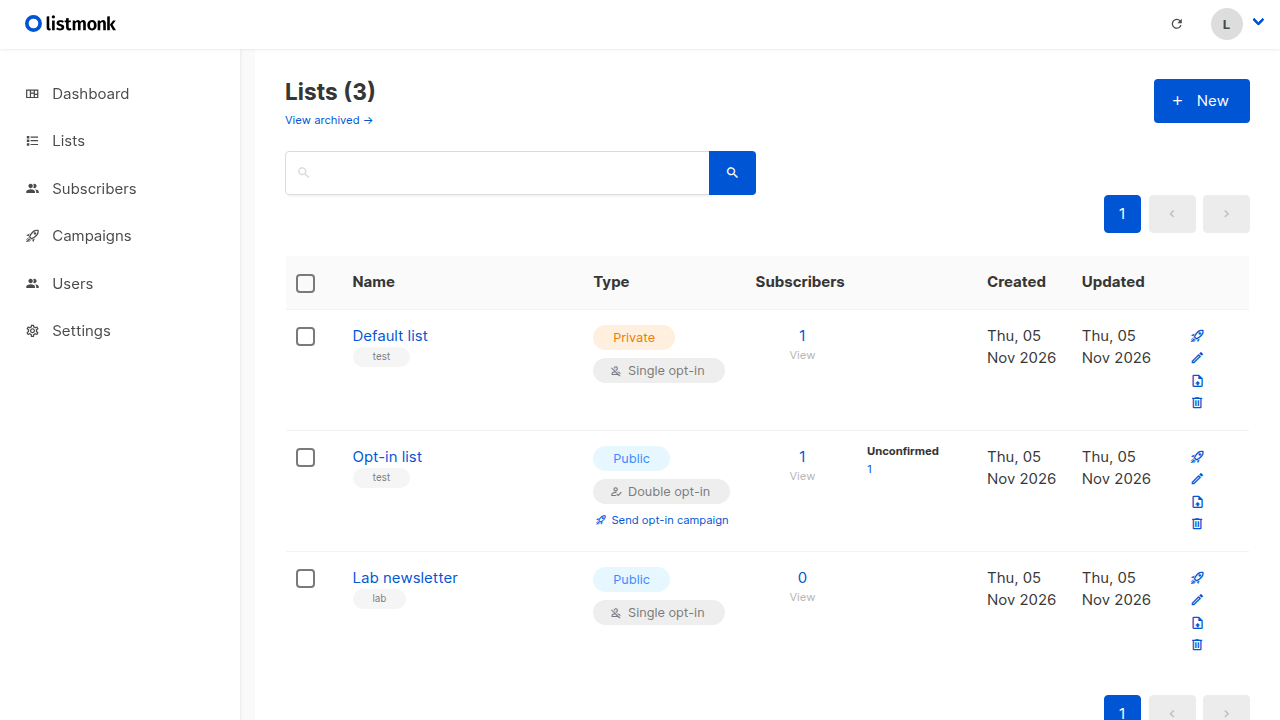
Create a list under Lists (or POST /api/lists with a session cookie). This lab created Lab newsletter, type public, opt-in single. The lists page shows it next to the stock Default and Opt-in lists.

Where does Caddy go?
lists.example.com {
	reverse_proxy 127.0.0.1:9000
}
Set the Root URL in Admin → Settings to that HTTPS name once DNS is ready. TLS setup is in the Caddy HTTPS post. Sending mail needs working SMTP and usually a clean PTR.

How do you back up Listmonk?
Subscribers and campaigns live in Postgres. Media lives under ./uploads if you pointed Settings → Media there.
docker exec listmonk_db pg_dump -U listmonk listmonk | gzip > listmonk.sql.gz
tar -C ~/listmonk -czf listmonk-uploads.tgz uploads
On this lab the dump was about 10.5 KB after bootstrap and one list. Point Restic at both archives.

How do you run campaigns without burning the domain?
Warm up a new SMTP identity with small sends. Honor unsubscribes immediately; Listmonk tracks them in the list. Keep HTML templates simple so filters are less suspicious. Separate transactional mail (password resets) from marketing lists when the provider asks. Monitor bounces and suppress bad addresses. A VPS that also hosts the blog should still send through a proper relay; raw port 25 is a different fight (port 25).
FAQ
Why not v7 beta? v7.0.0-beta.1 was already published. Pin stable v6.2.0. latest tracked that tag at lab time.
Default DB password? The sample compose uses listmonk for user, password, and database name. Replace at least the password before the first up.
SMTP / port 25? Listmonk queues campaigns through SMTP. Many VPS providers block outbound 25. Fix delivery after the UI works; see the port 25 notes.
Public subscribe vs admin? Both ride the same app port, so one Caddy hostname covers the subscribe form and /admin. To restrict admin logins, put auth middleware on /admin.
Postgres on the host? Official compose binds 127.0.0.1:5432. This lab left Postgres unpublished on the host and reachable only as db on the Compose network.