
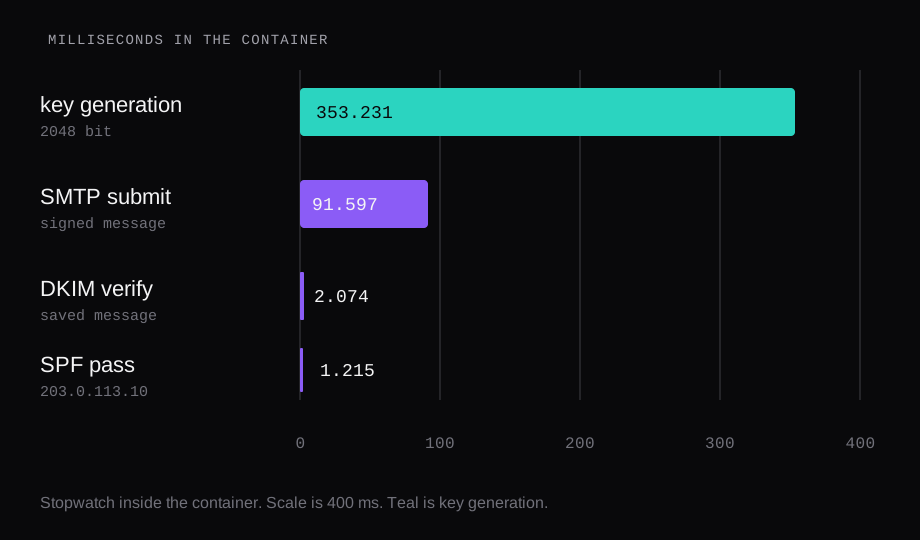
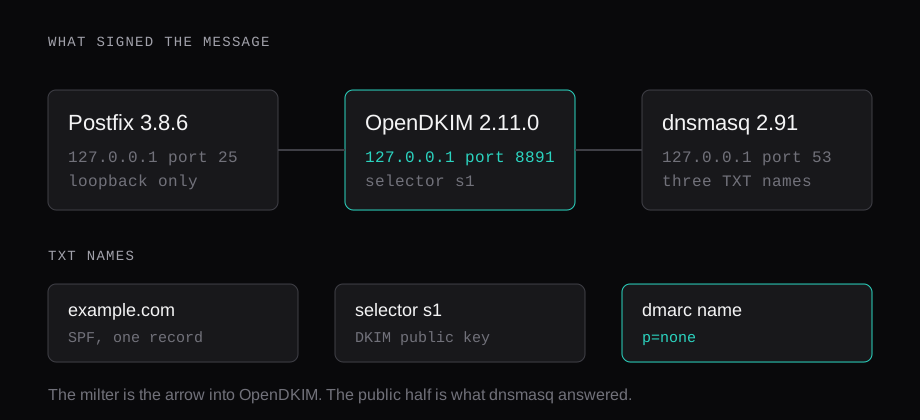
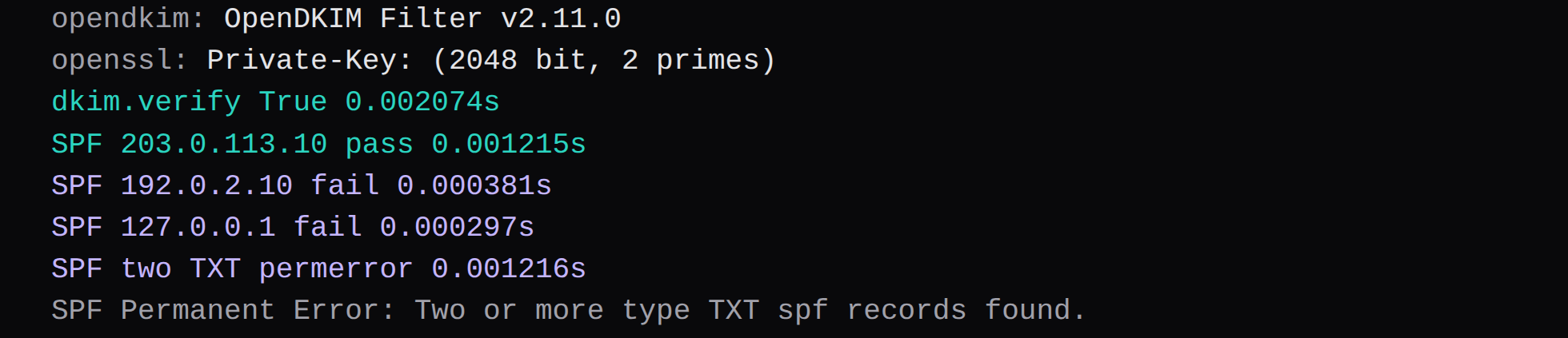
Postfix 3.8.6 accepted one message for [email protected], and OpenDKIM Filter v2.11.0 signed it for d=example.com, selector s1. On the saved file, dkim.verify returned true in 2.074 milliseconds. spf.check2 for 203.0.113.10 returned pass in 1.215 milliseconds, and the same check for 127.0.0.1, the address that submitted the message, returned fail. A second TXT record that also began with v=spf1 returned permerror in 1.216 milliseconds.
The packages ran in a container on Ubuntu 24.04.3 LTS, Docker 29.1.3, 8 CPUs, and 47 GiB of RAM. Postfix listened on 127.0.0.1 only. The port 25 checks ran on the host, read a 220 banner, and closed with QUIT. The Gmail and Outlook thresholds, the 10-lookup ceiling, and the reason p=none is the floor are in SPF, DKIM and DMARC for the 2026 Gmail and Outlook rules.
How do you install Postfix and OpenDKIM on Ubuntu
The Ubuntu 24.04 packages were postfix 3.8.6-1ubuntu0.1 and opendkim 2.11.0~beta2-9build4. The filter printed OpenDKIM Filter v2.11.0 and named OpenSSL 3.0.13. dnsmasq 2.91 answered the TXT queries. The checkers were python3-dkim 1.1.6 and python3-spf 2.0.14.
sudo apt-get install -y postfix \
  opendkim opendkim-tools
The key command that ran, selector s1, domain example.com, 2048 bits, with --restrict:
opendkim-genkey --bits=2048 \
  --domain=example.com \
  --selector=s1 \
  --restrict \
  --directory=/etc/opendkim/keys/example.com
That finished in 0.353231 seconds. openssl pkey -text -noout printed Private-Key: (2048 bit, 2 primes). The private file was mode 600 and owned by opendkim. It stays off this page.
--restrict is why the zone stub carries s=email. The stub was three quoted strings, 35, 252, and 142 characters, 429 characters joined. The 35-character piece is the tags, v=DKIM1; h=sha256; k=rsa; s=email;. The next piece starts with p=. Those two pieces after the tags hold a 392-character base64 public key, which is the length a 2048-bit SubjectPublicKeyInfo encodes to. The rules piece measured 392 on a different key and split its own TXT by hand. This one is the stub opendkim-genkey wrote.
How do you publish SPF, DKIM, and DMARC TXT records
dnsmasq 2.91 listened on 127.0.0.1 port 53 inside the container, and /etc/resolv.conf pointed at it. Three queries:
| Name | Time | What came back |
|---|---|---|
example.com | 0.017730 s | one SPF string |
_dmarc.example.com | 0.017475 s | one DMARC string |
s1._domainkey.example.com | 0.017934 s | three quoted DKIM pieces |
The SPF value was:
v=spf1 ip4:203.0.113.10 ip6:2001:db8::10 -all203.0.113.10 and 2001:db8::10 are documentation addresses from RFC 5737 and RFC 3849. They stand in for the VPS addresses you publish. ip4 and ip6 add no DNS lookup. The record ends in -all, so any other address fails. RFC 7208 is the evaluation rules, and the 10-lookup count for this shape of record is the chart in the rules piece.
The DMARC value was:
v=DMARC1; p=none; rua=mailto:[email protected]; adkim=r; aspf=rp=none is the policy in that record. RFC 7489 is the document that defines the tag. This run checked the signature and the SPF results. A DMARC policy engine was absent, so there is no dmarc= result from a milter here.
On a NodeRings zone those three names are TXT records. The DNS guide puts TTL between 30 and 86400 seconds, and @ is the apex. 3600 sits inside that range. The DKIM name is the selector plus _domainkey. If the form wants one value, paste the joined 429 characters. dig still prints the quoted pieces.
How do you make Postfix sign with OpenDKIM
The config that produced a signature uses Domain, Selector, and KeyFile. A signing table was tried first and missed.
Mode                    sv
Canonicalization        relaxed/simple
Socket                  inet:[email protected]
OversignHeaders         From
Domain                  example.com
Selector                s1
KeyFile                 /etc/opendkim/keys/example.com/s1.private
InternalHosts           file:/etc/opendkim/trusted.hosts
trusted.hosts listed 127.0.0.1 and localhost. That is the address the SMTP client used. Postfix was told to call the same socket, and to keep going if the call failed:
inet_interfaces = loopback-only
milter_protocol = 6
milter_default_action = accept
smtpd_milters = inet:127.0.0.1:8891
non_smtpd_milters = inet:127.0.0.1:8891
inet_interfaces = loopback-only is why this container had no public port 25. The outbound checks were a separate connect from the host.
Two misses came before the signature. With smtpd_milters pointed at port 1, the log was:
warning: connect to Milter service inet:127.0.0.1:1: Connection refusedmilter_default_action = accept still delivered the message. The queue line showed size=479. dkim.verify on that shape of file returned false.
A signing table file containing *@example.com and a key name, with SigningTable file:, logged:
no signing table match for '[email protected]'
no signature data
The maildir file from that attempt was 526 bytes, and verify returned false. The asterisk stayed a literal character in that file format. Domain, Selector, and KeyFile are what signed mail for example.com from the internal host. The saved file after that change was 1057 bytes.
The submit that was timed, after signing was working:
import smtplib
from email.message import EmailMessage
msg = EmailMessage()
msg["From"] = "[email protected]"
msg["To"] = "[email protected]"
msg["Subject"] = "signed"
msg.set_content("hello\n")
with smtplib.SMTP("127.0.0.1", 25, timeout=10) as s:
    s.send_message(msg)
The SMTP client returned in 0.091597 seconds. Postfix logged delay=0.1 and status=sent (delivered to maildir) for the message that later verified.
What did the DKIM and SPF checks return
The signature header, with b=, bh=, and the timestamp field left off:
DKIM-Signature: v=1; a=rsa-sha256; c=relaxed/simple;
  d=example.com; s=s1;
  h=From:To:Subject:Date:From
c=relaxed/simple is the Canonicalization line. h= lists From twice because OversignHeaders is From. d= and s= match the key that dnsmasq served. RFC 6376 is the signature specification. The check was the library against that DNS:
import dkim
print(dkim.verify(raw))
It printed True in 0.002074 seconds. raw was the 1057-byte maildir file.
SPF used the envelope sender [email protected] and the HELO name mail.example.com:
import spf
spf.check2(
    i="203.0.113.10",
    s="[email protected]",
    h="mail.example.com",
)| Address | Result | Time | Explanation |
|---|---|---|---|
203.0.113.10 | pass | 1.215 ms | sender SPF authorized |
192.0.2.10 | fail | 0.381 ms | fail, address outside the record |
127.0.0.1 | fail | 0.297 ms | fail, address outside the record |
192.0.2.10 is the other documentation network. 127.0.0.1 is what Postfix logged as the client. Both fail because the TXT names 203.0.113.10 and 2001:db8::10, and -all covers everyone else. The pass is the record evaluated at the address you would publish for the VPS. The fail is the address this container actually connected from. Publish the public address of the machine that sends, and the pass is the row a receiver evaluates. Publishing 127.0.0.1 would pass this container and fail for every other client.
One docker stats sample after those checks read 53.55 MiB, 0.00% CPU, and 44 processes. The container was also running dnsmasq and a syslog daemon, so that figure is the whole lab, one reading.
What does a second SPF TXT record return
A second line, v=spf1 a -all, was added on example.com and dnsmasq was restarted. dig +short TXT example.com printed two quoted strings, both beginning with v=spf1. The same spf.check2 call, still at 203.0.113.10, returned permerror in 1.216 milliseconds:
SPF Permanent Error: Two or more type TXT spf records found.The library refused to pick a record. Delete one of the two that begin with v=spf1. A TXT on the same name that is a site-verification string can stay, which is the case the rules piece already walks through.
Is port 25 open, and what about the PTR
Those connects were from the host, outside the container. gmail-smtp-in.l.google.com resolved to one IPv4 address. Four TCP handshakes completed in 8.124, 15.160, 15.133, and 15.133 seconds. The socket limit on the last three calls was 15 seconds, and the handshakes used about all of it. An earlier connect that also read the banner got 220 mx.google.com ESMTP and was closed with QUIT.
outlook-com.olc.protection.outlook.com resolved to four IPv4 addresses. Four handshakes completed in 0.079, 0.182, 0.158, and 0.218 seconds. The banner included 220 and Microsoft ESMTP MAIL Service ready. That connection was closed with QUIT too.
The address this host uses to leave the network came back NXDOMAIN from 1.1.1.1 and from 8.8.8.8, with an empty answer section. The address stays off the page. PTR records and why VPS mail lands in spam is the forward lookup that has to match. Which VPS providers still open port 25 is the connect when the handshake hangs past a few seconds. The host conversation ended at QUIT. The signature and the SPF rows are this host's checkers, against a resolver that served the three TXT records.
Where does the VPS address go in SPF
In the ip4 and ip6 terms, as the addresses the machine sends from. 203.0.113.10 passed because it is the address in the record. Your public address replaces it. Extra senders, a web form or a support desk on some other network, have to be named in that same TXT before you keep -all.
Why did loopback fail SPF
Postfix logged the client as 127.0.0.1. The TXT lists the documentation address. -all makes the rest a fail, and the library returned fail in 0.297 milliseconds. The record is doing what it says. The pass row is the one to read when you judge the TXT, and the fail row is the one to read when you judge which address connected.
What if OpenDKIM is down
With milter_default_action = accept, Postfix delivered anyway. The warning was Connection refused to the milter port, the queue size stayed 479 bytes, and dkim.verify returned false. A missed signing table logged no signing table match for '[email protected]' and no signature data, and that file was 526 bytes. The 1057-byte file is the one where Domain, Selector, and KeyFile were in the config the filter had loaded.
Do you still need a PTR if DKIM passes
The verifier here returned true, and the banners came back, and the outbound address is still NXDOMAIN. Gmail's check on that miss is the subject of the PTR piece. The TXT records and the signature are ready for a receiver. The PTR is the lookup those MX hosts still have in front of them on this network.
Alignment and warm-up around the TXT records
2025–2026 deliverability guides keep repeating the same stack around SPF, DKIM, and DMARC. The VPS needs a static IP whose PTR matches the HELO/EHLO hostname, and that hostname must resolve forward to the same address. SPF authorises the envelope sender; DKIM signs the message; DMARC requires those authenticated domains to align with the visible From domain. Passing SPF and DKIM while failing alignment is a common reason “correct” DNS still lands in spam. Start DMARC at p=none with rua reporting, then move to quarantine or reject once legitimate streams are clean. Warm a fresh IP gradually and watch Spamhaus-class lists. The records measured above are the authentication layer; reputation is the months after.