
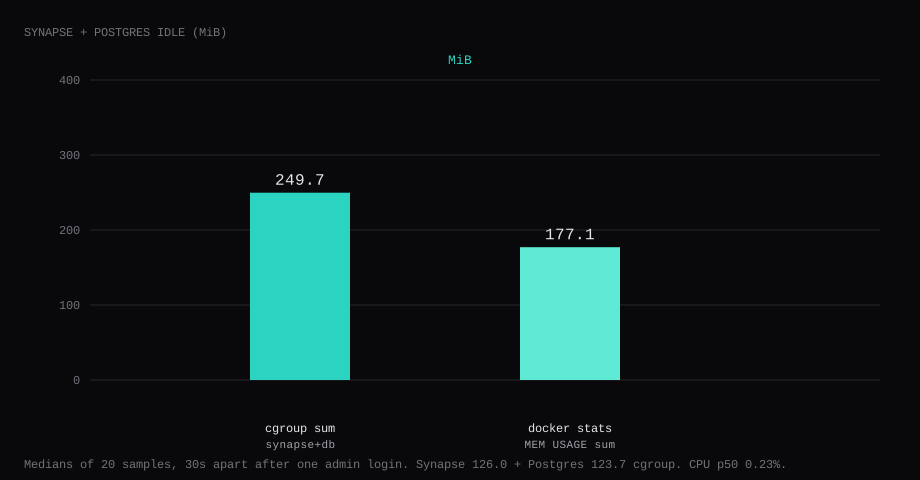
Synapse v1.163.0 plus Postgres 17 held 249.7 MiB idle on this lab host after one admin account could log in. That is the sum of the two cgroup memory.current readings, median of twenty samples taken 30 seconds apart with nobody chatting. Synapse alone sat at 126.0 MiB; Postgres at 123.7 MiB. docker stats summed to 177.1 MiB. CPU percent sat at 0.23. Port 8008 listened on 127.0.0.1 only. A curl to the guest's LAN address on 8008 was refused.
Matrix is an open protocol for chat, voice, and bridges into other networks. Element Synapse is still the reference homeserver: it stores accounts, rooms, media, and federation state, and speaks the Client-Server API that Element, FluffyChat, and dozens of other clients use. A one-account homeserver is useful when you want @you:your.domain under your control, end-to-end encrypted DMs with people on other servers once federation is on, or a private family space that never opens public registration. You can later add more users, bridges (Telegram, Discord, and so on), or workers; day one is Postgres, a closed registration gate, and one admin who can log in.
The Docker install generates a config, then leaves you to wire a database and decide who may register. A lot of paste-ready writeups publish 8008:8008 with open registration and treat a JSON reply from /_matrix/client/versions as done. Pin v1.163.0 by digest. Put Postgres behind Synapse, bind 8008 to loopback, set enable_registration: false, and create one admin with register_new_matrix_user. Prove a password login. Put Caddy in front when the client API must be public.
server_name is permanent, so pick the real Matrix domain before the first generate. This lab used lab.local. The examples below use matrix.example.com.
| Reading | Value |
|---|---|
cgroup memory.current (sum) | 249.7 MiB, median of 20 |
| Synapse / Postgres cgroup | 126.0 / 123.7 MiB |
docker stats (sum) | 177.1 MiB |
| CPU percent (sum) | 0.23, median |
| Host listener | 127.0.0.1:8008 |
| After proof | @labadmin:lab.local login token |
| Images | matrixdotorg/synapse:v1.163.0, postgres:17-alpine |
| Backup | pg_dump ~212 KB; stopped data tar ~1.5 KB |
| Skip this | What this run did |
|---|---|
8008:8008 on every interface | Published 127.0.0.1:8008:8008 |
| SQLite for now | Postgres 17 with psycopg2 |
enable_registration: true | false, then register_new_matrix_user -a |
Stopping at /versions | Password login for one admin |
| Opening 8008 on the panel firewall | Left 8008 closed; Caddy on 80/443 when public |
Floating latest | Pinned v1.163.0 by digest |
How do you install Synapse with Docker and Postgres?
Create a directory, generate the homeserver once, then bring up Compose with Postgres:
mkdir -p ~/synapse/data
cd ~/synapse

docker run --rm \
  -v "$(pwd)/data:/data" \
  -e SYNAPSE_SERVER_NAME=matrix.example.com \
  -e SYNAPSE_REPORT_STATS=no \
  matrixdotorg/synapse:v1.163.0 generate
The generate step writes homeserver.yaml, a signing key, and a log config under ./data. Synapse runs as uid 991 in the image, so fix ownership before the real start:
sudo chown -R 991:991 dataPoint the database block at Postgres and close open registration. Keep the secrets the generator wrote; only change database, registration, and public_baseurl:
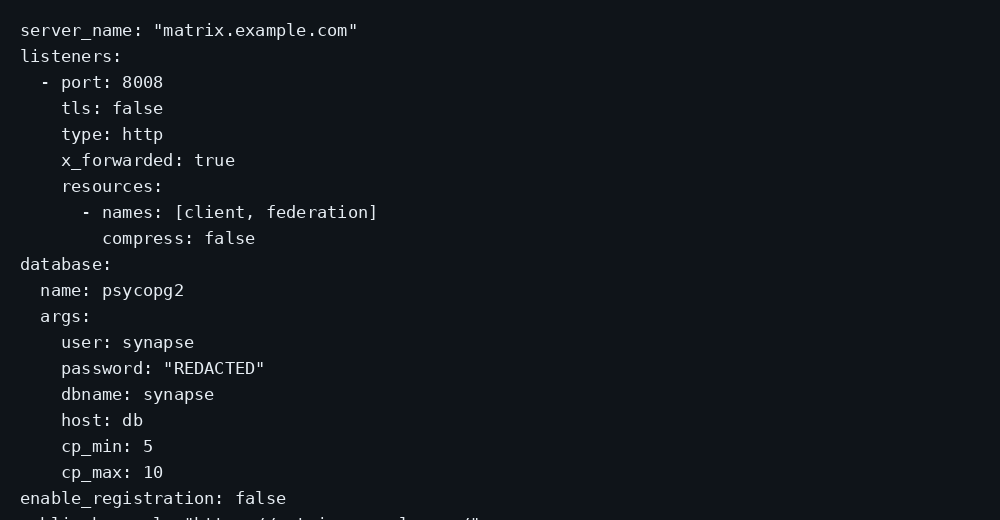
database:
  name: psycopg2
  args:
    user: synapse
    password: "PASTE_DB_PASSWORD"
    dbname: synapse
    host: db
    cp_min: 5
    cp_max: 10

enable_registration: false
public_baseurl: "https://matrix.example.com/"
# db.env - mode 600
POSTGRES_USER=synapse
POSTGRES_PASSWORD=PASTE_DB_PASSWORD
POSTGRES_DB=synapse
POSTGRES_INITDB_ARGS=--encoding=UTF-8 --lc-collate=C --lc-ctype=Cservices:
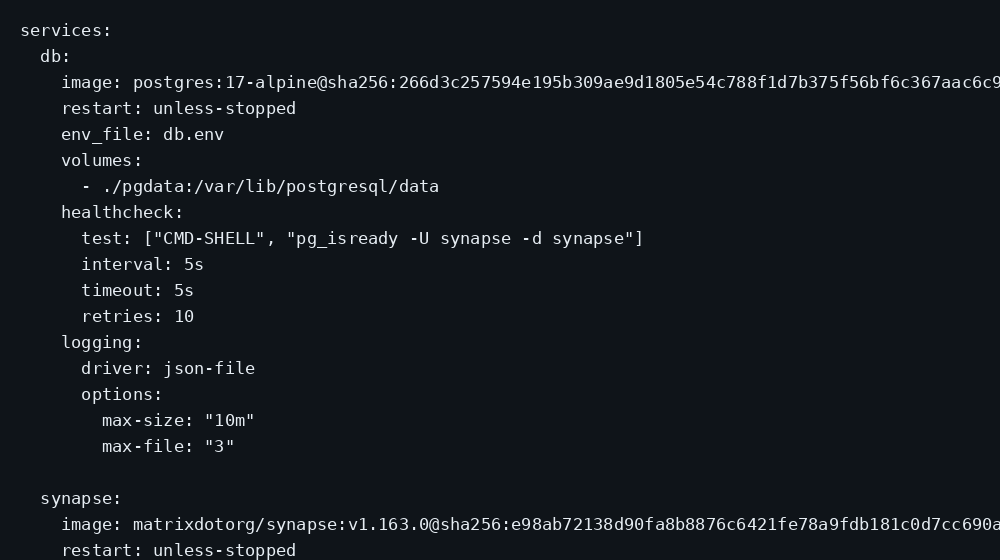
db:
image: postgres:17-alpine@sha256:266d3c257594e195b309ae9d1805e54c788f1d7b375f56bf6c367aac6c917e7b
restart: unless-stopped
env_file: db.env
volumes:
- ./pgdata:/var/lib/postgresql/data
healthcheck:
test: ["CMD-SHELL", "pg_isready -U synapse -d synapse"]
interval: 5s
timeout: 5s
retries: 10
logging:
driver: json-file
options:
max-size: "10m"
max-file: "3"
synapse:
image: matrixdotorg/synapse:v1.163.0@sha256:e98ab72138d90fa8b8876c6421fe78a9fdb181c0d7cc690ad740e5173e0c65e6
restart: unless-stopped
depends_on:
db:
condition: service_healthy
volumes:
- ./data:/data
ports:
- "127.0.0.1:8008:8008"
logging:
driver: json-file
options:
max-size: "10m"
max-file: "3"chmod 600 db.env
docker compose up -d
curl -sS http://127.0.0.1:8008/_matrix/client/versions | headLog rotation matches the Compose checklist. Federation port 8448 stays unpublished on this stack; clients use 8008 behind Caddy.
Why must 8008 stay on loopback?
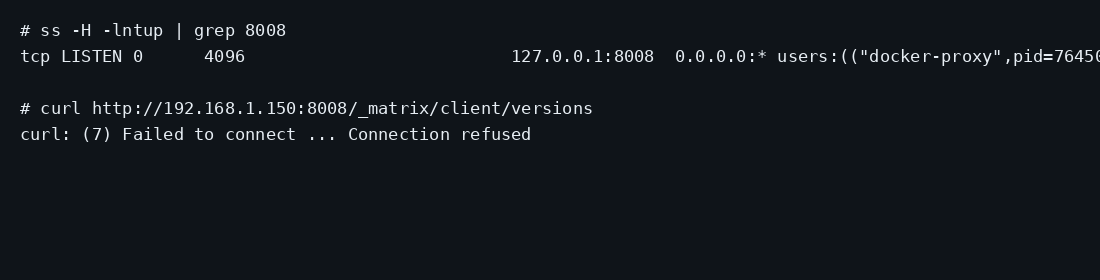
Synapse’s client API accepts passwords and issues access tokens. Publishing 8008 on every interface puts that API on the internet without TLS.
ss -H -lntup | grep 8008On this lab host the line showed 127.0.0.1:8008. Curl to the guest LAN address failed with connection refused. Leave 8008 closed in the panel firewall. Open 80 and 443 for Caddy when Element (or any client) must reach the homeserver from outside. Docker published ports often bypass UFW inside the guest, so the loopback bind kept the LAN address quiet. The public-address case is in provider-side firewall.
What should you tune in homeserver.yaml?
After Postgres and closed registration work, the configuration manual is the long menu. For a household VPS these are the knobs that matter first:
max_upload_size: 50M
# raise only if Caddy/nginx also allow the larger body

# leave false until you understand URL preview SSRF risk
url_preview_enabled: false

# private island: only talk to listed peers (optional)
# federation_domain_whitelist:
#   - friend.example.com
max_upload_size defaults to 50M; match it on the reverse proxy or large media uploads fail at the edge. URL previews must ship with a full url_preview_ip_range_blacklist if you enable them, or any room member can make your server fetch link-local and cloud metadata addresses. Rate limits (rc_message, rc_login, rc_registration) already have sane defaults; only raise them if Element Call or bots hit 429s. Presence, pushers, and email can wait until the account is in daily use.
Federation is a separate decision from “one account works.” With 8448 closed and no well-known m.server, remote homeservers cannot find you. That is fine for a lab or a family server that only talks among local users. When you want Matrix-wide DMs, publish well-known (or SRV), open federation the way the docs describe, and expect RAM and outbound traffic to climb.
TURN/STUN for reliable 1:1 voice is another optional service (coturn is the usual pair). Skip it until calls actually fail without it.
How do you create the one account?
With enable_registration: false, anonymous signups fail. Create the admin from inside the container using the registration shared secret already in homeserver.yaml:
docker compose exec synapse register_new_matrix_user \
  -c /data/homeserver.yaml \
  -a \
  -u labadmin \
  -p 'CHOOSE_A_LONG_PASSWORD' \
  http://localhost:8008
-a makes the user an admin. Prove the password path:
curl -sS -X POST http://127.0.0.1:8008/_matrix/client/v3/login \
  -H 'Content-Type: application/json' \
  -d '{"type":"m.login.password","identifier":{"type":"m.id.user","user":"labadmin"},"password":"CHOOSE_A_LONG_PASSWORD"}'
A JSON body with user_id @labadmin:matrix.example.com and an access_token means the stack works. Crop tokens from screenshots and shell history. Point Element at https://matrix.example.com (or an SSH tunnel to 127.0.0.1:8008 while testing).
ssh -N -L 8008:127.0.0.1:8008 user@YOUR_VPS_IPIn Element (Desktop, Web, or mobile), choose “Change” / custom homeserver and enter https://matrix.example.com (or the tunnel URL while testing). Sign in as @labadmin:matrix.example.com with the password you set. Create a room, send a message, and confirm media upload if you raised max_upload_size. Crop access tokens from screenshots.
Admin chores later use the Synapse Admin API or synadm: reset passwords, deactivate users, inspect rooms. Keep that surface behind the same HTTPS hostname and the admin account.
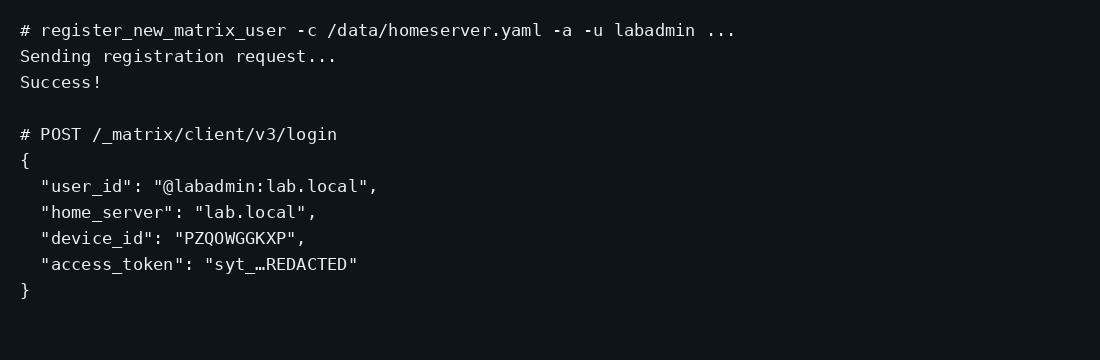
A closed registration check from the SelfHost Atlas Synapse deploy is worth keeping in the runbook: POST /_matrix/client/v3/register with an empty JSON body should return HTTP 403 (Registration has been disabled), not a user object.
Where does Caddy go?
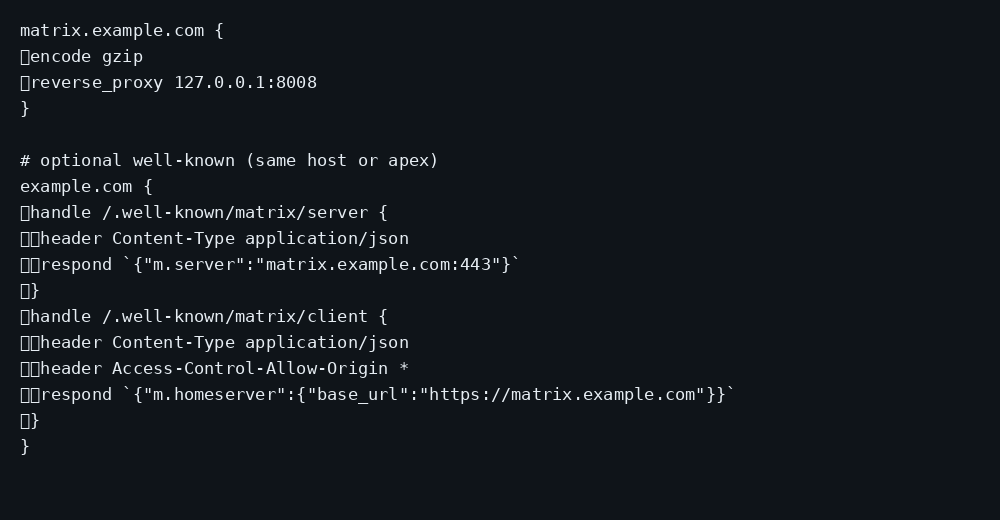
Set public_baseurl to the HTTPS URL clients will use. Proxy only the client and federation paths, as in the Matrix Docs Docker deployment and Raphael Kabo’s Synapse+Caddy writeup. Do not reverse-proxy bare /_synapse/admin to the internet:
matrix.example.com {
	encode gzip
	reverse_proxy /_matrix/* 127.0.0.1:8008
	reverse_proxy /_synapse/client/* 127.0.0.1:8008
}
Do not rewrite or “normalize” request paths on that proxy: Synapse’s federation signatures break if the path the peer signed is not the path Synapse sees.
If the Matrix server name is the apex (example.com) while Synapse listens on a subdomain, publish well-known on the apex so federation can use 443 instead of opening 8448. Serve both JSON files as application/json, and put Access-Control-Allow-Origin: * on the client file so browser clients can read it (Matrix Docs overview). The Caddyfile figure shows one pattern. Restart Synapse after changing public_baseurl. TLS setup is in the Caddy HTTPS post.
Federation needs DNS and usually port 8448 or a well-known m.server entry. Keep this VPS on a private client API and one local account until the domain and keys are ready for federation.
How do you back up Synapse?
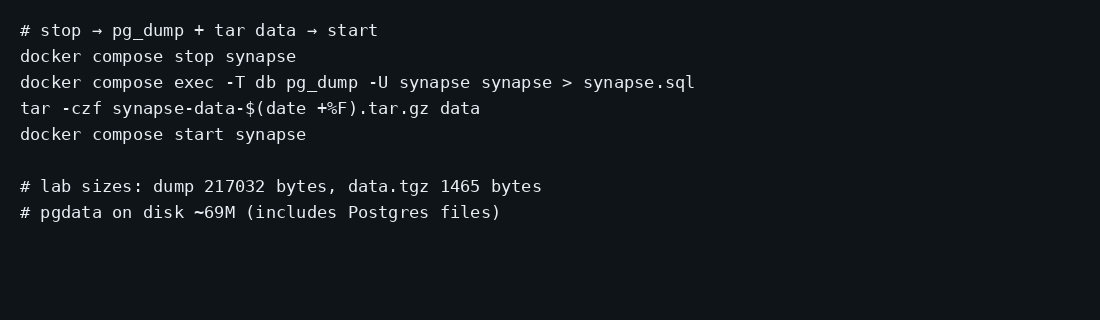
Accounts and rooms live in Postgres. The signing key, media store, and config live under ./data. Stop Synapse, dump the database, archive data, start again:
docker compose stop synapse
docker compose exec -T db pg_dump -U synapse synapse > synapse-$(date +%F).sql
tar -C ~/synapse -czf synapse-data-$(date +%F).tar.gz data
docker compose start synapse
On this lab the dump was about 212 KB and the stopped data archive about 1.5 KB before any media. pgdata on disk was about 69 MB. Point Restic at the dump and the tarball. Copying pgdata while Postgres writes risks a torn store; prefer pg_dump.
FAQ
Synapse or a hosted Matrix account? A hosted account is someone else's server_name. This stack is for a domain you control and one (or a few) accounts you create yourself.
SQLite on day one? Synapse still generates SQLite by default. Element’s docs steer production toward Postgres. This lab used Postgres 17 from the first boot so a later migration weekend never shows up.
Can friends register themselves? Keep enable_registration: false and run register_new_matrix_user for each account, or enable registration with a token flow when you are ready to operate that.
Workers / scaling? One Synapse process is enough for a household. Workers are a different ops surface.
Same VPS as Mastodon? Possible if RAM allows. Mastodon’s single-user idle in that post already sits near 700 MiB; add another ~250 MiB for this stack before federation noise.
Does UFW block a published 8008? Inside the guest, published Docker ports often bypass UFW. Bind 127.0.0.1:8008:8008 and leave 8008 closed on the panel firewall.