
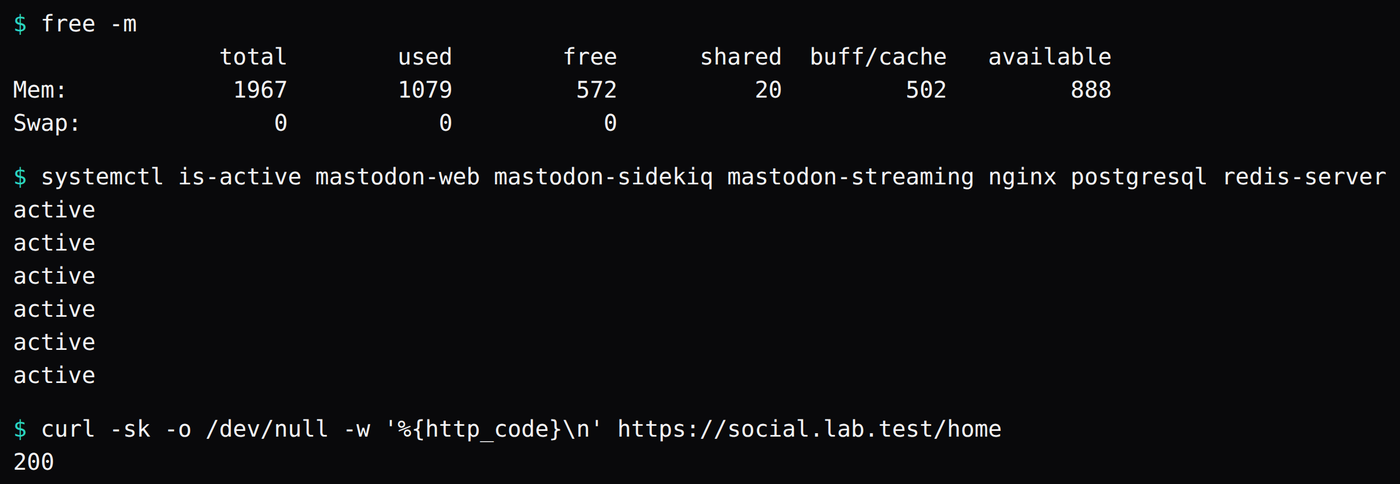
Mastodon v4.7.4, one account, @[email protected], idled at 701.2 MiB. That is the median of 20 readings of cgroup memory.current, taken 30 seconds apart, after 10 minutes with nobody federating. The confirmation mail was already in the mailbox: subject "Mastodon: Confirmation instructions for social.lab.test", from [email protected] to [email protected]. The same disk then booted with qemu -m 2048 -smp 2. free -m printed 1967 total, 1079 used, 888 available, swap 0, and https://social.lab.test/home returned 200.
The 701.2 MiB is five cgroups: Puma, Sidekiq, the Node streaming server, PostgreSQL 18.6, and Redis 7.0.15. On the same rounds, MemAvailable had a median of 6,719.1 MiB. MemTotal was 8,131,772 kB, which is 7,941.2 MiB, so the guest as a whole was using 1,222.1 MiB. The gap between those two medians is 520.9 MiB, which is Ubuntu, nginx, and cache outside the five units. The five process medians add to the same 701.2.
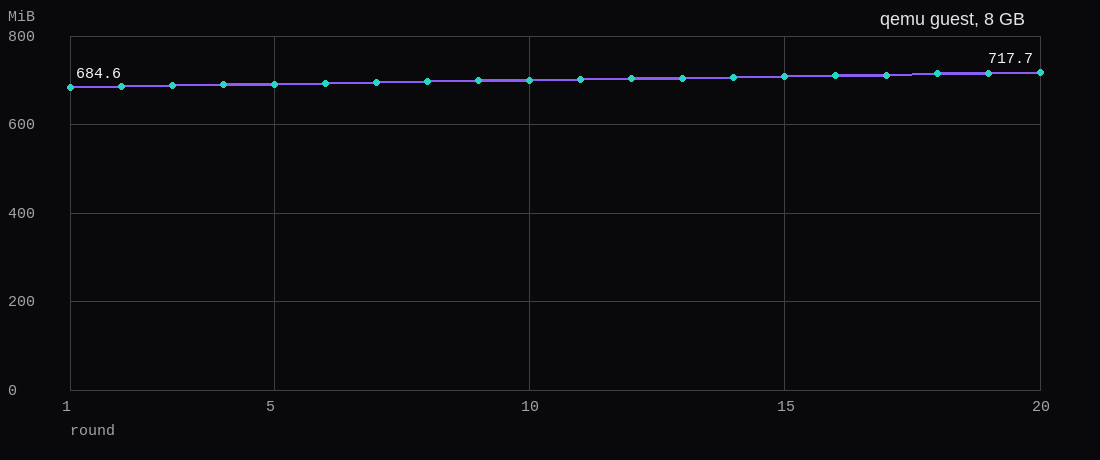
The sum rose on every one of the 19 steps, from 684.6 MiB on the first round to 717.7 on the twentieth. Eighteen gaps were 30 seconds and one was 31. After the window, Sidekiq's process title read sidekiq 8.1.6 live [0 of 25 busy].
The guest was Ubuntu 24.04.5 LTS, kernel 6.8.0-147-generic, hostname paas, started with qemu -m 8192 -smp 4. Swap was off. Ruby was 4.0.9, Node was v24.22.2, nginx was 1.24.0, Puma was 8.0.2 with a master and two cluster workers. The tag was v4.7.4, commit d04059fc80.
The 2022 annual report counts 2,527 servers and 294K monthly active users on January 1st, 2022, and 9,686 servers and 1.8M monthly active users on December 31st 2022. The same report describes that year's rush as monthly active users rising from 200K to 2.5M. The 2023 report opens at 9,780 servers, 6.36 million registered accounts, and 1.5M monthly active users, and closes the year at 9,800 servers, 8.8 million registered accounts, and 1.56 million monthly active users. The server count moved by 20.
What does a single-user Mastodon server need before the first account?
A domain, and a way to send mail. The install page lists three prerequisites: a machine running Ubuntu 24.04 or Debian 13 with root, a domain name, and "an email delivery service or other SMTP server." The run-your-own page says why the mail is on that list: "Mastodon needs to send confirmation links and various notifications through e-mail, and hosting your own SMTP server, while possible, is much more difficult to do reliably than to use a third-party provider."
The name you type is the name you keep. The sample .env.production from v4.7.4 says, next to LOCAL_DOMAIN, "This identifies your server and cannot be changed safely later." The config page is the long form: "This is the unique identifier of your server in the network. It cannot be safely changed later, as changing it will cause remote servers to confuse your existing accounts with entirely new ones." WEB_DOMAIN, if you set one, "cannot be safely changed once set", and "re-installing Mastodon from scratch will not fix the issue." This guest set LOCAL_DOMAIN=social.lab.test and left WEB_DOMAIN unset. .test is reserved, so the guest's /etc/hosts pointed the name at 127.0.0.1. On a real server you point the name first. That step is the DNS guide.
The account stays closed until the confirmation link is opened. The config page says SMTP_PORT defaults to 25, and if StartTLS is detected it may switch to 587. The sample file ships SMTP_PORT=587. SMTP_AUTH_METHOD defaults to plain, which the page describes as the password transmitted in the clear, with login and cram_md5 as the other two. SMTP_ENABLE_STARTTLS_AUTO defaults to true. SMTP_TLS defaults to false. SMTP_OPENSSL_VERIFY_MODE is none or peer.
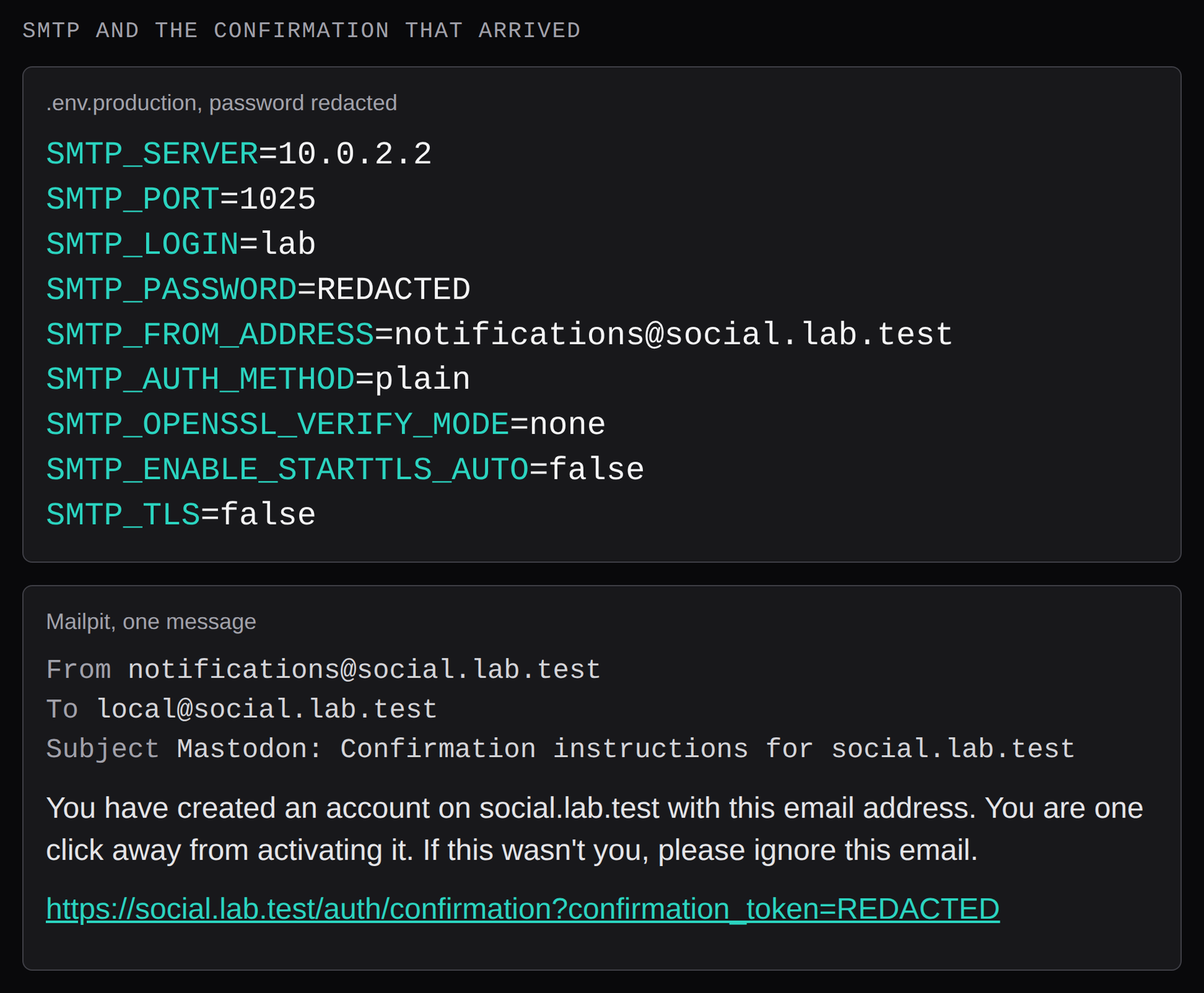
This guest sent through Mailpit on the bench host. From the qemu guest, 10.0.2.2 is the user-net gateway, and Mailpit was listening on port 1025. The block that produced the message:
SMTP_SERVER=10.0.2.2
SMTP_PORT=1025
SMTP_LOGIN=lab
SMTP_PASSWORD=REDACTED
[email protected]
SMTP_AUTH_METHOD=plain
SMTP_OPENSSL_VERIFY_MODE=none
SMTP_ENABLE_STARTTLS_AUTO=false
SMTP_TLS=false
StartTLS is off because this Mailpit speaks plain SMTP. A provider that wants 587 is the sample file. Mailpit was started with --smtp-auth-accept-any, so it accepted the login. The password is still in .env.production, mode 600, owner mastodon. The block here prints REDACTED in its place. Opening the link from that message set the account's confirmed flag. The handle is @local.
A mailbox on the same bench shows that Mastodon handed the message to SMTP. Delivery to Gmail is a different test, the one in which VPS providers still open port 25. Running the mail server yourself is Stalwart or Mailcow.
How do you install Mastodon 4.7.4 on Ubuntu 24.04?
The install page builds from source. Packages, the mastodon user, PostgreSQL, a git checkout of the latest stable tag, Ruby via rbenv with jemalloc, bundle and yarn, the setup wizard, then nginx and three systemd units. The wizard is interactive. The SMTP target here was a lab mailbox, so the env file was written out and db:setup was run by hand. The tag command is the one the doc uses, the latest tag matching ^v[0-9.]*$. It printed v4.7.4.
Node came from NodeSource node_24.x. The checkout's .nvmrc says 24.19. The binary that landed was v24.22.2. PostgreSQL came from PGDG, $(lsb_release -cs)-pgdg, and psql printed PostgreSQL 18.6 (Ubuntu 18.6-1.pgdg24.04+2). The config file is /etc/postgresql/18/main/postgresql.conf. It stayed on the package defaults. Redis is the Ubuntu package, v7.0.15. certbot and python3-certbot-nginx stayed out of the apt line. The name is a lab name, so nginx got a certificate generated on the guest for social.lab.test. The template's certificate lines are the Let's Encrypt paths, left commented until a public name exists.
apt install -y curl wget gnupg lsb-release ca-certificates
# NodeSource node_24.x and PGDG $(lsb_release -cs)-pgdg, then:
apt install -y \
  imagemagick ffmpeg libvips-tools libpq-dev libxslt1-dev file git \
  protobuf-compiler pkg-config autoconf bison build-essential \
  libssl-dev libyaml-dev libreadline-dev zlib1g-dev libffi-dev \
  libgdbm-dev libjemalloc-dev nginx nodejs redis-server postgresql \
  libidn-dev libicu-dev
adduser --disabled-password --gecos "" mastodon
sudo -u postgres psql -c "CREATE USER mastodon CREATEDB;"
As mastodon, in /home/mastodon:
git clone https://github.com/mastodon/mastodon.git live
cd live
git fetch --tags
git checkout "$(git tag -l | grep '^v[0-9.]*$' | sort -V | tail -n 1)"
git clone https://github.com/rbenv/rbenv.git ~/.rbenv
git clone https://github.com/rbenv/ruby-build.git ~/.rbenv/plugins/ruby-build
export PATH="$HOME/.rbenv/bin:$HOME/.rbenv/shims:$PATH"
eval "$(rbenv init -)"
RUBY_CONFIGURE_OPTS=--with-jemalloc rbenv install
bundle config deployment true
bundle config without 'development test'
bundle install
yarn install
corepack enable is what turns Yarn on. Run as mastodon, it died with EACCES: permission denied trying to symlink ../lib/node_modules/corepack/dist/pnpm.js into /usr/bin/pnpm. Run as root, corepack 0.36.0, the symlink landed, and yarn install printed "Done with warnings in 30s 897ms". bundle install printed Bundle complete! 154 Gemfile dependencies, 276 gems now installed. .ruby-version is 4.0.9, so that is the Ruby rbenv built, with jemalloc, which is also what the web and Sidekiq units preload.
Secrets come from three commands, and the values stay in the env file:
export RAILS_ENV=production
bundle exec rails secret
bundle exec rails mastodon:webpush:generate_vapid_key
bin/rails db:encryption:init
The sample file says the encryption keys have to be the same for every process, and to leave them alone once they are in use. The file on this guest, with the secrets removed:
LOCAL_DOMAIN=social.lab.test
REDIS_HOST=localhost
REDIS_PORT=6379
DB_HOST=/var/run/postgresql
DB_USER=mastodon
DB_NAME=mastodon_production
DB_PASS=
DB_PORT=5432
SECRET_KEY_BASE=REDACTED
VAPID_PRIVATE_KEY=REDACTED
VAPID_PUBLIC_KEY=REDACTED
ACTIVE_RECORD_ENCRYPTION_DETERMINISTIC_KEY=REDACTED
ACTIVE_RECORD_ENCRYPTION_KEY_DERIVATION_SALT=REDACTED
ACTIVE_RECORD_ENCRYPTION_PRIMARY_KEY=REDACTED
SINGLE_USER_MODE=true
DB_PASS is empty because Postgres is on the local socket and the mastodon role uses peer auth. One user, one socket. A pool in front of a crowd of app connections is what Postgres and PgBouncer on a 2 GB VPS measures. The sample also sets ES_ENABLED=true. That block was left out, so search is Postgres. S3_ENABLED was left off, so uploads stay on the VM disk.
export RAILS_ENV=production
bundle exec rails db:setup
bundle exec rails assets:precompile
A fresh database had Setting.registrations_mode equal to "none" and User.count equal to 0. One Account row was already there, the server's own actor, with no person on it. I opened registrations, created an application so the accounts API had a token, and registered local with email [email protected]. The first attempt, posted with no token, came back 401, "The access token is invalid." With the token it came back 200, and Mailpit had the confirmation. The link was opened on the guest. confirmed? was true. The user was given the Owner role. Registrations went back to none. SINGLE_USER_MODE=true was appended, and the three units were restarted before the quiet window. The config page says that with single-user mode on, "the front page of your Mastodon server will always redirect to the first profile in the database and registrations will be disabled."
assets:precompile ran under umask 077, the same umask that kept the env file at mode 600. public/packs came out mode 700. nginx, running as www-data, answered 403 for every pack, and the browser stayed on the logo. chmod -R a+rX /home/mastodon/live/public made the packs readable. The env file stayed mode 600. After that, /packs/application-DvIz3iPk.js returned 200 and the home timeline rendered.
cp /home/mastodon/live/dist/mastodon-*.service /etc/systemd/system/
systemctl daemon-reload
systemctl enable --now mastodon-web mastodon-sidekiq mastodon-streaming
chmod o+x /home/mastodon
mastodon-web runs bundle exec puma -C config/puma.rb as mastodon, PORT=3000, LD_PRELOAD=libjemalloc.so. config/puma.rb reads WEB_CONCURRENCY, default 2, and MAX_THREADS, default 5. Neither was set, so the process list was a master and puma: cluster worker 0 and worker 1. The scaling page says threads share the memory of their parent process, processes allocate their own, and "a larger number of threads maxes out your CPU first, and a larger number of processes maxes out your RAM first." mastodon-sidekiq sets DB_POOL=25 and MALLOC_ARENA_MAX=2, and the exec line is sidekiq -c 25. One process, 25 threads. mastodon-streaming.service is a oneshot whose job is to start [email protected]. The process is node ./streaming on 127.0.0.1:4000.
nginx is dist/nginx.conf with example.com replaced by social.lab.test. Port 80 redirects to https. The 443 server sends the app to 127.0.0.1:3000 and /api/v1/streaming to 127.0.0.1:4000. client_max_body_size is 99m. chmod o+x /home/mastodon is what lets nginx traverse to public/.
upstream backend {
    server 127.0.0.1:3000 fail_timeout=0;
}

upstream streaming {
    least_conn;
    server 127.0.0.1:4000 fail_timeout=0;
}

ssl_certificate     /etc/ssl/mastodon/fullchain.pem;
ssl_certificate_key /etc/ssl/mastodon/privkey.pem;
The idle guest and the 2 GB boot are both local qemu. qemu -m 8192 -smp 4 is the idle size, qemu -m 2048 -smp 2 is the second boot of the same disk. A VM in either of those shapes is the virtual machines guide.
How much RAM does an idle Mastodon server use?
A memory size is absent from the install page, the prerequisites page, and the run-your-own page. The scaling page explains threads and processes. The 8 GB guest is the size this run was given, qemu -m 8192 -smp 4. The sampling matches what fits on a 2 GB VPS: swap off, 10 minutes with no traffic, then 20 rounds, 30 seconds apart, of cgroup v2 memory.current. That counter includes the cgroup's page cache. The paths on this guest:
/sys/fs/cgroup/system.slice/mastodon-web.service/memory.current
/sys/fs/cgroup/system.slice/mastodon-sidekiq.service/memory.current
/sys/fs/cgroup/system.slice/system-mastodon\x2dstreaming.slice/[email protected]/memory.current
/sys/fs/cgroup/system.slice/system-postgresql.slice/[email protected]/memory.current
/sys/fs/cgroup/system.slice/redis-server.service/memory.current| Process | Median MiB | Min | Max |
|---|---|---|---|
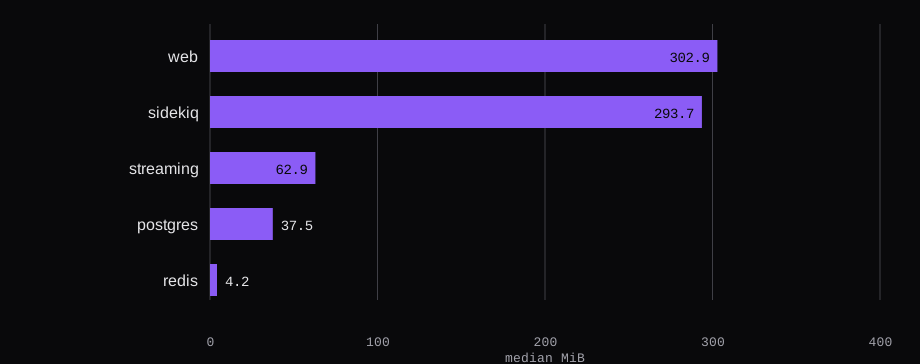
| web (Puma) | 302.9 | 299.9 | 305.5 |
| sidekiq | 293.7 | 280.2 | 307.6 |
| streaming | 62.9 | 62.9 | 62.9 |
| postgres | 37.5 | 37.5 | 37.5 |
| redis | 4.2 | 4.1 | 4.4 |
| sum | 701.2 | 684.6 | 717.7 |
Sidekiq is the bar that moved. It went from 280.2 MiB to 307.6, a gain of 27.4, while the unit was asking for 25 threads in one process. Puma, two workers at the default, went from 299.9 to 305.5. Streaming's 20 readings sat inside an 8 KiB band and round to 62.9. Postgres stayed inside 48 KiB and rounds to 37.5. Redis sat between 4.1 and 4.4. nginx and sshd sit outside the five cgroups, which is why MemTotal minus MemAvailable comes out at 1,222.1 MiB. Round 20 is the high end of the series, and the step into it was still upward.
What happens when the same disk boots with 2 GB?
The disk was powered off and started again with qemu -m 2048 -smp 2. Swap was still off. MemTotal was 2,014,852 kB, which is 1,967.6 MiB. free -m prints that as 1967. For about a minute and a half after the six units reported active, twelve readings of free -m stayed between 1,034 and 1,043 used, and between 923 and 933 available. systemctl --failed listed 0 units. A search of dmesg for the OOM lines printed 0. At the end of that stretch the five cgroups summed to 926.1 MiB in a single reading: web 396.5, Sidekiq 318.4, streaming 142.0, Postgres 62.5, Redis 6.8. That reading is a couple of minutes after boot. It is a different number from the 701.2 MiB idle median, which was taken on the 8 GB guest after a quiet 10 minutes.
A later check asked for the home page and got 200 while free -m read 1,079 used and 888 available. The 20-round idle median belongs to the 8 GB guest. The 2 GB numbers are this boot.
Where does Mastodon store uploaded images?
On the disk. S3_ENABLED stayed off. The run-your-own page says "Mastodon can save files that you and your users upload on the hard disk drive of the VPS it runs on, however, the hard disk drive is usually not infinite and difficult to upgrade later." Object storage is a separate setup, the object storage page.
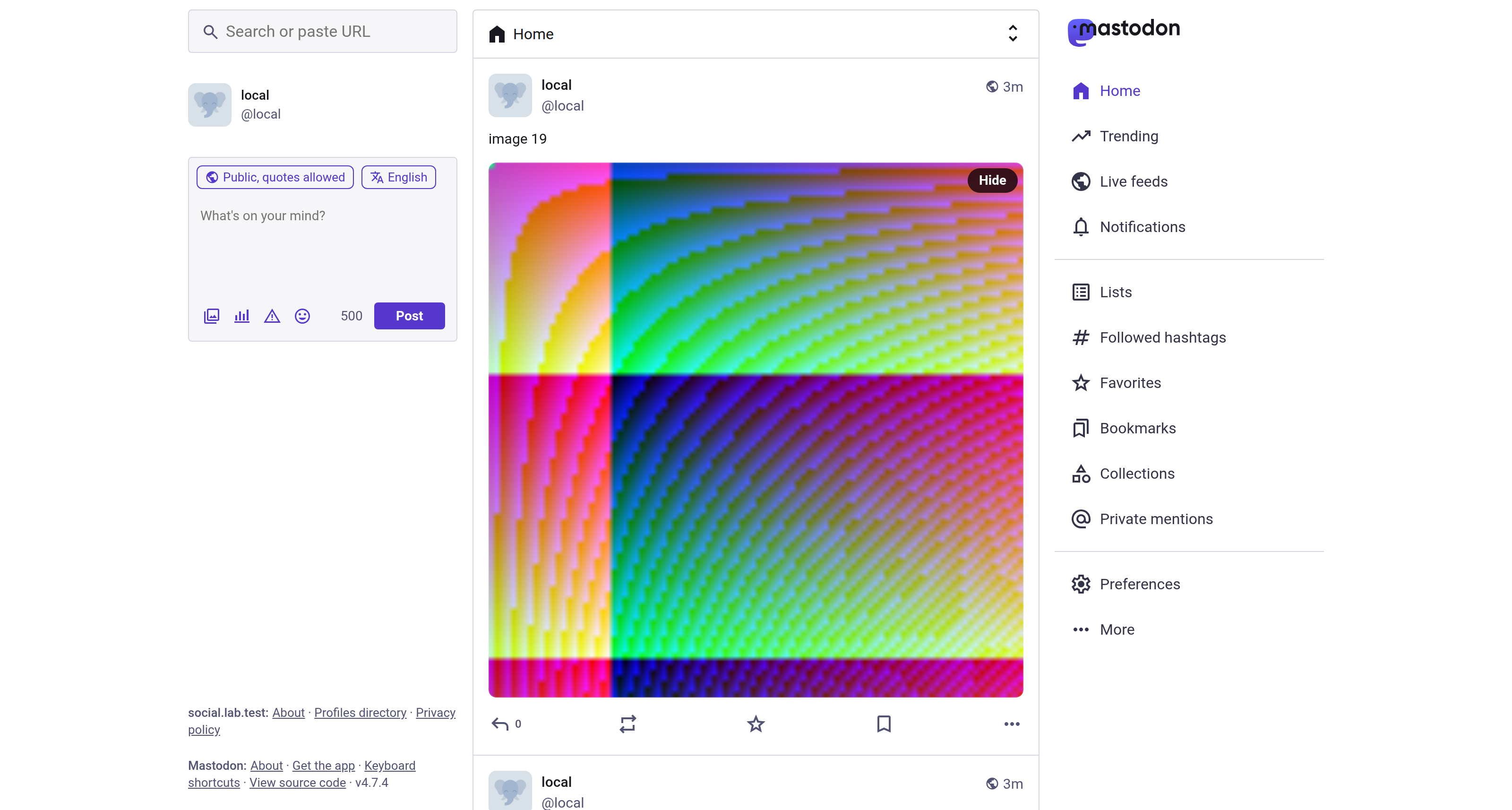
After the idle window, the account posted 20 statuses. Each one carried a 96 by 96 PNG. The 20 files on the way in were 74,633 bytes. du -sb /home/mastodon/live/public/system printed 1,064,026. That tree is public/system/media_attachments/files, 40 files: 20 under original and 20 under small. The originals total 532,013 bytes, and the small files total the same 532,013. Each small file has the same sha256 as its original. The source image is 96 by 96, so the small derivative is the file Mastodon wrote for the original. Those bytes are on the VM disk. They are still there on the qcow2 that booted the second time.
Can you change a Mastodon server's domain later?
You stand up a new server. Changing LOCAL_DOMAIN "will cause remote servers to confuse your existing accounts with entirely new ones," and a reinstall on the new name leaves the old name in those servers' records. @[email protected] is the handle this database will keep serving. Keeping the server, on the 8 GB guest, cost 701.2 MiB of web, Sidekiq, streaming, Postgres, and Redis once the confirmation mail had left, with the sum still climbing at round 20.