
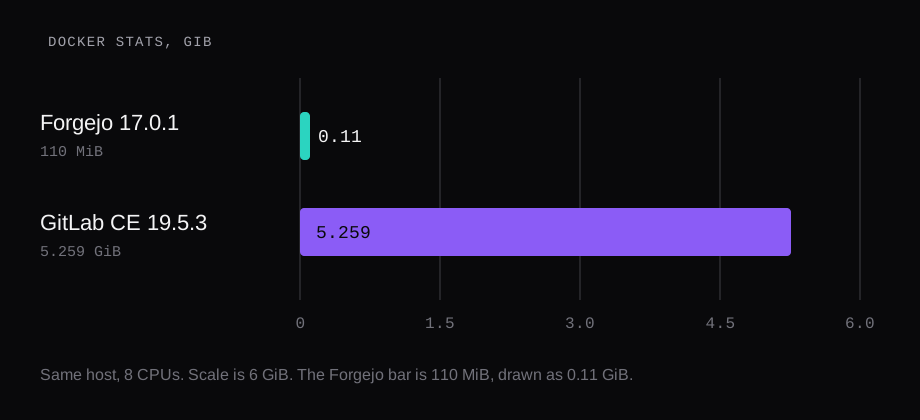
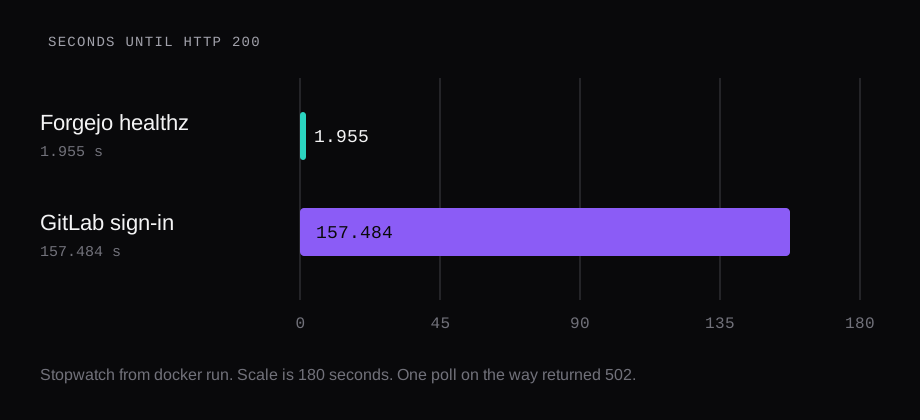
GitLab CE 19.5.3 answered /users/sign_in with HTTP 200 at 157.484 seconds after docker run. On the same host, Forgejo 17.0.1 had answered /api/healthz in 1.955 seconds. A later docker stats on the GitLab container printed 5.259 GiB, 2.40% CPU, 413 processes. The Forgejo reading after its push was 110 MiB and 21 processes. GitLab's sign-up URL returned 200 and rendered a form. Forgejo's signup page returned 200 and the HTML contained "Registration is disabled".
| Forgejo 17.0.1 | GitLab CE 19.5.3 | |
|---|---|---|
docker images | 287MB | 6.08GB |
docker image inspect Size | 82,533,704 bytes | 1,652,939,123 bytes |
| Pull on this host | 8.47 s | 526.85 s |
| First HTTP 200 | 1.955 s, /api/healthz | 157.484 s, /users/sign_in |
docker stats | 110 MiB after the push | 5.259 GiB, 2.40% CPU |
| Processes in that sample | 21 | 413 |
| Signup page | "Registration is disabled" | form: name, username, email, password |
The machine was Ubuntu 24.04.3 LTS, Docker 29.1.3, 8 CPUs, 47 GiB of RAM, and swap was 0. Both containers published ports on 127.0.0.1 only. That loopback habit is the one in the Compose checklist.
How long does GitLab CE take to boot
The stopwatch started at docker run and stopped when curl got HTTP 200 from /users/sign_in. That was 157.484 seconds. One poll on the way returned 502, which is nginx answering while Puma is still coming up. The 200 is the number to keep.
Once the page was up, a later GET of /users/sign_in returned 200 in 0.043 seconds. /users/sign_up returned 200 in 0.034 seconds. Those are warm requests. They are a different clock from the boot.
The first line of /opt/gitlab/version-manifest.txt was gitlab-ce 19.5.3. The image tag was gitlab/gitlab-ce:19.5.3-ce.0. The digest was:
sha256:6863d156a1a477bd6f69fc674b671d0163cd8b06bf63bb17cc4a4a803b78b27cdocker image inspect reported 1,652,939,123 bytes. docker images printed 6.08GB. The pull on this host took 526.85 seconds. That pull clock is this network. The byte counts are what a second pull on a faster link would still report.
Forgejo's pull of codeberg.org/forgejo/forgejo tag 17.0.1 took 8.47 seconds, docker images printed 287MB, and inspect reported 82,533,704 bytes. Its health check passed in 1.955 seconds. The two ready-times are the same kind of stopwatch. The two image sizes are two different counters, and both are in the table so a docker images reading is kept apart from inspect's Size.
How do you install GitLab CE with Docker
The Docker install page publishes 443, 80, and 22, with hostname gitlab.example.com, and --shm-size 256m. The page also shows a compose file that publishes 8929 and 2424 when you want those host ports, and sets external_url to the URL that includes the port. This lab followed that shape and bound the host side to loopback.
docker run -d --name gitlab \
  --hostname gitlab.example.com \
  --shm-size 256m \
  -p 127.0.0.1:8929:8929 \
  -p 127.0.0.1:2229:22 \
  -v ./gitlab/config:/etc/gitlab \
  -v ./gitlab/logs:/var/log/gitlab \
  -v ./gitlab/data:/var/opt/gitlab \
  -e GITLAB_OMNIBUS_CONFIG="\
external_url 'http://127.0.0.1:8929'; \
gitlab_rails['gitlab_shell_ssh_port'] = 2229" \
  gitlab/gitlab-ce:19.5.3-ce.0
The first attempt on this machine published 127.0.0.1:8929 onto container port 80. external_url still named port 8929, so nginx inside the container listened on 8929. The host mapping hit port 80, and curl got a connection reset. The run that returned the sign-in page published 8929:8929. SSH was 2229:22, and gitlab_shell_ssh_port was 2229 so clone URLs would carry the host port. No repository was pushed, so that SSH port was published and left unused.
GITLAB_OMNIBUS_CONFIG is evaluated when the container starts. The install page says it is left out of gitlab.rb and has to be passed again on the next docker run. The copy of gitlab.rb on the volume still had external_url commented. The live nginx was the one on 8929, which is how the 200 arrived.
The initial root password is written to initial_root_password under /etc/gitlab. The install page says to sign in as root with that value, and that the file is removed on the first container restart after 24 hours. This lab counted one line beginning Password: and left the value in the container.
docker exec gitlab \
  grep -c '^Password:' \
  /etc/gitlab/initial_root_password
That printed 1. A request to /api/v4/user with that password over HTTP basic returned 401. The password stayed off this page.

The fresh data directory was 485,405,423 bytes. Logs were 983,180 bytes and config was 198,118. The image is the large object. The data directory is an empty forge: database, redis, and the app files, with no project in it.
How much RAM does a default GitLab use
docker stats moved after the page was up. About fifteen seconds after the 200, three samples read 4.369 GiB at 103% CPU, 3.985 GiB at 262% CPU, and 4.044 GiB at 18% CPU. Later, with CPU near 2%, the readings were 4.52 GiB, then 5.088, 5.102, 5.152, 5.175, and 5.259 GiB. The last of those, at 2.40% CPU and 413 processes, is the bar. The cgroup memory.current on that same sample was 5,970,075,648 bytes. docker stats and the cgroup file are the same gap the 2 GB VPS piece measured on Gitea: stats can sit under the cgroup when the kernel is holding cache. Both numbers are this container. The chart uses the stats reading because that is the counter the Forgejo bar uses.
Puma logged workers 0 through 7. Eight workers on an 8-CPU host. The commented example in gitlab.rb shows puma['worker_processes'] = 2. That line was still a comment. The workers that booted are the log.
gitlab-ctl status listed alertmanager, gitaly, gitlab-exporter, gitlab-kas, gitlab-workhorse, logrotate, nginx, postgres-exporter, postgresql, prometheus, puma, redis, redis-exporter, sidekiq, and sshd. That list is the RAM. Forgejo's container was the server, s6, and sqlite. GitLab's is a small platform that starts whether you open a project or leave the sign-in page sitting there.
What RAM does the GitLab documentation ask for
The requirements page gives a single node a baseline of 8 vCPU and 16 GB of RAM. The same page says a memory-constrained single node can run with at least 8 GB, and it says to disable swap where possible. The constrained-environment page gives a lower floor: 2 GB of RAM plus 1 GB of swap, and optimally 2.5 GB plus 1 GB, with 20 GB of disk. It says that with those minimums the system should use swap, and that product behavior can degrade. It also says to install CE when memory is the concern.
Those are three documented floors. This lab measured a fourth thing: the default CE image, on 8 CPUs, with swap at 0, and none of the constrained cuts applied. docker stats printed 5.259 GiB. That is under the 8 GB line and under the 16 GB baseline, and it is an idle container with an empty data directory of 485,405,423 bytes. A loaded single node is what the 16 GB figure is planning for. This reading is the cost of the process list before anyone pushes.
The constrained page says setting puma['worker_processes'] = 0 dropped about 100 to 400 MB in their observation, and turning the bundled monitoring off dropped about 300 MB in theirs. Their example free output, after the cuts, shows about 1.7 GiB used of 1.9 GiB, with 153 MiB of swap in use. That is their published example. It is a different configuration from the container timed here. A 2-core VPS would also boot fewer Puma workers than the eight this host started, so its RSS would move for that reason alone.
Storage on the requirements page is 40 GB for an application node, at least as much as the repositories for Gitaly, and 5 to 12 GB for PostgreSQL. The 6.08GB image plus a 485,405,423 byte data directory is the fresh install. The 40 GB is the planning number for logs, temp, and the life of the node. Repository bytes sit on top.
Is GitLab signup open on a fresh install
/users/sign_up returned 200. The title was "Sign up · GitLab". The form included first name, last name, username, email, and password. The sign-in page included a Register now link. Community Edition was in the sign-in HTML. A fresh container of this image serves that form.
The application hardening page says to clear Allow new user accounts, to require two-factor authentication for every user, and to turn on Admin Mode. It says the default grace period is 48 hours and suggests something shorter, such as 8. It says the defaults for project, snippet, and group visibility are Private, and it says to keep import sources to the ones you use. The container was left on the image defaults, so the form is what a visitor gets. The hardening page is the list you work through before the hostname is public.
Forgejo's defaults point the other way, and the install we measured still had to set them. DISABLE_REGISTRATION defaults to false on Forgejo too. We set it true before the first request, and the signup HTML contained "Registration is disabled". REQUIRE_SIGNIN_VIEW sent /explore/repos to /user/login with a 303. An admin-only 2FA requirement answered the API with 403 until we turned it back off to time a push. Git hooks stayed at the default, which keeps custom hooks off. The whole of that container, after the push, was 110 MiB in docker stats.
What the 5.259 GiB is buying
The GitLab process list is Sidekiq, Gitaly, PostgreSQL, Redis, Prometheus, the exporter set, the agent server, and Puma with eight workers. Forgejo's measured container had sqlite, one private repository, one commit, and no Actions runner. The 157 seconds and the 5.259 GiB are the cost of starting that default list on this host, with the sign-up form still being served and with no project created.
A 2 GB VPS is the constrained page's floor, and that page expects swap and the Puma and monitoring cuts. This host had the RAM, swap stayed 0, and the default image was reading 5.259 GiB while the CPU reading fell to a couple of percent. If the forge is a place for a few people to push, the Forgejo container is the one that was ready in under two seconds and stayed near 110 MiB with signup closed. If you want the process list above, budget for the 5.259 GiB reading and for the 16 GB baseline the requirements page still prints, and close the sign-up form before the port faces anything but loopback.
What other 2026 Docker bake-offs keep showing
GitLab’s install docs still list 16 GB as the single-node baseline and at least 8 GB for the documented memory-constrained profile. Independent 2026 Compose labs that idle Forgejo with Postgres near a few hundred MiB and default GitLab CE in the multi-gigabyte range match the order of magnitude measured here; applying GitLab’s Puma/Sidekiq/Prometheus trims can cut the CE container a lot without making it Forgejo-small. Forgejo answers health checks in seconds; Omnibus GitLab commonly needs minutes before sign-in. Prefer Forgejo when the VPS is the constraint; prefer GitLab CE when integrated CI, package registry depth, and project management justify an 8 GB+ guest.