
On the lab node, Proxmox VE 8.1.3, the CPU is an 11th Gen Intel Core i7-1185G7E: 4 cores, 8 threads, one socket. VM 14950 was created with ostype win11, CPU type x86-64-v2-AES, VirtIO SCSI single, balloon 0, and citype configdrive2. QEMU reached running. The disk was an empty 4G volume, so the start ended at the firmware, and the VM was removed. The CPU type is accepted on this node. The guest image still needs the driver CD, cloudbase-init, and a licence count.
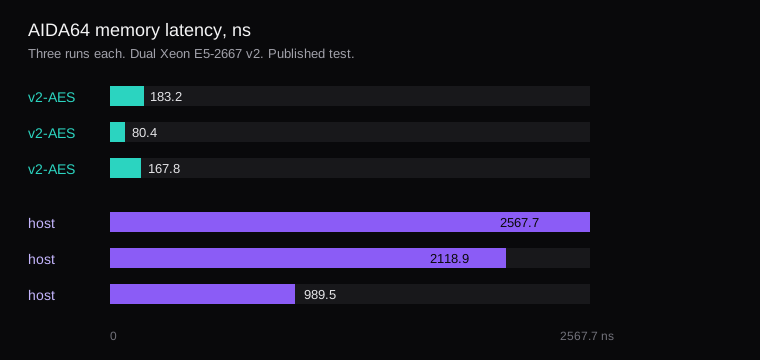
CPU type host is the slow Windows case in a published AIDA64 run. The numbers are from that test. This i7 supplied the CPU-type check. On two Xeon E5-2667 v2 processors, memory latency with x86-64-v2-AES was 183.2 ns, 80.4 ns, and 167.8 ns across three runs. With host the same three runs were 2567.7 ns, 2118.9 ns, and 989.5 ns. The author later summarised that E5 result as about 100 ns against about 2000 ns, and an i9-13900K retest as about 30 ns against about 90 ns. The write-up and the forum thread are the source. This lab is the wrong CPU for a rerun.
What CPU type host does on Intel
host hands the guest every flag on the physical CPU. Two of them exist for Intel side-channel mitigations. md_clear is the MDS flush. flush_l1d is the L1TF flush. Windows sees the flags and runs those mitigations on its own transitions. Inside the guest that work is expensive, which is why the E5 memory latency jumps and a Linux guest on the same node can feel ordinary. The generic models x86-64-v2-AES, x86-64-v3, and IvyBridge-IBRS leave those two flags out, so Windows leaves the mitigations off.
x86-64-v2-AES is the PVE 8 GUI default and the one that migrates across older hosts. x86-64-v3 wants AVX2 on every node. x86-64-v4 wants AVX-512. Pick the highest level the whole cluster can start. On this node the create used x86-64-v2-AES, and the process came up. A later change is applied by stopping the VM and starting it again. The CPU model is fixed when QEMU launches, so a reboot from inside Windows leaves the old model in place.
qm set 14950 --cpu x86-64-v2-AES
qm stop 14950
qm start 14950
If a guest needs nested virtualization, Hyper-V or WSL2, the x86-64-v* models omit vmx and svm, and host is the type that still exposes them. The inet.sh note shows qm set 102 --cpu host,flags=-md-clear for that case, and says flush_l1d stays, so half the stall remains. Those two flags are an Intel path. An EPYC or Ryzen box skips this particular latency hit, and host still pins the guest to one CPU generation. What 4 vCPU means on EPYC 9004 vs Xeon E5 is the hardware side of that generation gap.
On VE 9.2, Windows guests with Virtualization-based Security also meet a separate freeze on Intel when the CPU type is host. The fix there is machine version 11.0+pve2, covered in Proxmox VE 9: what changed, and what to test. This lab's machine line came back as pc-q35-8.1.
The NodeRings VM template doc tells Linux images to use --cpu host, because kvm64 is too old and some catalog images stall on x86-64-v2. The same page says a cloned customer VM receives the CPU type configured on the node, and that default is host. A Windows template built at x86-64-v2-AES still lands on host if the node setting is left on the Linux default. The CPU catalog is where that node type is chosen. Build a cloud-init template on Proxmox is the Linux image those scripts are written for.
What VirtIO the disk and the NIC need
The admin guide wants VirtIO SCSI single for a performance disk, with an I/O thread on each disk. The installer sees a VirtIO disk only after the virtio-win ISO is mounted as a second CD on an IDE drive. The VirtIO wiki recommends 0.1.271. It is still testing 0.1.302 and withholds a production recommendation for that build. 0.1.285 has been tied to read errors on IO-heavy Windows Server 2025 guests. Versions 0.1.215 through 0.1.262 log vioscsi event 129, Reset to device was issued, and can block I/O. The Windows 10 guest page points older Windows, such as Server 2012, at virtio-win 0.1.189. Server 2022 and 2025 want the current recommended ISO, and the folder that matches that release.
At the installer's disk screen, Load driver, then vioscsi\w10\amd64 for the Windows 10 path the guest page documents. The disk appears after the Red Hat VirtIO SCSI pass-through controller is selected. NetKVM is the matching folder for the NIC. The guest agent installer on the same ISO is guest-agent\qemu-ga-x86_64.msi, and virtio-win-gt-x64.msi installs the set. The QEMU agent option on the VM is what makes the summary show the guest IP after that service is in.
A disk that already boots on SATA or IDE needs the driver before the boot disk moves. Add a small VirtIO SCSI disk, boot, install vioscsi, shut down, move the boot disk onto VirtIO SCSI single, and drop the emulated disk. A fresh install can load the driver at the disk screen and skip that second hop. VM 14950 was that fresh shape, boot order on scsi0, disk empty.
qm create 14950 --name win-kvm-lab \
  --memory 4096 --balloon 0 --cores 4 \
  --cpu x86-64-v2-AES --ostype win11 \
  --machine q35 --bios ovmf \
  --scsihw virtio-scsi-single \
  --agent enabled=1 \
  --citype configdrive2 \
  --net0 virtio,bridge=vmbr0
qm set 14950 --scsi0 local-lvm:4,\
iothread=1,discard=on,cache=none,ssd=1
qm set 14950 --efidisk0 local-lvm:1,\
efitype=4m
qm set 14950 --ide2 local-lvm:cloudinit
qm set 14950 --boot order=scsi0
The config that came back:
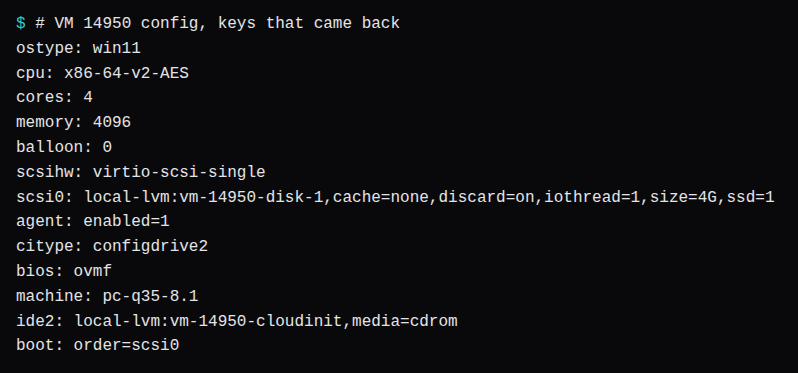
cache=none is the admin guide's default: the guest is told the write is done when the block reaches the storage write queue, and the host page cache is left out. The Windows guest page calls Write back the fast option and No cache the safer one. Discard passes TRIM through, which is what a thin pool needs after the guest deletes files. The SSD flag presents the disk as solid-state. Some Windows guests want that flag before they issue TRIM.
balloon 0 removes dynamic reclaim and pins the guest at the memory value, here 4096 MiB. The summary's memory percentage on Windows comes from the balloon device plus the balloon service, so with the device off that percentage stays uninformative. If the summary matters and the RAM must stay fixed, set the balloon minimum equal to the memory value and install the balloon service from the virtio ISO. This VM used 0.
After a restore, or after the NIC model changes, Windows often keeps the old adapter and names the new one Ethernet 2. The static address stays on the old adapter. Delete that adapter in Device Manager before you set the address again.
What cloudbase-init reads
Proxmox cloud-init for Windows is cloudbase-init. citype configdrive2 is the format, and it is the default once ostype is any Windows value. VM 14950 had both, plus an ide2 cloud-init CD. That CD is how the clone receives a hostname, a user, and an address. Linux cloud-init on the Ubuntu template is a different agent and a different citype.
Inside the guest, the wiki's useful keys are username, groups set to Administrators, inject_user_password set to true, and metadata_services pointed at ConfigDriveService so the first boot checks the config drive immediately. first_logon_behaviour skips the forced password change on first login. Set ostype to Windows before cipassword. If the type is still Linux, Proxmox stores an encrypted password and cloudbase-init then uses that ciphertext as the password.
Leave Sysprep until the config is in place. The cloudbase-init installer offers it at the end. Skip that, edit the config, shut down, add the cloud-init drive, and turn the VM into a template. Windows Server can sysprep with the Unattend.xml that ships with cloudbase-init. Desktop Windows needs the Administrator account enabled in that unattend file, and Windows 11 needs the OneDrive sync package removed first, or sysprep stops. The clone then gets qm set for cipassword, ipconfig0, and sshkeys. The first boot reboots once for the hostname, and the new password works after that reboot.
This lab stopped at the hypervisor keys. The guest image, cloudbase-init, and Sysprep stayed off the VM.
What a 4 vCPU guest bills
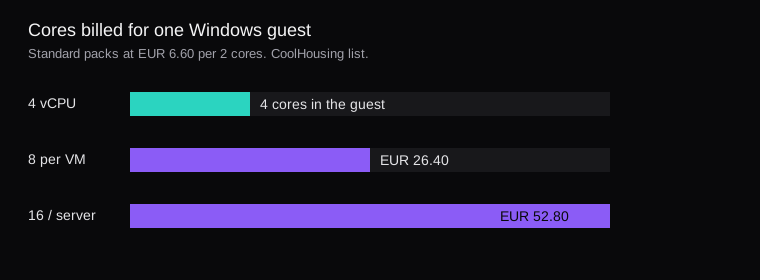
Microsoft's Windows Server 2025 guidance has two counts. Licensed by the metal, every physical core is covered, with a floor of 8 cores per processor and 16 cores per server. Licensed by the virtual machine, the count is the guest's virtual cores, with a floor of 8 per VM, and that path requires a subscription licence or Software Assurance. Core licences sell in 2-packs. A 4 vCPU guest is under the floor, so the per-VM line is 8 cores. A 12 vCPU guest is 12.
CoolHousing's SPLA rental list prices Windows Standard at €6.60 per 2 cores and €26.40 for the 8-core minimum. Datacenter is €41 per 2 cores and €164 for the same 8-core minimum. Four packs of Standard are the €26.40 row. This lab server has one processor and 4 cores, so the physical floor is the 16-core server minimum, eight packs, €52.80 of Standard a month. That physical set covers two OSEs. A third Windows guest on Standard means another full set. The per-VM path bills that one guest at 8 cores.
The same price list has Remote Desktop at €8 a CAL a month. That row is separate from the core packs. The January 2025 SPLA increase on Standard and Datacenter is in the hosting price-change log.
A Windows image in NodeRings is a VM template: a Proxmox VMID you register on the node, the same way the Linux images are registered. The required catalog on that page is Linux. There is a separate CPU field on the template record, and the clone still applies the node's CPU type afterwards. The licence is the pack count above, on the invoice next to that VMID. Set the node CPU type before the first Windows clone, or the guest comes up on host with an 8-core bill already attached.