
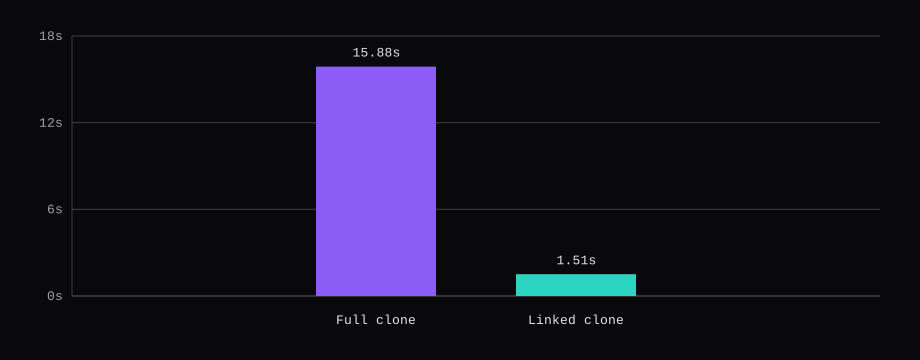
The file is ubuntu-26.04-server-cloudimg-amd64.img. SHA256 5645d0318ad21f643ebb1ac4567514620e9893380b07b0201fda163baa5b7eb5. It is 819 MiB on disk and 3.5 GiB once the guest sees it. VM 9000 holds that disk as a template. A full clone took 15.88 seconds, a linked clone took 1.51 seconds, and SSH as deploy reached 192.0.2.10/24 on eth0.
The first start of the clone never got an address. Proxmox writes the NIC name eth0 into the cloud-init seed. This image boots the virtio NIC as ens18. cloud-init 26.1 then tries to rename it, the interface is busy, and the static address stays off the wire. systemd-networkd-wait-online failed after 2 minutes 11 seconds. net.ifnames=0 biosdevname=0 on the kernel command line makes the guest call that NIC eth0 before cloud-init runs, which is the name already in the seed. The next start answered SSH.
| What | This template |
|---|---|
| Image | ubuntu-26.04-server-cloudimg-amd64.img, 819 MiB file, 3.5 GiB disk |
| SHA256 | 5645d0318ad21f643ebb1ac4567514620e9893380b07b0201fda163baa5b7eb5 |
| VM | 9000, ubuntu-2604, CPU host, 2 cores, 2048 MB |
| Disk | scsi0 on local-lvm, virtio SCSI, 3584M |
| Cloud-init | ide2, user deploy, upgrade packages off, 192.0.2.10/24 |
| Clone | full 15.88 s, linked 1.51 s, one run each |
| Login | deploy by key. A password attempt got Permission denied (publickey). |

The node is the one from Install Proxmox VE 9 on bare metal: pve-manager 9.2.24, storage local-lvm, bridge vmbr0.
Check the Ubuntu 26.04 cloud image
Ubuntu publishes the image at https://cloud-images.ubuntu.com/releases/26.04/release/ubuntu-26.04-server-cloudimg-amd64.img. The hash above is the line in SHA256SUMS for that filename. There is a second build, ubuntu-26.04-server-cloudimg-amd64v3.img. It is a different file. This template uses the plain amd64 image.
qemu-img info reports qcow2, virtual size 3.5 GiB (3758096384 bytes), disk size 819 MiB. The file itself is 859090944 bytes.

Create the VM and import the disk
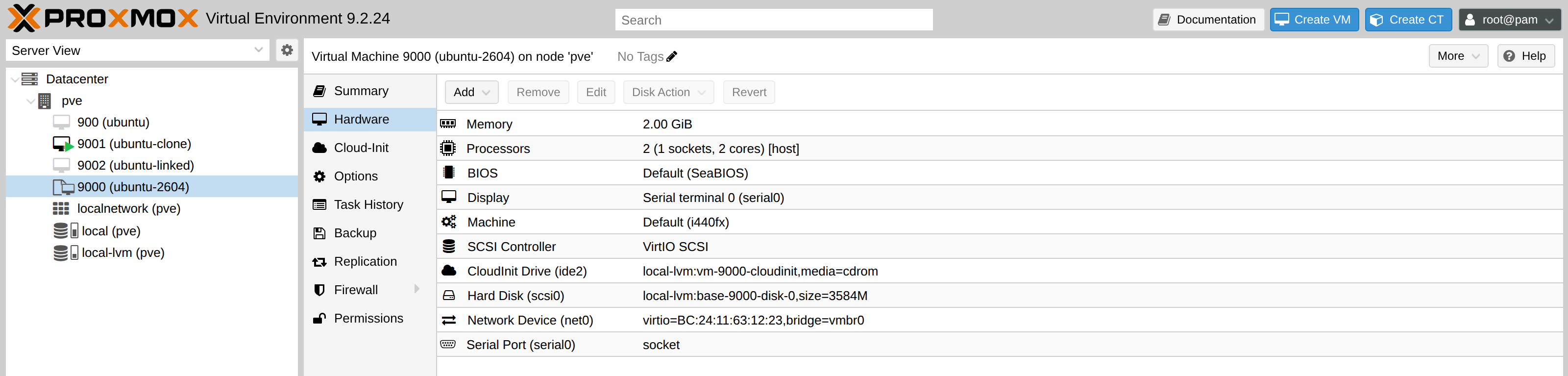
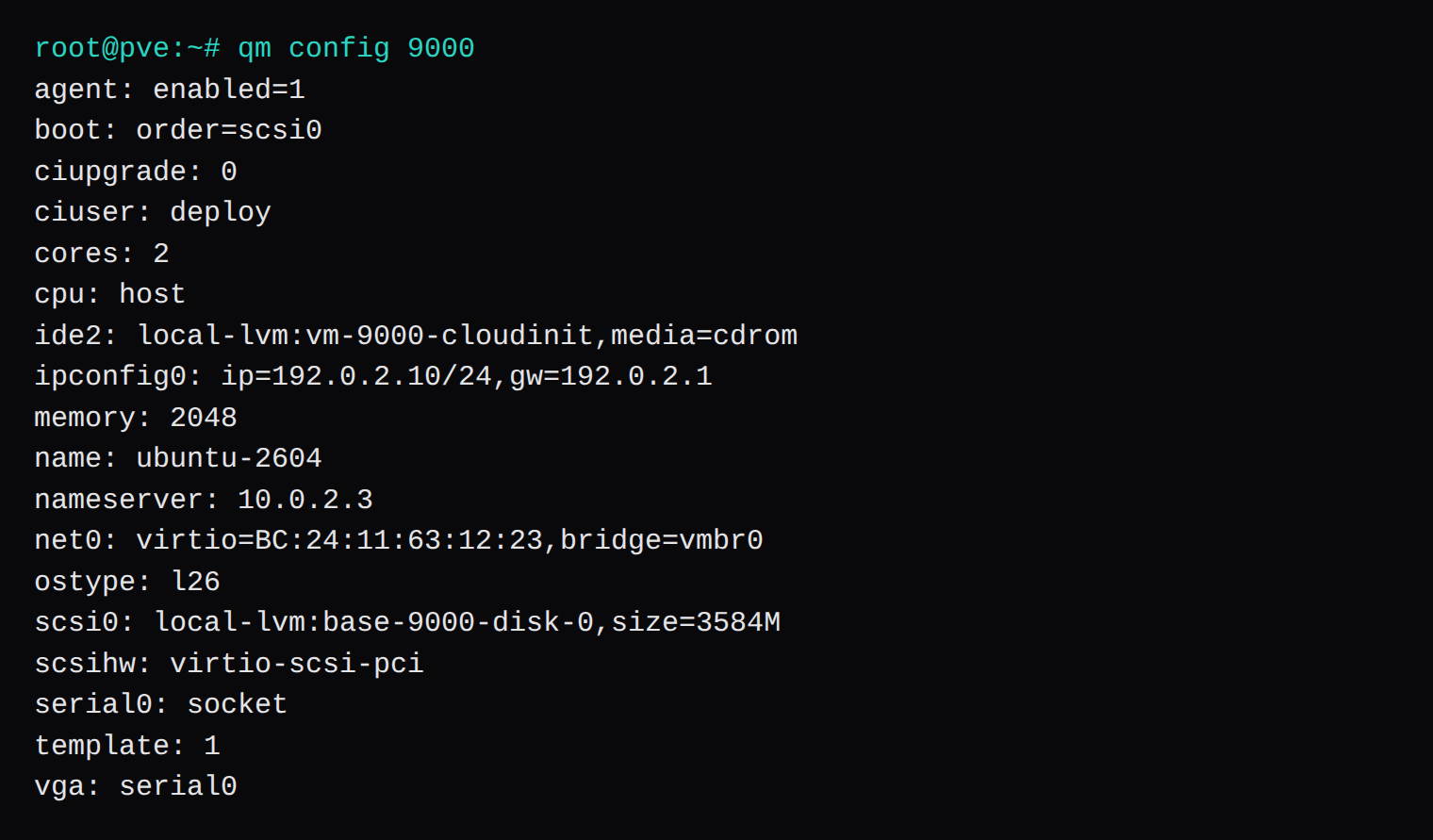
qm create reserves the VMID. The disk arrives with import-from, the current form of the older qm importdisk command. CPU type host is set on that create, because a new VM still defaults to kvm64. The VM templates guide says kvm64 is too old for several current images, which then die at boot with Fatal glibc error: CPU does not support x86-64-v2. This guest was created with host. The glibc error is from that guide, and this clone never printed it.
serial0 with vga set to serial0 puts the login prompt on the serial terminal. The image already boots with console=ttyS0. agent: enabled=1 adds the virtio channel and leaves qemu-guest-agent uninstalled.
qm create 9000 --name ubuntu-2604 --memory 2048 --cores 2 --cpu host \
  --net0 virtio,bridge=vmbr0 --scsihw virtio-scsi-pci --ostype l26 \
  --agent enabled=1 --serial0 socket --vga serial0
qm set 9000 --scsi0 local-lvm:0,import-from=/var/lib/vz/template/iso/ubuntu-26.04-server-cloudimg-amd64.img
qm set 9000 --ide2 local-lvm:cloudinit --boot order=scsi0
The import created local-lvm:vm-9000-disk-0 at 3584M. After qm template, that volume is renamed base-9000-disk-0. Boot order scsi0 makes the guest disk the boot device. The cloud-init CD is a 4 MiB seed on ide2.
local-lvm is an LVM-thin pool. The import and the full clone both printed a warning that the sum of the thin volumes was past the pool and the free space in the volume group. The full clone's line was:
WARNING: Sum of all thin volume sizes (<15.01 GiB) exceeds the size of thin pool pve/data and the amount of free space in volume group (<4.88 GiB).The copy still finished, and lvs then showed the pool 40% used. A pool that is out of extents fails the copy. ZFS vs LVM vs Ceph is the disk question if local-lvm is still a choice.
Set the user, the key, and the address
On this 9.2.24 node the Cloud-Init tab shows User deploy, Password none, Upgrade packages No (--ciupgrade 0), and IP Config ip=192.0.2.10/24,gw=192.0.2.1. DNS domain stayed on "use host settings", so the seed took the search domain example-hosting.com from the node. The nameserver is 10.0.2.3, the resolver this lab already had.
qm set 9000 --ciuser deploy --sshkeys /root/deploy.pub \
  --ipconfig0 ip=192.0.2.10/24,gw=192.0.2.1 --nameserver 10.0.2.3
qm set 9000 --ciupgrade 0
/root/deploy.pub is an ed25519 public key, and the tab shows its comment, [email protected]. qm cloudinit dump 9000 user lists user deploy and one ssh_authorized_keys entry. Before --ciupgrade 0 that dump also contained package_upgrade: true, so the first boot waits on apt. With the flag, the line is gone.
192.0.2.10/24 via 192.0.2.1 is a static address on vmbr0. This bridge had no DHCP for guests, so the node holds 192.0.2.1/24 and the clone uses it as the gateway. A bridge that serves DHCP can take ip=dhcp instead. Clone 9002 copied the same ipconfig0 and was left stopped. Two guests with one address fight over ARP as soon as both are running.

The drive on ide2, the boot order, and import-from are the Proxmox cloud-init steps. On start the node prints generating cloud-init ISO. The guest reported DataSourceNoCloud with seed=/dev/sr0, which is that CD.
The first boot has no IP address
The serial terminal reaches ubuntu-clone login: while ping still fails. The line in /var/log/cloud-init.log is:
net[WARNING]: Unable to rename interfaces: [['bc:24:11:c8:e6:21', 'eth0', None, None]] due to errors: ['[busy] Error renaming mac=bc:24:11:c8:e6:21 from ens18 to eth0']That MAC belongs to the clone. VM 9000's hardware page still shows BC:24:11:63:12:23. The guest had already brought the virtio NIC up as ens18, cloud-init 26.1 left the busy name alone, and netplan went on matching eth0, so 192.0.2.10 stayed unassigned. The same failure is cloud-init issue 6887. systemd-networkd-wait-online ran for 2 minutes 11 seconds and failed, and SSH to 192.0.2.10 timed out for the whole first start.
The kernel has to call the NIC eth0 before cloud-init starts. The GRUB line already contains console=tty1 console=ttyS0. Add net.ifnames=0 biosdevname=0 there, and to GRUB_CMDLINE_LINUX_DEFAULT in /etc/default/grub.d/50-cloudimg-settings.cfg, so a later update-grub keeps it.
On this image, blkid shows partition 1 as cloudimg-rootfs and partition 13, label BOOT, as the filesystem with /grub/grub.cfg. Change the normal linux lines. Leave the recovery entry alone.
qm stop 9001
lvchange -ay /dev/pve/vm-9001-disk-0
dev=$(losetup -fP --show /dev/pve/vm-9001-disk-0)
mkdir -p /mnt/boot /mnt/root
mount "${dev}p13" /mnt/boot
mount "${dev}p1" /mnt/root
sed -i '/recovery/!s|console=tty1 console=ttyS0$|console=tty1 console=ttyS0 net.ifnames=0 biosdevname=0|' /mnt/boot/grub/grub.cfg
sed -i 's|GRUB_CMDLINE_LINUX_DEFAULT="console=tty1 console=ttyS0"|GRUB_CMDLINE_LINUX_DEFAULT="console=tty1 console=ttyS0 net.ifnames=0 biosdevname=0"|' \
  /mnt/root/etc/default/grub.d/50-cloudimg-settings.cfg
umount /mnt/boot /mnt/root
losetup -d "$dev"
A read-only mount of a guest that has already been started can fail with recovery required on readonly filesystem. Mount that disk read-write, then unmount it before qm start. A disk that has never booted does not need the replay.
Do the edit before the first start, and before qm template. After qm template the base volume is read-only. A write to it fails, and lvs shows r on that volume. VM 9000 was already a template when the rename showed up, so these two edits went onto clone 9001. The next start used this command line:
BOOT_IMAGE=/vmlinuz-7.0.0-38-generic root=LABEL=cloudimg-rootfs ro console=tty1 console=ttyS0 net.ifnames=0 biosdevname=0ip -4 addr show eth0 then showed the address, with the predictable names still attached as altnames:
2: eth0: <BROADCAST,MULTICAST,UP,LOWER_UP> mtu 1500 qdisc pfifo_fast state UP group default qlen 1000
    altname enp0s18
    altname ens18
    altname enxbc2411c8e621
    inet 192.0.2.10/24 brd 192.0.2.255 scope global eth0
A clone of the unedited template still has the original GRUB line, so the arguments have to be in the image before qm template.
Convert the VM to a template and clone it
qm template 9000 changes the tree icon to a page and sets template: 1. Do that before the first start. A boot before it writes one set of SSH host keys into the image, and every clone inherits them. This template was never started. The clone generated its own host keys on first boot.
qm template 9000
qm clone 9000 9001 --name ubuntu-clone --full 1
qm clone 9000 9002 --name ubuntu-linked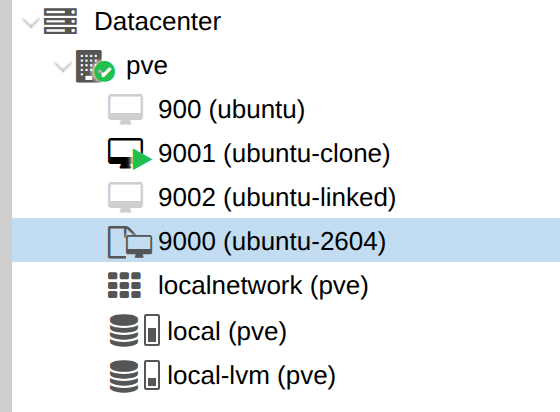
One full clone of the 3.5 GiB disk took 15.88 seconds. One linked clone took 1.51 seconds. The linked clone still copied the 4 MiB cloud-init drive in full. The 3.5 GiB disk was the snapshot. Both numbers are one run on this nested disk.
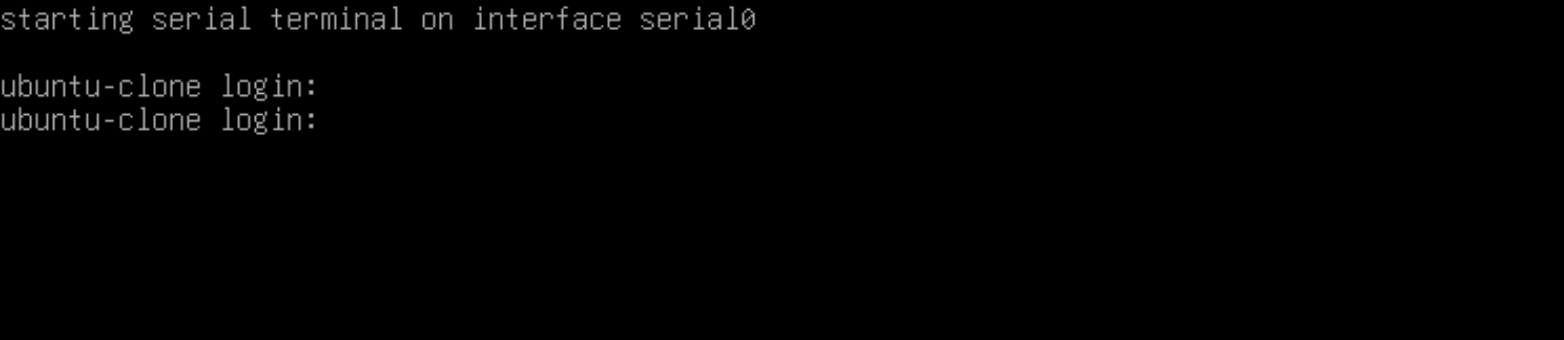
9001 is the guest that was started. With vga set to serial0, the console button opens a serial terminal. It prints starting serial terminal on interface serial0, then ubuntu-clone login:.
SSH into the clone
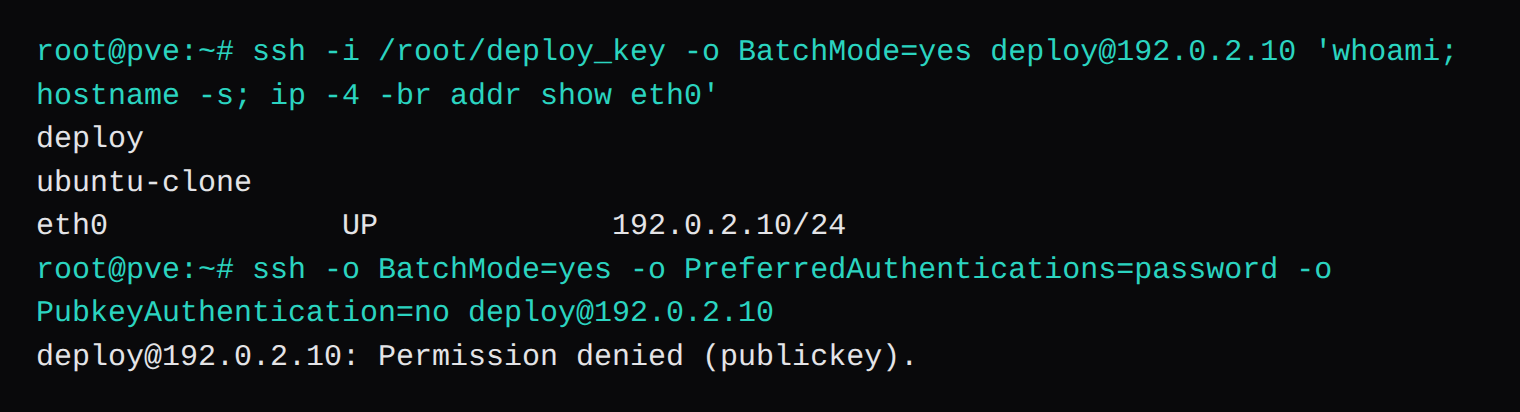
From the Proxmox node, with the private key that matches /root/deploy.pub, the check that succeeded was 72 seconds after qm start on the boot that already had net.ifnames=0. whoami printed deploy, the short hostname was ubuntu-clone, and eth0 was up at 192.0.2.10/24. cloud-init status printed status: done.
A second client that offered only a password, with public-key authentication turned off, got [email protected]: Permission denied (publickey). The image ships PasswordAuthentication no in /etc/ssh/sshd_config.d/60-cloudimg-settings.conf. The commented PasswordAuthentication yes in the main sshd_config loses to that drop-in. The Cloud-Init password row is none, and the account has no password.
qm guest cmd 9001 ping printed QEMU guest agent is not running. dpkg found no package and systemctl reported the unit not-found, so the summary page has an empty IP field while eth0 is already at 192.0.2.10. Proxmox learns that address from the agent.
What NodeRings changes at provision time
Cloud-init templates are the user-data, vendor-data, and network-data for an order. Addresses come from IPAM, static, with the gateway and DNS set in the template. VM templates are the disk you register by VMID. NodeRings does not build that disk. When their provisioner will clone it, leave the Proxmox cloud-init drive off. It removes one if it finds it, and injects a cidata ISO on ide2 when the customer VM is created. The Ubuntu 26.04 example there is UEFI, 1 vCPU, 1024 MB, a 5 GB disk, and --cpu host.
This clone kept the ide2 drive so it could be logged into from the node: SeaBIOS, 2 cores, 2048 MB. The image also has an EFI system partition, which is what that UEFI script boots. SeaBIOS reached ubuntu-clone login: on this disk. The VMID was not registered in the NodeRings UI.
Questions that come up on the first clone
Why does the clone boot with no address?
This image logged the ens18 to eth0 rename and then had no address. An empty ipconfig0 does that too, and so does ip=dhcp when the bridge has no DHCP server. ip -4 addr in the guest, or /var/log/cloud-init.log, tells them apart. ARP on the node stuck at INCOMPLETE means the guest never answered for 192.0.2.10.
Why does SSH say Permission denied (publickey)?
60-cloudimg-settings.conf sets PasswordAuthentication no, so the server offers keys only. The same sentence shows up when the key in --sshkeys is the wrong file, or when a paste split the key across two lines. The Cloud-Init tab should show the comment from your public key. The password row on this template is none.
Why is the console a serial terminal?
vga: serial0 sends the console button to serial0. The working window prints starting serial terminal on interface serial0 and then ubuntu-clone login:. A black window that never prints that line is a quiet serial socket, or a boot order still aimed at the cloud-init CD. This prompt came from boot: order=scsi0 and console=ttyS0 on the kernel line.
Why set the CPU type to host?
A new VM still defaults to kvm64, which lacks the x86-64-v2 instructions current userspace is built for. The VM templates guide quotes the glibc error that follows. host passes the node's CPU through. This template was started with host only.
Why does the guest agent stay down?
agent: enabled=1 is the virtio port. The Ubuntu 26.04 cloud image does not include qemu-guest-agent, so qm guest cmd 9001 ping says the agent is not running and the summary has no guest IP. cloud-init has still put 192.0.2.10 on eth0. The agent is only how Proxmox hears about it.