
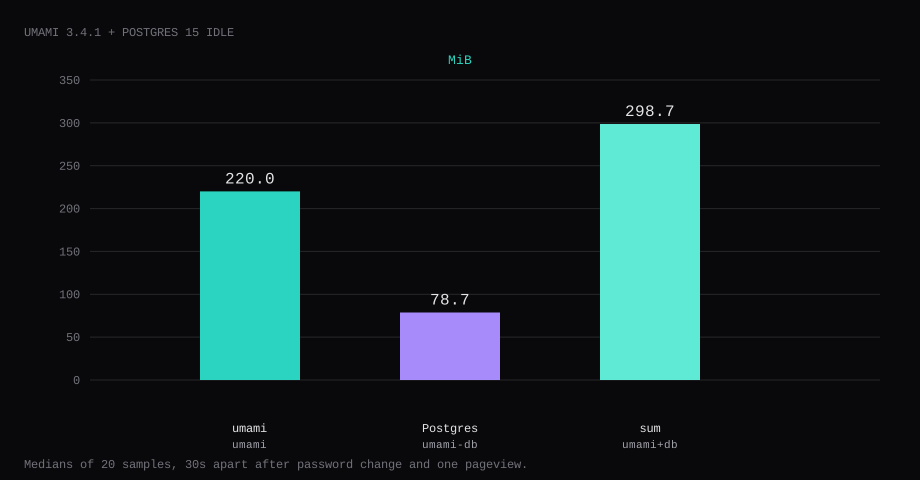
Umami 3.4.1 held 220.0 MiB idle on this lab host after the default password was changed and one website had recorded a pageview. That is cgroup memory.current for the umami container, the median of twenty samples taken 30 seconds apart with a quiet dashboard. docker stats printed 219.7 MiB. Postgres 15 next to it held 78.7 MiB of memory.current (30.9 MiB in docker stats). Together that is about 298.7 MiB before Ubuntu and Caddy. Port 3000 listened on 127.0.0.1 only. A curl to the guest's LAN address on 3000 was refused. /api/heartbeat returned {"ok":true} with no cookie.
Umami is an open-source web and product analytics platform. The docs intro frames it as acquisition, behavior, conversion, retention, and revenue in one place, without cookies or automatic collection of personal data. Self-hosted installs keep that data on your Postgres forever until you delete it; Umami Cloud has its own retention rules. You add a site, drop a small tracker script on pages you care about, and read pageviews, referrers, devices, custom events, funnels, and retention from the dashboard (or the API).
The official compose publishes 3000:3000 and ships example secrets. First login is admin / umami. Pin the digests and publish loopback only. Generate APP_SECRET, change that password before the hostname is public, create one website, and keep Caddy as the only public path.
| Reading | umami | umami-db |
|---|---|---|
cgroup memory.current | 220.0 MiB, median of 20 | 78.7 MiB |
docker stats | 219.7 MiB | 30.9 MiB |
process PSS (smaps) | 273.6 MiB | 33.6 MiB |
| CPU percent | 0.0 | 0.0 |
| Host listener | 127.0.0.1:3000 | unpublished |
| Image | umami:3.4.1 | postgres:15-alpine |
| Skip this | What this run did |
|---|---|
3000:3000 on every interface | Published 127.0.0.1:3000:3000 |
| Leaving admin / umami | Changed the password; old pair returns 401 |
Example APP_SECRET and DB password | openssl rand -hex 32 / mode 600 .env |
| Publishing 5432 | Left Postgres on the Compose network only |
:latest without a digest | Pinned 3.4.1 by digest |
How do you install Umami on Docker?
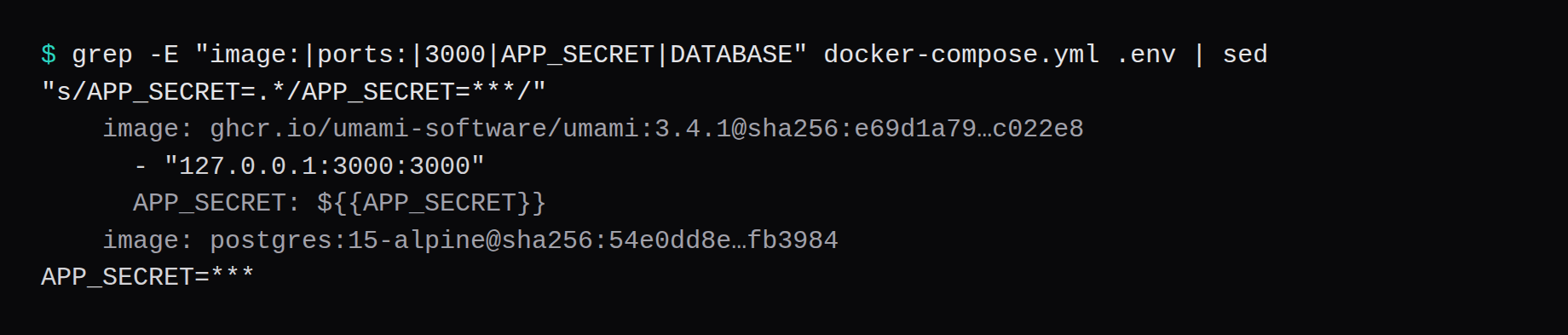
This lab pinned ghcr.io/umami-software/umami:3.4.1@sha256:e69d1a7932e9dab0fc523edc7be1f3a53f3c261f57856fc2167ae74a8fc022e8 and postgres:15-alpine@sha256:54e0dd8e8cddcdbb9156c2486eed5a43eccb7214d7c6828097d41ce049fb3984. On this pull, postgresql-latest pointed at the same digest as 3.4.1. Pin 3.4.1 in Compose.
mkdir -p ~/umami && cd ~/umami
openssl rand -hex 32 | awk '{print "APP_SECRET="$0}' > .env
openssl rand -hex 32 | awk '{print "TWO_FACTOR_ENCRYPTION_KEY="$0}' >> .env
DB=$(openssl rand -hex 16)
echo "POSTGRES_PASSWORD=$DB" >> .env
echo "DATABASE_URL=postgresql://umami:${DB}@db:5432/umami" >> .env
chmod 600 .env
services:
umami:
image: ghcr.io/umami-software/umami:3.4.1@sha256:e69d1a7932e9dab0fc523edc7be1f3a53f3c261f57856fc2167ae74a8fc022e8
container_name: umami
restart: unless-stopped
ports:
- "127.0.0.1:3000:3000"
environment:
DATABASE_URL: ${DATABASE_URL}
APP_SECRET: ${APP_SECRET}
TWO_FACTOR_ENCRYPTION_KEY: ${TWO_FACTOR_ENCRYPTION_KEY}
depends_on:
db:
condition: service_healthy
init: true
logging:
driver: json-file
options:
max-size: "10m"
max-file: "3"
db:
image: postgres:15-alpine@sha256:54e0dd8e8cddcdbb9156c2486eed5a43eccb7214d7c6828097d41ce049fb3984
container_name: umami-db
restart: unless-stopped
environment:
POSTGRES_DB: umami
POSTGRES_USER: umami
POSTGRES_PASSWORD: ${POSTGRES_PASSWORD}
volumes:
- ./pgdata:/var/lib/postgresql/data
healthcheck:
test: ["CMD-SHELL", "pg_isready -U $${POSTGRES_USER} -d $${POSTGRES_DB}"]
interval: 5s
timeout: 5s
retries: 10docker compose up -d
curl -sS http://127.0.0.1:3000/api/heartbeatYou want {"ok":true} once migrations finish. Log rotation matches the Compose checklist.
Why must 3000 stay on loopback?
Umami is the analytics dashboard and the ingest endpoint on one port. Publishing 3000 on every interface puts admin login on the internet without TLS.
ss -H -lntup | grep 3000On this host that printed 127.0.0.1:3000. Curl to 192.168.1.150:3000 failed with connection refused. Leave 3000 and 5432 closed in the panel firewall. Open 80 and 443 for Caddy. Docker published ports often bypass UFW inside the guest, so the loopback bind is what kept the LAN address quiet. The public-address case is in provider-side firewall.

What can Umami do once a site is tracking?
Out of the box the tracker records pageviews, visitors, bounce rate, visit time, referrers, countries, and devices. The marketing side covers UTM campaigns and channel attribution. Beyond pageviews you can define custom events (button clicks, signups, downloads), build funnels, look at journeys, and run retention cohorts that show how many people from a first-visit day come back later. Product analytics pieces such as heatmaps and session replay show up in the Cloud feature set; self-host still gives you events, funnels, retention, and the REST API. There is also an official MCP server for AI assistants that can query traffic and funnels with your existing permissions.
Privacy is the selling point versus Google Analytics: no cookies by default, no personal data collected automatically. Anything you send yourself through umami.identify() or event properties is your responsibility. For a personal blog or a product marketing site that is usually enough to replace a SaaS cookie banner stack.
How do you change admin / umami?
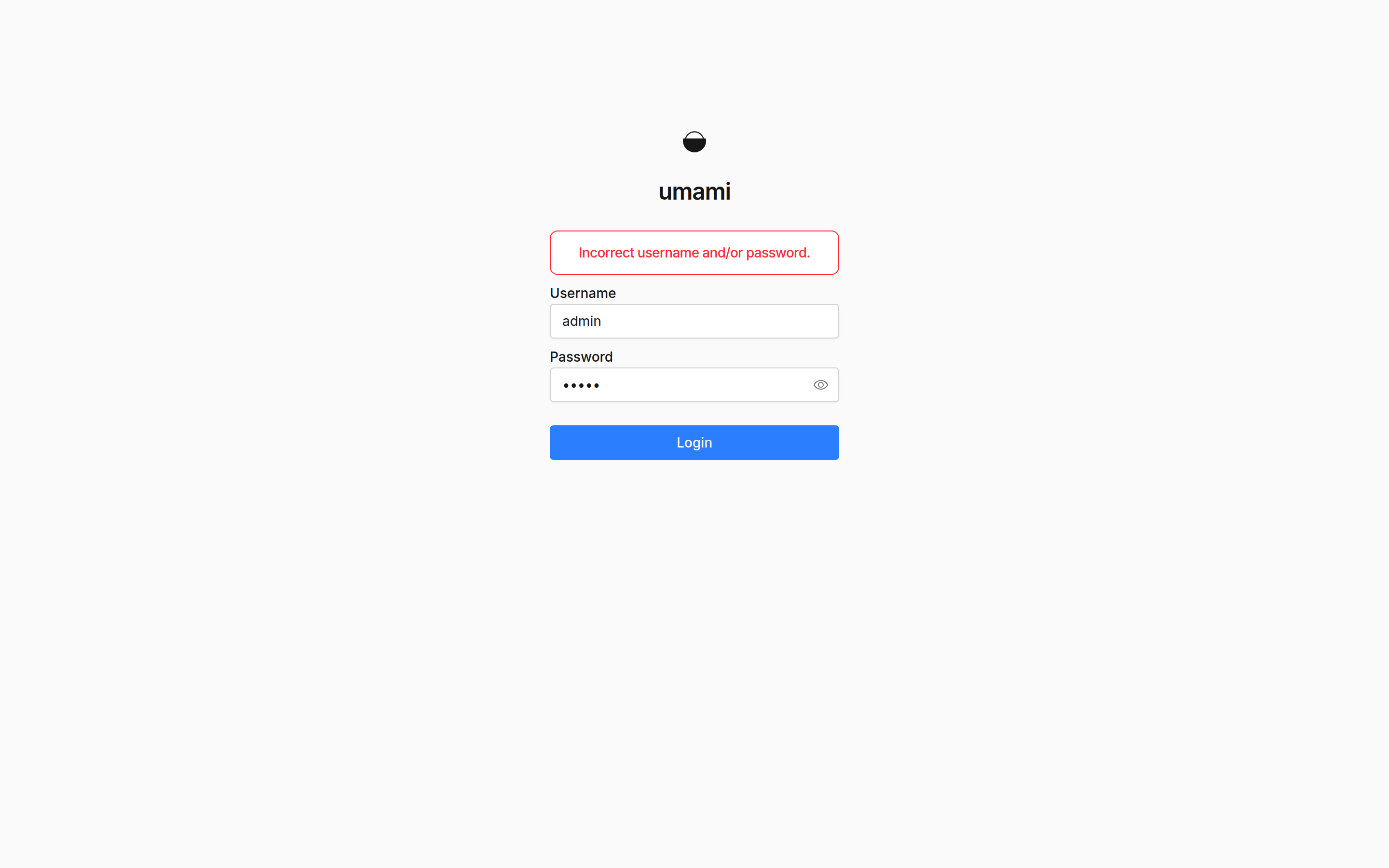
First login is username admin and password umami. The install docs say to change that immediately, so after the first token login, this lab posted {"password":"…"} to POST /api/users/{id}. A second login with admin / umami returned HTTP 401 incorrect-username-password. The new password signed in and reached the websites list.
Crop the new password from screenshots and shell history. Change it before DNS points at the box.
What does one website prove?
Create a website with a name and a domain (this lab used "Lab Site" and lab.example.com). The UI prints a tracker script keyed by the website id. After one POST /api/send pageview, the stats API showed pageviews: 1, visitors: 1.
curl -sS -X POST http://127.0.0.1:3000/api/send \
  -H 'Content-Type: application/json' \
  -d '{"type":"event","payload":{"website":"YOUR_WEBSITE_ID","hostname":"lab.example.com","language":"en-US","referrer":"","screen":"1440x900","title":"Lab home","url":"/"}}'
/api/heartbeat stays open without a cookie. Other /api routes that change state need a session.
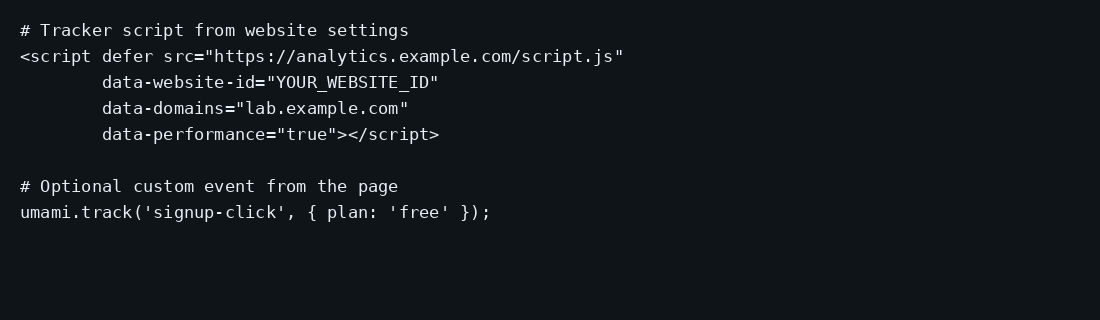
Paste the tracker from the site settings into your layout. The tracker configuration page documents data-host-url when the script is served from a different host than the ingest URL, data-domains so staging hosts stay quiet, data-performance for Core Web Vitals, and data-errors for uncaught exceptions (newer releases). Custom events use umami.track('event-name', { … }) from tracker functions.
<script defer src="https://analytics.example.com/script.js"
        data-website-id="YOUR_WEBSITE_ID"
        data-domains="lab.example.com"
        data-performance="true"></script>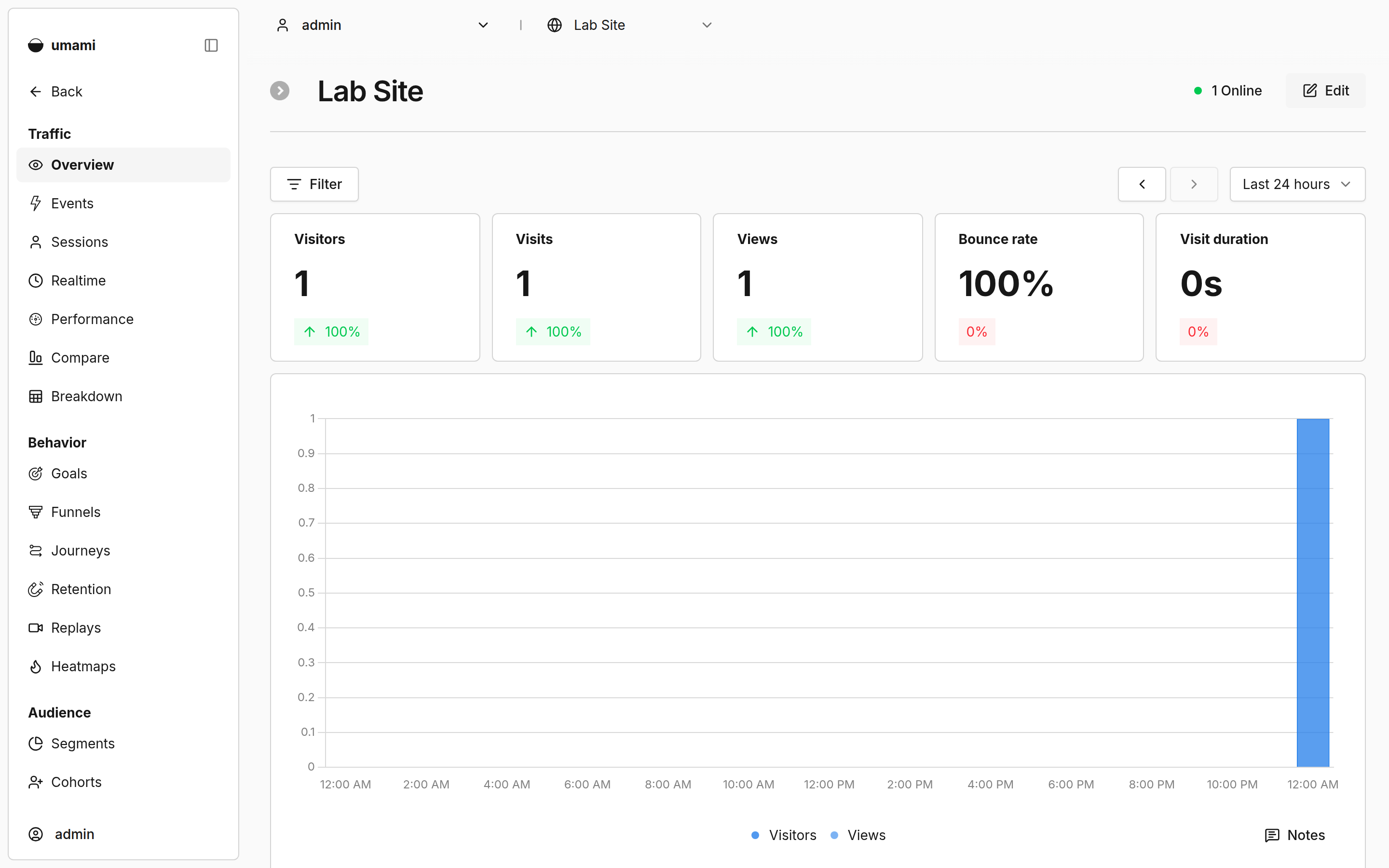
How do you fine-tune a self-hosted Umami?
Compose already carries APP_SECRET and TWO_FACTOR_ENCRYPTION_KEY. Keep APP_SECRET stable across restarts and restores: changing it invalidates login sessions (upstream note) and rewires how visit ids are derived, so treat a secret rotation as a deliberate cutover. Turn on 2FA for the admin after the password change. Set TRUSTED_PROXIES so client IP and geo look right behind Caddy; the env docs allow presets such as loopback or explicit CIDRs, and warn against a blanket private list if real visitors also use RFC1918 addresses. Riven Cloud’s Umami guide and HyperDC both change admin/umami over an SSH tunnel before DNS points at the box; that window is worth copying even when Compose already binds loopback. To dodge ad blockers that match /script.js and /api/send, set TRACKER_SCRIPT_NAME and COLLECT_API_ENDPOINT to neutral paths (bypass docs, Vultr’s Umami deploy), and prefer a bland subdomain like stats over analytics (AaronJBecker). DISABLE_TELEMETRY=1 turns off Umami’s own phone-home. If the public hostname differs from the script origin, set the tracker data-host-url to the analytics hostname.
Self-hosted data is retained until you delete it, so plan disk for Postgres growth. A quiet personal site stays small; a busy marketing site with years of events will need vacuum and backup discipline. Share links and teams exist for handing a read-only view to someone else without giving them the admin password. The REST API covers scripted exports if you want a copy outside Postgres.
Team features and some Cloud-only reports are not the point of this VPS run. The install is real when the password is changed, one site has a pageview, and Caddy is the only public listener.
Where does Caddy go?
analytics.example.com {
	reverse_proxy 127.0.0.1:3000
}
Set TRUSTED_PROXIES when you need real client IPs behind the proxy (loopback is enough if Caddy is on the same host). TLS setup is in the Caddy HTTPS post.

How do you back up Postgres?
docker compose exec -T db \
  pg_dump -U umami umami > umami.sql
On this lab the dump was about 48 KB after one site and one pageview. Point Restic at that file, or at a consistent snapshot of pgdata/.

FAQ
SQLite? Production Umami wants PostgreSQL (minimum 12.14). This compose uses 15-alpine.
Is postgresql-latest the same as 3.4.1? On this pull they shared one digest. Pin 3.4.1 in Compose so a floating tag cannot drift.
DISABLE_LOGIN? Leave it unset on a real site. The dashboard needs the admin account.
Umami or Plausible? Both are privacy-oriented analytics. Plausible is a lighter traffic dashboard with a commercial core. Umami’s open-source tree now pushes further into events, funnels, and retention. This post measures Umami.
How long is data kept? On self-host, until you delete it. Schedule pg_dump and watch pgdata size.
Can I track multiple sites? Yes. Each website gets its own id and tracker snippet. Idle RAM here is one site with one pageview; more sites share the same containers.
Does UFW block a published 3000? Often not inside the guest. Bind 127.0.0.1:3000:3000 and leave 3000 closed on the panel firewall.