
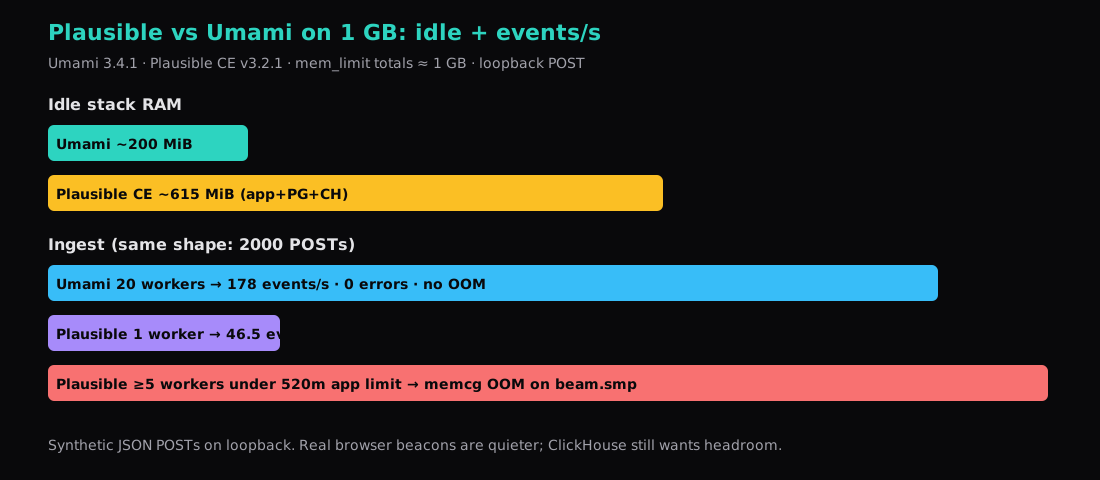
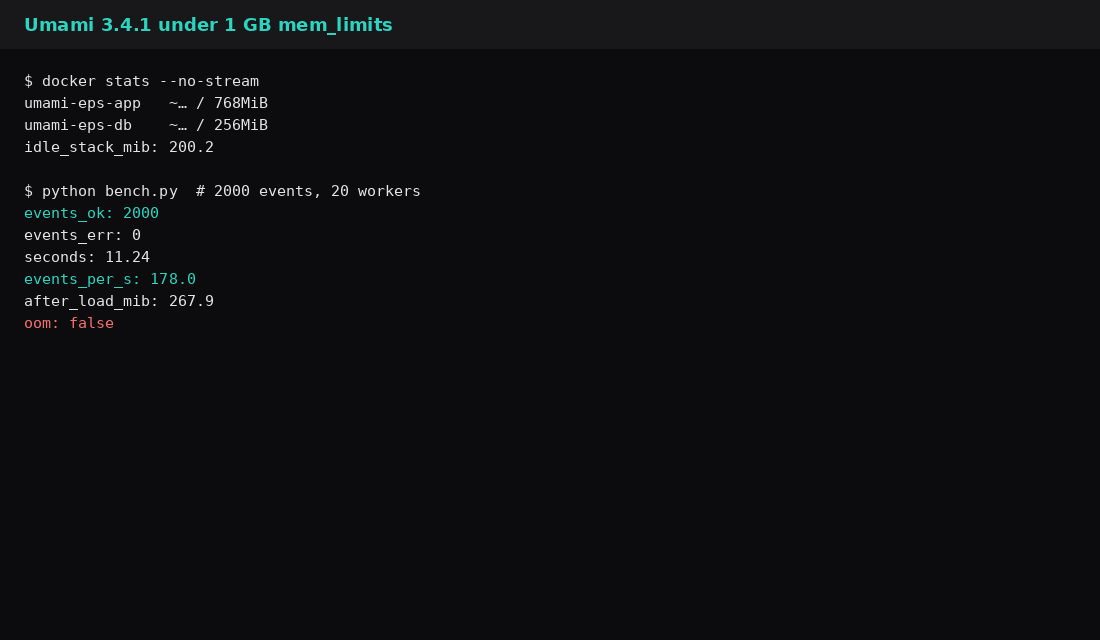
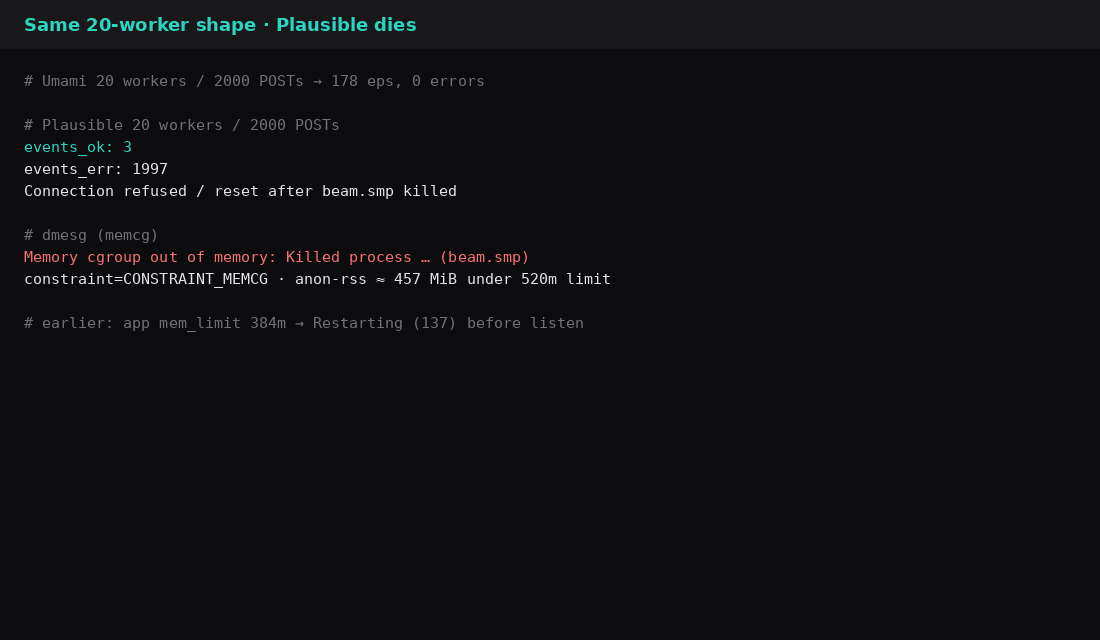
Umami 3.4.1 under Docker mem_limit of 768m for the app and 256m for Postgres accepted 2000 parallel pageview POSTs in 11.24 seconds: 178 events per second, zero errors, stack RAM about 200 MiB idle and 268 MiB after the load. Plausible Community Edition v3.2.1 with Postgres 16 and ClickHouse 24.12, limits split to 520m + 200m + 280m (1 GB total), idled near 615 MiB. One worker pushed about 46.5 events/s across 2000 sequential /api/event calls. Five or twenty workers under the same 520m app cgroup got the BEAM process killed by the memory controller (dmesg: CONSTRAINT_MEMCG on beam.smp).
| Stack | Idle (docker stats sum) | Load shape | Events/s | Errors | OOM |
|---|---|---|---|---|---|
| Umami 3.4.1 + PG15 | ~200 MiB | 2000 POST, 20 workers | 178 | 0 | no |
| Plausible CE v3.2.1 + PG16 + CH | ~615 MiB | 2000 POST, 1 worker | 46.5 | 0 | no |
| Plausible CE (same limits) | ~615 MiB | 2000 POST, 20 workers | crash | ~1997 | yes (memcg) |
Umami on a VPS already covers install hygiene (loopback, secrets, Caddy). The search that sits next to that post is this one: which privacy analytics stack still accepts events when the SKU is 1 GB.
Two containers vs three
Umami is the app plus Postgres. Plausible CE adds ClickHouse for events. Official Plausible self-host docs lean on roughly 2 GB of RAM for a comfortable CE box. Fitting CE into a 1 GB mem_limit budget means starving something. With the app at 384m beside ClickHouse and Postgres, the container never finished boot (Restarting (137)). Redistributing to 520 / 200 / 280 let /api/health return {"sessions":"ok","postgres":"ok","clickhouse":"ok",...} and left roughly 385 MiB unused at idle, which concurrent ingest then spent.
# Umami lab (compose excerpt)
services:
  db:
    image: postgres:15-alpine
    mem_limit: 256m
  umami:
    image: ghcr.io/umami-software/umami:3.4.1
    mem_limit: 768m
    ports: ["127.0.0.1:3010:3000"]
# Plausible CE override on top of the official clone
services:
plausible:
ports: ["127.0.0.1:8011:80"]
mem_limit: 520m
plausible_db:
mem_limit: 200m
plausible_events_db:
mem_limit: 280m# Plausible .env (lab)
BASE_URL=http://127.0.0.1:8011
SECRET_KEY_BASE=$(openssl rand -hex 64)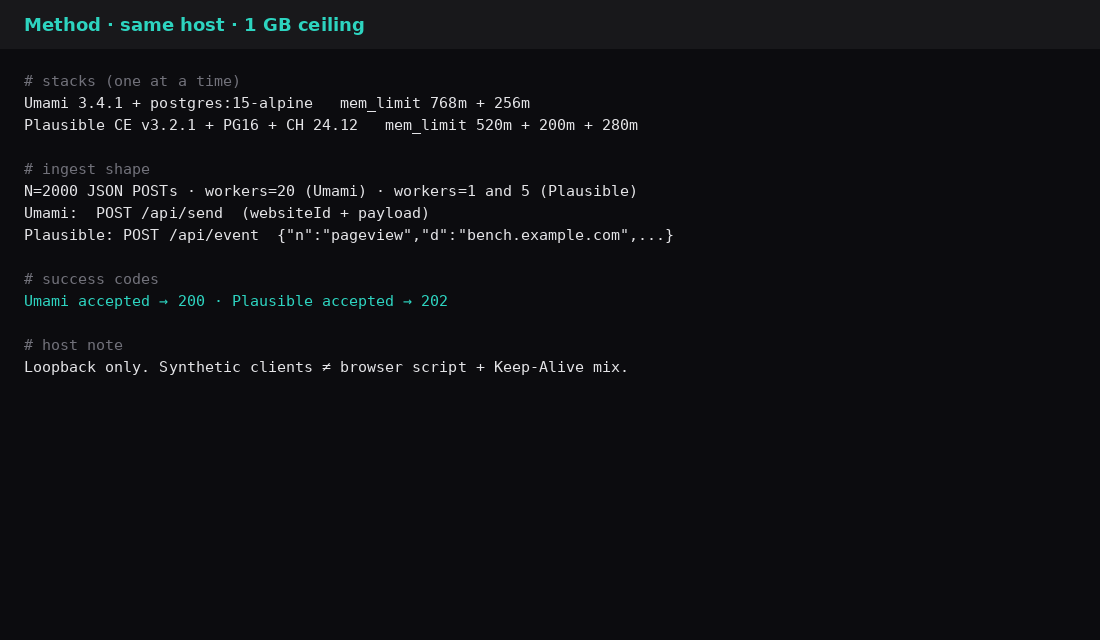
How the ingest was measured
Both stacks got a site first. Umami: create a website via the API, then POST /api/send with that websiteId. Plausible: register a user and Plausible.Sites.create for bench.example.com, then POST /api/event with "d":"bench.example.com". Success codes were 200 (Umami) and 202 (Plausible).
# Plausible smoke (after a site exists)
curl -s -o /dev/null -w '%{http_code}\n' -X POST http://127.0.0.1:8011/api/event \
  -H 'Content-Type: application/json' \
  -H 'User-Agent: Mozilla/5.0' \
  -d '{"n":"pageview","u":"https://bench.example.com/","d":"bench.example.com","r":null}'
# 202
# Shape used for both benches (Python ThreadPoolExecutor)
N, WORKERS = 2000, 20 # Plausible also run at WORKERS=1 and WORKERS=5
# POST JSON body to /api/send or /api/event
# count HTTP 200/202 vs errors; elapsed = wall time; eps = ok / elapsedThese are synthetic clients on loopback. Real browsers send fewer concurrent beacons and keep connections differently. The comparison still holds for what happens when a burst hits a memory-capped box.
Umami under the 1 GB ceiling
Idle stack about 200 MiB. After 2000 events at 20 workers: about 268 MiB, oom: false, 178 events/s.
| Field | Value |
|---|---|
| Version | Umami 3.4.1 + Postgres 15 |
| mem_limit | 768m + 256m |
| Idle stack | ~200 MiB |
| After load | ~268 MiB |
| Events OK / err | 2000 / 0 |
| Wall time | 11.24 s |
| Events/s | 178 |
Plausible CE under the same ceiling
Health was green. Idle hovered around 615 MiB with the app near 400 MiB of its 520m limit. Sequential ingest stayed healthy at 46.5 events/s for 2000 calls. Raising concurrency to five workers was enough to trip the cgroup killer on beam.smp. Twenty workers matched the Umami method and left almost every request as connection refused while the container restarted.
| Field | Value |
|---|---|
| Version | CE ghcr.io/plausible/community-edition:v3.2.1 |
| mem_limit | 520m + 200m + 280m |
| Idle stack | ~615 MiB |
| Seq 2000 / 1 worker | 46.5 events/s, 0 errors |
| Parallel 20 workers | OOM on beam.smp, ~3 OK then refuse |
| App at 384m (earlier try) | Exit 137 before listen |
# dmesg excerpt during the parallel run
Memory cgroup out of memory: Killed process … (beam.smp)
constraint=CONSTRAINT_MEMCG
anon-rss ≈ 457 MiB  (under the 520m app limit)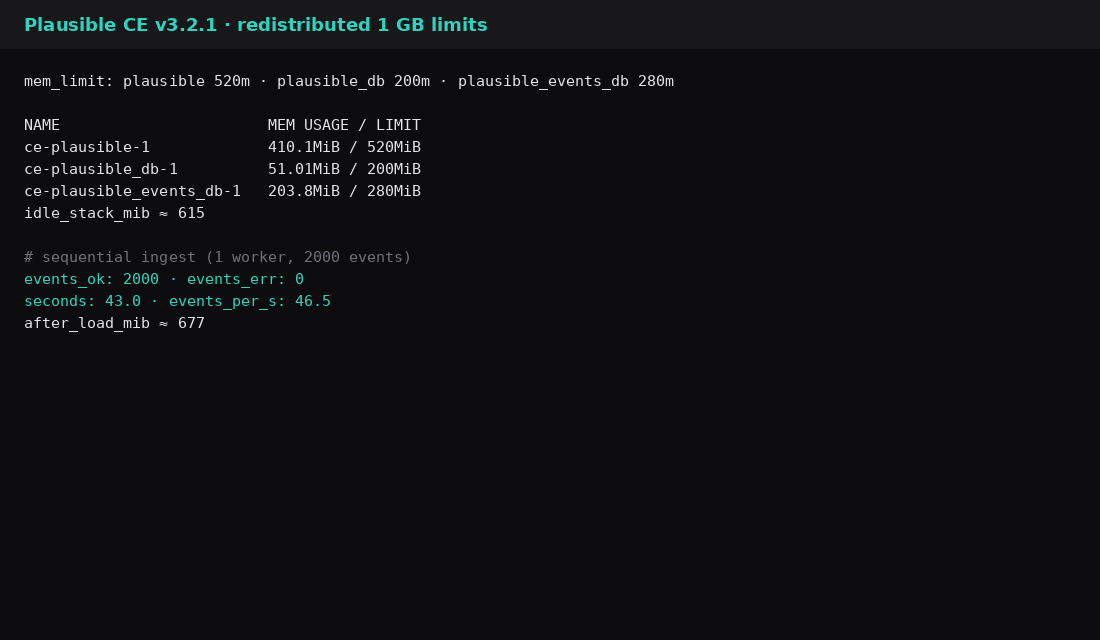
Which one to run on 1 GB
| You have | Lean this way |
|---|---|
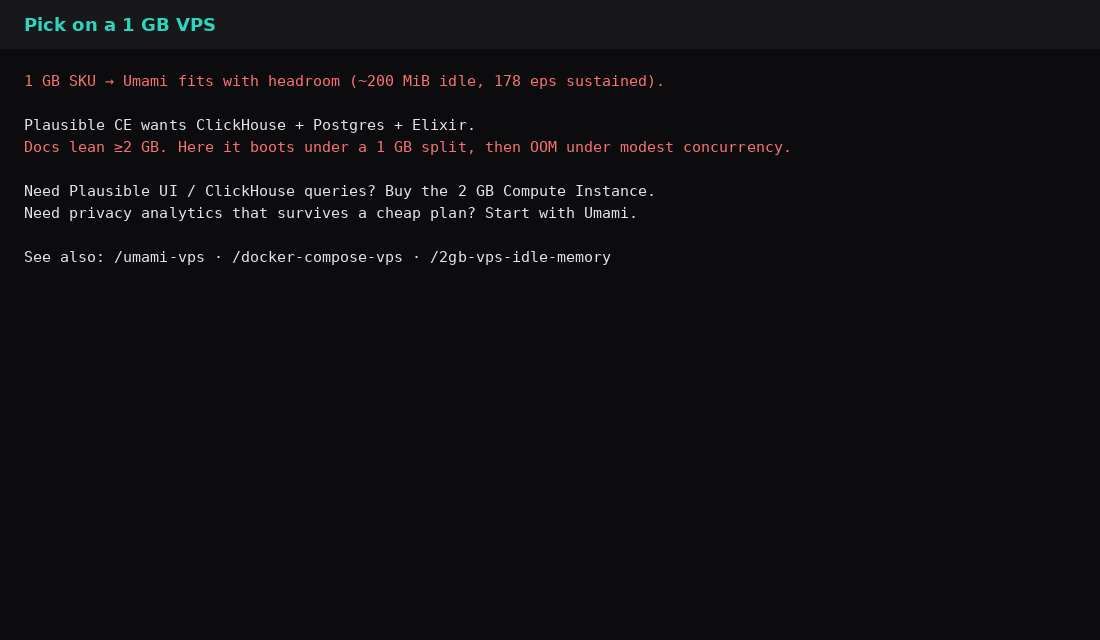
| A 1 GB VPS and you need analytics that survives bursts | Umami |
| You want Plausible’s product and ClickHouse queries | Plan a 2 GB box (or follow CE’s own guidance) |
| You already know Umami’s UI and want install steps | Umami on a VPS |
| You are comparing idle RSS across apps | What fits on a 2 GB VPS |
| Skip this | What this lab did |
|---|---|
| Running both stacks at once on 1 GB | One stack at a time |
| Treating vendor “2 GB” as idle usage | Measured idle and load under mem_limit |
Publishing app ports on 0.0.0.0 | Loopback binds only |
| Equating browser traffic with synthetic POSTs | Caveat in the method section |
| Leaving Plausible on 384m app + CH + PG | Recorded the boot OOM, then redistributed |
Why Plausible’s floor sits above Umami’s
Umami’s self-hosted shape is the app plus PostgreSQL (Node 22+ since 3.1.0, Postgres 12.14+). Independent 2026 idle checks land roughly 170–400 MiB depending on version and whether Caddy shares the guest. Plausible Community Edition adds ClickHouse beside Postgres and the Elixir app; the CE README recommends at least 2 GB of RAM and a CPU with SSE 4.2 or NEON. ClickHouse’s own small-RAM tips admit 2 GB is possible only with lowered caches, single query threads, and trimmed log tables, and even then ingestion stays low. That is the mechanism behind Plausible feeling heavy on a 1 GB VPS: three engines, one of them columnar. Licence differs too (Umami MIT, Plausible CE AGPLv3 with an MIT tracker script). Feature splits in current CE vs Umami Cloud/CE guides still matter for Search Console (Plausible) versus funnels/replays (Umami self-hosted), but the RAM decision on a small VPS is mostly ClickHouse yes/no.
FAQ
Does Plausible CE ever fit 1 GB? It can listen if you give the Elixir app most of the budget and keep ClickHouse thin. Concurrent ingest still hit the cgroup wall here. Treat 1 GB as a lab squeeze for CE; buy more RAM before production traffic.
Is 178 events/s enough? For a personal site or a small product, yes. Marketing spikes and multi-site ingest are a different sizing problem; raise workers and watch Postgres and the app RSS.
Umami Cloud or Plausible Cloud instead? Fine if you want someone else to run ClickHouse. This post is about self-host RAM and ingest on a small VPS.
Postgres vs ClickHouse? Umami keeps events in Postgres. Plausible CE uses ClickHouse for the event path, which is why the third container shows up in every RAM discussion.
What to run on the VPS
On a 1 GB Compute Instance, pin Umami + Postgres with loopback ports and Caddy in front, and you still have RAM left after a 178 events/s burst on this lab. If you want Plausible CE, start at 2 GB so ClickHouse and the BEAM VM share less of a knife-edge cgroup, then repeat an ingest check before you point production traffic at /api/event. Compose layout notes live in Docker Compose on a VPS.