
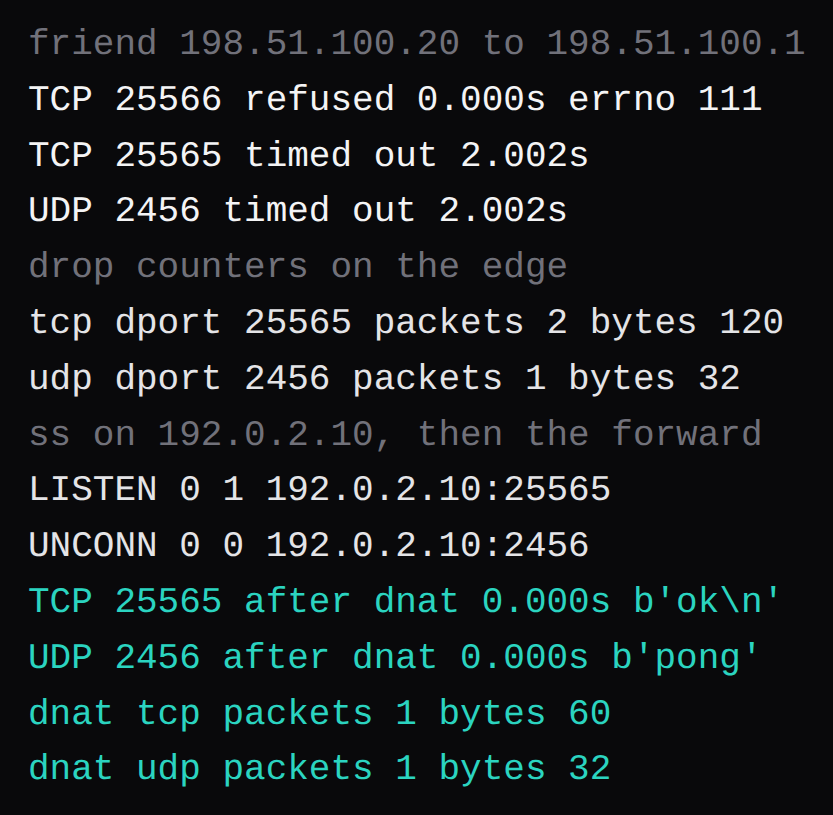
A friend at 198.51.100.20 opened three sockets toward the router at 198.51.100.1. TCP port 25566 came back connection refused in 0.000 seconds, errno 111. TCP 25565 waited 2.002 seconds. A UDP datagram to 2456 waited 2.002 seconds as well. The router was dropping those two on purpose, and the counters moved while the friend waited: 2 packets and 120 bytes on TCP 25565, 1 packet and 32 bytes on UDP 2456. With those drops replaced by destination NAT to 192.0.2.10, TCP 25565 returned the bytes ok in 0.000 seconds, and UDP 2456 returned pong in the same printed time.
Refused means the packet reached a machine and that machine sent a reset. The Paper systemd run hit the same errno 111 on 127.0.0.1:25565 before the process was listening, with UFW already allowing 25565/tcp. A timeout is the other message. The packet was discarded, or the friend sent it to an address some other machine holds. A forward you saved on the home router does not see a packet the friend sent to some other address.
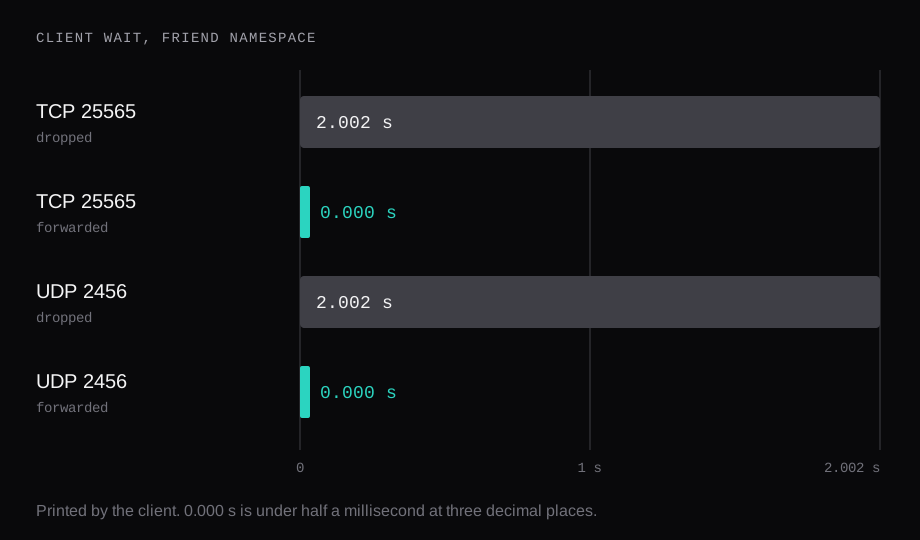
The client printed 0.000 seconds at three decimal places, so the refused connect and both forwarded ones finished in under half a millisecond. The 2.002 second lines are the timeout that client was given, and they line up with the drops.
Why a port forward times out
A port forward is a destination rewrite on the router that owns the address the friend typed. In this lab that address was 198.51.100.1 on the WAN side of one Linux edge, with 192.0.2.10 on the LAN. Until the edge rewrote the destination, a packet for 198.51.100.1:25565 was a packet for the edge itself, and the input drop took it. A process sitting on 192.0.2.10:25565 would have stayed idle through that whole wait, because the friend was aiming at 198.51.100.1.
People mix this up with the outbound rule. A home router masquerades LAN traffic so a laptop can open websites. That rule rewrites the source as packets leave. A friend on the internet is a packet coming in, and the masquerade has already done its job for browsing. The inbound rule is the one that changes the destination, which is what these two drops were standing in for:
iifname "v-edge-wan" tcp dport 25565 \
  counter drop
iifname "v-edge-wan" udp dport 2456 \
  counter drop
The rules that returned ok and pong:
iifname "v-edge-wan" tcp dport 25565 \
  counter dnat to 192.0.2.10:25565
iifname "v-edge-wan" udp dport 2456 \
  counter dnat to 192.0.2.10:2456
ss on the home side, taken while both sockets were open, showed LISTEN on 192.0.2.10:25565 and a UDP socket on 192.0.2.10:2456. The reply needed no extra masquerade. 198.51.100.20 was routed back through the same edge, forwarding was on, and the translation ran in reverse on the way out. One router, and the forward you can see is the forward the packet hits.
The TCP drop counted two packets for one attempt. A two second wait is long enough for the stack to send the SYN again, and two times 60 bytes is the 120 bytes on that counter. The forward's counter read 1 packet and 60 bytes, and the socket still returned ok. UDP sent a single datagram each time: 32 bytes on the drop, 32 bytes on the forward, and the second one came back as pong.
Minecraft, Valheim, Rust: which port
The port number and the protocol are separate boxes on the router. A rule with the right number and the wrong protocol is a rule for a different flow. The lab was that split on purpose. TCP 25565 is the Java port, and it stayed quiet until a TCP rule existed. UDP 2456 is the first port in Valheim's documented range, sent as a datagram, and the TCP rule on 25565 left it unanswered.
| Game | Port | What has to match |
|---|---|---|
| Minecraft Java | 25565 | TCP. Query, if you enable it, is a UDP socket |
| Minecraft Bedrock | 19132 | UDP client transport in the sample, for nethernet |
| Valheim | 2456 and 2457 | That port and the next one. Crossplay uses a relay |
| Rust | 28015 | UDP. Query is a second UDP port. RCON is TCP |
| Palworld | 8211 | Listen port. The community listing port is separate |
| Hytale | 5520 | QUIC over UDP |
Minecraft Java is the clean row. The server.properties page says server-port defaults to 25565 and calls it "The TCP port number the server listens on." The same page gives query.port a default of 25565, calls that one UDP, and it listens when query is enabled. rcon.port defaults to 25575 and is TCP. The Paper unit reached Done and listened on *:25565 with server-port=25565. A forward for the game itself is TCP 25565. A UDP rule on the same number is the query socket, and only after you turn query on.
Bedrock's sample on that wiki sets server-port to 19132, described as the IPv4 port the server listens on, and server-udp-ports to 19132. The second key configures UDP client transport ports. The comment says the property is skipped when transport=raknet, and the sample ships with transport=nethernet. For the file as written, the forward is UDP 19132. With transport=raknet and LAN visibility left on, the server binds 19132 and 19133 even after server-port changes. That is the wiki's own warning about two Bedrock servers on one host.
Valheim's dedicated server guide sets the default range at 2456-2457. -port 2456 picks the first, and the guide says the server uses that port and the next one. The crossplay path, -crossplay, sends through a relay, and the page treats the router forward as something you leave out on that backend. A crossplay join uses the public address, a join code, or the server list. Local addresses and loopback stay off that path. Leave -crossplay out and the Steam backend is what remains, which means the friends who find you there still need 2456 and 2457 open on a router you control.
Rust is plain on the Facepunch wiki. +server.port 28015 is the default, and the page says "This port is UDP." +rcon.port 28016 is TCP. server.queryport defaults to one more than the greater of the server port and the RCON port, it has to differ from server.port, and both the server port and the query port are UDP. Facepunch counts four ports, server and query on UDP, RCON and Rust+ on TCP, and says the server port is the one you need in order to connect and play. Open that UDP port first. If the router offers a single "both" or "all" protocol box, the same page tells you to leave it alone and name UDP. An address in 10.0.0.0/8, 172.16.0.0/12, or 192.168.0.0/16 is the case the guide calls private, and that case needs a public address plus a forward. Set your own RCON password before that port is reachable. The example on the wiki is a placeholder.
Palworld's arguments page sets -port=8211 as the listen port. -publicip and -publicport belong to a community listing. -publicport is the number shown on that listing, and the process keeps listening on -port. playit.gg places Palworld, Valheim, and Hytale on the free tier it groups under UDP. That is playit's classification of the tunnel, next to Pocketpair's port.
Hytale's server manual binds 0.0.0.0:5520 by default and says the protocol is QUIC over UDP. The forward it asks for is UDP 5520. --bind changes the port. The firewall samples on that page are a Windows UDP rule, an iptables UDP accept, and ufw allow 5520/udp. The Hytale hosting notes cover the memory and Java side of the same manual. A TCP rule on 5520 accepts a flow those samples leave out.
How to tell CGNAT from a forward you control
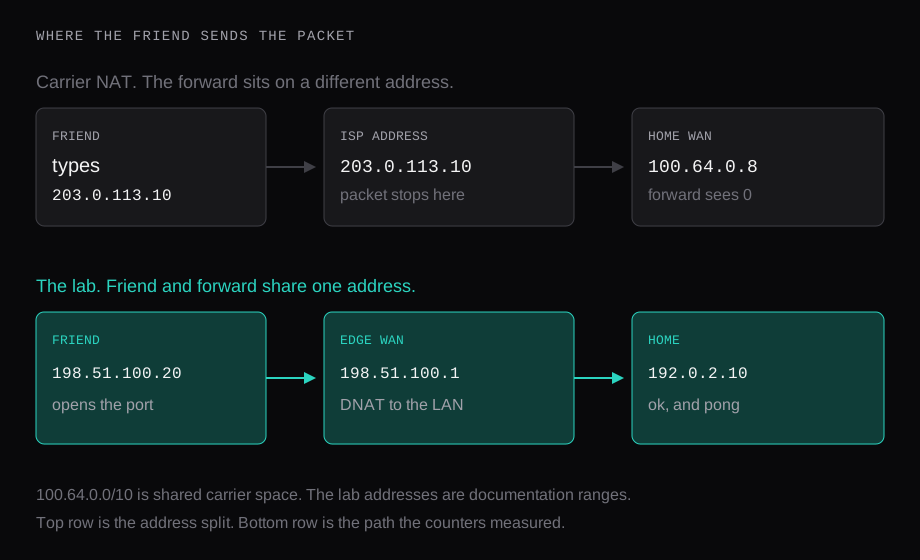
CGNAT is the case where the address on the router's WAN sits in 100.64.0.0/10. That block is shared carrier space, written down in RFC 6598. The drawing uses 100.64.0.8 for the WAN and 203.0.113.10 for the address a friend would have to type, an address on the ISP's side of the carrier NAT. The forward is attached to 100.64.0.8. The friend's packet is addressed to 203.0.113.10. Two machines. The counter on the home router stays at zero while the friend watches the attempt run out, and a fresh edit to the port number leaves that zero where it is.
The check is short. Read the WAN address on the router status page and put it next to the address the friend is typing. When they match, and that address is a public one, the forward is in the path and the counter is the test: have the friend try once, and watch the hit count. When the WAN sits in 100.64.0.0/10, or the two addresses disagree, the screen you are logged into is the wrong box. This lab measured the matching case, 198.51.100.1 on the rule and on the connect. The top of the drawing is the address split. The 2.002 second bars are a drop on a router the packet did reach.
What double NAT looks like on the WAN
Double NAT is the same split one house over, and the WAN address gives it away. It falls inside 10.0.0.0/8, 172.16.0.0/12, or 192.168.0.0/16, the private ranges in RFC 1918. The router you logged into is the inner one. A box in front of it, an ISP gateway, a mesh node, a second router from a move three flats ago, holds the address the internet can route. The inner forward rewrites packets that have already arrived on the inner WAN. The outer box still has to hand the friend's packet inward, and the login for that box often belongs to the ISP.
Facepunch describes those same private ranges for a Rust machine on a LAN, and the fix on that page is a public address plus a forward on the router that owns it. Two routers mean two forwards, protocol and port matched on each, or one of them bridged so a single WAN is the public address. This lab had one edge and one translation, which is why a single pair of rules was enough. I had the gear for that pair. I left a second NAT unstaged.
A tunnel for friends, a public port for everyone else
Once the WAN is stuck at the ISP, saving the forward again leaves the counter at zero. A tunnel gives the friend a different address, one that routes to the machine.
playit.gg says "No port forwarding required." Only the host runs the agent. Friends connect to an address on playit's side, so your home address stays off the invite. The free tier on that page lists Minecraft Java, both Bedrock transports, Palworld, Valheim, and Hytale, grouped under UDP. Games the page marks TCP+UDP sit on the plan priced at $3 a month. You are borrowing their address and their uptime. For a Saturday with four people, that borrow is the whole fix. A public server list is a different job, because the address has to be yours when playit's agent is down.
A virtual LAN, which is what Hamachi was built for, hands the group private addresses, and every friend installs the client. Tailscale, WireGuard, and Headscale are that shape with a key you hold. The group that will install a client can play on it. Someone who found the world on a list arrives with the game and stops there.
A hostname on Cloudflare is HTTP on their edge. That split is the tunnel comparison. Pangolin's raw resources are the other object: an unauthenticated TCP or UDP pipe bound to a port on a VPS, and their docs use a game server as the example. A pipe that carries TCP delivers the Java port from the table. Rust's server port and Hytale's 5520 are UDP, so the pipe has to be UDP or the datagram ends in the same wait as the lab's first attempt on 2456.
A public ip:port is the remaining fix when the server is on a list, when the players will skip an install, or when the WAN sits on a network whose admin login you lack. The game server guide names the connect address as ip:port, and the server page has a Network tab beside Console and Files. The port still has to be allowed in front of the guest. Firewall rules on a Proxmox VM are pushed to the hypervisor. VirtFusion and SolusVM 2 leave that layer with the provider's own networking. The provider firewall piece is a drop in front of the guest that leaves the guest's own ufw counter at zero. A ufw allow on a home PC counts packets that have already arrived. On CGNAT the friend's packet stops at the ISP, and the home counter stays at zero for the same structural reason. On a public address, the provider rule is the counter that has to move.
The Pterodactyl install published 192.0.2.21:25565 as TCP and as UDP. Java needs the TCP publish. The UDP rows in the table need the UDP publish. An allocation that opens one protocol leaves the other game in the 2.002 second wait.
The number worth watching is the counter on the rule that owns the address the friend typed. Here it moved by 2 packets and 120 bytes while TCP 25565 was dropped, and by 1 packet of 60 bytes when that port returned ok. A counter that stays at zero during their attempt is a packet arriving on some other machine, which is the top of the drawing, and another pass at the port on the home router leaves the zero where it is.