
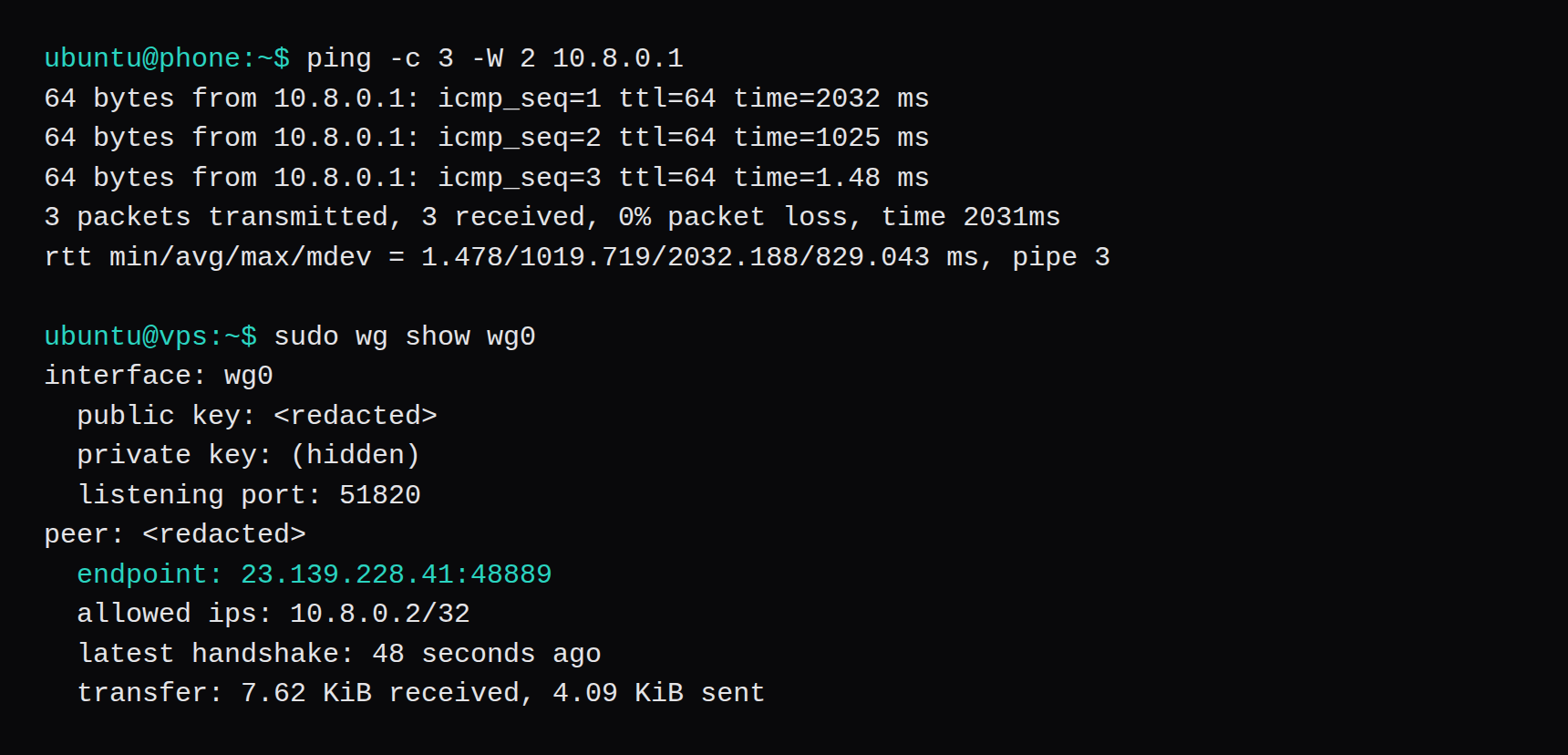
This VPS is running one WireGuard interface and one peer. Ubuntu 26.04.1, kernel 7.0.0-38-generic, systemd-detect-virt printed kvm, and wg --version printed wireguard-tools v1.0.20250521. wg0 holds 10.8.0.1/24 and listens on UDP 51820. The peer is 10.8.0.2/32, the address in the client config the QR encodes. While ufw still denied 51820, wg show on the peer had no handshake line: 296 bytes sent, nothing received, and a ping to 10.8.0.1 lost both packets. ufw allow 51820/udp changed that. The next ping got three replies, at 2032 ms, 1025 ms, and 1.48 ms, and a later wg show on the VPS read latest handshake: 48 seconds ago, with 7.62 KiB received and 4.09 KiB sent. A listener on the VPS saw the peer as 10.8.0.2. The QR figure is that client config, from qrencode on the VPS. The peer was removed and the key files shredded after the capture.
23.139.228.40 is the VPS public address, from NodeRings' 23.139.228.0/24. The client Endpoint is 23.139.228.40:51820. After the handshake, wg show on the VPS learned the phone at 23.139.228.41:48889.
| Piece | What this run used |
|---|---|
| Guest | Ubuntu 26.04.1 LTS (Resolute Raccoon), kernel 7.0.0-38-generic, kvm |
| Packages | wireguard 1.0.20250521-1ubuntu1, wireguard-tools v1.0.20250521, qrencode 4.1.1-2build1 |
| VPS | 23.139.228.40, enp0s3, wg0 at 10.8.0.1/24, UDP 51820 |
| Peer | 23.139.228.41, 10.8.0.2/32, keepalive 25 seconds, fwmark 0xca6c |
| Closed port | no handshake line, 0 B received, 296 B sent, ping 100% loss |
| After UDP 51820 | ping 2032 ms, 1025 ms, then 1.48 ms; handshake 48 seconds ago; 7.62 KiB received, 4.09 KiB sent |
| Through the tunnel | curl to the VPS returned 10.8.0.2; ping to 1.1.1.1 left enp0s3 as 23.139.228.40 |
| Routed TCP | http_code=000 at 5.002595 s, then 301 in 0.007769 s after the forward rule |
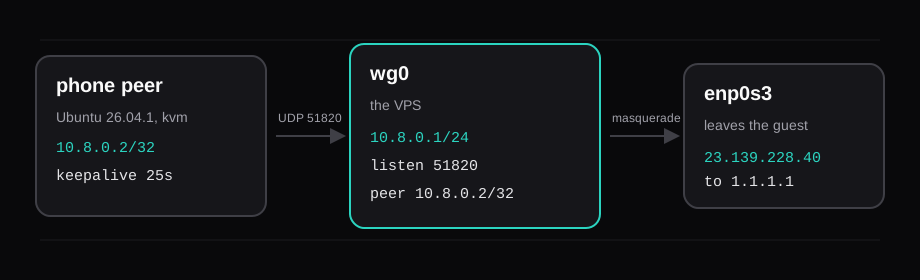
The quickstart is the short version of the key commands. This page is the same shape with the firewall in the way, because a handshake that never starts looks the same as a config that is wrong.
Install WireGuard on Ubuntu 26.04
Both guests are 26.04.1. The archive package is wireguard, which pulls wireguard-tools. qrencode is the program that writes the PNG, and it is in Ubuntu's universe archive, so it landed in the same install.
apt-get update
apt-get install -y wireguard qrencode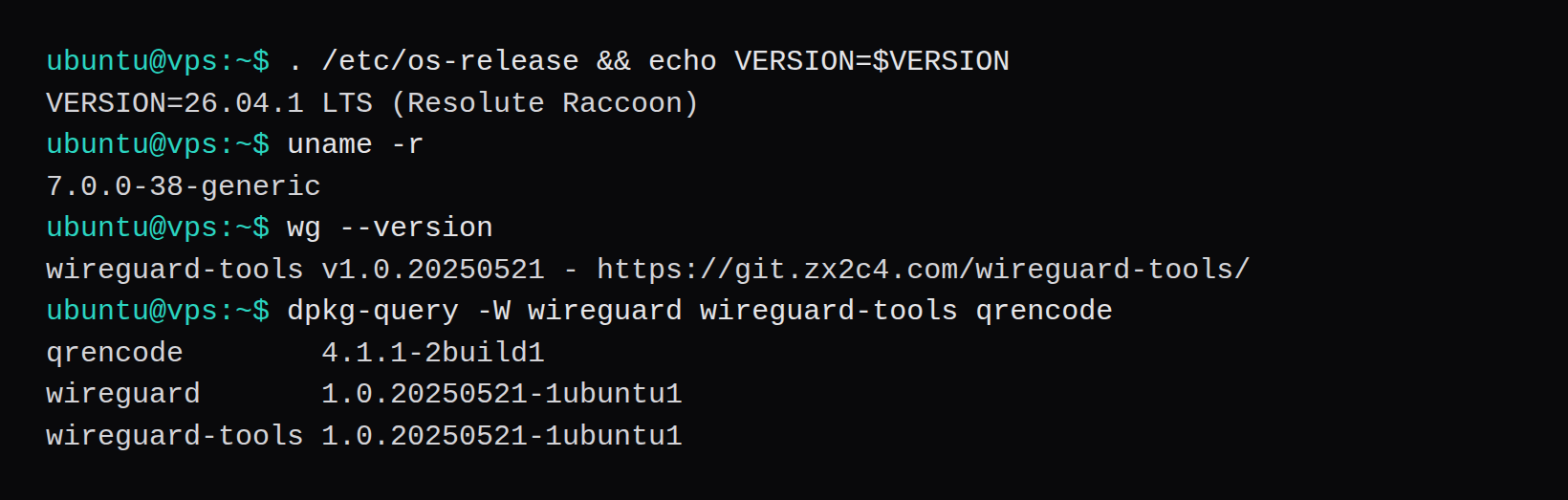
Keys stay in root-only files. wg reads the private key out of the config later, and wg show hides it on its own. The public key is the line you copy to the other machine.
umask 077
install -d -m 700 /etc/wireguard
wg genkey | tee /etc/wireguard/server.key | wg pubkey > /etc/wireguard/server.pub
The same two commands on the peer, with phone.key and phone.pub. Each public key came back as 44 characters. Neither private key is on this page.
Write wg0 for the VPS
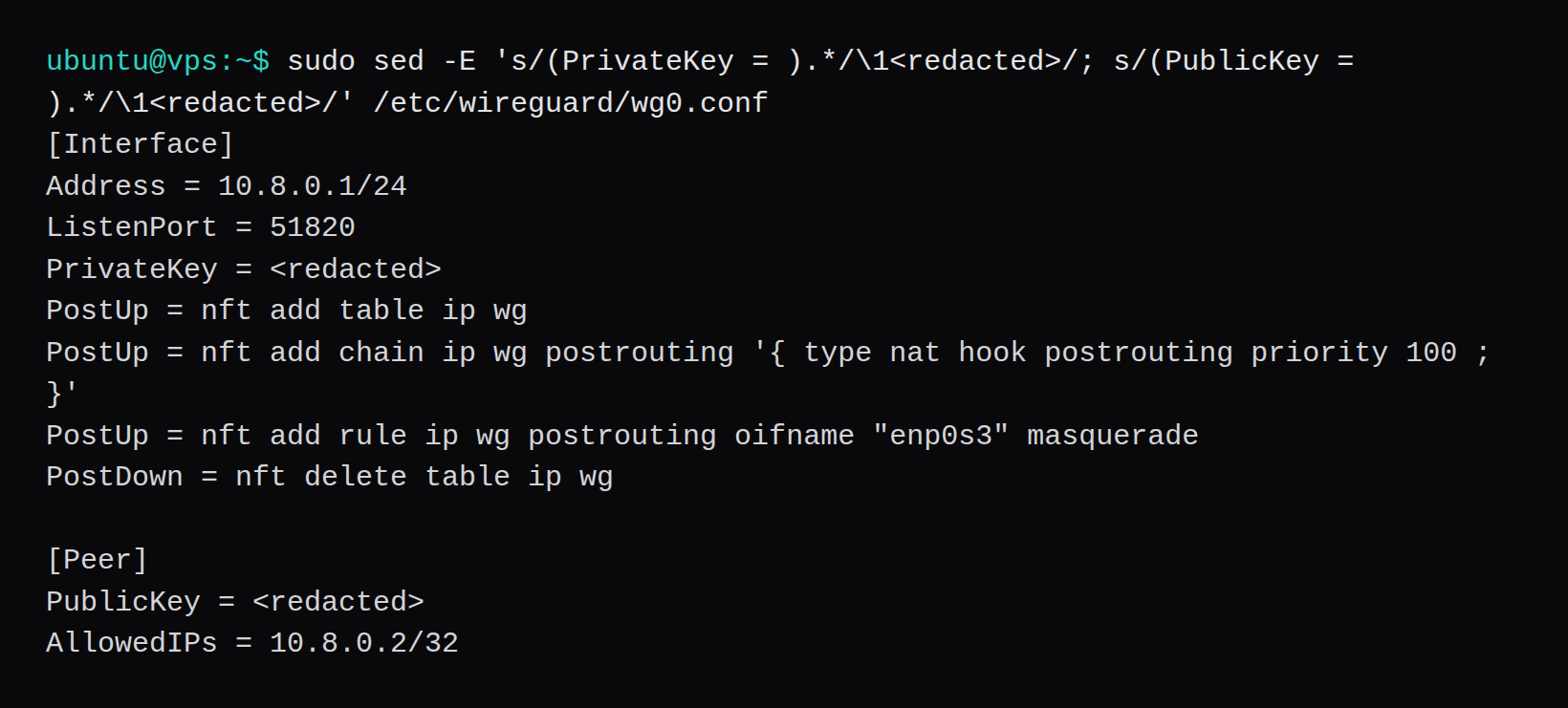
The server config has an address, a listen port, and one peer. AllowedIPs on this side is 10.8.0.2/32, so a packet that arrives from that peer with any other source address is dropped. The phone's AllowedIPs is a different field, and it decides what the phone sends into the tunnel.
enp0s3 is the device that held 23.139.228.40/24, and the PostUp lines use that name. A VPS whose default route sits on eth0 or ens3 puts that name in the masquerade rule. On this guest the echo requests left enp0s3 with source 23.139.228.40.
[Interface]
Address = 10.8.0.1/24
ListenPort = 51820
PrivateKey = <redacted>
PostUp = nft add table ip wg
PostUp = nft add chain ip wg postrouting '{ type nat hook postrouting priority 100 ; }'
PostUp = nft add rule ip wg postrouting oifname "enp0s3" masquerade
PostDown = nft delete table ip wg

[Peer]
PublicKey = <redacted>
AllowedIPs = 10.8.0.2/32
The single quotes are in the file. wg-quick hands each PostUp line to a shell, and the braces and the semicolon have to survive that shell. wg-quick up printed the line with the quotes, and nft list table ip wg showed a postrouting chain with oifname "enp0s3" masquerade.
systemctl enable wg-quick@wg0
wg-quick up wg0
enable created the wg-quick@wg0 symlink. wg-quick up brought the interface up in this session and ran the nft lines. ss then showed UDP 51820 on 0.0.0.0 and on [::].
Forward traffic and masquerade it
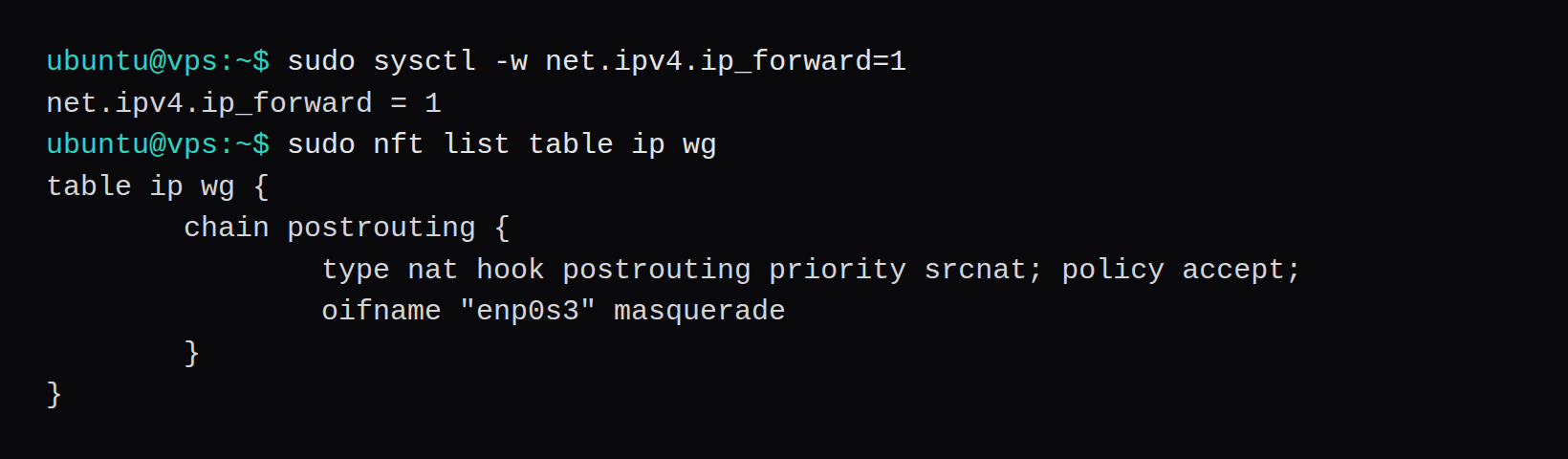
A packet from the phone arrives on wg0 and has to leave through enp0s3. That needs forwarding, and it needs the source rewritten to the VPS address, or the reply has nowhere to go.
printf 'net.ipv4.ip_forward=1\n' > /etc/sysctl.d/99-wireguard.conf
sysctl -w net.ipv4.ip_forward=1
sysctl -w printed net.ipv4.ip_forward = 1. The file under sysctl.d is what keeps it across a reboot. The nft table is what the PostUp lines created, and PostDown deletes it.
ufw was turned on before the tunnel, with SSH allowed first so the session survived:
ufw allow 22/tcp
ufw allow in on wg0
ufw --force enable
ufw status verbose came back Status: active, default deny incoming, allow outgoing, deny routed. The input rules were 22/tcp and Anywhere on wg0. UDP 51820 was not in the list yet. ufw allow in on wg0 accepts packets after WireGuard has decrypted them. The handshake is the UDP packet to 51820, and that allow came later.
Add the phone peer
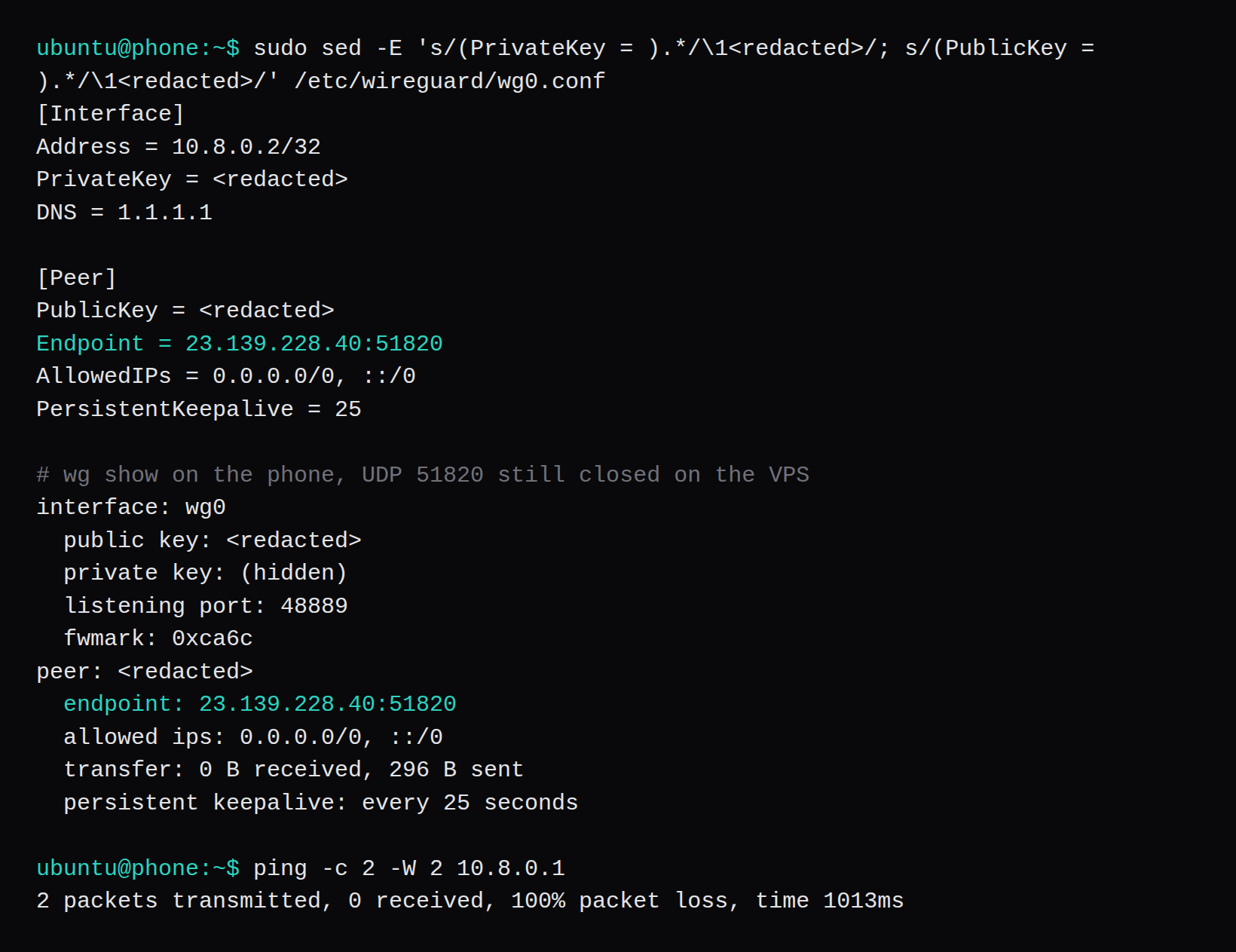
The client file is the one that becomes the QR. Address is a single host, 10.8.0.2/32. Endpoint is the VPS. PersistentKeepalive = 25 is the interval the quickstart uses so a peer behind NAT keeps the mapping open. DNS = 1.1.1.1 is in the file, and wg-quick ran resolvconf -a wg0 because of it.
AllowedIPs = 0.0.0.0/0, ::/0 is the full tunnel. The phone's other traffic goes to the VPS. AllowedIPs = 10.8.0.0/24 would route only that subnet into wg0 and leave the phone's other traffic on the phone's own default route. This run used the full tunnel. The split one was not brought up.
[Interface]
Address = 10.8.0.2/32
PrivateKey = <redacted>
DNS = 1.1.1.1

[Peer]
PublicKey = <redacted>
Endpoint = 23.139.228.40:51820
AllowedIPs = 0.0.0.0/0, ::/0
PersistentKeepalive = 25
wg-quick up wg0 on the peer, while 51820 was still closed on the VPS, printed the policy routing that the full tunnel installs. The handshake packets are marked so they do not follow the new default route back into the tunnel:
[#] ip link add dev wg0 type wireguard
[#] wg setconf wg0 /dev/fd/63
[#] ip -4 address add 10.8.0.2/32 dev wg0
[#] ip link set mtu 1420 up dev wg0
[#] resolvconf -a wg0 -m 0 -x
[#] wg set wg0 fwmark 51820
[#] ip -4 rule add not fwmark 51820 table 51820
[#] ip -4 rule add table main suppress_prefixlength 0
[#] ip -4 route add 0.0.0.0/0 dev wg0 table 51820
[#] sysctl -q net.ipv4.conf.all.src_valid_mark=1
The same pattern was added for IPv6. No IPv6 packet was sent. wg show on the peer reported fwmark: 0xca6c, which is 51820. Table 51820 held default dev wg0 scope link. The main table still had default via 23.139.228.1 dev enp0s3, which is the route the marked handshake packets still use.
Three seconds after the interface came up, the peer had sent 296 bytes and received none. There was no latest handshake line. Ping lost both packets.
Open UDP 51820
ufw allow 51820/udpThe status gained 51820/udp ALLOW IN Anywhere, and the v6 copy of that rule. The next ping got three replies. The first two waited on the handshake, 2032 ms and 1025 ms, and the third was 1.48 ms, with rtt min/avg/max/mdev = 1.478/1019.719/2032.188/829.043 ms. A later wg show on the VPS, after more traffic, is the block in the figure: endpoint 23.139.228.41:48889, latest handshake: 48 seconds ago, 7.62 KiB received, 4.09 KiB sent. Before the allow, that peer block had no endpoint and no handshake line. The server learns the peer's UDP source from a packet that arrives.
Make a QR code with qrencode
The PNG was made on the VPS, from the client file, with the package that had just been installed. No third-party site saw the config.
qrencode -t PNG -o client.png < client.conffile reported PNG image data, 195 x 195, 1-bit colormap, non-interlaced. The file was 1018 bytes.
The second guest stood in for the phone. There was no handset here, so there is no tunnel screen from the app. The official Android app's add menu includes "Scan from QR code", in its string catalog. The iOS app's add menu includes "Create from QR code", in its string catalog. Both apps are linked from the install page. A phone that scans this PNG imports that client file, keys included.
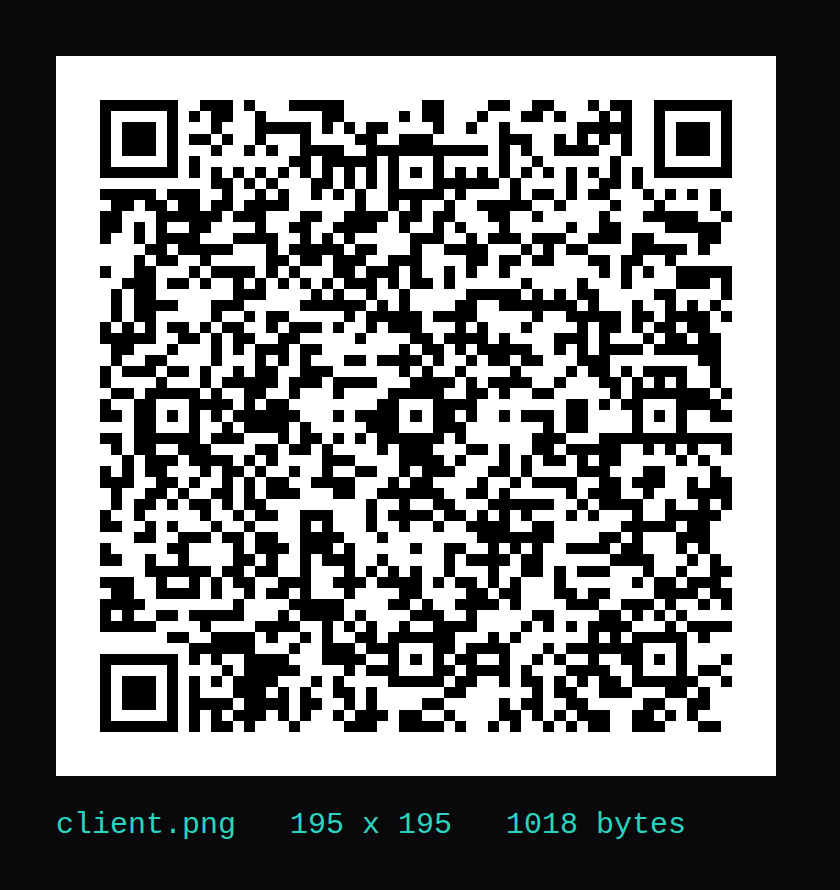
After the figures, wg-quick down wg0 on both guests deleted the interfaces, systemctl disable wg-quick@wg0 removed the symlink, and shred -u removed the key files. wg show then had no wg0. The PNG is still a private key. This VPS has no peer for it. A phone you actually use needs a new key pair, and that private key stays off the page.
Confirm the tunnel address and the masquerade
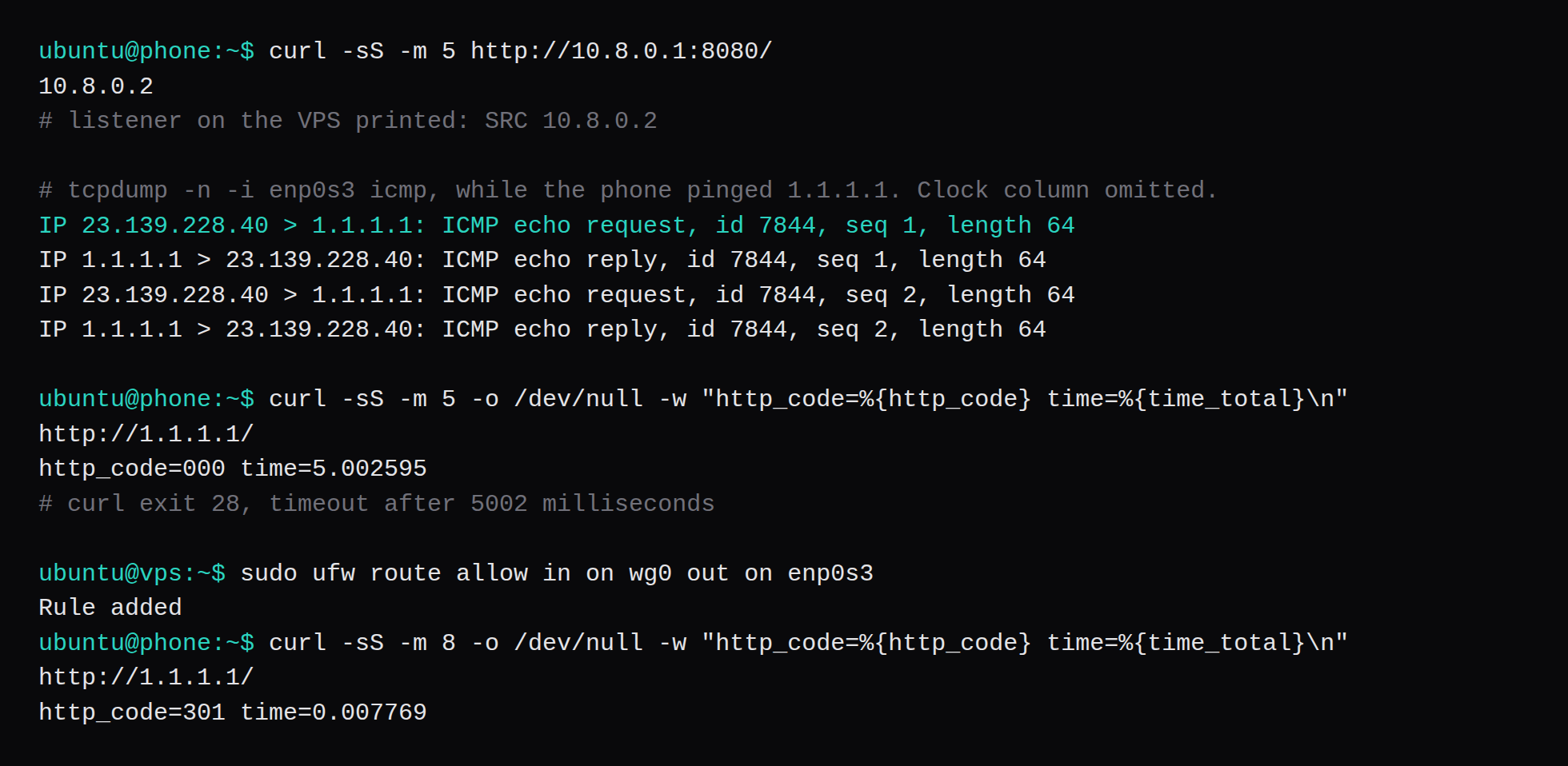
A listener on the VPS, TCP 8080, answered with the address it saw. From the peer, curl http://10.8.0.1:8080/ returned 10.8.0.2. The listener log was SRC 10.8.0.2. That is the tunnel address. A packet that had stayed on the guest subnet would have shown 23.139.228.41.
The ping to 1.1.1.1 took the other path out. On the phone it came back in 4.41 ms and 4.07 ms, ttl 54. On the VPS, tcpdump -n -i enp0s3 icmp showed those echo requests with source 23.139.228.40. The masquerade had rewritten 10.8.0.2 before the packet left the guest. The clock column from that capture is omitted.
ufw's default for routed packets is deny, and ufw-user-forward was empty. ICMP echo is accepted earlier, in ufw-before-forward, which is why the ping to 1.1.1.1 worked while HTTP waited out the timeout. curl to http://1.1.1.1/ exited 28. The -w line was http_code=000 time=5.002595, and the error said the connection timed out after 5002 milliseconds.
ufw route allow in on wg0 out on enp0s3ufw printed Rule added and a v6 copy. The status then had Anywhere on enp0s3 ALLOW FWD Anywhere on wg0. The same curl printed http_code=301 time=0.007769. 1.1.1.1 answers plain HTTP with a redirect.
The guest firewall and the firewall in front of the guest are two filters. This run blocked 51820 with ufw on the guest, and the host in front of these addresses was already forwarding. A provider ruleset that drops UDP 51820 leaves wg show in the same empty state the closed ufw rule produced. On NodeRings that outer ruleset is the firewall on the VM, the one described in How NodeRings works.
Why is the handshake line missing?
wg show with no latest handshake line, and a transfer counter stuck at 0 bytes received, means the UDP packet is not arriving. Here that was ufw, before ufw allow 51820/udp. The keepalive was already sending. 296 bytes went out, and the ping lost both packets. A provider firewall in front of the VPS drops the same packet and prints the same empty handshake. The server also has to be the machine named in Endpoint. This peer used 23.139.228.40:51820, which is the address it could route to.
Why did ping work while HTTP timed out?
Forwarding was already on, and the masquerade rule was already in the nft table. Ping to 1.1.1.1 was rewritten to 23.139.228.40 and answered. ufw status verbose still said deny (routed), and the user forward chain was empty. ufw accepts ICMP echo in ufw-before-forward, so the ping was accepted without a route rule. TCP waited on ufw route allow in on wg0 out on enp0s3, which took HTTP from a timeout at 5.002595 seconds to 301 in 0.007769 seconds.
What does AllowedIPs 0.0.0.0/0 change on the phone?
On the phone it installed a default route in table 51820 and a rule that sends unmarked packets there. The ping to 1.1.1.1 entered wg0 and left the VPS as 23.139.228.40. The WireGuard UDP to the endpoint is marked with fwmark 51820, so it stays on enp0s3 and the tunnel can come up. AllowedIPs = 10.8.0.0/24 on the phone would keep the phone's other traffic on the phone's own default route. The server's AllowedIPs = 10.8.0.2/32 is the source address it accepts from that peer. Copying the server's /32 onto the phone would route only that one host into the tunnel.
Will this QR connect a phone?
It encodes a real client config, and the official apps can import that PNG. The Android catalog names the menu item "Scan from QR code". The iOS catalog names it "Create from QR code". This lab had no handset, so that screen was not captured. The key in the PNG was shredded on both guests, and the server peer was removed. A phone that scans it gets a tunnel with nothing listening for that key. Generate a new pair for a phone you actually use, and keep the private key off the page. The Android catalog also has "Invalid key" and "Incorrect key length" for a key that is not 44 characters. The keys in this run were 44.
Where does the provider firewall fit?
ufw on the guest saw the UDP packet, and opening 51820 there made the handshake. A second filter in front of the VM can drop that packet before ufw exists. This run did not have that second drop, because the path to 23.139.228.40 was already open. On a VPS you allow UDP 51820 in both places, and you allow TCP 22 before you enable the guest firewall. The forward rule is the one HTTP needed. The handshake had already completed when UDP 51820 was allowed, and the ping to 1.1.1.1 was already coming back.