
OpenVPN 2.6.19 came up on Ubuntu 24.04.5 and pushed the client 10.8.0.2/24. The data channel was AES-256-GCM. Three pings to 10.8.0.1 came back at 0.456 ms, 1.26 ms, and 0.932 ms. Three 10-second iperf3 runs, receiver side, landed at 265.3, 192.1, and 167.9 Mbit/s. The median is 192.1.
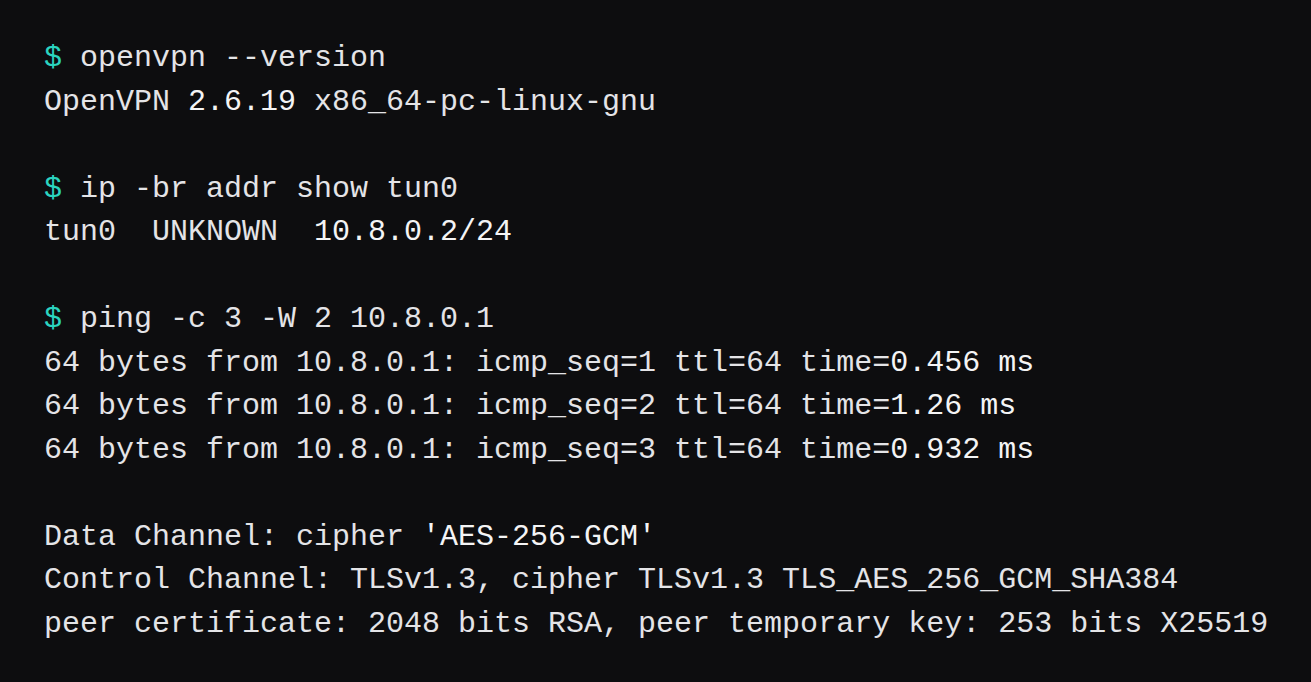
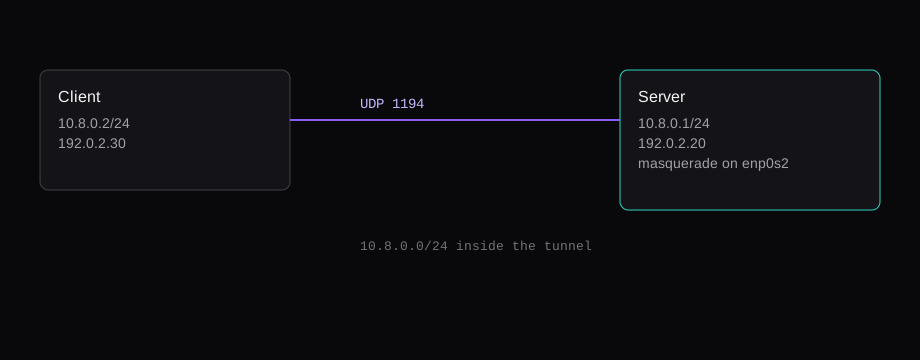
Both guests are qemu, one vCPU, kernel 6.8.0-147-generic. The server was -m 2048 and free -m printed 1,967. The client was -m 1024 and free -m printed 961. They share a bridge. The server is 192.0.2.20, the client 192.0.2.30. easy-rsa is 3.1.7-2. iperf3 is 3.16. ufw is 0.36.2. OpenSSL in the OpenVPN log is 3.0.13.
WireGuard on Ubuntu 24.04: UDP 51820 and a real handshake is the same two guests with WireGuard instead. The median there was 895.5 Mbit/s. WireGuard on a VPS, with a phone QR is the Ubuntu 26.04 phone path. This page is the OpenVPN server and one Linux client.
The CA, then the process
apt-get install openvpn easy-rsa
make-cadir /etc/openvpn/easy-rsa
cd /etc/openvpn/easy-rsa
export EASYRSA_BATCH=1
export EASYRSA_REQ_CN="lab-ca"
./easyrsa init-pki
./easyrsa build-ca nopass
./easyrsa gen-req server nopass
./easyrsa sign-req server server
./easyrsa gen-req client1 nopass
./easyrsa sign-req client client1
openvpn --genkey secret /etc/openvpn/ta.key
The CA key is unencrypted. The lab script had to sign without a prompt. A CA you keep wants a passphrase on that key.
The Ubuntu archive that matches these guests has openvpn at 2.6.19-0ubuntu0.24.04.5 and easy-rsa at 3.1.7-2. apt-get install openvpn easy-rsa is the line that put that binary on the server, and the same line on the client. make-cadir copies the easy-rsa tree into /etc/openvpn/easy-rsa. The four ./easyrsa lines above are what signed the server and client1.
server.conf names ca.crt, server.crt, and server.key with no directory. openvpn@server reads them from /etc/openvpn. ta.key is already there. The certificates are still inside the PKI until you copy them.
cd /etc/openvpn/easy-rsa
cp pki/ca.crt /etc/openvpn/
cp pki/issued/server.crt /etc/openvpn/
cp pki/private/server.key /etc/openvpn/
chmod 600 /etc/openvpn/server.key
chmod 600 /etc/openvpn/ta.key
The Ubuntu server guide still runs ./easyrsa gen-dh and points the config at dh dh.pem. This 2.6.19 binary accepted dh none. The unit reached Initialization Sequence Completed with that line, and the log recorded DCO version: N/A. A second line said data channel offload was disabled because the process drops to nobody and gives up CAP_NET_ADMIN. The 192.1 Mbit/s figure is that path: a tun device, offload disabled.
/etc/openvpn/server.conf:
port 1194
proto udp
dev tun
ca ca.crt
cert server.crt
key server.key
dh none
tls-crypt ta.key
topology subnet
server 10.8.0.0 255.255.255.0
keepalive 10 120
user nobody
group nogroup
persist-key
persist-tun
verb 3
explicit-exit-notify 1
systemctl enable --now openvpn@server is the unit name Ubuntu's guide uses for a file called server.conf. ss showed UDP 0.0.0.0:1194. I left redirect-gateway out of the push. A full-tunnel push would have taken the client's path back onto this bridge, and that path was my SSH.
A ping of 10.8.0.1 only needs the tunnel. Traffic from 10.8.0.2 toward anything else needs the server to forward, and a source address the far side will answer. Forwarding was one sysctl:
sysctl -w net.ipv4.ip_forward=1The masquerade was one nftables rule, source 10.8.0.0/24, out enp0s2. nft -f on this file installs it:
table ip nat {
  chain postrouting {
    type nat hook postrouting priority srcnat
    ip saddr 10.8.0.0/24
    oifname enp0s2 masquerade
  }
}
That is the rule that was present when curl to 1.1.1.1 returned 301. After the table was deleted, the same route produced the 5.003 second timeout.
One client file
The client config lives in /etc/openvpn/client.conf and the unit is openvpn@client.
client
dev tun
proto udp
remote 192.0.2.20 1194
nobind
remote-cert-tls server
ca ca.crt
cert client1.crt
key client1.key
tls-crypt ta.key
verb 3
The client unit reads the same kind of bare names from its own /etc/openvpn. The files are ca.crt, client1.crt from pki/issued/, client1.key from pki/private/, and a copy of ta.key.
install -m 644 ca.crt /etc/openvpn/
install -m 644 client1.crt /etc/openvpn/
install -m 600 client1.key /etc/openvpn/
install -m 600 ta.key /etc/openvpn/
systemctl enable --now openvpn@client
ip -4 addr show tun0
ping -c 3 10.8.0.1
ip -4 addr show tun0 is what printed 10.8.0.2/24. The three ping times in the opening are that last command, once UDP 1194 was allowed. Before the allow, the same restart left tun0 absent.
The package unit is [email protected]. systemctl enable --now openvpn@server fills %i with server. The unit runs openvpn --config /etc/openvpn/server.conf with --cd /etc/openvpn, and its working directory is that same path. openvpn@client is the template pointed at client.conf. The server log has to reach Initialization Sequence Completed. On this binary the next line was DCO version: N/A.
journalctl -u openvpn@server \
  -u openvpn@client --no-pager
scp ca.crt client1.crt client1.key ta.key \
  192.0.2.30:/etc/openvpn/
ufw allow 22/tcp
ufw allow 1194/udp
ufw status
printf '%s\n' net.ipv4.ip_forward=1 \
  > /etc/sysctl.d/99-ipforward.conf
sysctl --system
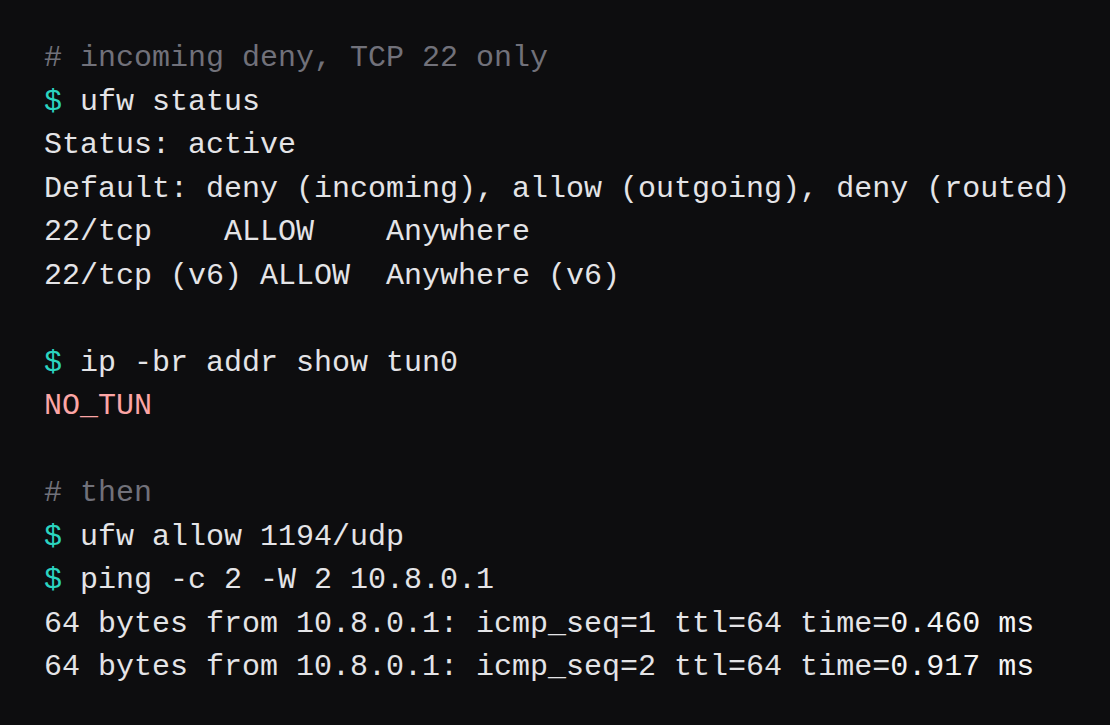
The scp is how the four client files get to 192.0.2.30. ufw on that server started as incoming deny, outgoing allow, TCP 22 allowed, and UDP 1194 absent. The ufw allow 1194/udp line is the one that let tun0 come up. sysctl -w holds forwarding until reboot. The file under /etc/sysctl.d is the same setting kept across a reboot.
The control channel was TLSv1.3, TLS_AES_256_GCM_SHA384, a 2048-bit RSA certificate, X25519 for the temporary key. The peer offered AES-256-GCM:AES-128-GCM:CHACHA20-POLY1305. The server picked AES-256-GCM, which is the first name in OpenVPN 2.6's default data-cipher list. The journal also prints a note when --cipher is unset. The data channel still came up as AES-256-GCM.
UDP 1194, or the interface stays down
ufw 0.36.2, incoming policy deny, and the only allow was TCP 22. I restarted openvpn@client. Three seconds later tun0 was absent. The process was active and had recorded the remote 192.0.2.20:1194. The interface was still missing.
ufw allow 1194/udp, then another restart. Two pings came back, 0.460 ms and 0.917 ms.
A drop in front of the guest is the other place a UDP 1194 rule can sit. A provider-side firewall does what ufw cannot measured that on a bridge.
192.1 Mbit/s, and a packet that had to be NATed
iperf3 3.16, client bound to 10.8.0.2, server bound to 10.8.0.1, ten seconds, three times. Receiver rates: 265.3, 192.1, 167.9 Mbit/s. Median 192.1.
The same iperf, bound to the bridge addresses 192.0.2.30 and 192.0.2.20, with the tunnel up and unused: 13,971, 12,811, and 11,306 Mbit/s. Median 12,811. That is virtio between two guests on one machine. It is the ceiling of this lab, and it is a long way above either tunnel.
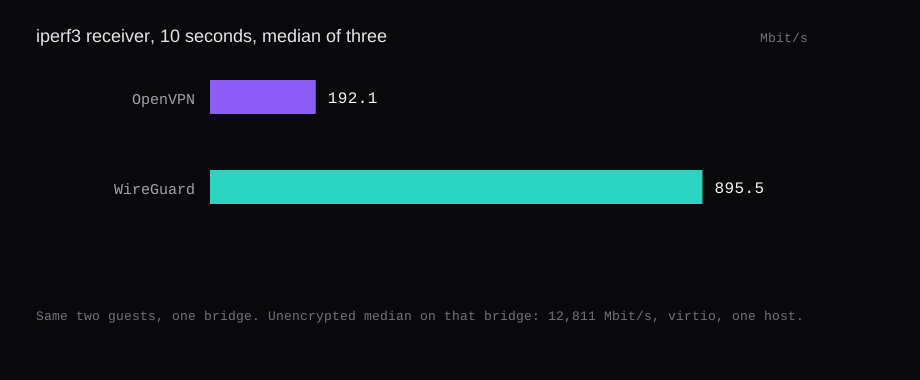
On the same guests, WireGuard's median was 895.5 Mbit/s. That is 4.7 times this OpenVPN median. The runs and the firewall check are in the WireGuard post.
I pointed 1.1.1.1/32 at 10.8.0.1 and curled https://1.1.1.1/. Status 301, in 0.125 seconds. Later I removed that nat table and sent the same route again. tcpdump on tun0 showed the SYNs to 1.1.1.1:443, and curl hit its 5.003 second timeout. The 301 belonged to the run that still had the masquerade.
DNS stayed off the push. I left easyrsa revoke unrun. That command, plus a CRL on the server, is how a later client gets refused. This lab stopped at one working client.