
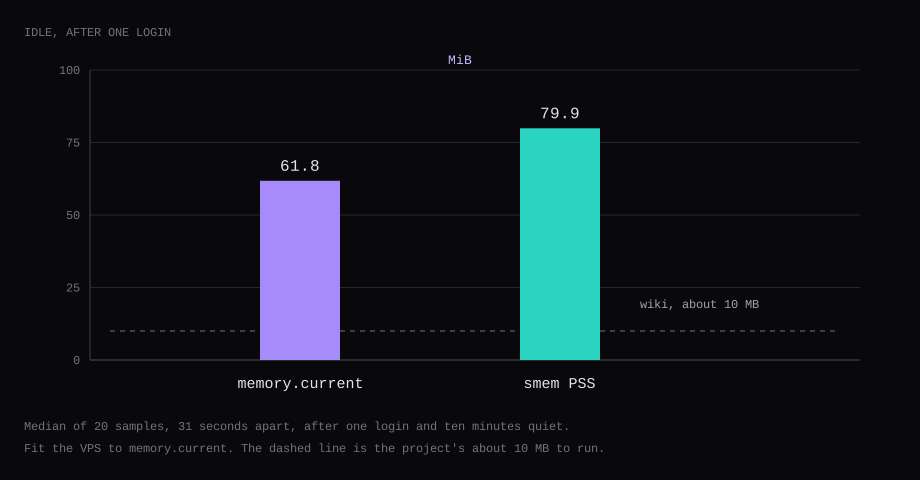
Vaultwarden 1.37.4 held 61.8 MiB idle. That is cgroup memory.current, the median of twenty samples taken 31 seconds apart, after one account existed and the container had been quiet for ten minutes. docker stats printed 60.2 MiB. smem put the same process at 79.9 MiB PSS. The three readings do not land on the same byte. The guest has to fit the cgroup number. The operating system sits beside it.
The building note says running Vaultwarden with the vault needs only about 10 MB, and building the web vault needs about 1.5 GB. The published image has already done that compile. This container still held 61.8 MiB. Ubuntu on the VPS is extra.
The image is vaultwarden/server:1.37.4, digest sha256:efb3cde962015fcc036b2ea625242248611943b27212ebf4392841fb30fad055. Signups were closed after the first account. The admin token is an argon2id hash. HTTP on a normal hostname stops on a banner that asks for HTTPS. Fifty logins came back from a sqlite backup. The page was answering 0.5 seconds after the stop, and the checksum matched.
| Reading | What it was |
|---|---|
cgroup memory.current | 61.8 MiB, median of 20 |
docker stats | 60.2 MiB, median of 20 |
smem PSS | 79.9 MiB, median of 20 |
| Wiki, running | about 10 MB |
| Wiki, building the web vault | about 1.5 GB |
| Skip this | What this run saw |
|---|---|
SIGNUPS_ALLOWED left on | The second address was refused once it was false |
Plaintext ADMIN_TOKEN | The server prints a notice and still boots. This run used a hash, and that notice was absent |
| HTTP, on a name other than localhost | The web vault stops. Subtle Crypto needs a secure context |
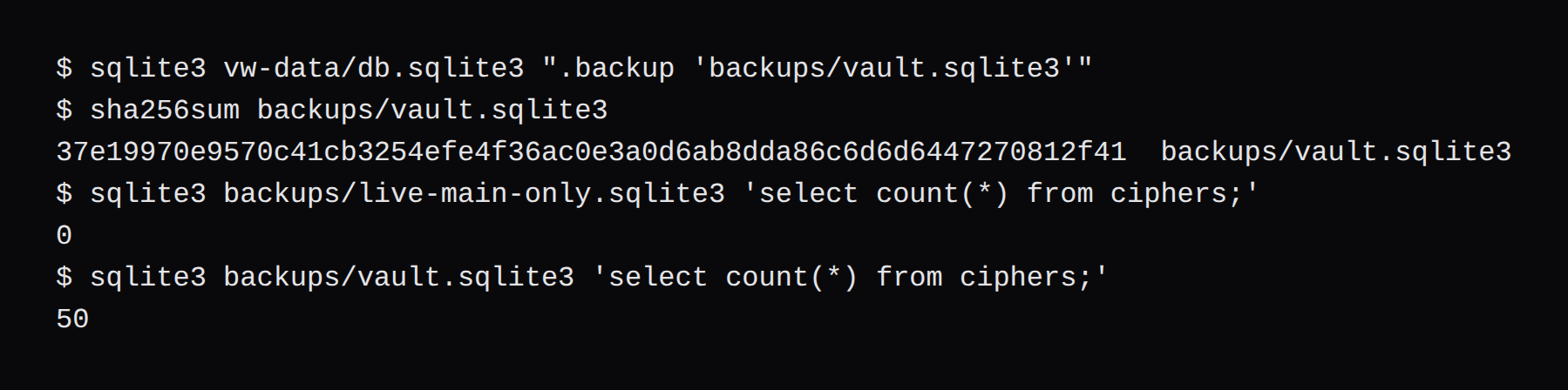
cp of a live db.sqlite3 | That copy had 0 ciphers. .backup had 50 |
Vaultwarden published on 0.0.0.0 | The service has no host port. Caddy is the listener |
Vaultwarden docker compose
One household, one admin, registration closed once that account exists. DOMAIN is the URL the browser uses, including https://. SIGNUPS_ALLOWED is true only long enough to create the first account, then false. IP_HEADER is X-Forwarded-For. The vault service publishes no port. Caddy is the process on 443.
services:
  vaultwarden:
    image: vaultwarden/server:1.37.4@sha256:efb3cde962015fcc036b2ea625242248611943b27212ebf4392841fb30fad055
    restart: unless-stopped
    environment:
      DOMAIN: https://vault.example.com
      SIGNUPS_ALLOWED: "false"
      IP_HEADER: X-Forwarded-For
      ADMIN_TOKEN: $$argon2id$$v=19$$m=19456,t=2,p=1$$SALT$$HASH
    volumes:
      - ./vw-data:/data
  caddy:
    image: caddy:2.11.7@sha256:36c24ad91a7ff7bc4c87fe22bfa8df3c4b18da0773d73fc12ee2c52b98c0bb7e
    restart: unless-stopped
    depends_on:
      - vaultwarden
    ports:
      - "80:80"
      - "443:443"
    volumes:
      - ./Caddyfile:/etc/caddy/Caddyfile:ro
      - caddy-data:/data
      - caddy-config:/config
volumes:
  caddy-data:
  caddy-config:
vault.example.com {
reverse_proxy vaultwarden:80
}The screenshots used a different front so they would leave this machine's own ports alone. vault.lab.test pointed at 127.0.0.1. Caddy listened on 127.0.0.1:8088 and 127.0.0.1:8443, with tls internal, and DOMAIN was https://vault.lab.test:8443. On the VPS those two port lines are 80:80 and 443:443, the name is the one in DNS, and Caddy gets the public certificate.
SIGNUPS_ALLOWED in the file above is the end state. The first account was created while the value was still true. Then it was set to false and the container was recreated. Start on false and the register form stops before it asks for a password.
Vaultwarden admin token
A plaintext ADMIN_TOKEN still starts the server. Vaultwarden prints a notice that it is insecure and points you at vaultwarden hash. This run stored a hash. The startup log did not print that notice. At /admin, type the password that produced the hash.
docker run --rm -it vaultwarden/server:1.37.4 /vaultwarden hash --preset owaspThe command asks for the password twice. With no flag, the preset is the Bitwarden one: 64 MiB, 3 iterations, 4 threads. --preset owasp is the one used here: 19 MiB, 2 iterations, 1 thread. The argon2 CLI has the same two presets, -k 65540 -t 3 -p 4 and -k 19456 -t 2 -p 1, both with -id. The admin token wiki has the full command. If the login box accepts the whole $argon2id$... string as the password, that wiki says the server is too old to understand argon2id.
The PHC string has five $ signs. Under environment: in Compose, each one has to be written $$. Leave them single and Compose treats $argon2id as a variable name, and the token arrives empty. A .env file does not need the doubling. Single quotes keep one $:
ADMIN_TOKEN='$argon2id$v=19$m=19456,t=2,p=1$SALT$HASH'The admin page can save over the environment. The banner there says those settings override the environment variables, and that once you save, you should stop setting the same keys in both places. This install never clicked Save, so the volume has no config.json. The token lives in the Compose file on the host.
Admin sessions last 20 minutes unless ADMIN_SESSION_LIFETIME changes it. The wiki's way to invalidate one is to remove rsa_key.pem from the data directory and restart. That also logs every vault user out, because the same key signs their tokens. A reboot of the VPS leaves the file where it was. The token and the key come back with the volume.
Close Vaultwarden signups
After the first account, SIGNUPS_ALLOWED=false. The checkbox in General settings was clear. The words beside it, Default: false, are the value this process was given. The compiled default in 1.37.4 is the other way: signups start allowed.

The login page still offered Create account. Registration is hidden when signups are off and either mail works or invitations are off. Mail is not configured here, and INVITATIONS_ALLOWED was still on, so the link stays. That is how an invited person finishes at /#/signup when you cannot send the mail.
[email protected] had no invitation.
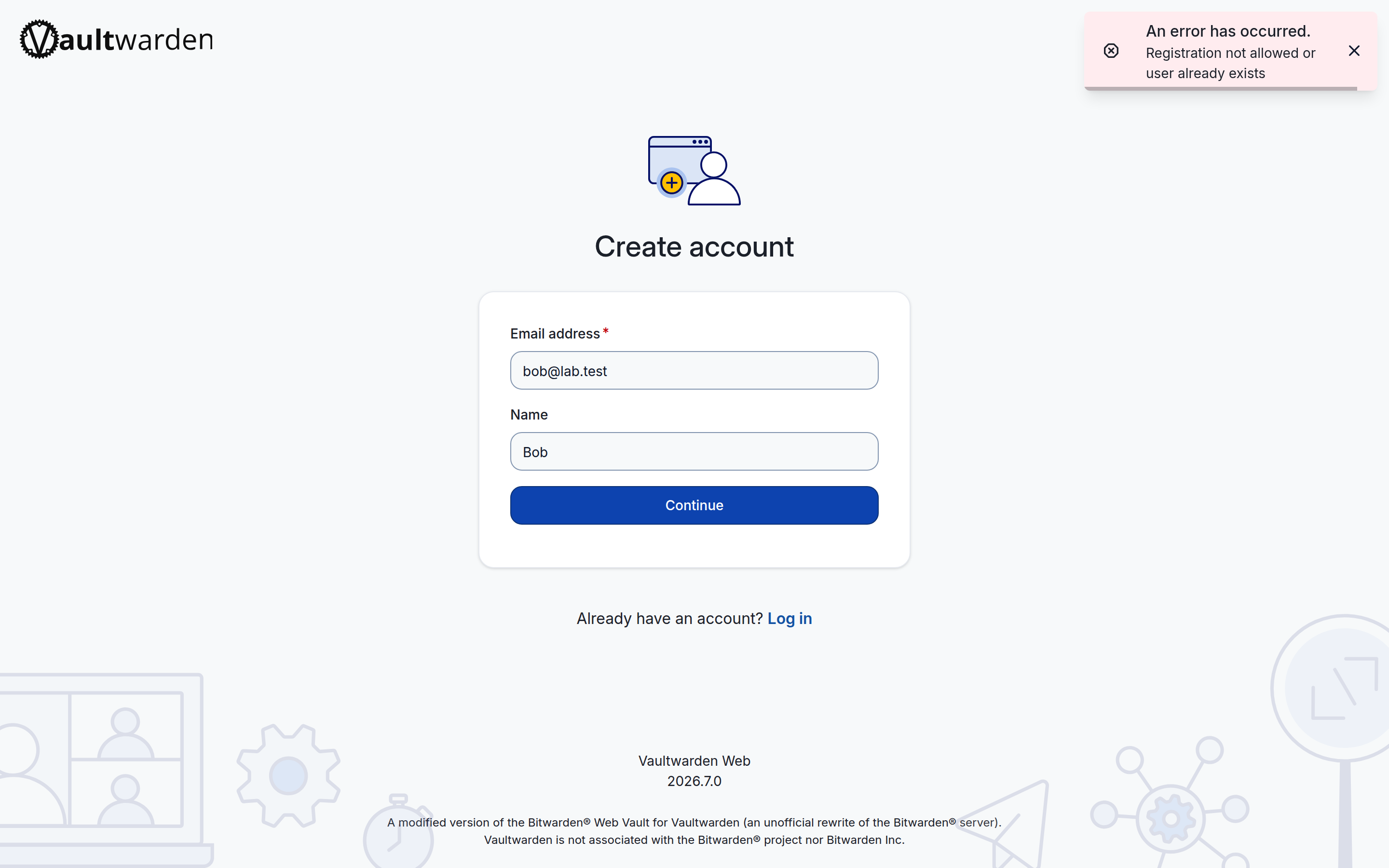
Without SMTP there is no invite mail and no email two-step login. Leave invitations on while a second person in the household still has to join, and send them the signup URL yourself. Set INVITATIONS_ALLOWED to false when that list is closed. The Create account link goes away with it.
Vaultwarden HTTPS reverse proxy
The web vault needs a secure context for the Web Crypto API. The README says it only works with HTTPS, and that a reverse proxy is the setup they want in front. Rocket can terminate TLS. The same README still says to put a proxy there.
http://vault.lab.test:8088 produced the banner and no login form.
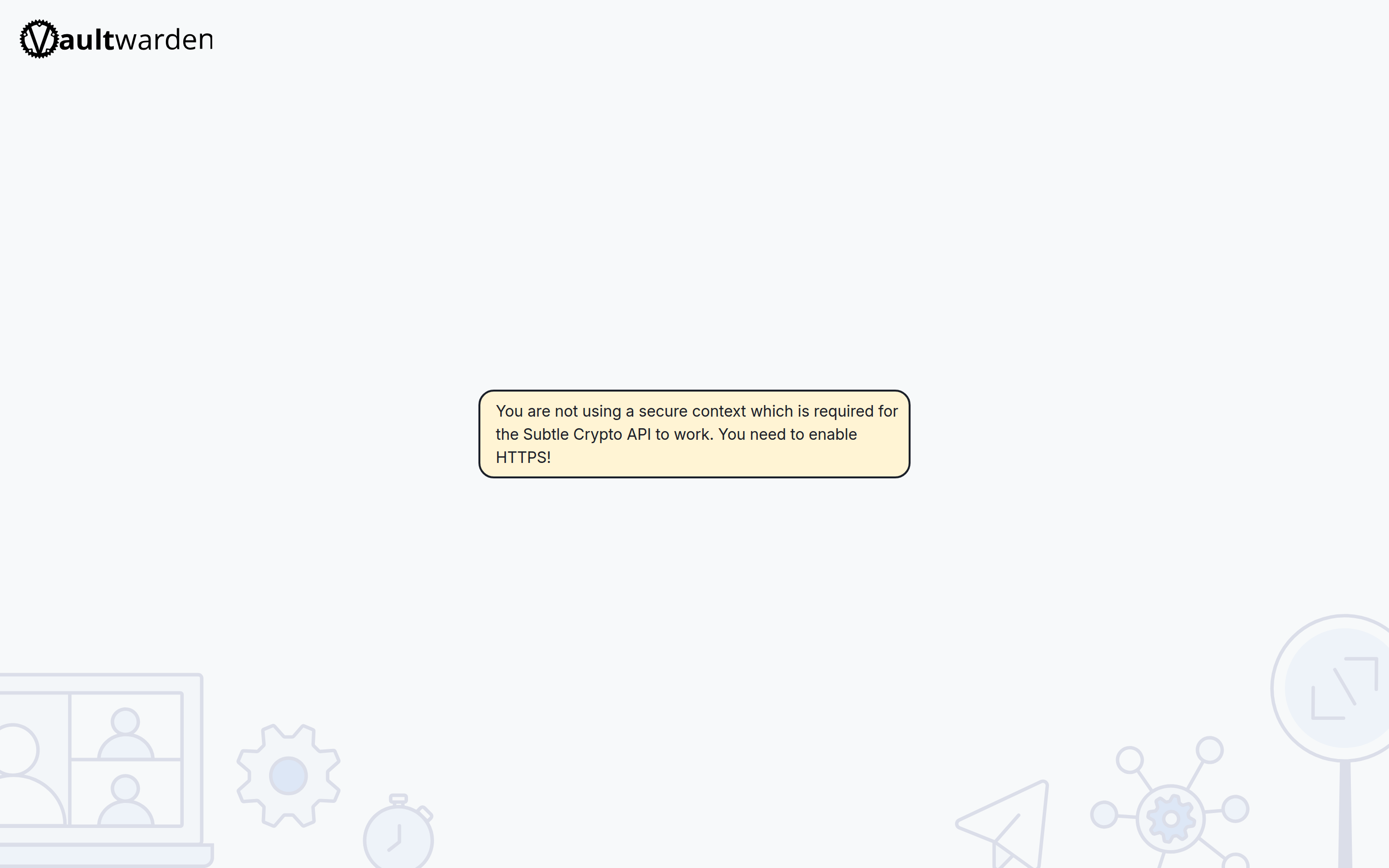
https://vault.lab.test:8443 showed the login form. The footer read Vaultwarden Web 2026.7.0, and the line under it says this is an unofficial rewrite and is not associated with Bitwarden Inc. /api/config reports a server version of 2026.6.0. That field is the Bitwarden-compatible version the clients look at. The footer is the web vault this image ships.
How much RAM does Vaultwarden use
smem PSS at 79.9 MiB sits above the cgroup total. memory.current is the number that has to fit in the guest. The fifty logins were imported after these samples, so the chart is the empty vault, one account, one login, then ten minutes of quiet. A 1 GB VPS can hold a container this size and still has to run the OS. These samples were taken on a machine with memory left over.
Vaultwarden backup and restore
cp db.sqlite3 while Vaultwarden is writing copies the main file and leaves the WAL behind. This run did that on purpose. The copy, moved out of the data directory so SQLite would not apply the WAL, contained 0 ciphers. It was 278,528 bytes. The WAL beside the live database was 1,227,792 bytes.
The wiki's command is SQLite's online backup, which folds the WAL in. The image has no sqlite3 binary. Since 1.32.1 the image has its own command. It runs VACUUM INTO and writes a file under /data whose name includes the time it ran. Sending the container USR1 triggers the same backup.
sqlite3 ./vw-data/db.sqlite3 ".backup 'backups/vault.sqlite3'"docker compose exec vaultwarden /vaultwarden backup.backup wrote 311,296 bytes and 50 ciphers. sha256sum was 37e19970e9570c41cb3254efe4f36ac0e3a0d6ab8dda86c6d6d6447270812f41. The in-image command also wrote 311,296 bytes and 50 ciphers, and a different hash, because VACUUM INTO rewrites the pages. The restore used the .backup file. The copy placed at db.sqlite3 hashed to the same value before the server opened it.
Stop Vaultwarden before you put the file back. Name it db.sqlite3. Delete any db.sqlite3-wal already in the directory. The wiki's warning is that SQLite can replay a stale WAL onto the restored file and corrupt it. db.sqlite3-shm is not part of the backup. If you ever copy the live db.sqlite3 and its matching WAL together, those two have to come back as a pair. A .backup file, or the file from /vaultwarden backup, comes back alone.
| Path | In the backup |
|---|---|
db.sqlite3, via .backup or /vaultwarden backup | Required |
attachments/ | Required when a login has a file. This vault had none |
rsa_key.pem and the .der keys beside it | Keep them, or every session is logged out. This directory had rsa_key.pem |
config.json | Keep it if the admin page has been saved. This volume never had one |
sends/ | Only if a Send file has to survive. Send text is already in the database |
icon_cache/ | Skip it. The icons get fetched again |
db.sqlite3-wal | Delete it when restoring a .backup or VACUUM INTO file |
db.sqlite3-shm | Skip it |
The fifty logins were a Bitwarden CSV, imported in the web vault, so the client encrypted them. Names Household 01 through Household 50. The server was stopped, the data directory was replaced with that backup plus rsa_key.pem, and the old WAL was not copied. From the stop until the page answered was 0.5 seconds. The next login listed the same names through Household 50, and select count(*) from ciphers was 50.
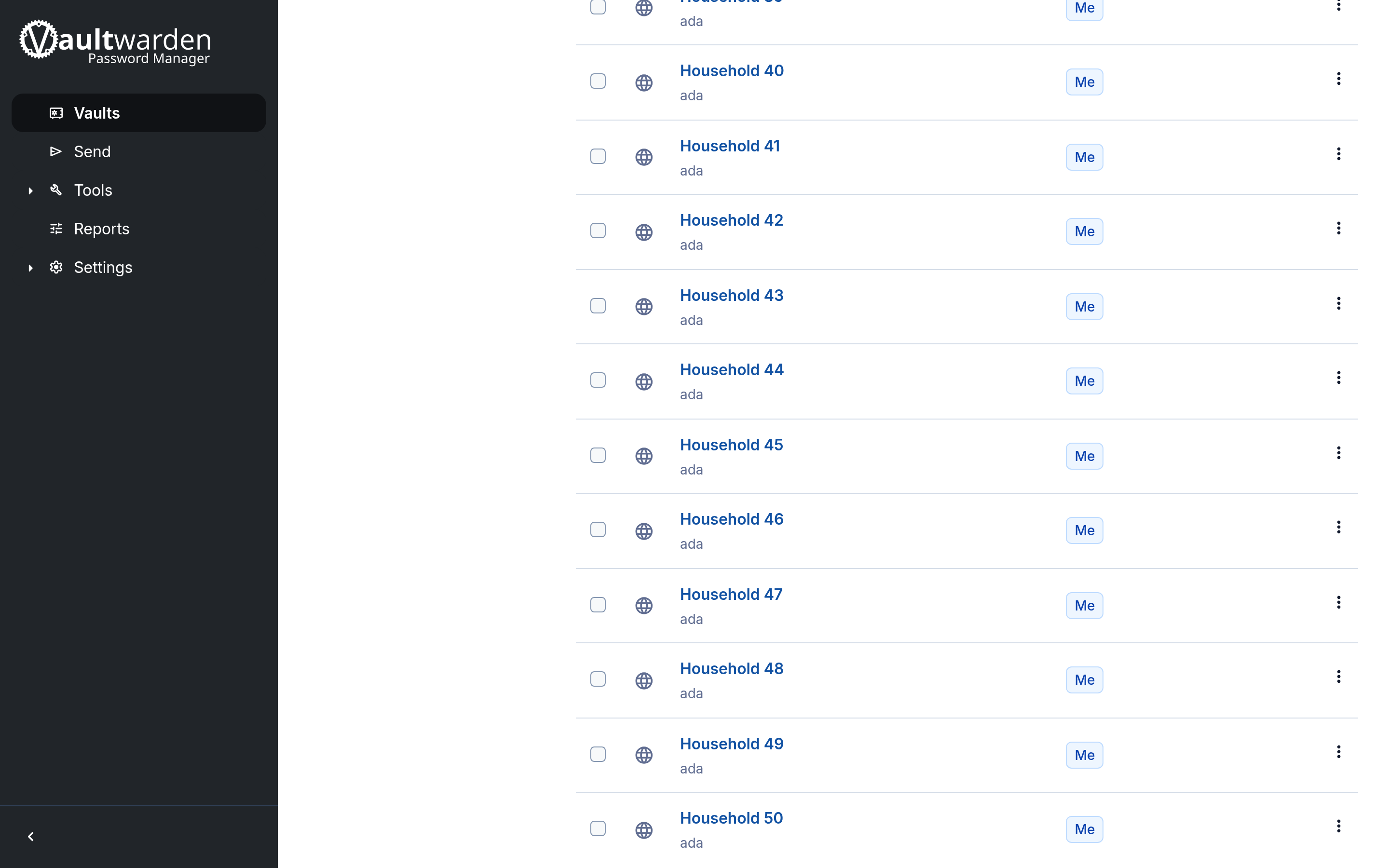
A filesystem snapshot of the whole VPS is a poor copy of this directory. The backup wiki says recovery from one is the case that goes wrong. Run .backup from a timer on the host, and keep a copy off the guest. The timer is the check worth alerting on. Uptime Kuma has a push URL for that job. If the job stops calling, the row goes red on its own.
Vaultwarden 1.37.4
1.37.4 changes how a reverse proxy is read. With IP_HEADER=X-Forwarded-For, the client IP is the rightmost address that is not listed in IP_HEADER_TRUSTED_PROXIES. It used to be the leftmost. One Caddy in front is a single address, and the default is enough. A CDN in front of Caddy is two proxies, and both belong in IP_HEADER_TRUSTED_PROXIES. Leave one out and the rate limits and the logs use the proxy in front of Vaultwarden, the same address for every visitor. For fail2ban, set LOG_FILE=/data/vaultwarden.log and point the jail at that file on the host. When Caddy runs on the host and Vaultwarden is loopback-only, the default fail2ban action on INPUT is enough; when the vault port is published into Docker’s DNAT path, use chain=DOCKER-USER and iptables-allports (fail2ban.dev, HyperDC). Unset ADMIN_TOKEN when you are not using /admin. Since 1.29, WebSockets share the HTTP port; no separate /notifications/hub proxy is required.
bw send receive on the Bitwarden CLI 2026.4.2 and older fails against this release. The note says that is the same behavior as Bitwarden's own servers since v2026.8.0. Creating and managing Sends still works. If EXPERIMENTAL_CLIENT_FEATURE_FLAGS still names a flag this release removed, startup warns and the admin page will not save until that flag is gone. DUO_USE_IFRAME is ignored. The old POST /identity/accounts/register route is gone. A script still posting there gets a 404, which is what this server returned.
The release is a security update. The item it describes in public is organization member revocation, GHSA-69q9-v8p6-xvx3, scored 8.1. Revoked organization members kept access to organization items. The notes list six more and say the details are private pending a CVE.
| Advisory in the 1.37.4 notes | Score |
|---|---|
| Organization member revocation | 8.1 |
| Two-factor authentication | 6.8 |
| Organization invitations | 6.8 |
| Attachments | 6.5 |
| Organization event logs | 4.3 |
| Cipher sharing | 4.3 |
| Organization API key | 3.8 |
If an organization has admins you do not fully trust, rotate its API key after updating. The release says that before this version, admins could also view that key. The path it gives is Admin Console, Settings, Rotate API key. This household vault has no organization, so there was no key to rotate.
The ports on the VPS
Vaultwarden is on the Compose network only. Caddy is the published side. On this machine those ports are 127.0.0.1:8088 and 127.0.0.1:8443.
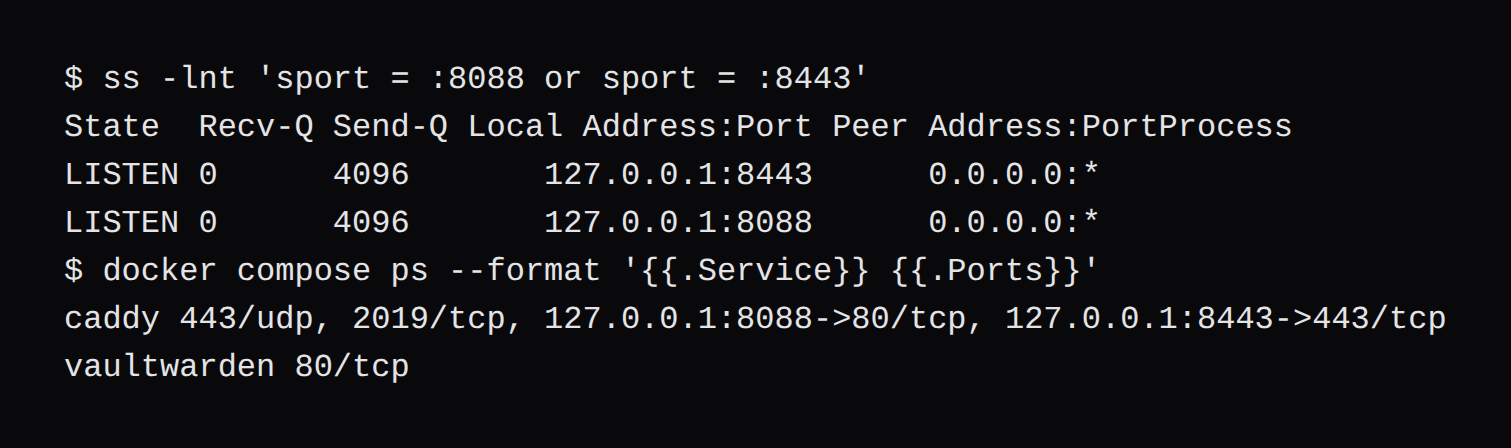
On the VPS, 80 and 443 are the public listeners. The firewall in front of the guest should allow 22 and 443. The vault's own port stays closed because it is not bound to the host. Those rules are the panel's ruleset, the one described in How NodeRings works.
A reboot leaves the admin token, rsa_key.pem, and the database on the volume. Nothing in this container rotates a secret because the machine came back. Instant Apps are a different path. The page names WordPress. Reinstalling one of those regenerates /root/.noderings_password. This vault is the Compose file above, and that password file is not the recovery for it.
FAQ
Can Vaultwarden run on a 1 GB VPS?
The container held 61.8 MiB. A 1 GB VPS still has to run the OS next to it. The about 10 MB line is the project's note for running the binary. The about 1.5 GB line is for building the web vault, which this image has already done.
Should Vaultwarden signups stay open?
Close them after the first account. With SMTP unset and invitations left on, the Create account link stays on the login page, and an address you did not invite gets Registration not allowed or user already exists.
Does a reboot change the Vaultwarden admin token?
No. The token is the environment variable, or config.json if you saved the admin page. Removing rsa_key.pem and restarting is what logs admin sessions out. A reboot leaves that file in place.
Does Vaultwarden need SMTP?
For invite mail and for email two-step login, yes. Without it, an invitation is a link you deliver yourself, and email 2FA is not available. The account, the vault, and the admin page all worked here with no SMTP configured.
Is Vaultwarden the official Bitwarden server?
No. The footer on the web vault says it is an unofficial rewrite and is not associated with Bitwarden Inc. The clients you install are the official Bitwarden clients, pointed at your URL. bw send receive on CLI 2026.4.2 and older fails here, and the release note says current Bitwarden servers reject that command too.