
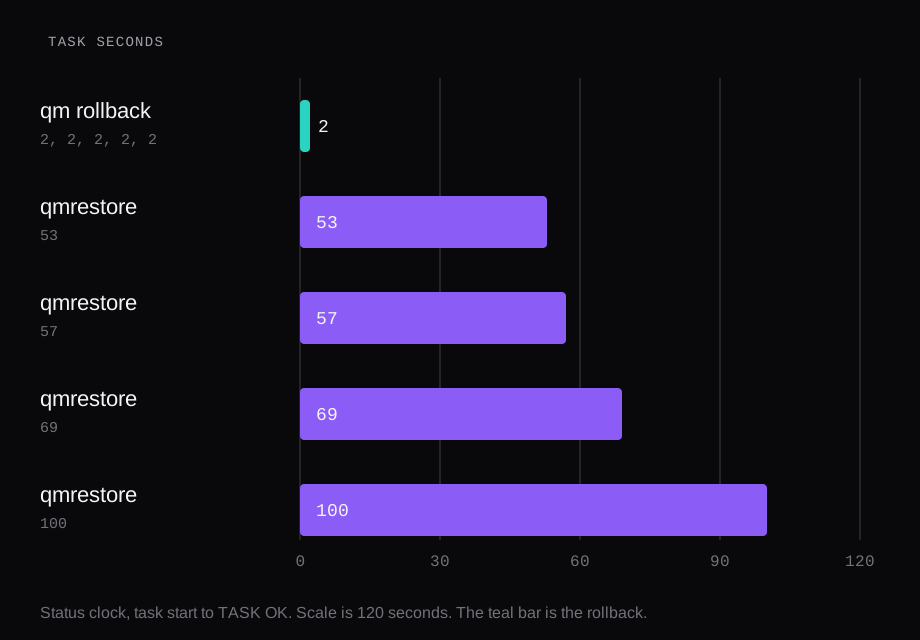
On this Ubuntu 24.04.4 guest the disk was 20 GiB, and one file of 8,589,934,592 bytes held most of the used space. A rollback finished in 2 seconds on all five runs, and the sha256 matched on the four that were hashed. vzdump, in snapshot mode with zstd, wrote the running guest to the local directory in 21, 21, 22, 21, and 21 seconds. qmrestore wrote that archive back in 53, 57, 69, and 100 seconds, and the hash matched each time. A snapshot does not leave the disk it was taken on. The snapshot volume and the archive both sat on the one Kingston NVMe that holds the guest.
| Path | What the task did | Task seconds | sha256 |
|---|---|---|---|
qm rollback | Remove the disk LV and create it from the snapshot LV | 2, 2, 2, 2, 2 | 4 hashed, all matched |
vzdump --mode snapshot --compress zstd, storage local | Write a .vma.zst under /var/lib/vz/dump | 21, 21, 22, 21, 21 | source file, hashed before the job |
qmrestore onto local-lvm | Write the archive back onto the thin pool | 53, 57, 69, 100 | 4 of 4 matched |
The node is pve-manager 8.1.3, kernel 6.5.11-4-pve. The guest agent that the backup froze was qemu-guest-agent 1:8.2.2+ds-0ubuntu1.18. Root was ext4. An earlier clock on this class of machine, a 16 GiB disk and a PBS 4.2.8 datastore on the same NVMe, is written up in PBS vs vzdump vs snapshots. Those medians were 2, 60, and 59 seconds. These clocks are the 20 GiB run. PBS, NFS, and a second provider stayed out of it.
How long does qm rollback take
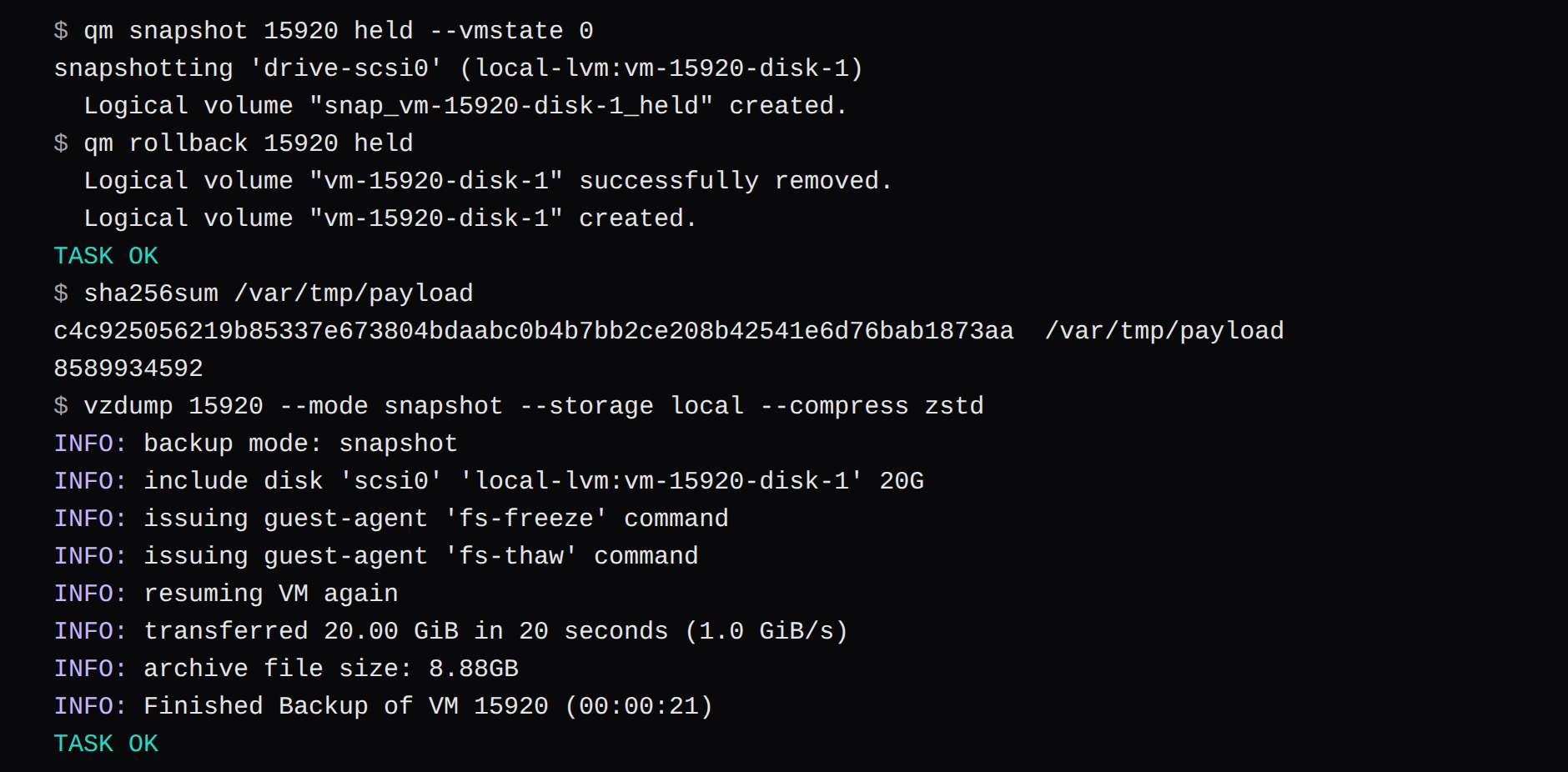
qm snapshot on LVM-thin creates a snapshot volume beside the disk. The log named it snap_vm-15920-disk-1_held for the 20 GiB disk, and it snapshotted the 4 MiB EFI disk in the same task. Rollback then spends the 2 seconds on a remove and a create: it removes vm-15920-disk-1 and creates that volume again from the snapshot, and it does the same for the EFI disk.
qm snapshot 15920 held --vmstate 0
qm rollback 15920 held
--vmstate 0 leaves RAM out. The check is a file on the disk, so a memory image would have timed a different operation. The status clock is whole seconds. Across six creates it read 0, 1, 1, 1, 3, and 4. A stopwatch on the last rollback call read 2.056 seconds, against a status clock of 2. After TASK OK the guest was stopped. It had to be started before the hash could be read.
On the run that timed the boot, the matching sha256 was back 26.156 seconds after the rollback call. That includes the 2 second task, a 1 second start, and the guest coming up far enough to answer SSH. The other four hashed rollbacks used the same remove-and-create log. Their boot was left off this stopwatch.
The file was built so zstd would have little to do:
dd if=/dev/zero bs=1M count=8192 \
  status=none \
  | openssl enc -aes-256-ctr \
  -nosalt -pass pass:lab \
  -out /var/tmp/payload
sha256sum and stat printed this. The passphrase only has to stay the same if you want that digest again. Any incompressible 8 GiB file would have made the same point about the archive size.
sha256sum /var/tmp/payload
c4c925056219b85337e673804bdaabc0b4b7bb2ce208b42541e6d76bab1873aa
8589934592
What vzdump snapshot mode writes
The vzdump chapter gives a VM three modes. Stop mode shuts the guest down, then a background QEMU reads the disks, and the guest can come back once that read has started. Suspend mode suspends the guest and then runs snapshot mode. The chapter keeps it for compatibility. Snapshot mode copies blocks while the guest runs. With agent: 1 and the guest agent running, the job calls guest-fsfreeze-freeze and guest-fsfreeze-thaw.
The flag and the qm snapshot command share a word and do different jobs. The flag is a live backup that writes an archive. The command creates the snapshot LV that rollback consumes. You can take a qm snapshot on LVM-thin with the agent silent. The first creates in this run did. The backup is the one that wants the agent, because the freeze is what makes the filesystem quiet for the second the copy begins.
vzdump 15920 --mode snapshot \
  --storage local --compress zstd
Each of the five logs issued fs-freeze and then fs-thaw, and then printed resuming VM again. The guest had been running when the job started. The copy that followed moved the whole 20.00 GiB disk image, zeros included, in about 20 seconds. The task clock is a second or two longer because the freeze and the archive open sit inside it. Two of the logs called the result sparse, 9.55 GiB and 9.54 GiB of zero data, 47 percent of the disk. That is why a 20 GiB image became an archive near 9 GB: the empty half of the disk dropped out, and the AES-CTR file stayed.
The storage index listed the five archives at 9,539,256,674, 9,536,509,533, 9,564,872,402, 9,558,841,633, and 9,556,659,665 bytes. The first two logs printed the size as 8.88GB. The later three are a few tens of megabytes larger, which is the guest's own writes between runs, the package install and the logs, on top of a payload whose hash stayed put.
local is a directory, path /var/lib/vz, and the API lists it shared=0. local-lvm is lvmthin, for images. The node has one disk, a Kingston OM8PDP3256B-A01 of 256,060,514,304 bytes, and it is the boot disk. The thin pool and /var/lib/vz are two names for regions of that NVMe.
How long does a VPS restore take
The guest was stopped, destroyed, and created again from the archive onto local-lvm. The restore log is zstd into vma extract, which creates the EFI LV, the 20 GiB disk, and the cloud-init drive, then maps the archive onto them.
qmrestore "$archive" 15920 \
  --storage local-lvm
The four task clocks were 53, 57, 69, and 100 seconds. Sorted, the middle pair is 57 and 69, so the median of the four is 63. The same file, the same mode, the same NVMe, and the slow run took almost twice the fast one. Another guest was running on the node the whole time. The clock is what the tasks recorded on a disk that was in ordinary use.
Three of the restores also timed the moment the hash came back, counting from the restore call. Those were 79.871, 91.753, and 122.949 seconds, paired with the 57, 69, and 100 second tasks. Subtract the integer task clock and the remainder is 22.871, 22.753, and 22.949 seconds. The boot sat still. The restore task is the part that moved. The 53 second run was hashed, and it matched, and that boot was left off the stopwatch.
Every one of those hashes was the same digest as the file written before the first snapshot.
Does a snapshot slow disk reads
A fresh snapshot, taken the minute before the read, left the read where it was. dd of the 8 GiB file to /dev/null took 4.893 seconds before any snapshot existed, and 4.816 seconds while held existed. The snapshot and the file were from the same minute, so the extents behind the read were the ones written with the file. A snapshot that has sat for two weeks, with the guest writing the whole time, lays those extents out differently, and the number here is for a snapshot taken that minute.
dd if=/var/tmp/payload of=/dev/null \
  bs=1M status=none
The filesystem those reads hit was 19,682,557,952 bytes, ext4 on the 20 GiB disk. After the file landed, df showed about 10.3 to 11.0 GiB used. The rest of the block device was the zeros the backup later called out as sparse.
What survives a dead disk
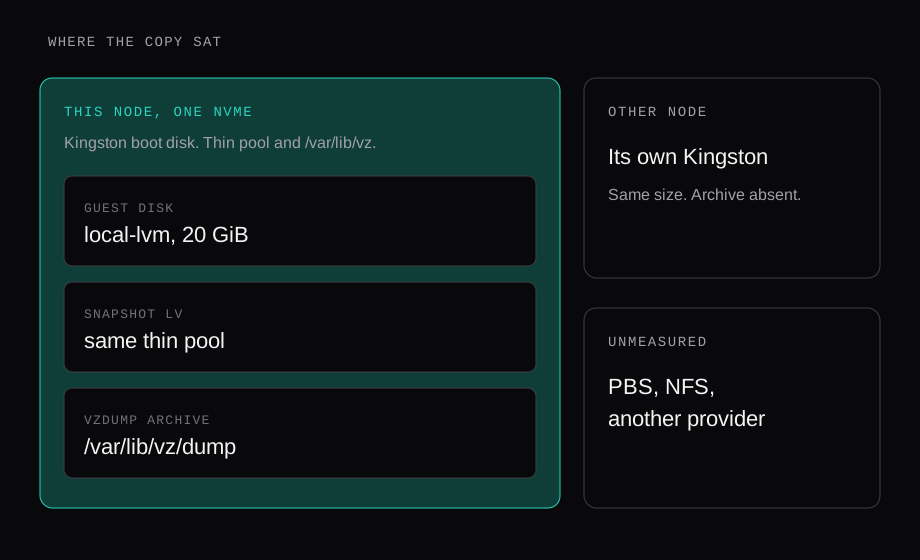
| Copy | Where the bytes were | If this NVMe dies |
|---|---|---|
| Snapshot LV | Beside the guest disk, on local-lvm | The guest and the snapshot go together |
vzdump archive on local | /var/lib/vz/dump, the root filesystem of that same disk | The archive goes with them |
| The other node's disk | Its own Kingston, same model and size | This guest's archive was absent |
| PBS, NFS, a second provider | Left out of this run | A different measurement |
The other node is a real second disk. local is per node, shared=0, so a job aimed at local lands in the directory of the node that runs it. Reaching the other disk takes storage both nodes can see, or a copy you carry over. This run wrote to local.
In OVH SBG2: the backup was in the same building, the copies that burned were backups, and they still shared a building with the VPS. A fast restore from /var/lib/vz is a same-disk restore. Ask for the building code on the backup storage while the guest still answers.
Restic to a storage box timed a different tool: 2.000 GiB restored onto a fresh guest in 15.3 seconds, checksum matched. Those bytes went to an SFTP server on the same bench. The tool can aim at another company. That clock was a same-bench clock, the way this archive is a same-NVMe clock.
The earlier PBS number belongs in that column too. The datastore was a directory on a guest whose virtual disk sat on this NVMe. Median restore 59 seconds. Dedup showed up in the backup size. A dead disk takes that directory with the guest.
Where a NodeRings backup is stored
The virtual machine guide puts backups and snapshots on per-VM tabs, and those tabs are there when the hypervisor supports them. On a Proxmox listing that is both tabs. VirtFusion and SolusVM 2 listings hide them.
Snapshots are the point-in-time rollback, the operation measured at 2 seconds here. Backups are scheduled vzdump-style jobs. Daily runs at 02:00 UTC every day. Weekly runs at 03:00 UTC every Sunday. Enabling a plan starts one backup immediately, then follows that table. The job uses snapshot mode where the platform supports it, so the guest keeps running, which is the mode whose log printed fs-freeze and fs-thaw above. The guide's retention example is seven days of daily backups and four weeks of weekly ones. Older backups go when they expire. Billing may be tied to a backup addon on the plan, and snapshot storage to its own addon.
The guide leaves the building of that storage unnamed. The provider picks the disk. On the node in this lab, the Backups tab's job was /var/lib/vz on the guest's own NVMe, and the Snapshots tab's job was an LV on that same NVMe. A provider who puts the archive on another machine is the case the table marks unmeasured. Ask which disk, and which building, before the schedule counts as a second copy.
The check is a hash you take before you need it. Write a file, sha256sum it, take the snapshot or wait for the backup, delete the file or restore over a fresh VM id, and hash again. The 2 second rollback and the 53 to 100 second restore were that loop. Delete the test guest when the digest matches.
FAQ
How long does a Proxmox snapshot rollback take?
2 seconds, five times, on this 20 GiB LVM-thin disk. The task removes the logical volume and creates it from the snapshot. The guest was stopped at TASK OK. On the timed boot the file's sha256 was back 26.156 seconds after the rollback call.
How long does qmrestore take?
53, 57, 69, and 100 seconds for the four archives, median 63, writing the 20 GiB disk back to local-lvm on the same NVMe. The hash matched all four. On three of them the checksum was readable about 23 seconds after the task clock.
Does a fresh snapshot slow a read?
On this disk, a read of the 8 GiB file took 4.893 seconds before any snapshot existed and 4.816 seconds while a snapshot from that minute was held. Two weeks of guest writes would build a different extent map, and that map was outside the measurement.
Where does the NodeRings Backups tab put the copy?
On the provider's storage, as a vzdump-style job in snapshot mode where that is supported. Daily is 02:00 UTC, weekly is 03:00 UTC Sunday, and the guide's example retention is seven daily and four weekly. The building of that storage is the provider's answer to give you. On this node the local archive and the snapshot shared the Kingston.