
A qm rollback of this 16 GiB disk finished in 2 seconds. The vzdump restore took 60 seconds, and the PBS 4.2.8 restore took 59. Those are medians of three runs, counted from task start to TASK OK, on one Kingston NVMe. The file inside the guest was 8,589,934,592 bytes, and all nine restores hashed to the same sha256.
The 2 second job deletes the logical volume and creates it again from the snapshot. The 60 and 59 second jobs write the disk back from a copy. On this node the snapshot, the vzdump file, and the PBS datastore were all on that one NVMe, so the clock is a same-disk clock. A dead disk would take the guest and all three with it.
| Method | Backup, task seconds | Bytes on disk after the backup | Restore, task seconds | sha256 |
|---|---|---|---|---|
qm snapshot, then qm rollback | 0.812 and 1.081 on the two timed creates | 0, shared extents | 2, 2, 2 | match |
vzdump --mode snapshot --compress zstd | 27, 28, 28 | 9,630,135,622, 9,626,310,345, 9,628,654,680 | 57, 60, 66 | match |
| PBS 4.2.8, datastore recreated each run | 40, 45, 48 | 9,618,753,368, 9,619,100,093, 9,619,403,132 | 66, 58, 59 | match |
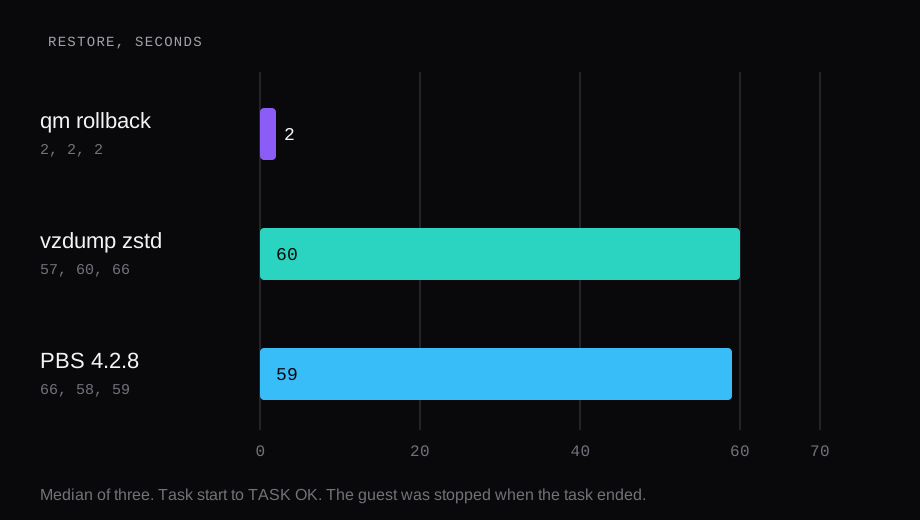
How long a Proxmox snapshot rollback takes
qm snapshot on LVM-thin creates a snapshot volume beside the disk. On this guest the log named it snap_vm-15901-disk-1_run1 for the 16 GiB disk and a second snapshot for the 4 MiB EFI disk. Rollback then does the thing the 2 seconds are spent on: it removes vm-15901-disk-1 and creates that volume again from the snapshot, and it does the same for the EFI disk.
qm snapshot 15901 run1 --vmstate 0
qm rollback 15901 run1
--vmstate 0 leaves RAM out of the snapshot. The check is a file on the disk, so the memory image would have measured a different operation. Before each rollback the file was deleted inside the guest. After TASK OK the guest was stopped. It had to boot before the hash could be read.

The two snapshot creates that were timed from the API call returned in 0.812 and 1.081 seconds. The task index records whole seconds, so those two landed as 0 and 1. The first create, timed only by that index, started and ended in the same second.
LVM also printed its thin-pool warning: the sum of virtual thin volumes was above the pool, and the volume group reported 16.00 GiB free. The three rollbacks still ended TASK OK. That warning is the thin-provisioning note, the virtual sizes adding up past the pool, and the tasks completed with it on screen.
How long qmrestore takes
The copy was a snapshot-mode vzdump onto the directory storage named local, compressed with zstd.
vzdump 15901 --mode snapshot \
  --storage local --compress zstd
The backup and restore page describes snapshot mode for a VM as a live backup. With the guest agent running, the log issued guest-agent 'fs-freeze' and then fs-thaw. The agent on this Ubuntu 24.04.5 guest was qemu-guest-agent 1:8.2.2. Stop mode is the other consistency choice on that page: it shuts the guest down, then a background QEMU reads the disks. This node's LVM-thin can take a qm snapshot, which is what the rollback used. vzdump's snapshot mode does not need a storage snapshot of its own. It is a QEMU live backup, on LVM-thin and on directory storage alike.
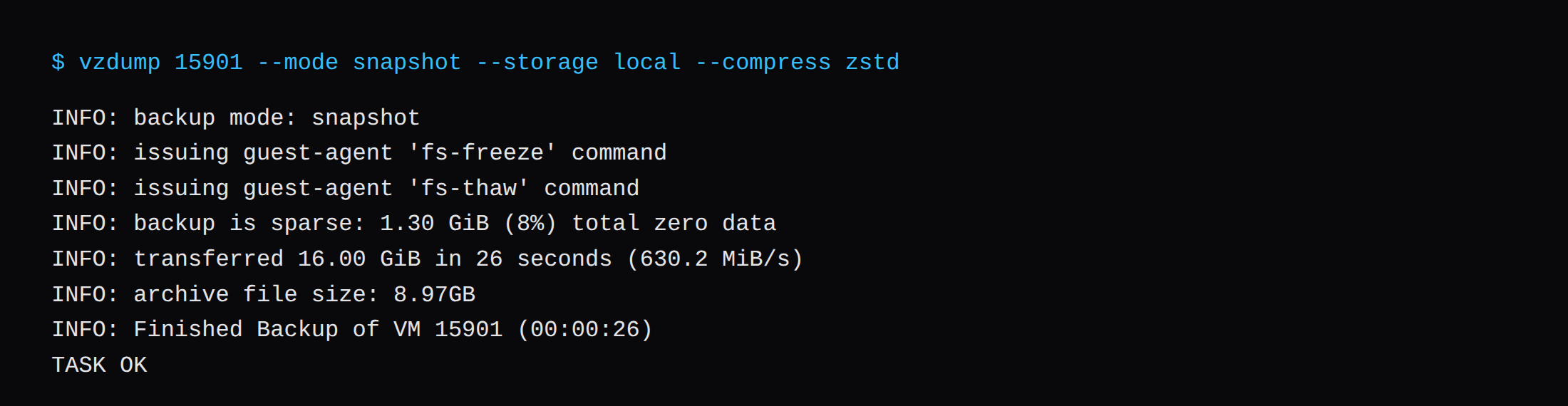
Each run read the whole 16.00 GiB disk. The log called 1.30 GiB, 1.31 GiB, and 1.31 GiB of that sparse zero data, about 8 percent. The archive file sizes were 9,630,135,622, 9,626,310,345, and 9,628,654,680 bytes. Median 9,628,654,680. The log printed 8.97GB for every one of them, which matches those byte counts once you treat the log's GB as gibibytes. zstd had little to squeeze. A 32 MiB sample of the file, compressed with zstd -3, came back at 33,323,005 bytes out of 33,554,432.
The guest was then destroyed, and qmrestore wrote the archive from /var/lib/vz/dump back onto local-lvm. The archive name is the one vzdump prints, vzdump-qemu-15901- plus the timestamp and .vma.zst.
qmrestore "$archive" 15901 \
  --storage local-lvm
The restore task clocks were 57, 60, and 66 seconds. Median 60. The extract progress inside those tasks reached 100 percent at 33, 33, and 39 seconds, after reading 17,180,459,008 bytes. The rest of the task is the volume create and the rescan, so the number to quote is the task clock, the one that ends at TASK OK. SSH answered about 12.8 seconds after the start task on each run, and the hash matched.
Fleecing stayed off. On a live backup with fleecing off, a guest write to a block the backup still needs waits until that block has been copied. This guest was idle after the file landed, so the clock is the read of a quiet disk.
How long a PBS 4.2 restore takes
PBS was proxmox-backup-server 4.2.8-1, running version 4.2.8, installed from the pbs-no-subscription repository onto a Debian 13.7 guest. uname -r on that guest was 6.12.95+deb13-amd64. The 4.2 release notes name Debian 13.4 and kernel 7.0 for the 4.2 image, and they mark S3-compatible object storage as a supported datastore. This clock used a directory, /datastore, on the PBS guest's virtual disk. The PVE side that sent the backup was pve-manager/8.1.3, kernel 6.5.11-4-pve. That is an older node than the VE 9 install written up on this site.
Each run removed the datastore and created it again, so the backup started from an empty directory. Right after the first create, du -sb /datastore was 159 bytes. The backup command was the same snapshot mode, pointed at the PBS storage.
vzdump 15901 --mode snapshot --storage pbs-labThe log froze and thawed the guest again. Task clocks were 40, 45, and 48 seconds. Median 45. Each log also said the backup reused about 5.1 GiB, 32 percent, 31 percent, and 31 percent. The directory had just been recreated, so those reused chunks are repeats inside this disk, and du afterward was 9,618,753,368, 9,619,100,093, and 9,619,403,132 bytes. Median 9,619,100,093. The path was the guest disk, through the host, into a second guest whose virtual disk sits on the same NVMe. That second hop is in the 45 seconds.
The guest was destroyed, then restored from the PBS snapshot onto local-lvm. Task clocks were 66, 58, and 59 seconds. Median 59. SSH came back in about 12.8 seconds, the same boot as the vzdump restores, and the hash matched.
PBS and vzdump spent the restore writing a 16 GiB disk onto the same thin pool. The medians landed one second apart. The chunk reuse showed up in the backup size and in the backup log, and the restore still had to lay the disk down.
Why the 8 GiB file had to be hard to compress
The payload is one file, written with fio 3.36 on Ubuntu 24.04.5. /var/tmp on this image is the root ext4, so the file is on the disk vzdump reads. The template disk was 5 GiB. It was grown to 16 GiB before the first boot, which left room for the file and the OS.
fio --name=fill \
  --filename=/var/tmp/fill.bin \
  --size=8G --bs=1M --rw=write \
  --ioengine=libaio --direct=1 \
  --end_fsync=1 --refill_buffers \
  --buffer_compress_percentage=0 \
  --randrepeat=0
--size=8G is 8192 MiB, and stat reported 8,589,934,592 bytes. The write finished in 10.997 seconds, 745 MiB/s, with end_fsync so the file was on the disk before the snapshot. --refill_buffers and --buffer_compress_percentage=0 are there because fio's plain buffer is a repeating pattern, and zstd collapses a repeating pattern the way it collapses zeros. A tiny archive would have made the restore clock a test of compression, which is a different question. That 32 MiB sample is the check that this file stayed large.

Where the three copies sat
The node reports one disk: a Kingston OM8PDP3256B-A01, 256,060,514,304 bytes, NVMe, health PASSED. local-lvm holds the guest disk and held the PBS guest's disk. The vzdump archive went to /var/lib/vz/dump, which is the directory storage local, the root filesystem on that same NVMe. The CPU the node reports is an i7-1185G7E, and that is the chip that ran zstd and the PBS tasks.
ZFS vs LVM vs Ceph: what survives a dead disk is the durability question. These clocks are how long the blocks take to come back while the disk is still alive. On this hardware a dead NVMe takes the snapshot and both copies. A second disk is what separates those fates, and this node has one. The disk model and the pve-manager version belong on the node record. Platforms and nodes is the provider-side list of those machines.
FAQ
How long does a Proxmox snapshot rollback take?
2 seconds, median of three, for this 16 GiB LVM-thin disk. The task removes the logical volume and creates it from the snapshot. The guest was stopped at TASK OK, and the hash was read after it booted.
How long does qmrestore take?
60 seconds median for the vzdump archive, 59 seconds median for the PBS 4.2.8 snapshot. Both wrote the 16 GiB disk back to local-lvm on the same NVMe. The three vzdump runs were 57, 60, and 66 seconds. The three PBS runs were 66, 58, and 59.
Is a Proxmox snapshot a backup?
It is a second name for extents on the same thin pool. Rollback is fast because those extents are already on the disk. The vzdump file and the PBS datastore are copies. On this node those copies lived on the same NVMe as the snapshot, so the speed and the survival of a dead disk are two different results.
Does snapshot mode shut the guest down?
vzdump snapshot mode froze the filesystem and left the guest running. The log shows fs-freeze, fs-thaw, and the guest resuming. qm rollback is the operation that left the guest stopped. Stop mode is the backup mode that shuts the guest down before the copy.
Which vzdump mode runs on directory storage?
Snapshot mode. For a VM it is a live backup, and the storage feature is optional. A qm snapshot still needs the storage to snapshot, which LVM-thin does. Container snapshot mode is the case the manual ties to a storage that can snapshot.