
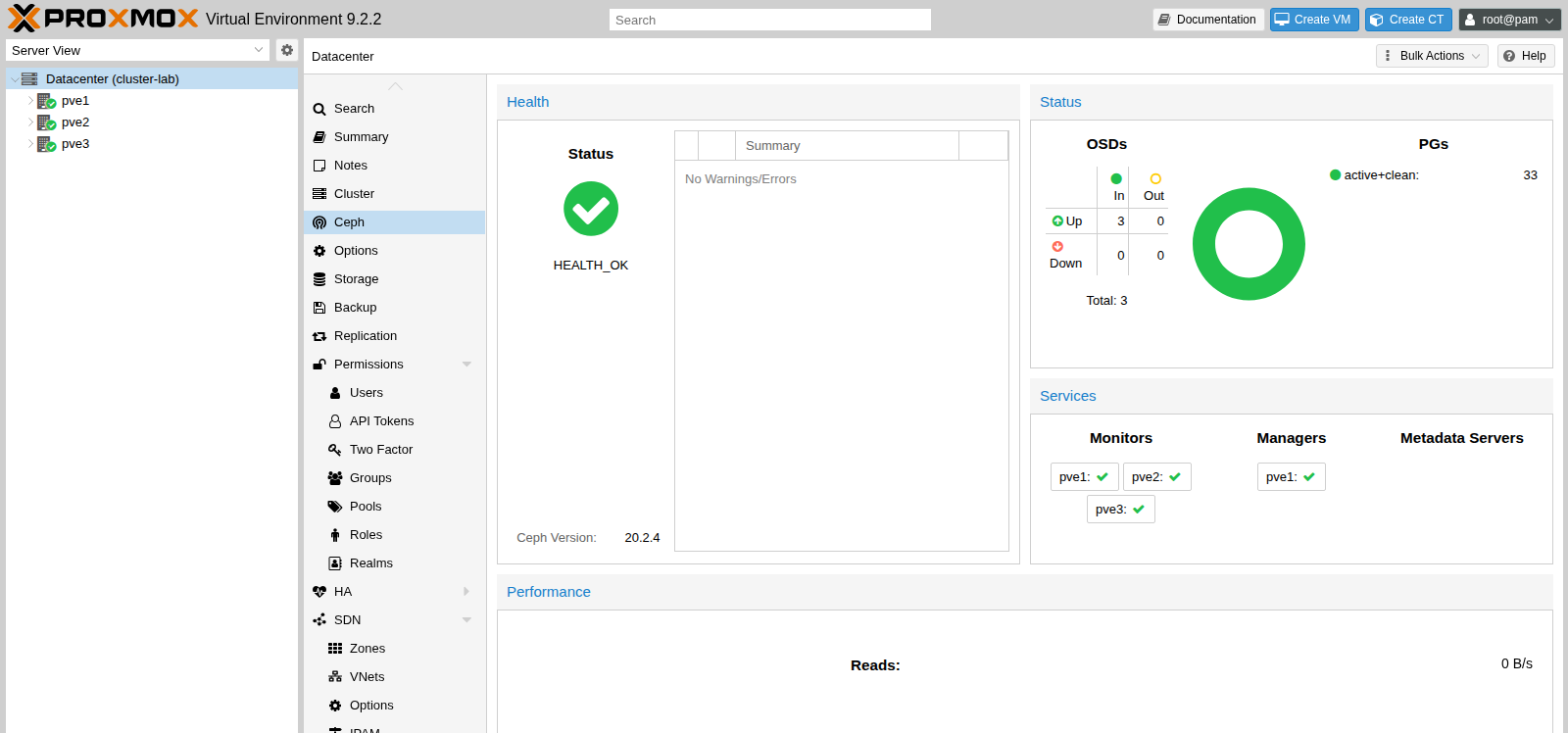
Three nodes, one pool, and a guest that moved. Each machine is pve-manager 9.2.2, kernel 7.0.2-6-pve. Ceph is 20.2.4 tentacle. pvecm status printed Quorate Yes, expected votes 3, quorum 2. ceph status settled at HEALTH_OK: three monitors in quorum, three OSDs up, 33 placement groups active+clean. VM 100 keeps a 442 MiB disk on the rbd pool. qm migrate 100 pve2 --online finished in 9 seconds, downtime 17 ms. A ping to 192.0.2.30 during that move got 39 replies out of 40.
192.0.2.11, .12, .13, and the guest at .30 are documentation addresses on 192.0.2.0/24.
| Piece | This run |
|---|---|
| Nodes | pve1 192.0.2.11, pve2 192.0.2.12, pve3 192.0.2.13 |
| Manager | pve-manager 9.2.2, kernel 7.0.2-6-pve |
| Cluster | cluster-lab, knet, Quorate Yes, expected votes 3, quorum 2 |
| Ceph | 20.2.4 tentacle, HEALTH_OK, 33 active+clean |
| Monitors | mon.pve1, mon.pve2, mon.pve3, quorum Yes; mgr.pve1 active |
| OSDs | one 6.0 GiB bluestore disk per node, 215 MiB raw use, 3.50% |
| Pool | rbd, size 3, min_size 2, 32 placement groups |
| Guest | VM 100, Alpine 3.24.3, 442 MiB on rbd, 192.0.2.30 |
| Migrate | pve1 to pve2, 9 seconds, 17 ms downtime, 39 of 40 pings |
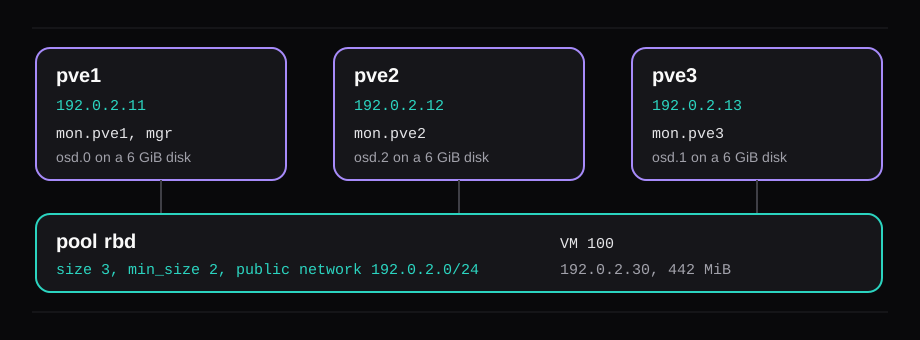
The Ceph chapter asks for at least three nodes and at least 12 OSDs. This lab has one 6 GiB disk per node, 2 vCPUs, and 4 GiB of RAM. That is enough to watch a monitor election, a replicated pool, and a live migrate. It is a poor way to learn disk speed. The three OSDs are files on one physical disk, so the 266.3 MiB/s in the migrate log is a memory copy, and the ping times are the lab network. ZFS vs LVM vs Ceph is the storage decision. The ISO these nodes came from, and the 401 on the enterprise repository, are Install Proxmox VE 9 on bare metal. These three are still the ISO's 9.2.2. The machine in that install was upgraded later, on its own disk.
Put all three names in /etc/hosts
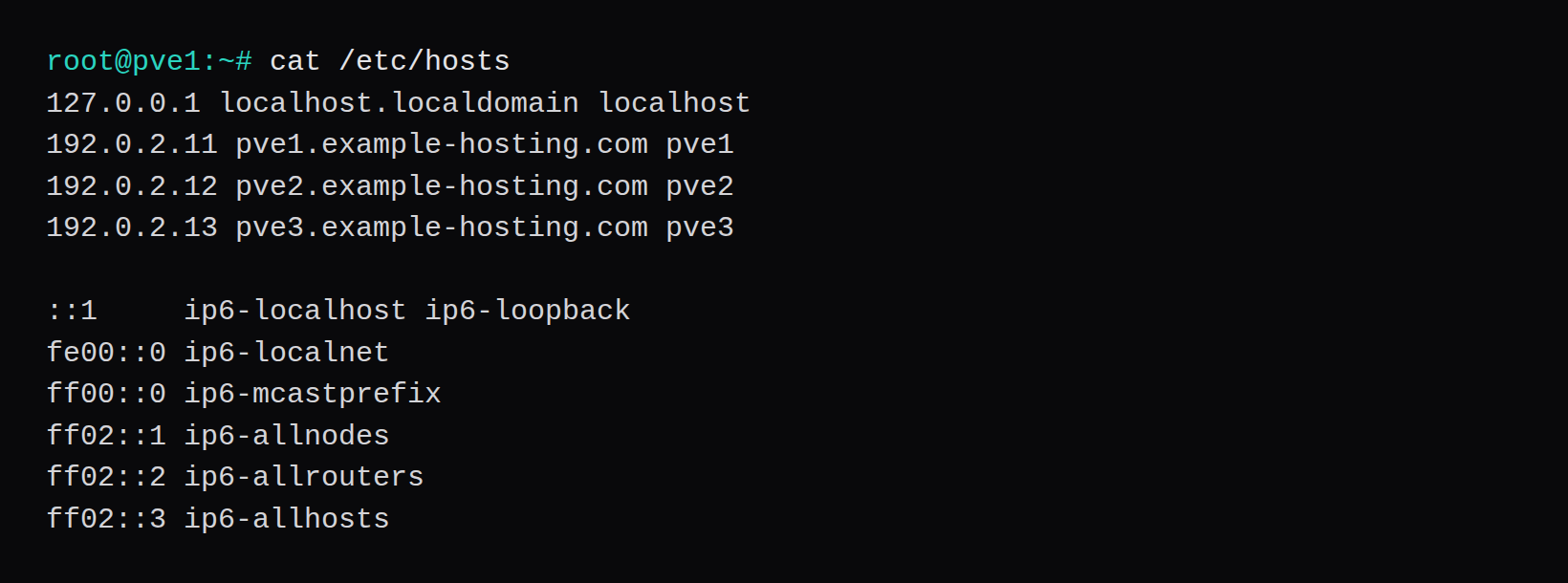
pvecm joins a node by name. The installer wrote a hosts file that knew only the local name. All three now share the same three address lines, above the IPv6 block the installer left in place.
The bridge is vmbr0. On pve1 it holds 192.0.2.11/24, gateway 192.0.2.1, and bridge-ports enp0s5. pve2 and pve3 are that stanza with .12 and .13.
auto vmbr0
iface vmbr0 inet static
	address 192.0.2.11/24
	gateway 192.0.2.1
	bridge-ports enp0s5
	bridge-stp off
	bridge-fd 0
enp0s5 is the name the NIC had when that file was written. A later boot renamed the NIC. vmbr0 kept the address, and the bridge had no port. From the gateway the ARP request went unanswered. SSH said No route to host. /etc/issue still printed https://192.0.2.11:8006/. ip -br addr is the check: the name in bridge-ports has to be the interface that is up, with no address of its own, and vmbr0 has to be the one holding 192.0.2.11/24. On these nodes that pair is enp0s5 and vmbr0.
Create the cluster with pvecm
On pve1:
pvecm create cluster-lab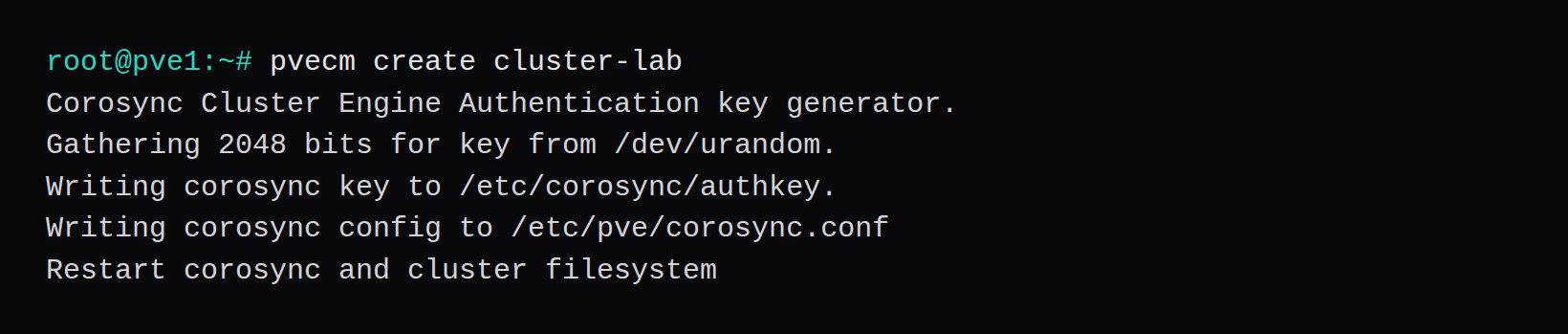
Join the other two nodes
pvecm add 192.0.2.11 with no terminal stops at EOF while reading password. The join reads the root password of pve1 through the API. A join without --fingerprint stops on the certificate question for 192.0.2.11. The SHA256 fingerprint of pve1's API certificate is 53:CB:1B:16:08:67:C0:4C:AF:15:72:5E:8F:0D:03:59:6C:72:A6:47:32:1C:0F:D1:F1:98:62:5D:6D:7F:EC:4E. Both joins passed that value, and the password, on a terminal.
pvecm add 192.0.2.11 --fingerprint 53:CB:1B:16:08:67:C0:4C:AF:15:72:5E:8F:0D:03:59:6C:72:A6:47:32:1C:0F:D1:F1:98:62:5D:6D:7F:EC:4Epve2 then printed Login succeeded, waiting for quorum...OK, and successfully added node 'pve2' to cluster. The fallback line was local node IP '192.0.2.12'. pve3 printed the same shape, with 192.0.2.13 and successfully added node 'pve3'.
A one-node cluster is already quorate. Expected votes 1 and Quorate Yes is pvecm status before the other nodes join. After pve3 joined, the same command printed expected votes 3, total votes 3, quorum 2, flags Quorate, and the three addresses.
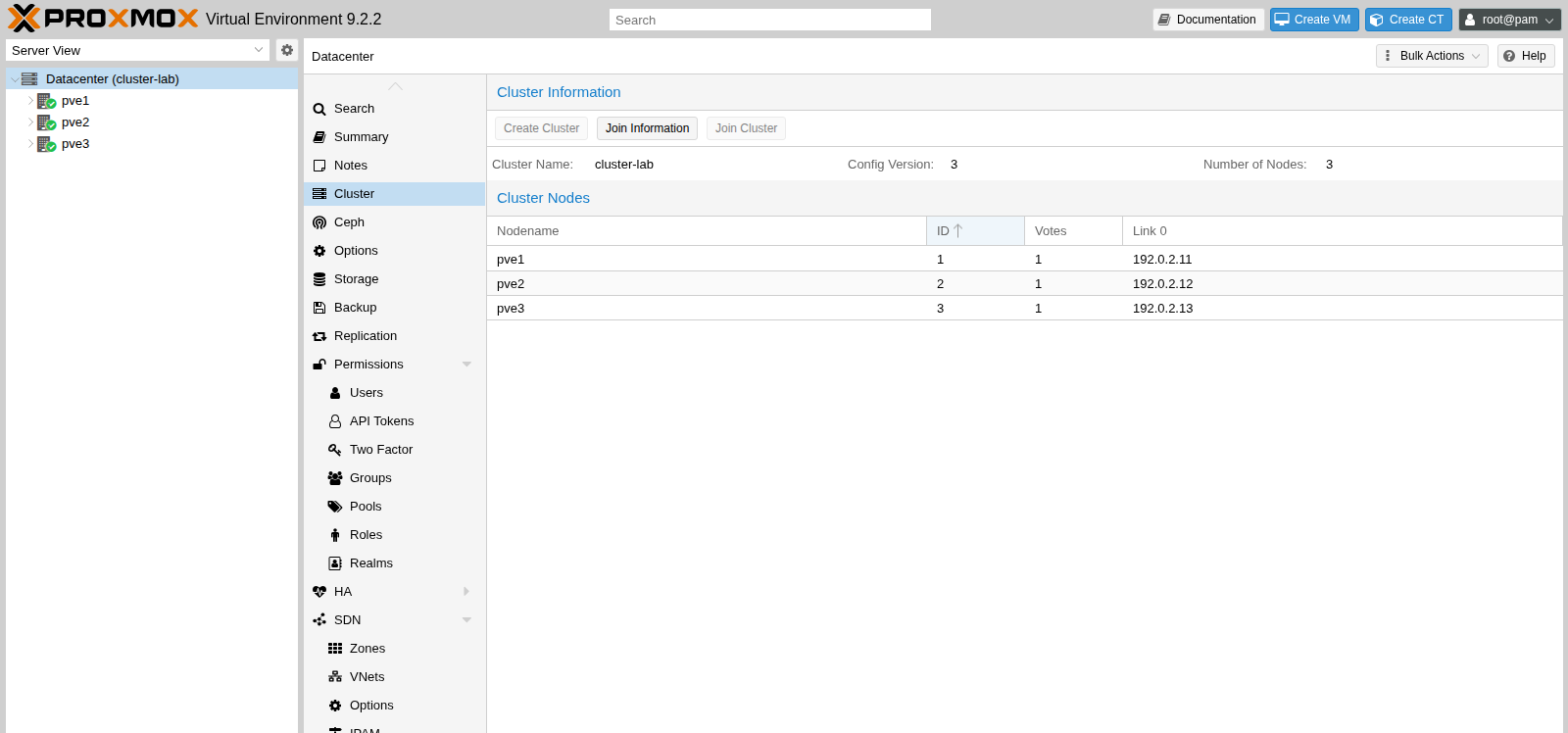
Quorum 2 still forms with one node gone. Two nodes down, and the cluster stops answering. Three monitors are that same majority.
Install Ceph Tentacle
apt-get update on a fresh node fails both enterprise lists. The lines were:
Err:3 https://enterprise.proxmox.com/debian/ceph-squid trixie InRelease
  401  Unauthorized
Err:4 https://enterprise.proxmox.com/debian/pve trixie InRelease
  401  Unauthorized
Apt followed each of those with is not signed. The shipped ceph.sources still pointed at ceph-squid until the install command replaced it. Enabled: no went into pve-enterprise.sources and that squid file. A proxmox.sources file points the node at the no-subscription PVE component, the same change as on the bare-metal install:
Types: deb
URIs: http://download.proxmox.com/debian/pve
Suites: trixie
Components: pve-no-subscription
Signed-By: /usr/share/keyrings/proxmox-archive-keyring.gpg
The release table in this pve-manager, PVE/Ceph/Releases.pm, has two Ceph releases for PVE 9. Squid is 19.2, with estimated upstream support through 2026-09-19. Tentacle is 20.2, marked as the backend default, with estimated upstream support through 2027-11-18. pveceph install with no version asks before it installs Tentacle, and the default repository is enterprise. That is the host that returned 401. The list of those repositories is on the package repositories page.
pveceph install --version tentacle --repository no-subscriptionThe first run reached apt and stopped at Do you want to continue? [Y/n] Abort. Nothing on stdin answered the prompt. With apt set to assume yes, the same command fetched 111 MB, used 194 MB more on the root disk, and printed installed Ceph 20.2 Tentacle successfully! Ahead of the download it printed:
HINT: The no-subscription repository is not the best choice for production setups.
Proxmox recommends using the enterprise repository with a valid subscription.
ceph --version then printed ceph version 20.2.4 (a12e197e4613a9d6be90e8fb073ac4fc3656aee2) tentacle (stable).
The command replaced /etc/apt/sources.list.d/ceph.sources:
Types: deb
URIs: http://download.proxmox.com/debian/ceph-tentacle
Suites: trixie
Components: no-subscription
Signed-By: /usr/share/keyrings/proxmox-archive-keyring.gpg
The same install ran on pve2 and pve3. The Ceph page showed version 20.2.4, three OSDs up, and HEALTH_OK.
Create three monitors
pveceph init --network 192.0.2.0/24That writes /etc/pve/ceph.conf and points /etc/ceph/ceph.conf at it. public_network and cluster_network are both 192.0.2.0/24. osd_pool_default_size is 3 and osd_pool_default_min_size is 2. One bridge carried the monitors and the OSD copies. A second NIC is how the copy traffic stays off the network the guests use. This lab has the one bridge.
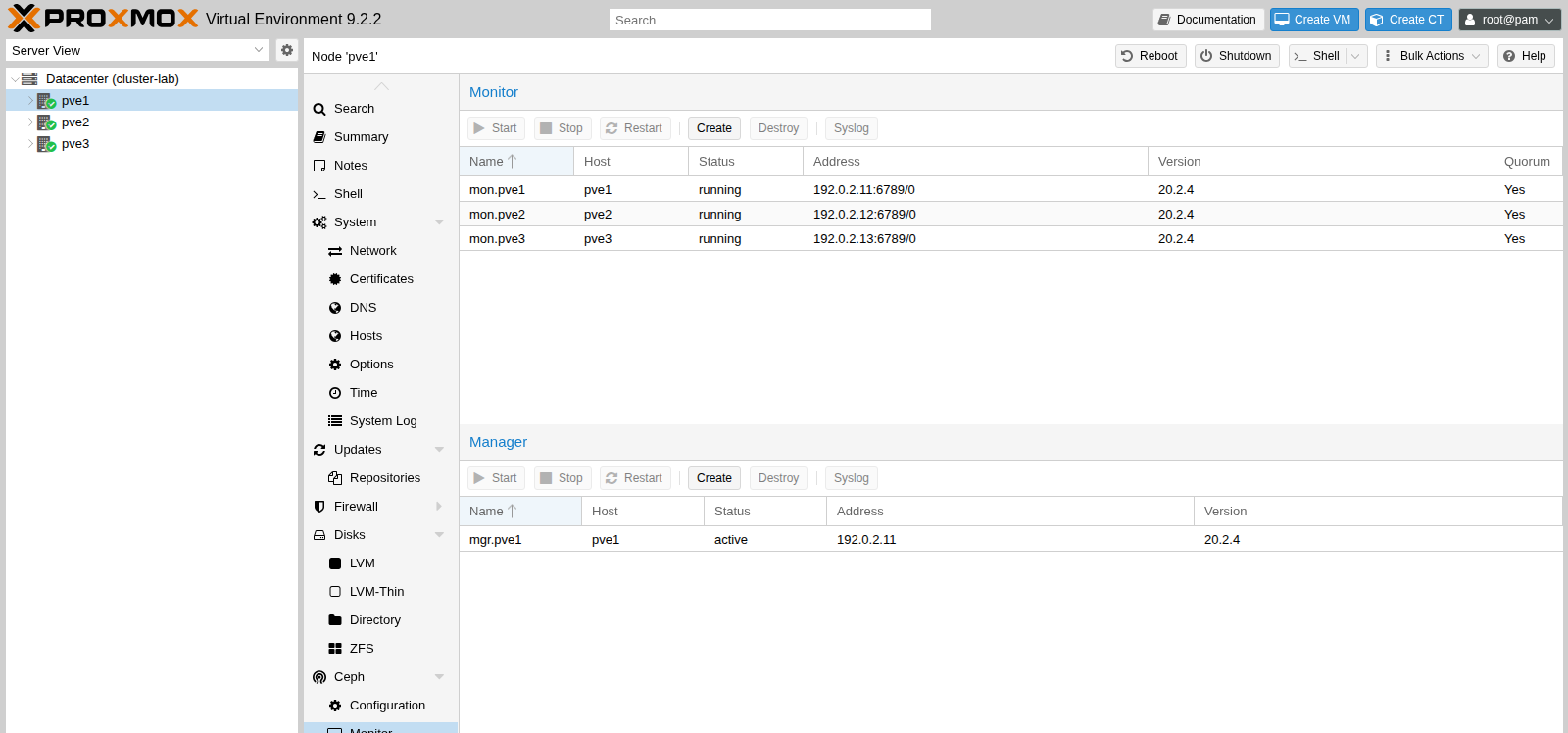
pveceph mon createRun that on each node, pve1 first. The first monitor has nothing to query, so it prints unable to get monitor info from DNS SRV with service name: ceph-mon and creating new monitor keyring, then creates mgr.pve1 on its own. pve2 adds mon.pve2. pve3 adds mon.pve3. ceph -s then read mon: 3 daemons, quorum pve1,pve2,pve3.
Create one OSD on the extra disk
pveceph osd create /dev/vda printed device '/dev/vda' is already in use and left the OS partitions where they were. The spare is vdb, 6 GiB, with no filesystem on it.
pveceph osd create /dev/vdbThe command wipes the device you name. The log said wiping block device /dev/vdb and wrote 200 MiB of zeros, then ceph-volume lvm create. On a disk that already holds files, that wipe is the last thing those files do. vdb was empty.
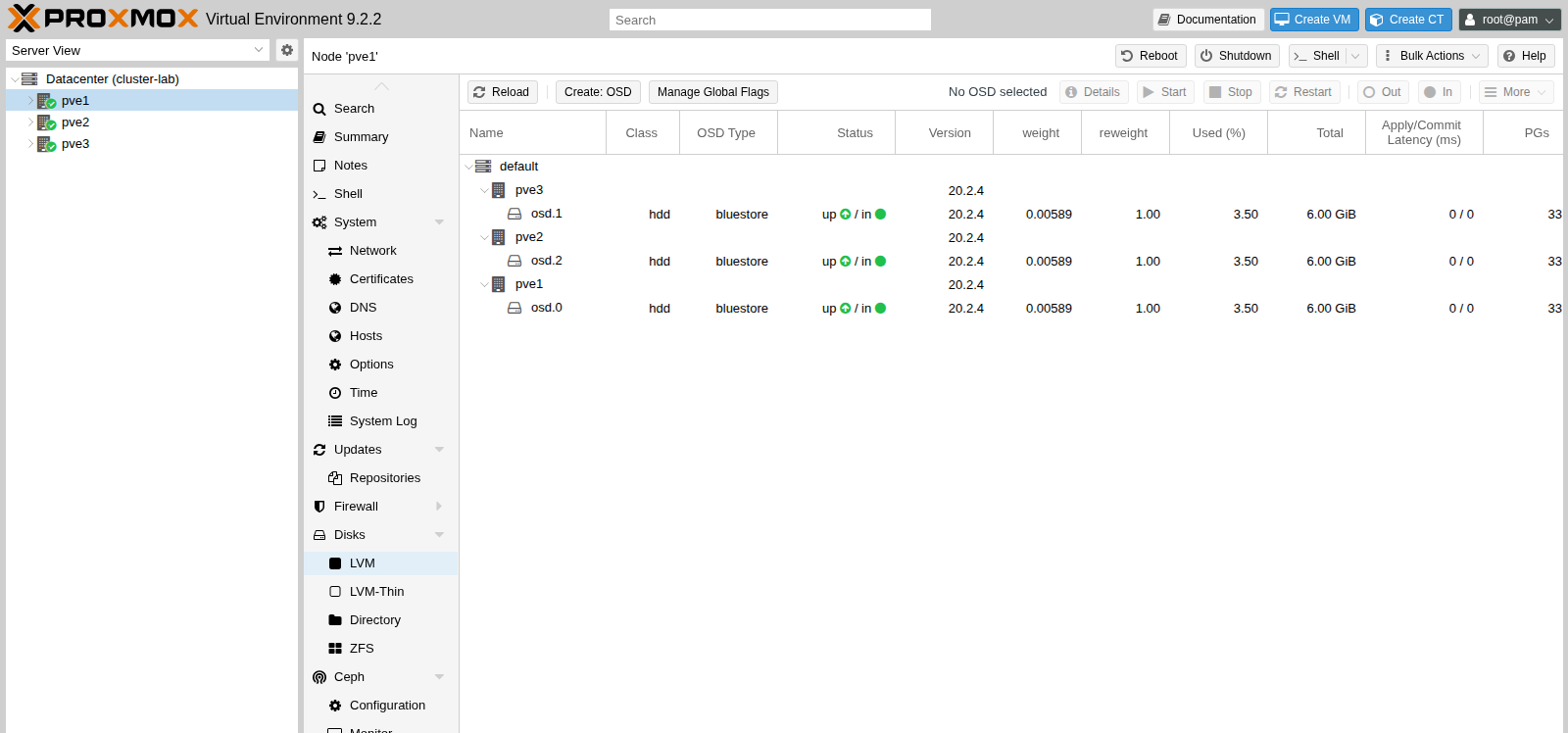
ceph osd tree placed osd.0 on pve1, osd.2 on pve2, and osd.1 on pve3, each up, class hdd, weight 0.00589. The Ceph chapter says to restart OSDs on one host at a time. Two replicas down together, and a pool with min_size 2 stops I/O until a second copy is back. The second and third OSDs here were created together, while the pool was still empty, and both came up. Once a guest disk is on the pool, one host at a time is the order that keeps min_size covered.
Create the rbd pool
pveceph pool create rbd --add_storagesSize, min_size, and pg_num were already the defaults, so the command said it was skipping them. It set the application to rbd and pg_autoscale_mode to warn. The defaults it skipped are size 3, min_size 2, and 128 placement groups. /etc/pve/storage.cfg gained:
rbd: rbd
	content rootdir,images
	krbd 0
	pool rbd
krbd 0 means a guest disk goes through librbd, which reads /etc/pve/priv/ceph/rbd.keyring on import.
ceph health detail then said:
HEALTH_WARN 1 pools have too many placement groups
Pool rbd has 128 placement groups, should have 32
128 is what pveceph pool create writes when pg_num is left alone. Three OSDs are a small rack for that many groups.
ceph osd pool set rbd pg_num 32
ceph osd pool set rbd pgp_num 32
The cluster went through peering and came back HEALTH_OK. ceph osd pool get rbd pg_num printed pg_num: 32. The age fields are omitted from this ceph -s:
cluster:
  id:     a48c0824-26d2-45b6-bea6-7a4627363361
  health: HEALTH_OK

services:
  mon: 3 daemons, quorum pve1,pve2,pve3 [leader: pve1]
  mgr: pve1(active)
  osd: 3 osds: 3 up, 3 in

data:
  pools:   2 pools, 33 pgs
  objects: 61 objects, 169 MiB
  usage:   645 MiB used, 17 GiB / 18 GiB avail
  pgs:     33 active+clean
The 33 are the 32 on rbd plus the one group on .mgr.
Leave min_size at 2. The pool chapter's warning is that a min_size of 1 accepts a write when only one replica is up, and that write is the one a returning OSD can disagree with. Init on this cluster already wrote osd_pool_default_min_size = 2.
The first qm importdisk onto this storage died before a byte of the guest disk landed:
Not a proper rbd authentication file: /etc/pve/priv/ceph/rbd.keyringThe file is a normal [client.admin] keyring, copied from /etc/pve/priv/ceph.client.admin.keyring when the storage was added. On this 9.2.2, the check in /usr/share/perl5/PVE/CephConfig.pm accepts an rbd key line when the key ends in ==. The Tentacle key in that file ends in a single =. The pool was healthy the whole time. The pattern is what refused the import. The import wrote rbd:vm-100-disk-0 after that match required a single trailing =. A later package of pve-manager will put the two-equals pattern back, and the same file will fail the check again until the package's check changes.
Migrate a VM whose disk is on that pool
The image is alpine-3.24.3-x86_64-cloudinit-r0.qcow2, the UEFI cloud build, 442 MiB virtual. VM 100 has 512 MiB of RAM, one core, machine q35, BIOS OVMF, and a NIC on vmbr0. --sshkeys took a public key, and that key stays on the node. Ping uses the address from ipconfig0.
qm create 100 --name ceph-guest --memory 512 --cores 1 \
  --machine q35 --bios ovmf --ostype l26 \
  --scsihw virtio-scsi-pci --net0 virtio,bridge=vmbr0
qm importdisk 100 alpine.qcow2 rbd
qm set 100 --scsi0 rbd:vm-100-disk-0
qm set 100 --efidisk0 rbd:1,efitype=4m,pre-enrolled-keys=0
qm set 100 --boot order=scsi0
qm set 100 --ide2 local:cloudinit
qm set 100 --ipconfig0 ip=192.0.2.30/24,gw=192.0.2.1
qm set 100 --nameserver 1.1.1.1
qm set 100 --ciuser alpine
qm start 100
The first ping that came back was 64 bytes from 192.0.2.30: icmp_seq=1 ttl=64 time=0.530 ms.
qm set 100 --delete ide2 ran before the move. The task log still listed the generated cloud-init image and copied 4.3 MiB of that local file. The 442 MiB disk was already on the pool. What moved across the network was the memory state.
qm migrate 100 pve2 --online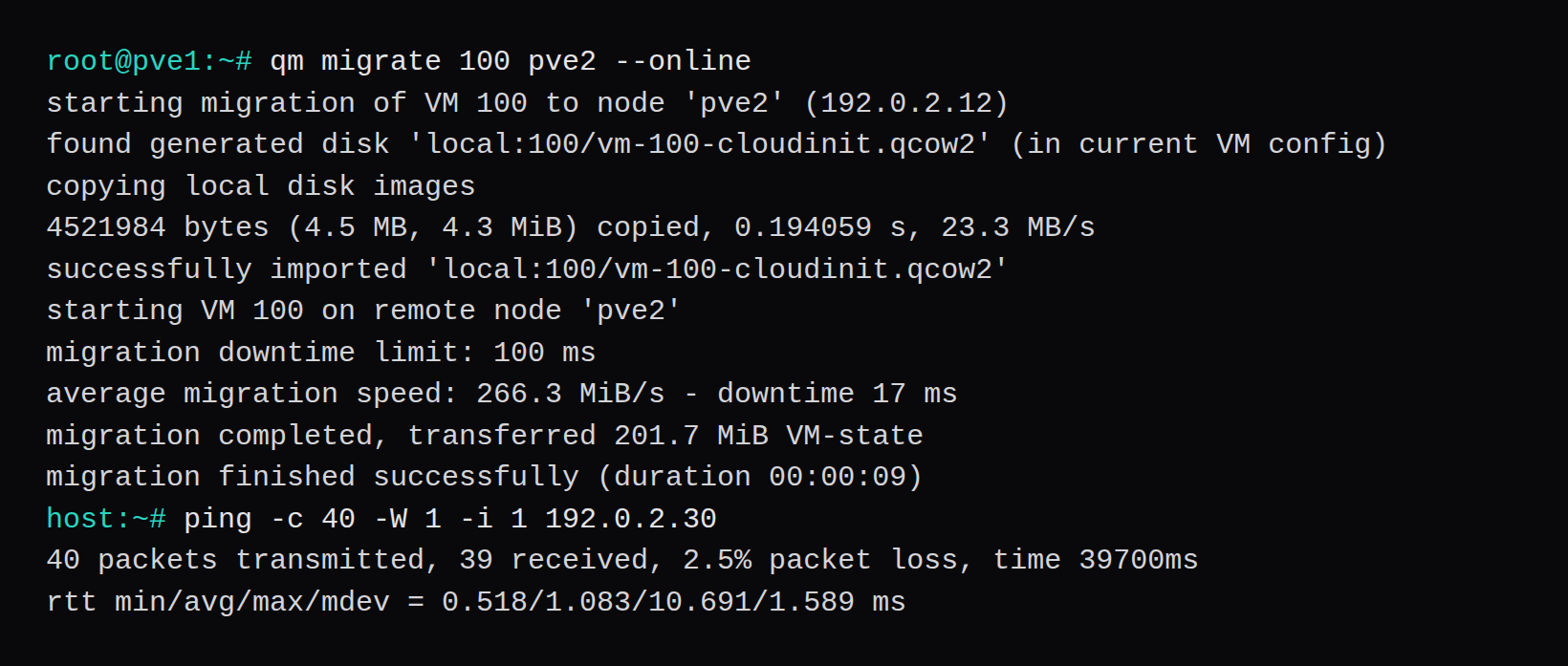
The task finished in 9 seconds. Average speed 266.3 MiB/s, downtime 17 ms, 201.7 MiB of VM state transferred. The guest config moved to pve2. During the 40 pings, 39 came back, one was lost, and the max round trip was 10.691 ms.
On pve2 the disk lines are:
scsi0: rbd:vm-100-disk-0,size=442M
efidisk0: rbd:vm-100-disk-1,efitype=4m,pre-enrolled-keys=0,size=528K
ipconfig0: ip=192.0.2.30/24,gw=192.0.2.1
ide2 is gone from the config on pve2. A ping after the move, two packets, came back in 0.783 ms and 0.624 ms.
ceph -s on this run had no slow-request line. The warning it did print was the placement-group one, and that cleared when the pool went from 128 groups to 32.
How many Proxmox nodes does Ceph need?
The Ceph chapter says at least three nodes and at least 12 OSDs. Quorum here is 2 votes out of 3, so one node can be down and the cluster still answers. A size-3 pool places a copy on each of these three machines. Twelve OSDs is the count the chapter wants before the cluster keeps guests for anyone else. Three nested disks are the count that draws the screens here.
Which Ceph release does Proxmox VE 9.2 install?
On this 9.2.2, pveceph install with no --version defaults to Tentacle 20.2 and asks for a confirmation. Squid 19.2 is the other release that table offers for PVE 9. The run here passed --version tentacle --repository no-subscription, and ceph --version printed 20.2.4 tentacle. Estimated upstream support in the table is 2027-11-18 for Tentacle and 2026-09-19 for Squid.
Why does apt return 401 before Ceph installs?
A fresh VE 9.2 node ships pve-enterprise.sources and a ceph.sources aimed at enterprise.proxmox.com. With no subscription, both InRelease files return 401 and apt adds is not signed. Enabled: no on those files, plus the pve-no-subscription component on download.proxmox.com, is what let the update finish. --repository no-subscription then pointed Ceph at debian/ceph-tentacle. The command's own hint calls that repository a poor fit for production and points a subscribed node at the enterprise URI.
Why did the rbd pool warn about placement groups?
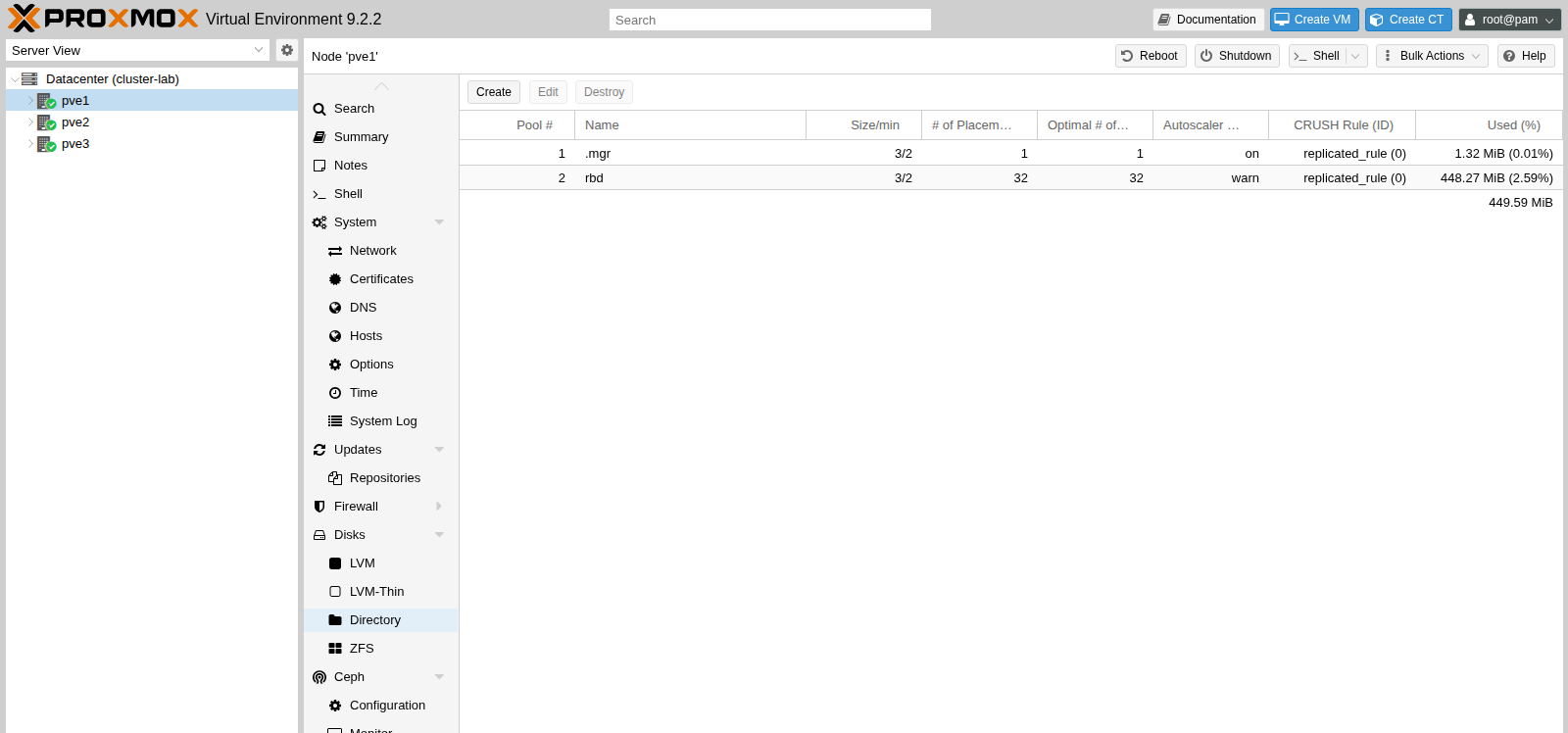
pveceph pool create writes 128 groups when pg_num is left unset. Ceph looked at three OSDs and wanted 32 on rbd. Setting pg_num and pgp_num to 32 cleared it, after a stretch of peering. The pools page shows 32. ceph -s shows 33 active+clean because .mgr keeps one group.
Why did the disk import reject the keyring?
qm importdisk stopped on Not a proper rbd authentication file: /etc/pve/priv/ceph/rbd.keyring while the pool was already HEALTH_OK. The file was the admin keyring copied into place when the storage was added. The 9.2.2 check wants that key to end in ==, and this Tentacle key ends in one =. Once the check accepted the single =, the import created rbd:vm-100-disk-0, which is the disk that moved to pve2.