
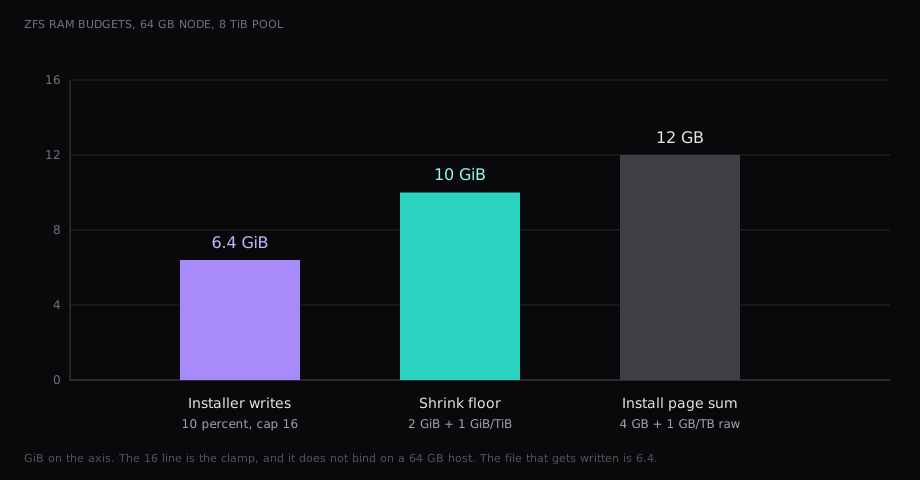
On a 64 GB Proxmox node the installer caps the ZFS cache at 6.4 GiB. The ZFS page's example, a pool with 8 TiB available, wants 10 GiB if you shrink that cache. The install page's performance tip is a third sum, 4 GB plus 1 GB per TB of raw disk, which is 12 GB at 8 TB raw. Ceph's deployment page wants three nodes, twelve OSDs, and 10 Gbps reserved for Ceph.
The 6.4 GiB cap is the one that lands in the file, mirror or not. A mirror cuts the available space, and the floor falls with it. The installer number stays put.
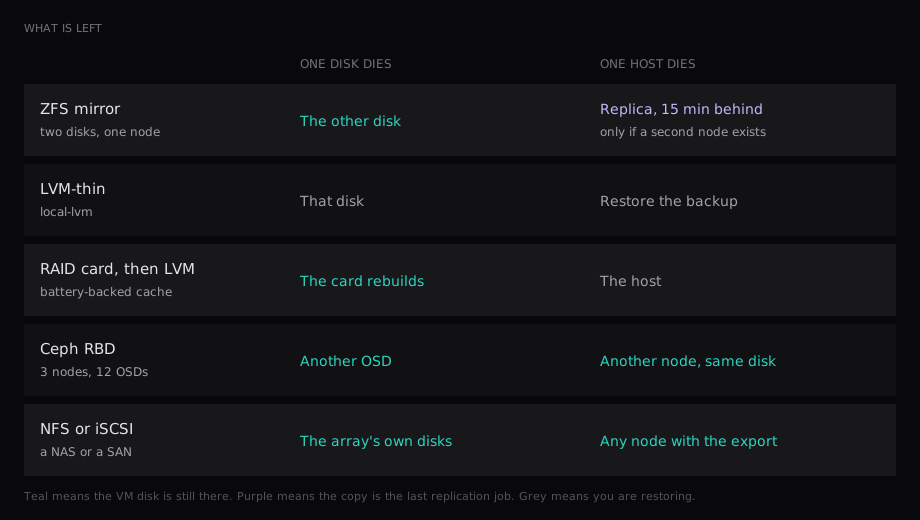
| You have | Run this | One disk dies | One host dies |
|---|---|---|---|
| One node, two disks you can see | ZFS mirror | The other disk | The last replica, every 15 minutes, if a second node exists |
| One node, backups elsewhere | LVM-thin | The disk | The host. Restore the backup |
| A RAID card with a battery, disks hidden behind it | LVM-thin on the logical volume | The card rebuilds | The host |
| Three nodes and a free 10 Gbps network | Ceph RBD | Another OSD | Another node. The disk is already there |
| A NAS you already run | NFS or iSCSI | The NAS's disks | The VM starts on any node that has the export |
What Proxmox will put a VM disk on
The storage plugins live in /etc/pve/storage.cfg. Hardware RAID is absent from that list. A RAID card hands the installer one logical disk, and you still choose ext4, XFS, or ZFS. Ext4 and XFS become LVM. ZFS on that card is the combination the install page calls unsupported.
The storage page splits plugins into file and block. File storage can hold an ISO and a backup. Block storage holds the VM disk. ZFS does both jobs at once. The pool is a filesystem, the VM disk is a zvol, and local-zfs can take images and container disks.
| Plugin | Shared | Snapshots | After one host dies |
|---|---|---|---|
| Directory, qcow2 | No | Yes. Creating one stops the VM | The disk is on the dead host |
| LVM | Only when the LUN is iSCSI or Fibre Channel | Volume chain since VE 9 | The LUN, if it was shared |
| LVM-thin | No | Yes | The disk is on the dead host |
| ZFS | No | Yes | The replica, if a job exists |
| NFS, CIFS | Yes | qcow2, and slow on a large disk | Any node with the export |
| iSCSI, Fibre Channel | Yes, LVM splits the LUN | Volume chain since VE 9 | Any node that sees the LUN |
| Ceph RBD | Yes | Yes | Any node in the pool |
| Btrfs | No | Yes | Technology preview |
Fill any of these and every guest on that storage gets I/O errors. The storage page says the result can be a corrupt filesystem. The free space you leave is the difference between a snapshot and an outage.
The cluster copies storage.cfg to every node. That copy is the configuration. local-lvm on node A and local-lvm on node B are two pools that share a name. The shared flag records that a pool is already one pool. Ticking it on a local thin pool records a lie.
ZFS when the node owns the disks
ZFS on Linux wants the disks raw. An HBA, or an LSI card flashed to IT mode, stays out of the way. The install page is the short version: ZFS on any hardware RAID is unsupported and can lose the pool.
A mirror writes each block to two disks and can read from both. RAIDZ writes parity. For VM disks the page does the arithmetic that decides it. A zvol defaults to 8k. With ashift=12 the pool block is 4k, so RAIDZ2 stores two extra 4k parity blocks beside that 8k. One guest write lands as 16k. Four disks in RAIDZ2 hold the same usable space as two mirrors, and the mirrors behave like two disks of write IOPS and four disks of read IOPS. RAIDZ behaves like one disk for IOPS and like the stripe for bandwidth. Use mirrors for VM disks. RAIDZ is the pool you build when the job is large sequential reads and one disk's worth of IOPS is enough. dRAID matches RAIDZ on speed, and the page points it at pools past 10 to 15 disks.
A current install writes zfs_arc_max into /etc/modprobe.d/zfs.conf. Ten percent of host RAM, clamped at 16 GiB. On this 64 GB node that file says 6.4 GiB. Before VE 8.1 the installer wrote nothing, so ZFS kept its own default, 50 percent on older ZFS and 62.5 percent from ZFS 2.3.0. That is 32 GiB or 40 GiB on the same node, held as cache until someone sets the cap and reboots. If the root pool is ZFS, the page also says to rebuild the initramfs first.
Shrink the cache and the same page wants 2 GiB plus 1 GiB per TiB available. Its example is an 8 TiB pool and a 10 GiB floor. ZFS will refuse to go under 64 MiB. The install page still prints 4 GB plus 1 GB per TB of raw disk in the performance tips. The hardware section wants 8 GB of RAM before you start, and ECC if the budget has it. Raising the 6.4 GiB cap toward that 10 GiB floor takes the RAM from guests on a box you sell by the gigabyte.
The measured guest, 4 vCPU and 8 GB on one enterprise NVMe, did 186,000 4k read IOPS and 54,000 writes on ZFS. LVM-thin on the same guest did 248,000 and 132,000. The write gap is the intent log on that drive. A mirror adds the second disk and still waits for both sides, so the write rate stays with the log.
Replication is the second copy that is still local storage. pvesr has a single supported row, ZFS. Leave the schedule alone and the job runs every 15 minutes. The shortest interval is one minute. The longest is once a week. HA is allowed on top of a replication job, and the writes after the last successful run are gone with the node. The traffic uses the migration network. With no migration network set, that is the management network, the same place corosync already is.
LVM-thin when the guest's IOPS matter more than a second disk
Choose ext4 or XFS in the installer and you get a volume group named pve, logical volumes for root, swap, and data, and a thin pool published as local-lvm. The data pool is created when the leftover space is bigger than 4 GB. Snapshots and clones work on the thin pool. Thick LVM snapshots need free extents in the volume group, which is why minfree defaults to 16 GB once the disk is over 128 GB. Thin snapshots skip that reservation.
The thin pool stays on this node. Since VE 9, thick LVM can snapshot as a volume chain, which is how iSCSI and Fibre Channel do it. The LUN is shared, LVM cuts it into VM disks, and the chain holds the snapshot. That is a SAN, a different machine from local-lvm.
LVM is missing from the replication table. The host dies with the disk, and the restore is the backup that already left. On that guest the trade was the fast row, a 0.48 ms 99th percentile on the 4k reads.
Ceph when the disk has to outlive the node
The deployment page recommends at least three nodes and at least twelve OSDs, one OSD per disk, spread across the nodes. Quorum needs three monitors. A small or medium cluster stays at three monitors. A fourth machine can run guests. The odd count is the monitor count.
Each OSD defaults to 4 GiB. The page says to plan at least 8 GiB (ceph config set osd osd_memory_target 8G). Four OSDs on one node, twelve disks split over three nodes, is 32 GiB before a guest is started. A fast NVMe OSD can take four to six CPU threads. The page's example is one monitor, one manager, and six OSDs, which it counts as eight cores reserved for a basic stable cluster.
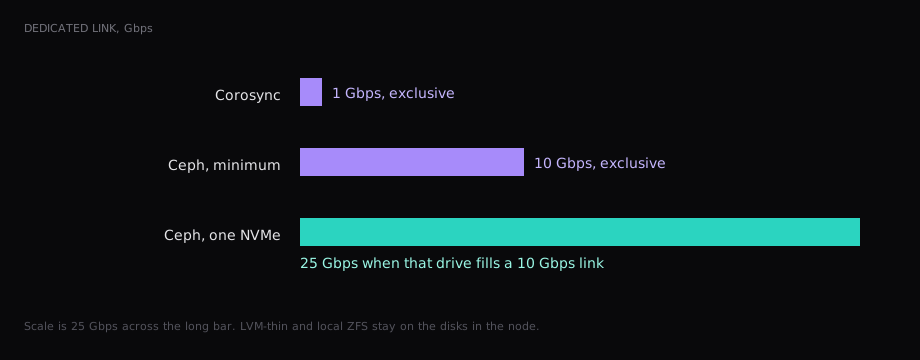
The network is the bill people try to skip. Ceph wants 10 Gbps or more, used by Ceph alone. One NVMe can fill a 10 Gbps link, and for that disk the page asks for at least 25 Gbps. Corosync wants its own 1 Gbps. Recovery, rebalance, and scrub run when a disk or a node has already failed, which is the moment the cluster network is busiest. Ceph traffic on the corosync link is how a dead OSD becomes a lost quorum.
A three-node pool with one OSD per node, size 3, 25 GbE, and a 0.21 ms ping did 72,000 4k reads and 19,400 writes. That is 30 percent of the LVM-thin read and 15 percent of the write. A read can return from one copy. A write waits until the other two nodes have it, and the 99th percentile on those writes was 5.8 ms against 0.96 ms on LVM-thin. Sequential reads stopped at 2,150 MB/s on a link of about 3,100 MB/s. The local guest on the same model of disk was already at 3,480 MB/s. One OSD per node runs. The deployment page's cluster is twelve OSDs.
| Same guest | LVM-thin | ZFS | Ceph, one OSD per node |
|---|---|---|---|
| 4k random read, IOPS | 248,000 | 186,000 | 72,000 |
| 4k random write, IOPS | 132,000 | 54,000 | 19,400 |
| 4k read, 99th percentile | 0.48 ms | 0.74 ms | 2.1 ms |
| 4k write, 99th percentile | 0.96 ms | 2.4 ms | 5.8 ms |
CephFS is the file side of the same cluster, shared, with snapshots. VM disks belong on RBD. ZFS over iSCSI is the other shared plugin with that name: a remote ZFS target, snapshots included, and it is a SAN target, separate from local-zfs.
The RAID card you already paid for
Leave a battery-backed card in RAID mode and install ext4 or XFS, then LVM. A Ceph OSD wants the physical disk, same as ZFS. Put either one on the card's virtual disk and two caches both think they flushed the write.
The card then owns rebuilds and failed-drive alerts. Monitoring that only sees the Linux disk sees one healthy volume while a member is already dead. Delete a file, encrypt the volume, fill it, and the mirror holds a second copy of the same problem. The copy that helps is a backup that has left the pool. Proxmox Backup Server is the shared plugin for that, and the running disk stays on ZFS, LVM-thin, or RBD.
NFS and iSCSI when the disks live in another box
NFS and CIFS are shared, so a live migration skips the disk copy. The other node already has the files open. Local ZFS and LVM-thin can migrate too, and that migration moves the whole disk.
On file storage the snapshot is qcow2. Creating or deleting an internal qcow2 snapshot blocks the running VM. The storage page says this is slow on NFS, and on a disk of several hundred GiB, or a TiB, it can take minutes, sometimes hours. Shut the guest down before snapshotting a disk that size. Volume-chain snapshots, the VE 9 block path, keep the guest running.
iSCSI and Fibre Channel plus LVM put a SAN in the middle, with multipath in front when the array has two fabrics. The Proxmox nodes stay compute nodes. Ceph makes the compute nodes into that SAN, which is why 32 GiB, eight cores, and a 25 Gbps cable land on the same invoice as the guests.
/var/lib/vz is the directory pool named local. The installer always creates it, and ISOs and backups live there while VM disks sit on local-lvm or local-zfs. Move the VM disks into local and the snapshot stops the guest again, with a second disk only when that filesystem sits on the RAID card.
What the cache costs on a 64 GB node
What one Proxmox node costs per sold gigabyte prices a 64 GB auction node at €72, and each sold gigabyte at €1.61 when 70 percent of the RAM has a customer. The ARC cap of 6.4 GB is €10.30 a month, and the guest still did 186,000 read IOPS. The install-page sum of 12 GB would be €19.32 held as cache. Four Ceph OSDs at 8 GiB are 32 GB, €51.52, on a node whose rent is €72, before a guest starts.
An empty node is that invoice with the guests missing. How the node is attached is the platforms and nodes guide.
Before the installer
Should ZFS sit on a hardware RAID controller?
The install page says ZFS on any hardware RAID is unsupported and can result in data loss. The ZFS page says ZFS has to talk to the disks, so the controller is an HBA or a card in IT mode. A battery-backed RAID card stays under ext4 or XFS, with LVM on the logical volume.
Is Ceph faster than ZFS?
On that guest, ZFS did 186,000 4k reads and Ceph did 72,000. LVM-thin did 248,000. Ceph's write was 19,400 against 54,000 on ZFS. Ceph is the pool you take when the VM has to start on another node against the same disk. ZFS replication can start it on the other node against the disk from the last 15 minute run.
Does Ceph need an odd number of nodes?
Quorum needs three monitors. The deployment page says a small cluster stays at three monitors, and it recommends at least three nodes and twelve OSDs. A fourth node can run guests next to those monitors. Ceph recovery on the 1 Gbps link corosync is using is how a dead OSD takes the quorum with it.
How often does ZFS replication run?
The default job is every 15 minutes. The range is once a minute to once a week. The replication table contains the ZFS plugin only. LVM-thin has nothing to schedule. The minutes since the last success are the writes HA will miss.
Is LVM-thin shared because the nodes are in a cluster?
The cluster shares the configuration file. The thin pool stays on the node that holds the disks. Two nodes with a storage ID of local-lvm have two pools.